PRODUCT MARKING AND BARCODE-IDENTIFICATION
Edition 3
Barcode Label Printer
Precision - Made in Germany
For more than 30 years now cab has been developing and manufacturing label marking systems for industry, distribution and services. The constant requirements of changing markets demand innovative ideas and form tomorrow´s products. Our experience and our aim to make our printers more simple in operation have made cab to a leading manufacturer world-wide.
Made in Germany with a large vertical range of manufacture our quality system is subject to DIN ISO 9001 - from receiving inspection up to consignment.
Application
4
Overview of types
5
Technical details
6
Maintenance / Spare parts
7
Models
8
Interfaces
9
Technical data
10 - 11
Accessories printer
12 - 15
Applicator A 1000
16
Accessories Applicator
17
Software tools
18
Label software
19
Delivery program
20 - 21
Content
4
Small and large labels precise and fast – examples
Application
Type plates
Pin sharp fonts with 600 dpi.
PCB identification label
Smallest label size 4 x 5 mm, if there is only little space.
Packaging
Labels up to DIN A4 size
The professional printer for
industrial demands
Our professional printers can be used within a broad application range. Our ambition was to create easy handling and high reliability. The print mechanism
and the chassis are made of first-class material, perfectly harmonised in form and function. Any specific customer requirement can be realised with the
extensive periphery and software. Stand-alone operation, PC-application or mains operation: A+ is the solution – any time.
5
Overview of types
Printing method Thermal transfer Thermal direct Print resolution dpi 300 Print width up to mm 162,6 Print speed up to mm/s 200
The broad
material width up to 180 mm
Printing method Thermal transfer Thermal direct Print resolution dpi 300 Print width up to mm 216 Print speed up to mm/s 150
The extra broad
material width up to 25 mm
Standard Option
The small sized
material width up to 65 mm
Printing method Thermal transfer Thermal direct Print resolution dpi 300 Print width up to mm 54,2 Print speed up to mm/s 150
The fast allrounder
material width up to 120 mm
Printing method
Thermal transfer
Thermal direct - - - Print resolution dpi 203 300 600 203 300 Print width up to mm 104 105,6 105,6 104 108,4 Print speed up to mm/s 250 250 100 200 150
One concept − four widths
Printing to measure
6
1. Big graphic display
White backlight guarantees clearness of display.
2. Ribbon retainer
The threepart tightening axles allow a fast and easy ribbon exchange.
. Convenient navigator pad
With the interactive menu prompting only the available functions are readable.
4. Easy adjustment
The printhead is pressed down with two sliders. One is mounted to the left label margin, the other one is pushed onto the right label margin.
5. Printing with 20, 00
or 600 dpi
The print heads can be exchanged easily from 203 to 300 dpi. The printer automa-tically detects the resolution.
6. Peel-off option
The label is removed via peel-off-plate. A high printing and applying accuracy can be achieved through the additionally powered rewind assistant roller and the pinch roller.
7. Peripheral connection
Add-on modules like cutter, external re-winder, peel-off adapter and applicators can be connected via USB peripheral interface.
8. Solid, buckling resistant chassis
It is made of dye-cast aluminium. All devices are assembled to it.
9. Roll holder
Serially made for core diameters from 38 – 76 mm. Accessorily available are adapters with core diameters up to 100 mm or rotatable roll holders.
10. Label re-winder
With the threepart tightening axles with adjustable diameter labels or backing paper with or without cardboard core can be rewound and removed easily.
Precise printing
Elaborate - easy made
Transfer printing with
peel-off function
Technical details
3 1 5 4 8 7 6 27
10
The Label sensor can be unlocked with only one finger and can be removed for cleaning.
Label sensor
Easy servicing
and removing of consumables
The printhead can be exchanged in only a few steps. Adjustments and settings are not necessary.
Printhead
For cleaning or replacement the print roller can be easily removed by loosening only three screws.
Print roller
11. One tool for all maintenance
tasks
Only one tool for all service requirements. It is readily available in the machine.
Maintenance
I
Spare parts
11 9
8
1
2.
For printing on labels and continuous material. After printing it can be torn off with the ridged tear-off plate. It can be cut or rewound externaly.
Dispense version
For printing and dispensing labels. During the printing the label is removed from the liner. It can be taken off manually or by an appli-cator. The present sensor has to be ordered separately.
Thermal direct printing
Basic version
For printing on standard paper, cardboard, textiles, plastic foil (PE, PP, PVC, PA or PI). Wax-, resin- or wax/resin ribbons can be used.
For printing on thermal-sensitive materials. All transfer printers can be used as thermal direct printers.
The transfer printers A4+ and A6+ are available with a full metal cover (standard with the A8+) on request.
The 2-parts cover folds when opened. Therewith the printer needs the smallest footprint in its class.
Metal cover
Compact cover
The cab RFID option for the printers of the A+-series reads and rewrites transponders in smart-labels with 13,56 MHz during the printing process. Please ask for our separate data sheet.
RFID ( additional option )
Models
1
Four steps to the optimal appliance
.
4.
Transfer printing
9
All required interfaces are factory installed
Interfaces
12 7 2 11 6 1PC/SPS interfaces
1.
Serial RS22 C
interface up to 230.400 Baud2. USB 2.0 High Speed Slave
interface. Parallel Centronics
acc. IEEE 1284 The data from the Centronics interface are converted onto the USB Full Speed interface. PC connection: 25-pin SubD plugPrinter connection: USB Master
4. Serial RS422
for long distance communicationSerial RS485
for networking up to25 printers. Serial interface: 25-pin SubD plug Printer connection: USB Master
5. Label selection box
Up to 16 different input signals for automatic loading and printing of labels from the memory card.
Serial interface: 25-pin SubD plug Printer connection: USB Master
6.
Ethernet 10/100 Base T
- interface with TCP/IP proto-col Printing with LPR/LPD, Raw IP or FTP.IP adress can be set manually or obtained via DHCP. Status information and set up via internet browser. FTP for firmware updates and PC-card Type II/Compact-Flash administration.
Error messages can be sent via e-mail or SNMP. Time and date synchronisation through time server
Network connection
Stand-Alone operation without PC
Peripherical connection
Complete labels can be created on a PC with a labelling software program such as cablabel R2, Codesoft or Easy- label. It will be saved on a CompactFlash card in the printer.
Recall this labels from the printer with an USB keybaord. Add variable text, databases values and graphics and print out the requested labels.
Slot for Memory card
11.
TwoUSB-Master
interfaces for keyboard or scanner connection12.
CompactFlash Type I Card
7.
Slot forWireless LAN
-Card orPC-Card Type II
(PCMCIA)8. WLAN-card IEEE 802.11 b/g
for wireles network connection, dependend on chip set IEEE 802.11 b: 11 MBit/s, 2,4 GHz Band IEEE 802.11 g: 54 MBit/s, 2,4 GHz Band9. Twinax-Converter for connection with IBM AS/400 Printer connection: serial RS232 C 9-pin SubD plug
10. Coax-Converter for connection with IBM 3270 Printer connection: serial RS232 C 9-pin SubD plug
11.
Two
USB-Master
interfaces to connect keyboard, scanner, external operation panel
Standard Option
10
1. Printhead A2+ A4+ A4.3+ A6+ A8+
Technical data
Printing method Thermal transfer Thermal direct - - - Print resolution dpi 300 203 300 600 203 300 300 300 Print speed up to mm/s 150 250 250 100 200 150 200 150 Print width up to mm 54,2 104 105,6 105,6 104 108,4 162,6 216
2. Labels
Material: Labels, endless rolls or Leporello thermal and standard paper, cardboard, textil, plastic foils PE, PP, PVC, PA, PI Material thickness mm / weight g/m2 0,07 - 0,35 / 60 - 250
Media roll: Total diameter up to mm 210 Core diameter mm 38 - 100 Winding direction inside or outside
Material width mm with a thickness 0,07 - 0,35 mm 25 - 65 25 - 120 50 - 180 50 - 235 with a thickness 0,25 - 0,35 mm 10 - 65 10 - 120 - -Label width mm 4 - 61 4 - 116 50 - 176 50 - 220 Label width when dispensing1) min. mm 25 50
-Label height min. mm 5 6 10 Label height when dispensing1) min. mm 12 25
-Label height max. mm 2.000 2.000 2.000 1.000 2.000 2.000 2.000 1.000
. Ribbon
Ink inside or outside Roll diameter up to mm 80
Core diameter mm 25
Ribbon length variabel up to m 500
Width up to mm 56 114 165 220
4. Internal re-winder (only Peel-off version)
Total diameter up to mm 145
Core diameter mm 38,1
Winding direction only outside
5. Dimensions printer
Hight x Dept mm 274 x 446
Width mm 190 242 302 352
Weight kg 8,5 9 13 15
6. Label sensor
See through/Reflective sensor from below, adjustable mm 5 - 26 5 - 53
7. Electronics
Prozessor high speed 32 Bit ColdFire/Taktrate MHz 266
RAM MB 64
ROM MB Flash 8
Slot for memory CompactFlash-card Type I up to 1 GB Slot for memory card Cardbus / PC-Card Type II Real time clock, Print out of time and date
8. Operation panel
Buttons illuminated, depending on mode of operation Pause, Feed, Cancel, Menu, Enter, 4 x Cursor LCD graphic display Width x Height in mm 60 x 40
lines/characters 4 / about 20
9. Interfaces
Parallel Centronics bi-direktional acc. IEEE 1284
Serial RS 232 C 1.200 up to 230.400 Baud/8 Bit USB 2.0 High Speed Slave for PC-connection Ethernet 10/100 Base T, LPD, RawIP-Printing, DHCP, HTTP, FTP, SMTP, SNMP, NTP
RS 422, RS 485 1.200 up to 230.400 Baud/8 Bit
Peripherical connection
WLAN card 802.11b/g
USB Master for keyboard and scanner 2x
Twinax/Coax-Converter
Standard Option
The data for all devices
11
Technical data
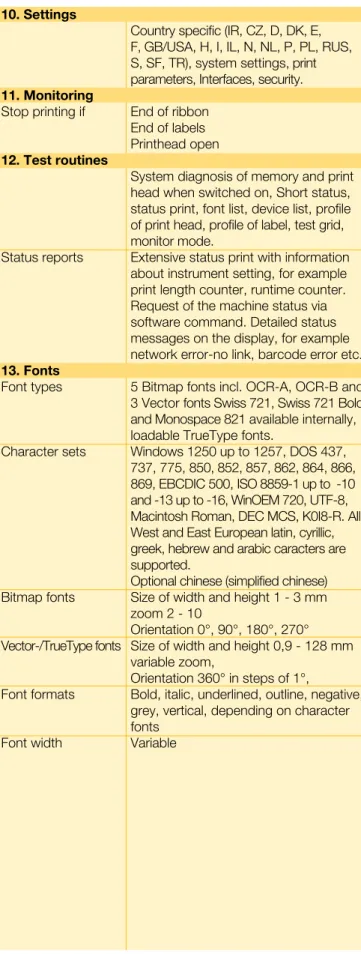
10. Settings
Country specific (IR, CZ, D, DK, E, F, GB/USA, H, I, IL, N, NL, P, PL, RUS, S, SF, TR), system settings, print parameters, Interfaces, security.
11. Monitoring
Stop printing if End of ribbon End of labels Printhead open
12. Test routines
System diagnosis of memory and print head when switched on, Short status, status print, font list, device list, profile of print head, profile of label, test grid, monitor mode.
Status reports Extensive status print with information about instrument setting, for example print length counter, runtime counter. Request of the machine status via software command. Detailed status messages on the display, for example network error-no link, barcode error etc.
1. Fonts
Font types 5 Bitmap fonts incl. OCR-A, OCR-B and 3 Vector fonts Swiss 721, Swiss 721 Bold and Monospace 821 available internally, loadable TrueType fonts.
Character sets Windows 1250 up to 1257, DOS 437, 737, 775, 850, 852, 857, 862, 864, 866, 869, EBCDIC 500, ISO 8859-1 up to -10 and -13 up to -16, WinOEM 720, UTF-8, Macintosh Roman, DEC MCS, K0I8-R. All West and East European latin, cyrillic, greek, hebrew and arabic caracters are supported.
Optional chinese (simplified chinese) Bitmap fonts Size of width and height 1 - 3 mm
zoom 2 - 10
Orientation 0°, 90°, 180°, 270° Vector-/TrueType fonts Size of width and height 0,9 - 128 mm
variable zoom,
Orientation 360° in steps of 1°,
Font formats Bold, italic, underlined, outline, negative, grey, vertical, depending on character fonts
Font width Variable
Standard Option
14. Graphics
Graphic elements Line, arrow, box, circle, ellipse, filled and filled with fading
Graphic formats PCX, IMG, BMP, TIF, MAC, GIF, PNG
15. Codes
Linear Barcodes Code 39, Code 93 Interleaved 2/5 Code 39 Full ASCII Ident- and lead Code 128 A, B, C code of german Post AG Codabar JAN 8, 13 EAN 8, 13 MSI EAN/UCC 128 Plessey EAN/UPC Appendix 2 Postnet EAN/UPC Appendix 5 RSS 14 FIM UPC A, E, E0 HIBC
2D-Codes Aztec, Codablock F, Data Matrix, PDF 417, Micro PDF 417, UPS Maxicode, QR-Code, RSS 14
All codes variable in height, module width and ratio. Orientation 0°, 90°, 180°, 270°. Optionally with check digit, printed cha- racters and Start/Stop code, depending on code type.
16. Software
Programming J-Script direct programming abc-Basic Compiler Database Connector
System diagnosis/ cab-printer monitoring Administration cab-Network Manager
cab-Card Manager
cab Label software cablabel R2 Lite cablabel R2 Pro
More Easylabel, Codesoft, Nicelabel,
Label software Bartender, Label Matrix, Labelview Windows driver 2000, XP32/64 bit,
2003 32/64 bit
Mac driver OS X printer driver from version 10.3 Linux driver Testet with Suse 9.0,
CUPS based
17. Operation data
Power supply 100 - 240 V ~ 50/60 Hz, PFC Energy consumption max. 250 W
Operation temperat. 10 - 35°C Humidity 30 - 85% not condensing
Safety regulations CE, FCC class A, CB, CCC
The current specifications are according to our technical
knowledge. They are subject to change.
12
for the printer Page Basic d. Dispense d. A2+ A4+ A6+ A8+
1. Cutter CU 12
•
•
2. Cutter CU-I 12
•
•
3. Barcode tester 13
•
•
4. Guide plate for internal rewinding 13 -•
- - 5. External re-winder for direct printer connection 13•
•
6. External re-winder with built-in power supply 13
•
•
7. External un-winding of rolls up to 300 mm Ø 13
•
•
8. Peel-off plate PS5 for automatic operation 14 -
•
9. Present sensor PS8 for manual operation 14 -•
-10. Present sensor PS6 for manual /automatic operation 14 -•
- 11. Pause adapter PS7 – pause of print job 14•
•
12. Extended peel-off plate 14 -•
-13. Sidewise displaced photo cell 14 -•
-14. Adapter 76 mm Ø 15•
•
15. Adapter 100 mm Ø 15•
•
16. Rotating label un-winder 76 mm Ø 15•
•
17. Memory card 15
•
•
18. External operation panel 15
•
•
19. Numerical keyboard 15
•
•
20. Compact keyboard 15
•
•
•
Models Standard OptionPeripheral devices - optimal accessories
at full benefit
2. Cutter CU-I
Additional external interface
An external signal activates the cutting function. All further technical attributes correspond to the CU-cutter.
1. Cutter CU
The cutter is used to cut labels, card-board, textiles or plastic foils or even heat-shrinkable tubes one label after the other, after a certain number of labels or at the end of job.
Perforation cut: Continuous material can be cut perforated on request. Delivery is customer-specific.
Accessories
I
Printer
Cutting labels
and continuous
material
Cutter CU2 CU4 CU6 CU8
with external Interface CU2-I CU4-I CU6-I CU8-I
for printer A2+ A4+ A6+ A8+ Material weight up to g/m2 500
Material width up to mm 65 120 180 232 Material height from mm 2 - Depending on material limitation
-1
. Barcode tester
The built-in scanner tests the barcodes directly after printing. If the barcode is not readable the printing process can be stopped at once so the faulty labels can be removed.
5. External re-winder
7. External un-winder
for printer all A+-Series devices all A+-Series-devices a. other manuf. Material widht up to mm 120 180 235 120 120 180 235 Winding speed up to mm/s 250 200 150 300 300 250 200 Power supply 24 VDC 100 - 240 V~ 50/60 Hz Core Ø mm 40 - re-winding with or without cardboard core Adapter mm 76 - re-winding with cardboard core Winding of labels inside or outside
External re-winder ER1 ER2 ER ER4 ER4 ER6 ER8 Roll Ø max. mm 210 210 210 210 00 00 00
for Printer A+-Series and other manufac. Material width up to mm 120 180 235 Core Ø mm 40 Adapter mm 76 Winding of labels inside or outside
External un-winder EU4 EU6 EU8 Roll Ø max. mm 00 00 00
6. External re-winder
Accessories
I
Printer
On- and off-winding of
labels and continuous material
For label rolls up to 145 mm Ø
The internal rewinding is operated by the dispense printer. The peel-off-plate is replaced with the rewind guide plate (for devices A2+ and A4+).
4. Rewind guide for internal
re-winding
For label rolls up to 00 mm Ø
The un-winder works both with inside and outside wound labels. It enables a smooth feeding of labels for heavy rolls.
Testing barcodes directly
after printing
General use together with the external re-winder ER4 - ER8.
With built-in power supply
Due to the built-in power supply unit the re-winder can be attached to every other printer. The label winding is optional inside or outside. A smooth and tight winding can be achieved through the electronic control of the swing arm.
Direct connection onto the printer
The re-winder is screwed directly onto the transfer printer. The label winding is optional inside or outside. A smooth and tight winding can be achieved through the electronic control of the swing arm.
14
12. Extended peel-off plate
If labels are difficult to peel off we recom-mend an extended peel-off plate. It is made to customer´s specifications.
1. Sidewise displaced photo cell
For dispensing labels where the outer edges are not detected by standard photo cell. The extension is made on customer´s specification for PS6 or PS8.
11. Pause adapter PS7
Interruption of print job
The printing can be paused by an exter-nal sigexter-nal by using a label loop.
9. Present sensor PS8
For manual operation
The photo cell detects the label in peel position and pauses the labelling pro-cess. After removing the label the next one is printed instantly.
10. Present sensor PS6
For manual and automatic
ope-ration
It contains the functions for both manual and automatic handling. There are two options:
1. Dispensing after removal (manual) without connection to the external peripherical connector.
2. Dispensing on demand (semi-automa- tic) with manual button, foot switch and external control system.
8. Peel-off adapter PS5
For automatic operation
Printing and dispensing of the label is started via an external signal. The dis- charging can be made by a robot, appli- cator or manually. With six additional in- put and output signals like “label taken” or “print of label is started” the labelling process can be controlled.
Discerning solutions for different requirements.
15
Accessories
I
Printer
I
Periphery
16. Rotating label un-winder 76 mm Ø
15. Adapter 100 mm Ø
Both for very sensitive or small labels and labelling in lateral position we recommend a core diameter of 100 mm.
14. Adapter 76 mm Ø
Recommended für dust-sensitive areas. The roll is fixed tightly onto the un-winder, which avoids abrasion through the card-board core.
Recommended for heavy rolls with a core diameter of 76 mm.
18. External operation panel
19. Num. keyboard
20. Compact keyboard
Connection USB Keys Menu, Pause, Feed,
Cancel, Enter, 4 x Cursor Graphic Displ. 60 x 40 mm Slot for CompactFlash-card Type I L x W x H mm 182 x 68 x 30 Same operation like the operation panel on the machine, with an additional slot for a memory card.
For the input of numeric data in stand-alone-mode.
For direct input of variable data in stand-alone-mode.
CompactFlash Type I 512 MB
Memory card
Label formats, fonts, texts and gra- phics can be saved. It can be acces-sed from the printer or from the PC.
512
17. Memory card
Connection USB No. of keys 19 L x W mm 120 x 76
For semi-automatic applications the printing, cutting and the peel-off-function can be activ- ated via manual control switch.
21. Present trigger
For semi-automatic applica-tions the printing, cutting and the peel-off-function can be activated via foot switch.
22. Foot switch
For easy connection the sub-D plug is equipped with a screwed clamp.
For automatic product identi-fication on the conveyor belt.
2. Photo cell
24. Sub-D plug
15 pole 25 pole
Accessories for Cutter CU-I Present sensor PS5 / 6 Pause adapter PS7 Applicator A 1000
21. Present trigger
22. Foot switch
23. Photo cell - - -
24. Sub-D plug 15 pole
25 pole - - -
Connection USB No. of keys 86 L x W mm 282 x 132
Compact keyboard External operation panel Numerical keyboard
16
1. Long operation lines
The guides have ball bearings which avoid abrasion.
2. Variable product heights
With the pneumatic cylinder it is possible to compensate differences in product heights. It is available in different heights of stroke.
. Simple adjustment
Four screws are needed to adjust the tamp pad to the dispensing edge. The processing can be optimized at the operator panel during the testing.
4. Pre-dispense key
Tests the labelling function. At the first operation the label is printed and then transferred via the applicator. By pushing the button again the label is applied.
5. Air service unit
The mounting takes place directly on the printer. The micro strainer prevents con-tamination, the compressed air regulator guarantees the labelling quality.
6. High process reliability
The supporting air jet streaming, the vacuum and the speed of the cylinder are adjustable. For highly sensitive products and packaging the pressure to apply labels can be reduced to less than 1 kg. Consequently there is no risk of injury. To avoid contamination within the vacuum channels are cleaned by an air pressure impulse at the end of each application.
7. Real time labelling
Labels with a height of 25 - 200 mm and with a width of 25 - 176 mm can be applied.
8. Quick assembly
Like any other accessory, the applica-tor is plugged into the printer with two stoppers and can be fixed with only one screw.
Digital I/O-Interface
The master (e.g. PLC) starts or stops the labelling process. The status and error messages are issued at the same time.
Label tranfer method Tamp Roll on Blow
Label width mm 25 - 176 25 - 176 25 - 176 Label height mm 25 - 200 80 - 200 25 - 100 Cylinder stroke mm 220 / 300
Stroke of tamp below
printer mm 70 / 150 Compressed air bar 4 - 8 Product surface flat
Product height variable fixed - -
Product fixed -
linear movement -
Applicator A 1000
Print and apply in real-time
1 2 3 5 6 7 8 4
The applicator A 1000 represents, in combination with the thermal printers A2+, A4+ and A6+, the inexpensive solution both for semi-automatic labeling and for the integration into automated production lines.
17
During the print and apply cycle the pro-duct remains fixed. The universal tamp ist covered by a foil. According to the size of the label the holes can be pierced. The tamp pads are customized to the dimen-sions of the label sizes on request.
For applying pressure to sensitive products the label can be blown onto the product with the supporting air jet stream. The print and apply cycle performs in a fixed position or in a linear movement of the product. The blow pad moves to a pre adjusted position approx. 10 mm away from the product.
Using the roll-on pad the label is dispensed until it touches the roller. The tamp pad moves on top of the product. The label is then rolled on and applied by the move-ment of the product.
Tamp pad
Blow pad
Roll-on pad
The lower frame can be customized ac-cording to the special requirements re-garding width and height. The print and apply system is positioned by adjust- ing two bolts. The exact position of the system can be adjusted on a guide rail.
The stand enables the fast and flexible application of the printer in every ma-nufacturing line. The labelling position is easy to adjust in height and width. Four guide rollers at the undercarriage provide for mobility. It is adjusted with bases at the place of installation.
Lower frame
The stand for flexible printer mounting
Printer on lower frame
The print and apply system is mounted on a base plate with a thickness of 10 mm and can be fixed with only one clamp.
Stand
Printer holder
for A4+ and A6+,
A2+ on request
Accessories
I
Applicator
Total height mm 1.600 Labelling height up to mm 1.400 Projection mm 230 - 500 Undercarriage (base distance)Width x Depth x Height mm 600 x 860 x 140
18
Optimal output through optimal input
Software tools
J Job Start
H 100 Speed (100 mm/s)
O R Orientation rotated by 180°
S I1;0,0,68,70,100 Size of label (100x68 mm, gap 2 mm)
T 10,10,0,5,pt20;sample Text object/font: Swiss bold, 20 pt
B 10,20,0,EAN-13,SC2;401234512345 Barcode EAN 1, size SC 2
G 8,3.5,0;R:30,9,0.3,0.3 Graphic, box 0 x 9 mm, Line strength 0. mm
A 1 Number of labels (in this example 1)
Direct programming with J-Script
abc - Basic Compiler
Database Connector
The cab database connector allows to link up stand-alone printers via TCP/IP interface to central SQL databases in the network. Data can be requested, printed and written back during the prin-ting process.
cab printer monitoring with Intra- and Internet
cab-Network Manager
The cab network administration enables the administrator to manage all printers connected to one network at the same time. With a single mouse click different printers can be monitored, configured or updated with firmware; furthermore PIN codes of the printers are changed and data on the memory card can be managed.
cab-Card Manager
Printer Control
Monitoring
Administration
The cab Basic Compiler is always one step ahead. With an easy basic programming data is operated or logically combined be-fore they are sent to the printer for further processing. This offers e.g. the possibility to emulate other printers or to integrate data strings from barcode readers or scales in printing processes. All data received is printed in real time.
cab J-Script allows easy programming of the printer by using text strings and this independently from the used label soft-ware. Labels can be designed and the status of the printer can be enquired. The memory card allows to save complex layouts, graphics and fonts, which reduces the data transmis-sion time.
cab printers provide to be monitored and configured with standard web browsers or FTP clients. Firmware updates or data mana-gement on the memory card are easy to handle. By the use of SNMP- and SMTP clients, status, warning and error messages are sent via email or SNMP telegram to the network.
Via RS232 port the memory card can be administrated fast and easly. Label layouts, special text fonts, complex graphics or databases can be up- or downloaded.
19
Create and print your label with a Win-dows program for ex. MS Word, Excel, Access, Works, Corel Draw etc. Windows printer driver are provided for 2000, XP 32/64 bit, 2003 32/64 bit.
cab Windows driver
For LINUX cab offers also a CUPS
based printer driver.
Linux driver
cablabel software for cab printers
The software to create labels
Label software
32-Bit Platform compatibility Languages European Version: IR, CZ, D, DK, E, F, FIN, GB/USA, H, I, IL,N, NL, P, PL, RUS, S, TR
Languages Asian Version : Chinese, EST, J, LV, ROK Label samples
Online documentation with tutorials
Multi-level Undo
number of levels Graphic format import
Color support
Color graphic reduction Text art
TrueType font Graphic barcodes numbers
Native printer barcodes Hidden (not printable) objects
Label preview Graphics preview Grid view/print OLE-Client
Windows driver support Control of printers Support of net printer (TCP/IP) Bi-directional communication to the printer Stand-alone Printing to file Font Downloader Database Database Manager Access, DBF
ASCII, ODBC, OLEDB
Variables
Flexible date and time stamping Host of date and time with Date offset
Printing counter Host counter
Variable graphic images Free variables
Global files
Decimal value formating Basic formular
User Input Fields
Text alignment Set input format Minimum input length Selection of default values Automatic prompt
Extras
UCC/EAN 128 and Maxicode Assistent
cablabel R2 Lite Pro
1 40 9 37 1 99 Perfect labels need optimized text
fonts. cab offers a large number of bitmap and vector fonts. Height and width of the font can be scaled and the object can be positioned and arran-ged. Additional true type fonts can be downloaded to the memory card. Most of the country specific code- pages are supported.
Take advantage of using the multiple possibilties of cablabel R2.
cablabel R2 Lite
is equivalent to the previous Advanced-version. You get it - free of charge - with every cab printer.
cablabel R2 Pro
Assistant for UCC/EAN 128 barcode. Allows the collection of printing data from different data bases.
Wether simple texts, barcodes, graphics and the connection of databases, cablabel R2 is most flexible - all in 24 languages.
MDI (Multiple Document Interface) helps to open and handle several labels at the same time. Objects can be copied, moved and inserted into another label. cablabel R2 provides its own drivers with individual respond to all different function of cab printers. This most effective way of communication between software and printer enables to achieve perfect results.
Further label Software
cab offers a range of additional label software (Easylabel, Codesoft, Nice- Label) enabling to program printers, to print and to apply systems.
For MAC OS X cab offers a CUPS based printer driver. Please ask us.
Mac OS X driver
cab developed together with SAP the „replacefil“ application. This is a simple way to run cab printers with SAPScript out of SAP R/3. Upload-Methode SAP R/ note no. 17 1 Create labels with software Transfer replace file into
SAPScript Exchange of variable data with SAPScript and printout ®
SAP
20
59545xx.101 Printer with metal cover (A4+, A6+)
59545xx.10 Printer with metal cover and RFID Read-Write unit 13,56 MHz
59545xx.102 Printer with RFID Read-Write unit 13,56 MHz 300 5954511 Transfer printer A2+/300
300 5954512 Transfer printer A2+/300P 203 5954500 Transfer printer A4+/200
203 5954505 Transfer printer A4+/200P 300 5954501 Transfer printer A4+/300
300 5954506 Transfer printer A4+/300P 600 5954502 Transfer printer A4+/600
600 5954507 Transfer printer A4+/600P
203 5954524 Transfer printer A4.3+/200
203 5954526 Transfer printer A4.3+/200P
300 5954525 Transfer printer A4.3+/300
300 5954527 Transfer printer A4.3+/300P 300 595451 Transfer printer A6+/300
300 5954514 Transfer printer A6+/300P 300 5954517.101 Transfer printer A8+/300
with metal cover
300 5954528 Thermal direct printer A2+/300 300 5954529 Thermal direct printer A2+/300P 203 595450 Thermal direct printer A4.3+/200 203 595451 Thermal direct printer A4.3+/200P 300 595452 Thermal direct printer A4.3+/300
300 59545 Thermal direct printer A4.3+/300P 300 5954515 Thermal direct printer A6+/300
300 5954516 Thermal direct printer A6+/300P 300 5954518.101 Thermal direct print. A8+/300
with metal cover
5954102.001 Print roller DR2 5954104.001 Rewind assist r. RR2 5954180.001 Print roller DR4 595418.001 Rewind assist r. RR4 5954245.001 Print roller DR6 5954246.001 Rewind assist r. RR6 595410.001 Print roller DR8 5954102.001 Print roller DR2 5954104.001 Rewind assist r. RR2 5954180.001 Print roller DR4 595418.001 Rewind assist r. RR4 5954245.001 Print roller DR6 5954246.001 Rewind assist r. RR6 595410.001 Print roller DR8 5954105.001 Printhead 2/300 5954081.001 Printhead 4/203 5954072.001 Printhead 4/300 5954077.001 Printhead 4/600 5954085.001 Printhead 4.3/203 5954089.001 Printhead 4.3/300 5954106.001 Printhead 6/300 5954107.001 Printhead 8/300 5954105.001 Printhead 2/300 5954085.001 Printhead 4.3/203 5954089.001 Printhead 4.3/300 5954106.001 Printhead 6/300 5954107.001 Printhead 8/300 5561041 WLAN-card 802.11 b/g 5954200 Parallel Centronics 5954201 Serial RS422/RS485 5551279 Twinax-Converter 5551280 Coax-Converter
5954191 Label selection box
5550818 Cable RS232 C 9/9-pin, length 3 m
5901616 Cable USB Length 3 m
5901656 Cable USB Mini length 3 m Interfaces Printhead Part No. Printer Rollers Part No. Spare Parts Accessories 5954012.001 Metal cover A4+
595401.001 Metal cover A6+
594882 Cutter CU2 5948000 Cutter CU4 5948001 Cutter CU6 5948002 Cutter CU8 5948897 Cutter CU2-I 5948899 Cutter CU4-I 5948890 Cutter CU6-I 5948896 Cutter CU8-I 5946995.001 Cutter tray 4 5948650.001 Tear-off plate TP2 5946244.001 Tear-off plate TP4 5946414.001 Tear-off plate TP6 5954108.001 Rewind guide RG2 for internal rewinding
5954190.001 Rewind guide RG4 for internal rewinding
on request Barcode tester hl40-2
5570820 Barcode tester hl40-4 on request Barcode tester hl40-6
5948102 External re-winder ER1/210
594251 External re-winder ER2/210
5945802 External re-winder ER3/210
Standard Option
Delivery program
21
5948100 External re-winder ER4/210 5946090 External re-winder ER4/300 5946420 External re-winder ER6/300
5945804 External re-winder ER8/300
5948170 Adapter plate for ER/EU
5946091 External un-winder EU4/300
5946421 External un-winder EU6/300
5945806 External un-winder EU8/300
595474.001 Adapter 76 mm Ø
595475.001 Adapter 100 mm Ø
595471.001 Rotati. label un-winder IU4 76 mm Ø
595472.001 Rotati. label un-winder IU6 76 mm Ø
59547.001 Rotati. label un-winder IU8 76 mm Ø
5946900.001 Present sensor PS8 manual operation 59425.001 Present sensor PS6 manual/automatic operation 5946120.001 Peel-off adapter PS5 Automatikbetrieb 5946146.001 Pause adapter PS7
on request Extended peel-off plate on request Sidewise displased photo cell
556104 Memory card 512 MB CompactFlash Type I
595480.001 External operation panel
5917909 Numerical PC keyboard USB
590160 Compact PC keyboard USB Cherry Classic Line G84 4100
594245 Present trigger TR1
555901 Foot switch SPS
5941526 Light barrier to start SPS 5917652 Interface connector SUB-D-plug 15 pole Phönix Contact 2761606 5917651 Interface connector SUB-D-plug 25 pole Phönix Contact 2761622
Part No. Description Accessories
Fit-up aid Applicators 594909 Lower frame 340 x 160 5xxxxxx Lower frame W x H 5947400 Stand 1600 89169 Printer holder 55240 Testbox 2 Automatic operation 5580212 cab-Database Connector 5580215 cab-Network Manager 5580216 cab-Card Manager
5580220 Label software cablabel R2 Lite
5580221 Label software cablabel R2 Professional
5949002 Applicator A 1000-300
5949072 Universal tamp pad A1021 70 x 60
5949075 Universal tamp pad A1021 90 x 90
5xxxxxx Tamp pad A1021 W x H
5949076 Universal tamp pad A1321 116 x 102
5949077 Universal tamp pad A1321 116 x 152 5xxxxxx Tamp pad A1321 W x H 5xxxxxx Blow pad A2021 W x H 5xxxxxx Roll on pad Software 512
Delivery program
TestboxPart No. Description
The current specifications are according to our technical knowledge. They are subject to change.
© Copyright by cab/9008476 Germany cab Produkttechnik GmbH & Co KG Postfach 1904 D-76007 Karlsruhe Wilhelm-Schickard-Str. 14 D-76131 Karlsruhe Telefon +49 721 6626-0 Telefax +49 721 6626-249 www.cabgmbh.com [email protected] France
cab technologies s.a.r.l. B.P. 50020
Z.A. Nord du Val de Moder F-67350 Niedermodern Téléphone +33 388 722 501 [email protected] España cab España S.L. Josep Pla 9, 6°, 2a
E-08304 Mataró (Barcelona) Teléfono +34 937 414 605 [email protected]
USA
cab Technology Inc. 90 Progress Avenue Unit #2 Tyngsboro MA, 01879 Phone +1 978 649 0293 www.cabtechn.com [email protected]
South Africa
cab Technology (Pty.) Ltd. 14, Republic Road 2125 Randburg
Phone +27 11-886-3580 [email protected]
Representatives in other countries on request. Asia 亞 洲 分 公 司
希愛比科技股份有限公司 cab Technology Co, Ltd.
台灣台北縣板橋市 民生路一段33號十九樓之一
19F-1, No. 33, Sec. 1, Min Sheng Road Panchiao 220, Taipei, Taiwan, R.O.C.
電話 Phone +886 2 2950 9185
網址 www.cabasia.net