Discussion Draft
June 2004
Implementing
Electronic
Information
Management
(EIM):
A Planning Guide
i
i
Management
Produced by
Information Management Branch Open Government
Service Alberta 3rd Floor, Commerce Place
10155 – 102 Street Edmonton, Alberta, Canada
T5J 4L4 Office Phone: (780) 427-3927 Fax: (780) 422-0818 Websites: www.im.gov.ab.ca www.servicealberta.ca/foip www.pipa.gov.ab.ca
Contents
1. Introduction ... 1
What is EIM? ... 1
Overview of the planning guide ... 3
2. Getting Started ... 6
EIM and ICT planning ... 6
The project team ... 6
Governance structure ... 7
Checklist... 7
3. Developing the Road Map ... 8
Objective ... 8
Establishing the value of EIM... 8
Developing the road map ... 10
Checklist... 12
4. Building the Business Case ... 14
Estimating costs, benefits, net present value and return on investment ... 15
Managing Risks ... 18
Checklist... 19
5. Evaluating and Implementing the Prerequisites for EIM .... 20
Information management practices ... 20
Culture and attitude ... 22
Moving forward ... 22
Checklist... 22
6. Establishing the Implementation Team ... 23
Core implementation team ... 23
Additional skills and expertise ... 23
Lessons learned ... 24
Checklist... 24
7. Develop the Tactical Plan ... 25
Checklist... 28 8. Deployment ... 30 Communications ... 30 Set-up ... 30 Training ... 30 Migration ... 31 Issues management ... 31
Coaching and support... 31
Evaluation and Learnings ... 31
9. Ongoing Management and Evaluation ... 33
EIM Management Team ... 33
EIM Operations Team ... 33
Training Plan ... 33
Evaluation ... 34
Checklist... 36
Appendix 1: EIM Readiness Assessment ... 37
Document management ... 37
Classification ... 37
Retention and Disposition Scheduling ... 38
Metadata ... 38
Controlled Vocabulary/Taxonomy ... 38
Responsibility/Stewardship ... 39
Culture/Attitudes ... 39
1.
Introduction
Electronic information management is a powerful tool to manage an organization’s information resources in an integrated manner throughout their entire life-cycle.
EIM makes it easier:
for people to do their work;
for the general public, contractors and governance groups to gain access, when authorized, to government information; and
for ministries to meet their accountability requirements.
Successfully implementing electronic information management, however, is a complex task. It means implementing new business practices and changing the way staff work. As such, change management is a significant factor in the success of implementation. Successful implementation of EIM is a multi-year project. In the end, it will transform your organization – the way people work and the way information assets are managed.
This guide is intended to be a planning tool for those responsible for implementing EIM within ministries in the Government of Alberta. It is meant to be used in conjunction with other tools developed for EIM, namely:
Functional Requirements; Business Rules and Practices; Model Accountability Structure; and
Training Materials (to be developed in Phase 2).
What is EIM?
EIM, also referred to as Enterprise Content Management (ECM) and Smart Enterprise Suite (SES), has recently evolved from the more specific concepts of Electronic Records Management, Electronic Document Management (ER/EDM) and Electronic Collaboration.
Content, also known as “unstructured data” or “document-based”
in rows and columns in corporate and ministry databases. Industry estimates indicate that approximately 85% of all business information now exists as “content”, but the overwhelming majority of technology resources and discipline to date have been directed towards management of “structured” data in operational systems and databases.
Examples of “content” include:
office documents, such as reports, letters, presentations, spreadsheets, e-mail messages and attachments; notes and discussions threads;
graphical objects and images, often combined with or embedded in documents;
multimedia items, e.g. sound and video; and
web content (both publications and other forms of content). Electronic information management (EIM) introduces the required consistent and systematic approach to managing all content assets of the government through their life cycles, integrating the management of information in electronic formats with those in hard copy such as paper, photographs, and microfilm. Figure 1 presents the management model of EIM.
Figure 1
Electronic information management Model Dynamic Content Platform Dec
la re O ff ic ia l Rec ords
Static Content Platform
Document Management Records Management
Preservation Management Team Collaboration
Imaging, Scanning Web Content Management
Manage Content by Managing Common and Unique Functionality: Create and Capture Content Manage Collabo-ration Manage Content Organize Content Manage Content Use Publish Content Manage Records Preserve Records Manage Repositories by Managing Common Functionality:
Manage Metadata Manage Search and Browse Manage Users Manage Workflow Manage Reporting Administer EIM Repositories
Overview of the planning guide
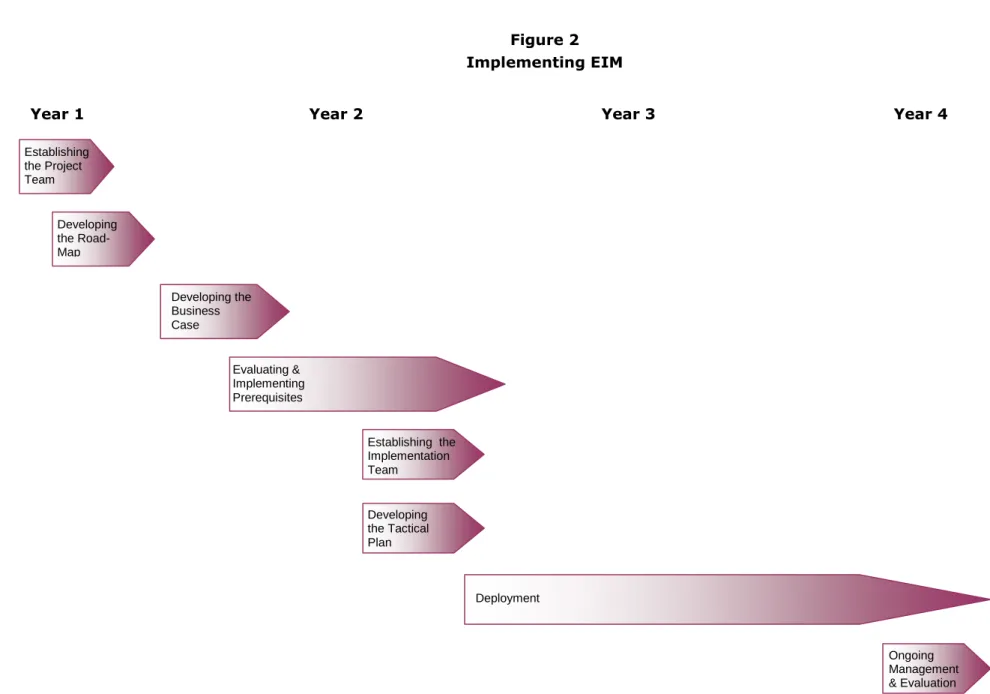
The guide is organized around the major steps of an implementation process for EIM (see Figure 2 on the page 5). While the steps in the process are generic, the actual timing will vary depending on the size and complexity of your ministry and the level of resources you are able to apply to EIM. These steps in implementing EIM are:
Getting Started: EIM needs to be integrated into your ministry’s
Information and Communications Technology (ICT) plan. It also needs the contribution from a number of information practitioner communities – information technology services, information management, and records management for example. Having the right people involved from the beginning and establishing a sound governance structure is essential.
Developing the “Road-Map:” Implementing EIM is a multi-year project. The Road-Map is intended to provide a high-level plan for your ministry. Approval of the road-map is the first key decision point in implementing EIM. The expected outcome of this stage is approval to proceed with the business case.
Developing the Business Case: Because EIM represents a significant investment of resources, the business case is the second key decision point in implementation. A clear road-map will help set the stage for the business case. However, the business case has to make sense in the context of your organization. The expected outcome of this stage is the investment decision and approval to go forward with implementation.
Evaluating and Implementing Prerequisites: Before implementing an EIM solution, several information management practices need to be in place and should be running smoothly. A readiness assessment can help you identify those critical practices and how well they are established in your organization.
Establishing the Implementation Team: Involving the right people and having the right mix of skills on the project team will facilitate
implementation.
Developing the Tactical Plan: There are many factors that will influence how you go about “rolling out” EIM. These include the different types of information resources your organization has, the size of your organization, and the readiness of different parts of your organization. All of these will affect how you go about implementation and the timing of implementation.
Deployment: Rolling-out EIM, based on your tactical plan, will take a significant amount of time. Setting milestones for evaluating both the process of implementation, and the results achieved, will help you make corrections to your plan and document the impact of EIM.
Ongoing Managementand Evaluation: Making EIM a standard business practice will require ongoing management. This includes having a clear management structure as well as ongoing training and coaching for staff.
Figure 2 Implementing EIM Developing the Road-Map Evaluating & Implementing Prerequisites Establishing the Implementation Team Developing the Business Case Developing the Tactical Plan Deployment Ongoing Management & Evaluation
Year 1 Year 2 Year 3 Year 4
Establishing the Project Team Road-Map
2.
Getting Started
Implementing EIM is a multi-year project. To properly manage the project, you’ll need to involve the right people and establish the project structure.
EIM and ICT planning
Because EIM involves a significant investment of both human and financial resources, EIM should be in your ministry’s information plan and its ICT plan as a multi-year project. In this way, the planning can be managed and integrated.
The project team
As a multi-year project, getting the right project resources committed to the project is essential. It’s also important to involve the right people.
In many cases, the project manager should to be committed to the EIM project on a full-time basis for the duration of the project.
Other resources to involve in the core project team include staff from: information technology services;
information management; web management; and records management.
These specialists will probably not be required on a full-time basis. Rather, their commitment is likely to be about 10% of their time (a half day a week) until you get to the deployment stage.
The project team will be stronger, and it will be easier to build commitment to EIM, if you also involve staff from some line business areas. These members of the team could be drawn from business areas that recognize the need for EIM and would likely be early adopters of the solution.
Governance structure
In addition to the project team, you should also establish a governance structure for the project. In many ministries, this may simply be engaging and executive sponsor for the project. In more complex organizations, you may need to establish a formal steering committee to guide the project and present the project to Executive at key decision points.
Checklist
Is EIM (planning and deployment) included in your ministry’s ICT plan? Do you have a project manager committed for a significant percentage of
time (in many cases full-time) to the EIM project?
Do you have the right mix of professional skills and the right parts of your organization on the project team?
Have you engaged an executive sponsor?
3.
Developing the Road Map
EIM is a business solution, not an information technology solution. As such, the business must see the value of this approach to managing information resources.
Because EIM will involve a substantial investment of both money and time (and will change the way people work) there is significant risk in bringing forward a business case without first building awareness of the issues and the potential value of EIM. You need to establish a clear vision of what EIM is and what it will do for your ministry. This is the value of the “Road Map.”
Objective
The objectives of this “stage” are to:
build awareness of the need for improved electronic information management, and the opportunity EIM provides;
manage expectations of decision-makers;
develop key messages around the business value of EIM; and
obtain the authority and resources to develop a full business case for the investment decision.
Establishing the value of EIM
The value proposition for EIM will vary from organization to organization. In developing the value proposition, you’ll need to consider the business risk, the business benefits, and the potential operational benefits of EIM.
Business risk
Typical business risks associated with managing information resources include:
Inefficient work practices waste time and slow-down decision making. This is often characterized by
o an inability to locate and identify authoritative versions of
determine a given record’s origins, level of approval, or whether it is the latest, most complete or relevant version;
o management of records and data as “my” records or “my program’s” rather than corporate assets, resulting in a failure to leverage, through sharing and re-use, the public investment made in creating and maintaining these assets; and
o limited knowledge of what records and data exist and where they are located.
Increased duplication, copying, modification, and storage of electronic records and hardcopy versions across business units, applications and media with an accompanying escalation of costs associated with storage and use.
Loss of corporate memory. Information leaving the organization when employees leave, or becoming “orphaned” in boxes or on electronic systems.
Unauthorized access to confidential information. Inability to adequately protect confidential information or apply security classification standards to this information.
Risk to business continuity. The inability to mitigate against disruption because vital information assets have not been identified or mitigation strategies have not been implemented.
Inability to meet legislative requirements. In addition to ministry specific legislation, your organization may be at risk of not meeting the
requirements of the Freedom of Information and Protection of Privacy Act, the
Historical Resources Act, the Evidence Act, and the Records Management Regulation.
Increasing frustration of staff. Employee surveys may be indicating an increasing level of frustration among staff related to working more outside of work hours to manage priorities, information handling and communication (e-mail in particular) or too much time looking for the information they need to do their job.
Business and operational benefits
Typical business benefits of EIM include:
Provide instant access to needed information:
o Control information access
o Share and edit documents more effectively
Reduce business risks:
o Reduce/eliminate lost and misfiled documents
o Accurate information to make decisions
o Maintain corporate memory
Improve accessibility to information resources by staff and others:
o Leverage information for use in other parts of the organization
o No need to “reinvent the wheel” Improve productivity of staff:
o Less time searching for information
o Manage information once for multiple uses Reduce cost of FOIP compliance and legal discovery:
o Reduce the number of locations to search for information relevant to an access request or discovery process
o Reduce the time to search and collect relevant information Eliminate duplicate filing systems.
Improve space utilization and reduce the cost of storage.
Improve business continuity capabilities because vital records are in electronic form and backed-up regularly.
Developing the road map
Not all of the business risks or business and operational benefits will be important to your organization. The challenge in selling the road map is to choose the most important factors for your business and the factors that “resonate” with decision-makers.
For example, in some private sector organizations, the high amount of duplicate information on electronic systems (and the associated time to back-up this information) is increasing beyond the available time for backing-back-up information (typically overnight).
In other organizations fiduciary and legal risks are the primary business reasons for implementing EIM.
Remember, the key objective here is to build awareness and understanding of the value of EIM to your ministry.
The Road Map can usually be developed over a period of about 3 months. You’ll want to:
document current practices (and risks);
engage staff to understand their frustrations and needs for improved information management;
research what other organizations have done and the results;
develop key messages that are appropriate to your organization and test them with business managers; and
present the road-map to Executive.
Assess current risk and needs
You’ll want to assess the current risk and needs. One way to do this is to benchmark current IM practices. A benchmarking tool, developed for the Government of Alberta, can be accessed at
https://www.im.gov.ab.ca/documents/publications/BenchmarkingIM.pdf Another useful way to assess the current situation is to survey staff on current behaviours, practices related to information management. A sample survey that can be adapted to your organization is in the Information Management Planning guide.
Develop and test key messages
Once you’ve documented the current risk and needs, you can assess what are the issues that will be most persuasive in building the road map. You’ll also want to “test” these key messages with senior managers to ensure they reflect the concerns of decision-makers in your organization.
Some key messages that other organizations have found helpful are: “The current situation is unsustainable. We’ve lost control of the
information we have through multiple classification schemes, inconsistent practices, and an enormous amount of duplication of electronic information.”
“We are at risk legally. We are at risk of not meeting our legal responsibilities to clients. If there is legal action, our information
management practices will make discovery very expensive and we are not sure that we can do it completely.”
“The paper records system does not work. As we work more and more in an electronic environment, information assets are not making their way into the paper records system. And, it is simply impractical and too costly to do so. We must manage information assets once – in an electronic environment – for as long as they are needed.”
“The corporate direction in information management is to EIM. The Government of Alberta, like other governments and private-sector organizations are ‘in the same boat’ and moving to EIM. Our approach is moving in a consistent manner with the corporate direction.”
“Staff are burning out! Finding information is getting more and more difficult. If we don’t make it easier for people to get the information to do their jobs, we risk burning out staff or losing key human resources to other organizations. We need to get the right information to the right person at the right time.”
“We’re spending too much money managing information. Because of the amount of duplication of records, our back-up procedures are costing too much. In fact, it’s taking so long to back up information that we no longer can do this outside of work hours without impacting staff. Add to that the rent we’re paying to store paper records. And, it’s only going to get worse. We can free up significant resources over the long-term with EIM.”
Contents of the road map
The actual road-map can be fairly simple. It is a high level plan of how you intend to proceed. It should include:
a statement of the need (documented by results from the benchmarking exercise or staff survey);
statement of the benefit;
alignment with your ministry’s strategic objectives and the Government of Alberta corporate priorities;
lessons learned from others who have done this;
the timing and costs involved in developing the business case; and the decision required (approval to develop a full business case).
Checklist
The following checklist can help you develop the EIM Road Map: Have you documented the current risk and needs of staff – either
through benchmarking information management practices or a staff survey (or both)?
What key messages will you use to build awareness and understanding of the need and opportunity?
Have you tested the key messages with senior managers?
Do you have the expertise in-house to develop the business case? If not, where will you get it and at what cost?
How long will it take you to develop the business case?
Is the timing for the business case in line with your annual and long-term budget and IT planning? Will you be bringing the business case forward at a time that, if approved, it will included the ministry’s budget over the next three years?
4.
Building the Business Case
The business case for EIM will help you establish the basis for the investment decision. A Government of Alberta standard business case template and usage guidelines are available at
www.im.gov.ab.ca/documents/publications/Infrastructure-EIMbuscase.pdf. Also, you may be able to learn from business cases that other ministries have used for EIM. While the form of the business case will be fairly similar across organizations, the content must be specific to your organization. The information gathered in developing the road map and doing the readiness assessment will help you decide what, exactly, to include.
A typical business case will include the following elements: Executive Summary
Background: What is the business problem EIM is solving? What opportunities does EIM present?
Project Description: What is involved in implementing EIM (i.e., selection of tool; roll-out, communication and change management)? Strategic Alignment: How does EIM align with ministry strategic
objectives and corporate (GoA) initiatives such as alignment with GAEA and the Information Management Framework?
Cost and Benefits: Identification of the costs, benefits, net present value and return on investment.
Risk Management: What are the risks associated with implementing EIM and how will you manage them?
Implementation Plan: How will you manage the project and implementation of EIM, what is the timing, what resources will you require?
Conclusion and Recommendations
This section discusses some of the key factors you’ll need to consider in developing the business case.
Estimating costs, benefits, net present value and
return on investment
The core of the business case is the measurement of costs, benefits and net present value.
Costs
Costs to be included in your business case include: purchase of hardware;
purchase of software license; ongoing support of software;
implementation costs (project management, conversion, training, communication); and
ongoing management of EIM (staff resources).
Note: Estimates of the range of these costs on a per seat basis will be identified during vendor qualification in Phase 2 of the EIM Project.
Benefits
There is a cost to the measurement of benefits of EIM. You’ll want to consider what the most relevant benefits to your organization are. Typical benefits that can be measured are:
reduced time to find information; reduced storage costs; and
cost avoidance (e.g., the ability to support self-service rather than human intervention in the delivery of documents or information; the ability to reduce printing and distribution).
Table 1
Measuring Financial Benefits of EIM
Benefit Measure
Reduced time to find information Annual savings = [estimated time per employee (in minutes per day) x 220 days / 96,000 (the number of minutes in a typical work year)] x average salary x number of staff.
Reduced storage costs Annual savings = [% duplicated files in Gb x annual back-up
costs] + [estimated reduction in paper storage space in sq. feet x annual rental cost per square foot]
Cost avoidance Annual savings = [salaries, supplies and overhead to provide
service] + [reduction in printing distribution costs]
In addition to the financial benefits, you’ll also want to identify other more intangible benefits. While these benefits will not enter into the calculation of return on investment, they can help make the case stronger for EIM. Some of the intangible benefits to consider are:
Customer service: EIM can speed responses to customer inquiries or to retrieve relevant documentation, while directly serving the customer (internal or external).
Staff productivity: Productivity improvements gained by EIM include reduced filing requirements; elimination of misfiled, lost, and/or
damaged documents; and automatic document/file routing. Improvements in customer satisfaction: The use of EIM offers
opportunities to achieve these improvements by providing immediate and direct accessibility to required documents at the point of service delivery. The time delays traditionally associated with document retrievals are virtually eliminated, or at least significantly reduced. Speed of business resumption: Fire and water damage, particularly to
documents stored either in filing cabinets or off-site in cardboard boxes, could be devastating. By storing documents centrally in EIM, and making periodic backups for off-site storage can protect themselves against such disasters. The cost of preparing and storing these backups as part of the Ministry’s disaster recovery plan is minor compared to the high cost of a catastrophic loss.
Redeployment of staff. If you have used a calculation of time saved in finding information, the intangible benefit is that you may be able to redeploy staff to new projects as a result of these time savings.
Net present value
You’ll need to calculate the “Net Present Value” for both costs and benefits. The concept of net present value is used to account for the fact that $1 today is not worth the same as $1 five years from now, due to inflation and interest rates.
If there are some assumptions that have a significant impact on the cost or benefit, a sensitivity analysis should be presented. Contingency allowances or interest rate premiums should be used to account for differences in
certainty/risk. The cost/benefit analysis should be reviewed for reasonableness through the use of benchmarks, other organization’s experience, or industry data etc.
Return on investment
The formula for calculating return on investment is the return over a given period of time divided by the amount of the investment over that same period of time.
In the case of software, the bases of such a calculation can be nebulous. Costs are difficult to tally because software introduces new burdens on the network that hosts the software, the staff who deploy and support the software and, in some cases, the business people who use the software. The benefits of that software may be tangible but difficult to measure, particularly if those benefits are pervasive improvements in productivity rather than avoidance of costs.
Finally, because return on investment is a measure of benefits attributable to an investment over a fixed period, a historical comparison should be made between the way a business operated prior to the software’s deployment and after.
The return on investment for EIM is especially complex because the
technology delivers different benefits to different audiences, often within the same deployment.
The analysis of return on investment accounts for three dimensions: Timeframe: Over what period of time are you measuring costs and
benefits? In the case of EIM it will be over a period of 3-5 years, most likely. Is there an opportunity for higher ROI over longer time-frames? Costs: What is the total cost of ownership? There are several costs
and customization for your ministry, ongoing licensing, deployment costs (including costs of the project team and training), ongoing maintenance costs as well as your ongoing management costs associated with EIM. Benefits: What are the benefits? When do they occur, and how will you
measure those benefits?
Managing Risks
The business case should also include how you plan to manage risks during the project. Some typical risks and suggested mitigating strategies are identified in Table 2.
Table 2:
Risks and Potential Mitigating Strategies
Risks Suggested Mitigation Strategies
Varying level of experience and interest among business unit document creators and records managers
Train business staff early on technical improvements and automated business processes
Automate functionality and metadata capture where possible
Lack of preparedness, time and/or resources of business units and their staff
Develop training materials, both on-line and paper
Provide communication and organizational change management plan
Use automated toolsets to the full extent possible
Lack of commitment from management Engage Executive Sponsor
Obtain and constantly demonstrate / communicate senior management commitment to the project
Complexity of EIM application for users Ease of use is one of the main acceptance criteria
Ensure staff participate in developing the business process scripts
Circulate design document for review
Hold public/contractor/employee focus groups
Scope and Manageability Identify and address stakeholder issues
Monitor scope and deliverables
Define roles and responsibilities, with decision escalation process
Complexity of application for internal IT resources
Provide training as required
Bring on additional contracted designers/developers
Users may be skeptical based on the length of time the EIM has been talked about
Conduct user requirements / educational meetings with representative client groups
Position EIM project as responding to issues and concerns identified
Clearly communicate the length of time it will take to implement
In building your business case and assessing risks, you should be honest about the amount of effort it will take to implement EIM – it will mean a significant change in the way people work. During the initial implementation, it will also be disruptive and slow down other work. Being realistic about this “downside” will help you plan better and manage expectations around EIM.
Checklist
Have you identified all of the costs involved in the project? Have you identified and measured the relevant financial benefits? How are you measuring the non-financial benefits and in what time
frame?
Over what period of time are you measuring your return on investment? Do you have a documented risk mitigation strategy?
5.
Evaluating and Implementing the
Prerequisites for EIM
Several information management practices need to be well established in the organization to achieve the benefits of EIM. In addition, several cultural or behavioural attitudes will be important to the successful implementation of EIM.
A “readiness assessment” can help you identify the extent to which both information management practices and cultural attitudes exist to support EIM implementation. A sample readiness assessment tool is presented in Appendix 1.
The readiness assessment is best conducted in consultation with staff. You could use this tool to assess current practices branch by branch, or across the organization by engaging staff in focus groups.
Information management practices
Ideally, the following information management practices should be well established to facilitate implementation of EIM:
Document Management: discipline around electronic document management (including naming of files, version control, document labeling);
Classification: use of the organization’s standard records classification structure;
Retention and disposition scheduling: up-to-date retention and disposition schedules and a plan to maintain the schedules;
Metadata: document-level metadata elements are defined;
Controlled vocabulary/taxonomy of information content: a controlled vocabulary that can be used to describe the information resources (this is needed to associate keyword metadata to documents). Responsibilitiesand stewardship: clearly articulated roles and
responsibilities for information (i.e., staff know what they are responsible for managing and know how to do it) and processes to transfer
In a perfect world, these practices would not only be formally established but they would be ingrained in routine behaviour in your organization. However, it is quite likely that some of these will only be established but not routinely practiced.
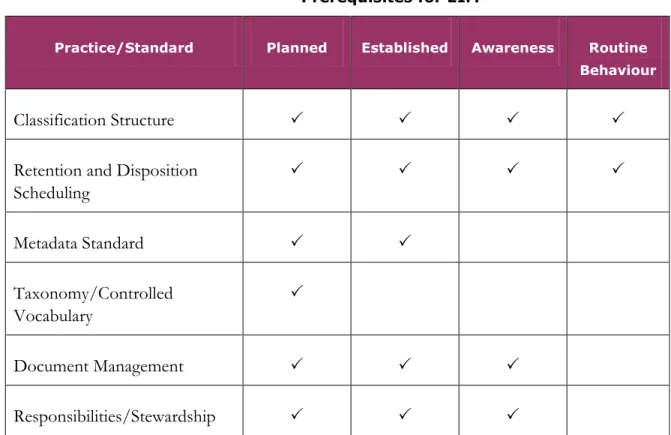
As shown in Table 3, the more critical practices relate to a classification structure for content and up-to-date records retention and disposition schedules. Others, such as metadata standards, should be established, but will likely be implemented along with EIM. The implementation of EIM can also be a good opportunity to develop a controlled vocabulary for describing ministry content as well as establishing better practices around document management and responsibility for information management.
Table 3 identifies the degree to which each of these practice areas should be in place before proceeding with EIM.
Table 3
Prerequisites for EIM
Practice/Standard Planned Established Awareness Routine Behaviour
Classification Structure
Retention and Disposition Scheduling Metadata Standard Taxonomy/Controlled Vocabulary Document Management Responsibilities/Stewardship
In many cases, you can begin to address deficiencies in these areas in your current environment to “set” the stage for EIM implementation.
Culture and attitude
In addition to the information practices, you’ll want to assess the extent to which the current “culture” of the organization is ready for the
implementation of EIM. Some attitudes and behaviors to consider here include:
Responsibility: Is document management still perceived by many employees primarily as filing, and therefore a separate clerical activity that may or may not pertain to them?
Corporate resource: Is information still not fully recognized and managed as a key corporate resource, but as “my” or “our branches” information?
Sharing: Is there little sharing of information among individuals and organizational units (some times only the document creator knows that a document exists)?
Business linkages: Is information management still perceived as and “add-on” to work rather than a “way of doing business?”
Again, these attitudes can be addressed in the current environment to ease the change involved in implementing EIM.
Moving forward
The readiness assessment will help you identify gaps. You can begin to address these gaps in your annual information management plan while you are preparing the business case for EIM. The implementation of EIM will be much smoother if good electronic information management practices and tools are established in your ministry.
Checklist
Have you identified the priority gaps that need to be addressed through a “readiness assessment”?
Do you have an action plan to address the gaps? Who will you involve in addressing the gaps?
Does your ministry’s information management plan include the actions you’ve identified (and resources needed)?
6.
Establishing the Implementation Team
The implementation team will be broader than your initial project team that you established to develop the Road Map and Business Case. As you move forward to develop the tactical plan and deployment, you will need to include others to ensure smooth implementation.
Core implementation team
You’ll need the following skills and expertise on your “core” team: project management; IT architect; application analyst; database administration; records management; communication; and change management.
You’ll need to establish a clear project charter and terms of reference and mandate for the implementation team.
The size of your team will depend on the size of your organization. For example, you many need to involve multiple people in some of the roles identified, depending on the size of your organization and the speed with which you plan on deploying EIM.
The core team may be needed 100% of the time during the project.
Additional skills and expertise
As you begin to deploy EIM, you’ll want to complement the skills of the core team with additional skills and expertise, including:
FOIP;
web managers; trainers; and
business unit representatives (during planning and implementation for the unit).
The broader implementation team will not be needed full-time. Their level of effort will vary during the project, but you could start by estimating about a 20% time-commitment needed from these members.
Lessons learned
This suggested project organization is based on lessons learned by other government and private sector organizations that have implemented EIM. Namely:
It is important to involve communication specialists and change
management specialists from the beginning and throughout the project – “it’s not about technology, but the way we work.”
It is important to involve business unit representatives in designing and planning how EIM will work in your ministry – “built by the users for the users.”
Checklist
Have you recruited your project team members?
Are team members committed for the appropriate amount of time? Do you have a plan to deal with turnover on the team during the life of
7.
Develop the Tactical Plan
There are many factors that will influence how you go about “rolling out” EIM. These include the different types of information resources your organization has, the size of your organization, and the readiness of different parts of your organization. All of these will affect how you go about
implementation and the timing of implementation.
It is highly unlikely that you will be able to implement EIM across the entire organization all at once. Rather, a phased approach is far more likely. Your tactical plan should address and plan for how you will:
acquire the solution;
set up the technology and migrate from existing systems; deploy, including pilots projects;
communicate with different user groups; incorporate learnings and modifications; provide ongoing management and support.
Acquire solution
You’ll need to assess your requirements and work through the procurement process for the EIM solution.
While the cross-government Electronic Information Management Working Committee has identified a number of functional requirements for EIM, you’ll need to map these against the specific requirements of your ministry. Which requirements are absolutely necessary to your business, which are desirable for your operating environment, and which requirements are “nice,” but not really needed. You may also have unique requirements based on your organization’s business that were not included in the cross-government requirements.
After defining your own requirements, you’ll need to procure the solution. A list of pre-qualified solutions will be located at www.im.gov.ab.ca. [Note: not yet available.] Through the standard procurement process, you’ll need to evaluate these solutions against your requirements, including establishing how you will test the degree to which solutions meet your requirements, and negotiating with the preferred vendor.
Depending on your requirements (and resources), you may choose to acquire and implement certain aspects of EIM first and wait until a later date to implement other aspects of the solution. For example, all EIM solutions will need to employ electronic records management. And, most organizations will deploy electronic document management at the same time. However, other aspects, such as collaborations imaging, workflow, and digital rights management may not be as important to you. By adequately defining your needs, you may be able to make deployment easier (and less costly).
Spending the time to adequately define your requirements should help you decide what aspects of EIM are most important to your business.
Technology install, set up and migration strategies
You’ll need a test and production environment in which to work while you are implementing EIM in the ministry. This involves customizing the EIM solution for your ministry.
During this phase, you will also need to plan your migration strategies, including migration from existing systems such as your records management systems. For example, unless you intend to move completely into electronic information management (i.e., eliminate the filing of paper) when you implement EIM, you’ll need to migrate your ministry’s records classification system, retention and disposition schedules and other records management data to EIM as part of your deployment.
Deployment plan
Your tactical plan should establish a realistic time-frame and schedule for deployment. The most common deployment strategy is to run at least one “pilot” as a demonstration and learning project. In large, complex
organizations, you may need to run several pilot deployments. The advantage to this approach is that you can deploy in a controlled environment and use the learnings from the pilot to speed implementation in other areas.
First, revisit the results of your readiness assessment you did when assessing pre-requisites for EIM. You may need to update the assessment if a sufficient period of time has elapsed. The results of the readiness
assessment may help you identify possible pilot project.
In addition to the readiness of various business units, you’ll also want to consider interdependencies – units that rely on the same information. Interdependent units and or functions will need to be rolled out at the same time.
You’ll also want to document learnings from the pilot project(s). You may also be able to build off the learnings from other ministries that have already adopted EIM. Inevitably, there will be modifications made to your
deployment plan after running the pilots.
Planning deployment beyond the pilot phase can take many forms. The actual approach you choose will depend on the nature of your business (e.g., how interdependent the business units are) and how you can keep each deployment to a manageable size.
Some typical approaches to implementation are:
Process Approach: This approach involves examining and
reengineering distinct business processes. The next step is to surround that process with EIM. A process could be contained within a single business unit, across your ministry or even across several ministries. Function Approach: A functional approach involves a number of
processes that span a function such as contract development. Many processes and transactions combine to fulfill the function of developing contracts. Again, processes contained within the function would be examined and reengineered in the EIM roll-out.
Information Unit Approach: An example of an information unit would be case files for child welfare or legal cases. Each information unit relates to a single topic. Contents of the unit are similar in nature.
Ensuring the availability and authenticity of documentation becomes the prime focus. EIM could be rolled out based on information units in the ministry.
Business Unit Approach: This approach would roll-out EIM to a single business unit such as a branch or division. All business transactions within the business unit are supported within their processes and
functions. The opportunity exists for process reengineering with this approach if the processes are independent from other business units. In reality, you may end up choosing a mix of these approaches. Your readiness assessment will help you plan the timing of the roll-out of EIM. You don’t want to deploy until a unit or function is substantially ready to adopt EIM.
A significant part of the roll-out is going to be training and issues
management with units as EIM is implemented. Depending on the size of the roll-out (unit, function, process) and the number of people involved, you’ll want to plan on being “on-site” after EIM has been implemented. This will enable your team to answer questions, coach users, and modify EIM
practices as required. Over the longer term, the business unit representative on your implementation team then becomes the key resource for users. Another important aspect of your roll-out will be your migration strategy – that is how do you start getting documents and other information assets into EIM. A couple of ways to do this are:
Choose a “go forward date” and populate EIM as documents are created or used. Then, at some point in time work to recover other needed documents to migrate into EIM.
Get employees to “clean” current electronic documents by deleting transitory records. Migrate electronic documents to EIM.
The second strategy here is more invasive and requires more “down” time for the business unit.
Provide ongoing management and support
An important part of your tactical plan is how you will continue to manage EIM over the long term. This will involve defining roles for systems administrators, branch or divisional EIM administrators, and training support. It will also involve a management structure to address changes/enhancements to EIM in the context of broader information management initiatives in your ministry.
The management structures that need to be in place for ongoing management of EIM are outlined in Section 9.
Checklist
Have you adequately assessed your requirements? Does the assessment suggest you need a total, integrated EIM solution or should you
implement only specific components (i.e., records management, document management) first?
Do you have a migration strategy for current systems that relate to EIM? Do you have an up-to-date readiness assessment for various units in the
ministry?
Based on the readiness assessment, what area is most capable of implementing EIM successfully? What areas are candidates for pilot projects?
Have you investigated how other ministries have deployed EIM?
What approach makes the most sense for implementation after the pilot projects are completed?
What interdependencies are there between business units that need to be taken into consideration?
Can you, based on your analysis, develop a long term plan for rolling-out EIM across the ministry?
8.
Deployment
The actual deployment of EIM is labour intensive. For each deployment, the implementation team will need to plan for a number of activities. Beginning with your pilot project, and for each deployment that follows (regardless of the approach you take), you will require:
communications
set-up and modification of the EIM system for the business area (pilot, function, information type, process) you are deploying with,
training;
migration to EIM;
issues management in migration and use; coaching and support; and
evaluation.
Communications
Before attempting to deploy EIM, develop a communications plan for the business area that is getting ready to implement the solution. The
communications strategy should include how EIM will change the way they work, the timing of the deployment (including training), the actual plan for deployment in that area (including the migration plan). Staff will need to have a clear idea of what is going to happen, how it will happen, and when it will happen (including how long it will take).
Set-up
Working with the business unit representative as well as the implementation team, you will need to “set-up” the solution for that particular area, including folder structure and tables.
Training
Before deploying, staff should be trained in the use of EIM, how it is set up for their work environment and the business rules associated with EIM. This training should be hands-on and delivered prior to deployment. On an
ongoing basis, this training needs to be linked with the ministry’s Managing Information @ Work awareness strategy.
Migration
During migration, the project team will be need to be present in the work unit that is deploying EIM. Depending on the migration strategy, you will need to monitor and advise staff as content is prepared for migration and is actually moved to the EIM environment.
Issues management
It is wise to plan regular meetings with staff during the deployment. In addition, at this phase, it is likely that your project team will have daily meetings to assess and deal with issues that emerge. The length of time for migration will depend on the volume of content and the size of the unit that in which you are deploying EIM.
Coaching and support
Like any new technology, EIM takes time to get used to. However, because EIM is a core business practice, business units cannot afford to be disrupted for a long period of time. You should plan on continuing an “on-site” presence for a period of time after initial migration to deal questions and issues that continue to emerge.
Evaluation and Learnings
After each deployment, you should conduct a post-deployment assessment to identify what worked and what didn’t work. This will enable you to adapt your planning and future deployment of EIM.
Checklist
Have you implemented your pre-deployment communications plan with the business unit?
Have you involved the right people to set up and customize the EIM solution for the business unit?
Is the project team schedule to be “on-site” during initial migration and use?
Are project team members available for coaching and support after initial migration and use?
9.
Ongoing Management and Evaluation
The implementation of EIM will take time. However, even after roll-out, there is a need for ongoing management of the tool and the business
practices related to its use. As your business changes, you’ll need to plan for adaptations to EIM practices.
Your ongoing management plan should include: the EIM Management Team;
the EIM Operations Team; a training plan; and
an evaluation plan.
EIM Management Team
The EIM Management Team will usually consist of a combination of representatives from information technology, information management and business units. The role of this team is to monitor use of EIM and address issues that emerge. The team is also responsible for overseeing repository management as well as managing audit activities.
EIM Operations Team
The Operations Team consists of the EIM Administrator and EIM business unit (branch) administrators. The team may also include a network of “power users” across the organization. The role of this team is to conduct the day-to-day management of EIM, including repository management and audit activities. The EIM team also needs a process by which to identify and resolve emerging issues or to be able to escalate the issue to the EIM
management team for decision.
Training Plan
An ongoing training plan that combines online training and classroom instruction will be needed for new employees. Additional training may also
be needed as a “refresher” for employees involved in the original implementation.
Evaluation
As a core business practice, EIM should be evaluated with each deployment. This evaluation will feed into the ongoing management and improvement of EIM within your organization.
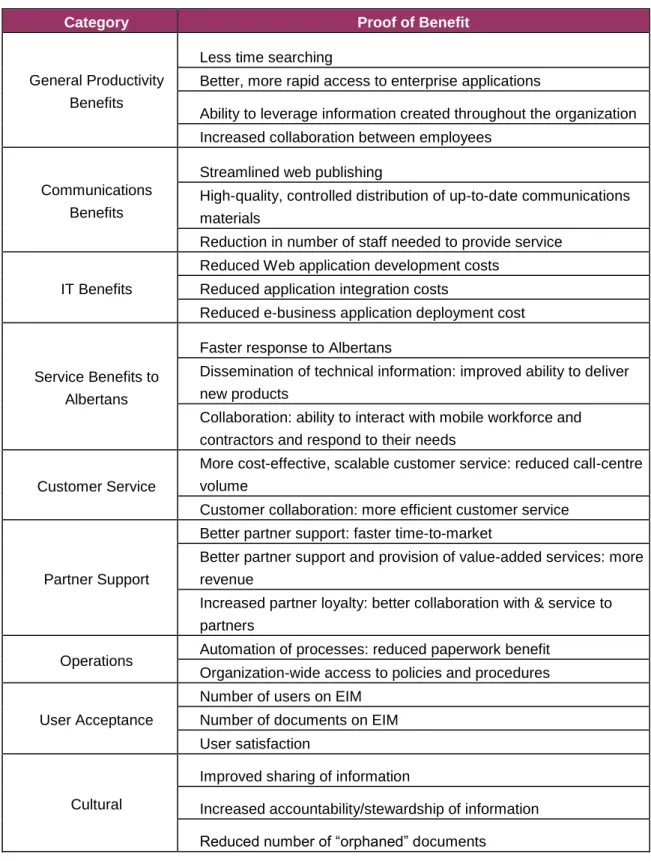
The following evaluation criteria are often used to evaluate the successful outcome of the EIM:
productivity improvements; communications benefits; IT benefits;
service value to Albertans and other clients; customer service;
partner support and collaboration; operations benefits;
cultural benefits; and user acceptance.
Table 4 on the following page identifies the evaluation criteria and possible measures for each. Not all criteria may be relevant to your ministry. The idea is to choose those evaluation criteria that are most relevant and track them over time to evaluate EIM as a business practice.
Table 4 Evaluation of EIM
Category Proof of Benefit
General Productivity Benefits
Less time searching
Better, more rapid access to enterprise applications
Ability to leverage information created throughout the organization Increased collaboration between employees
Communications Benefits
Streamlined web publishing
High-quality, controlled distribution of up-to-date communications materials
Reduction in number of staff needed to provide service
IT Benefits
Reduced Web application development costs Reduced application integration costs
Reduced e-business application deployment cost
Service Benefits to Albertans
Faster response to Albertans
Dissemination of technical information: improved ability to deliver new products
Collaboration: ability to interact with mobile workforce and contractors and respond to their needs
Customer Service
More cost-effective, scalable customer service: reduced call-centre volume
Customer collaboration: more efficient customer service
Partner Support
Better partner support: faster time-to-market
Better partner support and provision of value-added services: more revenue
Increased partner loyalty: better collaboration with & service to partners
Operations Automation of processes: reduced paperwork benefit
Organization-wide access to policies and procedures
User Acceptance
Number of users on EIM Number of documents on EIM User satisfaction
Cultural
Improved sharing of information
Increased accountability/stewardship of information Reduced number of “orphaned” documents
Checklist
Have you identified and recruited the EIM Implementation Team? Have you identified and recruited the EIM Operations Team?
Have you put in place training programs (online as well as face-to-face) to support new employees and those employees who need refresher training?
What is the appropriate timeframe for evaluation of EIM in your organization?
Have you identified the relevant criteria for your ministry by which to evaluate EIM?
How will you measure these criteria?
Appendix 1:
EIM Readiness Assessment
Most organizations find that different business units are at different stages of readiness to implement EIM. This readiness assessment will help you identify those units that have practices and behaviours established that will support the
implementation of EIM.
Document management
Practice/Behaviour Not At all Somewhat Established Well
Established
Remarks
We use common ways to name files.
We regularly track versions of documents under development. We have established procedures for information to be place in “headers” and “footers” of documents.
We classify documents using the information security classification. Other:
Other:
Classification
Practice/Behaviour Not At all Somewhat Established Well
Established
Remarks
We have an established records classification structure for the unit. All staff understand the classification structure and apply it to documents.
The classification structure is up-to-date
Retention and Disposition Scheduling
Practice/Behaviour Not At all Somewhat Established Well
Established
Remarks
All records are covered by a valid retention and disposition schedule. Retention and disposition schedules are up-to-date.
Retention and disposition schedules meet business needs. Other:
Other:
Metadata
Practice/Behaviour Not At all Somewhat Established Well
Established
Remarks
Document metadata elements are defined.
Metadata elements are applied to electronic content.
Staff have been trained in search techniques using metadata elements Other:
Other:
Controlled Vocabulary/Taxonomy
Practice/Behaviour Not At all Somewhat Established Well
Established
Remarks
A controlled/common vocabulary has been developed to describe the content of documents.
Controlled vocabulary is used in labeling documents or as metadata. Other:
Responsibility/Stewardship
Practice/Behaviour Not At all Somewhat Established Well
Established
Remarks
Responsibilities for documents is well defined.
Responsibilities for documents is transferred when employees leave. We have few “orphaned” files on the system.
Employees are evaluated on their information management practices. Other:
Other:
Culture/Attitudes
Practice/Behaviour Not At all Somewhat Established Well
Established
Remarks
Document management is embraced by all employees as a normal part of their job.
Documents and information are seen as a corporate resource and shared freely.
Information management practices are discussed at team or branch meetings.
We regularly share information with other branches in the ministry. Management talks about and demands common information management practices.
Other: Other:
Appendix 2:
Communications Plan Template
The Communications Plan will need to address each phase of the project and the needs of specific target audiences. Typically, communication supports the adoption of new technology and new processes in stages:
awareness: the “what” is being proposed and “why;” understanding: the “how it works” and “how it will help;” support: the “how to” (training);
involvement: the “how to change” and “adapt;” commitment: the “success.”
For each of these stages, you can use the following template to do your communications planning.
Target Audience Key Messages Vehicles (How) Timing Expected Outcome Executives Business Managers Employees EIM Project Team