Bachelor Technische Informatica
Kroket
Kroket
Architectural Design Document
Authors:
Peter van Heck (0649886) Peter Koymans (0748876) Kay Lukas (0758084) Astrid Pieterse (0743073) Robbert Raats (0675661) Willem Sonke (0752229) Roby Visser (0654428) Project Manager: Sebastiaan Candel Quality Assurance Manager: Ronald van Zon Senior Management: Mark van den Brand,mf 7.0.96
Lou Somers,mf 7.145 Advisor: Erik Scheffers,mf 7.146 Customer: Lex Lemmens, hg-01.27 October 26, 2012 Eindhoven
This document contains descriptions of the architecture of thekroketapplication. This ap-plication is developed for the Software Engineering Project (2IP35) at Eindhoven University of Technology.
The document complies with the Architectural Design Document (ADD) from the Soft-ware Engineering Standard, as set by the European Space Agency [1].
Contents
Document Status Sheet 3
Document Change Records 4
1 Introduction 6
1.1 Purpose . . . 6
1.2 Scope . . . 6
1.3 List of definitions and abbreviations . . . 6
1.3.1 Definitions . . . 6 1.3.2 Abbreviations . . . 7 1.4 List of references . . . 8 1.5 Overview . . . 8 2 System overview 9 3 System context 10 3.1 External interface definition for OWIS . . . 10
3.1.1 Implementation of the interface . . . 10
3.2 External interface definition for NT authentication . . . 13
3.2.1 Implementation of the interface . . . 13
4 System design 14 4.1 Design method . . . 14
4.2 Decomposition description . . . 14
4.2.1 List of components . . . 14
4.2.2 Dependencies between components . . . 15
4.3 Introduction to the Django framework . . . 15
4.3.1 Version of Django . . . 15
4.3.2 Models, templates and views . . . 17
4.3.3 Persistent storage . . . 17
4.3.4 Request processing . . . 18
4.3.5 Programming languages . . . 19
4.4 Integration of KROKET into the Django framework . . . 19
4.4.1 List of implemented views . . . 19
4.4.3 Mapping of URIs to views . . . 20
4.5 Internals of the KROKET webserver . . . 20
4.6 Code structure . . . 21 5 Component descriptions 23 5.1 Description model . . . 23 5.1.1 Component identifier . . . 23 5.1.2 Type . . . 23 5.1.3 Purpose . . . 23 5.1.4 Function . . . 23 5.1.5 Subordinates . . . 23 5.1.6 Dependencies . . . 24 5.1.7 Interfaces . . . 24 5.1.8 Processing . . . 24 5.1.9 Data . . . 24 5.2 Server . . . 24 5.2.1 Subject data . . . 24 5.2.2 User data . . . 26 5.2.3 Major . . . 27 5.2.4 Package . . . 28 5.2.5 Recommendation . . . 29 5.2.6 Subject . . . 30 5.2.7 User . . . 31 5.2.8 Schedule . . . 33 5.2.9 Update database . . . 35 5.3 Client . . . 36 5.3.1 Layout . . . 36 5.3.2 Content . . . 37 5.3.3 Authentication . . . 38 5.3.4 Language . . . 39 5.3.5 Persistent data . . . 39 5.3.6 Print . . . 40 5.3.7 Search package . . . 41 5.3.8 Search subject . . . 42 5.3.9 Storage . . . 43 5.3.10 Studyplanner . . . 44 5.3.11 Validator . . . 45
6 Feasibility and resource estimates 47 7 Requirements traceability matrices 48 7.1 SR to AD . . . 48
7.2 AD to SR . . . 50
Document Status Sheet
General
Document title Architectural Design Document Identification Documentatie.ADD.1.0.0
Authors Peter Koymans, Astrid Pieterse, Robbert Raats Document status Approved by Lex Lemmens
Document history
Version Date Author Reason of change
0.0.0 3-9-2012 Astrid Pieterse Initial version
0.0.1 12-9-2012 Peter Koymans, Robbert Raats First version
1.0.0 24-10-2012 not applicable Accepted by Lex Lem-mens
General
Date 24-10-2012
Document title Architectural Design Document Identification Documentatie.ADD.1.0.0
Document history since
0
.
0
.
0
Sections Reason of changeChapter
1
Introduction
1
.
1
Purpose
The Architectural Design Document (ADD) describes the basic design of the software that will be made bykroket. It describes the decomposition of the software into components. Then for each component it describes the relation to external interfaces and the dependen-cies on other components.
1
.
2
Scope
kroketis an application designed and developed bykroketgroup for the Bachelor College at the Eindhoven University of Technology. The application is designed to aid students in determining their choice for electives.
1
.
3
List of definitions and abbreviations
1.3.1 Definitions
AJAX Asynchronous JavaScript and XML: a group of interrelated web development tech-niques used on the client-side to create asynchronous web applications.
Bachelor College The result of a reform of bachelor education at the TU/e. See URD [2] appendix B for a description.
Bootstrap A free collection of tools for creating websites and web applications. It con-tains HTML and CSS-based design templates for typography, forms, buttons, charts, navigation and other interface components, as well as optional JavaScript extensions. Chrome An internet browser developed by Google.
Cookie Usually a small piece of data sent from a website and stored in a user’s web browser while a user is browsing a website. The data stored in the cookie can be retrieved by the website when the user browses the same website in the future.
Django A high-level Python Web framework.
Excel A commercial spreadsheet application developed by Microsoft. Firefox An internet browser developed by Mozilla.
Internet Explorer An internet browser developed by Microsoft.
JavaScript Scripting language, especially for developing interactive web applications. jQuery A fast and concise JavaScript Library.
JSON A lightweight data-interchange format.
KROKET Software engineering team developing the application.
Microsoft Biztalk Microsoft Biztalk connects systems inside and across organizations for data exchange and process orchestration.
NT authentication Employees and students of Eindhoven University of Technology are all assigned a ’NT account’. Authentication of these accounts is possible through the NT authentication system.
Opera An internet browser developed by Opera Software.
Python An interpreted, interactive, object-oriented, extensible programming language. Safari An internet browser developed by Apple.
PostgreSQL A powerful, open source object-relational database system. 1.3.2 Abbreviations
ADD Architectural Design Document CSS Cascading Style Sheets
CSV Comma-Separated Values DDD Detailed Design Document
Dienst ICT Information and Communication Technology Service ECTS European Credit Transfer System
ESA European Space Agency GUI Graphical User Interface HTML HyperText Markup Language HTTPS HyperText Transfer Protocol Secure JSON JavaScript Object Notation
KROKET Kies niet Roekeloos maar Objectief Keuzevakken Effici¨ent en Tevreden LDAP Lightweight Directory Access Protocol
MTV Model-Template-View framework ORM Object-Relational Manager
CHAPTER1. INTRODUCTION
RDBMS Relational Database Management System SCR Identification for Software Requirements SQL Structured Query Language
SRD Software Requirements Document STU Education and Student Service Centre TU/e Eindhoven University of Technology UCR Identification for User Requirements URD User Requirements Document URI Uniform Resource Identifier USE User, Society and Enterprise
1
.
4
List of references
1. ESA Board for Software Standardization and Control (BSCC). European space agency software engineering standards, February 1991. (ESA PSS-05-0Issue2).
2. kroket group, Software Requirements Document (SRD).
3. kroket group, User Requirements Document (URD).
4. Django, The Web framework for perfectionists with deadlines. Retrieved September
26,2012, fromhttps://www.djangoproject.com.
5. kroket group, Detailed Design Document (DDD).
1
.
5
Overview
The remainder of this document gives a system overview in chapter2. Chapter3covers the system context. We explain the relationship with each external system. Chapter4treats the system design. We give a name and reference of the method used. Furthermore, we give an overview of components. We will pay special attention to decomposition, dependencies and interfaces.
In chapter5we discuss the components. For each component, we give the component identifier, type, purpose, function, subordinates, dependencies, interfaces, resources, refer-ences, processing and data. Chapter6 covers feasibility and resource estimates. Lastly, we give a requirements traceability matrix in chapter7.
System overview
For a description ofkroket, see the User Requirements Document (URD) [3]. For a de-scription of the relevant background and the environment in whichkroket will operate, see the Software Requirements Document (SRD) [2].
kroket is a web-based information system. It can interact with various other infor-mation systems in its environment. Figure 2.1 shows how kroket is embedded into that environment.
Internet
kroketserver
kroketuser
TU/e Intranet
OWIS server NT-authentication server using a web browser
Chapter
3
System context
This chapter describes the connections thatkrokethas with external systems. kroketmust be able to operate properly without these connections. kroket interfaces with the OWIS and NT authentication systems.
3
.
1
External interface definition for OWIS
The OWIS system is explained in section 2.5.1 of the SRD [2]. OWIS is the educational system at the TU/e. Microsoft Biztalk provides a uniform interface for applications to OWIS. Therefore, kroketwill send queries to Microsoft Biztalk in order to access OWIS.
However, kroket also has its own database. This database stores all relevant subject information for thekroketapplication. Microsoft Biztalk is only used bykroketto update its own database with the latest subject information. This will be done on a regular basis. 3.1.1 Implementation of the interface
This interface is currently not implemented in kroket, because STU did not give kroket
access to the OWIS system. Therefore,kroketuses various other sources to obtain its data. This is described in appendix C of the SRD [2]. We will provide the implementation details for each data source.
STU files
Here, we will describe the format of the Excel file that was received from STU. The Excel file consists of three spreadsheets. We converted each spreadsheet to a separate CSV file for our own convenience. We will describe the contents of each spreadsheet. Note however that the provided spreadsheets are outdated and far from complete.
Target group This spreadsheet contains the target groups for the Bachelor College. Target groups can be majors or coherent packages. The different fields are:
• Study year: contains the study year for the target group in yyyy-format. • Main group code: 210for majors, 212for coherent packages.
• Main group Dutch description: Bachelor College Major onderwijs for majors and
Bachelor College Keuze Coherent for coherent packages.
• Main group English description: Bachelor College Major onderwijs for majors and
Bachelor College Keuze Coherent for coherent packages. kroketdoes not know why the English description is given in Dutch.
• Target group code: an integer that uniquely identifies majors and coherent packages. • Target group Dutch description: Dutch name for the major or coherent package. • Target group English description: English name for the major or coherent package. • Year code: 1for the ”propedeuse”,2otherwise.
• Year code Dutch: identical to the year code. kroketis unaware of this field’s purpose. • Year code English: identical to the year code. kroket is unaware of this field’s
pur-pose.
Subjects This spreadsheet contains the subject information for the Bachelor College. It only contains subject information that is not due to change. An example of subject infor-mation that is due to change would be scheduling inforinfor-mation. The different fields are:
• Study year: contains the study year for the subject in yyyy-format.
• Target group code: contains the target group of the subject. It references the target
group code as described in the previous section.
• Year code: 1for the ”propedeuse”,2otherwise. • Subject code: a string that uniquely identifies subjects. • Subject description Dutch: the subject name in Dutch. • Subject description English: the subject name in English.
• Difficulty level Dutch: Inleidend, Verdiepend or Gevorderd. It should be noted that
this field is left empty for many subjects.
• Difficulty level English: Basic, Intermediate or Advanced. Basic corresponds to
Inlei-dend and Intermediate corresponds to Verdiepend.
• ECTS: an integer with the total number of ECTS for the subject. This can be0or5. • Mandatory: a string that is either J or N. J indicates that the subject is mandatory for
CHAPTER3. SYSTEM CONTEXT
Planning This spreadsheet contains the subject information for the Bachelor College that is due to change. The different fields are:
• Study year: contains the study year for the subject in yyyy-format.
• Target group code: contains the target group of the subject. It references the target
group code as described in Target group.
• Year code: 1for the ”propedeuse”,2otherwise. • Subject code: a string that uniquely identifies subjects.
• Quartile start: an integer between 1 and4. It represents the quartile that the subject
starts (inclusive).
• Quartile end: an integer between 1 and4. It represents the quartile that the subject
ends (inclusive).
• Timeslot 1: a string which can be ”A”, ”B”, ”C”, ”D” or ”E”. It represents the first
timeslot in which the subject is given.
• Timeslot2: a string which can be ”A”, ”B”, ”C”, ”D” or ”E”. It represents the second
timeslot in which the subject is given. Currently, kroket does not know how this should be interpreted. Either, this could mean that the subject can be taken in timeslot
1or timeslot2. Alternatively, this could mean that the subject uses two timeslots. OWInfo
Since the data in the STU files is outdated and incomplete,kroketparses OWInfo to obtain additional subject data. This means thatkroketrelies on OWInfo. If the OWInfo website is changed, the parser may no longer work. Furthermore, the correctness of thekroketdata depends on the correctness of the OWInfo data. kroket parses the corresponding subject page for each subject found in the STU files. The following fields are parsed from OWInfo:
• subject code: a string that uniquely identifies subjects. • subject name: a string with the subject name.
• ECTS: an integer with the total number of ECTS for the subject. • content: a string with a description of the subject content.
• study goal: a string with a description of the study goal for the subject.
OWIS
kroket has also been provided with access to a test server. This test server contains out-dated and incomplete OWIS data. krokethas implemented this external connection, but it is currently not activated. The test server only contains a few subjects and is slow.
3
.
2
External interface definition for NT authentication
The NT authentication system is explained in section 2.5.2 of the SRD [2]. We define cre-dentials as a pair (NT-username, password). The NT authentication interface is used to authenticate credentials.
Users send their credentials tokroket. This connection must be over HTTPS for security reasons. kroketsends the credentials to a server running LDAP of the NT authentication system.
3.2.1 Implementation of the interface
This interface is currently not implemented in kroket, because Dienst ICT did not give
kroket access to the NT authentication system. Therefore, kroket has created its own login system. The database side for the login system is described in section2.7.2of the SRD [2], while the queries are described in section3.1.9of the SRD [2].
Chapter
4
System design
This chapter describes the technical aspects of the design ofkroket.
4
.
1
Design method
kroketis implemented as a web application based on the Django framework. The frame-work supplies many useful components for the development of web applications. The structure and terminology of the framework determine the structure and terminology used in the description ofkroket.
Section4.2defines the components ofkroketand their dependencies. Section4.3offers a short introduction to the Django framework. Please refer to the Django website for more information on Django [4]. Section4.4describes howkroket is integrated into the Django framework.
4
.
2
Decomposition description
The decomposition of kroket into components is based on the requirements of the URD [3] and the SRD [2].
Section4.2.1 lists the components, which are further described in chapter5. Figure 4.1
illustrates the dependencies between the components. 4.2.1 List of components
The following components are identified:
• Server ◦ Database · Subject data · User data ◦ Query · Major
· Package · Recommendation · Subject · User · Schedule ◦ Update database • Client ◦ GUI · Layout · Content ◦ Scripts · Authentication · Language · Persistent data · Print · SearchPackage · SearchSubject · Storage · Studyplanner · Validator
4.2.2 Dependencies between components
Figure4.1illustrates the dependencies between the components ofkroket. Arrows indicate a ”depends on” relation between components.
4
.
3
Introduction to the Django framework
A Django-based application consists of models, templates and views with additional data-processing components. Because of the Django terminology of models, templates and views, Django is sometimes called an MTV framework, which is similar to the Model-View-Controller pattern.
Section4.3.2 introduces the termsmodel,template andview. Section4.3.3describes how persistent storage is achieved. The use of programming languages is detailed in section
4.3.5. Section4.3.4describes how an HTTP-request is processed. 4.3.1 Version of Django
Django is an open-source project that is under continuous development. Proper functioning ofkroketis only guaranteed when installed on a server running an appropriate version of Django. kroketis developed using version1.4.1of the Django framework.
CHAPTER4. SYSTEM DESIGN
Layout Content
Authentication Language Persistent data Print SearchPackage Search Subject Storage Studyplanner Validator Major Package Subject Recommendation User Schedule
Subject data User data Update database Update database: Database: Query: Scripts: GUI:
4.3.2 Models, templates and views Models
Models describe the logical grouping of data and functionality, like classes in the object-oriented paradigm. Django uses the word modelwhere object-oriented paradigm uses the wordclass. Objects are calledmodel instancesin Django.
Django models are compatible with the object-oriented paradigm. Therefore, thekroket
models include all attributes as described in the class diagram of the SRD. In addition, implementation-specific attributes are added, as described in the DDD [5].
Templates
Templates define the looks of the user interface of a Django application. Templates consist of HTML code with special tags, which are replaced with information from specific model instances.
When the template engine, an essential component of the Django MTV system, ren-ders a template, it processes the template file and replaces all tags with the appropriate information.
Views
Views define the structure of a Django application. They group units of user functionality together and they describe the possible user interactions with the models.
Mapping of URIs to views
Each HTTP request contains at least a Uniform Resource Identifier (URI). Django can map URIs to specific views (i.e. user functionality). It uses regular expression pattern matching to map a URI to the appropriate view.
4.3.3 Persistent storage
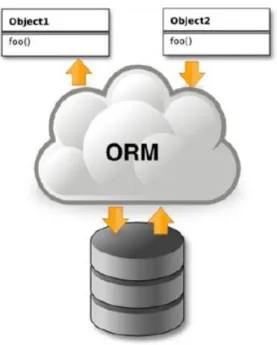
To enable persistent storage of data, Django ships with an Object-Relational Mapper (ORM). The ORM transparently keeps a persistent storage of all model instances created and mod-ified in the Django application. An off-the-shelf Relational Database Management System (RDBMS) is used for the actual storage.
For the programming perspective, the ORM translates between the object-oriented way of accessing data and the queries required to retrieve the correct data from the RDBMS.
Figure 4.2 illustrates the position of the ORM in the architecture of an object-oriented application that uses an RDBMS for persistent storage.
RDBMS
kroketuses PostgreSQL9.0as RDBMS, but many other popular RDBMS systems are sup-ported by Django and may be used instead. However, SQLite and MySQL5.0fail to execute some complex queries generated by the ORM.
CHAPTER4. SYSTEM DESIGN
Figure4.2: Object-Relational Mapper
Communicating with an RDBMS is a large bottleneck. To speed up the processing of requests by the web server, the ORM has a caching mechanism that reduces the number of database connections. The ORM queries related data as well: when the name of a subject is retrieved, it is likely that the subject code of the subject has to be retrieved too, so it is retrieved as well. When generating a report listing all subjects of a package, the ORM retrieves relevant data of all packages in one query and keep this in cache for later use.
Relational data model
The use of an ORM enables the developers of a Django application to abstract from the relational data model used by the RDBMS both for storage and for queries. Even the creation and alteration of tables is handled by the ORM. Therefore, although an RDBMS is part of kroket, no low-level Entity-Relationship Diagram (ERD) has to be designed. However, an high-level ERD is given in the SRD [2]. The relational data model that is used by the RDBMS is generated by the ORM from the models defined in KroketApp.models (see figure4.4in section4.6).
4.3.4 Request processing
The way a user interacts with a web application can be described as a sequence of requests from the user to the application, each followed by response of the application.
HTTP requests and responses
A web application transfers requests and responses between client and server using the HTTP protocol. An HTTP request typically consists of a Uniform Resource Identifier (URI) and optional GET and POST data. An HTTP response consists of a status code and a messagebody.
Django HttpRequest and HttpResponse objects
By means ofHttpRequestandHttpResponseobjects, Django offers functionality for handling HTTP requests at the server side and sending back HTTP responses to the client side. 4.3.5 Programming languages
Django is built using Python, which is an interpreted high level programming language that supports object-oriented programming. Sincekroketis built closely on top of Django, all code describing the models and views is written in Python. The GUI consists of a hierarchy of templates. Templates consist of HTML code with tags. To enable animation of GUI elements, Javascript is used.
4
.
4
Integration of KROKET into the Django framework
This section describes the integration ofkroket with the Django framework as described in section4.3. This section discusses functionality that follows from the user requirements of the URD [3] and the software requirements of the SRD [2], but that is not captured in the components as discussed in chapter5.
4.4.1 List of implemented views
This section describes the decomposition of the GUI ofkroketinto views. Forkroket, the are views on the database. The following views are defined:
• query/electivepackage/list; • query/major/list; • query/major/subjects; • query/package/search; • query/package/subjects; • query/recommendation/subject; • query/schedule/delete; • query/schedule/list; • query/schedule/load;
CHAPTER4. SYSTEM DESIGN • query/schedule/rename; • query/schedule/save; • query/schedule/validate; • query/subject/info; • query/subject/search; • query/usepackage/list; • query/user/change; • query/user/login; • query/user/logout; • query/user/info; • query/user/register. 4.4.2 Templates
Templates are not used bykroket. Instead, JavaScript is used on the client-side. 4.4.3 Mapping of URIs to views
kroketuses Django to map URIs to specific views. We use the following URI structure: query/model name/action
We do not include parameters in the URI structure. Parameters are sent in the HTTP Post.
4
.
5
Internals of the KROKET webserver
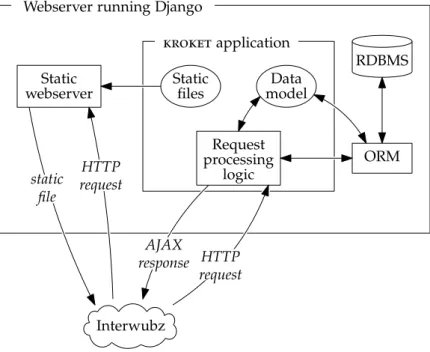
Figure 4.3 illustrates the internal server structure of kroket. The RDBMS runs on the same server as kroket. Running the RDBMS on an external server introduces additional connection overhead and there may be a bandwidth bottleneck in the network connecting the RDBMS with the webserver. Running the RDBMS on the same server askroketreduces the costs of operation of the system and it will not harm performance because the expected server load is low.
Interwubz Webserver running Django
Static webserver
kroketapplication Static
files modelData
Request processing logic ORM static file HTTP request HTTP request AJAX response RDBMS
Figure4.3: The internal server structure ofkroket.
4
.
6
Code structure
Django prescribes a typical code structure that is preserved in kroket. Django code is structured into a project that consists of one or more apps. kroket comes in the form of one Django project consisting of one app, named KroketApp. The directory structure of
kroketand a description of the most important files is given in figure4.4. In Python, files are referenced by means of a dot notation, e.g. KroketApp.models. This dot notation per definition maps directly to the directory structure of the application’s code directory, so the Python statementimport KroketApp.modelswill import the fileKroketApp/models.py.
CHAPTER4. SYSTEM DESIGN
/release_# /KroketApp
__init__.py Defines database initialization procedures.
models.py Defines models.
admin.py Defines views for specific models.
views.py Defines views not related to specific models.
/query
/electivepackage Outputs the package name and a list with subject codes.
/major Outputs the major name.
/package Contains searching a packet (USE or elective). /recommendation Contains the recommendation of subjects.
/schedule Contains all related things for saving, loading, renaming etc. of schedules.
/subject Contains searching a subject.
/usepackage Outputs the package name and a list with subject codes.
/user Contains user-related things, like
authentication.
/schedule Updates the database daily.
/media Contains client-side media referred to by
template.
index.html Contains the style information for the website.
layout.css Contains GUI layout for the website.
studyplanner.js Is the ’head’ javascript file.
validator.js Defines the validator for checking the schedule.
/test Contains QUnit testing.
/templates Contains HTML template definitions.
Component descriptions
In this chapter we will describe every component of chapter4in detail. We will, however, start by giving a description model.
5
.
1
Description model
In this section we specify how components are described. For each component we describe the component identifier, type, purpose, function, subordinates, dependencies, interfaces, processing and data.
5.1.1 Component identifier
In the component identifier, we give a unique identifier to the component. 5.1.2 Type
The type of a component can be either server or client. The server has two subtypes: database and query. The client also has two subtypes: GUI and script.
5.1.3 Purpose
In the purpose of a component, we give a list of software requirements implemented. Some software requirements are not implemented by one component, but by several components together. In this case, it is included in the purpose of each component that contributes to its implementation. The software requirements can be found in section3of the SRD [2]. 5.1.4 Function
In the function of a component, we describe what the component does. 5.1.5 Subordinates
The subordinates of a component are child modules (modules called, files composed of, classes used).
CHAPTER5. COMPONENT DESCRIPTIONS
5.1.6 Dependencies
The dependencies of a component consist of components to be executed before or after, and excluded operations during execution.
5.1.7 Interfaces
In the interface of a component, we describe the data and control flow in and out. 5.1.8 Processing
In the processing of a component, we describe the internal control and data flow. Since
kroketis based on a client-server architecture, this will often dictate a natural ordening on the internal control and data flow as can be seen in the MSCs in section 2.7.3 of the SRD [2]. We will therefore not describe the processing whenever this naturally follows from the component’s description.
5.1.9 Data
In the data of a component, we describe the internal data.
5
.
2
Server
5.2.1 Subject data Component identifier Server.Database.Subject data. Type Database. PurposeThe following software requirements are implemented:
SCR1, SCR2, SCR3, SCR4, SCR5, SCR6, SCR7, SCR8, SCR9, SCR11, SCR12, SCR13, SCR14, SCR15, SCR16, SCR17, SCR21, SCR22, SCR23, SCR26, SCR27, SCR28, SCR29, SCR31, SCR32, SCR36, SCR37, SCR38, SCR41, SCR42, SCR43, SCR46, SCR51, SCR52, SCR53, SCR54, SCR55, SCR56, SCR57, SCR61, SCR66, SCR67, SCR68, SCR69, SCR70, SCR71, SCR72, SCR76, SCR81, SCR82, SCR83, SCR84, SCR85, SCR86, SCR87, SCR88, SCR89, SCR90, SCR91, SCR92, SCR93, SCR94, SCR95, SCR96, SCR97, SCR98.
Function
This component of the database contains all subject information. It is closely related to the Python scripts for accessing this data. A complete list of Python scripts is given in section
3.1of the SRD [2]. The component is used by the following queries of this list:
• subject/search; • package/search; • major/list; • usepackage/list; • electivepackage/list; • major/subjects; • package/subjects; • subject/info. Subordinates
Subject data does not have any child modules. It consists of several database entities and relations, as described in section2.7.2of the SRD [2].
Dependencies
The Subject data component depends on the Update data component to keep the subject data updated in the database. This update is automatically executed every day. kroket
uses the concept of database transactions. In this way, the update can be performed, while the server is up. See figure4.1.
Interfaces
This component is used by all queries mentioned in Function. AJAX is used for the com-munication between server and client. The Python script craft the corresponding database query and retrieve it from the database using Django. The query result is then sent to the client in JSON format. Detailed information per query can be found in section 3.1 of the SRD [2].
The Subject data component gets its data from the Update database component. The Update database component will update the database on a regular basis with the latest subject data. This is further described in appendix C of the SRD [2].
Processing
The processing for this component is done automatically by Django. kroket only has to create models as discussed in chapter4.
CHAPTER5. COMPONENT DESCRIPTIONS
Data
See section2.7.2of the SRD [2]. 5.2.2 User data Component identifier Server.Database.User data. Type Database. Purpose
The following software requirements are implemented:
SCR101, SCR102, SCR106, SCR111, SCR112, SCR116, SCR121, SCR122, SCR123, SCR126, SCR127, SCR131, SCR136, SCR137, SCR141, SCR146, SCR147, SCR148, SCR149, SCR151, SCR152, SCR156, SCR157, SCR158, SCR159, SCR160, SCR166, SCR171, SCR176, SCR181, SCR182, SCR186, SCR191, SCR192, SCR196, SCR197, SCR198, SCR199, SCR200, SCR201, SCR202, SCR203. Function
This component of the database contains all user data, including schedules and recommen-dations. It is closely related to the Python scripts for accessing this data. A complete list of Python scripts is given in section 3.1 of the SRD [2]. The component is used by the following queries of this list:
• user/authenticate; • user/change; • recommendation/subject; • schedule/save; • schedule/load; • schedule/list; • schedule/delete; • schedule/rename; • schedule/validate.
Subordinates
User data does not have any child modules. It consists of several database entities and relations, as described in section2.7.2of the SRD [2].
Dependencies
The User data component depends on the Update data component. The Update data com-ponent uses the schedules stored in the User data comcom-ponent to update the Recommen-dation relation, which is part of the User data component. This is automatically executed every day. Again, we use database transactions to perform this update. See figure4.1. Interfaces
This component is used by all Python scripts mentioned in Function. AJAX is used for the communication between server and client. Note that user/authenticate consists of four Python scripts: register, login, logout and info. The Python scripts craft the corresponding query and retrieve it from the database using Django. The query result is then sent to the client with JSON. Detailed information per query can be found in section 3.1 of the SRD [2].
The User data component is much more dynamic than the Subject data component. The Subject data component is updated on a regular basis, but the user data can be changed at any time. User/login and user/logout affect the session state. The session state is maintained by the server. It is not stored in the database.
Processing
The processing for this component is done automatically by Django. kroket only has to create models as discussed in chapter4.
Data
See section2.7.2of the SRD [2]. 5.2.3 Major Component identifier Server.Query.Major. Type Query. Purpose
The following software requirements are implemented:
CHAPTER5. COMPONENT DESCRIPTIONS
Function
This component provides all major-related Python scripts. Subordinates
The component consists of the following Python scripts:
• major/list. • major/subjects.
Dependencies
The Major component depends on the Subject data component: the Python scripts will retrieve data from this part of the database. For an overview of dependencies, see figure
4.1. Interfaces
The GUI sends HTTP requests to the server. Django processes HTTP requests for us, but we will abstract from this when describing the queries. For the description, it is sufficient to know that Django can map HTTP requests to queries. A HTTP request is only accepted if it is an AJAX request and of type POST. Otherwise, a 403Forbidden will be raised.
Thus, the Python script receives a HTTP request from the GUI. The major/list query receives no parameter in the HTTP request. It will use Django to retrieve a list of all majors from the database. This list is returned to the client in JSON format.
The major/subjects script receives a major as parameter in the HTTP request. It will use Django to retrieve a list of all mandatory subjects in the given major. This list is returned to the client in JSON format.
Processing
Follows from the component’s function and interfaces. Data Not applicable. 5.2.4 Package Component identifier Server.Query.Package. Type Query.
Purpose
The following software requirements are implemented:
SCR21, SCR22, SCR23, SCR26, SCR27, SCR28, SCR29, SCR61, SCR66, SCR67, SCR68, SCR69, SCR70, SCR71, SCR72.
Function
This component provides all package-related Python scripts. Subordinates
The component consists of the following Python scripts:
• package/search. • package/subjects.
Dependencies
The Package component depends on the Subject data component: the Python scripts will retrieve data from this part of the database. For an overview of dependencies, see figure
4.1. Interfaces
The package/search Python script receives a search request in the HTTP request. This HTTP request contains a search term with several other fields. These other fields are de-scribed in section3.1.2of the SRD [2]. An appropriate query is created, after which Django is used to retrieve a search list from the database. This list is returned to the client in JSON format.
Processing
Follows from the component’s function and interfaces. Data Not applicable. 5.2.5 Recommendation Component identifier Server.Query.Recommendation. Type Query.
CHAPTER5. COMPONENT DESCRIPTIONS
Purpose
The following software requirements are implemented: SCR136, SCR137, SCR141.
Function
This component provides all subject-related Python scripts. Subordinates
The component consists of the following Python scripts:
• recommendation/subject.
Dependencies
The Recommendation component depends on the User data component: the Python scripts will retrieve data from this part of the database. The Recommendation relation is updated by the Update database component. For an overview of dependencies, see figure4.1. Interfaces
The recommendation/subject Python script recommends subjects to users, given the cur-rent subjects in the schedule. The parameters for this script in the HTTP request are the major and an array of subjects. The script creates a corresponding database query, Django will then retrieve it from the database.
This query uses the Recommendation relation. First, the24 best matching subjects are retrieved. From the 24 best matching subjects, a total of8 will be randomly selected. The better a subject matches, the higher the probability it is selected. A list of recommended subjects is returned in JSON format.
Processing
Follows from the component’s function and interfaces. Data Not applicable. 5.2.6 Subject Component identifier Server.Query.Subject. Type Query.
Purpose
The following software requirements are implemented:
SCR1, SCR2, SCR3, SCR4, SCR5, SCR6, SCR7, SCR8, SCR9, SCR11, SCR12, SCR13, SCR14, SCR15, SCR16, SCR17, SCR76, SCR81, SCR82, SCR83, SCR84, SCR85, SCR86, SCR87, SCR88, SCR89, SCR90, SCR91, SCR92, SCR93, SCR94, SCR95, SCR96, SCR97, SCR98. Function
This component provides all recommendation-related queries. Subordinates
The component consists of the following Python scripts:
• subject/search. • subject/info.
Dependencies
The Subject component depends on the Subject data component: the Python scripts will retrieve data from this part of the database. For an overview of dependencies, see figure
4.1. Interfaces
The subject/search Python script receives a search request in the HTTP request. This search request contains a search term with several other fields. These other fields are described in section3.1.1of the SRD [2]. An appropriate query is created, after which Django is used to retrieve a search list from the database. This list is returned to the client in JSON format.
The subject/info Python script receives a subject code in the HTTP request. An appro-priate query is created, after which Django is used to retrieve detailed subject information for the given subject code. The precise content of the detailed subject information is de-scribed in section3.1.8of the SRD [2]. It is returned in JSON format.
Processing
Follows from the component’s function and interfaces. Data
Not applicable. 5.2.7 User
Component identifier Server.Query.User.
CHAPTER5. COMPONENT DESCRIPTIONS
Type Query. Purpose
The following software requirements are implemented:
SCR101, SCR102, SCR106, SCR111, SCR112, SCR116, SCR121, SCR122, SCR123, SCR126, SCR127, SCR131.
Function
This component provides all user-related Python scripts. Subordinates
The component consists of the following Python scripts:
• user/authenticate. • user/change.
Note that user/authenticate can further be decomposed into:
• user/register. • user/login. • user/logout. • user/info.
Dependencies
The User component depends on the User data component: the Python scripts will retrieve data from this part of the database. For an overview of dependencies, see figure4.1. Interfaces
The user/authenticate consists of user/register, user/login, user/logout and user/info. We will discuss these queries individually. Session state is used to implement these queries, except for user/register. Session state is maintained by the server.
The user/register Python script receives a username and a password in the HTTP re-quest. The Python script checks if the username and password satisfy the constraints as given in section 3.1.9of the SRD [2]. If these constraints are fulfilled, an appropriate query is created that adds the user to the User data component. The success status is returned to the client in JSON format.
The user/login Python script receives a username and a password in the HTTP request. The Python script creates a corresponding query, which checks if the combination of user-name and password exists in the database. The success status is returned to the client in JSON format. Furthermore, a session is created for the user.
The user/logout Python script does not need any arguments in the HTTP request. The server then removes the session corresponding to that user. Nothing will be returned to the client.
The user/info Pythons script does not need any arguments in the HTTP request. The Python script checks if there is a session for the user. It returns if the user is logged in with JSON. If the user is logged in, it also returns the username as string. Furthermore, if the user has already loaded a schedule in the session, the name of that schedule is also returned.
The user/change Python script receives the current password and a new password as arguments in the HTTP request. If the current password is correct and the new password satisfies the constraints for passwords as given in section3.1.9of the SRD [2], the password will be changed. The success status is returned to the client in JSON format.
Processing
Follows from the component’s function and interfaces. Data Not applicable. 5.2.8 Schedule Component identifier Server.Query.Schedule. Type Query. Purpose
The following software requirements are implemented:
SCR146, SCR147, SCR148, SCR149, SCR151, SCR152, SCR156, SCR157, SCR158, SCR159, SCR160, SCR166, SCR171, SCR176, SCR181, SCR182, SCR186, SCR191, SCR192, SCR196, SCR197, SCR198, SCR199, SCR200, SCR201, SCR202, SCR203.
Function
CHAPTER5. COMPONENT DESCRIPTIONS
Subordinates
The component consists of the following Python scripts:
• schedule/save. • schedule/load. • schedule/list. • schedule/delete. • schedule/rename. • schedule/validate. Dependencies
The Schedule component depends on the User data component: the Python scripts will retrieve data from this part of the database. For an overview of dependencies, see figure
4.1. Interfaces
The schedule/save Python script receives a schedule, a name, a major and a year in the HTTP request. The Python script creates the corresponding query, so Django will add the schedule to the database. If a schedule with the given name already exists, it will be overwritten. Nothing will be returned to the client.
The schedule/load Python script receives a username and a schedule name in the HTTP request. Note that we do not enforce uniqueness of schedule names, but the combination of username and schedule name is unique. The Python script creates a corresponding query, so Django will retrieve the schedule with the given schedule name for the given user. The success status is returned in JSON format. If successful, the schedule, major, major name and start year will also be returned in JSON format.
The schedule/list Python script does not need any arguments in the HTTP request. It uses the session state to identify the user. The Python script uses Django to retrieve a list of all schedule names for that user. This list is returned in JSON format.
The schedule/delete Python script receives a schedule name in the HTTP request. The session state is used to check if this request comes from the user owning the schedule. Therefore, the user must be logged in to use the query. A query is created, so that Django will delete the schedule from the database. The success status is returned in JSON format.
The schedule/rename Python script receives the old schedule name and a new schedule name in the HTTP request. A query is created, so that Django will rename the schedule. The success status is returned in JSON format.
The schedule/validate Python script receives a schedule and a major. The server per-forms four checks on the schedule. It returns the result for each schedule. We decided to create four separate checks, because this allows us to give sophisticated feedback. The result of these checks are returned in JSON format. More details can be found in section
Processing
Follows from the component’s function and interfaces. Data Not applicable. 5.2.9 Update database Component identifier Server.Update database. Type Server. Purpose
The following software requirements are implemented:
SCR1, SCR2, SCR3, SCR4, SCR5, SCR6, SCR7, SCR8, SCR9, SCR11, SCR12, SCR13, SCR14, SCR15, SCR16, SCR17, SCR21, SCR22, SCR23, SCR26, SCR27, SCR28, SCR29, SCR31, SCR32, SCR36, SCR37, SCR38, SCR41, SCR42, SCR43, SCR46, SCR51, SCR52, SCR53, SCR54, SCR55, SCR56, SCR57, SCR61, SCR66, SCR67, SCR68, SCR69, SCR70, SCR71, SCR72, SCR76, SCR81, SCR82, SCR83, SCR84, SCR85, SCR86, SCR87, SCR88, SCR89, SCR90, SCR91, SCR92, SCR93, SCR94, SCR95, SCR96, SCR97, SCR98. Function
This component of the server is for database maintenance: it makes sure the kroket
database is frequently updated with OWIS data. Subordinates
Update database does not have any child modules. Dependencies
The Update database component does not depend on any other kroket components. See figure4.1.
Interfaces
Control is passed to this component daily. The component scans the STU files and then starts parsing OWInfo as described in appendix C of the SRD [2]. The database is then updated with new subject data.
CHAPTER5. COMPONENT DESCRIPTIONS
Processing
Follows from the component’s function and interfaces. Data
See appendix C of the SRD [2].
5
.
3
Client
5.3.1 Layout Component identifier Client.GUI.Layout. Type GUI. PurposeThe following software requirements are implemented: none. Function
This component is responsible for the GUI layout. Subordinates
The component consists of the following CSS files:
• layout. • printlayout.
The CSS files are created with Bootstrap. Dependencies
The Layout component does not depend on any other component. Interfaces
No interfaces. Processing Not applicable.
Data Not applicable. 5.3.2 Content Component identifier Client.GUI.Content. Type GUI. Purpose
The following software requirements are implemented: none. Function
This component is responsible for the GUI content. Subordinates
The component consists of the following HTML files:
• about. • index. • index-nl NL. • printversion.
Dependencies
The Content component does not depend on any other component. Interfaces No interfaces. Processing Not applicable. Data Not applicable.
CHAPTER5. COMPONENT DESCRIPTIONS 5.3.3 Authentication Component identifier Client.Script.Authentication. Type Script. Purpose
The following software requirements are implemented:
SCR101, SCR102, SCR106, SCR111, SCR112, SCR116, SCR121, SCR122, SCR123, SCR126, SCR127, SCR131.
Function
This component provides the client-side part of authentication. Subordinates
Authentication does not have any child modules. Dependencies
The Authentication component depends on the User component. Interfaces
Control is passed to this component whenever the user wants to register, log in or log out. When registering, the user has to enter his password and a confirmation of his password. We check on the client-side if these passwords are the same. The username and password constraints as described in section 3.1.9of the SRD [2] are also checked on the client-side. Next, the corresponding query in the User component is called. The component will then react based on the query response.
Processing
Follows from the component’s function and interfaces. Data
5.3.4 Language Component identifier Client.Script.Language. Type Script. Purpose
The following software requirements are implemented: SCR211, SCR212.
Function
This component provides translations for text in static HTML. Subordinates
Language does not have any child modules. Dependencies
The Language component depends on the Content component. Interfaces
Since the Language component provides translations for text in static HTML, it interfaces with the Content component. In essence, this is a dictionary between keywords and trans-lations.
Processing Not applicable. Data
A dictionary between keywords and translations. 5.3.5 Persistent data
Component identifier Client.Script.Persistent data.
CHAPTER5. COMPONENT DESCRIPTIONS
Type Script. Purpose
The following software requirements are implemented: none. Function
This component provides storage for persistent data. Subordinates
Persistent data does not have any child modules. Dependencies
Persistent data does not depend on any other component. Interfaces
Not applicable. Processing Not applicable. Data
Persistent data locally stores the schedule of a user. This means that the schedule is not lost when the page is refreshed or closed.
5.3.6 Print Component identifier Client.Script.Print. Type Script. Purpose
The following software requirements are implemented: none. Note that there are no soft-ware requirements for printing, because printing is GUI-related. This component imple-ments UCR27.
Function
This component allows users to print their schedule. Subordinates
Print does not have any child modules. Dependencies
This component uses the special print layout of the Layout component. Interfaces
When the user clicks on Print schedule, control is passed to this component. The component uses the special print layout to generate a new page. This page only contains the schedule. Furthermore, a pop-up is created. This pop-up allows users to select printer options. Processing
Follows from the component’s function and interfaces. Data Not applicable. 5.3.7 Search package Component identifier Client.Script.Search package. Type Script. Purpose
The following software requirements are implemented:
SCR21, SCR22, SCR23, SCR26, SCR27, SCR28, SCR29, SCR61, SCR66, SCR67, SCR68, SCR69, SCR70, SCR71, SCR72.
Function
This component provides the client-side part of searching packages. Subordinates
CHAPTER5. COMPONENT DESCRIPTIONS
Dependencies
The Search package component depends on the Package component. Interfaces
When the user searches for packages, control is passed to this component. The pack-age/search query of the Package component is then called. It returns a list of packages, which is then displayed.
When the user clicks on one of the packages, control is passed again to this component. The package/subjects query of the Package component is then called. This query gives subject information for each subject in a given package.
Processing
Follows from the component’s function and interfaces. Data Not applicable. 5.3.8 Search subject Component identifier Client.Script.Search subject. Type Script. Purpose
The following software requirements are implemented:
SCR1, SCR2, SCR3, SCR4, SCR5, SCR6, SCR7, SCR8, SCR9, SCR11, SCR12, SCR13, SCR14, SCR15, SCR16, SCR17, SCR76, SCR81, SCR82, SCR83, SCR84, SCR85, SCR86, SCR87, SCR88, SCR89, SCR90, SCR91, SCR92, SCR93, SCR94, SCR95, SCR96, SCR97, SCR98. Subordinates
Search subject does not have any child modules. Dependencies
Interfaces
When the user searches for subjects, control is passed to this component. The subject/search query of the Package component is then called. It returns a list of subejcts, which is then displayed.
When the user clicks on one of the subjects, control is passed again to this component. The subject/info query of the Package component is then called. This query gives detailed subject information for the subject.
Processing
Follows from the component’s function and interfaces. Data Not applicable. 5.3.9 Storage Component identifier Client.Script.Storage. Type Script. Purpose
The following software requirements are implemented:
SCR146, SCR147, SCR148, SCR149, SCR151, SCR152, SCR156, SCR157, SCR158, SCR159, SCR160, SCR166, SCR171, SCR176, SCR181, SCR182, SCR186.
Function
This component provides the client-side part of saving and loading schedules. Subordinates
Storage does not have any child modules. Dependencies
CHAPTER5. COMPONENT DESCRIPTIONS
Interfaces
When the user clicks on Load, Save or Save As, control is passed to this component. If the user clicks on Load, a list of schedule names is displayed. This list is retrieved from the server with the schedule/list query. The user can then select one of the schedule names. The user may choose to load this schedule, after which the corresponding schedule is retrieved from the server with the schedule/load query. Alternatively, the user may choose to delete the schedule. In this case, the schedule/delete query is used to delete schedules.
If the user clicks on Save, the schedule/save query is used to save the schedule on the server. If the schedule has not been saved before, the user also has to provide a name for the schedule.
If the user clicks on Save As, the user has to provide a new schedule name. In the case that the schedule name is not already used by that user, the schedule will be saved on the server. However, if the schedule name is already used by that user, kroket will ask if it should overwrite the schedule.
Processing
Follows from the component’s function and interfaces. Data
The local storage functionality of HTML5is used to achieve this. 5.3.10 Studyplanner Component identifier Client.Script.Studyplanner. Type Script. Purpose
The following software requirements are implemented:
SCR31, SCR32, SCR46, SCR51, SCR52, SCR53, SCR54, SCR55, SCR56, SCR57, SCR121, SCR122, SCR123, SCR123, SCR136, SCR137, SCR141.
Function
At the moment, Studyplanner is a multi-purpose component. It is responsible for the following tasks:
• Event handling.
• Helper functions. • On load tasks.
Subordinates
Studyplanner does not have any child modules. Dependencies
The Studyplanner component depends on all client scripts, the Major component, the Rec-ommendation component and the User component.
Interfaces
For each event, Studyplanner calls the corresponding client script to handle this event. Sim-ple events are however handled immediately by Studyplanner. Furthermore, Studyplanner contains all global variables and definitions. It also defines several helper functions that are useful for all other client scripts.
One of the helper functions takes care of subject recommendation. New subject recom-mendations are shown each time a subject is added or removed from the schedule. New subject recommendations are also shown when a schedule is loaded from the server.
Lastly, there are several on load tasks. We will discuss the most important tasks here. Firstly, we check if the user is still logged in. For this purpose, we use the user/info query. Secondly, a list of all majors is retrieved from the server with the major/list query.
Processing
Follows from the component’s function and interfaces. Data
Global variables and definitions. 5.3.11 Validator Component identifier Client.Script.Validator. Type Script. Purpose
The following software requirements are implemented:
CHAPTER5. COMPONENT DESCRIPTIONS
Function
This component provides schedule validation. Subordinates
Validator does not have any child modules. Dependencies
The Validator component depends on the Schedule component. Interfaces
When the user clicks on Validate schedule, control is passed to this component. Processing
Follows from the component’s function and interfaces. Data
Feasibility and resource estimates
This chapter gives an estimation of the computer resources which are needed to develop and operatekroket.
The requirements for the development ofkroket are: CPU >1.0GHz x86or equivalent
Memory >1GB RAM
Hard disk >1GB free on hard disk
Operating system Linux
Software Python2.7or higher, Django1.4.1, Firefox version13and above, Chrome version20and above, Internet Explorer version9
and above, Safari version5and above, Opera version12
and above and RDBMS supported by Django The requirements for operatingkroketare:
• Server side:
CPU >2.0GHz x86or equivalent
Memory >2GB RAM
Hard disk >4GB free on hard disk
Operating system Linux
Software Python2.7or higher, Django1.4.1and RDBMS supported by Django
• Client side:
CPU >1.0GHz x86or equivalent
Memory >512MB RAM
Operating system Any supporting the software
Software Firefox version13and above, Chrome version20and above, Internet Explorer version9and above, Safari version5
Chapter
7
Requirements traceability matrices
Tracing software requirements to components is vital in the software production process. It allows developers to relate specific parts of the software to the user requirements. In this way, each developer should know what a component’s purpose is.
7
.
1
SR to AD
This section describes all components related to a certain software requirement. Hence, we can see which component were made to fulfill a certain software requirement. This gives a nice method to check the architectural design. For each software requirement, we inspect the related components and ask ourselves if the components are sufficient to fulfill the software requirement. If not, the components are probably incomplete.
Several non-functional software requirements can not be linked to specific components. They impose a system-wide constraint for kroket. It should be noted that a software requirement is often linked to several components. This is indeed natural when we consider how the software requirements were specified.
SR AD
1 Subject data, Update database, Subject, Search subject
2 Subject data, Update database, Subject, Search subject
3 Subject data, Update database, Subject, Search subject
4 Subject data, Update database, Subject, Search subject
5 Subject data, Update database, Subject, Search subject
6 Subject data, Update database, Subject, Search subject
7 Subject data, Update database, Subject, Search subject
8 Subject data, Update database, Subject, Search subject
9 Subject data, Update database, Subject, Search subject
11 Subject data, Update database, Subject, Search subject
12 Subject data, Update database, Subject, Search subject
13 Subject data, Update database, Subject, Search subject
14 Subject data, Update database, Subject, Search subject
15 Subject data, Update database, Subject, Search subject
Subject, Search subject
17 Subject data, Update database, Subject, Search subject
21 Subject data, Update database, Package, Search package 22 Subject data, Update database,
Package, Search package 23 Subject data, Update database,
Package, Search package 26 Subject data, Update database,
Package, Search package 27 Subject data, Update database,
Package, Search package 28 Subject data, Update database,
Package, Search package 29 Subject data, Update database,
Package, Search package
31 Subject data, Update database, Major 32 Subject data, Update database, Major 36 Subject data, Update database
37 Subject data, Update database 38 Subject data, Update database 41 Subject data, Update database 42 Subject data, Update database 43 Subject data, Update database
46 Subject data, Update database, Major 51 Subject data, Update database, Major 52 Subject data, Update database, Major 53 Subject data, Update database, Major 54 Subject data, Update database, Major 55 Subject data, Update database, Major 56 Subject data, Update database, Major 57 Subject data, Update database, Major 61 Subject data, Update database,
Package, Search package 66 Subject data, Update database,
Package, Search package 67 Subject data, Update database,
Package, Search package 68 Subject data, Update database,
Package, Search package 69 Subject data, Update database,
Package, Search package
70 Subject data, Update database, Package, Search package 71 Subject data, Update database,
Package, Search package 72 Subject data, Update database,
Package, Search package 76 Subject data, Update database,
Subject, Search subject
81 Subject data, Update database, Subject, Search subject
82 Subject data, Update database, Subject, Search subject
83 Subject data, Update database, Subject, Search subject
84 Subject data, Update database, Subject, Search subject
85 Subject data, Update database, Subject, Search subject
86 Subject data, Update database, Subject, Search subject
87 Subject data, Update database, Subject, Search subject
88 Subject data, Update database, Subject, Search subject
89 Subject data, Update database, Subject, Search subject
90 Subject data, Update database, Subject, Search subject
91 Subject data, Update database, Subject, Search subject
92 Subject data, Update database, Subject, Search subject
93 Subject data, Update database, Subject, Search subject
94 Subject data, Update database, Subject, Search subject
95 Subject data, Update database, Subject, Search subject
96 Subject data, Update database, Subject, Search subject
97 Subject data, Update database, Subject, Search subject
98 Subject data, Update database, Subject, Search subject
CHAPTER7. REQUIREMENTS TRACEABILITY MATRICES
101 User data, User, Authentication 102 User data, User, Authentication 106 User data, User, Authentication 111 User data, User, Authentication 112 User data, User, Authentication 116 User data, User, Authentication 121 User data, User, Authentication 122 User data, User, Authentication 123 User data, User, Authentication 126 User data, User, Authentication 127 User data, User, Authentication 131 User data, User, Authentication 136 User data, Recommendation 137 User data, Recommendation 141 User data, Recommendation 146 User data, Schedule, Storage 147 User data, Schedule, Storage 148 User data, Schedule, Storage 149 User data, Schedule, Storage 151 User data, Schedule, Storage 152 User data, Schedule, Storage 156 User data, Schedule, Storage 157 User data, Schedule, Storage 158 User data, Schedule, Storage 159 User data, Schedule, Storage 160 User data, Schedule, Storage 166 User data, Schedule, Storage 171 User data, Schedule, Storage
176 User data, Schedule, Storage 181 User data, Schedule, Storage 182 User data, Schedule, Storage 186 User data, Schedule, Storage 191 User data, Schedule, Validator 192 User data, Schedule, Validator 196 User data, Schedule, Validator 197 User data, Schedule, Validator 198 User data, Schedule, Validator 199 User data, Schedule, Validator 200 User data, Schedule, Validator 201 User data, Schedule, Validator 202 User data, Schedule, Validator 203 User data, Schedule, Validator 211 Language 212 Language 213 System-wide 214 System-wide 215 System-wide 216 System-wide 217 System-wide 218 Layout, Content 219 Layout, Content 220 Layout, Content 221 Layout, Content 222 Layout, Content 223 Layout
7
.
2
AD to SR
We now describe all software requirements related to a certain architectural design. Note that this should simply be the transpose of the relation in the previous table. This is in-deed the case, which suggests that the software requirements and components match. If a component is not related to any software requirement, then this component is either superfluous or the software requirements are incomplete.
Two components are not related to any software requirement. These components are Persistent Data and Print. However, no software requirements were made for the GUI as explained in section4.1of the SRD [2].
AD SR
Subject data 1,2,3,4,5,6,7,8,9,11,12,13,14,15,16,17,21,22,23,26,27,
61,66,67,68,69,70,71,72,76,81,82,83,84,85,86,87,88,89, 90,91,92,93,94,95,96,97,98 User data 101,102,106,111,112,116,121,122,123,126,127,131,136,137, 141,146,147,148,149,151,152,156,157,158,159,160,166,171, 176,181,182,186,191,192,196,197,198,199,200,201,202,203 Major 31,32,46,51,52,53,54,55,56,57 Package 21,22,23,26,27,28,29,61,66,67,68,69,70,71,72 Recommendation 136,137,141 Subject 1,2,3,4,5,6,7,8,9,11,12,13,14,15,16,17,76,81,82,83,84, 85,86,87,88,89,90,91,92,93,94,95,96,97,98 User 101,102,106,111,112,116,121,122,123,126,127,131 Schedule 146,147,148,149,151,152,156,157,158,159,160,166,171,176, 181,182,186,191,192,196,197,198,199,200,201,202,203 Update database 1,2,3,4,5,6,7,8,9,11,12,13,14,15,16,17,21,22,23,26,27, 28,29,31,32,36,37,38,41,42,43,46,51,52,53,54,55,56,57, 61,66,67,68,69,70,71,72,76,81,82,83,84,85,86,87,88,89, 90,91,92,93,94,95,96,97,98 Layout 218,219,220,221,222,223 Content 218,219,220,221,222 Authentication 101,102,106,111,112,116,121,122,123,126,127,131 Language 211,212 Persistent data Print Search package 21,22,23,26,27,28,29,61,66,67,68,69,70,71,72 Search subject 1,2,3,4,5,6,7,8,9,11,12,13,14,15,16,17,76,81,82,83,84, 85,86,87,88,89,90,91,92,93,94,95,96,97,98 Storage 146,147,148,149,151,152,156,157,158,159,160,166,171,176, 181,182,186 Studyplanner 31,32,46,51,52,53,54,55,56,57,121,122,123,123,136,137, 141 Validator 191,192,196,197,198,199,200,201,202,203