Performance Analysis of Networked Web Based Educational Tool
Savitri Bevinakoppa
[email protected] Melbourne Institute of Technology
388 Lonsdale St, Melbourne VIC 3000, AUSTRALIA
Abstract.
Moodle is a web based educational tool which provides students to learn and access site at their own pace. Melbourne Institute of Technology (MIT) is planning to implement Moodle. It will be used by staff and students within MIT campus and outside using internet. This paper explains plan, design and performance analysis of implementation of Moodle on a network. Performance of jitter, delay and server load shows acceptable and efficient.Keywords:
Network, Moodle, router, switch, VPN1.
Introduction
Web based educational tool is an effective way to deliver teaching materials online to students. Students can access material at their own pace. The implementation of web based tool needs proper planning and designing. This paper explains the plan, design and performance analysis of Moodle based educational tool on a networked environment.
This paper outlines a setup of a laboratory for networked environment. Section 2 gives background on requirement and performance measurements of a network, section 3 explains network requirements including estimated cost. The laboratory setup is detailed in section 4, and performance analysis using OPNET is explained in section 5. Section 6 concludes the paper.
2.
Background
Melbourne Institute of Technology (MIT) [1] is a leading higher educational private provider at Melbourne, Australia. The main aim of MIT is to design and implement scalable, an efficient and reliable network that meet the online delivery of lecture materials to adapt to current trend of educational system. MIT is a medium scale higher educational institute which consists of 4000 students, about 200 staff members including lecturers, administrators and technical staff.
MIT is planning to implement Moodle [2] for the first time. It has two campuses located in Melbourne and Sydney. There are various servers such as web server, mail server, file server, DNS servers on level 6 and in addition to the servers, a router and switches, Uninterruptible Power Supply (UPS) system and data backup device are interconnected each other.
3.
Network Requirements
Physical network
• The main branch in Melbourne has 12 levels.
• Main laboratory rooms are on level 5, 6 and 10.
• Each level has about 3-4 lab rooms with 25 computers each.
• Currently MIT has 2 campuses: Melbourne and Sydney.
• For simulation purpose, 3 more campuses are added for scalability testing.
• All the branches will have the same physical network layout as the main building.
2011 International Conference on Education, Research and Innovation IPEDR vol.18 (2011) © (2011) IACSIT Press, Singapore
Network features
• Security system and Authentication has been designed for the staff and students.
• E-Learning system (Moodle) for both staff and students.
• Internet and Email facilities for all staff and students.
• Sharing printing system.
• Configuring e-mail, web, DNS, DHCP servers.
• All the laptops will be connected successfully to the network through wireless and able to use e-mails, web and printing facilities.
• VPN IPSec [4] connection is planned to the other department for security reason.
• Wireless access for all admin, staff and students. Access to the servers:
• Each person will get a unique user ID and password to log in to the network
• Passwords will change every month
• Virus guards’ server will be running in the network and will be updated automatically
• Secure Web e-mail access
• Secure wireless access
• Implementing security policies for users [3]
4.
Laboratory Setup
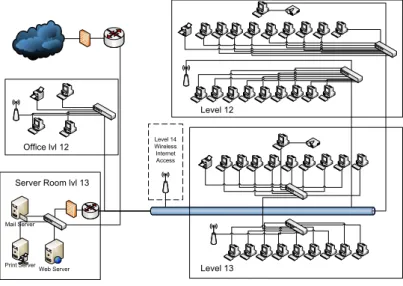
This section outlines an efficient space utilization and user friendly room setup for networking students. It has three servers running simultaneously which consist of two Window Server 2008 [5] and one Suse Linux server [6]. On top of Server 2008, Domain Name Server (DNS), Dynamic Host Configuration Protocol (DHCP) server [7] [8], and email server has been configured as shown in figure 1. Web server which is Apache is installed on the Linux server. Moodle e-learning system installed on the Linux server. Server farm will be in a virtual environment. There will be an IPSec VPN connection between Melbourne branch and other branches to communicate each other as shown in figure 2. Melbourne branch will have wireless access as well.
Office lvl 12 Mail Server Web Server Print Server Server Room lvl 13 Level 12 Level 13 Level 14 Wireless Internet Access
Fig. 1: Floor Plan of laboratory.
MIT’s basic network diagram will have VPN switch at each end of the networks in each branch. In the lab environment, routers will be used to configure VPN connection between branches. Each Branch has separate VPN connections to the main branch via ISP. All the services such as shared printers, servers and wireless access points will be included in each branch as shown in figure 1. Connectivity between branches will be created using IPSec mechanisms which can provide the best secure environment for the institute. IPSec connections will run over the ISP network and ISP provides a scalable connectivity between branches.
IP VPN (Business WAN connection) will be used to connect each branch with the main building. This connection is a high quality managed IP wide area network service with a simple, cost-effective and secure way of interconnecting between offices. This connection will be configured, managed and troubleshoot by the Internet Service Provider (ISP) company.
Fig. 2: Network Plan
5.
Performance Analysis
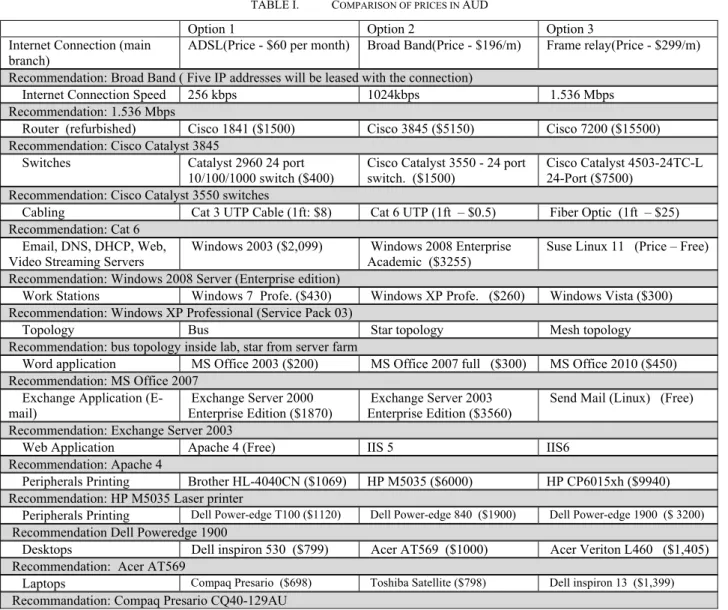
MIT server farm meets the green IT concepts in server consolidation and virtualization. Table 1 gives comparison of various components prices. Based on MIT’s budget, table 1 gives recommended items which are cost effective and efficient.
TABLE I. COMPARISON OF PRICES IN AUD
Option 1 Option 2 Option 3
Internet Connection (main branch)
ADSL(Price - $60 per month) Broad Band(Price - $196/m) Frame relay(Price - $299/m) Recommendation: Broad Band ( Five IP addresses will be leased with the connection)
Internet Connection Speed 256 kbps 1024kbps 1.536 Mbps Recommendation: 1.536 Mbps
Router (refurbished) Cisco 1841 ($1500) Cisco 3845 ($5150) Cisco 7200 ($15500) Recommendation: Cisco Catalyst 3845
Switches Catalyst 2960 24 port 10/100/1000 switch ($400)
Cisco Catalyst 3550 - 24 port switch. ($1500)
Cisco Catalyst 4503-24TC-L 24-Port ($7500)
Recommendation: Cisco Catalyst 3550 switches
Cabling Cat 3 UTP Cable (1ft: $8) Cat 6 UTP (1ft – $0.5) Fiber Optic (1ft – $25) Recommendation: Cat 6
Email, DNS, DHCP, Web,
Video Streaming Servers Windows 2003 ($2,099) Windows 2008 Enterprise Academic ($3255) Suse Linux 11 (Price – Free) Recommendation: Windows 2008 Server (Enterprise edition)
Work Stations Windows 7 Profe. ($430) Windows XP Profe. ($260) Windows Vista ($300) Recommendation: Windows XP Professional (Service Pack 03)
Topology Bus Star topology Mesh topology
Recommendation: bus topology inside lab, star from server farm
Word application MS Office 2003 ($200) MS Office 2007 full ($300) MS Office 2010 ($450) Recommendation: MS Office 2007
Exchange Application (E-mail)
Exchange Server 2000 Enterprise Edition ($1870)
Exchange Server 2003 Enterprise Edition ($3560)
Send Mail (Linux) (Free) Recommendation: Exchange Server 2003
Web Application Apache 4 (Free) IIS 5 IIS6
Recommendation: Apache 4
Peripherals Printing Brother HL-4040CN ($1069) HP M5035 ($6000) HP CP6015xh ($9940) Recommendation: HP M5035 Laser printer
Peripherals Printing Dell Power-edge T100 ($1120) Dell Power-edge 840 ($1900) Dell Power-edge 1900 ($ 3200)
Recommendation Dell Poweredge 1900
Desktops Dell inspiron 530 ($799) Acer AT569 ($1000) Acer Veriton L460 ($1,405) Recommendation: Acer AT569
Laptops Compaq Presario ($698) Toshiba Satellite ($798) Dell inspiron 13 ($1,399)
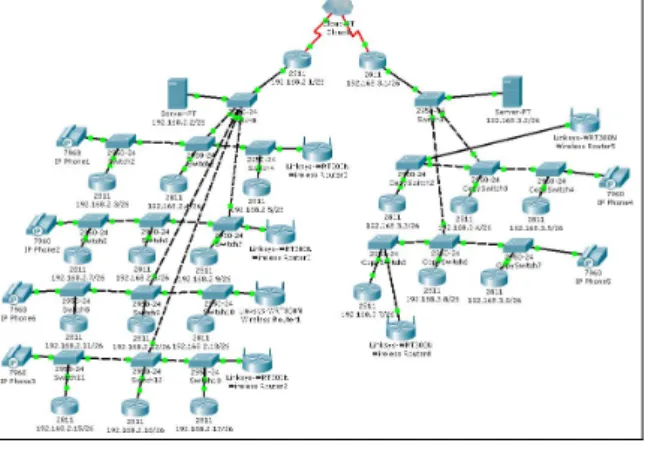
The lab environment has been logically configured and tested using packet tracer [8] simulator as shown in figure 3. This setup also includes VOIP system as students can use phones for discussion purpose.
Fig. 3: Laboratory Setup on Packet Tracer.
Session Interface Protocol (SIP) and H.323 gateway has been configured for VOIP services [9]. The example configuration of implementing VOIP gateway is given below:
HQ(config)#voice-port 0/2/0
HQ(config-voiceport)#signal groundstart HQ(config-voiceport)#cptone AU
HQ(config-voiceport)#ring cadence pattern01 HQ(config-voiceport)#no shutdown
HQ(config)#voice service voip HQ(conf-voi-serv)#h323 HQ(conf-voi-serv)#no shutdown HQ(config)#interface loopback 0
HQ(config-if)#ip address 10.10.1.1 255.255.255.0 HQ(config-if)#h323-gateway voip interface HQ(config-if)#h323-gateway voip h323-id gw1
HQ(config-if)#h323-gateway voip bind srcaddr 10.10.1.1 HQ(config)#voice class codec 100
HQ(config-class)#codec preference 1 g711alaw HQ(config-class)#codec preference 2 g729br8 HQ(config)#dial-peer voice 500 pots
HQ(config-dial-peer)#voice-class codec 100
dial-peer voice 123 voip destination-pattern [12]... session protocol sipv2 session target ipv4:10.8.17.42 dtmf-relay sip-notify
Part of security configuration using tunneling is given below. crypto isakmp policy 10
encryption aes256 authentication pre-share hash md5
group 5
crypto isakmp key cisco address 203.1.1.1
crypto ipsec transform-set 50 ah-sha-hmac esp-3des esp-sha-hmac crypto map MYMAP 10 ipsec-isakmp
set peer 203.1.1.1 set transform-set 50 match address 101 interface Tunnel0
ip address 10.1.1.1 255.255.255.0 tunnel source Serial0
tunnel destination 203.1.1.1 interface Serial0
ip address 202.1.1.1 255.255.255.0 no ip directed-broadcast
clock rate 64000 crypto map MYMAP ip access-group 102 in interface FastEthernet0/0
ip address 192.168.1.4 255.255.255.0 no ip directed-broadcast
The network has been simulated on Opnet IT Guru [10]. The graph for packet delay for end to end device in seconds is shown in figure 4. It varies between 0.08 to 0.115 seconds which is considered low and acceptable.
Jitter for a network varies between -0.0002 to 0.0009 (0.9 ms) seconds as shown in figure 5. SIP usually has higher jitter values than other protocol such as H323.
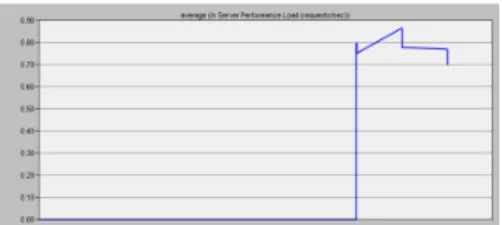
For server load, network is simulated with various applications load such as VOIP, downloading, uploading, video etc. The graph in figure 6 shows variation in server load in terms of requests/sec. It reaches up-to 1 request/sec for our selected server i.e.
DELL power edge 1750.
Fig 6. Server performance (in request/sec).
6.
Conclusion
Moodle is a cost effective and an efficient web based education tool and will be implemented at Melbourne Institute of Technology (MIT). The network plan has been tested on packet tracer and simulated on Opnet IT Guru. Based on the simulated results of jitter, delay of packets and server load, the planned network is suitable for MIT’s network. It is scalable as well, since results include future campuses. Future plan is to work on physical implementation of the laboratory setup.
7.
References
[1] http://www.mit.edu.au/
[2] R. Perez-Rodriguez, M. Caeiro-Rodriguez, L. Anido-Rifon, Enabling Process-Based Collaboration in Moodle by Using Aspectual Services, Ninth IEEE International Conference on Advanced Learning Technologies, ICALT 2009, pp.301-302
[3] J. Arturo Perez, V. Zarate, A. Montes, C. Garcia, Quality of Service Analysis of IPSec VPNs for Voice and Video Traffic, Advanced International Conference on Telecommunications and International Conference on Internet and Web Applications and Services (AICT-ICIW'06), 2006, pp.43
[4] T.H.Tran, Proactive Multicast-Based IPSEC Discovery Protocol and Multicast extension, IEEE Military Communications Conference, MILCOM, 23-25 Oct. 2006, Washington, DC, pp 1 – 7.
[5] K. Lim, P. Ranganathan, J. Chang, et al, Understanding and Designing New Server Architectures for Emerging Warehouse-Computing Environments, International Symposium on Computer Architecture, 2008, pp.315-326. [6] Whitty, J.. Real Time Distributed Simulations Using SIMSAT Linux, 3rd International Conference on Recent
Advances in Space Technologies, 2007. RAST '07, Istanbul, pp. 423 – 428.
[7] J. Wang; C. Tsai; T. Lee;. DHCP support for secure automatic detection of host status, 13th Asia-Pacific Computer Systems Architecture Conference, ACSAC 2008, Hsinchu, pp 1-4
[8] J. Janitor, F. Jakab, K. Kniewald, Visual Learning Tools for Teaching/Learning Computer Networks: Cisco Networking Academy and Packet tracer, Sixth International Conference on Networking and Services (ICNS), 2010, Cancun, pp 351 - 355 .
[9] Haiyang Si, Liyan Dong, Zhaojun Liu, "Research on SIP and H.323 Protocol Conversion," icicic, pp.366, 2008 3rd International Conference on Innovative Computing Information and Control, 2008.
[10] T. Subash, S. Indira Gandhi, “Performance analysis of scheduling disciplines in optical networks”, IFIP International Conference on Wireless and Optical Communications Networks, 2006, Bangalore , pp 5.