ORAtips
PageOR
A
tip
s
Journal
October 2005 V
olume I Issue 1
Editor’s Note: Oracle database technology expert Scott Jesse has seen a lot of changes over the course of his Oracle career. Today’s Oracle customers want to learn more about Oracle’s strategic capabilities that can be leverage on any platform and especially MS Windows. In his debut article, and the first of many, Scott provides a very detailed explana-tion for implementing Oracle10g on Windows including things to know, best practices for maximiz-ing memory usage, and overviews of using AWE and RAC technology.Introduction
Word on the street these days is that Linux is hot. In fact, I recently came across an Oracle CD that had this on the jacket: “Linux - Very Hot. Oracle On Linux: Very Cool!” It is hard to argue with this when looking at the database market share num-bers for 2004. Gartner Dataquest’s 2004 RDBMS market share report shows that the Linux RDBMS mar-ket grew 118%, with Oracle holding 80% of that market. But, lost in the shuffle of that staggering triple-digit growth and 80% market share num-ber is the fact that the RDBMS mar-ket on Windows also grew at a rate of 10%, while Oracle on Windows grew by 8.5%. These numbers may seem small when viewed as a percentage, but consider that the overall RDBMS market revenue for Windows in 2004 totaled just over $3 billion, whereas Linux market revenue was $650 mil-lion in comparison. So – if you are one of those running Oracle on Win-dows, you are not alone.
As a support engineer with Oracle for the past nine years, I have worked
with hundreds (probably thousands) of customers running the Oracle RDBMS on Windows. During those years I have learned the ins and outs of Oracle on Windows, and the ups and downs of working on the Win-dows platform. The problems and challenges of those implementations have been issues across the board, ranging from basic how-to’s for a new “DBA”, to assisting in design-ing and maintaindesign-ing highly-available mission-critical databases capable of running an entire company’s busi-ness. While there are many varied challenges in any implementation, the most common by far that I have encountered with Oracle on the Win-dows platform is the challenge of juggling memory to get the most out of the Oracle RDBMS. Therefore, the focus of this article is to give the DBA, whether novice or veteran, tips and insights into how to get the most out of Oracle and Windows, and make your database implementation as successful as possible.
Understanding the Oracle Architecture on Windows
To begin with, let’s go over the architecture of Oracle on the Windows platform. This is a main component in what makes Windows unique and challenging, as compared to other operating systems. On UNIX and Linux operating systems, the Oracle database is implemented as multi-ple processes, using shared memory management functionality to facili-tate communications between the processes. Thus, the Oracle RDBMS itself is made up of a set of distinct, separate processes, including back-ground processes and foreback-ground processes. Well-known examples of background processes are PMON, SMON, LGWR, DBWR, etc.
On Windows, Oracle is implement-ed as a single process, running as an executable called oracle.exe. Within this single process, the functionality of PMON, SMON, LGWR, DBWR, etc., is still the same as on any other platform; however, the difference is that these background “processes” are actually implemented as threads of a single process – that process being the aforementioned “oracle. exe”. So, while PMON still exists, you will not see a separate PMON process running on a Windows machine, as this process is actually just a thread of the oracle executable.
By the same token, user connec-tions, seen as foreground process-es on UNIX/Linux environments, become threads within the same ora-cle executable – again, all running under a single process on Windows. So, the end result is one process com-prised of threads that are considered to be both background “threads”
Implementing Oracle
®10g on Windows, Part 1:
Optimizing Memory Usage
By Scott Jesse
On Windows, Oracle
is implemented as
a single process,
running as an
executable called
oracle.exe.
4
on Database - Optimization
ORAtips
PageOR
A
tip
s
Journal
October 2005 V
olume I Issue 1
(PMON,SMON, etc.) and foreground “threads” (user application connec-tions) for the database. Therefore, if you are attempting to view processes through the normal means on Win-dows (i.e., via Task Manager), you will not see anything BUT the Oracle process. In a future article, I will discuss how to identify the threads within the Oracle process, but for now, the key is in understanding how Oracle is architected.
Why Threads?
So, why this deviation on the Win-dows platform, when UNIX plat-forms operate as separate processes? In fact, in the earliest releases of Ora-cle on Windows, OraOra-cle attempted to stick with the convention of having separate processes – but the shared memory implementation between processes on Windows was deemed to be too slow and inefficient for Oracle’s needs. The simple fact is that Windows as an operating system lends itself to an architecture where applications run most efficiently as a single process with multiple threads. Oracle quickly modified the archi-tecture to conform to this principle and has stuck with that model since the early days of Oracle 7. The result is a high-performing, feature-rich RDBMS, which has the same core components and the same look and feel across all major server platforms, but with modifications under the cov-ers to make it perform at its highest efficiency on the Windows platform.
The next logical question is, “Why does this really matter?” As I have just noted, Oracle has the same look and feel and rock solid reliability on every platform – so why bother your-self with the internals and with ques-tions about thread-based versus pro-cess-based architectures? Obviously there are many reasons, but the most crucial, which just so happens to be the topic of this article, is memory.
To digress momen-tarily, I would like to discuss certain reali-ties that I see today from my perspective
working within Oracle Support. It is a fact of the marketplace that the vast majority of Windows servers being used in the workplace today are still 32-Bit machines. Windows is not alone in this category, as the major-ity of Linux servers in use today are also 32-Bit machines. Anecdotally, I would estimate that of the customers I deal with on a daily basis who are on Windows or Linux, around 75% to 80% are still on 32-Bit versions of the OS – though that is changing more quickly of late.
Because of this fact, Windows and Linux are unique, so Oracle has released both 32-Bit and 64-Bit 10g versions for Windows and Linux operating systems. This is not true on any other platform, as Oracle did not release a version of Oracle10g for any other 32-Bit OS’s – i.e., for Sun Sparc Solaris, AIX, HP-UX PA-RISC, etc. Oracle has released only a 64-Bit version of Oracle Database 10g, but my expectation is that Oracle will continue to release new versions of the RDBMS for 32-Bit Windows and Linux for the foreseeable future.
Living in a 32-Bit Windows World
Given that 32-Bit Windows is not going away any time soon, there are still many who must continue to cope with life in a 32-Bit World.
In a 32-Bit world, there are certain limitations that get magnified with a single-process architecture, the fore-most of which is addressable memo-ry. Any 32-bit process, no matter the operating system, can only address up to 4 GB of memory (to confirm this, write out 32-bits in binary as all 1s, and then convert from binary to decimal):
Operating systems differ in how much of that 4 GB of addressable memory they will allow a user appli-cation to take advantage of. On Win-dows, by default, a single process is only allowed to directly address half of that 4 GB, as the other half is reserved for operating system kernel memory.
What this means is that if running with the default settings on a Win-dows server, the oracle.exe process, which we previously discussed, can only directly address a total of 2 GB of memory. This in turn means that all memory for the database, includ-ing the SGA and all PGA memory for individual sessions, is counted towards this total. Add to this the overhead associated with the Ora-cle process itself (which is about 100 MB), and 1 MB of stack space reserved for every thread within the process address space, and you can see that 2 GB of memory can be very quickly consumed.
Monitoring Oracle Memory Usage
The first step in managing mem-ory usage is knowing how to accu-rately gauge its usage. When the Oracle process reaches the maximum addressable memory limit, there are a couple of different errors that may occur, depending on the situation.
Binary: Decimal:
_______ ________
11111111 11111111 11111111 11111111 -> 4294967295
4
on Database - Optimization
The first step in
managing memory
usage is knowing
how to accurately
gauge its usage.
ORAtips
PageOR
A
tip
s
Journal
October 2005 V
olume I Issue 1
problem (or preferably, to head off a problem). It is surprising to me how many Systems Administrators and DBAs use Windows Task Manager as the only tool for monitoring memo-ry utilization for a given process. In many cases, they may even be aware of the aforementioned limitations, but are certain that they do not have a problem because Task Manager only shows that the Oracle process is using 1.5 GB (as an example).
What Task Manager is not showing you is the total memory addressed by the process. By default, Task Man-ager has only a Mem Usage column, which is simply the working set, or recently used/touched memory pages for the process. You can add a second memory column in Task Manager called VM Size, but that still does not show the total picture, as it only show memory committed by the process. In addition to committed memory, it is possible to have memory reserved, but not committed. This memory still counts against the addressable mem-ory limit, but will not be shown any-where in Task manager. Instead, you must run the Windows Performance Utility.
You can access Perfmon using the navigation path:
Start > Programs > Administrative Tools > Performance.
1. Highlight System Monitor on the left-hand side
2. To monitor memory, first click on the “+” icon along the top menu bar. This will open the dialog box to add counters to the chart.
As you can see in Figure 1, you can monitor a remote computer or a local computer.
3. Under Performance Object, select “Process” and, from the list of counters, choose “Virtual Bytes”.
4. On the right-hand side, select “oracle” from the list of (pro-cess) instances, and choose “Add” to begin charting the Vir-tual Bytes for the process. This value for “Virtual Bytes” gives you the true, accurate count of all memory being addressed by the oracle.exe process.
Where Is That Memory Going?
So what is using this memory within the Oracle process? You can use the following as a rough calcu-If an existing connection/session is
attempting to allocate more memory, for example, if an existing session attempts to do a sort in memory, or open a new cursor, and the oracle. exe process cannot address any more memory, an ORA-4030 error will occur.
The ORA-4030 error text is fairly straightforward:
“out of process memory when try-ing to allocate %s bytes”
Thus there is not a lot of mystery in this error.
However, if a new connection attempt is being made, the client will normally first make contact with the listener, where the thread is ini-tially spawned, and the listener then attempts to hand that thread off to the oracle executable. The initial contact with the listener is successful, but an error occurs in the handoff, because the oracle.exe does not have enough remaining address space to spawn the thread. The resulting error here is an ORA-12500.
The ORA-12500 error text is fairly straightforward:
“TNS:listener failed to start a dedi-cated server process”
This is a slightly more cryptic error, and, on Windows, it is technically an inaccurate description, because we are actually trying to start a thread, not a process. Unfortunately, this error often leads a DBA down the wrong path, attempting to trouble-shoot a networking problem, when in fact the problem is that the data-base process has exhausted all avail-able memory. Therefore, it is critical to not only know what the memory limitations are, but how to accurately measure the memory usage, in order
to quickly identify the source of a Figure 1 – Monitoring Virtual Bytes for the Oracle Process
4
on Database - Optimization
ORAtips
PageOR
A
tip
s
Journal
October 2005 V
olume I Issue 1
to PGA memory that cannot be fully controlled. To calculate current PGA memory used, you can run a query against the v$sysstat and v$sesstat views, such as the queries shown here:
Of particular interest are the values for UGA memory and PGA memory. The v$sysstat view gives you a sum of all PGA/UGA memory used by all sessions. To drill down further to determine what individual sessions are actually using the most memory, you can use the v$sesstat view, using the values for statistic# as indicated in the above query results
For example: SQL> select *
from v$sesstat where statistic# in
(20,21,25,26) order by value; Once you know the SID, you can join with v$session to get more infor-mation on that particular session and what it may be doing. If a session or set of sessions is using an inordinate amount of PGA, the application code being executed should be investigat-ed further to look for poor manage-ment of cursors as a possible source of PGA memory growth.
Stack Space for Threads
I also noted above that each thread within the oracle.exe uses 1 MB of stack space. To view the current stack size of a given executable, you can run the orastack utility, which comes with Oracle10g (and earlier versions), and pass the executable name.
For example:
D:\oracle\Ora10g\BIN>orastack tnslsnr.exe
Dump of file tnslsnr.exe
Current Reserved Memory per Thread = 1048576
Current Committed Memory per Thread = 4096
Orastack’s main purpose is to be able to change the stack size. To see how to do this, just run “orastack” by itself. Note that the process must be stopped in order for the stack size of an executable to be changed. I would also recommend that you change the stack both for the tnslsnr.exe and for the oracle.exe, as the majority of threads are actually created first by the listener, but many threads can also be spawned directly from the oracle.exe (background processes, shared servers, job_queue processes, etc.). A value of 500k can be used with no real downside. Here is an example of changing the tnslsnr. exe:
D:\>net stop OracleOraDb10g_ home1TNSListener
The OracleOraDb10g_ home1TNSListener service is stopping.
The OracleOraDb10g_ home1TNSListener service was stopped successfully.
D:\>orastack D:\oracle\Ora10g\ BIN\tnslsnr.exe 500000
Dump of file D:\oracle\Ora10g\ BIN\tnslsnr.exe
lation for the total memory used by the process, which should be roughly equivalent to the value for Virtual Bytes:
Process Overhead (approximately 100 MB) + Thread Stack (1 MB x # of threads) +
Total SGA + Total PGA =
Virtual Bytes for oracle.exe
The total SGA is easily calculated by looking at init.ora parameters and/or querying v$sga – but calcu-lating/limiting the total PGA used is a bit more involved. You can limit the amount of PGA memory used for operations (such as sorts and hash joins) by setting the PGA_AGGRE-GATE_TARGET parameter, but this will not place a limit on memory used for cursors. The total number of cursors can be limited by setting the OPEN_CURSORS parameter, but still, this will not limit the size of any single cursor. An application or a user can open a single large cur-sor, which might consume a large amount of memory (say a PL/SQL table or varray in memory), so there will always be a variable component
SQL> col statistic# for 999 SQL> col name for a30
SQL> col value for 9999999999999 SQL> select statistic#, name, value from v$sysstat
where name like ‘%memory%’;
STATISTIC# NAME VALUE
--- ---
20 session uga memory 3205664
21 session uga memory max 14729472
25 session pga memory 25780016
26 session pga memory max 56385328
293 workarea memory allocated 0
310 sorts (memory) 4400
ORAtips
PageOR
A
tip
s
Journal
October 2005 V
olume I Issue 1
Current Reserved Memory per Thread = 1048576
Current Committed Memory per Thread = 4096
New Reserved Memory per Thread = 500000
Of course, another way to reduce the total stack size for threads within the oracle.exe is to reduce the total number of threads. In this vein, using shared servers on Windows is anoth-er strategy that must be given care-ful consideration. I have worked with many customers running Oracle on Windows who have successfully used shared server implementations to manage over 1000 concurrent con-nections to the database, while keep-ing the total thread count at or below 100 threads.
Increasing Memory Available to Oracle
So far we discussed the known lim-itations and Windows’ default mem-ory settings out of the box. We also touched on how to monitor the avail-able memory and determine where it is being used, as well as on how to minimize your memory utilization. But be honest – what everyone really wants to know is – how do I get to use MORE memory? This is what really matters. So, we will now delve into strategies for getting more memory out of the system, including:
• Increasing the addressable mem-ory from the default of 2 GB • Taking advantage of PAE / AWE
/ VLM
• Implementing RAC for scalabil-ity
• Moving to 64-Bit.
Increasing Directly Addressable Process Memory on Windows
As noted previously, the address-able memory for a 32-Bit process is
limited to 4 GB, but Microsoft Win-dows reserves half of that for kernel memory, leaving only half (the other 2 GB) for the process (oracle.exe). Depending on the version of Windows that you are running (i.e., if you are on Advanced Server or Enterprise Server versions of Windows), you can change that dynamic by adding a switch to the boot.ini file. Microsoft refers to this as 4GT RAM tuning, though the switch itself is actually a /3GB switch. The boot.ini file is a hidden file found at the root of the boot drive, whichever drive that is (usually C:). Adding the /3GB switch to the correct boot line will produce a boot.ini which looks something like this:
After setting the /3GB switch in the boot.ini, the server must be rebooted for that change to take effect. Once this is done, the oracle executable will be able to directly address 3 GB, with no other changes neces-sary. The additional memory can be used by any component that you desire; it can be used for increasing any component of the SGA, or by allowing additional PGA utilization, or additional threads, etc. There are no restrictions on how this memory is used - you effectively increase your addressable memory by 50%. On the surface, this seems like a no-brainer, but as with most things in life, there is a tradeoff. By setting the /3GB switch, the memory available for the operating system kernel memory is effectively cut in half. So what is the impact of this?
Kernel Memory Impact with /3GB Enabled
Operating system kernel memory on Windows is essentially divided into three major areas - the Paged Pool, the Non-Paged Pool, and
memory set aside for Free System Page table entries (PTEs). With the default settings (no /3GB switch) the Paged Pool can max out at around 360 MB, the Non-Paged Pool can max out at around 256 MB, and Free System Page table entries are abun-dant. However, when setting the /3GB switch, the Paged Pool maxi-mum becomes 256 MB, Non-Paged Pool maximum becomes 128 MB, and Free System Page table entries become scarce.
So while I strongly recommend using the /3GB switch wherever pos-sible, it is also highly advisable to monitor these kernel memory coun-ters to ensure that you are not exceed-ing these thresh-olds. Symptoms of exhausting kernel memory space include instability of the operating system and vague problems such as unex-plained hangs, Disk I/O problems, or exceedingly poor performance. Spe-cific problems include OS errors such as an OS error 1450 or OS 10055.
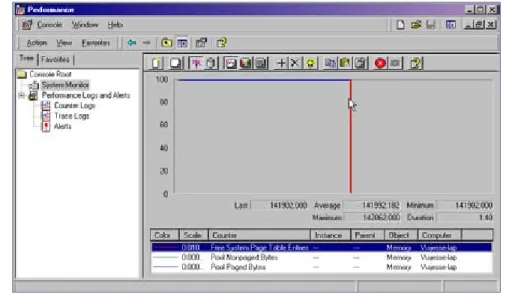
When monitoring these kernel memory values, pay particular atten-tion to Non-Paged Pool and Free Sys-tem Page table entries (PTEs). Non-Paged Pool is an increasing counter, meaning that as more resources are consumed, the higher this value will grow. As it approaches the maximum of 128 MB, you are more likely to experience instability of the operat-ing system.
On the other hand, Free System PTEs is a decreasing counter, mean-ing that as more resources are used on the system, the number of Free PTEs decreases. Therefore, as this counter approaches 0, you are more likely to experience problems. Again, these values can and should be monitored using the Windows Performance Util-ity as shown in Figure 2.
scsi(0)disk(0)rdisk(0)partition(1)\WINNT=
“Microsoft Windows 2000 Advanced Server” /fastdetect /3GB
ORAtips
PageOR
A
tip
s
Journal
October 2005 V
olume I Issue 1
Because the ability to increase the addressable memory by 50% is an opportunity that is too valuable to pass up, I almost always recommend this to customers who are constrained by memory, with the caveat that ker-nel memory be closely monitored. As such, throughout the rest of this arti-cle, I will be assuming a value of 3 GB is the maximum for addressable memory. If you choose not to enable this switch, simply substitute in a value of 2 GB whenever I reference 3 GB as the maximum value.
Should you find that Free System PTEs are running low, you may be able to do some fine-tuning. Adding in the /USERVA switch to the boot. ini may allow you to give a small por-tion of the 3 GB back to the OS, thus putting you over the top for kernel memory needs. See Metalink Note # 297498.1 and Microsoft Article #810371 for more details on this.
On the other hand, if you find that Non-Paged Pool is being eaten up, you may need to use utilities such as Poolmon, which comes with the Win-dows Resource Kit, to drill deeper into where the Non-Paged Pool con-sumption is originating. Depending on the source of the growth, you may
find that updating some device driv-ers (which reside in the Non-Paged Pool) will put a stop to excessive memory growth.
Accessing Additional Memory Indirectly Using AWE
A question that I get asked by many customers indicates a common misconception on the 32-Bit Win-dows platform – that question usu-ally goes along the lines of something like this – “My Windows 2003 Server has 16 GB of RAM. How can I use all of that memory?” This question is frequently asked in light of the rev-elation that in spite of having that much memory, a single process can only address a maximum of 3 GB of memory. So, what is one to do with all of that additional memory?
The answer to this is twofold: First, realize that the 32-Bit address space restriction is on a “per-process” basis. So, if you have multiple processes, each one can separately address up to 3 GB. You may have additional processes in the form of an addi-tional Oracle instance (for example, an ASM instance), or you may have some other third-party application, running as its own process, which
can take advantage of that additional memory as well. However, it is also possible to allow a single process, i.e., the oracle.exe for one instance, to indirectly access that memory. Aside from setting the /3GB switch in the boot.ini, it is also possible to set the /PAE switch.
PAE stands for Physical Address Extensions, which essentially is a term for the ability to address an additional 4 bits on the Intel Proces-sor (giving you 36-Bits of address space). Those additional 4 bits must be accessed through a window that is carved out of the base 32-Bits – this is done on the Windows platform via the use of Address Windowing Extensions (AWE). You will often hear terms such as PAE, AWE, and even VLM (Very Large Memory) tossed about interchangeably. They essentially mean the same thing - the ability on a 32-Bit OS to address memory, indirectly, beyond 4 GB. Figure 2 – Using Perfmon to Monitor Windows Kernel Memory
You will often hear
terms such as PAE,
AWE, and even VLM
(Very Large Memory)
tossed about
interchangeably.
They essentially
mean the same
thing ….
ORAtips
PageOR
A
tip
s
Journal
October 2005 V
olume I Issue 1
Oracle Implementation of AWE on WindowsOracle implements AWE support on Windows by the addition of an init.ora parameter called USE_INDI-RECT_DATA_BUFFERS. By setting this value to true, Oracle will use the AWE APIs on Windows to allow the oracle executable to address memory beyond 4 GB – up to a maximum of 16 GB. However, UNLIKE the set-ting of the /3GB switch, this memory cannot be used by all Oracle compo-nents. Recall that the memory used by Oracle is comprised of the SGA, the PGA, overhead for the process, and the stack for all threads.
When setting the value of USE_ INDIRECT_DATA_BUFFERS to TRUE, Oracle will only allow you to increase the database buffer cache to make use of that additional memory, but you can increase the buffer cache to a value as high as you wish, up to the maximum of 16 GB. Note that the 16 GB maximum includes the buffer cache plus the rest of the memory used by the process, so a realistic maximum value for the buffer cache alone is more like 12 GB, provided you have that much memory in the system.
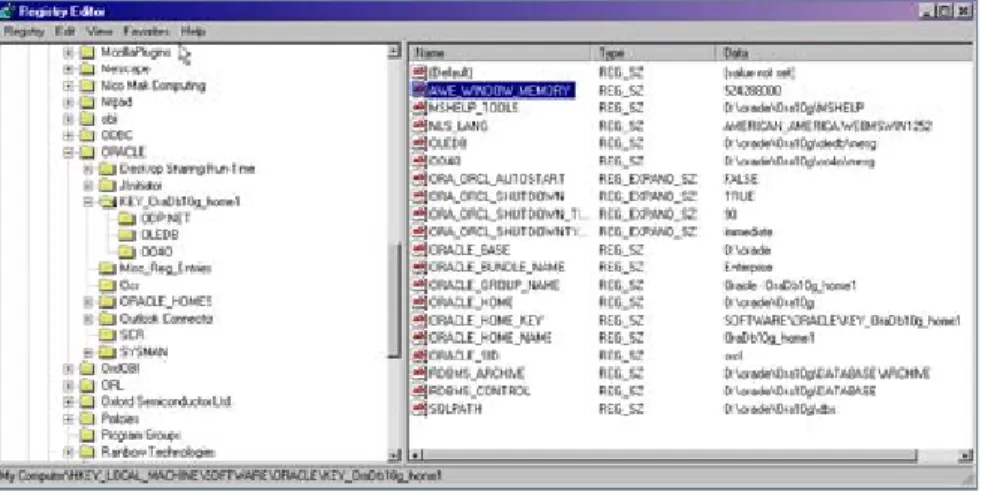
In order to address this extra memory indirectly, a window must be created within the normal 3 GB address space. This window is defined by a registry entry called AWE_WINDOW_MEMORY. This value does NOT have to be explicitly set. If it does not exist in the registry, a default value of 1 GB is assumed. If you do not want to use a window size of 1 GB, then you must add this value in the key for your particular ORACLE_HOME. For example: HKEY_LOCAL_MACHINE\ SOFTWARE\ORACLE\KEY_ OraDb10g_home1 Where “KEY_OraDb10g_home1” is the key associated with your par-ticular ORACLE_HOME, as shown in Figure 3. If USE_INDIRECT_DATA_ BUFFERS is set to the default value of FALSE, the setting for AWE_WIN-DOW_MEMORY is ignored.
When using indirect data buffers, you must change the formula for cal-culating the total amount of memory used within the 3 GB address space to ONLY include the AWE_WIN-DOW_MEMORY portion of the fer cache. The remainder of the buf-fer cache should be excluded from calculations to determine how close you are to the 3 GB address space. So, the new formula for this would be along the lines of:
Note also that the thread stack is variable, as it may change from 1 MB if the orastack utility has been used. This will not give you the total amount of memory used by the Ora-cle process, but it will tell you how much of that memory counts towards the address space limitation of 3 GB. This is also the same value that will be shown by the virtual bytes counter in Perfmon, as Perfmon will not show the indirectly addressed memory.
To help understand this further, consider as an example a case where you have a buffer cache alone that is 6 GB. You would only count 1 GB (assuming the value of AWE_WIN-DOW_MEMORY is left at the default) of that 6 GB in the above calculation. Figure 3 – Registry Editor
Total Memory Used within 3GB =
AWE_WINDOW_MEMORY (+)
Non-Buffer cache portion of the SGA
(i.e. Shared_Pool, Large_Pool, Java_Pool, Stream_Pool and Log_Buffers) (+)
PGA (+) Process Overhead (+)
(Thread Stack * # of threads)
ORAtips
PageOR
A
tip
s
Journal
October 2005 V
olume I Issue 1
The remainder of the buffer cache does not count against the normal 32-Bit address space limitations, because it is addressed indirectly.
When a database block buffer is needed by the database, it is mapped into the window, whose size is defined by AWE_WINDOW_MEMORY, and then can be accessed by the RDBMS. If the window fills and additional blocks need to be accessed, then the window is “redrawn” to exclude less recently used blocks and to include the newly requested blocks. There is no memory copy done – just a redrawing of the window – i.e., one buffer may be unmapped and anoth-er buffanoth-er will be mapped, meaning the window is essentially “reshaped”. The “shape” of the window may change, but the total size of the win-dow itself will not change unless the value for AWE_WINDOW_MEMORY is changed and the database service restarted.
The process of mapping and unmapping buffers will add some overhead beyond what would nor-mally be experienced if a block could be directly addressed within the 3 GB space. However, this mapping/ unmapping of blocks in memory should be much faster than a disk I/ O, which would be the alternative.
Thus, the only real disadvantage of using indirect data buffers is that you must use old-style init.ora param-eters for defining the buffer cache – i.e., you must set DB_BLOCK_BUF-FERS instead of DB_CACHE_SIZE. This, in turn, disables the automatic SGA tuning features introduced in Oracle10g by the SGA_TARGET parameter. Aside from this, there is some additional administrative work that must be done in calculating appropriate values for AWE_WIN-DOW_MEMORY. For more details on implementing Address Window-ing Extensions for Oracle on
Win-dows, please refer to Metalink Note # 225349.1.
Using RAC to Scale on Windows
Yet another way to increase the addressable memory for the data-base is to increase the number of processes. As noted thus far, the 3 GB address space limit applies on a per-process basis – and each Oracle instance runs as a single process. In traditional database parlance, a single instance is accessing a single database. But, if you throw Oracle RAC (Real Application Clusters) into the mix, you now have multiple instances accessing a single data-base, from different nodes. The RAC architecture puts all of your database files on a shared-everything storage system, which can be accessed simul-taneously by as many as 64 different server nodes, each running its own separate oracle.exe.
In a RAC environment, the oracle executable comprising the Oracle instance would have its own separate process on each node. The process overhead of approximately 100 MB would be the same on each node, as would the SGA – but user ses-sions can be spread across multiple nodes, meaning that the amount of PGA memory and thread stack memory is not all concentrated with-in a swith-ingle process, but is with-instead spread across many processes, run-ning on as many separate nodes as you need. Clustering together several Windows machines running on inex-pensive hardware is an effective way of scaling the database to meet the demands of organizations of every size. In a future article, I will go into more detail on implementing RAC and CRS on Windows.
Using 64-Bit Windows.
Finally, I said at the beginning of this article that a majority of custom-ers on both Windows and Linux are still running in 32-Bit environments. However, that tide is turning and more and more customers of both operating systems are turning to 64-Bit Hardware. Up to now, the focus of our discussion has been on 32-Bit hardware, but I will turn now to the options on the 64-Bit platform, in particular regarding Oracle on Win-dows.
The primary advantage of 64-Bit Windows with 64-Bit Oracle running on top is that the addressable memo-ry for a single process jumps from a maximum of 3 GB to a maximum of 8 TB (Yes – terabytes). This memory is directly addressable by the 64-Bit oracle.exe. As such, if running on a 64-Bit version of Oracle on Windows, it is no longer necessary to concern yourself with issues such as setting the /3GB switch, or using the /PAE switch or AWE_WINDOW_MEMORY, etc. The process will directly address as much memory as you can realistically
Clustering together
several Windows
machines running
on inexpensive
hardware is an
effec-tive way of
scaling the database
to meet the
demands of
organizations of
every size.
ORAtips
PageOR
A
tip
s
Journal
October 2005 V
olume I Issue 1
put into the machine, with no special tweaking or switches.
The complicating factor, and the reason that this warrants more dis-cussion, is that there are multiple fla-vors of 64-Bit chips. The two main flavors of chips are the Intel Itanium flavor, and the x86_64 flavor, (which includes the AMD Opteron chip, and the Intel EM64T chip). These fla-vors of chips differ from one another architecturally, and therefore require a separate version of the operating system and a separate version of Oracle.
The Intel Itanium chips are on their second generation, and Win-dows 2003 has supported Itanium chips with a 64-Bit version of Win-dows 2003 since it was first released. Oracle on 64-Bit Windows 2003 (Ita-nium) has been available from ver-sion 9.2.0.3 and onwards. However, the Itanium chips can ONLY run 64-bit Windows 2003 – they do not support installing a 32-Bit version of Windows on an Itanium chip.
The x86_64 chips have the advan-tage of being able to run either a 32-Bit or a 64-Bit operating system. However, Windows did not release a 64-Bit version of their OS for the x86_64 chips until the Spring of 2005. Therefore, while it was pos-sible to have a machine with x86_64 chips, which were running a 32-Bit version of Windows 2003, it was not possible to run 64-bit apps on those chips until just recently. By the way, installing 32-Bit Windows 2003 on an AMD chip, and then running the 32-Bit version of Oracle on top of that is fully supported. But, if that were the case, there is no distinction between 32-Bit Oracle on a Pentium or equivalent processor, and Oracle on 32-Bit x86_64. The same address space limitations would still apply.
Since there was no 64-bit version of Windows for the x86_64 until just recently, Oracle10g Release 1 was not released with a version that runs on 64-Bit x86_64 Windows. Only 64-Bit versions of Oracle9i and Oracle10g Release 1 were released to support the Itanium chip. The first release of Oracle that will run on the AMD (x86_64) platform will be 10g Release 2, expected to be released in late summer of 2005. With the release of Oracle10gR2 for Windows, the 64-Bit choices will be greatly increased.
Cool
The stated goal of this article was to assist Oracle DBA’s on Windows with a successful implementation of their database, whatever stage you are at in the implementation, and whatever the size of your organiza-tion. Hopefully, with the tips con-tained here-in, you will be able to echo my sentiments that Oracle on Windows is very cool.
Scott Jesse, Oracle Corporation – Scott has worked for Oracle Sup-port for the past nine years and is currently a member of the High Availability Advanced Resolution Team. He works primarily on Win-dows and Linux RAC environments, as well as with Oracle Fail Safe and Data Guard. Scott is the co-author of two Oracle Press titles: “Oracle9i for Windows 2000 Tips & Techniques”, published by Oracle Press in Decem-ber 2001, and more recently, “Oracle Database 10g High Availability with RAC, Flashback and Dataguard”, published by Oracle Press in April of 2004. Scott may be contacted at [email protected]
≈
4
on Database - Optimization
ORAtips
Page 0OR
A
tip
s
Journal
Journal
October 2005 V
olume I Issue 1
The information on our website and in our publications is the copyrighted work of Klee Associates, Inc. and is owned by Klee Associates, Inc. NO WARRANTY: This documentation is delivered as is, and Klee Associates, Inc. makes no warranty as to its accuracy or use. Any use of this documentation is at the risk of the user. Although we make every good faith effort to ensure accuracy, this document may include technical or other inaccuracies or typographical errors. Klee Associates, Inc. reserves the right to make changes without prior notice. NO AFFILIATION: Klee Associates, Inc. and this publication are not affiliated with or endorsed by Oracle Corporation. Oracle is a registered trademark of Oracle Corporation and/or its affiliates. Klee Associates, Inc. is a member of the Oracle Partner Network
This article was originally published by Klee Associates, Inc., publishers of JDEtips and SAPtips. For training, consulting, and articles on JD Edwards or SAP, please visit our websites: