A’ System for Program Visualization
in the Classroom
Raghvinder
S. ‘Sangwan
Department
of Mathematics
and Computer
Science
Shippensburg
University
Shippensburg,
PA 17257
James F. Kksh
Pzkl S. LaFollette,
Jr
.
Department
of Computer
and Information
Sciences
Temple
University
:
*
Philadelphia,
Abstract ‘.
This paper describes the use of a system which will allow effortless visualization and animation of standard C/C++ piogrhms. tie system brings alive programs so. that students in CS 1 and CS 2 classes can more easily see each instruction and its effects. They can also see the effects of larger entities such as functions. The system serves as an excellent instructional tool and debugger.
introduction “
Conventional programming environments provide some support ‘for program ‘understanding, development, and debugging. Once .a program is syntactically correct, a student can use a debugger to monitor the Values of variables and step through a program’s instructions. Although very useful, this-,process A-. can be quite,involved and laborious. 1 The feedback a programmer receives does not provide an over+1 v&w of the program’s behavior. It is more instructive to display the dynamics of a program rather than static snapshots of data structure values that are constantly Updated as program instructions are executed. Software visualization systems ,allow custom animations that attempt $0 capture these dynamics[l]. Such systems generally require the writing of animation code ’ and understanding of the, program one is trying to animate. The aim of our system is to provide automatic animations that are useful and require no additional coding and may lead to understanding of the underlying algorithm. One area, for instance, which has been identified as particularly troublesome for students is parameter passing[2]. Our permission to n&e di&lhrd copies of all or part of this material for personal or classroom use is granted without fee provided that the copies we not made or distributed for profit or commercial advanhgc, Ihe COPY- r+t notice, the title of the publicxdion and its date appe;~. and notice is given hat copyright is by pqission ofthe ACM, Inc. To copy ofi&Se, to Epub[ish, to pod on servers or to redistribute to lists. require specific permission and/or fee.
SIGSCE 98 AtlantaGA USA Copyright 1998 0-89791-994-7/9812..%5.00
. .
PA 19122
system is particularljr h&ftil to students in understanding this. Students appear to be effective learners when they create animations [3]. Because the system allows animations to be created esSentially “for free”, it is easy to allow students to create’animations which they can then explain to their peer.51
Students or the instructor would create C/C++ programs specified in textual form, but the system creates high level dynamic displays using bitmapped graphics and window interface technology. Almost all that the student or instructor needs to do is to make simple syntactic changes to data type. declarations. The system organizes information to show global and local variables and parameters as. well as code for the currently executing instruction in the context of the current function. In addition, the current status of the call stack can be shown, making this a useful tool for enhancing understanding of recursion. The use of this system imposes almost no need for learning syntax or constructs outside of the C/C++ language itself.
t A Simple Example
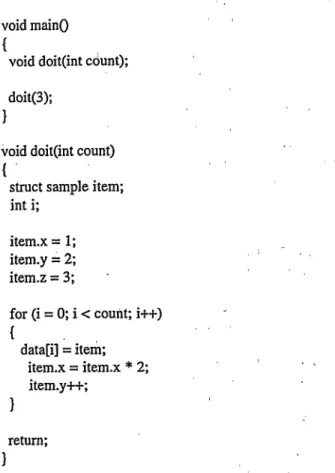
To demonstrate several features of the system in use, consider a contrived example. We hope that the potential for demonstrating simpler ideas such as decision structures or programs using only basic types will be clear to the.reader. The program is:
int b; struct sample { int x; .int y; int z; I; struct sample data[3];
void main0
1
void doit(int count); doit(3);
I
void doit(int count) {’
struct sample item; int i;
item.x = 1; item.y i 2;
item.z = 3; .
for (i = 0; i < count; i-H-) - { data[i] = item; item.x = item.x * 2; , , item.y++; I return; I
To make this program suitable for use by the visualization system, we first decide to animate the struct sample members x and y, and the parameter count and local variable i of the function doit. Then we change the declarations for x, y, count, and i from type int to type INT. In this way, we have specified which variables we want to see in action. The system can then compile and run the program
Figure 1 shows the initial appearance of the system window just as the function doit is being invoked in the main program. The main program appears in the CODE pane. Note that the statement about to be executed (doit(3)) is highlighted. Four of the remaining panes show the variables we selected for animation. Theses are either GLOBALS, or in the HEAP, or LOCALS to the currently executing function, or PAMMETERS which have been passed to the currently executing function. The OPERATIONS pane is used to show and animate expressions as they are evaluated and actual parameters before they are passed to the PARAMETERS pane of the current function. The actual parameters that appear in the OPERATIONS pane are shown moving from their “home” locations to the OPERATIONS pane when their “home” locations are visible.. Thus the constant 3 which appears as an actual parameter would have been seen
OPERATIONS pane. The OPERATIONS pane is also used to animate the evaluation of expressions and to show the movement of variables as they are computed and assigned. The CALL STACK pane contains the names of functions currently being executed. At this point only main is being executed.
Any variable of type struct sample will be automatically animated because struct has animated members (x and y). Each of these structs consists of three integer values. In the source code only x and y are declared to be of type lNT, while z is declared ‘to be of type int. This indicates to the system that x and y are to be animated while z is not. Similarly, the global array named data will be animated because it consists of animated entries. Although it is not apparent from the part of the data array which is visible, member z does not appear on the screen. This could be confirmed by using the scroll bar in the structure. The x and y members of the struct data[O] contain ‘?‘s to indicate that they have not been initialized. The#+include “vc++.h” is required by the system as this is the place where the type INT is given meaning, and where the overloaded operations which support the animation are declared. Any variable of type lNT will have assignments, comparisons, ‘and arithmetic operations. These operations have the same behavior as the corresponding operations on ints, but will also result in theirdynamics being displayed.
Figure 2 captures the screen as doit is testing the for loop condition, as is shown in the OPERATIONS pane. The value of i would have been seen flowing into tbis pane from its “home” location in LOCALS, and similarly count would have flowed from its home location in PARAMETERS. The value of the expression “i < count” is also shotiin to, be FALSE in the OPERATIONS pane. The array data in GLOBALS has been scrolled so that the values of the struct data[2] are visible. This scrolling took ,place automatically as the contents of data[2] were updated. The reader is encouraged to imagine the pictures of the memory cells moving from place to place on the screen as operations are executed. For instance, the 4
stored in data[2].x would have moved from
OPERATIONS into its final position in GLOBALS. It would have been generated in OPERATIONS from constants and variables such as item.x which flowed from the LOCALS pane. Notice that in CALL STACK, doit is highlighted, indicating that it is currently executing. If desired, the student or instructor may examine code, local variables, and parameters of other functions on the call stack by pausing the execution of the program and clicking on the desired function.
..aJ-.d.. -.-....-,--.-.- __-. .-._ -.-
Suppose ,a, student wanted to understand the AM. insertion algorithm, or an instructor wanted to demonstrate its action. A standard C implementation of this algorithm is found in Korsh and Garrett [4]. Changes of int to INT (s,imilar to those above) and also changes in some pointer declarations would produce the program to be animated. .The cost to the student or instructor as demonstrated above is minimal. He or she needs only to decide which data storage units should become animated and then change their type declarations using INT in place of int, PTR<type> in place of type T. At present our implementation supports ints, and types derived from ints using pointers, arrays, and structs.
Figure 3 is a snapshot of the animation in progress after the node containing 30 has been inserted into the AVL tree in the HEAP pane. , Previously, functions search, createnode, and insertnode, respectively searched for the insertion point, created the node to hold 30, and inserted it in the proper place. The code about to be executed will check for balance and perform appropriate rebalancing rotations if required. In this case, no rebalancing is needed. Notice that the GLOBAL pane is not displayed. This is because we .exetcised.the option of closing it to make room for the entire tree to appear in HEAP. HaI we not done this, part of the tree would have been obscured, but could have been scrolled to if desired. At this point, the student or instructor couId examine any nodes of the tree in more detail by clicking on them. This would “open”, the, node and allow a graphical representation of the struct representing it to be seen and explored.
We point out again that in a printed paper it is impossible to demonstrate the animated sequence that, the system actually displays,, However, the user would have next seen sub-trees collapsing into their root nodes,, being moved to a “work area” above the tree, and expanded. Similarly, trees from the “work area” would be collapsed and moved to the appropriate re-insertion sites in the tree
and r-e-expanded. I 2’.
_‘I ‘.
Discussion 1
We have given a brief introduction :to the capabilities and use of our system. This ‘paper has not illustrated all features of its current implementation. We have omitted, for instance, discussing options that allow the student or instructor to selectively disable the display of various functions and operators, or discussing the meaning of colors that appear in the panes. Disabling functions allows control of the amount of detail displayed. The color encodes the type of objects and other factors.
Our goal was to create a system for animating standard code that would be totally automatic and require no changes beyond type declarations. We recognize that the system will not be able to provide animations as tailored to a particular application as a custom program using more complex animation tools. However, we believe that it is evolving into a system which is clearly easy to use, and appears to provide very effective animations of simple and complex data structures and associated algorithms. ln preliminary demonstrations, the reaction of our students has been extremely positive.
References
1. Price, B., Baecker, R., and Small, I. A Principled Taxonomy of Software Visualization. Journal of Visual Languages and Computing 4 (1993), 21 l-266 2. Naps, T.L., and Stenglem, J. Tools for Visual
Exploration of Scope and Parameter Passing in a Programming Languages Course SIGCSE Bulletin
(March 1996), 305-309
3. Stasko, J.T. Using Student Built Algorithm Animations as Learning Aids Proceedings of the Twenty-eighth SIGCSE Technical Symposium on Computer Science Educafion (1997) 25-29 4. Korsh, J. and Garrett, L. Data Structures, Algorithms,
and Program Style using C. PWS-Kent,
Boston, Mass. (1988). (AIso available on CD-ROM, Dr. Dobbs Essential Books on Algorithms and Data Structures, 1995)
struct scmple datap1: Mid MinO
Mid MinO t t
void &Yitmtr cam: void ait mr cam:
p” doit(m
cmt’
p” doit(m
cmt’
‘,“i” sap’c
sta:
‘,“i” sap’c
;
;
sta:
1tm.x
= 1:
1tm.x
= 1:
1tm.y = 2: 1tm.y = 2: jtm.2 = 3: jtm.2 = 3: 1' 1' I I daiarjl = itm: daiarjl = itm: ;:g.;xg Iten.x * 2: ;:g.;xg Iten.x * 2: J ” J ” raun: J Figure I1
blmrytreqltr p, pr’eczp, Imt, perJ105 ini fowid; --iir&;;yqlue - Id-ZnJ) if (last-=baJme _ R 01 1 . . Iasi-=kuI-e = -1; ractputJlbal-c5(keyvnllle, I else if (lost-=bolpxe = l l) i last-+boImce = 0; 1 rE5FtJJOtJlbOlUlc~(fOJ~. else 1 q = Ins+Bleftptr: if lJwvnJ~ c T+PY) II (kw~lllfA.Imt.pl: else lr(kcyvnJ~~.61ast;bq,pJ; lost-=bnJrrur = 0; if fJndJmt m IUL) *pt 0 Just;
_ eke if (kegvalue - pdloli predlat-Neftptr = lost; else
I
Figure3