System & Network Engineering
Large Installation Administration
Comparing open source
deduplication performance
for virtual machines
Authors:
Berry Hoekstra
Daan Wagenaar
Supervisor:
Jaap van Ginkel
University of Amsterdam
Abstract
The research presented in this paper shows in which specific situations the most efficient use of storage resources can be achieved using open source deduplication solutions, LessFS and ZFS, while at the same time maintaining an acceptable level of disk performance. This study specifi-cally aims at the disk performance for virtual guests that have their disks stored at the deduplicated file systems. The results of this study show that optimal performance can be achieved not using any data deduplica-tion soludeduplica-tion, especially when virtual guests need to perform heavy write actions. However, if you want to save huge amounts of storage, only a small expense in performance is paid when using ZFS as the deduplica-tion soludeduplica-tion. Furthermore, the research shows that ZFS is best used as the open source deduplication solution as it performs best in most of the test cases while still maintaining a high level of storage consolidation. Fi-nally, the research shows the effectiveness of both deduplication solutions in storage consolidation and it can be seen that LessFS is the most efficient in this task.
CONTENTS 1
Contents
1 Introduction 2 1.1 Data deduplication . . . 2 2 Research 5 2.1 Research questions . . . 5 2.2 Literature review . . . 52.3 Open source solutions . . . 6
2.4 Performance measurement tools . . . 7
2.5 Disk performance determining factors . . . 8
3 Experiments 9 3.1 Lab setup . . . 9 3.2 Storage measurements . . . 10 4 Results 15 4.1 Sequential write . . . 15 4.2 Sequential read . . . 15 4.3 Random rewrite . . . 16 4.4 Random seeks . . . 16 4.5 Storage consolidation . . . 17 5 Conclusion 20 6 Future work 21 A Server hardware 22 A.1 Storage server . . . 22
A.2 Host server . . . 22
1 INTRODUCTION 2
1
Introduction
In an ever growing and competitive hosting market, keeping costs down is one of the more important factors. It is therefore important to make the most ef-ficient use of resources while keeping the same level of performance. With the increase in bandwidth speeds, larger data files and increasing storage require-ments a solution for efficient and fast data storage is needed. To this end data deduplication [1] has gained enormous popularity as an efficient way of storing data.
1.1
Data deduplication
Storage systems are often dedicated to storing large amounts of data. Storage systems store this data on its file system in the form of blocks of a certain size. For instance, take a system administrator who has configured nightly backup jobs of all the desktop machines in his organization. These backups are to be stored on the central backup storage system. Most likely, each backup will contain many similar data files, which will require the same amount of storage space each time it has to be stored on the storage system containing all the backups of the organization.
An example of efficient resource utilization is virtualization [2]. Many bare-metal systems that are providing only a single service, e.g. a DNS or Mail server, often do not fully utilize the available resources. By using virtualization, a bare-metal server can be used to run multiple virtual operating systems using virtualization technology. From a user point of view, the OS appears isolated and stand-alone. Effectively, one system can be used to create multiple, virtual, systems increasing the utilization of the resources of the bare-metal server. However, each virtualized system still requires the storage of its operating system files, which is often stored on a central storage repository accessible over the network. In scenarios where the same OS is virtualized more than once, the same files are likely to be stored more than once as well. According to Keren Jin and Ethan L. Miller [3], making use of data deduplication for storing virtual disks helps considerably in consolidating storage. However, practical data deduplication implementations and virtual guest performance have not been researched. Data deduplication is a method to eliminate duplicate copies of the same data blocks, which can be used to reduce the required amount of space in storage systems like described in the examples above.
There are different types of data deduplication, which we will discuss further in this paper. By using data deduplication techniques on a storage system, data that is stored on it is checked for duplicate blocks. When identical data blocks are found, the system will create a pointer to the data block that was already present on the system. This approach only requires the storage space for one file together with some overhead to store the pointers.
1 INTRODUCTION 3
1.1.1 Types of deduplication
Data deduplication differs from regular compression algorithms in the sense that it actually works on the block level of a storage device, instead of on the files themselves. As there are many more data blocks than there are data files, it is therefore most likely that many blocks are the same in contrast to duplicate data files. This potentially allows for more amounts of duplicated data that can be saved. A downside is that the process itself is a CPU intensive task, as new data needs to be matched against previously stored data.
There are different forms of deduplication that can be used in various scenarios. The usage of each type depends on the storage and network setup and require-ments. We can distinguish between the location, the time and the method of deduplication.
Location The location of where the deduplication is done is an important
factor to take into account. For instance, when there is a limited amount of bandwidth available, the maximum amount of time a backup can take will increase. The choice where deduplication has to take place is dependent on the amount of bandwidth available.
Depending on how the storage infrastructure is designed, choices have to be made on how to utilize it. Deduplication methods can be applied at the source the data is stored, or at the target. In the example above, applying source deduplication can shorten the backup time, as there is less data to transfer when transferring the backup to the backup system. With target deduplication, more bandwidth is required, plus the target storage system would initially have to require more disk space in contrast to source deduplication.
Time A storage system with a high system load is undesired at times when the
system is actively used. The time to perform deduplication on your data can influence the performance of a storage system and can be noticed by the direct or indirect users of such a system. Depending on the function of the storage system, it may be wise to let the deduplication algorithms run when the system is not actively used, for instance, at night.
Method The method of deduplication defines what type of deduplication
tech-nique is performed on the data to reduce the amount of space it consumes.
1.1.2 Deduplication methods
There are different deduplication methods of how the actual data is stored and how they are reduced in file size. The most common methods are described below.
In-line deduplication is a form of source deduplication where the
1 INTRODUCTION 4
If a duplicate block of data is detected, a new pointer to the existing block is created. Besides the pointer, no data is written to the storage system in general. A downside to this is that it slows down the system if a large amount of data is being received [4].
Out-of-line deduplication is, as the name suggests, the opposite of in-line
deduplication. Deduplication is performed at the target data storage.
This method is also known as post-process deduplication. The data is first received on disk, where it is deduplicated at a later time, for example, to avoid a loss in performance during business hours. With this form of deduplication, more storage space is required to store the initial data first, before it is duplicated [4].
File-based deduplication , which is commonly known as Content
Address-able Storage (CAS) [5] is a deduplication method on file level instead of block level.
The methods described above each have their own pro’s and con’s. Which one to implement is depending on the requirements and utilization of a storage system. Deduplication impacts the write performance on a system, so this is an important aspect to take into account when choosing the most suitable method.
2 RESEARCH 5
2
Research
Our research focuses on the use of different open source data deduplication solutions as storage platforms for virtual disks and the amount of storage that can be consolidated. Furthermore, we want to see if it is possible to gain insight into the impact on the performance of the virtual guests with virtual disks stored on a deduplicated storage platform.
2.1
Research questions
Based on the description above, we defined the following research question.
What is the impact on virtual guest disk performance when using open source data deduplication solutions?
The following subquestions will help to answer the main research question.
• What is the amount of storage saved when a deduplication mechanism is
applied?
• How does increasing amounts of storage consolidation influence the virtual
disk performance?
2.2
Literature review
Prior to the start of this study, we have looked into existing related research on the subject.
Keren Jin and Ethan L. Miller have done research on the effectiveness of data deduplication of virtual disks in their paper “The Effectiveness of Deduplication on Virtual Machine Disk Images” [3]. They found that using data deduplication on virtual disks can save about 80% of storage. However, the methods used are purely conceptual and proof of concept as they treat each virtual disk as a byte stream and separate the stream into chunks of a specific size. For each chunk they calculate a SHA1 hash and if multiple chunks have the same SHA1 hash, they are considered to be duplicates of each other. Whether the same percentage of storage saving can be achieved in practice is not clear.
A more practical approach into the effectiveness of data deduplication is taken by Dutch T. Meyer and William J. Bolosky in “A Study of Practical Deduplica-tion ” [6]. Their results show that data deduplicaDeduplica-tion is very effective within a large commercial company . However, they do not look at the use of data dedu-plication in virtualized environments and only look at Windows based desktop machines. This research shows the effectiveness of data deduplication on a large set of different data between different systems which is relevant for our research.
2 RESEARCH 6
2.3
Open source solutions
Companies such as NetApp [7] and EMC [8] provide storage solutions which
are often very costly to implement into a business. Such solutions are not
affordable by every company as these solutions are proprietary and also require trained engineers or a support contract.
Although the latter two can also desired when using an open source solution, an open source solution can be a more viable option. In this study, we specifically look into open source implementations of deduplication mechanisms. Below a few of the open source deduplication solutions available are discussed.
SDFS is an open source deduplication solution by OpenDedup. It is capable of
performing in-line deduplication [9] on the files stored in its file system. It is a cross platform solution with support for multiple, distributed storage nodes. OpenDedup provides support for in-line and out-of-line (batch) deduplication. They claim to be an open source enterprise deduplication platform that is able to perform deduplication at line speeds of 1 Gigabyte per second or faster. The official homepage contains well documented guides on how to setup an OpenDedup file system on a Linux system. OpenDedup could be an interesting choice for this research, as it provides an easy setup and promises great performance.
LessFS provides in-line data deduplication using FUSE [10]. LessFS is a
user-space deduplication solution that has support for in-line deduplication, compression and encryption. The official LessFS website focuses on us-ability by providing easy to follow tutorials on how to setup a simple LessFS-based file system on a Linux system using common tools. The suggested usability of LessFS makes this solution a very viable candidate to be used in our research.
s3ql is a source-based deduplication technique that deduplicates data before
sending it to the Amazon S3 storage buckets in the “cloud” [11]. A similar approach is taken by s3fs [12], but it does not provide local deduplication. Both solutions sound very interesting, especially when looked at with a cost-saving point of view. However, cost-saving is not the prime focus of this research and thus not interesting for us to investigate further.
ZFS is a well-known file system that has build-in data deduplication. ZFS is
a robust and reliable file system originally introduced with the OpenSo-laris operating system in 2005. It has support for large storage volumes of up to 16 Exabytes, support for file and folder snapshots and is able to continuously perform file integrity checking [13] to prevent data cor-ruption. More recently, native support for ZFS file systems was included in the FreeBSD operating system [14]. We think ZFS is also interesting to include in our research, as it is a popular file system and has build-in support for deduplication.
2 RESEARCH 7
2.4
Performance measurement tools
To perform the actual measurements, we have done research on existing tools that are able to aid us in the measurements.
iozone is a file system benchmark tool [15]. It can simulate various workloads
(or IO operations) on file systems to measure it’s real-life performance [16].
iostat is a similar tool as iozone. It is mostly used on local storage or NFS
shares to monitor and measure the IO performance [17].
hdparm is a utility to view and change hard drive parameters to gain optimal
drive performance. It can also be used to perform disk throughput tests to measure disk performance [18].
bonnie++ is basically a rewrite in the C++ programming language of a
sim-ilar tool calledbonnie. It has many features to perform the disk
perfor-mance measurements we require.
fio is a popular tool to measure storage performance [19]. It features a
com-prehensive set of features, such as 13 different IO engines, multiple IO priorities (for newer Linux kernels) and multi-threading.
Iperf can measure the maximum performance and bandwidth of TCP and UDP
based connections [20]. A client-server model is used to perform measure-ments on the network performance. For a specified amount of time, a
traffic stream is generated between an iperf client and server and
net-work throughput is reported upon completion. Although this tool can’t be used to measure IOPS, it is still useful to measure the raw network throughput. A similar tool is Netperf [21].
2 RESEARCH 8
2.5
Disk performance determining factors
How a disk performs in a storage system depends on certain factors. The hard-ware that is used in the system is obviously the most important factor. While hardware has its limitations, software can improve the performance of the sys-tem. The most important factors that can influence disk performance in the are the following.
• CPU (clockspeed, L3 cache size)
• Storage device (SSD, HDD, PCI)
• Storage configuration (RAID level)
• Caching mechanisms (RAM)
• File system (block size, journaling)
• IO scheduler (type of algorithm and configuration)
3 EXPERIMENTS 9
3
Experiments
We have created a test plan to be able to get consistent test results. The defined test procedures were applied on the different lab setups using different config-uration parameters. This method of consistent testing results in comparable measurements.
3.1
Lab setup
For us to perform measurements, we set up a lab environment. This test en-vironment consists of a total of six Dell servers which will be used during the experiments. The specific models and hardware specifications are described in Appendix A.
Out of the six available machines, five will be used as the hosts which will run multiple virtual guest machines. These virtual guests are installed with a default x64 installation of Debian Squeeze. On top of this the virtualization software Xen will be used [22], which will enable us to run multiple operating systems simultaneously. We chose to use Xen because it is easy to setup, widely used, has a large community and is an enterprise ready virtualization solution. Xen
is installed from the Ubuntu repository using thexen-hypervisor-4.1-amd64
package.
The sixth machine will be used as a shared storage server on which we will install the deduplication software. This server will share its storage over the network to the five host machines.
3.1.1 Initial network test
First, we want to test the performance of the network to confirm the reliability and stability of the network and its speed. This is important so we can be sure that the network is not a limiting factor in achieving our results.
Accessing a shared storage resource over a network, results in a slight perfor-mance overhead. Because of this, our initial network test will be done using
a benchmark tool called iperf, which we have described in Section 2.4. The
iperftest was performed without any tweaks to the TCP/IP stack. The test performed is shown below.
iperf command. hostA~# iperf -s
hostB~# iperf -c hostA
An average network speed of 939 Mbits/sec is measured using the shown method to set up a server and client connection. The test generates traffic from memory,
3 EXPERIMENTS 10
so disk performance is not measured or taken into account during this test. The results shown a near line-speed network bandwidth, which proves a stable network.
3.2
Storage measurements
3.2.1 Storage setup
As we want to be able to perform measurements using a shared storage system, we have to setup a server that will provide these services.
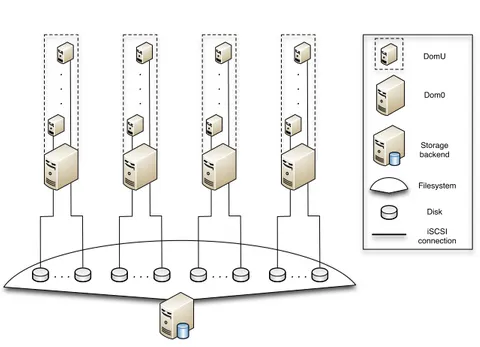
We choose to use the iSCSI protocol to share the file system on the shared storage server to the different virtual host machines. For every virtual guest in the lab setup, we create a separate sparse file containing the operating system. Normally, when storing files on disk, the size of the file can be requested by issuing a specific system call to the operating system. A special way of storing files is by doing this in a sparse way. Sparse files are different than normal files in the sense that empty parts of the file are not actually stored on disk, but are represented using meta data, thus saving valuable storage space on the file system [23].
Each sparse file belonging to a separate virtual guest is represented as an iSCSI volume (LUN), which was mounted on the host where the virtual guest would run.
Each of the five hosts would mount the shared iSCSI LUNs to provide the hosted virtual guests with disk space. Each virtual guest would have a separate physical hard disk of 5 Gigabyte configured in its Xen configuration file which represented the actual iSCSI LUN mounted on the host. This setup enables the virtual guest to directly boot from the iSCSI LUN located on the shared storage server.
The setup is visualized and shown in Figure 1.
The first step is to perform measurements on the lab setup without any dedu-plication solution running on the shared storage server. The storage server is installed using the EXT4 file system. We choose to use EXT4 as the base file system for the storage server as it is a modern file system with great perfor-mance, as benchmarked in [24].
By performing measurements on the EXT4 file system, we are able to gain insight in the basic performance of the lab setup. A baseline of the performance is created, which in turn enables us to compare it against the deduplication solutions.
To be able to compare the baseline performance of the lab setup with the dedu-plicated setup we have to install multiple open source deduplication solutions. We choose two solutions of solutions discussed in Section 2.3 to perform mea-surements on.
3 EXPERIMENTS 11 . . . . . . . . . . . . . . . . . . . . . . . . DomU Dom0 Storage backend Filesystem Disk iSCSI connection
Figure 1: Lab setup.
Initially we have selected OpenDedup’s SDFS and the ZFS file system. However, we were unsuccessful in maintaining stability when performing measurements on the SDFS solution under high loads. As time is a limiting factor for this project, we choose to use ZFS in a separate installation of FreeBSD 9.and LessFS instead of SDFS.
LessFS and ZFS seem to be two of the most popular open source deduplica-tion soludeduplica-tions that perform in-line deduplicadeduplica-tion. LessFS runs in user space, while ZFS runs in kernel space (a native implementation) in the FreeBSD 9 installation. Currently ZFS for FreeBSD is the only native file system with deduplication capabilities.
While both solutions fundamentally differ from each other in the way they are run, we believe it is still very interesting to see a comparison. The drawback of running an application in user space is that more context switching is required to switch from user to kernel space. Some might argue that comparing a user space solution to a kernel space solution is unfair. While this may be true in essence, we believe the comparison is still valid as real world practice shows that, mostly due to management constrains, using FreeBSD in a strict Linux environment is often not a possibility. This results in the need for a different solution which, currently, automatically means a user space implementation is the only option.
3 EXPERIMENTS 12
3.2.2 Lab measurements
The measurements will be conducted on the lab setup simultaneously running 10, 20 and 30 virtual guests respectively.
By using increasing amounts of virtual guests, we were able to compare the differences in load on every measurement. In turn, the results can be used to draw conclusions on what the best performing solution is and to determine what to take into account when deploying deduplication in a similar way.
To be able to calculate average values, the measurements are done a total of
three times using the bonnie++tool which we briefly discussed in Section 2.4.
The reason for usingbonnie++for benchmarking is because it is a widely used
tool for measuring disk performance which is able to run all of the benchmarks
we require for this research. The version used is version 1.96 ofbonnie++.
To be able to efficiently perform measurements on the lab setup, we had to automate the deployment and bootstrapping of the virtual guests on the host machines over iSCSI. To automate this, scripts are created. The automation part consists of two parts.
The first script acts as a central control script on the storage server, which in turn contacts a second script on the hosts using SSH public key methods for password-less login. This second script is able to dynamically mount the iSCSI LUNS required for the given amount of virtual guests that we require to boot on the lab setup.
To start or stop a virtual environment consisting of 30 virtual guests, running on our lab setup, we would issue the following command on the control server:
Control command to boot the virtual lab environment. control_server:~# /lab-control.sh start 30
control_server:~# /lab-control.sh stop 30
The 30 virtual guests are equally distributed over the five host servers. The control script contacts all five hosts to dynamically mount the iSCSI mounts located on the storage server and boots the Xen virtual guests on each respective host.
The scripts are available on request.
3.2.3 Measuring the performance
There are multiple tools available for Linux distributions that are suitable for performance measurements [25]. In Section 2.4, we have looked into several of the available tools that are able to test hard drive and system performance [26].
3 EXPERIMENTS 13
Out of these tools we found that the most suitable tool for our experiments was
bonnie++.
Bonnie++ performs four types of tests, which can be divided into three cate-gories. “sequential output”, “sequential input” and “random seeks”. Some of these tests require data being present on the disk before they can be performed.
For each of these tests,bonnie++first writes a file with random data to disk.
Sequential output The “sequential output” category consist out of two tests.
The first test is the writing of blocks of data sequentially to disk. The second test in this category is the “rewrite” test. This test “seeks” 8000 times in parallel a part of the generated file and reads it to memory. In addition, in 10% of the cases, the read data is changed and written back to disk. Both of these tests are aimed at measuring how fast files can be written to disk.
Sequential input In the “sequential input” category, the test performed is
the sequential reading of data from disk into memory. Effectively this test measures how fast files can be read from disk into memory so they can be used by the user or arbitrary applications.
Random seeks Finally, the “random seeks” category contains a test for
ran-domly reading data from the disk in parallel. This test focuses on mea-suring how fast data can be read from different parts of the disk simulta-neously [26].
3 EXPERIMENTS 14
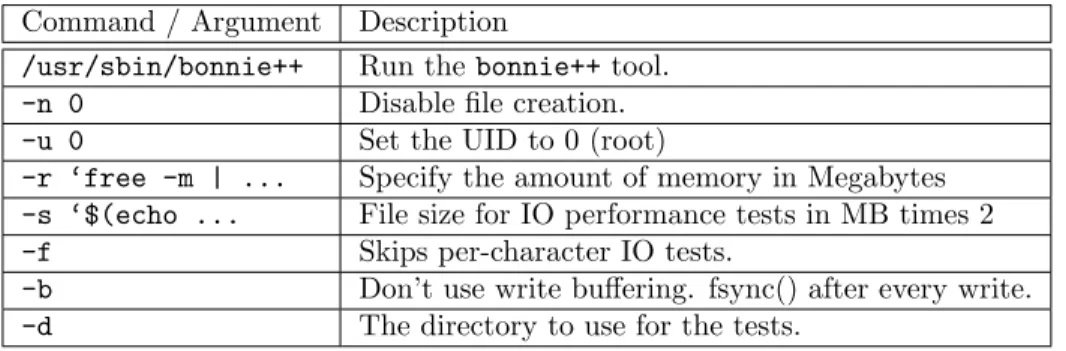
We used the followingbonnie++command in combination with standard GNU
tools to get the desired output.
Bonnie++ command.
$ /usr/sbin/bonnie++ -n 0 -u 0 -r ‘free -m | grep ’Mem:’ | \ awk ’{print $2}’‘ -s $(echo "scale=0;‘free -m | grep ’Mem:’ | \ awk ’{print $2}’‘*2" | bc -l) -f -b -d /tmp/ > /tmp/bonnie.output’
The command does the following:
Command / Argument Description
/usr/sbin/bonnie++ Run thebonnie++tool.
-n 0 Disable file creation.
-u 0 Set the UID to 0 (root)
-r ‘free -m | ... Specify the amount of memory in Megabytes
-s ‘$(echo ... File size for IO performance tests in MB times 2
-f Skips per-character IO tests.
-b Don’t use write buffering. fsync() after every write.
-d The directory to use for the tests.
Table 1: Description of bonnie++ used arguments.
When runningbonnie++ in parallel with the parameters mentioned in tables
1, it will write small files, similar to a real-world scenario. We are skipping per-character IO writes as we want to perform sequential writes to the storage system. The combination using files twice as large as the maximum amount of memory, in combination with disabling write buffering, we completely bypass the operating systems caching mechanisms.
4 RESULTS 15
4
Results
4.1
Sequential write
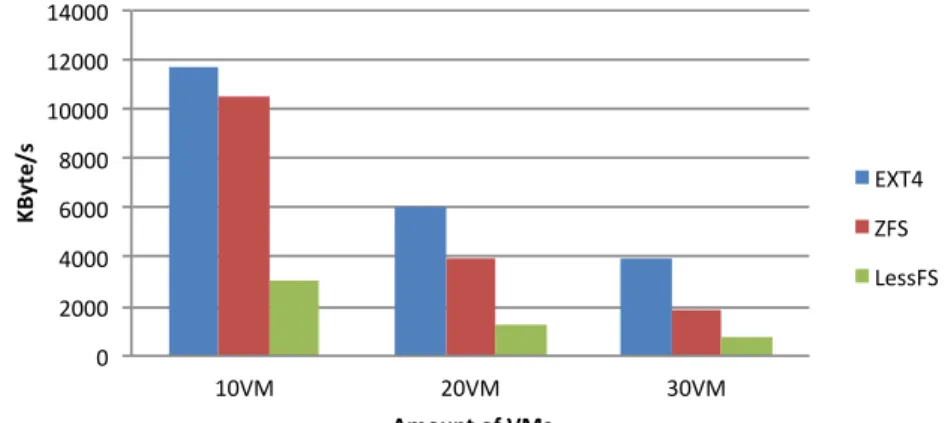
Figure 2 shows the average performance of a virtual guest when 10, 20 or 30 virtual guests are writing to disk simultaneously. These results are as expected since writing to an EXT4 file system requires less actions to be taken before the data can be stored on disk. In the case where a deduplication solution is used, overhead in the form of deduplication and compression is introduced which makes the writing slower compared to EXT4.
0 2000 4000 6000 8000 10000 12000 14000 10VM 20VM 30VM KByte /s Amount of VMs EXT4 ZFS LessFS
Figure 2: Average write performance.
4.2
Sequential read
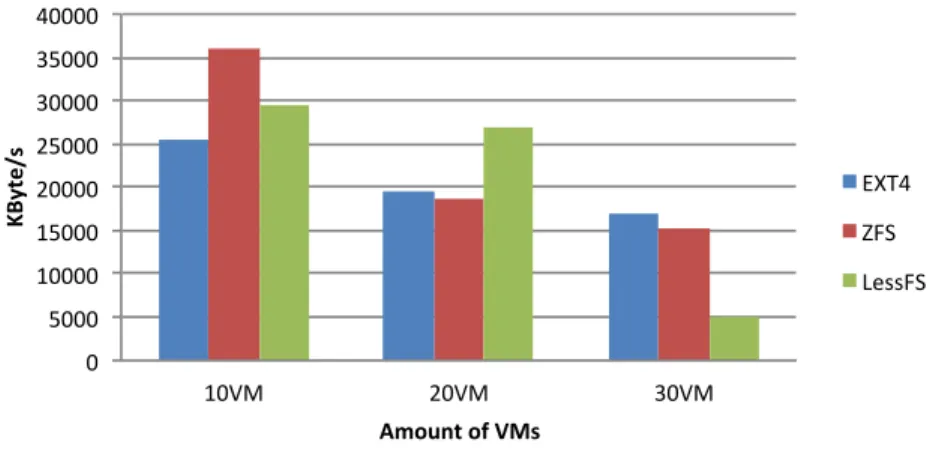
For the results of the read tests, we can take a look at figure 3. The results gathered are not as expected and show inconsistent behavior when these tests are performed with different amounts of virtual guests. However, interestingly both deduplication solutions gradually perform less in contrast to EXT4 when more virtual guests are being used.
The data that needs to be read is stored in a compressed state on disk and therefore is read faster into memory since less data needs to be read. The decompression process that follows is needed to get the complete set of data. This process is solely a CPU intensive task. However, when 20 or 30 virtual guests are used, we can see a rapid decline in the performance of the dedupli-cation solutions. This is because the CPU of the storage backend now becomes the bottleneck for these same decompression actions that need to be taken. We therefore believe that the reason for the better performance of the deduplication
4 RESULTS 16
solutions when tests are run for 10 virtual guests is because of the compression employed by both deduplication solutions.
0 5000 10000 15000 20000 25000 30000 35000 40000 10VM 20VM 30VM KByte /s Amount of VMs EXT4 ZFS LessFS
Figure 3: Average read performance.
4.3
Random rewrite
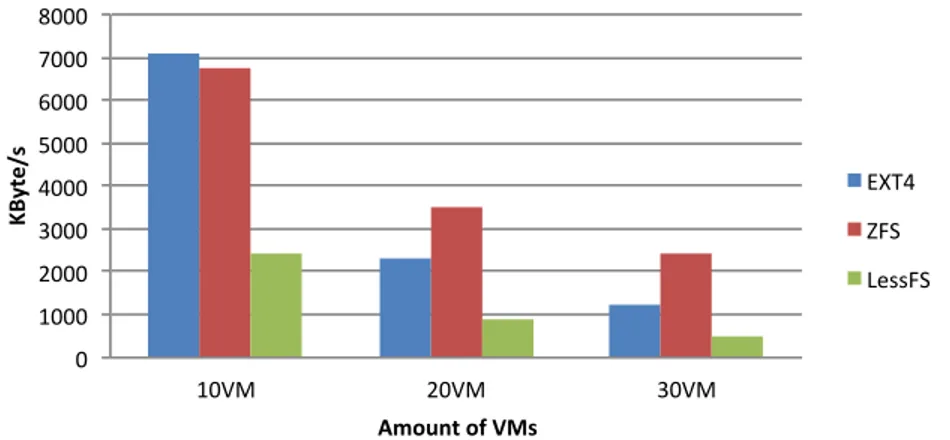
The results for the rewrite tests are shown in figure 4. In this graph, you can immediately see that LessFS is outperformed by ZFS and EXT4. Furthermore, ZFS either performs almost as good as EXT4 or even better. The reason ZFS actually performs better when using 20 or 30 virtual guests can be contributed to the use of dynamic block sizes of up to 128 Kilobytes [13].
When this test is conducted with 10 virtual guests, the size of the blocks used in both EXT4 and ZFS have no real impact as enough disk resources are available to accommodate all the disk access requests by the virtual guests. However, for 20 and 30 virtual guests, this is no longer the case. But because ZFS uses a dynamic block size, smaller blocks can actually be read, changed and written faster compared to the fixed size blocks of EXT4 and the even larger blocks of LessFS.
4.4
Random seeks
As mentioned in section 3.2.3, the seek test actually tries to “seek” a part of the test file in parallel. It does this 8000 times. And in 10% of the cases, the read data is changed and written back. The results for this test can be seen in figure 5. The results are as expected because reading random data from disk, and sometimes writing data back to disk is directly affected by the number of actions needed to complete these tasks. We believe that mainly the
4 RESULTS 17 0 1000 2000 3000 4000 5000 6000 7000 8000 10VM 20VM 30VM KByte /s Amount of VMs EXT4 ZFS LessFS
Figure 4: Average rewrite performance.
decompression action is the bottleneck, as trying to decompress something 8000 times in parallel is a very CPU intensive task.
Also interesting to see is that LessFS outperforms ZFS structurally for the first time, albeit not by much.This is most likely due to the fact that the compression algorithm used by LessFS is actually a little faster in decompressing data than the compression algorithm used by ZFS.
LessFS uses the QuickLZ algorithm to apply additional compression on top of the deduplication. QuickLZ developers claim to be “the world’s fastest com-pression library” and that they can reach over 358 Megabytes per second in decompression throughput [27].
The ZFS pool we configured uses the LZJB compression algorithm, which we believe is a slower decompression algorithm when compared to QLZ. We base this belief on [28] in which LZJB is compared against LZO, the latter being significantly slower than QuickLZ. It is shown that decompression rates of LZJB are relatively poor, especially for smaller blocks of data.
4.5
Storage consolidation
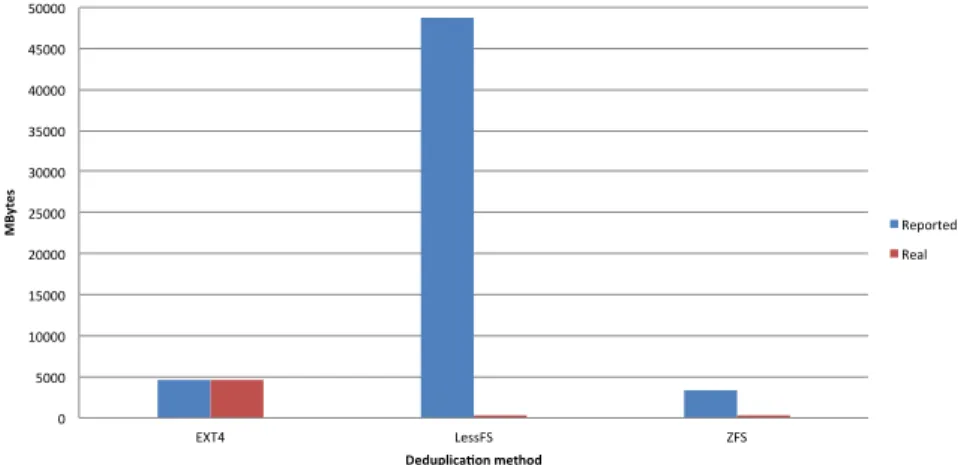
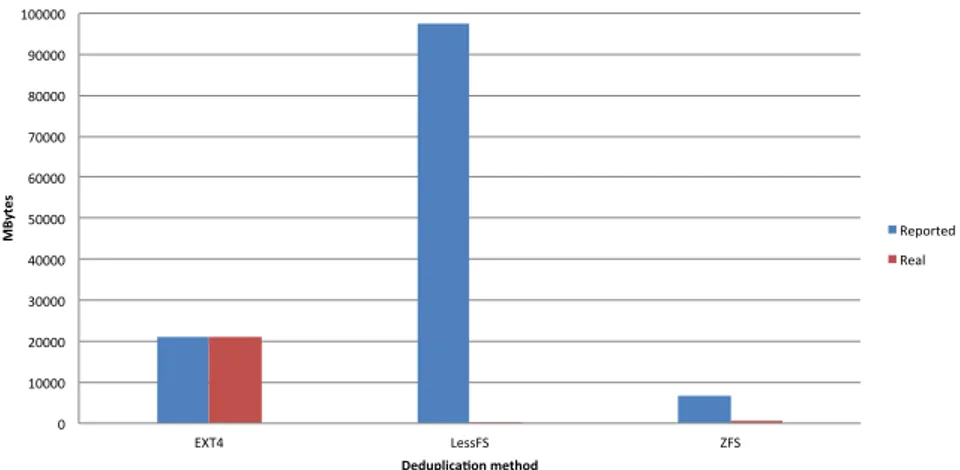
Figures 6, 7 and 8 show the reported usage and the actual file system usage. As discussed in Section 3.2.1, sparse files have been used and get interpreted correctly by the operating system in case of the EXT4 file system. Therefore, we can see the same size for both the reported and actual size in the case of the EXT4 file system.
The most interesting thing about these results is the amount of reported usage by LessFS. This is due to the fact that LessFS does not take into account the sparse properties of the files and therefore reports the full size for each file. ZFS
4 RESULTS 18 0 100 200 300 400 500 600 700 800 10VM 20VM 30VM Se eks /s Amount of VMs EXT4 ZFS LessFS
Figure 5: Average seek performance.
on the other hand does take the sparse properties in account and in addition also accounts for the used compression. This results in the reported size being just below the size reported by the EXT4 file system.
0 5000 10000 15000 20000 25000 30000 35000 40000 45000 50000 EXT4 LessFS ZFS MB yt es Deduplica0on method Reported Real
Figure 6: Used space for 10 virtual guests
For a better look at the amounts of space reported, used and saved, we can take a look at Table 2. This table shows that LessFS actually consolidates more storage when compared to ZFS and EXT4.
4 RESULTS 19 0 10000 20000 30000 40000 50000 60000 70000 80000 90000 100000 EXT4 LessFS ZFS MB yt es Deduplica0on method Reported Real
Figure 7: Used space for 20 virtual guests
0 20000 40000 60000 80000 100000 120000 140000 160000 EXT4 LessFS ZFS MB yt es Deduplica0on method Reported Real
Figure 8: Used space for 30 virtual guests
10 VM 20 VM 30 VM
Real Reported Real Reported Real Reported
EXT4 4594,604 4594,604 21188,584 21188,584 36024,68 36024,68
LessFS 251,052 48828,127 252,26 97656,252 252,812 146484,377
ZFS 323 3295,62 434 6827,363328 525 9989,535
5 CONCLUSION 20
5
Conclusion
In general you can get better performance when not using any data dedupli-cation solution, especially when virtual guests need to perform heavy write actions. However, in some specific cases it might actually prove more fruitful to use the deduplication features of ZFS. In cases where large amounts of virtual guests need to read data, change it and write it back, ZFS can get you better performance than using, for instance, EXT4.
In most cases, ZFS outperforms LessFS as can be seen in our results. We believe this is mostly because of the fact that ZFS is a native file system, which is implemented in kernel space, as to where LessFS is implemented in user space and requires the FUSE libraries. This extra layer adds additional overhead, which in turn results in slower performance.
The results clearly show that using a deduplication solution is very effective in saving storage. It hardly has no effect on the actual amount of storage used when you save 10 times the same data or 30 times the same data. However, if you correlate the results of the tests and the amount of storage space saved, the performance of all the file systems drop considerably when more virtual guests are run concurrently, which is expected. However, our results show no tangible evidence that the amount of storage consolidation actually influences the rate of decrease in performance for deduplication solutions.
We can argue that in an environment on which you have virtual guests with mixed functions and you want to save as much space as possible without losing to much performance, the best way to go is to use ZFS. ZFS saves more space compared to EXT4 and performs better when compared to LessFS.
Finally, in situations when disk performance is not as important as storage consolidation, LessFS is the better choice as it is the most efficient deduplication solution for saving space.
6 FUTURE WORK 21
6
Future work
Due to time limitations, not every aspect was feasible to research extensively. This section discusses some ideas for further and future research in this area.
Different hypervisor In this study, we have chosen Xen as the main
hyper-visor to perform testing with. An interesting extension to this research would be to compare it with different hypervisors, such as VMware or KVM.
Replicated performance In cases, like failover clusters, where multiple
vir-tual machines need to stay in sync and thus write the same data to disk, different results could be achieved. It might be interesting to see the mea-surements when identical blocks of data are written and read from disk of the different virtual machines.
Different deduplication methods It might be interesting to see the
perfor-mance of the other deduplication methods such as Nexenta [29]. We were not able to continue the measurements using OpenDedup because of oc-curring crashes. Perhaps in the future this particular solution is more stable.
Multiple datasets Using a multiple of different operating systems for the
vir-tual machines will most likely result in different space usage between the different file systems. The disk performance might be affected because of the different datasets that need to be kept in the deduplication databases.
High-end Hardware The hardware used in our setup is far from modern. It
might be interesting to pursue the usage of modern and high-end hardware and the impact it has on the results.
ZFS user mode A comparison between LessFS, which runs in user mode, and
ZFS running in user mode. Although unpractical, it would be better
A SERVER HARDWARE 22
A
Server hardware
In the lab setups described in Section 3.1 , five machines were used. The hard-ware specifications of the machines in the setup are below:
A.1
Storage server
One server acting as a storage backend using data deduplication on the shared storage volume.
Brand Dell
Model PowerEdge R210
CPU Intel(R) Xeon(R) CPU L3426 @ 1.87GHz
Memory 8GB
Hard disk Western Digital WD5002ABYS-18B1B0 500GB (x2)
NIC Embedded Broadcom 5716 NetXtreme II BCM5716 Gigabit Ethernet (x2)
Operating system Ubuntu 11.10 x64 & FreeBSD 9.0-RELEASE #0
Linux kernel 3.0.0-15-generic x86 64 & 9.0-RELEASE #0
A.2
Host server
A total of five servers acting as a Xen host for the DomU virtual machines.
Brand Dell
Model PowerEdge 850
CPU Intel(R) Pentium(R) D CPU @ 3.00GHz
Memory 2GB
Hard disk Seagate ST3808110AS 80GB (x2)
NIC Embedded Broadcom 5716 NetXtreme BCM5721 Gigabit Ethernet(x2)
Operating system Debian 6 (Squeeze) x64
A SERVER HARDWARE 23
A.3
Virtual guest server
A maximum of 30 virtual guests were booted to perform measurements on.
Brand Xen
Model Version 4.1
vCPU Intel(R) Pentium(R) D CPU @ 3.00GHz
Memory 128MB
Hard disk 5GB iSCSI mount
NIC Xen routed from Dom0
Operating system Debian 6 (Squeeze) x64
REFERENCES 24
References
[1] Nagapramod Mandagere, Pin Zhou, Mark A Smith, and Sandeep
Ut-tamchandani. Demystifying data deduplication. In Proceedings of the
ACM/IFIP/USENIX Middleware ’08 Conference Companion, Companion ’08, pages 12–17, New York, NY, USA, 2008. ACM.
[2] G. Goth. Virtualization: Old technology offers huge new potential.
Dis-tributed Systems Online, IEEE, 8(2):3, feb. 2007.
[3] Keren Jin and Ethan L. Miller. The effectiveness of deduplication on virtual
machine disk images. InProceedings of SYSTOR 2009: The Israeli
Exper-imental Systems Conference, SYSTOR ’09, pages 7:1–7:12, New York, NY, USA, 2009. ACM.
[4] Datadomain - in-line deduplication. Website, http://www.datadomain.
com/pdf/DataDomain-TechBrief-Inline-Deduplication.pdf. [Online; consulted on March 9 2012].
[5] Searchtarget - how data deduplication works.
Web-site, http://searchstorage.techtarget.com/feature/
How-data-deduplication-works. [Online; consulted on March 9 2012].
[6] Dutch T. Meyer and William J. Bolosky. A study of practical deduplication. usenix, 2009.
[7] Netapp - official homepage. Website, http://www.netapp.com. [Online;
consulted on March 13 2012].
[8] Emc - leading cloud computing, big data, and trusted it solutions. Website,
http://www.emc.com. [Online; consulted on March 13 2012].
[9] opendedup.org. Opendedup official website. http://www.opendedup.org,
February 2012. [Online; Consulted on February 21, 2012].
[10] Mark Ruijter. lessfs - open source data de-duplication. http://www.
lessfs.com, February 2012. [Online; Consulted on February 21, 2012].
[11] s3ql - a full-featured file system for online data storage. Website, http:
//code.google.com/p/s3ql/. [Online; consulted on March 6, 2012].
[12] s3fs. s3fs - fuse-based file system backed by amazon s3. http://code.
google.com/p/s3fs/, February 2012. [Online; Consulted on February 21, 2012].
[13] Wikipedia.org - zfs. Website,http://en.wikipedia.org/wiki/Zfs.
[On-line; consulted on March 7 2012].
[14] Freebsd wiki - zfs. Website, http://wiki.freebsd.org/ZFS. [Online;
REFERENCES 25
[15] IOzone. Iozone.org - iozone pdf documentation.http://www.iozone.org/
docs/IOzone_msword_98.pdf, March 2012. [Online; Consulted on March 6, 2012].
[16] nixcraft - how to measure linux filesystem i/o performance
with iozone. Website, http://www.cyberciti.biz/tips/
linux-filesystem-benchmarking-with-iozone.html. [Online; con-sulted on March 6, 2012].
[17] iostat linux man page. Website, http://linux.die.net/man/1/iostat.
[Online; consulted on March 6, 2012].
[18] hdparm - get/set ata/sata drive parameters under linux. Website, http:
//sourceforge.net/projects/hdparm/. [Online; consulted on March 6, 2012].
[19] fio website. Website, http://freshmeat.net/projects/fio/. [Online;
consulted on March 6, 2012].
[20] Iperf website. Website, http://sourceforge.net/projects/iperf/.
[Online; consulted on March 6, 2012].
[21] Netperf official homepage. Website,http://www.netperf.org/netperf/.
[Online; consulted on March 21 2012].
[22] Xen.org - xen official homepage. Website,http://www.xen.org. [Online;
consulted on March 20 2012].
[23] Wikipedia.org - sparse files. Website, http://en.wikipedia.org/wiki/
Sparse_files. [Online; consulted on March 30 2012].
[24] Kernel.org - ext4 benchmark. Website, http://kernel.org/doc/ols/
2007/ols2007v2-pages-21-34.pdf. [Online; consulted on March 22 2012].
[25] Linux benchmark suite homepage. Website, http://lbs.sourceforge.
net/. [Online; consulted on March 13 2012].
[26] Bonnie++ - official homepage. Website, http://www.coker.com.au/
bonnie++/. [Online; consulted on March 13 2012].
[27] Quicklz - official website. Website, http://www.quicklz.com. [Online;
consulted on March 22 2012].
[28] Lzo vs. lzjb in zfs. Website, http://denisy.dyndns.org/lzo_vs_lzjb/.
[Online; consulted on March 23 2012].
[29] Nexenta - enterprise class storage for everyone. Website, http://www.