more about security?
SANS Institute
InfoSec Reading Room
This paper is from the SANS Institute Reading Room site. Reposting is not permitted without express written permission.
Pros and Cons of using Linux and Windows Live CDs
in Incident Handling and Forensics
This paper describes the examination of the use of five different live CDs in the six-step incident handling
process and the subsequent forensic examination of the machines. A brief synopsis of the six step incident
handling process to provide the background for the testing conducted. The first part of the examination will
be an evaluation of the ability of the live CD to be used for incident response by a first responder. After
the first response capability is evaluated, an examination of the capability of the live CD...
Copyright SANS Institute
Author Retains Full Rights
© SANS Institute 200
7
, Author retains full rights.
Key fingerprint = AF19 FA27 2F94 998D FDB5 DE3D F8B5 06E4 A169 4E46
Live CDs in Incident Handling and Forensic
Pros and Cons of Using Linux and Windows Live CDs in
Incident Handling and Forensics
GCIH Gold Certification
Author: Ricky D. Smith, [email protected]
Adviser: Jim Purcell
Accepted: January 14
th© SANS Institute 200
7
, Author retains full rights.
Key fingerprint = AF19 FA27 2F94 998D FDB5 DE3D F8B5 06E4 A169 4E46
Live CDs in Incident Handling and Forensic
Outline
1.
Abstract ... 3
2.
Requirements for System Examination for Incident Handling
and Forensics ... 3
Incident Handling Six-Step Process ... 5
Live CDs ... 10
3.
Testing the Live CDs ... 11
Testing Environment ... 11
Test Methodology and Criteria ... 11
4.
Testing Results ... 20
Live CDs Used for Live System Incident Handling .. 20
Analysis of the Forensic Images ... 29
5.
Summary ... 32
6.
References ... 34
7.
Appendix A Common Files Modified by the Live CDs on the
Windows XP Virtual Machine ... 39
8.
Appendix B Files Modified by the Live CDs on the Windows
XP Virtual Machine ... 41
9.
Appendix C Common Files Modified by the Live CDs on the
RedHat 9 Linux Virtual Machine ... 58
10.
Appendix D Files Modified on the RedHat Linux 9 Virtual
Machines ... 63
© SANS Institute 200
7
, Author retains full rights.
Key fingerprint = AF19 FA27 2F94 998D FDB5 DE3D F8B5 06E4 A169 4E46
Live CDs in Incident Handling and Forensic
1.
Abstract
This paper describes the examination of the use of five
different live CDs in the six-step incident handling process and
the subsequent forensic examination of the machines. A brief
synopsis of the six step incident handling process to provide
the background for the testing conducted. The first part of the
examination will be an evaluation of the ability of the live CD
to be used for incident response by a first responder. After the
first response capability is evaluated, an examination of the
capability of the live CDs to carry out the initial forensics
imaging will be conducted. The test procedures used on a Windows
XP and Linux machines are described including the sets of
commands that simulate the first responder actions each
operating system. The advantages and disadvantages of using each
live CD for incident response and their effect on the forensic
process are examined on the basis of the testing.
2.
Requirements for System Examination for Incident Handling
and Forensics
One of the first things that an incident handler takes for
a potential computer incident is verifying that an incident has
actually occurred. As part of the verification process, the
incident handler will need to examine the system looking for the
evidence of the incident. In some cases, this may be a simple as
opening a web browser on another machine and pointing it at the
suspect system to view a defaced web server. Other cases may
require that the incident handler review multiple different
aspects of the system, for example, the list of open files and
the processes that opened those files.
© SANS Institute 200
7
, Author retains full rights.
Key fingerprint = AF19 FA27 2F94 998D FDB5 DE3D F8B5 06E4 A169 4E46
Live CDs in Incident Handling and Forensic
In either case, once the incident has been verified the
incident handler will need to further examine the system
determine how the attacker compromised the system so that the
vulnerability that was exploited can be mitigated during the
system restoration. This will be a more thorough examination of
the system that includes many more aspects of system. In this
process the incident handler will also use other tools to
examine the system for viruses, worms, spyware, or other
malicious code, all of this is sometimes called malware.
Until now we have been talking about what the incident
handler needs to do. Now we need to consider how the handler
will go about doing some of these tasks and reasons for doing
the tasks in a particular fashion. There are competing sets of
priorities:
•
the business process owners that want the system back
up and supporting the business process,
•
the security team that wants to fully understand the
attack and how to prevent it, and
•
the legal counsel or law enforcement agencies that may
consider bringing civil suits or filing criminal charges against
the attacker.
All of these priorities affect what the incident handler
does and how it is done.
Generally for the business process owners, the priority is
getting the system returned to service as quickly as possible
without losing any data and without the attack succeeding again.
They want to try cleaning the malware off the system, patching
© SANS Institute 200
7
, Author retains full rights.
Key fingerprint = AF19 FA27 2F94 998D FDB5 DE3D F8B5 06E4 A169 4E46
Live CDs in Incident Handling and Forensic
the vulnerability, restoring any potentially compromised data
from backup, and putting the system back in service. In other
cases, like a root kit was installed, it may be backing up the
data, re-installing the operating system, patching the
vulnerability, restoring the data from backup and placing it
back in service.
For the security team, the priority is to support the
business process restoration but as part of that they need to
understand what the attack was and why it succeeded in order to
prevent its reoccurrence. Their concern in examining the system
is minimizing the changes to the system to allow them to
accurately follow the attacker’s tracks as the system was
compromised. With that information the security team can
identify the vulnerability that allowed the compromise and
methods to prevent the attack from succeeding again or mitigate
the risk of the attack.
For the legal team that may be considering civil or
criminal action against the attacker, the priority is to
minimize any changes to the system to ensure that the evidence
collected form the system will give them the best case against
the attacker. Conversely, the legal team may also be concerned
with the downstream liability and want to contain the attack and
may not be concerned with preserving any evidence.
Incident Handling Six-Step Process
With an understanding of some of the issues and constraints
that affect the incident handling process, a synopsis of the
overall incident handling process is needed to understand where
the use of live CDs fit in the process and the examination of
© SANS Institute 200
7
, Author retains full rights.
Key fingerprint = AF19 FA27 2F94 998D FDB5 DE3D F8B5 06E4 A169 4E46
Live CDs in Incident Handling and Forensic
the use of these CDs in the investigation of events of interest,
the indicators or evidence of incidents.
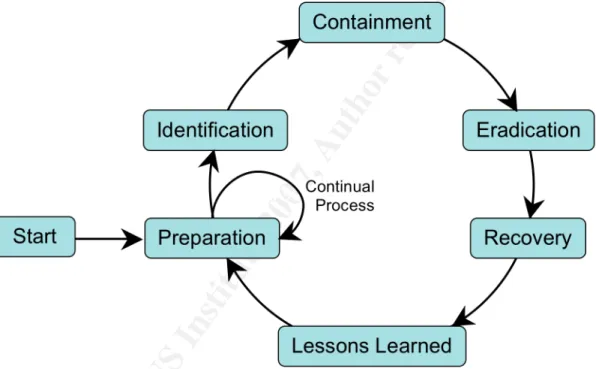
For most incident response or handling teams, the incident
handling process is a six-step loop (
Incident Handling Step by
Step
, 2006). For most incident handling teams, the team members
may be investigating or working different incidents at different
steps at the same time but they will all be following the same
process shown in Figure 1. The different steps are discussed in
the following sections.
Figure 1: Six-Step Incident Handling Process Loop
Preparation
At the beginning of the loop is the Preparation Step. In
this step the team writes, reviews and revises their policies,
procedures and processes for investigating and handling
© SANS Institute 200
7
, Author retains full rights.
Key fingerprint = AF19 FA27 2F94 998D FDB5 DE3D F8B5 06E4 A169 4E46
Live CDs in Incident Handling and Forensic
new skills that will enable them to better handle incidents. An
important part of this step is building relationships with other
organizations that may assist in the incident handling process.
The organizations could be internal, such as the human resources
and legal counsel departments, or outside agencies, such as law
enforcement and other computer incident response teams. These
relationships can be extremely beneficial during an incident as
a source of information or assistance. This is the step where
most incident handling teams would like to spend most of their
time.
Identification
The second step of the process is Identification. In this
step, a team of first responders is assigned to investigate a
possible event of interest. A team of two or more is preferred
for the investigation since different people will see different
things and bring different views and those may contribute to a
better understanding of the events. The first responders are
trained to identify and conduct the initial investigation of
events that may be incidents. First responders could be help
desk personnel, system administrators working for other
departments, or fully trained incident handlers.
The team will investigate an event to determine if it, or
possibly a series of events, constitutes an incident. In this
step the team may be only examining a specific system but
generally will also be looking at logs from network devices,
such as intrusion detection systems, routers, and firewalls, and
other related systems. While trying to verify the incident, the
incident handlers will try to minimize the changes they make to
the system. Changes to the system by the team will impact their
© SANS Institute 200
7
, Author retains full rights.
Key fingerprint = AF19 FA27 2F94 998D FDB5 DE3D F8B5 06E4 A169 4E46
Live CDs in Incident Handling and Forensic
own efforts to understand the attack and the forensic analysis
of any evidence they collect. Once the events are classified as
an incident, the team of first responders transitions the
investigation over to fully trained incident handlers who will
complete the rest of the process.
Containment
The next step is Containment where the incident handlers,
in cooperation with the system owners and system administrators,
begin making changes the system to restrict the spread of the
attack. Examples of actions that may be taken are backing up the
system data, unplugging the system from the network, changing
the DNS name or IP address of the system, and pulling the power
cord from the wall. The business risk, based on the criticality
of the system as assessed by the system owner, and the severity
of the attack will determine how drastic the actions will be in
this step. Also the incident handlers should also be reviewing
nearby systems, in network terms, and systems that have trust
relationships with the suspect system.
Eradication
After the incident is contained, the next step is the
removing the effects of the attack in the Eradication step. The
actions taken in this step are dependent on the severity of the
attack and the business criticality of the system. For example,
if the incident was caused by easily removed and relatively
benign spyware, then the eradication may be the installation of
anti-spyware software and allowing it to remove the spyware. At
the other end of the spectrum, if the attacker installed a
© SANS Institute 200
7
, Author retains full rights.
Key fingerprint = AF19 FA27 2F94 998D FDB5 DE3D F8B5 06E4 A169 4E46
Live CDs in Incident Handling and Forensic
involve wiping the disks and completely rebuilding the operating
system.
Recovery
The next step is Recovery. This step restores the system
back to its pre-incident functionality and verifies that the
vulnerability that was exploited in the incident has been
mitigated or eliminated. Full system functionality testing by
the system owner should be conducted before placing the system
back into production. Also the verification should include
checking that all required patches have been installed, any
necessary changes to the configuration of the machine has been
made, and a vulnerability scan of the system conducted and the
resulting findings mitigated.
Lessons Learned
The sixth step in the loop is Lessons Learned. In this step
the incident handlers for an incident write a short report on
the handling of that incident. They should analyze the incident
to determine the parts of the incident handling process went
well and those that didn’t. They should also make any specific
recommendations to improve the incident response policies,
processes and procedures. The improvements in the incident
handling process generated in the Lessons Learned step are fed
back into the Preparation step. This way the other incident
handlers and first responders will be trained on the
© SANS Institute 200
7
, Author retains full rights.
Key fingerprint = AF19 FA27 2F94 998D FDB5 DE3D F8B5 06E4 A169 4E46
Live CDs in Incident Handling and Forensic
Live CDs
Live CDs are bootable CDs that have an operating system
installed that can be run directly from the CD. Live CDs operate
without installing any software on the hard drive of the system.
Most live CDs are Linux based. Although there are some live CDs
that are based on one of the 4.4BSD descendants (Wikipedia.org,
2007), e.g., the OliveBSD live CD that is based on OpenBSD 3.8
(Paderni, 2006).
One of the more popular live CD distributions is Knoppix
(Knopper, 2006), which is based on Debian GNU/Linux. Numerous
other specialized live CD distributions, such as Knoppix-STD
(s-t-d.org, 2006) and Auditor (remote-exploit.org, 2006), are based
on Knoppix. Other live CD distributions are based on Slackware
Linux (Slackware.com, 2006) or Ubuntu Linux (Ubuntu.com, 2006).
For a more complete list see FrozenTech’s Live CD List (Brand,
2006).
For Windows live CDs, the selection is much more limited
due to the licensing restrictions of Windows itself. The two
most known options are Windows PE (Microsoft, 2004) from
Microsoft and BartPE (Lagerweij, 2006). Windows PE is only
available to purchasers of Microsoft’s Software Assurance
program. BartPE, however, can be built using the installation
media for a licensed copy of Windows XP or Windows Server 2003.
The use of the live CDs will be covered in the context of
the Investigation and Containment steps of the six-step incident
handling process loop. The live CDs’ capability to provide the
known good tools used in these steps will be examined. The
capability of the live CD to create a forensically sound image
© SANS Institute 200
7
, Author retains full rights.
Key fingerprint = AF19 FA27 2F94 998D FDB5 DE3D F8B5 06E4 A169 4E46
Live CDs in Incident Handling and Forensic
of the target machines’ hard drives will examined. In addition,
the effect of the use of each live CDs on the
modified-accessed-changed (MAC) timeline created from the forensic image of the
hard drive will also be examined. (
Forensic and Investigative
Essentials
, 2006)
3.
Testing the Live CDs
Testing Environment
VMware virtual machines (VMs) will be used as the platform
for the target machines for the testing of the effects of using
the live CDs on the target machines. By using the snapshot
features of VMware 5 (VMware.com, 2006), the state of the target
machines can be reset back to the same point in the before
testing each live CD on the target machine. There will be two
target virtual machines, one machine running Windows XP SP2 and
the other running RedHat Linux 9.
Once the testing with a live CD on the live system has been
completed, the live CD will be used to create a forensically
sound image of the virtual hard drive of the VM. The hard drive
forensic images will be analyzed with the Autopsy Forensic
Browser (Carrier, 2006) to create the MAC timeline for each
image. The MAC time lines will be compared with various tools to
examine the effect of the live CD used.
Test Methodology and Criteria
There will be three criteria for comparing the capabilities
of live CDs. The two main criteria will be the effect of running
a standard set of tools on the virtual machine in live system
investigation and in a dead system investigation. The second
© SANS Institute 200
7
, Author retains full rights.
Key fingerprint = AF19 FA27 2F94 998D FDB5 DE3D F8B5 06E4 A169 4E46
Live CDs in Incident Handling and Forensic
main criteria will be a comparison of the tools and utilities
included on the CD. The third criteria will be an examination of
the other capabilities of the CD.
To measure the effect of running the tools from the live
CD, the live CD will be used as the tool the first responder
will use to investigate the system. The simulation of the first
responder actions will consist of:
•
inserting the live CD in the system;
•
starting a terminal or command prompt window from the
live CD;
•
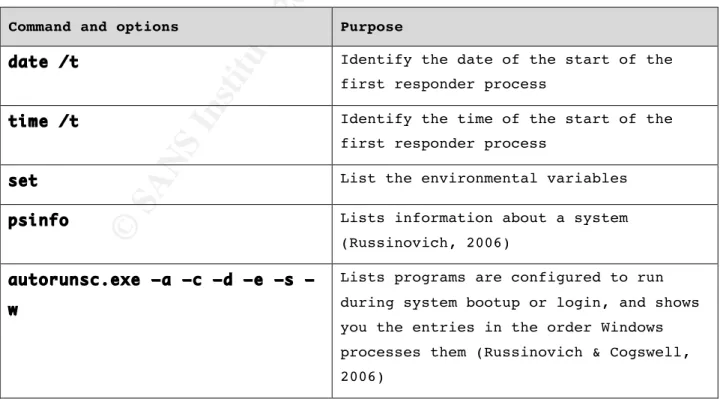
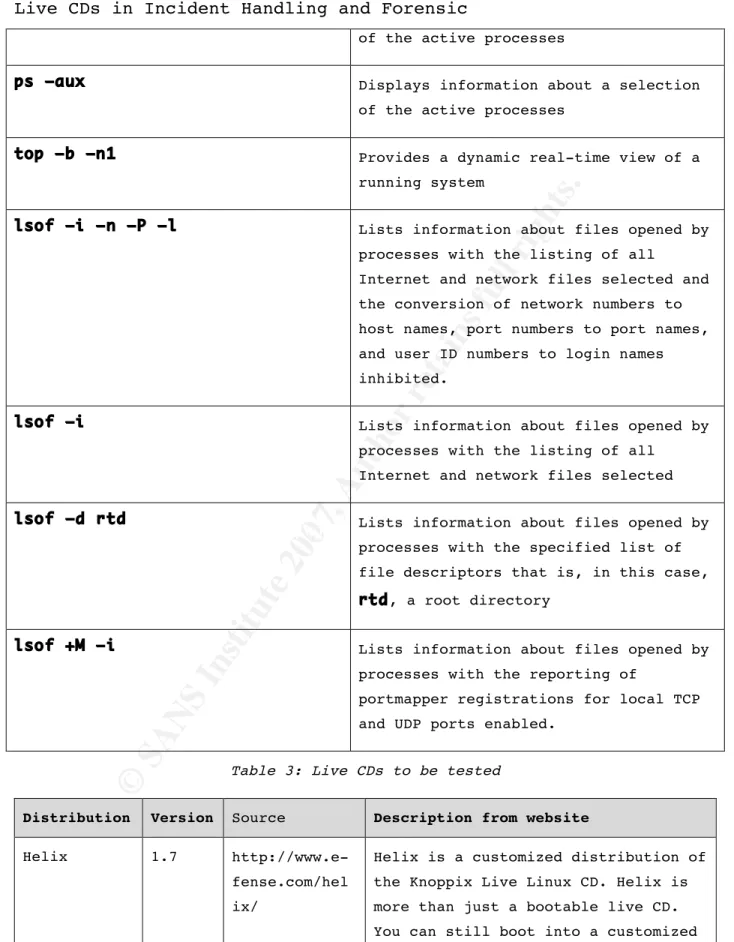
running the commands in Table 1 for the suspect
machine running Windows (First Responders – Windows, 2005) or in
Table 2 for the suspect machine running RedHat Linux 9 (First
Responders – Unix/Linux, 2005) and sending the data across the
network using netcat (Hobbit, 1996);
•
securing power Abruptly to the machine;
•
rebooting the machine from the live CD; and
•
imaging the hard drive using dd and sending the image
across the network using netcat to the forensic workstation.
(
Forensic and Investigative Essentials
, 2006)
On the Windows XP machines being imaged with the BartPE
live CD using
dd.exe(Syring, 2004):
© SANS Institute 200
7
, Author retains full rights.
Key fingerprint = AF19 FA27 2F94 998D FDB5 DE3D F8B5 06E4 A169 4E46
Live CDs in Incident Handling and Forensic
On the Windows XP machines being imaged with one of the
other live CDs:
dd if=/dev/hda | nc 192.168.154.1 1234
or for the RedHat Linux 9 machines:
dd if=/dev/sda | nc 192.168.154.1 1234
and on the forensics workstation:
nc –l –p 1234 | dd
<LiveCD name>-<machine OS>_data.img
Once the first responder testing with a live CD has been
completed, the virtual machines will be abruptly powered down
and the virtual hard drive imaged with the live CD if possible.
The hard drive images will be transferred to a forensics
workstation for a limited analysis of the MAC timeline.
Table 1: Commands used for testing using the Windows live CDs on a live
system
Command and options Purpose
date /t Identify the date of the start of the
first responder process
time /t Identify the time of the start of the
first responder process
set List the environmental variables
psinfo Lists information about a system
(Russinovich, 2006)
autorunsc.exe –a –c –d –e –s – w
Lists programs are configured to run during system bootup or login, and shows you the entries in the order Windows processes them (Russinovich & Cogswell, 2006)
© SANS Institute 200
7
, Author retains full rights.
Key fingerprint = AF19 FA27 2F94 998D FDB5 DE3D F8B5 06E4 A169 4E46
Live CDs in Incident Handling and Forensic
ipconfig /all List the current configuration of all
network interface cards.
tasklist Displays a list of application(s) and
associated task(s)/process(es) currently running the local system.
tasklist /m Displays all DLL modules loaded by each
task.
tasklist /svc Displays services in each process.
tasklist /v Displays a list of application(s) and
associated task(s)/process(es) currently running the local system and specifies that the verbose information is to be displayed.
pslist Lists detailed information about
processes (Russinovich, 2006)
pulist Lists processes running on local or
remote computers. (From Windows 2000 Resource Kit) (Microsoft.com, 2000)
pstat Lists the status of threads, processes,
and drivers that are currently running on the local machine. (From Windows XP
Support Tools) (Microsoft.com, 2004)
net session Displays information about all sessions
with the local computer.
nbtstat –S Displays protocol statistics and current
TCP/IP connections using NBT (NetBIOS over TCP/IP) and lists sessions table with the destination IP addresses.
nbtstat –A
test_machine_IP_address
Lists the remote machine's name table given its IP address.
attrib –r –h –s Clears the read-only, hidden and system file attributes for all files in
© SANS Institute 200
7
, Author retains full rights.
Key fingerprint = AF19 FA27 2F94 998D FDB5 DE3D F8B5 06E4 A169 4E46
Live CDs in Incident Handling and Forensic
C:\Windows\Tasks\*
C:\Windows\Task.at Displays the scheduled commands and
programs to run on the local machine at a
specified time and date.
netstat –nao Displays protocol statistics and current
TCP/IP network connections including all connections and listening ports with addresses and port numbers in numerical form, and displays the owning process ID associated with each connection.
fport Lists all open TCP/IP and UDP ports and
maps them to the associated application (Foundstone.com, 2002)
cmdline Lists processes on the system, including
process IDs and full command lines (with all parameters) (DiamondCS.com, 2003)
Table 2: Commands used for testing using the Linux live CDs on a live system
Commands and options Purpose
date Identify the date and time of the start
of the first responder process
set List the environmental variables
mount –n /mnt/cdrom Mount the first responder CD
/mnt/cdrom/bin/bash Start a known good shell from the first
responder CD
cd /mnt/cdrom/bin Move to the directory containing the
known good binaries.
PATH=”/mnt/cdrom/bin” Set the PATH variable to the location
© SANS Institute 200
7
, Author retains full rights.
Key fingerprint = AF19 FA27 2F94 998D FDB5 DE3D F8B5 06E4 A169 4E46
Live CDs in Incident Handling and Forensic
LD_LIBRARY_PATH=”/mnt/cdrom/lib” Set the LD_LIBRARY_PATH variable to
the location of the known good libraries
export PATH Make the PATH variable to be in the
environment of subsequently executed commands
export LD_LIBRARY_PATH Make the LD_LIBRARY_PATH variable to
be in the environment of subsequently executed commands
echo $PATH Verify the setting of the environment
variable
echo $LD_LIBRARY_PATH Verify the setting of the environment
variable
ls –la /mnt/cdrom/bin List the contents of the binaries used
by the first responder
ls –la /mnt/cdrom/lib List the contents of the libraries used
by the first responder
ifconfig –a List the current configuration of all
network interfaces.
netstat –a Symbolically displays the contents of
various network-related data structures showing the address of any protocol control blocks associated with sockets
netstat –arp Symbolically displays the contents of
various network-related data structures showing the address of any protocol control blocks associated with sockets
© SANS Institute 200
7
, Author retains full rights.
Key fingerprint = AF19 FA27 2F94 998D FDB5 DE3D F8B5 06E4 A169 4E46
Live CDs in Incident Handling and Forensic
and the routing tables.
netstat –ap –inet Symbolically displays the contents of
various network-related data structures showing
route –n –v –ee Display and manually manipulate the
network routing tables
arp –v –n Displays and modifies the
Internet-to-Ethernet address translation tables used by the address resolution protocol
w Prints a summary of the current
activity on the system, including what each user is doing
who Displays information about currently
logged in users
last Displays a list of all users logged in
(and out) since
/var/log/wtmp
wascreated.
who –Hi Displays information about currently
logged in users
finger –ls Displays information about the system
users
last –aix Displays a list of all users logged in
(and out) since
/var/log/wtmp
lastb –aix Displays a list of all of the bad login
attempts since
/var/log/btmp
wascreated
© SANS Institute 200
7
, Author retains full rights.
Key fingerprint = AF19 FA27 2F94 998D FDB5 DE3D F8B5 06E4 A169 4E46
Live CDs in Incident Handling and Forensic
of the active processes
ps –aux Displays information about a selection
of the active processes
top –b –n1 Provides a dynamic real-time view of a
running system
lsof –i –n –P –l Lists information about files opened by
processes with the listing of all
Internet and network files selected and the conversion of network numbers to host names, port numbers to port names, and user ID numbers to login names inhibited.
lsof –i Lists information about files opened by
processes with the listing of all Internet and network files selected
lsof –d rtd Lists information about files opened by
processes with the specified list of file descriptors that is, in this case,
rtd, a root directory
lsof +M –i Lists information about files opened by
processes with the reporting of
portmapper registrations for local TCP and UDP ports enabled.
Table 3: Live CDs to be tested
Distribution Version Source Description from website
Helix 1.7
http://www.e-fense.com/hel ix/
Helix is a customized distribution of the Knoppix Live Linux CD. Helix is more than just a bootable live CD. You can still boot into a customized
© SANS Institute 200
7
, Author retains full rights.
Key fingerprint = AF19 FA27 2F94 998D FDB5 DE3D F8B5 06E4 A169 4E46
Live CDs in Incident Handling and Forensic
Linux environment that includes customized linux kernels, excellent hardware detection and many
applications dedicated to Incident Response and Forensics. (e-fense.com, 2006) Bart's Preinstalled Environment bootable live windows CD/DVD (BartPE) Version 3.1.10a http://www.nu 2.nu/pebuilde r/
Bart's PE Builder helps you build a "BartPE" (Bart Preinstalled
Environment) bootable Windows CD-Rom or DVD from the original Windows XP or Windows Server 2003
installation/setup CD, very suitable for PC maintenance tasks. It will give you a complete Win32 environment with network support, a graphical user interface (800x600) and FAT/NTFS/CDFS filesystem support. (Lagerweij, 2006) Forensic and Incident Response Environment Bootable CD (F.I.R.E.) 0.3.5b http://biatch ux.dmzs.com/
FIRE is a portable bootable cdrom based distribution with the goal of providing an immediate environment to perform forensic analysis, incident response, data recovery, virus scanning and vulnerability assessment. (Salusky, 2002) Inside Security Rescue Toolkit (INSERT) v1.3.6 http://www.in side-security.de/i nsert_en.html
INSERT is a complete, bootable linux system. It comes with a graphical user interface running the fluxbox window manager while still being sufficiently small to fit on a credit card-sized CD-ROM. (Inside Security IT Consulting GmbH, 2006)
© SANS Institute 200
7
, Author retains full rights.
Key fingerprint = AF19 FA27 2F94 998D FDB5 DE3D F8B5 06E4 A169 4E46
Live CDs in Incident Handling and Forensic
sysadmin.com/ operator/
distribution that runs from a single bootable CD and runs entirely in RAM. The Operator contains an extensive set of Open Source network security tools that can be used for monitoring and discovering networks. This
virtually can turn any PC into a network security pen-testing device without having to install any
software. Operator also contains a set of computer forensic and data recovery tools that can be used to assist you in data retrieval on the local system. (Barber, 2005)
4.
Testing Results
Live CDs Used for Live System Incident Handling
This section discusses the each live CD including the pros
and cons and other issues with using the live CD as a first
responders’ tool.
BartPE:
This is the hardest live CD to obtain since you must build
the ISO image using your licensed copy of Widows XP. All tools
that you want to use must be collected from the appropriate
website before attempting to build the ISO. It took multiple
trial versions to create the CD used that had all of the Windows
tools and required DLLs available and running.
© SANS Institute 200
7
, Author retains full rights.
Key fingerprint = AF19 FA27 2F94 998D FDB5 DE3D F8B5 06E4 A169 4E46
Live CDs in Incident Handling and Forensic
It’s very easy to customize since you are building your own
ISO image to burn to the CD. The customization attempted for
this evaluation was limited to the addition of tools for
Windows. Further customization could be done to add Linux static
binary tools and the addition of other device drivers.
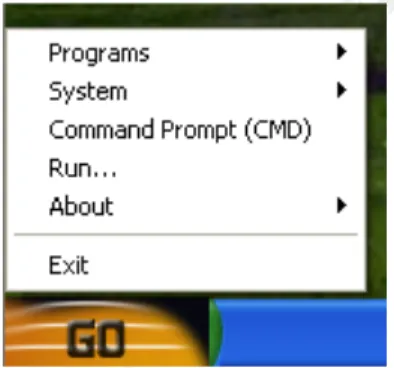
When you insert the CD in a live system, a “Go” menu is
created over the Start menu and it gives you access to the
known-good command shell from the CD. From there, the known good
tools can be used as a first responder.
Figure 2: BartPE Go Menu
Cons:
There are no Linux binaries for incident response. For
imaging the RedHat Linux 9 machine, there is no capability to
access Linux partitions in the VMware machines because the
drivers for the virtualized SCSI adapter are not on the BartPE
CD, not to mention the fact that drivers for the EXT2 file
system are not included. For the forensic imaging of the RedHat
Linux 9 machine, the INSERT live CD was used to boot the machine
and image the hard drive.
© SANS Institute 200
7
, Author retains full rights.
Key fingerprint = AF19 FA27 2F94 998D FDB5 DE3D F8B5 06E4 A169 4E46
Live CDs in Incident Handling and Forensic
F.I.R.E.
Pros:
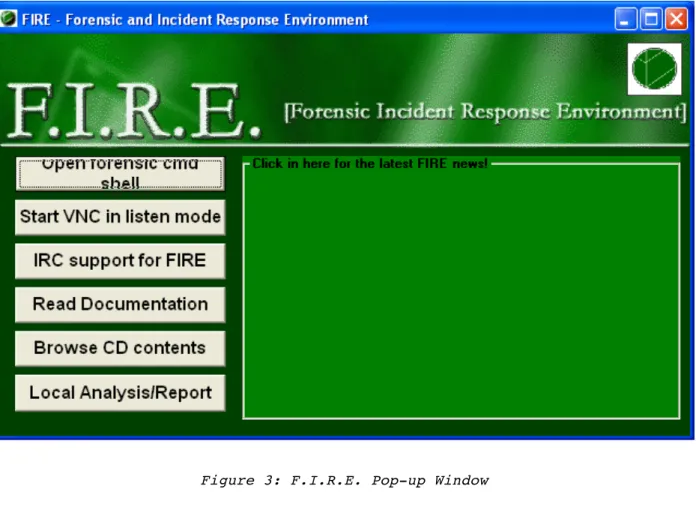
The F.I.R.E. interface launches upon insertion of the CD
into a machine if autorun is enabled on the suspect machine.
That allows quick access to the Forensic Command Shell. One of
the advantages of the Forensic Command shell is its start-up
script sets the PATH environment to the directory of the known
good Windows executables on the F.I.R.E. live CD. This should
help to minimize the effect of the live CD on the subsequent
forensic analysis.
© SANS Institute 200
7
, Author retains full rights.
Key fingerprint = AF19 FA27 2F94 998D FDB5 DE3D F8B5 06E4 A169 4E46
Live CDs in Incident Handling and Forensic
Figure 4: F.I.R.E. Command Shell
Cons:
Several of the tools selected for use on Windows machines
were not available.
For the Linux machine, several of the static binary tools
were missing or failed with a segmentation fault. The missing
tools were:
finger,
last,
w,
lastb, and
ps. The tools that failed
were:
netstat,
lsof.
For imaging the RedHat Linux 9 machine, the SCSI hard drive
that contained the Linux partitions in the VMware machines could
not be accessed because the drivers for the virtualized SCSI
adapter are not on the F.I.R.E. live CD. To image the RedHat
Linux 9 machine, the INSERT LiveCD was used to boot the machine
© SANS Institute 200
7
, Author retains full rights.
Key fingerprint = AF19 FA27 2F94 998D FDB5 DE3D F8B5 06E4 A169 4E46
Live CDs in Incident Handling and Forensic
Helix
The CD contains numerous other incident response and
forensics tools and toolkits, including Autopsy Forensics
Browser (Carrier, 2006) and the Windows Forensics Toolchest
(WFT) (McDougal, 2006).
Pros:
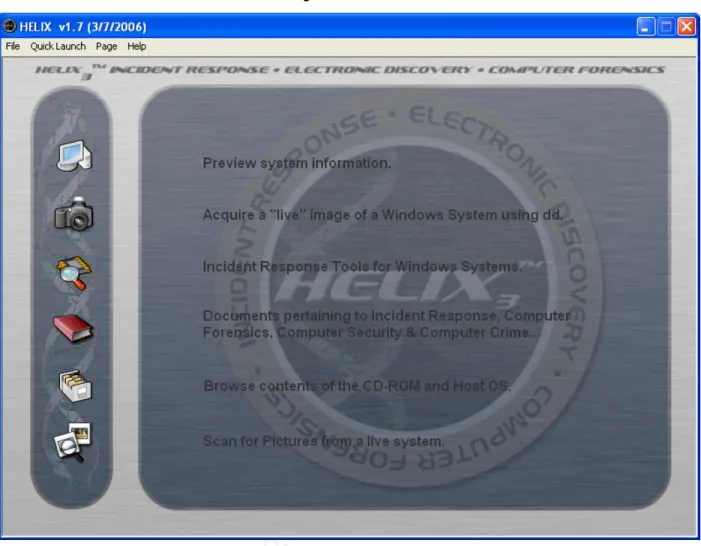
The Helix splash screen launches upon insertion of the CD
into a machine if autorun is enabled on the target machine. That
allows quick access to a known good Command Prompt from the
menu. Like the F.I.R.E. live CD, one of the advantages of the
Forensic Command Prompt is it’s start-up script sets the PATH
environment to the directory of the known good Windows
© SANS Institute 200
7
, Author retains full rights.
Key fingerprint = AF19 FA27 2F94 998D FDB5 DE3D F8B5 06E4 A169 4E46
Live CDs in Incident Handling and Forensic
Figure 5: Helix Initial Screen
Figure 6: Accessing the Helix Command Prompt
The Helix CD also includes numerous other packages of tools
that can automate the process to collect the first responder
data and for the subsequent forensics examination.
© SANS Institute 200
7
, Author retains full rights.
Key fingerprint = AF19 FA27 2F94 998D FDB5 DE3D F8B5 06E4 A169 4E46
Live CDs in Incident Handling and Forensic
Cons:
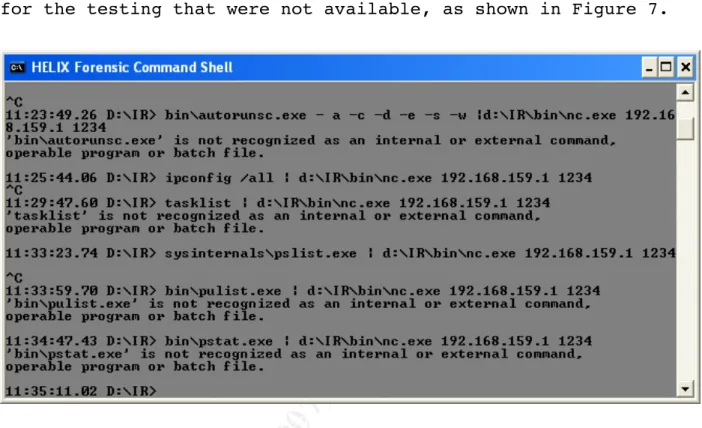
On the Windows XP machine there were several tools chosen
for the testing that were not available, as shown in Figure 7.
Figure 7: Some of Missing Tools on Helix Live CD
For the Linux machine, several of the static binary tools
were missing or failed with a segmentation fault. The missing
tools were:
finger,
w, and
lastb. The tools that failed were:
netstat
,
top, and
lsof.
Similar to the BartPE and F.I.R.E. live CDs, the SCSI hard
drive could not be accessed due to the lack of SCSI adapter
drivers. The INSERT LiveCD was used to boot the machine and
image the hard drive.
© SANS Institute 200
7
, Author retains full rights.
Key fingerprint = AF19 FA27 2F94 998D FDB5 DE3D F8B5 06E4 A169 4E46
Live CDs in Incident Handling and Forensic
INSERT
INSERT worked well within its limitations. One thing to
note for the INSERT live CD, the netcat binary is “netcat” not
“nc” as it is on most Linux machines.
Pros:
When used to boot the RedHat Linux machines, it recognized
and had the drivers for the SCSI adapter in the RedHat Linux
virtual machine.
The ISO includes the captive NTFS drivers (Kratochvil,
2006) for mounting the Windows NTFS partitions but does not
mount them by default.
Cons:
No Windows tools for the first responder, however, it is
capable of imaging the Windows VM hard drive. If the CD is
inserted in a running machine, the autorun opens a browser
window containing the index.html from the root directory of the
CD.
© SANS Institute 200
7
, Author retains full rights.
Key fingerprint = AF19 FA27 2F94 998D FDB5 DE3D F8B5 06E4 A169 4E46
Live CDs in Incident Handling and Forensic
Figure 8: INSERT Autorun Web Page
No Linux tools for the first responder, however, it does
have the drivers for the SCSI adapter used in the RedHat virtual
machine and is capable of imaging the Linux drive.
Operator
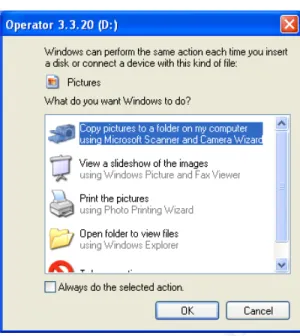
The Operator CD is similar to the INSERT CD in
functionality being tested. Although, the Operator CD does not
have an automatically opening HTML file when the CD is inserted
in the live machine.
© SANS Institute 200
7
, Author retains full rights.
Key fingerprint = AF19 FA27 2F94 998D FDB5 DE3D F8B5 06E4 A169 4E46
Live CDs in Incident Handling and Forensic
Figure 9: Results of Inserting the Operator Live CD in the Windows XP Machine
Pros:
When used to boot the RedHat Linux machines, it recognized
and had the drivers for the SCSI adapter in the RedHat Linux
machine.
Cons:
No Windows or Linux tools for the first responder, however,
it is capable of imaging the Windows and the Linux hard drives.
Analysis of the Forensic Images
The hard drive images taken from the target machines with
the live CDs were analyzed using Autopsy to create a File
Activity Timeline for each hard drive. The timelines for each
target operating system, Windows XP and RedHat Linux 9, were
compared to determine which live CD creates the biggest
© SANS Institute 200
7
, Author retains full rights.
Key fingerprint = AF19 FA27 2F94 998D FDB5 DE3D F8B5 06E4 A169 4E46
Live CDs in Incident Handling and Forensic
were changed after the approximate time that the virtual machine
was suspended were used to create a signature for that live CD.
For the Windows XP system, the time was Sun Oct 01 2006
04:06:38.
For the RedHat Linux 9 system, the approximate time of
suspending the virtual machine was Sun Oct 01 2006 06:40:10.
Slight differences existed between the timelines before that
time. However, those differences were due to deleted files
appearing at different locations in the timeline.
Comparison of the Windows XP Timelines
Not surprisingly, the live CDs with the lowest interaction
with the live system, i.e., those with no Windows first
responder tools, produced the smallest number of changes in the
timeline. The converse is also true for the live CDs that had a
large number of first responder tools, e.g., F.I.R.E. and Helix.
The BartPE live CD had the largest number of Windows first
responder tools had the largest effect on the hard drive.
Table 4: Windows Results
Live CD Number of Timeline entries
Operator 86
INSERT 163
Helix 327
FIRE 343
© SANS Institute 200
7
, Author retains full rights.
Key fingerprint = AF19 FA27 2F94 998D FDB5 DE3D F8B5 06E4 A169 4E46
Live CDs in Incident Handling and Forensic
Reviewing the files listed in the File Activity Timeline
for the period of interest, there were 79 files that were common
to all of the live CDs, see Appendix A for the list of files.
The BartPE live CD had the largest number of Windows first
responder tools had the largest effect on the hard drive. The
difference between Operator and INSERT, the two live CDs with no
first responder tools, is due to autorun opening of the browser
with the INSERT HTML file.
Comparison of the RedHat Linux 9 Timelines
For the two live CDs that were able to image the hard drive
on the RedHat Linux machine, the files that were modified while
the system running were almost exactly the same. This is
probably a result of the GUI running for the period of time it
took to insert the CD in the live system, the CD to automount
and then securing power to the system.
Table 5: Linux Results
Live CD Number of Timeline entries
BartPE 376
Operator 377
INSERT 384
FIRE 410
Helix 764
A review of the differences of between the signatures of
the live CDs showed that the large delta between the Helix live
CD and the rest was caused by the Helix CD accessing 360 files
© SANS Institute 200
7
, Author retains full rights.
Key fingerprint = AF19 FA27 2F94 998D FDB5 DE3D F8B5 06E4 A169 4E46
Live CDs in Incident Handling and Forensic
in the /usr/lib/locale directory. If those 360 files are taken
out of the analysis, there are 369 modified files that are
common to all five live CD signatures, these are listed in
Appendix C. Two files that were deleted, at inodes 290894 and
290964, are included in the list. For the modified files that
were not common, there were several that were in the signature
for three of the five, F.I.R.E, Helix, and INSERT, but not by
the other two. Appendix D lists the modified files that are not
common amount all five live CDs.
Table 6: Linux Results with Common Files Removed
Live CD Number of Timeline entries
BartPE 7 Operator 8 INSERT 15 Helix 35 FIRE 41
5.
Summary
The use of live CDs as a first responders’ tool has several
advantages. They provide known good tools to the first
responders. They may also provide additional tools that may not
exist on the standard machine. However, the choice of live CD to
use depends on the environment that it will be used in.
For a Windows environment, the Helix live CD will be the
best choice unless a customized BartPE live CD is created for
the environment. The F.I.R.E live CD would also be a good
© SANS Institute 200
7
, Author retains full rights.
Key fingerprint = AF19 FA27 2F94 998D FDB5 DE3D F8B5 06E4 A169 4E46
Live CDs in Incident Handling and Forensic
choice, but it’s not recommended since it doesn’t appear to be
currently maintained.
In a Linux-centric environment, the Helix live CD is again
probably the best choice. The next best choice would be a
customized live CD that included static binaries for the
versions of the Linux kernel that are in use in the environment,
i.e., 2.4 and 2.6.
In some cases it might be better to have two CDs for first
responders, one with the known good tools for live system
investigation and another CD for dead system investigation that
is bootable with the necessary devices drivers to image the
machines and access the drives.
If the option exists to customize the CD, scripts and
approved procedures can be added to the live CD to standardize
“actions” taken by the first responder. Other additions to the
customized live CD that may be required are drivers for devices
that exist in the environment but not on the standard version of
the live CD.
In any case that a live CD is used as a first responders’
tool in the six-step incident handling process, it will affect
the forensics of the computer. All of the live CDs change the
state of the machine being examined to some degree. The actions
taken and tools used by the first responders and incident
handlers must be recorded. The forensics expert needs the record
to differentiate between the attackers’ actions and the incident
response process.
© SANS Institute 200
7
, Author retains full rights.
Key fingerprint = AF19 FA27 2F94 998D FDB5 DE3D F8B5 06E4 A169 4E46
Live CDs in Incident Handling and Forensic
6.
References
Barber, J. (2005, October 1). Operator v3.3.20 [Computer
Software]. Retrieved January 5, 2007, from US Sysadmin Web site:
http://www.ussysadmin.com/operator/
Brand, N. (2006, December 30). The LiveCD List. Retrieved
January 3, 2007, from FrozenTech Web site:
http://www.frozentech.com/content/livecd.php
Carrier, B. (2006, September 1). Autopsy Forensic Browser.
Retrieved January 4, 2007, from The Sleuth Kit Web site:
http://www.sleuthkit.org/autopsy/
DiamondCS.com. (2003). CmdLine - Freeware Console Tool for
Windows to show all processes and commandline parameters.
Retrieved January 5, 2007, from DiamondCS Web site:
http://www.diamondcs.com.au/index.php?page=console-cmdline
e-fense.com. (2006). Helix - Incident Response & Computer
Forensics Live CD by e-fense, Inc. [Computer Software].
Retrieved January 3, 2007, from e-fense™, Inc. Web site:
http://www.e-fense.com/helix/
First Responders – Unix/Linux Stay Sharp Course Book (Security
552)
, (2005). Bethesda, MD: SANS Institute.
First Responders – Windows Stay Sharp Course Book (Security
551)
, (2005). Bethesda, MD: SANS Institute.
Forensic and Investigative Essentials
. (2006) In R. Lee (Ed.),
© SANS Institute 200
7
, Author retains full rights.
Key fingerprint = AF19 FA27 2F94 998D FDB5 DE3D F8B5 06E4 A169 4E46
Live CDs in Incident Handling and Forensic
Bethesda, MD: SANS Institute.
Foundstone.com. (2002). Intrusion Detection Tools: Fport v2.0
[Computer Software]. Retrieved January 5, 2007, from Foundstone,
a division of McAfee, Inc. Web site:
http://www.foundstone.com/index.htm?subnav=home/navigation.htm&s
ubcontent=/search/index_search.htm%3Fq%3Dfport
Hobbit. (1996, March 20). Netcat (Version 1.10 for Unix and
Version 1.11 for NT) [Computer Software]. Retrieved January 3,
2007, from VulnWatch: vulnerability disclosure list Web site:
http://www.vulnwatch.org/netcat/
Incident Handling Step by Step and Computer Crime Investigation
.
(2006). In E. Skoudis (Ed.),
Security 504 Hacker Techniques,
Exploits & Incident Handling
. Bethesda, MD: SANS Institute.
Inside Security IT Consulting GmbH. (2006, February 22). Inside
Security Rescue Toolkit - INSERT (Version 1.3.6) [Computer
Software]. Retrieved January 5, 2007, from Inside Security Web
site: http://www.inside-security.de/insert_en.html
Knopper, K (2006). KNOPPIX - Live Linux Filesystem On CD.
Retrieved January 3, 2007, from knoppix.org Web site:
http://www.knopper.net/knoppix/index-en.html
Kratochvil, J. (2006, February 28). Jan Kratochvil: Captive: The
first free NTFS read/write filesystem for GNU/Linux. Retrieved
January 5, 2007, from Jan Kratochvil: Project List Web site:
http://www.jankratochvil.net/project/captive/
Lagerweij, B. (2006, February 17). Bart's Preinstalled
© SANS Institute 200
7
, Author retains full rights.
Key fingerprint = AF19 FA27 2F94 998D FDB5 DE3D F8B5 06E4 A169 4E46
Live CDs in Incident Handling and Forensic
January 3, 2007, from nu2.nu Web site:
http://www.nu2.nu/pebuilder/
McDougal, M. (2006, September 1). Windows Forensic Toolchest
(WFT). Retrieved January 4, 2007, from Fool Moon Software &
Security Web site: http://www.foolmoon.net/security/wft/
Microsoft.com. (2004, August 10). Windows XP Service Pack 2
Support Tools [Computer Software]. Retrieved January 5, 2007,
from Microsoft TechNet Web site:
http://www.microsoft.com/downloads/details.aspx?FamilyID=49AE857
6-9BB9-4126-9761-BA8011FABF38&displaylang=en
Microsoft.com. (2004, June 30). Windows Preinstallation
Environment Overview. Retrieved January 3, 2007, from
microsoft.com Web site:
http://www.microsoft.com/whdc/system/winpreinst/WindowsPE_over.m
spx
Microsoft.com. (2000, October 18). Windows 2000 Resource Kit
Tool : PUList (pulist.exe) [Computer Software]. Retrieved
January 5, 2007, from Microsoft TechNet Web site:
http://www.microsoft.com/downloads/details.aspx?FamilyID=9b9da78
d-f7d1-4b8a-8a31-3bb725c7a069&DisplayLang=en
Paderni, G. (2006, February 18). OliveBSD - OpenBSD Live CD.
Retrieved January 12, 2007, from OliveBSD - OpenBSD Live CD Web
site: http://g.paderni.free.fr/olivebsd/
Remote-exploit.org, (2006). Auditor - Remote-exploit.org.
Retrieved January 3, 2007, from remote-exploit.org Web site:
http://www.remote-exploit.org/index.php/Auditor
© SANS Institute 200
7
, Author retains full rights.
Key fingerprint = AF19 FA27 2F94 998D FDB5 DE3D F8B5 06E4 A169 4E46
Live CDs in Incident Handling and Forensic
Russinovich, M. (2006, December 4). PsInfo v1.74 [Computer
Software]. Retrieved January 5, 2007, from Microsoft TechNet:
Windows SysInternals Web site:
http://www.microsoft.com/technet/sysinternals/utilities/psinfo.m
spx
Russinovich, M. (2006, December 4). PsList v1.28 [Computer
Software]. Retrieved January 5, 2007, from Microsoft TechNet:
Windows SysInternals Web site:
http://www.microsoft.com/technet/sysinternals/ProcessesAndThread
s/PsList.mspx
Russinovich, M. & Cogswell, B. (2006, November 1). AutoRuns for
Windows v8.54 [Computer Software]. Retrieved January 5, 2007,
from Microsoft TechNet: Windows SysInternals Web site:
http://www.microsoft.com/technet/sysinternals/ProcessesAndThread
s/Autoruns.mspx
Salusky, W. (2002, November 29). F.I.R.E. Forensic and Incident
Response Environment Bootable CD (Version 0.3.5b) [Computer
Software]. Retrieved January 4, 2007, from F.I.R.E. Forensic and
Incident Response Environment Bootable CD Web site:
http://fire.dmzs.com
Slackware.com, (2006). The Slackware Linux Project. Retrieved
January 3, 2007, from The Slackware Linux Project Web site:
http://www.slackware.com
S-T-D.org, (2006). S-T-D. Retrieved January 3, 2007, from STD
0.1 security tools distribution Web site:
© SANS Institute 200
7
, Author retains full rights.
Key fingerprint = AF19 FA27 2F94 998D FDB5 DE3D F8B5 06E4 A169 4E46
Live CDs in Incident Handling and Forensic
Syring, K. M. (2004, April 30). GNU utilities for Win32
[Computer software]. Retrieved January 3, 2007, from Native
win32 ports of some GNU utilities Web site:
http://unxutils.sourceforge.net
Ubuntu.com. (2006). Ubuntu: Linux for human beings. Retrieved
January 3, 2007, from Ubuntu Web site: http://www.ubuntu.com/
VMware.com. (2006). VMware Workstation virtual machine for
Linux, Windows & More: VMware - VMware. Retrieved January 3,
2007, from VMware: Virtualization, Virtual Machine & Virtual
Server Consolidation - VMware Web site:
http://www.vmware.com/products/ws/
Wikipedia.org, (2007, January 6). Berkeley Software Distribution
- Wikipedia, the free encyclopedia. Retrieved January 12, 2007,
from Wikipedia.org Web site:
© SANS Institute 200
7
, Author retains full rights.
Key fingerprint = AF19 FA27 2F94 998D FDB5 DE3D F8B5 06E4 A169 4E46
Live CDs in Incident Handling and Forensic
7.
Appendix A Common Files Modified by the Live CDs on the
Windows XP Virtual Machine
1175-144-1 C:/Documents and Settings/test/Local Settings/Temp/VMwareDnD 124-144-5 C:/WINDOWS/WinSxS 124-144-5 C:/WINDOWS/WinSxS (deleted-realloc) 15510-128-3 C:/WINDOWS/system32/setupapi.dll 15526-128-3 C:/WINDOWS/system32/oleaut32.dll 15531-128-3 C:/WINDOWS/system32/ntdll.dll 15541-128-3 C:/WINDOWS/system32/kernel32.dll 15542-128-3 C:/WINDOWS/system32/imagehlp.dll 15549-128-3 C:/WINDOWS/system32/comctl32.dll 15550-128-3 C:/WINDOWS/system32/cmd.exe 15553-128-3 C:/WINDOWS/system32/advapi32.dll 15555-128-3 C:/WINDOWS/system32/xpsp2res.dll 15613-128-3 C:/WINDOWS/system32/wintrust.dll 15622-128-3 C:/WINDOWS/system32/winmm.dll 15624-128-3 C:/WINDOWS/system32/SET1D8.tmp (deleted-realloc) 15624-128-3 C:/WINDOWS/system32/winlogon.exe 15653-128-3 C:/WINDOWS/system32/SET1ED.tmp (deleted-realloc) 15653-128-3 C:/WINDOWS/system32/version.dll 15660-128-3 C:/WINDOWS/system32/SET1F3.tmp (deleted-realloc) 15660-128-3 C:/WINDOWS/system32/uxtheme.dll 15664-128-3 C:/WINDOWS/system32/SET1F6.tmp (deleted-realloc) 15664-128-3 C:/WINDOWS/system32/userenv.dll 15665-128-3 C:/WINDOWS/system32/SET1F7.tmp (deleted-realloc) 15665-128-3 C:/WINDOWS/system32/user32.dll 15772-128-3 C:/WINDOWS/system32/SET24F.tmp (deleted-realloc) 15772-128-3 C:/WINDOWS/system32/shlwapi.dll 15775-128-3 C:/WINDOWS/system32/SET251.tmp (deleted-realloc) 15775-128-3 C:/WINDOWS/system32/shimeng.dll 15778-128-3 C:/WINDOWS/system32/SET254.tmp (deleted-realloc) 15778-128-3 C:/WINDOWS/system32/shell32.dll 15820-128-3 C:/WINDOWS/system32/rundll32.exe 15827-128-3 C:/WINDOWS/system32/rsaenh.dll 15829-128-3 C:/WINDOWS/system32/rpcss.dll 15831-128-3 C:/WINDOWS/system32/rpcrt4.dll 15831-128-3 C:/WINDOWS/system32/SET27A.tmp (deleted-realloc) 15913-128-3 C:/WINDOWS/system32/ole32.dll 15913-128-3 C:/WINDOWS/system32/SET2BE.tmp (deleted-realloc) 16018-128-3 C:/WINDOWS/system32/msvcrt.dll 16018-128-3 C:/WINDOWS/system32/SET312.tmp (deleted-realloc) 16107-128-3 C:/WINDOWS/system32/msacm32.dll 16107-128-3 C:/WINDOWS/system32/SET362.tmp (deleted-realloc) 16209-128-3 C:/WINDOWS/system32/imapi.exe 16247-128-3
© SANS Institute 200
7
, Author retains full rights.
Key fingerprint = AF19 FA27 2F94 998D FDB5 DE3D F8B5 06E4 A169 4E46
Live CDs in Incident Handling and Forensic
16247-128-3 C:/WINDOWS/system32/SET3E2.tmp (deleted-realloc) 16383-128-3 C:/WINDOWS/system32/crypt32.dll 16383-128-3 C:/WINDOWS/system32/SET456.tmp (deleted-realloc) 16392-128-3 C:/WINDOWS/system32/comres.dll 16392-128-3 C:/WINDOWS/system32/SET45C.tmp (deleted-realloc) 17163-144-1 C:/WINDOWS/WinSxS/x86_Microsoft. Windows.Common-Controls_6595b64144ccf1df_6.0.26 00.2180_x-ww_a84f1ff9 17164-128-3 C:/WINDOWS/WinSxS/x86_Microsoft. Windows.Common-Controls_6595b64144ccf1df_6.0.26 00.2180_x-ww_a84f1ff9/comctl32.dll 17166-128-4 C:/WINDOWS/WinSxS/Manifests/x86_ Microsoft.Windows.Common-Controls_6595b64144ccf1df_6.0.26 00.2180_x-ww_a84f1ff9.Manifest 17168-128-4 C:/WINDOWS/WinSxS/Policies/x86_p olicy.6.0.Microsoft.Windows.Comm on-Controls_6595b64144ccf1df_x-ww_5ddad775/6.0.2600.2180.Policy 1726-128-3 C:/WINDOWS/system32/wbem/wbemcon s.dll 180-128-3 C:/WINDOWS/system32/clbcatq.dll 2615-144-6 C:/Program Files/VMware/VMware Tools 2619-144-1 C:/Documents and Settings/test/Local Settings/Temp/VMwareDnD/000069da 2708-128-3 C:/WINDOWS/AppPatch/acgenral.dll 271-128-4 C:/WINDOWS/Prefetch/RUNDLL32.EXE -451FC2C0.pf 28-144-6 C:/WINDOWS 29-144-7 C:/WINDOWS/system32 2963-128-3 C:/WINDOWS/system32/msasn1.dll 2963-128-3 C:/WINDOWS/system32/SET35D.tmp 3328-128-4 C:/Documents and Settings/test/NTUSER.DAT.LOG 3330-128-3 C:/WINDOWS/system32/config/syste m.LOG 3331-128-0 C:/WINDOWS/system32/config/softw are.LOG 3387-144-6 C:/WINDOWS/WinSxS/Policies/x86_p olicy.6.0.Microsoft.Windows.Comm on-Controls_6595b64144ccf1df_x-ww_5ddad775 401-128-3 C:/WINDOWS/system32/actxprxy.dll 401-128-3 C:/WINDOWS/system32/SET4A2.tmp (deleted-realloc) 5188-144-6 C:/WINDOWS/Registration 5472-144-1 C:/WINDOWS/Tasks 6165-128-4 C:/WINDOWS/WindowsShell.Manifest 6165-128-4 C:/WINDOWS/WindowsShell.Manifest (deleted-realloc) 72-144-1 C:/WINDOWS/Temp 87-144-5 C:/WINDOWS/AppPatch 921-128-4 C:/WINDOWS/Prefetch/IMAPI.EXE-0BF740A4.pf 9631-128-3 C:/WINDOWS/system32/wbem/Logs/wb emess.log
© SANS Institute 200
7
, Author retains full rights.
Key fingerprint = AF19 FA27 2F94 998D FDB5 DE3D F8B5 06E4 A169 4E46
Live CDs in Incident Handling and Forensic
8.
Appendix B Files Modified by the Live CDs on the Windows XP
Virtual Machine
Live CD File
BartPE 1076-128-4 C:/WINDOWS/system32/wbem/Repository/FS/INDEX.MAP
BartPE 1077-128-3 C:/Program Files/Windows NT/Accessories/wordpad.exe
BartPE 1106-128-4 C:/WINDOWS/Prefetch/WUAUCLT.EXE-399A8E72.pf
BartPE 1399-128-3 C:/Program Files/Common Files/System/Ole DB/oledb32.dll
BartPE 1399-128-3 C:/Program Files/Common Files/System/Ole DB/SET4FB.tmp
(deleted-realloc)
BartPE 1399-128-3 C:/WINDOWS/system32/msrd3x40.dll (deleted-realloc)
BartPE 1422-128-3 C:/WINDOWS/system32/msxml3r.dll
BartPE 1544-128-3 C:/WINDOWS/system32/ntlanui2.dll
BartPE 15464-128-3 C:/WINDOWS/system32/drivers/ipnat.sys
BartPE 15464-128-3 C:/WINDOWS/system32/drivers/ipnat.sys (deleted-realloc)
BartPE 15496-128-3 C:/WINDOWS/system32/drivers/acpi.sys
BartPE 15498-128-3 C:/WINDOWS/system32/winspool.drv
BartPE 15501-128-3 C:/WINDOWS/system32/userinit.exe
BartPE 15512-128-3 C:/WINDOWS/system32/services.exe
BartPE 15512-128-3 C:/WINDOWS/system32/services.exe (deleted-realloc)
BartPE 15517-128-3 C:/WINDOWS/system32/samlib.dll BartPE 15518-128-3 C:/WINDOWS/system32/rshx32.dll BartPE 15520-128-3 C:/WINDOWS/system32/rasman.dll BartPE 15523-128-3 C:/WINDOWS/system32/rasapi32.dll BartPE 15524-128-3 C:/WINDOWS/system32/printui.dll BartPE 15525-128-3 C:/WINDOWS/system32/perfctrs.dll BartPE 15533-128-3 C:/WINDOWS/system32/msv1_0.dll BartPE 15563-128-3 C:/WINDOWS/system32/wzcsapi.dll BartPE 15564-128-3 C:/WINDOWS/system32/wzcdlg.dll BartPE 15565-128-3 C:/WINDOWS/system32/wtsapi32.dll BartPE 15568-128-3 C:/WINDOWS/system32/wsock32.dll BartPE 15571-128-3 C:/WINDOWS/system32/wshtcpip.dll BartPE 15576-128-3 C:/WINDOWS/system32/wshext.dll BartPE 15579-128-3 C:/WINDOWS/system32/ws2help.dll BartPE 15581-128-3 C:/WINDOWS/system32/ws2_32.dll BartPE 15595-128-3 C:/WINDOWS/system32/wmpshell.dll BartPE 15601-128-3 C:/WINDOWS/system32/wmi.dll BartPE 15608-128-3 C:/WINDOWS/system32/wlnotify.dll BartPE 15610-128-3 C:/WINDOWS/system32/wldap32.dll BartPE 15615-128-3 C:/WINDOWS/system32/winsta.dll BartPE 15616-128-3 C:/WINDOWS/system32/winsrv.dll BartPE 15619-128-3 C:/WINDOWS/system32/winrnr.dll BartPE 15627-128-3 C:/WINDOWS/system32/wininet.dll BartPE 15630-128-3 C:/WINDOWS/system32/wiashext.dll BartPE 15641-128-3 C:/WINDOWS/system32/webcheck.dll BartPE 15677-128-3 C:/WINDOWS/system32/upnp.dll
© SANS Institute 200
7
, Author retains full rights.
Key fingerprint = AF19 FA27 2F94 998D FDB5 DE3D F8B5 06E4 A169 4E46
Live CDs in Incident Handling and Forensic
Live CD File BartPE 15709-128-3 C:/WINDOWS/system32/tapi32.dll BartPE 15715-128-3 C:/WINDOWS/system32/syncui.dll BartPE 15719-128-3 C:/WINDOWS/system32/svchost.exe BartPE 15723-128-3 C:/WINDOWS/system32/stobject.dll BartPE 15748-128-3 C:/WINDOWS/system32/spoolsv.exe BartPE 15760-128-3 C:/WINDOWS/system32/slayerxp.dll BartPE 15768-128-3 C:/WINDOWS/system32/shscrap.dll BartPE 15770-128-3 C:/WINDOWS/system32/shmgrate.exe BartPE 15771-128-3 C:/WINDOWS/system32/shmedia.dll BartPE 15774-128-3 C:/WINDOWS/system32/shimgvw.dll BartPE 15777-128-3 C:/WINDOWS/system32/shfolder.dll BartPE 15780-128-3 C:/WINDOWS/system32/shdocvw.dll BartPE 15784-128-3 C:/WINDOWS/system32/sfc_os.dll BartPE 15786-128-3 C:/WINDOWS/system32/sfc.dll BartPE 15791-128-3 C:/WINDOWS/system32/sensapi.dll BartPE 15793-128-3 C:/WINDOWS/system32/sens.dll BartPE 15795-128-3 C:/WINDOWS/system32/sendmail.dll BartPE 15798-128-3 C:/WINDOWS/system32/secur32.dll BartPE 1580-128-3 C:/WINDOWS/system32/wbem/wmiutils.dll BartPE 15804-128-3 C:/WINDOWS/system32/scrobj.dll BartPE 15821-128-3 C:/WINDOWS/system32/rtutils.dll BartPE 15833-128-3 C:/WINDOWS/system32/riched20.dll BartPE 15835-128-3 C:/WINDOWS/system32/resutils.dll BartPE 15838-128-3 C:/WINDOWS/system32/remotepg.dll BartPE 15840-128-3 C:/WINDOWS/system32/regsvr32.exe BartPE 15856-128-3 C:/WINDOWS/system32/rcbdyctl.dll BartPE 15866-128-3 C:/WINDOWS/system32/rasadhlp.dll BartPE 15869-128-3 C:/WINDOWS/system32/query.dll BartPE 15884-128-3 C:/WINDOWS/system32/psapi.dll BartPE 15900-128-3 C:/WINDOWS/system32/photowiz.dll BartPE 15901-128-3 C:/WINDOWS/system32/perfproc.dll BartPE 15902-128-3 C:/WINDOWS/system32/perfos.dll BartPE 15904-128-3 C:/WINDOWS/system32/perfdisk.dll BartPE 15905-128-3 C:/WINDOWS/system32/pdh.dll BartPE 15937-128-3 C:/WINDOWS/system32/occache.dll BartPE 15942-128-3 C:/WINDOWS/system32/ntshrui.dll BartPE 15948-128-3 C:/WINDOWS/system32/ntmarta.dll BartPE 15957-128-3 C:/WINDOWS/system32/ntdsapi.dll BartPE 15960-128-3 C:/WINDOWS/system32/notepad.exe BartPE 15970-128-3 C:/WINDOWS/system32/netshell.dll BartPE 15976-128-3 C:/WINDOWS/system32/netplwiz.dll BartPE 15983-128-3 C:/WINDOWS/system32/netcfgx.dll BartPE 15985-128-3 C:/WINDOWS/system32/netapi32.dll BartPE 15994-128-3 C:/WINDOWS/system32/ncobjapi.dll BartPE 15996-128-3 C:/WINDOWS/system32/mydocs.dll BartPE 15999-128-3 C:/WINDOWS/system32/mtxclu.dll