Toward Reducing Fault Fix Time: Understanding Developer Behavior for the
Design of Automated Fault Detection Tools, the Full Report
Lucas Layman, Laurie Williams, Robert St. Amant
Department of Computer Science
North Carolina State University, Raleigh, NC, USA
[email protected], {williams, stamant}@csc.ncsu.edu
Abstract
The longer a fault remains in the code from the time it was injected, the more time it will take to fix the fault. Increasingly, automated fault detection (AFD) tools are providing developers with prompt feedback on recently-introduced faults to reduce fault fix time. If, however, the frequency and content of this feedback does not match the developer’s goals and/or workflow, the developer may ignore the information. We conducted a controlled study with 18 developers to explore what factors are used by developers to decide whether or not to address a fault when notified of the error. The findings of our study lead to several conjectures about the design of AFD tools to effectively notify developers of faults in the coding phase. The AFD tools should present fault information that is relevant to the primary programming task with accurate and precise descriptions. The fault severity and the specific timing of fault notification should be customizable. Finally, the AFD tool must be accurate and reliable to build trust with the developer.
1.
Introduction
Long fault fix latency, the time between fault injection and fault removal, could substantially increase the cost of fixing a fault. Research [6, 7, 19] indicates that the time a developer requires to fix a fault is positively correlated with ignorance time – the time between fault injection and the point at which the developer becomes consciously aware of the details of a reported fault. Increasingly, automated fault detection (AFD) tools provide developers with prompt feedback on recently-introduced faults, thereby reducing ignorance time. AFD tools examine source code using static and/or dynamic analysis techniques
to uncover potential faults in the code. Studies have shown that the use of AFD tools can increase software quality and developer productivity [28, 29]. Some examples of AFD tools are FindBugs [18], Check ‘n Crash [9], Continuous Testing [29], and the continuous compilation in integrated development environments (IDE) such as Eclipse.
Ideally, we want the developer to act upon an alert, the notification of a potential fault, as soon as it is displayed. However, alerts that are provided but not acted upon may be an indication that the alerts are being produced too often, are not informative, and/or may be distracting to the developer. Systems that automatically volunteer information can degrade rather than improve performance if their behavior is not closely matched to user needs and expectations; users may begin to view such systems as a constantly-ringing alarm clock and simply ignore them [22].
Typically, a developer will pick a certain point in a programming task to suspend his or her thoughts and investigate a fault. The goal of this paper is to explore what factors are used by developers to decide whether or not to address a fault when notified. These factors can be used to guide the design of intelligent fault notification systems that integrate AFD tools with programming environments to reduce ignorance time.
approach to the qualitative analysis of the participant responses.
The remainder of this paper is organized as follows: Section 2 provides related work on memory and task interruption, Section 3 discusses the details of the study setup and execution, Section 4 contains the analysis of the participants’ responses, Section 5 contains conjectures for further quantitative studies into usable design of automated fault notification systems during code development, and we provide conclusions and future work in Section 6.
2.
Related work
In considering when to notify a developer of a potential fault, we address two fundamental areas that underlie our research: cognitive processing and task interruption. Understanding how and why an interruption can interfere with a working task provides a valuable starting point for examining developer interruption in a coding environment.
2.1. Interruptions and cognitive processing
Human attention is recognized to have a limited capacity. Limited cognitive resources require humans to be selective about the information they process [2]. Limitations in human memory and attention result in any interruption having the potential to cause
interference with a working task. An interruption interferes with a working task by consuming cognitive resources initially used by the working task [11, 24, 27]. The amount of resources a task uses in the brain is the cognitive load of that task. The degree to which an interrupting task interferes with a primary task is dependent on several factors:
• the cognitive loads of the working and interrupting tasks [12, 26]
• the similarity of the two tasks [12] • personal attributes of the developer [3] • attributes of the tasks (e.g. complexity) [4, 5]. The cognitive load of debugging tasks varies according to task complexity and developer experience [1, 8, 33]. Interrupting a complex task with a complex debugging task may result in destructive interference, whereas interrupting a low complexity task with a low complexity debugging task may cause no interference. For example, debugging a recursive algorithm while in the midst of implementing a tightly coupled method may result in significant interference between tasks. However, there may not be interference if a developer needed to insert a semicolon in another line while writing a print statement.
2.2. Interruptions in human-computer interaction and decision theory
Human-computer interaction (HCI) studies have shown that the similarity of the interrupting task to the primary task and the interrupting task’s complexity can affect user performance in environments that support multiple activities [4, 5, 10, 31]. Design guidelines for systems where user attention may be divided between multiple activities [17, 23, 25] have also been published. McFarlane [21] asserts that a negotiated interruption style, where the system alerts the user but does not force attention away from the primary task is best in terms of user performance in most situations.
Horvitz has studied decision theory for using information about developer goals to guide the decision of an intelligent notification system [15, 16]. He describes that an agent takes action based on utility
as a function of action or inaction given what the system can infer about a user’s goals. Horvitz labels the critical threshold of action versus inaction as p*. In this study, we are investigating what factors may contribute to a p* value that defines the threshold between the user addressing an alert or not.
3.
Study description
This section describes a controlled study of developers working with an AFD system, the Automated Warning Application for Reliability Engineering (AWARE) [14, 30]. To achieve the goal of our study, we examined factors that cause a developer to interrupt the task at hand and devote time to investigate a fault. All study materials, including the example program, task descriptions, interviewer scripts, and transcriptions and coding may be found at http://agile.csc.ncsu.edu/aware/research/
resources_LWS07.zip. The task descriptions and interviewer scripts may be found in the Appendices.
3.1. AWARE
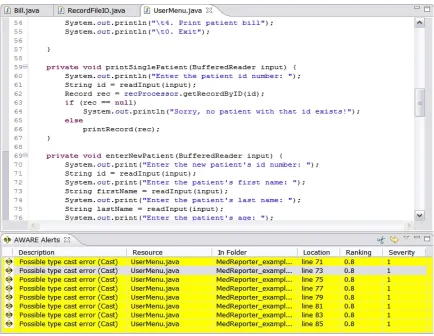
AWARE is a plug-in for the Eclipse IDE that runs third-party AFD tools. AWARE also estimates the severity of a fault and ranks the fault according to the likelihood that it is not a false positive. For a more thorough discussion of AWARE, please see [30]. A screenshot of AWARE can be seen in Figure 1. The AWARE display shows a list of faults initially ordered by true positive probability. Each fault in the list contains the following information in order:
• the folder, class file, and the line number at which the fault was detected in the code • the probability at the fault is a true positive • the severity of the fault from 1-3 with 3 being
the most severe
The version of AWARE used in this study did not incorporate any fault analysis tools, but instead displayed seeded fault notifications at scheduled times.
At the beginning of the study, AWARE’s fault notification was not attracting the attention of the participants. AWARE was changed so that the fault notification window would change from white to
yellow whenever a fault appeared. Six of the 18 subjects participated in the study before this change was made. Some participants still did not notice the fault notification after the change was made due to their engrossment in the programming tasks. We cannot provide a reliable analysis of any systematic difference in the responses of the two groups due to the variability in the responses. Anecdotally, we observe that more participants noticed the fault notifications after the yellow background change, but did not necessarily begin debugging more than the group prior to the interface change.
Figure 1. AWARE in the Eclipse IDE (cropped image)
3.2. Pre-study analysis
To guide our study, we needed to identify some potential factors that may cause a developer to interrupt a working task to address an alert. A literature search yielded little information on this topic, and so we performed a task analysis of developer behavior while using an advanced IDE that
current working context; c) the estimated cost of fixing the fault in terms of time; and d) the potential criticality of the fault as estimated by the system-assigned priority of the fault notification.
3.3. Study participants
Participants were solicited from the North Carolina State University Department of Computer Science through a graduate student mailing list and by posting fliers throughout the computer science building. A $20 gift certificate to a location of the participant’s choice was offered as incentive to participate in the study. The requirements to participate in the study were a working knowledge of Java and object-oriented programming, participation in a 45 minute live study session, and consent to be audio recorded. No experience with AFD tools or IDEs was necessary. All participants completed an online survey to sign up for the study. The online survey collected the participants’ contact information, gender, and times available for the live portion of the study. The survey also collected each participant’s years of programming, Java, IDE, and professional development experience. Participants were also prompted to list any IDEs they may have used. Finally, the survey asked for the study participants’ response on a scale from 1 to 9 in confidence in solving programming problems (1 = not confident, 9 = very confident) and their enjoyment of coding in general (1 = I hate coding, 9 = I love coding). In total, 28 survey responses were collected.
Twenty subjects participated in the study and the other eight missed their appointments. Of the 20 participants, one session was aborted because the participant admitted to having no Java experience, and one session was discarded because of problems with AWARE. Thus, 18 live sessions were used in the study analysis. The programming experience responses of the 18 participants are summarized in Table 1.
Table 1. Subjects counts - years of experience
Programming Java ID
E
Professiona l
Non e
0 0 2 5
0-1 0 6 5 3
1-3 3 5 3 6
3-5 8 4 4 1
5-10 4 3 2 3
>10 3 0 2 0
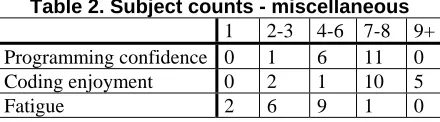
At the beginning of each live session, the participant was asked to rate his or her fatigue at that time on a scale from 1-10 with 1 being rested and 10 being completed exhausted. The fatigue rating, programming confidence and coding enjoyment of the 18 participants is summarized Table 2. This information was used in assigning participants to the different treatments for the experiment, discussed in Section 3.5.
Table 2. Subject counts - miscellaneous
1 2-3 4-6 7-8 9+
Programming confidence 0 1 6 11 0
Coding enjoyment 0 2 1 10 5
Fatigue 2 6 9 1 0
In general, the participant sample was widely distributed over the survey questions, though the sample size was too small to perform a statistical analysis. The limitations in using this sample of participants are discussed in Section 4.5.
3.4. Study programming tasks
The bulk of the live session required the participants to complete four programming tasks while interacting with AWARE. The programming tasks required participants to modify and to add to an existing example program – a simple medical reporting and billing system written by the first author. The example program was designed to be easily comprehended and contained enough classes and functionality (seven classes, 413 LoC) to simulate cognitively complex programming and debugging tasks.
3.5. Study procedure
In the main portion of the study, participants met individually with the investigator (the first author) in a private meeting room to perform programming tasks and discuss alerts. These sessions were comprised of five parts.
3.5.1. Part 1: Introduction. To provide some context to the session, the investigator explained that the purpose of the study was to examine how developers interacted with advanced IDE environments. No further detail was provided. The participants were then given a brief demonstration of Eclipse and AWARE on a research laptop. Study participants were shown a sample program to demonstrate how Eclipse compiles the source code every time a file is saved and displays any resulting compiler errors or warnings. The study participants were then told AWARE works in a similar fashion, but uses different tools to find different types of faults. The subjects were also told that AWARE’s analysis takes more time and runs in the background, so the timing of the alert displays was unpredictable.
3.5.2. Part 2: Familiarization. Since the participants were working on an unfamiliar program and using unfamiliar tools, they were given several familiarization tasks to reduce any learning effects. First, the participants ran the example program and used several of its features, including printing out patient data and entering patient information. Second, the subjects performed an informal code walkthrough of the same features to familiarize them with the general architecture of the example program.
3.5.3. Part 3: Example tasks. Two example
programming tasks (as discussed in Section 3.4) were given to familiarize the participants with the main tasks in Part 4 of the study. The participants were given a written requirement to modify a feature in the example program. The participants were told that they must completely implement the requirement and correct all errors detected by AWARE, but that the ordering of these activities was unimportant. Finally, the participants were instructed to “think out loud” to verbalize their thoughts to the investigator while working on the task. The subjects were told that they will work on the task until it is completed or until stopped by the investigator.
The investigator began audio recording as the subjects commenced on the programming task. The participants were stopped by the investigator approximately one minute after the AWARE fault
notification was displayed. This one minute window allowed the investigator to observe whether or not the subject chose to interrupt the main programming task to address the alert. The investigator also noted the subject’s start time, the time of interruption and any observations about the subject’s behavior at the time of the alert. The participants performed two example programming tasks. Both of the programming tasks in Part 3 were injected with faults that were more trivial to fix than in the Part 4 of the study.
3.5.4.Part 4: Main tasks. This portion of the study involved two programming tasks with differing complexities. The simpler task required finding and changing numerical values in the code, and the more complex task involved making changed to several coupled methods. Again, AWARE displayed a fault notification at a scheduled time during each task and the same procedures were followed as in Part 3.
To reduce the effect of the ordering of the programming tasks, the subjects were divided into two groups that had similar numbers of students with IDE experience and varying degrees of programming experience. One group performed the more complex task first, and the other group performed the simpler task first. However, due to the variability of the subjects’ data, neither the ordering of the programming tasks nor the experience data were used in our analysis.
After the investigator stopped the subjects on the programming task, the participants were asked to explain their rationale for either addressing an alert or ignoring it. The investigator prodded the participants to continue explaining their rationale until they had no more information to share. Some participants commented that they did not notice the alerts at all.
3.5.5. Part 5: Exit interview and debriefing. After the programming portion had been completed, the participants were asked to postulate on any additional factors that might influence their decision to address an alert or not. Participants were asked to think of scenarios where they would stop working on a programming task to address an alert and scenarios where an alert would be deferred until later. After the study, the participants were thanked and given a more detailed explanation of the study’s purpose.
4.
Analysis and findings
pages of information. The transcriptions were then coded by the first author. Coding is the process that categorizes qualitative data into different themes via three steps: open coding, axial coding, and selective coding [32]. Open coding is the process of identifying the categories in the data and the properties of the different categories. Axial coding is used to connect the categories and find their interrelationships. In the last step, selective coding identifies one or two central categories and forms a conceptual framework. Typically, coding should be performed by multiple persons to ensure the reliability of the analysis. Resource constraints prevented more than one person performing the coding, and we accept this limitation since our study is exploratory and designed to help guide future work rather than draw final conclusions.
The coding process yielded 37 distinct themes organized into seven categories dealing with task interruption and fault assessment:
1. Strategies – describe developer behavior as relates to addressing faults
2. Fault assessment criteria – the factors used by developers to determine whether or not to interrupt the primary task to address an alert 3. Interruption points – specifically when in time
the primary task will be interrupted
4. Environment – influences created by the programming environment itself
5. Individual differences – attributes of the developers
6. Perspectives – the impacts of developer understanding of the example program or AWARE tool that influenced interruptions 7. External influences – factors related to the
experimental setup that influenced developer behavior
Once the themes were identified, a count was made of the number of participants who mentioned a particular theme. Those themes which were mentioned by five or more subjects are discussed below. A complete list of all 37 themes grouped by category may be found in Appendix A.
4.1. Fault assessment criteria
The primary purpose of this study was to assess what factors would contribute to a developer interrupting their workflow to address a fault presented during the coding process. The attributes of the fault itself are critical components in the developer’s decision to interrupt. Study participants identified several of these fault assessment criteria.
Nine participants commented that the description of the fault was critical in assessing the importance of a
fault. The fault description contained information about the nature of the fault, such as whether it was a potential null pointer exception, and array index out of bounds, or an uninitialized variable. For example, one subject noted, “the main thing that I’m going to look at is null pointer exceptions … Something should not happen that could cause the entire program to crash – that is what I would look at first.” Speaking on the fault description, another subject observed “I wasn’t using the ranking and severity as much as I was using my own programming experience and instinct in deciding whether to inspect that error or not.”
Nine participants used the ranking and severity of the AWARE fault notifications as part of their fault assessment criteria. When AWARE displayed an alert during a programming task, one subject had the following reaction, “Array index too large – what’s this? Line 10: RecordProcessor.getSize(). I don’t see a reason why… oh, severity is 3, ranking is 0.9. Oh okay, so this could definitely be a problem.” In general, it appeared that the subjects used the fault ranking and severity when they did not assess the importance of the fault from description and personal experience alone. The subjects may also have been primed to look at this information due to the introduction of the AWARE tool earlier in the experiment.
Another important assessment criterion was the
relevance of the fault to the code currently being written. When asked why she addressed an alert immediately, one subject responded, “Well it seemed connected to my problem. I’m losing some data, so I’m trying to figure out – maybe it’s not been initialized here.” Oftentimes, subjects stated that they were quick to dismiss faults that did not seem relevant to their current task. “If it’s something that’s not really relevant to what I’m doing now, I’m going to go back and finish what I was doing,” said one participant. The criteria for assessing the relevance of a fault to the current task varied from subject to subject. Some participants spoke on a high level about related tasks, while others specifically stated that they would address alerts in the current class file.
4.2. Interruption points
Determining when to notify the developer of a fault is of commensurate importance to understanding why
fault, one subject responded, “I wanted to finish what I was doing and then investigate afterwards. I don’t want to lose my current train of thought of what I was working on.”
These statements reflect current theories of mental task management and task switching. When given the choice, people will tend to switch between tasks only at a convenient breaking point between high level mental tasks and not between low level details [10, 23]. One subject remarked, “If I had some logic in my head, maybe an if-statement with a lot of different attributes, different things that I wanted to get out of my head and onto the code, I would have done that before I interrupted.” These observations also go to the heart of our motivation for this study: while fault notifications may be beneficial during development, they should be done with care so as not to impede the mental workflow of programming.
Other subjects more precisely defined their interruption points. Many participants interrupted themselves after completing the current line of code. For some subjects, finishing the line of code was a convenient stopping point. Others wanted to finish the line of code to determine if the alerts were the result of an incomplete piece of code. For example, one subject observed, “I figured I am not done with [the code] yet, so once I might finish, the error might disappear, which happens a lot with Eclipse.”
Other subjects interrupted only between sections of code, which in some cases was an extended version of finishing a line to see if alerts go away: “Instead of fixing the line every time, [fix them] every now and then after just 20 lines or 30 lines. After 30 lines I can fix them and see these are the probable errors.” In other cases, finishing a section of code seemed to coincide with completing a thought. Said one participant, “Let’s say I figure out certain logic, I want to finish that and then see what the problem with it is.”
The variations in where to interrupt the programming task, whether at the end of a line or at the end of a code section, may derive from the complexity of the current programming task. Though the programming tasks were designed with varying complexities to test the importance of primary task complexity, the variability of the data precludes a more rigorous analysis.
4.3. Environment and perspectives
Several themes arose related to the participants’ general interactions with AWARE and Eclipse. These themes are grouped into two categories: Environment and Perspectives. While the themes in these categories do not always directly involve fault
interruption and interaction, the themes do present some important design implications.
Five of the study participants expressed that they needed to trust the fault detection system. Trust was earned in the form of accurate, reliable fault information. Many of the participants had several years of programming and tool experience. This experience led them to distrust some analysis tools because of poor accuracy, and these participants placed higher values on their own assessments of potential faults. According to one subject, “If I used [AWARE] regularly, and I saw this ranking of 1.0… If I did it say, twice, and each time it was 1.0 and it was definitely something that was an error, then I think I would definitely, certainly start looking at this.”
Other subjects were intrinsically interested in AWARE’s fault information because it inspired them “to think of something as potentially an error that I hadn’t thought of when I previously developed.” Both of these perspectives suggest that both developer experience and familiarity with the code may play an important role in the usage of AFD tools.
Another emergent category involved the difficulties some subjects had in interpreting the fault information. Some subjects incorrectly believed that a fault was the cause of something directly related to the code they were typing, when the actual cause of the fault was rooted elsewhere. Six subjects made such mistakes, though the investigator did not reveal these mistakes to them at any point. This mischaracterization of a fault was often the result of developer expectations: the participant was developing code that was incomplete and thus was expecting a fault to be detected. Then, by chance, an alert was displayed referring to a separate portion of the code. The subject then drew the conclusion that the coding and fault were related when in fact they were not. The reverse of this scenario happened four times when participants believed that a fault was not
4.4. Individual differences
The individual differences of the developers have some bearing on the use of the AWARE system. Six of the participants expressly stated that they were very interrupt-driven, and that when something pops up, they tend to address it right away. One subject stated, “Every time I get a new mail icon, I’ll just stop whatever I’m doing to go check. I’m just that type of person.” The same subject later added rationale to the interrupt-driven personality while programming, “I guess any time I see errors or warnings I try to go and address those before I do something new because they might have a ripple effect.” A developer’s proclivity for interruption may make the usage of an AFD system more challenging since they may be more prone to the destructive interference caused by interrupting tasks.
4.5. Study limitations
The primary limitations of this study are external validity limitations concerned with the sample population and the study environment. Limitations regarding the changing of the AWARE environment and the coding procedure have been discussed in Sections 3.1 and 4 respectively.
All 18 subjects were drawn from a student population (though some had professional experience) and thus the results of this study may not generalize to professionals. Similarly, because of the controlled and time-limited nature of the experiment, we could not reproduce the project complexities and environmental factors of the professional workplace. Therefore, the responses of the sample subjects may not reflect the diversity of professional developers in a professional setting. However, since we are using this study to provide conjectures and to form a basis for future study, we do not believe that these limitations significantly diminish our findings.
Some experimental validity concerns arose during the study. With a few of the subjects, a Hawthorne effect may have been present. Since they had been told about the capabilities of AWARE, they purposefully waited for alerts to appear and may have investigated the alerts when they would not have under normal, unobserved programming conditions. Also, some subjects did not notice the alerts until they were asked by the investigator if they observed the alerts. For those subjects who did not initially notice the alerts, a learning effect occurred wherein they noticed the alert on the next task. However, while these subjects did subsequently notice the faults, they
did not necessarily interrupt the primary task to investigate them.
5.
Conjectures
Based on our analysis, we identify several conjectures to guide future quantitative research on the integration of AFD systems with IDEs to reduce fault ignorance time.
Conjecture 1: Fault descriptions should be as informative and precise as possible.
At least half of the subjects used the fault description to assess the importance of the fault and weighed on the decision to interrupt the programming task. Furthermore, some subjects had difficulty in identifying the exact location of a fault because of the imprecise nature of some fault descriptions.
Conjecture 2: System-assigned fault severity should reflect the developer’s perceptions of fault severity.
Developer assessment of fault severity was often subjectively based on the fault description. Developer’s perceptions of fault severity varied between subjects. Therefore, the system-assigned fault severity should be customizable (based on fault type) so that the AFD systems can more accurately estimate a developer’s decision to interrupt a programming task.
Conjecture 3: Fault information should be presented when the fault is relevant to the current programming task.
Creating a mechanism to assess the relevance of a fault to the developer’s current working context will be difficult. However, the relevance of the fault is central to some developer’s decisions to interrupt the programming task. The location of the fault relative to the currently active line of code, coupling between code sections and data and control flow analysis may provide avenues for estimating relevance.
Conjecture 4: The point at which the AFD tool notifies the developer should be customizable by the developer.
statement, while others may only wish to know of certain classes of errors such as null pointers.
Conjecture 5: The developer must trust that the fault information from the AFD tool is accurate and reliable.
If the developer cannot trust the accuracy of the fault information provided by the AFD tool, the utility of the tool will drop significantly and may be ignored entirely. Trusting the accuracy of the tool seems to be particularly important when the developer is not familiar with the code. However, accurately identifying faults can be problematic for tools that employ static analysis, which is known to generate high false positive rates [20]. In AWARE, each detected fault is provided with a probability that the fault is a true positive. Concurrent research on AWARE is investigating techniques to improve the accuracy of the true positive probability. Several subjects believed that some faults were the result of incomplete code. Therefore, deferring fault notifications until a source statement is complete may increase trust in the system.
6.
Conclusion and future work
By leveraging the fault detection power of AFD tools and integrating them with code development, developers can reduce the ignorance time of faults identified by AFD tools and lower the cost-of-fix of these faults. If these tools are to be utilized by developers, they must be of value in terms of both information and usability. Programming is a complex cognitive process, and developers must be notified of fault information carefully to avoid valueless disruption. We performed a controlled case study to better understand how to create an intelligent interface between the developer and AFD tools. Our study revealed several important factors that contribute to a developer’s decision to interrupt a programming task to debug a fault when using AFD tools.
We have provided five conjectures to guide further study on developer switches from programming to debugging tasks. We will use the findings of this study to guide the design and refinement of AWARE’s alert system. We will investigate a means of estimating developer’s fault assessment criteria to create an intelligent system for identifying which faults are of most importance to the developer and observe developer’s actual decision criteria in live use of the system. We will also incorporate customizable notification options and learning algorithms based on developer interactions with AWARE to help refine its facilities. Our ultimate goal is to investigate
empirically the impact on fault fix latency and cost-of-fix when AFD tools are integrated with IDEs to reduce ignorance time.
Acknowledgements
The authors would like to thank the North Carolina State University software engineering RealSearch group for their helpful comments on this paper. This work is supported by the National Science Foundation under the Grant No. 00305917. Any opinions, findings, and conclusions or recommendations expressed in this material are those of the authors and do not necessarily reflect the views of the National Science Foundation.
References
[1] B. Adelson, D. Littman, K. Ehrleich, J. Black, and E. Soloway, "Novice-Expert Differences in Software Design," proceedings of Human-Computer Interaction (INTERACT '84), 1984, pp. 187-192.
[2] A. Allport, "Visual Attention," in Foundations of Cognitive Science, M. I. Posner, Ed. Cambridge, MA: The MIT Press, 1989, pp. 631-682.
[3] J. W. Atkinson, "The Achievement Motive and Recall of Interrupted and Completed Tasks," Journal of Experimental Psychology, vol. 46, 1953, pp. 381-390.
[4] B. P. Bailey, J. A. Konstan, and J. V. Carlis, "The Effects of Interruptions on Task Performance, Annoyance, and Anxiety in the User Interface," proceedings of Human-Computer Interaction (INTERACT 2001), Tokyo, Japan, 2001, pp. 593-601.
[5] B. P. Bailey, J. A. Konstan, and J. V. Carlis, "Measuring the Effects of Interruptions on Task Performance in the User Interface," proceedings of IEEE International Conference on Systems, Man, and Cybernetics 2000 (SMC '00), Nashville, TN, 2000, pp. 757-762.
[6] W. Baziuk, "BNR/NORTEL: Path to improve
product quality, reliability, and customer satisfaction," proceedings of International Symposium on Software Reliability Engineering, Toulouse, France, 1995, pp. 256-262.
[7] B. W. Boehm, Software Engineering Economics,
Prentice-Hall, Inc., Englewood Cliffs, NJ, 1981.
[9] C. Csallner and Y. Smaragdakis, "Check 'n' Crash: Combining Static Checking and Testing," proceedings of International Conference on Software Engineering (ICSE '05), St. Louis, MO, 2005, pp. 422-431.
[10] E. Cutrell, M. Czerwinski, and E. Horvitz, "Notification, Distruption, and Memory: Effectors of Messaging Interruptions on Memory and Performance," proceedings of Human-Computer Interaction (Interact 2001), Tokyo, Japan, 2001, pp. 263-269.
[11] M. B. Edwards and S. D. Gronlund, "Task Interruption and its Effects on Memory," Memory, vol. 6, 1998, pp. 665-687.
[12] T. Gillie and D. Broadbent, "What Makes Interruptions Disruptive? A Study of Length, Similarity, and Complexity?" Psychological Research, vol. 50, 1989, pp. 243-250.
[13] G. Glaser and L. Anselm, The Discovery of Grounded Theory: Strategies for Qualitative Research, Aldine de Gruyter, Chicagom, IL, 1967.
[14] S. Heckman, "AWARE Research Home Page," http://agile.csc.ncsu.edu/aware, accessed January 11, 2007.
[15] E. Horvitz, "Principles of Mixed-Initiative User Interfaces," proceedings of Computer-Human Interaction (CHI '99), Pittsburgh, PA, 1999, pp. 159-166.
[16] E. Horvitz, A. Jacobs, and D. Hovel, "Attention-sensitive Alerting," proceedings of Conference on Uncertainty and Artificial Intelligence (UAI '99), Stockholm, Sweden, 1999, pp.
[17] E. Horvitz, C. Kadie, T. Paek, and D. Hovel, "Models of Attention in Computing and Communication: From Principles to Applications," Communications of the ACM, vol. 46, 2003, pp. 52-59.
[18] D. Hovemeyer and B. Pugh, "Finding Bugs is Easy," ACM SIGPLAN Notices, vol. 39, 2004, pp. 92-106.
[19] W. S. Humphrey, A Discipline for Software Engineering, Addison Wesley, Reading, MA, 1995.
[20] T. Kremenek, K. Ashcraft, J. Yang, and D. Enger, "Correlation Exploitation in Error Ranking," proceedings of International Symposium on Foundations of Software Engineering (ISESE '04), Newport Beach, CA, 2004, pp. 83-93.
[21] D. C. McFarlane, "Comparison of Four Primary Methods for Coordinating the Interruption of People in Human-Computer Interaction," Human-Computer Interaction, vol. 17, 2002, pp. 63-139.
[22] D. C. McFarlane and K. A. Latorella, "The Scope and Importance of Human Interruption in Human-Computer
Interaction Design," Human-Computer Interaction, vol. 17, 2002, pp. 1-61.
[23] Y. Miyata and D. A. Norman, "Psychological Issues in Support of Multiple Activities," in User Centered System Design: New Perspectives on Human-Computer Interaction, D. A. Norman and S. W. Draper, Eds. Hillsdale, NJ: Lawrence Erlbaum Associates, 1986, pp. 267-284.
[24] D. A. Norman, "Categorization of Action Slips," Psychological Review, vol. 88, 1981, pp. 1-15.
[25] D. A. Norman, "Cognitive Engineering," in User Centered System Design: New Perspectives on Human-Computer Interaction, D. A. Norman and S. W. Draper, Eds. Hillsdale, NJ: Lawrence Erlbaum Associates, 1986, pp. 31-61.
[26] D. A. Norman and D. G. Bobrow, "On Data-limited and Resource-Data-limited Processes," Cognitive Psychology, vol. 7, 1975, pp. 44-64.
[27] M. I. Posner and A. F. Konick, "On the Role of Interference in Short-term Retention," Journal of Experimental Psychology, vol. 72, 1966, pp. 221-231.
[28] D. Saff and M. D. Ernst, "An Experimental Evaluation of Continuous Testing during Development," proceedings of International Symposium on Software Testing and Analysis (ISSTA '04), Boston, MA, 2004, pp. 76-85.
[29] D. Saff and M. D. Ernst, "Reducing Wasted Development Time via Continuous Testing," proceedings of International Symposium on Software Reliability
Engineering (ISSRE '04), Denver, CO, 2004, pp. 281-292.
[30] S. E. Smith, L. Williams, and J. Xu, "Expediting Programmer AWAREness of Anomalous Code,"
proceedings of International Symposium on Software Reliability Engineering (ISSRE '05), Chicago, IL, 2005, pp. 4.49-4.50.
[31] C. Speier, J. S. Valacich, and I. Vessey, "The Effects of Task Interruption and Information Presentation on Individual Decision Making," proceedings of International Conference on Information Systems (ICIS '97), Atlanta, GA, 1997, pp. 21-36.
[32] A. L. Strauss and J. M. Corbin, Basics of Qualitative Research: Techniques and Procedures of Developing Grounded Theory, Second ed., Sage Publications, Thousand Oaks, CA, 1998.
Appendix A – Coded themes and
categories
The following table lists all categories (grey background) and themes that emerged from the participant transcriptions. The “#” column signified the number of transcriptions that expressed a theme.
Assessment criteria #
Criticality – the potential impact of a fault 3
Description of the fault 9
Effort required to fix a fault 3
Interrelated – is the fault related to others 2 Is the fault a long standing problem 1 Actively ignore ranking and severity 1
Contemplate ranking or severity 8
Relevance/impact of the fault to the current task 9 Likelihood the fault will be difficult to fix later 3
Environment #
AWARE can be used to guide development 1 Low number of faults makes it easier to focus 1
AWARE may reveal unknown faults 5
Will ignore too many displayed faults 1 Necessary to trust AWARE’s accuracy 5
External influences #
Perceived fault because of overlap with example code
1
Primed to look at the fault window because of familiarization
1
Interruption points #
Interrupt the primary task after finishing a section of code
5
Interrupt between different features 2 Interrupt after finishing a line of code 7 Finish thought before interrupting 5
Personal characteristics #
Code-Compile-Fix mentality 2
Focused solely on the editor and not AWARE 4 Interrupt-driven and will address any popup 5 Focus on AWARE because it is new and unique 1 Desire to fix all errors before they propagate 2
Perspectives #
Could not understand the connection between the fault and the associated code
6
Incorrectly thought that a fault was related to a line or section currently being coded
6
Incorrectly thought that a fault had to do with an unrelated piece of code
4
Strategy #
Interrupt when it will be easy to resume 3 If the root cause of a fault is not apparent, defer until later in hopes that the cause will be revealed
2
Correct the error if it is in the line of code currently being edited
1
Interrupt after line(s) of code are complete since the fault may be resolved upon completion.
6
Defer investigation of the code is unfamiliar 1 Interruption depending on the development goal (writing new code vs. comprehension)
1
Purse a fault persistently if the fault has high criticality
2
Purse a fault persistently if the fault has high rank
1
Correct only errors related to the primary code task and defer unrelated errors
Appendix B – Investigator scripts
Script 1 - Introduction
“Welcome, and thank you for participating. My name is <name and I’m a graduate student and research assistant at NC State. What about you?” <Wait for response>
“Thanks again for volunteering, <name>. The goal of our research is to determine how programmers interact with advanced development environments. Basically, what we will do here today is have you work through some programming problems on the computer and ask you questions about doing so. The whole process will take about 30 minutes.”
“The first thing I would like to do is have you fill out this consent form. It explains what information we are collecting and what we intend to do with it. Please read it through and let me know if you have any questions.”
<Wait for completion of the consent form.>
“Okay, thank you. Now let’s go ahead and get started. First, I would like to ask you to rate your level of tiredness or fatigue on a scale from 1 to 10, with 1 being normal, rested self and 10 being completely exhausted.
Script 2 – Familiarization with tasks and Eclipse
“Okay, let’s get started then. First, let me ask, have you ever worked with an IDE such as Eclipse or Visual Studio? <Wait for answer> Respond with either “Okay, I will ask you to write down how much experience you have with <IDE> now,” or “Okay, let me show you Eclipse, which is one such IDE.”
<The subject will be shown the Eclipse IDE, which will be running on the researcher’s laptop. The IDE will have the first familiarization task already open on it.>
“This is Eclipse. [As you already know,] here is where you write your Java code. There is a navigation pane through the Java file system on the left, and an outline of your current class on the left. The panel at the bottom tells you if Eclipse has detected any errors in your code. As you can see, a few exist in this project. You can compile the project by clicking the Run button at the top.”
“As you can see, Eclipse has highlighted a few lines of this program because it has detected syntax errors and compiler warnings. In the code it works much like Microsoft Word’s spellchecker by underlining errors it finds. If you look at the Problems View window at the bottom, Eclipse will give you a more complete description of what it thinks the error is. All that Eclipse can detect are compiler errors and compiler warnings, so that’s what you see here. Please go ahead and fix those errors. So now, the alerts at the bottom have gone away since you’ve fixed them. Eclipse is compiling as you go so it can right away tell if the problem is fixed or not. Does that all make sense? Do you have any questions?”
<Wait for response>
“So what our research is about is extending that functionality. Eclipse can tell you compiler warnings, but there are all sorts of bugs that can occur that a compiler cannot detect. Buffer overruns, security errors, incorrect processing. What we are trying to do in our research is tie in a wider variety of error detection to tell you about problems while you’re coding. There are a variety of tools out there that can look at whole different classes of bugs. Let me show you what I mean.”
“This version of Eclipse has functionality added to it that we wrote. We named this functionality AWARE. This is the same program that you were just looking at, but now you can see there are more errors detected. The errors at the bottom have different symbols next to them which means that our program, AWARE, detected them. There is also some information there about how severe we think the error is and how confident we are that the error actually exists. The main problem with the programs that search for errors is that they tend to turn up a lot of false positives, so we are trying to help the programmer out by telling him/her whether or not we think that it’s really an error or not. Any questions about what’s going on there?”
<Wait for response>
“Okay, go ahead and click on one of the alerts. As you can see, it jumps you through the code. We’re now in another class file. AWARE has placed the cursor at the line where the error was detected, just like when you clicked on the compiler error. Go ahead and see if you can fix the error.”
<Pause>
“Right now, since this is a prototype, if you fix the error, the alert won’t go away. But at least you know where it thinks the error is. Okay, the last thing that you need to know about AWARE is that it’s not as fast as the Eclipse compiler by itself. So it takes a few minutes to run sometimes to do all of the analysis in the background. It’s hard to say exactly when AWARE will tell you that it has detected errors, but they will eventually pop-up down in the Problems View. Those are the basics. Do you have any questions about AWARE or how it works?”
Script 3 – Black box tasks
Most of what we’ll be doing is having you work on an example program in Eclipse. First thing that we will do is show you about the example program you’ll be working with and the basics of what it does. The idea is that it is a Medical Reporter program. Imagine that you’re working at a hospital. This simple program prints out patient records and calculates their bills. Every patient has a unique patient number assigned to them. Their patient records contain a variety of information. The amount they’re charged for visiting the hospital depends on what they’re there for and how long they’ve stayed. This is just a simple example program, and isn’t meant to be extremely robust. It should work pretty well, but might not handle unexpected input very well.
Let’s go through a few simple tasks first.
First, try printing out all of the patients in the system. You can see what’s in a patient record there, and how some of them have different types of status. Okay, now pick one of the patients and note their patient number.
Okay, second, try printing out just the patient record for the patient you selected.
Now, try looking up that patient’s bill.
Finally, go ahead and enter new a new patient. Remember what number you enter. So for status, you can enter either ICU, OVERNIGHT, ROUTINE, or SURGERY.
All right, now look up that patient’s info, or print them all out and see if your patient is there.
Okay, any questions about what the example program does?
Script 4 – Walkthrough
The next thing that we’ll do is try and familiarize you with the code structure of the example program a little bit. What I would like you to do is trace the flow of events through the code for some of the tasks just to get a feel for the system and where the functionality is located. You don’t need to worry about memorizing every line of code and there won’t be a quiz, but you will be adding and modifying some of the functionality, so I want you to have an idea of how the functionality is laid out so you don’t have to spend a ton of time searching for things later.
<Open up Eclipse and show the clean code>
Here is the code. Here’s what I would like you to do: just trace the way the order that a request is processed through the system. Trace the flow of information, if you will, and talk your way through the code. So let’s start with the UserMenu. Say that the user want’s to print out all patients. Here is the loop where it is listening for the user to enter input. If they select the one to print all patients, it calls this function. Then this function calls this function, etc. Now I’ll ask you to go ahead and complete the function call chain to complete the request. Feel free to ask me if you have any general questions, but try to follow the functions by yourself.
Now try tracing through the code for creating a new patient.
Finally, try tracing through the code for printing out a patient’s bill.
Script 5 – Preliminary tasks
Okay, now onto some programming tasks. We’re going to change it up here a little, and this is also where we’ll start recording. I’m going to give you a short problem statement/requirements specification for you to add or modify something in the medical reporter system. AWARE will also be running in the background working on its analysis. Your goal will be to implement the requirement and also to correct any and all errors that AWARE detects. While you’re working, I want you to talk out loud and tell me what you’re thinking as you go through the code. I’d just like to hear your thoughts, what sort of things you’re thinking about, why you’re doing this and that. The experiment isn’t about how well you program or how quickly you work through the problems or anything like that. Understanding what you’re thinking is at the crux of the study, so it’s really important that you keep thinking out loud and talking to me.
Feel free to ask me technical questions if something goes wrong with AWARE or Eclipse, but I can’t help you work on the problem. You have a pen and some papers here if you need to scratch anything down, and I have a web browser open to the Java API. Feel free to take advantage of any Eclipse features you know about. Other than that, I’ll ask you not to use anything else on the web to help you work on the problem.
At some point, I will stop you and we’ll move on. If I haven’t stopped you, and you believe that you’ve completed the problem, just let me know.
Do you have any questions?
<Wait for response>
Okay, here is the requirement. Read that and let me know if you have any questions while I get Eclipse ready.
<Wait until subject is finished reading the requirement>
Do you have any more questions about the problem? Okay, here we go.
<Start timer and hand over Eclipse. Remember to note times and what the subject is doing when interrupted and what their reaction is. Time is limited to five minutes.>
Great, okay, let’s move on. Now we’re going to do the same thing again. Solve a different problem, think out loud, and correct any errors that show up.
Script 6 – Main tasks
All right, let’s move on to some more programming tasks. Same thing as before, solve the task, fix any errors, and talk out loud. Ready?
<Wait for response>
Okay, here you go.
<Start timer and hand over Eclipse. Remember to note times and what the subject is doing when interrupted and what their reaction is. Time is limited to five minutes/15 minutes. Stop after one minute.>
Script 7 - Exit Interview
Great, well that’s all I have for the programming tasks.
Now, let me ask, if you’re in that scenario where you’re programming and then you get some information at the bottom that says something is broken, can you think of anything else that might affect your decision on whether to address it or not. You mentioned a few things… can you think of anything else, maybe having to do with the code, or your environment…. Anything at all that might make a difference?
<Listen, react, prod>
Appendix C – Programming task requirements
Example task 1 – Record Display Format
The staff using the MedReporter system are not satisfied with the way that patient records are displayed. They want the patients’ general information to be in one column and their vitals in another. They want all patient records to appear like this:
Patient ID: xxx Age: xxx
Check in time: xxx Heart rate: xxx
First name: xxx Respirations: xxx
Last name: xxx Blood pressure: xxx
Status: xxx
Furthermore, they would like you to add a Health Index statistic below the Blood pressure information. The Health Index is computed as (Heart rate + Respirations) / Age.
Example task 2 – Height and Weight
Main programming task A – Account Changes
A new multibillion dollar conglomerate has taken over the hospital where the MedReporter is being used. They didn’t get to be multibillionaires by being cheap, and they think that it’s time to up the prices of the hospital’s services. Consequently, all of the accounting prices have to be modified. Currently, the bills are based on a service fee ($25) that is multiplied by a factor depending on whether a patient is there for a routine visit, surgery, in the Intensive Care Unit, or is just staying overnight. The new conglomerate thinks that the factors are not big enough. Now, they want to charge all of the factors as follows:
• Surgery patients are charged 10x the service fee. • ICU patients are charged 8x the service fee. • Overnight patients are charged 5x the service fee. • There is no change to routine patients.
Additionally, they want to add a new status for patients called SPECIAL_CARE. Special care patients must pay 20x the normal service fee.
Furthermore, the consulting fee for visiting the hospital needs to be increased to $150.
Main programming task B – Fixing Bugs and Changing Data Format
Due to some shoddy testing, a few bugs have escaped into the MedReporter system and these need to be fixed as soon as possible.
The system now reads and prints heights and weights from medical records, but it doesn’t save them. When you create a new patient in the system, there is no option for the staff to enter the height and weight information. Furthermore, whenever you create a new patient, the height and weight information for ALL patients is lost. Fortunately, we have a copy of the records (Copy of records.txt). These bugs need to be fixed right away.
Additionally, one of the more high-strung project managers seems to think that the records file is not organized very well. Change the order of the information in the data file such that each line appears like this:
<ID>, <Last Name>, <First Name>, <Status Code>, <Check-in Time>, <Age>, <Height>, <Weight>, <Blood Pressure>, <Heart Rate>, <Respirations>