Corporate Headquarters
Cisco Systems, Inc. 170 West Tasman Drive San Jose, CA 95134-1706 USA
http://www.cisco.com Tel: 408 526-4000
800 553-NETS (6387) Fax: 408 526-4100
THE SPECIFICATIONS AND INFORMATION REGARDING THE PRODUCTS IN THIS MANUAL ARE SUBJECT TO CHANGE WITHOUT NOTICE. ALL STATEMENTS, INFORMATION, AND RECOMMENDATIONS IN THIS MANUAL ARE BELIEVED TO BE ACCURATE BUT ARE PRESENTED WITHOUT WARRANTY OF ANY KIND, EXPRESS OR IMPLIED. USERS MUST TAKE FULL RESPONSIBILITY FOR THEIR APPLICATION OF ANY PRODUCTS. THE SOFTWARE LICENSE AND LIMITED WARRANTY FOR THE ACCOMPANYING PRODUCT ARE SET FORTH IN THE INFORMATION PACKET THAT SHIPPED WITH THE PRODUCT AND ARE INCORPORATED HEREIN BY THIS REFERENCE. IF YOU ARE UNABLE TO LOCATE THE SOFTWARE LICENSE OR LIMITED WARRANTY, CONTACT YOUR CISCO REPRESENTATIVE FOR A COPY.
The Cisco implementation of TCP header compression is an adaptation of a program developed by the University of California, Berkeley (UCB) as part of UCB’s public domain version of the UNIX operating system. All rights reserved. Copyright © 1981, Regents of the University of California.
NOTWITHSTANDING ANY OTHER WARRANTY HEREIN, ALL DOCUMENT FILES AND SOFTWARE OF THESE SUPPLIERS ARE PROVIDED “AS IS” WITH ALL FAULTS. CISCO AND THE ABOVE-NAMED SUPPLIERS DISCLAIM ALL WARRANTIES, EXPRESSED OR IMPLIED, INCLUDING, WITHOUT
LIMITATION, THOSE OF MERCHANTABILITY, FITNESS FOR A PARTICULAR PURPOSE AND NONINFRINGEMENT OR ARISING FROM A COURSE OF DEALING, USAGE, OR TRADE PRACTICE.
IN NO EVENT SHALL CISCO OR ITS SUPPLIERS BE LIABLE FOR ANY INDIRECT, SPECIAL, CONSEQUENTIAL, OR INCIDENTAL DAMAGES, INCLUDING, WITHOUT LIMITATION, LOST PROFITS OR LOSS OR DAMAGE TO DATA ARISING OUT OF THE USE OR INABILITY TO USE THIS MANUAL, EVEN IF CISCO OR ITS SUPPLIERS HAVE BEEN ADVISED OF THE POSSIBILITY OF SUCH DAMAGES.
Catalyst 6500 Series and Cisco 7600 Series Switch Firewall Services Module Command Reference, 3.1
Copyright © 2006 Cisco Systems, Inc. All rights reserved.
CCSP, CCVP, the Cisco Square Bridge logo, Follow Me Browsing, and StackWise are trademarks of Cisco Systems, Inc.; Changing the Way We Work, Live, Play, and Learn, and iQuick Study are service marks of Cisco Systems, Inc.; and Access Registrar, Aironet, BPX, Catalyst, CCDA, CCDP, CCIE, CCIP, CCNA, CCNP, Cisco, the Cisco Certified Internetwork Expert logo, Cisco IOS, Cisco Press, Cisco Systems, Cisco Systems Capital, the Cisco Systems logo, Cisco Unity, Enterprise/Solver, EtherChannel, EtherFast, EtherSwitch, Fast Step, FormShare, GigaDrive, GigaStack, HomeLink, Internet Quotient, IOS, IP/TV, iQ Expertise, the iQ logo, iQ Net Readiness Scorecard, LightStream, Linksys, MeetingPlace, MGX, the Networkers logo, Networking Academy, Network Registrar, Packet, PIX, Post-Routing, Pre-Routing, ProConnect, RateMUX, ScriptShare, SlideCast, SMARTnet, The Fastest Way to Increase Your Internet Quotient, and TransPath are registered trademarks of Cisco Systems, Inc. and/or its affiliates in the United States and certain other countries.
C O N T E N T S
About This Guide
xxxiiiUsing the Command-Line Interface
1- 1aaa accounting through accounting-server-group Commands
2 - 1aaa accounting
2 - 2aaa accounting command
2 - 5aaa accounting console
2 - 7aaa accounting match
2 - 9aaa authentication
2 - 11aaa authentication console
2 - 17aaa authentication match
2 - 22aaa authentication secure-http-client
2 - 24aaa authorization
2 - 26aaa authorization command
2 - 30aaa authorization match
2 - 32aaa local authentication attempts max-fail
2 - 34aaa mac-exempt
2 - 36aaa proxy-limit
2 - 37aaa-server host
2 - 39aaa-server protocol
2 - 42absolute
2 - 44accept-subordinates
2 - 46access-group
2 - 48access-list alert-interval
2 - 50access-list commit
2 - 52access-list deny-flow-max
2 - 54access-list ethertype
2 - 56access-list extended
2 - 58access-list mode
2 - 63access-list remark
2 - 67access-list standard
2 - 69Contents
accounting-port
2 - 73accounting-server-group
2 - 75activation-key through auto-update timeout Commands
3 - 1activation-key
3 - 2address-pool
3 - 3admin-context
3 - 5alias
3 - 7allocate-acl-partition
3 - 10allocate-interface
3 - 12area
3 - 15area authentication
3 - 17area default-cost
3 - 19area filter-list prefix
3 - 21area nssa
3 - 23area range
3 - 25area stub
3 - 27area virtual-link
3 - 29arp
3 - 32arp timeout
3 - 34arp-inspection
3 - 35asdm disconnect
3 - 37asdm disconnect log_session
3 - 39asdm group
3 - 41asdm history enable
3 - 42asdm location
3 - 43asr-group
3 - 44authentication-port
3 - 46authentication-server-group
3 - 48authorization-dn-attributes
3 - 50authorization-required
3 - 52authorization-server-group
3 - 54auth-prompt
3 - 56auto-update device-id
3 - 58Contents
auto-update timeout
3 - 64backup-servers through bridge-group Commands
4 - 1backup-servers
4 - 2banner
4 - 4banner (group-policy)
4 - 6blocks
4 - 7bridge-group
4 - 9cache-time through clear capture Commands
5 - 1cache-time
5 - 2call-agent
5 - 3capture
5 - 5cd
5 - 8certificate
5 - 9chain
5 - 11changeto
5 - 13checkheaps
5 - 15check-retransmission
5 - 17checksum-verification
5 - 19class
5 - 21class (policy-map)
5 - 23class-map
5 - 25clear aaa local user fail-attempts
5 - 27clear aaa local user lockout
5 - 29clear aaa-server statistics
5 - 31clear access-group
5 - 33clear access-list
5 - 34clear arp
5 - 35clear asp drop
5 - 36clear blocks
5 - 38clear capture
5 - 39clear configure through clear configure virtual Commands
6 - 1clear configure
6 - 2clear configure aaa
6 - 4Contents
clear configure access-group
6 - 7clear configure access-list
6 - 8clear configure alias
6 - 9clear configure arp
6 - 10clear configure arp-inspection
6 - 11clear configure asdm
6 - 12clear configure auth-prompt
6 - 14clear configure auto-update
6 - 15clear configure banner
6 - 16clear configure ca certificate map
6 - 17clear configure class
6 - 18clear configure class-map
6 - 19clear configure command-alias
6 - 20clear configure console
6 - 21clear configure context
6 - 22clear configure crypto
6 - 24clear configure crypto ca trustpoint
6 - 25clear configure crypto dynamic-map
6 - 26clear configure crypto map
6 - 27clear configure dhcpd
6 - 28clear configure dhcprelay
6 - 29clear configure dns
6 - 29clear configure established
6 - 31clear configure failover
6 - 32clear configure filter
6 - 33clear configure firewall
6 - 34clear configure fixup
6 - 35clear configure fragment
6 - 36clear configure ftp
6 - 38clear configure ftp-map
6 - 39clear configure global
6 - 40clear configure group-policy
6 - 41clear configure gtp-map
6 - 42clear configure hostname
6 - 43Contents
clear configure http-map
6 - 45clear configure icmp
6 - 46clear configure interface
6 - 47clear configure interface bvi
6 - 49clear configure ip
6 - 50clear configure ip local pool
6 - 51clear configure ip verify reverse-path
6 - 52clear configure ipv6
6 - 53clear configure isakmp
6 - 54clear configure isakmp policy
6 - 55clear configure logging
6 - 56clear configure mac-address-table
6 - 58clear configure mac-learn
6 - 59clear configure mac-list
6 - 60clear configure management-access
6 - 61clear configure mgcp-map
6 - 62clear configure monitor-interface
6 - 63clear configure mroute
6 - 64clear configure mtu
6 - 65clear configure multicast-routing
6 - 66clear configure name
6 - 67clear configure nat
6 - 68clear configure object-group
6 - 69clear configure passwd
6 - 70clear configure pim
6 - 70clear configure policy-map
6 - 72clear configure prefix-list
6 - 73clear configure privilege
6 - 74clear configure rip
6 - 75clear configure route
6 - 76clear configure route-map
6 - 77clear configure router
6 - 78clear configure service-policy
6 - 79clear configure snmp-map
6 - 80Contents
clear configure ssh
6 - 82clear configure static
6 - 83clear configure sunrpc-server
6 - 84clear configure sysopt
6 - 85clear configure telnet
6 - 86clear configure terminal
6 - 87clear configure timeout
6 - 88clear configure tunnel-group
6 - 89clear configure url-block
6 - 90clear configure url-cache
6 - 91clear configure url-server
6 - 92clear configure username
6 - 93clear configure virtual
6 - 94clear console-output through clear xlate Commands
7 - 1clear console-output
7 - 2clear counters
7 - 3clear crashinfo
7 - 4clear crypto accelerator statistics
7 - 5clear crypto ca crls
7 - 6clear crypto protocol statistics
7 - 7clear dhcprelay statistics
7 - 9clear dns-hosts cache
7 - 10clear failover statistics
7 - 11clear fragment
7 - 12clear gc
7 - 14clear igmp counters
7 - 15clear igmp group
7 - 16clear igmp traffic
7 - 17clear interface
7 - 18clear ip verify statistics
7 - 20clear ipsec sa
7 - 21clear ipv6 access-list counters
7 - 22clear ipv6 neighbors
7 - 23Contents
clear local-host
7 - 27clear logging asdm
7 - 29clear logging buffer
7 - 30clear mac-address-table
7 - 31clear memory profile
7 - 32clear mfib counters
7 - 33clear ospf
7 - 34clear pim counters
7 - 36clear pim reset
7 - 37clear pim topology
7 - 38clear prompt
7 - 39clear resource usage
7 - 41clear route
7 - 43clear service-policy
7 - 44clear service-policy inspect gtp
7 - 46clear shun
7 - 48clear sunrpc-server active
7 - 49clear traffic
7 - 50clear uauth
7 - 51clear url-block block statistics
7 - 53clear url-cache statistics
7 - 55clear url-server
7 - 57clear xlate
7 - 58client-access-rule through crl-configure Commands
8 - 1client-access-rule
8 - 2client-firewall
8 - 4client-update
8 - 6command-alias
8 - 8command-queue
8 - 10compatible rfc1583
8 - 12configure http
8 - 13configure memory
8 - 15configure net
8 - 17configure terminal
8 - 19Contents
console timeout
8 - 23content-length
8 - 24content-type-verification
8 - 26context
8 - 28copy
8 - 30copy capture
8 - 32crashinfo force
8 - 34crashinfo save disable
8 - 36crashinfo test
8 - 37crl
8 - 38crl configure
8 - 39crypto ca authenticate through crypto map set trustpoint Commands
9 - 1crypto ca authenticate
9 - 2crypto ca certificate chain
9 - 4crypto ca certificate map
9 - 5crypto ca crl request
9 - 7crypto ca enroll
9 - 8crypto ca export
9 - 10crypto ca import
9 - 12crypto ca trustpoint
9 - 14crypto dynamic-map match address
9 - 16crypto dynamic-map set peer
9 - 17crypto dynamic-map set pfs
9 - 18crypto dynamic-map set reverse route
9 - 20crypto dynamic-map set security-association lifetime
9 - 21crypto dynamic-map set transform-set
9 - 23crypto ipsec df-bit
9 - 25crypto ipsec fragmentation
9 - 27crypto ipsec security-association lifetime
9 - 29crypto ipsec transform-set
9 - 31crypto key generate dsa
9 - 34crypto key generate rsa
9 - 36crypto key zeroize
9 - 38Contents
crypto map match address
9 - 43crypto map set connection-type
9 - 45crypto map set peer
9 - 47crypto map set pfs
9 - 49crypto map set phase1 mode
9 - 51crypto map set reverse-route
9 - 53crypto map set security-association lifetime
9 - 54crypto map set transform-set
9 - 56crypto map set trustpoint
9 - 58debug aaa through debug sip Commands
10 - 1debug aaa
10 - 2debug appfw
10 - 4debug arp
10 - 5debug arp-inspection
10 - 6debug asdm history
10 - 7debug context
10 - 8debug control-plane
10 - 10debug crypto ca
10 - 12debug crypto ipsec
10 - 14debug crypto isakmp
10 - 15debug crypto isakmp
10 - 17debug ctiqbe
10 - 19debug ctm
10 - 21debug dhcpc
10 - 23debug dhcpd
10 - 25debug dhcprelay
10 - 27debug disk
10 - 29debug dns
10 - 31debug entity
10 - 32debug fixup
10 - 34debug fover
10 - 36debug fsm
10 - 38debug ftp client
10 - 40debug generic
10 - 42Contents
debug h323
10 - 46debug http
10 - 48debug http-map
10 - 49debug icmp
10 - 50debug igmp
10 - 52debug ils
10 - 54debug imagemgr
10 - 56debug ipsec-over-tcp
10 - 58debug ipv6
10 - 60debug iua-proxy
10 - 62debug kerberos
10 - 64debug ldap
10 - 66debug mac-address-table
10 - 68debug menu
10 - 70debug mfib
10 - 71debug mgcp
10 - 73debug mrib
10 - 74debug ntdomain
10 - 76debug ospf
10 - 78debug parser cache
10 - 80debug pim
10 - 82debug pix acl
10 - 84debug pix cls
10 - 85debug pix pkt2pc
10 - 86debug pix process
10 - 87debug pix uauth
10 - 88debug pptp
10 - 89debug radius
10 - 91debug rip
10 - 94debug rtsp
10 - 96debug sdi
10 - 98debug sequence
10 - 100debug skinny
10 - 102debug smtp
10 - 104Contents
debug ssh
10 - 108debug sunrpc
10 - 110debug tacacs
10 - 112debug tcp-map
10 - 114debug timestamps
10 - 116debug vpn-sessiondb
10 - 118debug xdmcp
10 - 120debug sip
10 - 122default through drop Commands
11 - 1default (crl configure)
11 - 2default (crl configure)
11 - 3default (time-range)
11 - 4default-domain
11 - 6default enrollment
11 - 8default-group-policy
11 - 9default-information originate
11 - 11delete
11 - 13deny-request-cmd
11 - 14dhcpd dns
11 - 16dhcpd domain
11 - 18dhcpd enable
11 - 20dhcpd lease
11 - 22dhcpd option
11 - 24dhcpd ping-timeout
11 - 27dhcpd wins
11 - 29dhcp-network-scope
11 - 31dhcprelay enable
11 - 32dhcprelay server
11 - 34dhcprelay setroute
11 - 36dhcprelay enable
11 - 38dhcp-server
11 - 40dir
11 - 42disable
11 - 44distance ospf
11 - 45Contents
dns name-server
11 - 49dns retries
11 - 51description
11 - 52dns-server
11 - 54dns timeout
11 - 55domain-name
11 - 56drop
11 - 58email through ftp-map Commands
12 - 1enable
12 - 3enable password
12 - 5endpoint
12 - 7enforcenextupdate
12 - 9enrollment retry count
12 - 10enrollment retry period
12 - 12enrollment terminal
12 - 13enrollment url
12 - 14erase
12 - 15established
12 - 16exit
12 - 19failover
12 - 21failover active
12 - 23failover group
12 - 24failover interface ip
12 - 26failover interface-policy
12 - 28failover key
12 - 30failover lan interface
12 - 32failover lan unit
12 - 34failover link
12 - 36failover polltime
12 - 38failover reload-standby
12 - 40failover replication http
12 - 41failover reset
12 - 43Contents
filter ftp
12 - 48filter https
12 - 50filter java
12 - 52filter url
12 - 54firewall transparent
12 - 58format
12 - 60fqdn
12 - 61fragment
12 - 62ftp mode passive
12 - 64ftp-map
12 - 66gateway through http-map Commands
13 - 1gateway
13 - 2global
13 - 4group-delimiter
13 - 7group-lock
13 - 8group-object
13 - 9group-policy
13 - 11group-policy attributes
13 - 14h225-map
13 - 16help
13 - 18hostname
13 - 20hsi
13 - 22hsi-group
13 - 24hsi-group
13 - 26http
13 - 28http authentication-certificate
13 - 30http redirect
13 - 32http server enable
13 - 34http-map
13 - 35icmp through ignore lsa mospf Commands
14 - 1icmp
14 - 2icmp-object
14 - 5id-cert-issuer
14 - 7igmp
14 - 9Contents
igmp forward interface
14 - 11igmp join-group
14 - 12igmp limit
14 - 13igmp query-interval
14 - 14igmp query-max-response-time
14 - 16igmp query-timeout
14 - 17igmp static-group
14 - 18igmp version
14 - 19ignore lsa mospf
14 - 20inspect ctiqbe through inspect xdmcp Commands
15 - 1inspect ctiqbe
15 - 2inspect dns
15 - 4inspect esmtp
15 - 7inspect ftp
15 - 10inspect gtp
15 - 13inspect h323
15 - 15inspect http
15 - 19inspect icmp
15 - 22inspect icmp error
15 - 24inspect ils
15 - 26inspect mgcp
15 - 28inspect netbios
15 - 31inspect pptp
15 - 33inspect rsh
15 - 35inspect rtsp
15 - 37inspect sip
15 - 40inspect skinny
15 - 43inspect smtp
15 - 46inspect snmp
15 - 48inspect sqlnet
15 - 50inspect sunrpc
15 - 52inspect tftp
15 - 54inspect xdmcp
15 - 56Contents
interface bvi
16 - 4interface-policy
16 - 6‘ip address
16 - 8ip-address
16 - 10ip-address-privacy
16 - 11ip local pool
16 - 13ip verify reverse-path
16 - 15ip-comp
16 - 17ip-phone-bypass
16 - 18ipsec-udp
16 - 19ipsec-udp-port
16 - 21ipv6 access-list
16 - 22ipv6 access-list remark
16 - 26ipv6 address
16 - 28ipv6 enable
16 - 30ipv6 icmp
16 - 31ipv6 nd dad attempts
16 - 34ipv6 nd ns-interval
16 - 36ipv6 nd prefix
16 - 37ipv6 nd ra-interval
16 - 39ipv6 nd ra-lifetime
16 - 41ipv6 nd reachable-time
16 - 43ipv6 nd suppress-ra
16 - 44ipv6 neighbor
16 - 45ipv6 route
16 - 47isakmp am-disable
16 - 49isakmp disconnect-notify
16 - 50isakmp enable
16 - 51isakmp identity
16 - 52isakmp keepalive
16 - 53isakmp policy authentication
16 - 55isakmp policy encryption
16 - 57isakmp policy group
16 - 59isakmp policy hash
16 - 61Contents
isakmp reload-wait
16 - 65issuer-name
16 - 66join-failover-group through kill Commands
17 - 1join-failover-group
17 - 2kerberos-realm
17 - 4key
17 - 6keypair
17 - 8kill
17 - 9ldap-base-dn through log-adj-changes Commands
18 - 1ldap-base-dn
18 - 2ldap-defaults
18 - 4ldap-dn
18 - 5ldap-login-dn
18 - 7ldap-login-password
18 - 9ldap-naming-attribute
18 - 11ldap-scope
18 - 13leap-bypass
18 - 15limit-resource
18 - 17log-adj-changes
18 - 20logging asdm through logout Commands
19 - 1logging asdm
19 - 2logging asdm-buffer-size
19 - 4logging buffered
19 - 6logging buffer-size
19 - 8logging class
19 - 10logging console
19 - 13logging debug-trace
19 - 15logging device-id
19 - 17logging emblem
19 - 19logging enable
19 - 21logging facility
19 - 23logging flash-bufferwrap
19 - 25logging flash-maximum-allocation
19 - 27Contents
logging from-address
19 - 31logging ftp-bufferwrap
19 - 33logging ftp-server
19 - 35logging history
19 - 37logging host
19 - 39logging list
19 - 41logging mail
19 - 44logging message
19 - 46logging monitor
19 - 48logging permit-hostdown
19 - 50logging queue
19 - 52logging recipient-address
19 - 54logging savelog
19 - 56logging standby
19 - 58logging timestamp
19 - 60logging trap
19 - 61login
19 - 63logout
19 - 65mac-address-table aging-time through multicast-routing Commands
20 - 1mac-address-table aging-time
20 - 2mac-address-table static
20 - 3mac-learn
20 - 5mac-list
20 - 7management-access
20 - 9mask-syst-reply
20 - 11match access-list
20 - 12match any
20 - 14match default-inspection-traffic
20 - 16match dscp
20 - 18match interface
20 - 20match ip address
20 - 22match ip next-hop
20 - 24match ip route-source
20 - 26match metric
20 - 28Contents
match precedence
20 - 32match route-type
20 - 34match rtp
20 - 36max-failed-attempts
20 - 38max-header-length
20 - 40max-uri-length
20 - 42mcc
20 - 44member
20 - 46memory caller-address
20 - 48memory profile enable
20 - 50memory profile text
20 - 51message-length
20 - 53mgcp-map
20 - 55mkdir
20 - 57mode
20 - 58monitor-interface
20 - 61more
20 - 63mroute
20 - 65mtu
20 - 67multicast-routing
20 - 69name through ospf transmit-delay Commands
21 - 1name
21 - 2nameif
21 - 4names
21 - 6nat
21 - 7nat-control
21 - 13neighbor
21 - 15nem
21 - 17network area
21 - 18network-object
21 - 20nt-auth-domain-controller
21 - 22object-group
21 - 24ospf authentication
21 - 29Contents
ospf database-filter all out
21 - 34ospf dead-interval
21 - 35ospf hello-interval
21 - 36ospf message-digest-key
21 - 37ospf mtu-ignore
21 - 39ospf network point-to-point non-broadcast
21 - 40ospf priority
21 - 42ospf retransmit-interval
21 - 43ospf transmit-delay
21 - 44pager through pwd Commands
22 - 1pager
22 - 2passwd
22 - 4password (crypto ca trustpoint)
22 - 6password-storage
22 - 8peer-id-validate
22 - 9perfmon
22 - 11perfmon interval
22 - 13perfmon settings
22 - 14periodic
22 - 15permit errors
22 - 17pfs
22 - 19pim
22 - 20pim accept-register
22 - 21pim dr-priority
22 - 22pim hello-interval
22 - 23pim join-prune-interval
22 - 24pim old-register-checksum
22 - 25pim rp-address
22 - 26pim spt-threshold infinity
22 - 28ping
22 - 29policy
22 - 31policy-map
22 - 33polltime interface
22 - 35port-misuse
22 - 37Contents
preempt
22 - 42prefix-list
22 - 44prefix-list description
22 - 47prefix-list sequence-number
22 - 49pre-shared-key
22 - 50primary
22 - 51privilege
22 - 53prompt
22 - 55protocol http
22 - 57protocol ldap
22 - 59protocol-object
22 - 60protocol scep
22 - 62pwd
22 - 63queue-limit through router-id Commands
23 - 1queue-limit
23 - 2quit
23 - 4radius-common-pw
23 - 6radius-with-expiry
23 - 8reactivation-mode
23 - 9redistribute
23 - 11reload
23 - 13remote-access threshold session-threshold-exceeded
23 - 16rename
23 - 17replication http
23 - 19request-command deny
23 - 21request-method
23 - 23request-queue
23 - 26resource acl-partition
23 - 28retry-interval
23 - 30re-xauth
23 - 32rip
23 - 34rmdir
23 - 37route
23 - 38Contents
router-id
23 - 44same-security-traffic through show asdmsessions Commands
24 - 1same-security-traffic
24 - 2sdi-pre-5-slave
24 - 4sdi-version
24 - 6secure-unit-authentication
24 - 8security-level
24 - 10serial-number
24 - 12server-port
24 - 13service resetinbound
24 - 15service-policy
24 - 17set connection
24 - 19set connection timeout
24 - 21set metric
24 - 23set metric
24 - 25setup
24 - 27show aaa local user
24 - 29show access-list
24 - 31show activation-key
24 - 33show admin-context
24 - 35show arp
24 - 36show arp-inspection
24 - 37show arp statistics
24 - 38show asdm history
24 - 40show asdm sessions
24 - 47show asp drop through show curpriv Commands
25 - 1show asp drop
25 - 2show asp table arp
25 - 5show asp table classify
25 - 7show asp table interfaces
25 - 10show asp table mac-address-table
25 - 12show asp table routing
25 - 14show asp table vpn-context
25 - 16show asr
25 - 18Contents
show blocks
25 - 21show capture
25 - 27show checkheaps
25 - 29show checksum
25 - 30show chunkstat
25 - 31show class
25 - 32show conn
25 - 33show console-output
25 - 38show context
25 - 39show counters
25 - 43show counters description
25 - 45show cpu
25 - 46show crashinfo
25 - 48show crypto accelerator statistics
25 - 56show crypto ca certificates
25 - 59show crypto ca crls
25 - 61show crypto ipsec df-bit
25 - 62show crypto ipsec fragmentation
25 - 63show crypto key mypubkey
25 - 64show crypto protocol statistics
25 - 65show ctiqbe
25 - 68show curpriv
25 - 70show debug through show ipv6 traffic Commands
26 - 1show debug
26 - 2show dhcprelay state
26 - 5show dhcprelay statistics
26 - 7show disk
26 - 9show dns-hosts
26 - 11show failover
26 - 13show file
26 - 17show firewall
26 - 18show fragment
26 - 19show gc
26 - 21Contents
show h323-ras
26 - 26show history
26 - 28show idb
26 - 30show igmp groups
26 - 32show igmp traffic
26 - 33show interface
26 - 34show interface ip brief
26 - 40show ip address
26 - 42show ip verify statistics
26 - 44show ipsec sa
26 - 45show ipsec sa summary
26 - 52show ipsec stats
26 - 54show ipv6 access-list
26 - 56show ipv6 interface
26 - 58show ipv6 neighbor
26 - 60show ipv6 route
26 - 62show ipv6 routers
26 - 64show ipv6 traffic
26 - 65show isakmp sa through show route Commands
27 - 1show isakmp sa
27 - 2show isakmp stats
27 - 4show local-host
27 - 7show logging
27 - 9show mac-address-table
27 - 11show management-access
27 - 13show memory
27 - 14show memory binsize
27 - 17show memory profile
27 - 18show memory-caller address
27 - 21show mfib
27 - 23show mfib active
27 - 24show mfib count
27 - 26show mfib interface
27 - 27show mfib reserved
27 - 28Contents
show mfib summary
27 - 31show mfib verbose
27 - 32show mgcp
27 - 33show mode
27 - 35show mrib client
27 - 36show mrib route
27 - 38show mrib route summary
27 - 40show mroute
27 - 41show nameif
27 - 44show ospf
27 - 46show ospf border-routers
27 - 48show ospf database
27 - 49show ospf flood-list
27 - 53show ospf interface
27 - 55show ospf neighbor
27 - 57show ospf request-list
27 - 59show ospf retransmission-list
27 - 60show ospf summary-address
27 - 62show ospf virtual-links
27 - 63show perfmon
27 - 64show pim df
27 - 66show pim group-map
27 - 67show pim interface
27 - 69show pim join-prune statistic
27 - 70show pim neighbor
27 - 72show pim range-list
27 - 74show pim topology
27 - 76show pim topology reserved
27 - 78show pim topology route-count
27 - 79show pim traffic
27 - 80show pim tunnel
27 - 82show processes
27 - 83show prompt
27 - 86show reload
27 - 88Contents
show resource allocation
27 - 90show resource types
27 - 94show resource usage
27 - 96show route
27 - 99show running-config through show running-config isakmp Commands
28 - 1show running-config
28 - 2show running-config aaa
28 - 5show running-config aaa-server
28 - 7show running-config aaa-server host
28 - 9show running-config access-group
28 - 11show running-config access-list
28 - 12show running-config alias
28 - 14show running-config arp
28 - 15show running-config arp timeout
28 - 16show running-config arp-inspection
28 - 17show running-config asdm
28 - 18show running-config auth-prompt
28 - 20show running-config auto-update
28 - 21show running-config banner
28 - 22show running-config class-map
28 - 23show running-config command-alias
28 - 24show running-config console timeout
28 - 26show running-config context
28 - 27show running-config crypto
28 - 29show running-config crypto isakmp
28 - 31show running-config crypto ipsec
28 - 32show running-config crypto map
28 - 33show running-config crypto dynamic-map
28 - 34show running-config dhcpd
28 - 36show running-config dhcprelay
28 - 37show running-config dns
28 - 38show running-config domain-name
28 - 39show running-config enable
28 - 40show running-config established
28 - 41Contents
show running-config filter
28 - 43show running-config fragment
28 - 44show running-config ftp mode
28 - 46show running-config ftp-map
28 - 47show running-config global
28 - 48show running-config group-delimiter
28 - 49show running-config group-policy
28 - 50show running-config gtp-map
28 - 51show running-config http
28 - 53show running-config http-map
28 - 54show running-config icmp
28 - 56show running-config interface
28 - 57show running-config interface bvi
28 - 59show running-config ip address
28 - 60show running-config ip local pool
28 - 62show running-config ip verify reverse-path
28 - 64show running-config ipv6
28 - 65show running-config isakmp
28 - 66show running-config logging through show running-config vpn-sessiondb Commands
29 - 1show running-config logging
29 - 2show running-config logging rate-limit
29 - 3show running-config mac-address-table
29 - 4show running-config mac-learn
29 - 5show running-config mac-list
29 - 6show running-config management-access
29 - 8show running-config mgcp-map
29 - 9show running-config monitor-interface
29 - 11show running-config mroute
29 - 13show running-config mtu
29 - 14show running-config multicast-routing
29 - 15show running-config name
29 - 16show running-config nameif
29 - 17show running-config names
29 - 19Contents
show running-config object-group
29 - 23show running-config passwd
29 - 25show running-config pim
29 - 26show running-config policy-map
29 - 27show running-config prefix-list
29 - 29show running-config privilege
29 - 30show running-config rip
29 - 32show running-config route
29 - 33show running-config route-map
29 - 34show running-config router
29 - 36show running-config same-security-traffic
29 - 37show running-config service
29 - 38show running-config service-policy
29 - 39show running-config snmp-map
29 - 40show running-config snmp-server
29 - 41show running-config ssh
29 - 42show running-config static
29 - 44show running-config sunrpc-server
29 - 45show running-config sysopt
29 - 46show running-config telnet
29 - 48show running-config terminal
29 - 49show running-config tftp-server
29 - 50show running-config timeout
29 - 51show running-config tunnel-group
29 - 52show running-config url-block
29 - 54show running-config url-cache
29 - 56show running-config url-server
29 - 57show running-config username
29 - 58show running-config virtual
29 - 60show running-configuration vpn-sessiondb
29 - 61show service-policy through show xlate Commands
30 - 1show service-policy
30 - 2show service-policy inspect gtp
30 - 5show shun
30 - 8Contents
show skinny
30 - 11show snmp-server statistics
30 - 13show ssh sessions
30 - 15show startup-config
30 - 17show sunrpc-server active
30 - 19show tcpstat
30 - 20show tech-support
30 - 23show traffic
30 - 28show uauth
30 - 32show url-block
30 - 34show url-cache statistics
30 - 36show url-server
30 - 38show version
30 - 40show vlan
30 - 42show vpn-sessiondb
30 - 43show vpn-sessiondb ratio
30 - 47show vpn-sessiondb summary
30 - 49show xlate
30 - 50shun through sysopt uauth allow-http-cache Commands
31 - 1shun
31 - 1shutdown
31 - 3sip-map
31 - 5smtp-server
31 - 7snmp-map
31 - 8snmp-server community
31 - 10snmp-server contact
31 - 11snmp-server enable
31 - 12snmp-server enable traps
31 - 14snmp-server host
31 - 16snmp-server listen-port
31 - 18snmp-server location
31 - 19split-dns
31 - 20split-tunnel-network-list
31 - 22Contents
ssh disconnect
31 - 28ssh scopy enable
31 - 30ssh timeout
31 - 32ssh version
31 - 34static
31 - 36strict-http
31 - 41strip-group
31 - 43strip-realm
31 - 45subject-name (crypto ca certificate map)
31 - 47subject-name (crypto ca trustpoint)
31 - 49summary-address
31 - 50sunrpc-server
31 - 52support-user-cert-validation
31 - 54sysopt connection tcpmss
31 - 56sysopt connection timewait
31 - 58sysopt nodnsalias
31 - 60sysopt noproxyarp
31 - 62sysopt radius ignore-secret
31 - 64sysopt uauth allow-http-cache
31 - 65tcp-map through tunnel-limit Commands
32 - 1telnet
32 - 2terminal
32 - 5terminal pager
32 - 6terminal width
32 - 8tftp-server
32 - 9timeout
32 - 11timeout (aaa-server host)
32 - 14timeout (gtp-map)
32 - 16time-range
32 - 18timers lsa-group-pacing
32 - 20timers spf
32 - 21transfer-encoding
32 - 23trust-point
32 - 26tunnel-group
32 - 28Contents
tunnel-group ipsec-attributes
32 - 32tunnel-group-map default-group
32 - 34tunnel-group-map enable
32 - 36tunnel-limit
32 - 38upgrade-mp through write terminal Commands
33 - 1upgrade-mp
33 - 1url
33 - 3url-block
33 - 5url-cache
33 - 7url-server
33 - 9user-authentication
33 - 12user-authentication-idle-timeout
33 - 14username
33 - 16username attributes
33 - 18virtual http
33 - 20virtual telnet
33 - 22vpn-access-hours
33 - 24vpn-addr-assign
33 - 25vpn-filter
33 - 27vpn-framed-ip-address
33 - 28vpn-framed-ip-netmask
33 - 29vpn-group-policy
33 - 30vpn-idle-timeout
33 - 32vpn-sessiondb logoff
33 - 34vpn-sessiondb max-session-limit
33 - 36vpn-session-timeout
33 - 37vpn-simultaneous-logins
33 - 39vpn-tunnel-protocol
33 - 40who
33 - 41wins-server
33 - 42write erase
33 - 43write memory
33 - 44write net
33 - 46About This Guide
This preface describes who should read the Catalyst 6500 Series Switch and Cisco 7600 Series Router Firewall Services Module Command Reference, how it is organized, and its document conventions. This preface includes the following sections:
• Document Objectives, page xxxiii
• Audience, page xxxiii
• Document Organization, page xxxiv
• Document Conventions, page xxxv
• Related Documentation, page xxxvi
• Obtaining Documentation, page xxxvi
• Documentation Feedback, page xxxvii
• Cisco Product Security Overview, page xxxvii
• Obtaining Technical Assistance, page xxxviii
• Obtaining Additional Publications and Information, page xl
Document Objectives
This guide contains the commands available for use with the FWSM to protect your network from unauthorized use.
You can also configure and monitor the FWSM by using ASDM, a web-based GUI application. ASDM includes configuration wizards to guide you through some common configuration scenarios, and online Help for less common scenarios. For more information, see:
http://www.cisco.com/univercd/cc/td/doc/product/netsec/secmgmt/asdm/index.htm.
Audience
About This Guide Document Organization
Document Organization
This guide includes the following chapters:
• Chapter 1, “Using the Command-Line Interface,” introduces you to the FWSM commands and access modes.
• Chapter 2, “aaa accounting through accounting-server-group Commands,” provides detailed descriptions of the aaa accounting through accounting-server-group commands.
• Chapter 3, “activation-key through auto-update timeout Commands,” provides detailed descriptions of the activation-key through auto-update timeout commands.
• Chapter 4, “backup-servers through bridge-group Commands,” provides detailed descriptions of the
backup-servers through bridge-group commands.
• Chapter 5, “cache-time through clear capture Commands,” provides detailed descriptions of the
cache-time through clear capture commands
• Chapter 6, “clear configure through clear configure virtual Commands,” provides detailed descriptons of the clear configure through clear configure virtual commands.
• Chapter 7, “clear console-output through clear xlate Commands,” provides detailed descriptons of the clear console-output through clear xlate commands.
• Chapter 8, “client-access-rule through crl-configure Commands,” provides detailed descriptons of the client-access-rule through crl-configure commands.
• Chapter 9, “crypto ca authenticate through crypto map set trustpoint Commands,” provides detailed descriptons of the crypto ca authenticate through crypto map set trustpoint commands.
• Chapter 10, “debug aaa through debug sip Commands,” provides detailed descriptons of the debug aaa through debug sip commands.
• Chapter 11, “default through drop Commands,” provides detailed descriptons of the default
through drop commands.
• Chapter 12, “email through ftp-map Commands,” provides detailed descriptons of the email
through ftp-map commands.
• Chapter 13, “gateway through http-map Commands,” provides detailed descriptons of the gateway
through http-map commands.
• Chapter 14, “icmp through ignore lsa mospf Commands,” provides detailed descriptons of the icmp
through ignore lsamospf commands.
• Chapter 15, “inspect ctiqbe through inspect xdmcp Commands,” provides detailed descriptons of the inspect ctiqbe through inspect xdmcp commands.
• Chapter 16, “interface through issuer-name Commands,” provides detailed descriptons of the
interface through issuer-name commands.
• Chapter 17, “join-failover-group through kill Commands,”provides detailed descriptons of the
join-failover-group through kill commands.
• Chapter 18, “ldap-base-dn through log-adj-changes Commands,” provides detailed descriptons of the ldap-base-dn through log-adj-changes commands.
• Chapter 19, “logging asdm through logout Commands,” provides detailed descriptons of the inspect ctiqbe through inspect xdmcp commands.
About This Guide
Document Conventions
• Chapter 21, “name through ospf transmit-delay Commands,” provides detailed descriptons of the
name through ospf transmit-delaycommands.
• Chapter 22, “pager through pwd Commands,” provides detailed descriptons of the passwd through
pwd commands.
• Chapter 23, “queue-limit through router-id Commands,” provides detailed descriptons of the
queue-limit through router-id commands.
• Chapter 24, “same-security-traffic through show asdmsessions Commands,” provides detailed descriptons of the same-security-traffic through show asdm sessions commands.
• Chapter 25, “show asp drop through show curpriv Commands,” provides detailed descriptons of the
show asp drop through show curpriv commands.
• Chapter 26, “show debug through show ipv6 traffic Commands,” provides detailed descriptons of the show debug through show ipv6 traffic commands.
• Chapter 27, “show isakmp sa through show route Commands,” provides detailed descriptons of the
show isakmp sa through show route commands.
• Chapter 28, “show running-config through show running-config isakmp Commands,” provides detailed descriptons of the show running-config through show running-config isakmp
commands.
• Chapter 29, “show running-config logging through show running-config vpn-sessiondb Commands,” provides detailed descriptons of the show running-config logging through show running-config vpn-sessionb commands.
• Chapter 30, “show service-policy through show xlate Commands,” provides detailed descriptons of the show service-policy through show xlate commands.
• Chapter 31, “shun through sysopt uauth allow-http-cache Commands,” provides detailed descriptons of the shun through sysopt unauth allow-http-cache commands.
• Chapter 32, “tcp-map through tunnel-limit Commands,” provides detailed descriptons of the
tcp-map through tunnel-limit commands.
• Chapter 33, “upgrade-mp through write terminal Commands,” provides detailed descriptons of the
upgrade-mp through write terminal commands.
Document Conventions
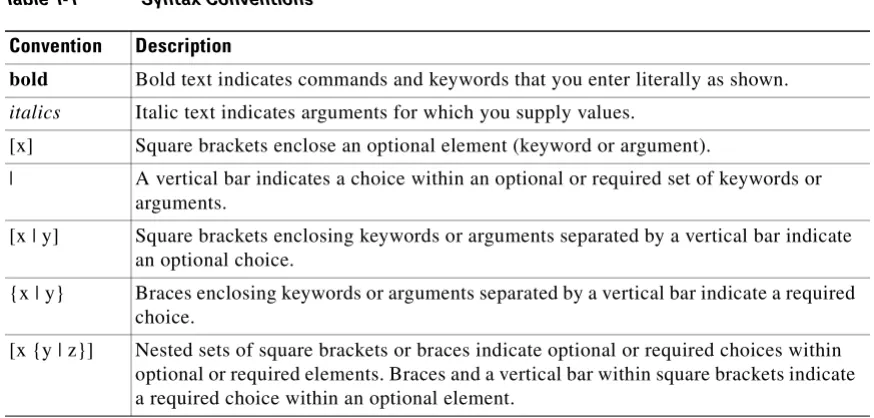
The FWSM command syntax descriptions use the following conventions: Command descriptions use these conventions:
• Braces ({ }) indicate a required choice.
• Square brackets ([ ]) indicate optional elements.
• Vertical bars ( | ) separate alternative, mutually exclusive elements.
• Boldface indicates commands and keywords that are entered literally as shown.
• Italics indicate arguments for which you supply values. Examples use these conventions:
• Examples depict screen displays and the command line in screen font.
• Information you need to enter in examples is shown in boldfacescreen font.
About This Guide Related Documentation
• Examples might include output from different platforms; for example, you might not recognize an interface type in an example because it is not available on your platform. Differences should be minor.
Note Means reader take note. Notes contain helpful suggestions or references to material not covered in the manual.
For information on modes, prompts, and syntax, see Chapter 1, “Using the Command-Line Interface.”
Related Documentation
For more information, refer to the following documentation:
• Catalyst 6500 Series Switch and Cisco 7600 Series Router Firewall Services Module Configuration Guide
• Catalyst 6500 Series Switch and Cisco 7600 Series Router Firewall Services Module Logging Configuration and System Log Messages
• Upgrading the Catalyst 6500 Series Switch and Cisco 7600 Series Router Firewall Services Module to Release 3.1
• Catalyst 6500 Series Switch and Cisco 7600 Series Router Firewall Services Module Release Notes
• Cisco ASDM Release Notes
Obtaining Documentation
Cisco documentation and additional literature are available on Cisco.com. Cisco also provides several ways to obtain technical assistance and other technical resources. These sections explain how to obtain technical information from Cisco Systems.
Cisco.com
You can access the most current Cisco documentation at this URL:
http://www.cisco.com/techsupport
You can access the Cisco website at this URL:
http://www.cisco.com
You can access international Cisco websites at this URL:
http://www.cisco.com/public/countries_languages.shtml
Product Documentation DVD
About This Guide
Documentation Feedback
The Product Documentation DVD is a comprehensive library of technical product documentation on portable media. The DVD enables you to access multiple versions of hardware and software installation, configuration, and command guides for Cisco products and to view technical documentation in HTML. With the DVD, you have access to the same documentation that is found on the Cisco website without being connected to the Internet. Certain products also have .pdf versions of the documentation available. The Product Documentation DVD is available as a single unit or as a subscription. Registered Cisco.com users (Cisco direct customers) can order a Product Documentation DVD (product number
DOC-DOCDVD=) from Cisco Marketplace at this URL:
http://www.cisco.com/go/marketplace/
Ordering Documentation
Beginning June 30, 2005, registered Cisco.com users may order Cisco documentation at the Product Documentation Store in the Cisco Marketplace at this URL:
http://www.cisco.com/go/marketplace/
Nonregistered Cisco.com users can order technical documentation from 8:00 a.m. to 5:00 p.m. (0800 to 1700) PDT by calling 1 866 463-3487 in the United States and Canada, or elsewhere by calling 011 408 519-5055. You can also order documentation by e-mail at
[email protected] or by fax at 1 408 519-5001 in the United States and Canada, or elsewhere at 011 408 519-5001.
Documentation Feedback
You can rate and provide feedback about Cisco technical documents by completing the online feedback form that appears with the technical documents on Cisco.com.
You can send comments about Cisco documentation to [email protected].
You can submit comments by using the response card (if present) behind the front cover of your document or by writing to the following address:
Cisco Systems
Attn: Customer Document Ordering 170 West Tasman Drive
San Jose, CA 95134-9883 We appreciate your comments.
Cisco Product Security Overview
Cisco provides a free online Security Vulnerability Policy portal at this URL:
http://www.cisco.com/en/US/products/products_security_vulnerability_policy.html
From this site, you can perform these tasks:
• Report security vulnerabilities in Cisco products.
• Obtain assistance with security incidents that involve Cisco products.
• Register to receive security information from Cisco.
About This Guide Obtaining Technical Assistance
http://www.cisco.com/go/psirt
If you prefer to see advisories and notices as they are updated in real time, you can access a Product Security Incident Response Team Really Simple Syndication (PSIRT RSS) feed from this URL:
http://www.cisco.com/en/US/products/products_psirt_rss_feed.html
Reporting Security Problems in Cisco Products
Cisco is committed to delivering secure products. We test our products internally before we release them, and we strive to correct all vulnerabilities quickly. If you think that you might have identified a vulnerability in a Cisco product, contact PSIRT:
• Emergencies —[email protected]
An emergency is either a condition in which a system is under active attack or a condition for which a severe and urgent security vulnerability should be reported. All other conditions are considered nonemergencies.
• Nonemergencies —[email protected]
In an emergency, you can also reach PSIRT by telephone:
• 1 877 228-7302
• 1 408 525-6532
Tip We encourage you to use Pretty Good Privacy (PGP) or a compatible product to encrypt any sensitive information that you send to Cisco. PSIRT can work from encrypted information that is compatible with PGP versions 2.x through 8.x.
Never use a revoked or an expired encryption key. The correct public key to use in your correspondence with PSIRT is the one linked in the Contact Summary section of the Security Vulnerability Policy page at this URL:
http://www.cisco.com/en/US/products/products_security_vulnerability_policy.html
The link on this page has the current PGP key ID in use.
Obtaining Technical Assistance
About This Guide
Obtaining Technical Assistance
Cisco Technical Support & Documentation Website
The Cisco Technical Support & Documentation website provides online documents and tools for troubleshooting and resolving technical issues with Cisco products and technologies. The website is available 24 hours a day, at this URL:
http://www.cisco.com/techsupport
Access to all tools on the Cisco Technical Support & Documentation website requires a Cisco.com user ID and password. If you have a valid service contract but do not have a user ID or password, you can register at this URL:
http://tools.cisco.com/RPF/register/register.do
Note Use the Cisco Product Identification (CPI) tool to locate your product serial number before submitting a web or phone request for service. You can access the CPI tool from the Cisco Technical Support & Documentation website by clicking the Tools & Resources link under Documentation & Tools.Choose
Cisco Product Identification Tool from the Alphabetical Index drop-down list, or click the Cisco Product Identification Tool link under Alerts & RMAs. The CPI tool offers three search options: by product ID or model name; by tree view; or for certain products, by copying and pasting show command output. Search results show an illustration of your product with the serial number label location highlighted. Locate the serial number label on your product and record the information before placing a service call.
Submitting a Service Request
Using the online TAC Service Request Tool is the fastest way to open S3 and S4 service requests. (S3 and S4 service requests are those in which your network is minimally impaired or for which you require product information.) After you describe your situation, the TAC Service Request Tool provides recommended solutions. If your issue is not resolved using the recommended resources, your service request is assigned to a Cisco engineer. The TAC Service Request Tool is located at this URL:
http://www.cisco.com/techsupport/servicerequest
For S1 or S2 service requests or if you do not have Internet access, contact the Cisco TAC by telephone. (S1 or S2 service requests are those in which your production network is down or severely degraded.) Cisco engineers are assigned immediately to S1 and S2 service requests to help keep your business operations running smoothly.
To open a service request by telephone, use one of the following numbers: Asia-Pacific: +61 2 8446 7411 (Australia: 1 800 805 227)
EMEA: +32 2 704 55 55 USA: 1 800 553-2447
For a complete list of Cisco TAC contacts, go to this URL:
http://www.cisco.com/techsupport/contacts
Definitions of Service Request Severity
About This Guide Obtaining Additional Publications and Information
Severity 1 (S1)—Your network is “down,” or there is a critical impact to your business operations. You and Cisco will commit all necessary resources around the clock to resolve the situation.
Severity 2 (S2)—Operation of an existing network is severely degraded, or significant aspects of your business operation are negatively affected by inadequate performance of Cisco products. You and Cisco will commit full-time resources during normal business hours to resolve the situation.
Severity 3 (S3)—Operational performance of your network is impaired, but most business operations remain functional. You and Cisco will commit resources during normal business hours to restore service to satisfactory levels.
Severity 4 (S4)—You require information or assistance with Cisco product capabilities, installation, or configuration. There is little or no effect on your business operations.
Obtaining Additional Publications and Information
Information about Cisco products, technologies, and network solutions is available from various online and printed sources.
• Cisco Marketplace provides a variety of Cisco books, reference guides, documentation, and logo merchandise. Visit Cisco Marketplace, the company store, at this URL:
http://www.cisco.com/go/marketplace/
• Cisco Press publishes a wide range of general networking, training and certification titles. Both new and experienced users will benefit from these publications. For current Cisco Press titles and other information, go to Cisco Press at this URL:
http://www.ciscopress.com
• Packet magazine is the Cisco Systems technical user magazine for maximizing Internet and networking investments. Each quarter, Packet delivers coverage of the latest industry trends, technology breakthroughs, and Cisco products and solutions, as well as network deployment and troubleshooting tips, configuration examples, customer case studies, certification and training information, and links to scores of in-depth online resources. You can access Packet magazine at this URL:
http://www.cisco.com/packet
• iQ Magazine is the quarterly publication from Cisco Systems designed to help growing companies learn how they can use technology to increase revenue, streamline their business, and expand services. The publication identifies the challenges facing these companies and the technologies to help solve them, using real-world case studies and business strategies to help readers make sound technology investment decisions. You can access iQ Magazine at this URL:
http://www.cisco.com/go/iqmagazine
or view the digital edition at this URL:
http://ciscoiq.texterity.com/ciscoiq/sample/
• Internet Protocol Journal is a quarterly journal published by Cisco Systems for engineering professionals involved in designing, developing, and operating public and private internets and intranets. You can access the Internet Protocol Journal at this URL:
http://www.cisco.com/ipj
• Networking products offered by Cisco Systems, as well as customer support services, can be obtained at this URL:
About This Guide
Obtaining Additional Publications and Information
• Networking Professionals Connection is an interactive website for networking professionals to share questions, suggestions, and information about networking products and technologies with Cisco experts and other networking professionals. Join a discussion at this URL:
http://www.cisco.com/discuss/networking
• World-class networking training is available from Cisco. You can view current offerings at this URL:
C H A P T E R
1
Using the Command-Line Interface
This describes how to use the CLI on the FWSM, and includes the following topics:
• Firewall Mode and Security Context Mode, page 1-1
• Command Modes and Prompts, page 1-2
• Syntax Formatting, page 1-3
• Abbreviating Commands, page 1-3
• Command-Line Editing, page 1-3
• Command Completion, page 1-3
• Command Help, page 1-4
• Filtering show Command Output, page 1-4
• Command Output Paging, page 1-5
• Adding Comments, page 1-5
• Text Configuration Files, page 1-6
Note The CLI uses similar syntax and other conventions to the Cisco IOS CLI, but the FWSM operating system is not a version of Cisco IOS software. Do not assume that a Cisco IOS CLI command works with or has the same function on the FWSM.
Firewall Mode and Security Context Mode
The FWSM runs i