Issue 10
V-9939B
MICROPHONE ADAPTER
INTRODUCTION
These instructions provide identification, installation, connection, operation and maintenance information for the V-9939B Microphone Adapter.
The V-9939B is a Microphone Adapter designed to be used with Valcom paging equipment.
SPECIFICATIONS
Purpose
• Provides microphone access to Valcom
one-way amplified speaker assemblies.
Applications
• Allows local paging access to a zone of
one-way paging speakers
• Allows paging access to stand alone
systems
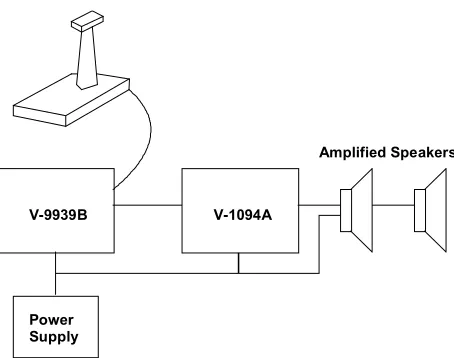
Refer to Figure 1 for a block diagram of a typical installation.
Features
• 600 Ohms balanced and 50,000 Ohms
inputs
• Works with most microphones with push to
talk switches
• Built in microphone preamplifier
• Mounts at microphone location
• Provides a set of form "C" contacts
• May be connected to a selected zone of a
multi- zone paging system
• Connector terminals for all connections
Capacity
Each V-9939B may be connected to one zone of a paging system.
Dimensions/Weight
• 8.25" H x 4.50" W x 2.35" D
(20.95cm H x 11.43cm W x 5.97cm D) 0.7lbs. (0.32kg)
Power Requirements
-21.5 to -26VDC filtered "A" Battery, 40mA max.
Environment
Temperature: 0 to 50°C
Humidity: 0 to 85% non-precipitating
Nominal Specifications
Input impedance: 600 Ohms balanced
50,000 Ohms unbalanced
Output impedance: 600 Ohms
SYSTEM DESIGN
Configuration
There are two basic ways the V-9939B Microphone Adapter may be used:
1. It may be used with a V-1094A and
Valcom one-way amplified speaker assemblies as a stand alone paging system.
When using the V-9939B for access to a stand alone paging system, the following will be required:
• 1 V-9939B Microphone Adapter
• 1-Microphone (push to talk)
• 1 V-1094A Booster Control
• Valcom one-way amplified speaker
assemblies (type determined by job requirements)
• Power Supply (type determined by style and
quantity of speakers - Consult the Valcom One-Way Paging VSP for more information)
2. By using the V-9939B with a V-2001A
One Zone Page Control you may automatically disconnect the speakers of one zone from a multi-zone page adapter and allow microphone access to that zone. These configurations will allow the microphone to override the telephone access.
NOTE: These will work only on a zone of ONE-WAY paging.
When using the V-9939B to override an existing zone of telephone accessed one-way paging, the following will be required:
• 1 V-9939B Microphone Adapter
• 1-Microphone (push to talk)
• 1 V-2001A One Zone Page Control
OR
• An existing Valcom one-way page system
Other configurations are possible. Contact Technical Support (540) 563-2000 with questions on specific applications.
Microphone Requirements
A standard high impedance (50,000 Ohms) or low impedance balanced (600 Ohms)
microphone may be used. The microphone will be required to provide a dry contact closure (push to talk) for page access.
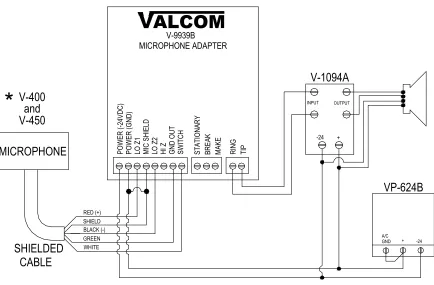
See Figure 3 for connections to Valcom V-400/450 or V-420 Microphones.
INSTALLATION
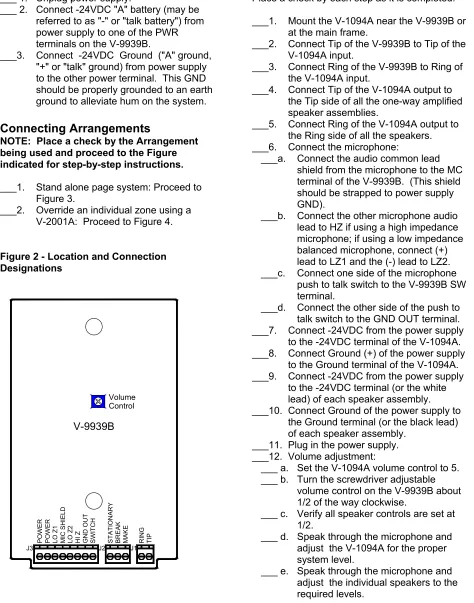
These instructions cover the installation procedures for the Valcom V-9939B and any associated Valcom equipment. Please consult practices for other manufacturer's equipment if any other equipment is being used. Refer to Figure 2 for location of connector connections and designations.
The following sections contain step-by-step instructions for wiring the V-9939B and associated Valcom equipment. Place a check on the appropriate line as the instruction is completed. The instructions also include tests along the way to verify connections have been made correctly. If these steps are followed exactly, installation of your Valcom system will go smoothly and quickly. If the results of a test do not correspond with what is shown, DO NOT PROCEED UNTIL THE PROBLEM HAS BEEN CORRECTED.
NOTE: During initial system setup it is recommended that all volume controls be set 1/2 turn clockwise.
Mounting
• Using two #6 ¾ inch wood screws, mount
the unit in a convenient location near the microphone location
V-9939B V-1094A
Amplified Speakers
S
T
ATI
O
NARY
B
R
EAK
MAKE RIN
G
TI
P
SW
IT
C
H
GND OU
T
PO
WE
R
PO
WE
R
MIC SHIELD
LO
Z
1
HI
Z
LO
Z
2
J3 J2 J1
V-9939B
Volume Control
Power Connections
___ 1. Unplug power supply.___ 2. Connect -24VDC "A" battery (may be referred to as "-" or "talk battery") from power supply to one of the PWR terminals on the V-9939B.
___3. Connect -24VDC Ground ("A" ground,
"+" or "talk" ground) from power supply to the other power terminal. This GND should be properly grounded to an earth ground to alleviate hum on the system.
Connecting Arrangements
NOTE: Place a check by the Arrangement being used and proceed to the Figure indicated for step-by-step instructions.
___1. Stand alone page system: Proceed to Figure 3.
___2. Override an individual zone using a
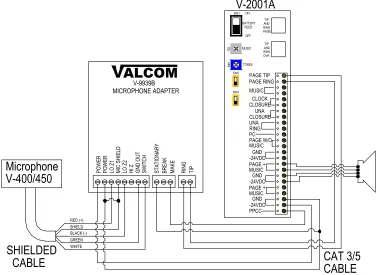
V-2001A: Proceed to Figure 4.
Figure 2 - Location and Connection Designations
WIRING INSTRUCTIONS (For Figure 3)
Place a check by each step as it is completed:___1. Mount the V-1094A near the V-9939B or
at the main frame.
___2. Connect Tip of the V-9939B to Tip of the
V-1094A input.
___3. Connect Ring of the V-9939B to Ring of
the V-1094A input.
___4. Connect Tip of the V-1094A output to
the Tip side of all the one-way amplified speaker assemblies.
___5. Connect Ring of the V-1094A output to
the Ring side of all the speakers.
___6. Connect the microphone:
___a. Connect the audio common lead
shield from the microphone to the MC terminal of the V-9939B. (This shield should be strapped to power supply GND).
___b. Connect the other microphone audio
lead to HZ if using a high impedance microphone; if using a low impedance balanced microphone, connect (+) lead to LZ1 and the (-) lead to LZ2.
___c. Connect one side of the microphone
push to talk switch to the V-9939B SW terminal.
___d. Connect the other side of the push to
talk switch to the GND OUT terminal.
___7. Connect -24VDC from the power supply
to the -24VDC terminal of the V-1094A.
___8. Connect Ground (+) of the power supply
to the Ground terminal of the V-1094A.
___9. Connect -24VDC from the power supply
to the -24VDC terminal (or the white lead) of each speaker assembly. ___10. Connect Ground of the power supply to
the Ground terminal (or the black lead) of each speaker assembly.
___11. Plug in the power supply. ___12. Volume adjustment:
___ a. Set the V-1094A volume control to 5. ___ b. Turn the screwdriver adjustable
volume control on the V-9939B about 1/2 of the way clockwise.
___ c. Verify all speaker controls are set at 1/2.
___ d. Speak through the microphone and adjust the V-1094A for the proper system level.
SW
IT
CH
MICROPHONE ADAPTERV-9939B
VALCOM
CABLE
SHIELDED
GREENRED SHIELD BLACK (-) WHITE (+)
MICROPHONE
V-420
LO Z1 GN
D OU
T
LO Z2
MIC SHIELD HI Z
VP-624B
-24 GND A/C
+
+
OUTPUT
V-1094A
MAKE
BRE
AK
STATIONA
RY
RING TIP
-24
INPUT
PO
W
ER
(-24
VDC
)
PO
WE
R
(G
ND
)
*
RED (+)
BLACK (-)
V-1094A
OUTPUT INPUT
A/C
GND + -24
-24 +
VP-624B
SHIELD
GREEN WHITE
SHIELDED
CABLE
MICROPHONE
STATIO
NARY
BRE
AK
MA
KE
RING TIP
VALCOM
V-9939B MICROPHONE ADAPTER
POWER (
-24VDC)
POWER (
G
ND)
LO Z1 MIC S
H
IELD
LO Z2 HI Z GND OUT SWI
TCH
V-450
and
V-400
FIGURE 4 – OVERRIDE A SINGLE ZONE WITH A V-2001A
WIRING INSTRUCTIONS
(For Figure 4)Place a check by each step as it is completed:
___ 1. IMPORTANT: Complete installation and testing of your page control unit and speakers before adding the microphone adapter.
___ 2. Mount the V-2001A near the microphone adapter.
___ 3. Connect Tip of the V-9939B to PAGE TIP.
___ 4. Connect Ring of the V-9939B to PAGE RING.
___ 5. Connect the GND of the V-2001A to terminal STATIONARY on the microphone.
___ 6. Connect the PPCC of the V-2001A to terminal MAKE of the microphone adapter.
___ 7. Disconnect Tip of the audio pair to the speakers on the zone being overridden from the Page Control unit and connect it to the PAGE + MUSIC of the V-2001A. ___ 8. Disconnect Ring of the audio pair to the
speakers from the Page Control unit and connect it to the PAGE + MUSIC of the V-2001A.
____9. Connect the MUSIC INPUT of the V-2001A to one side of the output pair from the page control unit for the zone to be overridden.
___10. Connect the MUSIC INPUT of the
V-2001A to the other side of the output pair from the page unit for the zone being used.
___11. Connect the microphone:
___a. Connect the audio common lead
shield of the microphone to the MC terminal of the V-9939B. This shield should be strapped to power supply GND.
___b. Connect the other microphone audio
lead to HZ if using high impedance microphone; if using a low impedance balanced microphone, connect (+) lead to LZ1 and the (-) lead to LZ2.
___c. Connect one side of the microphone
push to talk switch to the V-9939B SW terminal.
___d. Connect the other side of the push to
talk switch to the GND OUT terminal. ___12. Connect -24VDC filtered talk battery
from the V-2001A to the power of the V-9939B.
___13. Connect Ground (+) of the V-2001A to the power of the V-9939B.
___14. Volume adjustment:
___a. Turn the screwdriver adjustable
volume control on the V-9939B about 1/2 of the way clockwise.
___b. Speak through the microphone and
adjust the V-9939B screwdriver
adjustment for the proper page level.
RED (+) BLACK (-)
CABLE
SHIELDED
SHIELD GREEN WHITE PAGE TIP MUSIC CLOCK CLOSURE PC PPCC -24VDC SW1 SW2 SW4 R2 MUSIC ON OFF UNA CLOSURE UNA RING PAGE + MUSIC TONES R4 0V-2001A
V-400/450
PAGE RING GND GND -24VDC PAGE + MUSIC GND -24VDC TIP AND RING PAGE TIP AND RING OVR BATTERY FEEDCAT 3/5
CABLE
PAGE W/O MUSIC ST AT IO NA RYBREAK MAKE RING TIP
VALCOM
V-9939B MICROPHONE ADAPTER PO W ER PO W ER LO Z 1 MI C SHIEL D LO Z 2HI Z GND O
OPERATION
Circuit Description
The V-9939B Microphone Adapter has inputs for both high impedance and balanced low
impedance microphones. It also has input for a push to talk contact closure. When the closure is applied, a high gain pre-amplifier is turned on and the output relay is activated. The unit will stay active until the contact closure is removed. The preamplifier circuit also contains a voice limiting circuit to limit extremely loud inputs.
TECHNICAL ASSISTANCE
When trouble is reported, verify that power is being supplied to the unit and there are no broken connections. Check voltages for proper polarity on the cross connect block.
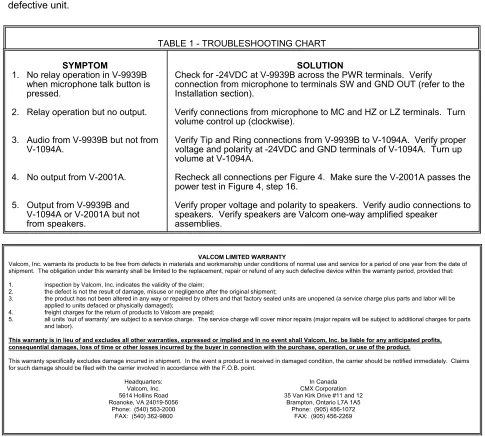
Table 1 identifies symptoms of some possible problems with solutions. If a spare unit is available, continue to troubleshoot by substituting the spare unit for the suspected defective unit.
Assistance in troubleshooting is available from the factory. When calling, you should have a VOM, a test set available and call from the job site. Call (540) 563-2000 and press 1 for Technical Support or visit our website at http://www.valcom.com.
The V-9939B is not field repairable. Valcom
equipment contains no user serviceable parts inside. Valcom, Inc. maintains service facilities in Roanoke, VA. Should repairs be necessary, attach a tag to the unit clearly stating your company name, address, phone number and contact person and the nature of the problem.
Send the unit to:
Valcom, Inc. Repair and Return Dept.
5614 Hollins Road Roanoke, VA 24019-5056
TABLE 1 - TROUBLESHOOTING CHART
SYMPTOM
1. No relay operation in V-9939B when microphone talk button is pressed.
2. Relay operation but no output. 3. Audio from V-9939B but not from
V-1094A.
4. No output from V-2001A. 5. Output from V-9939B and
V-1094A or V-2001A but not from speakers.
SOLUTION
Check for -24VDC at V-9939B across the PWR terminals. Verify connection from microphone to terminals SW and GND OUT (refer to the Installation section).
Verify connections from microphone to MC and HZ or LZ terminals. Turn volume control up (clockwise).
Verify Tip and Ring connections from V-9939B to V-1094A. Verify proper voltage and polarity at -24VDC and GND terminals of V-1094A. Turn up volume at V-1094A.
Recheck all connections per Figure 4. Make sure the V-2001A passes the power test in Figure 4, step 16.
Verify proper voltage and polarity to speakers. Verify audio connections to speakers. Verify speakers are Valcom one-way amplified speaker assemblies.
VALCOM LIMITED WARRANTY
Valcom, Inc. warrants its products to be free from defects in materials and workmanship under conditions of normal use and service for a period of one year from the date of shipment. The obligation under this warranty shall be limited to the replacement, repair or refund of any such defective device within the warranty period, provided that: 1. inspection by Valcom, Inc. indicates the validity of the claim;
2. the defect is not the result of damage, misuse or negligence after the original shipment;
3. the product has not been altered in any way or repaired by others and that factory sealed units are unopened (a service charge plus parts and labor will be applied to units defaced or physically damaged);
4. freight charges for the return of products to Valcom are prepaid;
5. all units ‘out of warranty’ are subject to a service charge. The service charge will cover minor repairs (major repairs will be subject to additional charges for parts and labor).
This warranty is in lieu of and excludes all other warranties, expressed or implied and in no event shall Valcom, Inc. be liable for any anticipated profits, consequential damages, loss of time or other losses incurred by the buyer in connection with the purchase, operation, or use of the product.
This warranty specifically excludes damage incurred in shipment. In the event a product is received in damaged condition, the carrier should be notified immediately. Claims for such damage should be filed with the carrier involved in accordance with the F.O.B. point.
Headquarters: In Canada