SANS Institute
InfoSec Reading Room
This paper is from the SANS Institute Reading Room site. Reposting is not permitted without express written permission.
The User Agent Field: Analyzing and Detecting the
Abnormal or Malicious in your Organization
Hackers are hiding within the noise of HTTP traffic. They understand that within this noise it is becoming increasingly difficult to detect malicious traffic. They know that overworked analysts have little time to
detect malicious/abnormal HTTP traffic hiding amongst a mountain of legitimate HTTP traffic. However hackers may be using unusual, alien to your organization, unique or just plain evil HTTP header request user agents. When they do they become easier to identify. This paper aids intrusion analysts in understan...
© 2
012
SA
NS
Ins
titu
te,
Au
tho
r re
tain
s fu
ll ri
gh
ts.
the abnormal or malicious in your organization
GIAC (GCIA) Gold Certification
Author: Darren Manners, [email protected] Advisor: Robert Vandenbrink
Accepted: October 20th 2011
Abstract
Hackers are hiding within the noise of HTTP traffic. They understand that within this noise it is becoming increasingly difficult to detect malicious traffic. They know that overworked analysts have little time to detect malicious/abnormal HTTP traffic hiding amongst a mountain of legitimate HTTP traffic. However hackers may be using unusual, alien to your organization, unique or just plain evil HTTP header request user agents. When they do they become easier to identify. This paper aids intrusion analysts in understanding the user agent field and how it can be used to detect malicious traffic. It will then show the analyst how, using free tools like Wireshark, Tshark, Tcpdump and regex commands, to separate the normal from the abnormal. It will build upon what we know about our own organizations. It will look at how hackers are using the HTTP request header user agent field to attack
© 2
012
SA
NS
Ins
titu
te,
Au
tho
r re
tain
s fu
ll ri
gh
ts.
1.
Introduction
In the early days of the Internet, users had to type in text commands to navigate. Tools were later developed, E.g. early browsers, to be the “user’s agent” so that commands did not have to be typed in to navigate -‐ the user could simply click to navigate. In June 1999, RFC2616 (Fielding, LastIrvine, Gettys, Compaq, Mogul, Compaq, Frystyk, Masinter, Xerox, Leach, Microsoft, Bernes-‐Lee, & MIT, 1999) defined the protocol for HTTP (Hyper Text Transfer Protocol) 1.1. RFC2616 further defines the protocol for the header field definitions, one definition being the use of the user agent field in subsection 14.43. It was deduced in 1999 that a mechanism was required to identify information about the user agent originating a request. The aptly named user agent field does just that. The RFC states that the user agent field is for statistical; protocol violation tracing and automated tailored responses.
If we fast forward a couple of decades to today’s technology we now see a myriad of user agents being used to access HTTP information. It is like the originators of the RFC saw the coming onslaught of user agents.
Modern examples of user agents are Mozilla Firefox, Internet Explorer and Safari. (Understanding user-‐agent strings, 2011) The common term for these tools are Internet browsers, however, user agents are not limited to just Internet
© 2
012
SA
NS
Ins
titu
te,
Au
tho
r re
tain
s fu
ll ri
gh
ts.
The RFC is pretty ambiguous in its definition of the user agent field, which in turn allows for differing interpretations of the user agent field by different user agents. This leads to potential security issues. It can also make identifying user agents easier since particular tools/applications may use unique user agents, which was, of course, its intention. As with most technology though, its legitimate use can be altered in such a way to create unexpected situations that pose a potential
security risk. This includes active user agent injection, which can lead to cross-‐site scripting (XSS) attacks or SQL injection. Malicious user agents can also be
responsible for denial of service and security bypass attacks. This paper will look at some advanced attack methods being employed by hackers in the field. It seems hackers are looking at all the trust functions available to them.
It would be fair to say then, if common user agents in the environment are known, any new user agents or HTTP requests that do not include a user agent, could possibly represent the introduction of a new tool. Further investigation would be warranted if it is determined that no new user agent had been introduced legitimately. So initially the known user agent field is gathered and parsed, this would represent the normalized user agent field for the organization. A comparison can be then conducted on subsequent agent fields to determine any abnormal user agent fields. Further analysis of the abnormal user agent fields can be conducted to determine intent, malicious or otherwise. HTTP request header data missing a user agent should also be investigated and noted.
© 2
012
SA
NS
Ins
titu
te,
Au
tho
r re
tain
s fu
ll ri
gh
ts.
It seems due to the enormous amount of traffic, analysis is impossible. However, with careful constructs using regex like tools, we can carve and
manipulate the user agent data to illuminate even the darkest corners of our capture file.
© 2
012
SA
NS
Ins
titu
te,
Au
tho
r re
tain
s fu
ll ri
gh
ts.
2. User Agent Technical Understanding
This section will start to explain the technical details of the HTTP request header user agent.
2.1. How and where is the user agent used?
The user agent is found within HTTP request header. Figure 1-‐1 is an example
Website User A opens up a web
browser and connects to www.sans.edu
Figure 1-‐1 Connection
HTTP REQUEST HEADER
Some examples are Request, Accept,Referer, Accept-‐Language User-‐Agent,Accept-‐Encoding,Host,If-‐Modified-‐Since,If-‐None-‐match, Connection
HTTP REQUEST BODY
Optional lines. An example would be data sent in a form via POST request.
Figure 1-‐2 Feature
© 2
012
SA
NS
Ins
titu
te,
Au
tho
r re
tain
s fu
ll ri
gh
ts.
is that of the clients’ machine. An HTTP packet was highlighted and after a right mouse click the “follow TCP stream” was selected.
Figure 1-‐3 Wireshark HTTP request header capture
The highlighted section in figure 1-‐3 represents the HTTP request header. (Below that you see the HTTP response header). The header in 1-‐3 shows the user agent field. The information contained will be discussed later in the document, but it shows a lot of information. Some would say way too much information.
User-‐Agent: Mozilla/4.0 (compatible; MSIE 7.0; Windows NT 6.1; Trident/4.0; SLCC2; .NET CLR 2.0.50727; .NET CLR 3.5.30729; .NET CLR 3.0.30729; Media Center PC 6.0; InfoPath.3)
All this information was sent to tell the webserver about the clients’ user agent.
2.2. What is the user agent?
© 2
012
SA
NS
Ins
titu
te,
Au
tho
r re
tain
s fu
ll ri
gh
ts.
“The User-‐Agent request-‐header field contains information about the user agent originating the request. This is for statistical purposes, the tracing of protocol violations, and automated recognition of user agents for the sake of tailoring responses to avoid particular user agent limitations. User agents SHOULD include this field with requests. The field can contain multiple product tokens (section 3.8) and comments identifying the agent and any sub products, which form a significant part of the user agent. By convention, the product tokens are listed in order of their significance for identifying the application.
User-‐Agent = "User-‐Agent" ":" 1*(product | comment )” (Fielding, et al 1999)
The above quotation from RFC2616 shows that in 1991 the user agent field had three functions. Firstly it was to be used for statistical purposes. Websites can track what user agents are connecting to them and can use this information to help guide developers as to how to best display information to users. An example would be if travel websites only see’s iPhone user agents connecting to them, perhaps
developers may tailor the site better for iPhones.
The second function was for the tracing of protocol violations. This is an error control feature for user agents. If a particular error keeps occurring, the user agent field can be examined to see if it is limited to a particular user agent.
The third function, to tailor responses based upon the user agent, is what the user agent is mainly used for today. An example would be if we had an Internet browser that was not able to handle Adobe flash, we could tailor the website based upon the user agent to replace the flash with static html.
There are other uses for each of the functions, the uses are only limited to the imagination. The RFC also stated that the user agent field could contain multiple tokens and comments that identify the agent and any sub products. In the previous user agent example the user agent has a token of “Trident/4.0;”
© 2
012
SA
NS
Ins
titu
te,
Au
tho
r re
tain
s fu
ll ri
gh
ts.
User-‐Agent: Mozilla/4.0 (compatible; MSIE 7.0; Windows NT 6.1; Trident/4.0; SLCC2; .NET CLR 2.0.50727; .NET CLR 3.5.30729; .NET CLR 3.0.30729; Media Center PC 6.0; InfoPath.3)
Trident 4.0 (also known as MSHTML) allows website code to detect the difference between Internet Explorer 8 and 7 clients when Internet Explorer 8 is running in compatibility mode.
The example above showed information about the user agent and information about the operating system. ("What's a user Agent?," 2011) In the above example it showed that the system was running Windows 7 service pack 1. This is type of information leakage is very useful to hackers. (As of Internet Explorer 9 additions, such as .NET, will no longer be sent in the user agent string.)
2.3. Examples
Here are some common examples of user agents and what they mean. ("What's a user Agent?" 2011)
Example1
Mozilla/5.0 (iPad; U; CPU OS 3_2 like Mac OS X; en-‐us) AppleWebKit/531.21.10 (KHTML, like Gecko)
Version/4.0.4 Mobile/7B334b Safari/531.21.102011-‐10-‐16 20:23:50
Mozilla/5.0 (iPad; U; CPU OS 3_2 like Mac OS X; en-‐us) AppleWebKit/531.21.10 (KHTML, like Gecko) Version/4.0.4 Mobile/7B334b Safari/531.21.102011-‐10-‐16 20:23:50
The above string can be broken down into various sections. Looking back at RFC 2616:
© 2
012
SA
NS
Ins
titu
te,
Au
tho
r re
tain
s fu
ll ri
gh
ts.
The user agent is Mozilla/5.0. Mozilla is common to nearly all modern browsers. The device is possibly an iPad 1 as its running an early 3_2 OS, but it is impossible to tell. The Apple developer site gives more information ("Optimizing web content," 2011). (iPad; U; CPU OS 3_2 like Mac OS X; en-‐us) shows the platform string. In this case an iPad. AppleWebKit/531.21.10 (KHTML, like Gecko) shows the Webkit engine build number. Version/4.0.4 shows the safari family version number. 4.0.4. Mobile/7B334b shows the mobile version build number.
Safari/531.21.102011-‐10-‐16 20:23:50 shoes the Safari build number.
It is evident that manufacturers can put anything they want to enable their products to be identified and be treated by websites/applications accordingly. To keep thinking like a hacker, this information is really useful especially if new vulnerabilities are released for particular product versions. The attacks would be adjusted based on the information found in the user agent field.
Example2
BlackBerry8300/4.2.2 Profile/MIDP-‐2.0 Configuration/CLDC-‐1.1
VendorID/107 UP.Link/6.2.3.15.02011-‐10-‐16 20:20:17
BlackBerry8300/4.2.2 Profile/MIDP-‐2.0 Configuration/CLDC-‐1.1 VendorID/107 UP.Link/6.2.3.15.02011-‐10-‐16 20:20:17
Still using RFC2616 the above user agent can be broken down. The format is an older blackberry agent string (Astanley, 2010). BlackBerry8300/4.2.2 shows the model type being a blackberry 8300 running an older version 4.2.2. Profile/MIDP-‐ 2.0 shows the rendering engine is MIDP 2.0 (Java). Configuration/CLDC-‐1.1 shows the connected limited device configuration ("Analyze UA," 2010). VendorID/107
© 2
012
SA
NS
Ins
titu
te,
Au
tho
r re
tain
s fu
ll ri
gh
ts.
to the gateway the Blackberry is using on the cellular network and the time it accessed that gateway.
© 2
012
SA
NS
Ins
titu
te,
Au
tho
r re
tain
s fu
ll ri
gh
ts.
3. Hunting down the user agent
This section will discuss how to begin to hunt down the user agent field amongst the mountain of data. The reason the capture and the manipulation are separate in this paper is that often we have to use the capture files given, or obtain capture files from firewalls or other network devices. More often than not, we have to use the capture file separated from the devices/networks that captured them.
3.1. Setup
The test machine was a virtual machine copy of Backtrack 5 R1.
("Downloads," ) The host was an Apple Macbook Pro laptop running 10.6 OS. The virtual machine was running inside VMFusion. The test host was a HP Desktop running Microsoft Windows 7. All the tools used are freely available. A Cisco ASA firewall was used to capture a variety of user agents running over a typical live network via an access list and a capture command.
access-‐list 101 permit tcp any any eq http
capture capture_packets access-‐list 101 interface inside
© 2
012
SA
NS
Ins
titu
te,
Au
tho
r re
tain
s fu
ll ri
gh
ts.
HUBTest Machine running BT5 R1 VM
Test Host Router
Internet
Figure 3-‐1
3.2. Using Wireshark to capture and display user agent fields
Wireshark is a tool for capturing packets and performing detailed packet analysis. It is a free tool and is widely used by the information security community. Simple packet filtering can be performed to select specific packets identified by the filter. Wireshark already has an inbuilt filter to capture user agents contained in the HTTP request header fields. (Lamping, Sharpe, NSComputers & Warnicke, 2011) Below, this simple filter was used to filter a PCAP file.
“http.user_agent contains "Mozilla"”
The resultant packets, in figure 3-‐2, shows an HTTP request header that contains the word “Mozilla” in the user agent field.
© 2
012
SA
NS
Ins
titu
te,
Au
tho
r re
tain
s fu
ll ri
gh
ts.
Figure 3-‐2 Packet Capture filter example
While this is very useful for filtering large number of packets individually, the user agent string would have to be entered for each unique user agent to separate them all. The results can be increased if we use more generic filters. The
requirement is to extract all unique user agent fields in the HTTP request headers and also extract HTTP request headers that do not contain user agents.
To meet the requirement we can use the following filter
(http.request == 1 and http.user_agent ) or (http.request == 1 and !http.user_agent) This is filtering for the existence of a HTTP request that contains a user agent or any packet that contains a HTTP request regardless of whether it contains a user agent or not. The filtered packets can then be exported for further manipulation.
© 2
012
SA
NS
Ins
titu
te,
Au
tho
r re
tain
s fu
ll ri
gh
ts.
Figure 3-‐2 Wireshark packet capture user agent filter
Select File >Export >File
© 2
012
SA
NS
Ins
titu
te,
Au
tho
r re
tain
s fu
ll ri
gh
ts.
Figure 3-‐3 save a capture file
Wireshark will capture and filter the required packets; other alternatives will have to be employed to manipulate the data for us to view only unique user agents. In section 4 capture data will be manipulated to extract all unique user agents and display them.
3.3. Using Snort to capture the user agent.
© 2
012
SA
NS
Ins
titu
te,
Au
tho
r re
tain
s fu
ll ri
gh
ts.
capture command that will log in Tcpdump format. It has a simple TCP filter to capture source and destination to port 80.
snort –xv –l /var/log/snort –F tcp port 80
Snort – Runs the snort command -‐x Hex output
-‐v Verbose -‐l /var/log/snort Log to
-‐F tcp port 80 Filter TCP port 80 packets
To capture just packets containing user agents a simple Snort rule can be used. (Babben, Biles & Orebaugh , 2005). Note that logging cannot be in binary mode. It does not show the actual user agent in the useragents.log, but shows the triggered alert in a separate useragent.log file. All the alert is saying is that an HTTP packet contained a user-‐agent in its header field.
Figure 3-‐4 Snort alert in useragents.log
To run snort in ascii logging mode use the command below
snort –K ascii –c snort.conf
snort Runs the snort command -‐K ascii Specifies Ascii Logging
© 2
012
SA
NS
Ins
titu
te,
Au
tho
r re
tain
s fu
ll ri
gh
ts.
This is the simple rule to alert on any HTTP request header packet containing an alert.
log tcp $HOME_NET any <> any $HTTP_PORTS (msg:"HTTP USER AGENT LOG"; flow:from_client; content:"user-‐agent"; logto:useragents.log; classtype:
attempted-‐recon; sid:10502; rev:1;)
You could add a content modifier “HTTP_header” to narrow the results to only the HTTP header. A couple of changes had to be made to enable this to work in snort version 2.8. (classtype:recon to classtype:attempted-‐recon, protocol “tcp” had to be added as well.)
log tcp $HOME_NET any <> any $HTTP_PORTS (msg:"HTTP USER AGENT LOG"; flow:from_client; content:"user-‐agent"; nocase; HTTP_header;
logto:/var/log/snort/useragents.log; classtype:attempted-‐recon; sid:10502; rev:1;)
This modified version will log the user agents to a file called useragents.log. The log command could be change to an alert command to trigger an event. This is really where the main use of Snort is; capturing specific user agents. These specific user agents can be added to the rule list to trigger alerts on known evil user agents. It is better to use snort to capture specific user agents than collect all user agents.
© 2
012
SA
NS
Ins
titu
te,
Au
tho
r re
tain
s fu
ll ri
gh
ts.
The above rule was taken from the emerging threats website. (Jonkman, 2011) They keep a good set of malicious user agents. Of course this signature based detection will only work for known signatures going to the network. (To make it go any direction you can change the “tcp $EXTERNAL_NET any -‐> $HOME_NET
$HTTP_PORTS” to “tcp any any -‐> any any any” or change the direction operator “-‐>” to “<>”. New or one off user agents created by hackers will not be triggered. That is why it is best to collect all user agents AND use rules of known user agents, rather than just one or the other.
3.4. Using Tcpdump to capture and display user agent fields.
Tcpdump is a free tool that is used to capture packets off the wire. It is widely used in the information security field. ("Tcpdump," 2009)
Since the requirement is to capture HTTP packets with user agents and non user agents in the request header, we can use a broad Tcpdump filter and use data manipulation later to extract the unique user agents/no user agents.
The simple Tcpdump filter used is
tcpdump -‐Xnvvv –i eth0 –w capture.pcap tcp port 80
-‐X print in hex and asci
-‐n do not run name resolution -‐vvv more verbose output -‐I listen on interface
eth0 selected interface to listen on
-‐w capture.pcap write raw packets to capture file called capture.pcap tcp port 80 filter on protocol tcp with source and destination of 80
© 2
012
SA
NS
Ins
titu
te,
Au
tho
r re
tain
s fu
ll ri
gh
ts.
Figure 3-‐5 Tcpdump running a packet capture
The dump will start and begin to count packets.
© 2
012
SA
NS
Ins
titu
te,
Au
tho
r re
tain
s fu
ll ri
gh
ts.
4. Manipulating the data to display user agents
This section will build on the previous section. It will begin to manipulate the captured HTTP request header user agents.
4.1. Manipulating data to find unique user agent fields from a
capture file.
Packet capture files have been obtained from three methods of capturing HTTP request header user agents. In those files are also packet captures of HTTP request headers that do not contain a user agent. This section will concentrate on extracting unique user agent strings.
The capture file that is being used is called capture.pcap. This was obtained from an ASA. Using similar filtering to what was done previously in Wireshark; we can use Tshark, the command line version of Wireshark, to extract the user agent data. ("Tshark -‐ Linux," 2011)
tshark –r capture.pcap –R http –T fields –e http.user_agent
The above command can be broken down
tshark Runs the Tshark program
-‐r capture.pcap Reads from the capture.pcap file -‐R http Read Filter
-‐T fields Format output -‐e http.user_agent field to print
© 2
012
SA
NS
Ins
titu
te,
Au
tho
r re
tain
s fu
ll ri
gh
ts.
Figure 4-‐1 Initial packet filter
As you can see figure 4-‐1 gives multiple entries for the same user agents. This can be changed by adding the “| sort -‐u” command to the end.
tshark –r capture.pcap –R http –T fields –e http.user_agent | sort -‐u
Figure 4-‐2 Sorted by unique entries
Now the results, in figure 4-‐2, can be sent to a text file by adding the “> out.txt” command to the end of the previous command.
© 2
012
SA
NS
Ins
titu
te,
Au
tho
r re
tain
s fu
ll ri
gh
ts.
This now shows the unique HTTP request header user agent strings that are within the capture file.
At times the source and destination of the IP addresses will need to be shown, to aid in identification. The following alteration of the above filter will show the unique user agents and source/destination addresses.
tshark –r capture.pcap –R “http.request ==1 and http.user_agent” –T fields –e http.user_agent –e ip.addr | sort –u > out.txt
Figure 4-‐3 IP address shown in capture
Files can be compared to each other using this “diff” command. This would be useful for comparing the list of known user agents against a file of new user agents captured. An example is below:
diff –u unique.txt out.txt > investigate.txt
The file unique.txt contains our list of already known user agents. Out.txt contains the newly captured agents. The files are Diff’d and placed into
© 2
012
SA
NS
Ins
titu
te,
Au
tho
r re
tain
s fu
ll ri
gh
ts.
Figure 4-‐4 Diff output
The plus (+) signs represent new user agents that have been found. A grep command can be used to pull the new strings “cat grep + investigate.txt”
Figure 4-‐5 New filtered agents
The two new user strings are shown in figure 4-‐5; strange and Mozilla/5.5.
4.2. Manipulating data to find HTTP request headers with blank
user agent fields from a capture file.
© 2
012
SA
NS
Ins
titu
te,
Au
tho
r re
tain
s fu
ll ri
gh
ts.
file and look for HTTP request headers that do not contain user agent fields. Of course, identification will still have to occur and for this the IP source and destination will have to be collected so as to have some field to further the investigation.
tshark –r capture.pcap –R “http.request == 1 and not http.user_agent” –T fields – e ip.addr | sort –u > outempty.txt
Figure 4-‐6 no user agent filter
Here figure 4-‐6 shows a source that is connecting to a webserver that is not using a user agent. (The tool being used is “wget” with the “—user-‐agent=”” “ set. This will omit the user agent field in the HTTP request header. So although a user agent did not exist, the capture still shows the source and destination address. It may be worth further investigation.
Files can be compared to each other using this “Diff” command as described before.
© 2
012
SA
NS
Ins
titu
te,
Au
tho
r re
tain
s fu
ll ri
gh
ts.
5. Following the streams
This section will show how to begin to conduct packet analysis on the targets of interest identified by earlier analysis.
5.1. Using Wireshark to conduct the hunt.
Personally, the easiest way to track down what a particular interaction is doing is to use Wireshark and follow the TCP streams. In this example traffic a user agent called “FacebookTouch3.3.1 OS/3/1/3 en_US Carrier/unavailable has been detected that is not part of normal operations.”
Rather than just open up Wireshark, an Internet search may yield some information. A simple Google search reveals that Facebook touch is probably an application resident on a mobile device. (This assumption is made due to the word “carrier” in the user agent, as this is usually associated with mobile devices.) Further Google searching shows that FacebookTouch is associated with touch screen devices. This would tally with the assumption that the user agent belongs to a mobile device.
If the full user agent is entered into Google, then it becomes clear that this is an app that is installed on an Apple iPhone device. Be careful, as the app itself may be the user agent regardless of the actual host. Further searching cannot find the user agent associated with anything else other than an Apple iPhone. (The device may still be a different touch controlled Apple device, like iPod Touch or iPad.) Start up Wireshark and open the capture file.
© 2
012
SA
NS
Ins
titu
te,
Au
tho
r re
tain
s fu
ll ri
gh
ts.
Figure 5-‐1 Wireshark filter
Using the filter “http.user_agent contains Facebook” two packets are shown in figure 5-‐1.
© 2
012
SA
NS
Ins
titu
te,
Au
tho
r re
tain
s fu
ll ri
gh
ts.
Figure 5-‐2 Follow TCP stream menu
Right mouse click, or Ctl clicking in Apple Macbook pro, brings up a sub menu shown in figure 5-‐2. By selecting follow TCP stream we are able to assemble the packets associated with this stream. It opens a window that shows the
conversation. From the original filter we know the IP address is 10.46.152.2.
© 2
012
SA
NS
Ins
titu
te,
Au
tho
r re
tain
s fu
ll ri
gh
ts.
Figure 5-‐3 Wireshark TCP stream result
The stream looks harmless enough, and confirms the earlier
assumption/research that this was linked to Facebook. Since the packet capture was relatively small, for the sake of demonstration, no more packets were seen from this IP address. If other user agents were spotted, in the same timeframe, we could further narrow down or confirm the host device.
© 2
012
SA
NS
Ins
titu
te,
Au
tho
r re
tain
s fu
ll ri
gh
ts.
6. Malicious examples of user agents
How can the hunter become the hunted? The answer is very simply – user agents. User agents rely a great deal upon trust. The server trusts that the user will not tamper with the user agent field. Trust that is not verified is a dream scenario for hackers. Since the user agent can be tampered with en route to the server or on the client itself, a hacker can manipulate the user agent to become any user agent required. This may be good news for developers as they can render pages best suited for the devices accessing them, and test without having to install different user agents all the time, but it is great news for hackers. They can now even select payloads of malicious software based upon the user agent.
There is now a whole industry devoted to collecting user agents accessing websites. Content management systems harvest the user agents as additional marketing data, after all knowing that 50% of your traffic is generated from iPad users is extremely important. The information on your site may need to be tailored to this fact, not just the rendering of the page. Advertisers may also be able to tailor the advertisements being displayed to differing user agents. Now think like a hacker for a minute.
If sites are collecting and storing this information in databases, not sanitized and totally trusted, could we not manipulate the user agent field to be more evil? If site admins are viewing this data in content management systems or other tools, maybe the data is viewed in a webpage? What nefarious deeds can we do with un-‐ sanitized data -‐ totally trusted data in a database; the answer it appears is a great deal.
6.1. Stored and Reflected XSS.
© 2
012
SA
NS
Ins
titu
te,
Au
tho
r re
tain
s fu
ll ri
gh
ts.
The HTTP request header user agent was always a prime candidate for XSS. It is trusted, in other words the server trusts what the user agent says it is. It is collected and placed in a database for later analysis and it was not usually validated. An administrator usually analyzes it. The perfect person; they have high-‐level access that, once stolen, may lead to further infiltration into the targets systems.
There are many tools that can hold a request, allow a user to edit it, and then continue with the request. Many proxy servers do this. The tool being used here is Tamper Data. It is a free tool made by Adam Judson and will allow the manipulation of the user agent field very easily in Firefox.
To install tamper data in Backtrack 5, open up Firefox and go to the URL
Figure 6-‐1 Tamper Data download
Continue to install as any normal plugin.
© 2
012
SA
NS
Ins
titu
te,
Au
tho
r re
tain
s fu
ll ri
gh
ts.
Figure 6-‐2 Enable Tamper Data
Once installed you will need to enable it in Add-‐ons Manager, restart the Internet browser and set the preferences. The user agent can be tampered on a per connection basis or you can change its default behavior.
The simplicity of a Stored XSS is that web analytical tools may add this to their database without validation. At first this seems like an older exploitation, but it seems history is never learned. A quick Google search shows that XSS, albeit a reflected XSS, user agent vulnerabilities are still very much in evidence. For instance, the vulnerability CVE-‐2011-‐3294 is a user agent reflected XSS attack against a Tandberg CVS system, addressed as a fix on October 12th 2011. Here the issue was that the user agent was present in a response page, this lead to a reflected XSS exposure ("Tandberg video communications," 2011)
© 2
012
SA
NS
Ins
titu
te,
Au
tho
r re
tain
s fu
ll ri
gh
ts.
This is an HTTP request header user agent stored XSS generic example. A victim could easily replace the hacker here as well. If in place of a hacker’s machine a victim had their user agent modified, maybe they downloaded a modified
malicious Internet browser, then they would be unaware of the modified user agent. They would happily go around the Internet attempting to spread their malicious modified user agent, totally oblivious. For clarity sake, assume in the example the hacker is directly modifying the user agent.
WebServer
1. Hacker Modifies the User agent with the evil script
2.Hacker connects to Web server
3. Web server stores the evil user agent
Figure 6-‐3 Stored XSS stage 1
i) The hacker modifies the user agent using Tamper-‐Data. The user agent is replaced with:
User-‐agent: Mozilla/5.0 à<script>alert(‘XSS Example’); </script><!— Of course an evil hacker will place a more evil script. But this will suffice for demonstration purposes.
ii) A web analytical tool stores the data without validation. The last known 20 user agents are displayed on the main page.
© 2
012
SA
NS
Ins
titu
te,
Au
tho
r re
tain
s fu
ll ri
gh
ts.
WebServer Admin open internet
browser and views user agent section
Server returns evil script to admin and is
executed by browser
Figure 6-‐4 Stored XSS stage 2
iii) An administrator opens a browser and enters the URL of the web analytical tool.
iv) The browser parses the 20 user agents on the main page. The
Administrators browser parses the modified user agent, and the script is run. (There are many helpful sites that will return your current user agent in the webpage, as a tool to help admins or users).
© 2
012
SA
NS
Ins
titu
te,
Au
tho
r re
tain
s fu
ll ri
gh
ts.
This is a generic reflected XSS example.
WebServer
1. Hacker sends malware to the victim which includes a
proxy agent.
2. Malware on victim changes browser settings to use hackers proxy agent and
user agent
Victim Browses to website that has reflected XSS
vulnerability
Figure 6-‐5 Reflected XSS stage 1
i) The hacker modifies the user agent. This could be done by malware – creating a proxy, (15) modified Internet browser or maybe altering the header en route via filters using a man in the middle attack. The user agent is replaced with:
User-‐agent: Mozilla/5.0 à<script>alert(‘XSS Example’);</script> <!—
© 2
012
SA
NS
Ins
titu
te,
Au
tho
r re
tain
s fu
ll ri
gh
ts.
ii) The user opens up Internet browser and browses to a website that is vulnerable to a reflected XSS.
WebServer
3. The web server returns the users user agent in the response
4. The Victims browser executes the script
Figure 6-‐6 Reflected XSS stage 2
iii) The website places the user agent in the response page. iv) The users’ browser interprets and executes the script.
The proxy agent does not necessarily have to be on the victim’s machine, it could be hosted elsewhere. As long as the victim’s browser proxy agent has been changed somehow, maybe via malware, then the external proxy can alter the user agent. The reflected differs from the stored in that the user agent must be altered and the website must return that user agent in some way to the victim immediately.
© 2
012
SA
NS
Ins
titu
te,
Au
tho
r re
tain
s fu
ll ri
gh
ts.
the latest versions. HTTP://ha.ckers.org/xss.html is an excellent site for the nastythings to put in user agents for XSS attacks.
6.2. Mitigating XSS user agent attacks.
Data should be validated and stored in such a way as no to pose a danger for users reviewing it through an Internet browser. To mitigate these types of attacks, ask yourself is the data really necessary to keep in the first place. This goes back to basic security. If you don’t need to capture the user agent, then don’t. Validate the user input. It is easy to forget about header information, but anything that can be altered and is trusted by the server should be validated to ensure the information conforms to policy. HTML, SQL and other scripting code should be removed from the user agents. Input validation mitigation will be dependent upon the code and version being used. This is an example to protect against reflected XSS in ASP.NET. This should be in addition to other protection, not the sole protection. The code can be added to the page or web.config
<pages validateRequest=”true” />
Now if the hacker attempted to enter our test script then the following
should be displayed, unless display errors are switched off. ("Securing your asp.net," 2004)
“Server Error in '/xssapp' Application.
-‐-‐-‐-‐-‐-‐-‐-‐-‐-‐-‐-‐-‐-‐-‐-‐-‐-‐-‐-‐-‐-‐-‐-‐-‐-‐-‐-‐-‐-‐-‐-‐-‐-‐-‐-‐-‐-‐-‐-‐-‐-‐-‐-‐-‐-‐-‐-‐-‐-‐-‐-‐-‐-‐-‐-‐-‐-‐-‐-‐-‐-‐-‐-‐-‐-‐-‐-‐-‐-‐-‐-‐-‐-‐-‐-‐-‐-‐-‐-‐
A potentially dangerous Request.Form value was detected from the client (searchTerms="<script>").
© 2
012
SA
NS
Ins
titu
te,
Au
tho
r re
tain
s fu
ll ri
gh
ts.
This value may indicate an attempt to compromise the security ofyour application, such as a cross-‐site scripting attack. You can disable request validation by setting validateRequest=false in the Page directive or in the configuration section.
However, it is strongly recommended that your application explicitly check all inputs in this case.
Exception Details: System.Web.HTTPRequestValidationException: A potentially dangerous Request.Form value was detected from the client (searchTerms="<script>").
Input validation should take place server side. The length, range format and type should be validated. Regular expression validators can be used to validate input. Stored XSS user agents are usually stored in either a text file or database. Rather than concentrate on the input validation, defenses against stored XSS should concentrate on output validation. Of course if it is being stored on a database, input validation will still have to be achieved to avoid any injection attack vectors. The mitigation within the code will be dependent upon the code being used and the version of that code. An example for output validation would use HtmlEncode to encode unsafe output. This replaces html code with harmless variables that
represent that character. An example is “<” is replaced with “<” The encoded data is not executed by the Internet browser.
If the information is needed, then store it in a safe manner. In the case of reflected XSS is it really necessary to reply with a response containing the user agent? If the budget is available, add a web application firewall in front of your Internet facing servers. Tune the IPS/IDS to look for common XSS signatures as well. There are plenty of rules available for snort to detect XSS. Be aware that many rules seen may be looking for “GET” requests and may ignore user agents in “POST” requests.
© 2
012
SA
NS
Ins
titu
te,
Au
tho
r re
tain
s fu
ll ri
gh
ts.
6.3. SQL injection via user agents
Another form of malicious use is to create an SQL injection attack via the user agent field. This is simpler than it seems. As already mentioned, a large number of web analytical tools store the user-‐agent in databases. Some of these, one example being Avactis Shopping cart 1.9 (McRee , 2010) store the agents without validating them first. The user agents are collected by web analytical software for later analysis. They are read into a database. The malicious user agents SQL injection is executed by the database as it is read into it. (Fig 6.7)
Database Web Server
Hacker creates a manual http request with an SQL injection in the user agent
field
Database reads user agent data and executes
SQL injection
Web analytics collects user agent fields for marketing
2
3
Figure 6.7 SQL diagram
The user agent is inserted into a database using some form of SQL query, maybe by an update command. If the user agent is appended with a “ ‘ “ (single quote) then vulnerable servers will see this as an escape string. This will cause the SQL string to be incorrect and possibly return an error. An example user agent would be
User-‐agent: Mozilla/5.0 (iPad; U; CPU OS 3_2 like Mac OS X; en-‐us)
AppleWebKit/531.21.10 (KHTML, like Gecko) Version/4.0.4 Mobile/7B334b Safari/531.21.102011-‐10-‐16 20:23:50’
© 2
012
SA
NS
Ins
titu
te,
Au
tho
r re
tain
s fu
ll ri
gh
ts.
Vulnerable Sever
1. Hacker Modifies User agent to include
an SQL query, “’”
2. Server returns an SQL error in its response page.
Figure 6-‐8 SQL diagram
The hacker can then start to experiment with various SQL statements to manipulate the data and tables. In certain instances this may lead to remote execution and may fully compromise the system. (Perhaps adding new user accounts, or even, allowing access to the xp-‐cmdshell). Of course if the application does not return an error, it does not mean that SQL injection was not possible. It may still be vulnerable to blind SQL injection attacks. It seems a good proportion of the exploits found in vulnerable applications are associated with shopping carts. This makes sense, since they are interested in marketing, advertisements and tracking user’s profiles.
6.4. Mitigating SQL injection user agent’s attacks.
© 2
012
SA
NS
Ins
titu
te,
Au
tho
r re
tain
s fu
ll ri
gh
ts.
The examples have been for ASP.NET but for any coding there are validators and functions that can be used to store, recall and display user input safely. Often a simple Google search will provide the answer to securing a particular code language. Detection using standard IPS/IDS snort rules is difficult as legitimate user agents can contain SQL language. Normal snort SQL rules may pick up on SQL insertion, but remember that the HTTP request header must be searched as well.
6.5. Security bypass
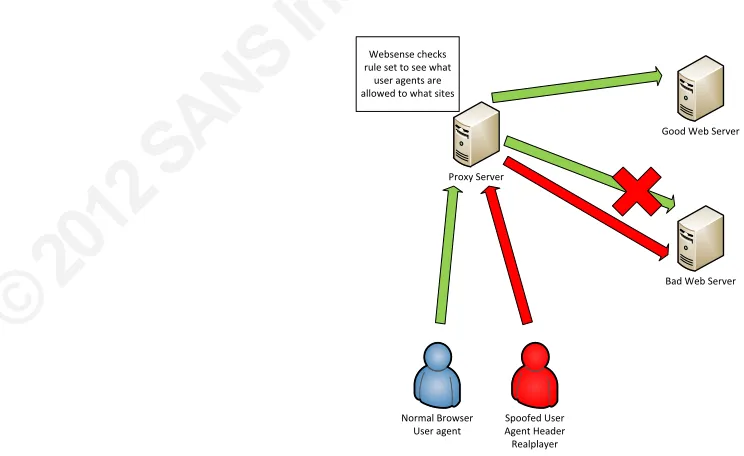
The user agent can be spoofed to avoid security filtering. Often filtering software will allow particular types of traffic based upon the user agent being sent in the HTTP request header. An example of this was Websense Enterprise version 6.3.1. Here the Internet browser user agent was spoofed to be Realplayer, MSN Messenger or Webex. Websense was identifying this traffic as non-‐HTTP. These types of tunneled protocols were being allowed, so subsequently if the Internet browser was incorrectly being identified as one of those protocols, Browsing was being allowed. (mrhinkydink, 2007) (Fig 6.1)
This was an older security bypass attack. Remember the golden rule; those who do not learn from history are doomed to repeat it. (Santayana, 1905)
Proxy Server
Spoofed User Agent Header Realplayer Normal Browser
User agent
Bad Web Server Good Web Server Websense checks
rule set to see what user agents are allowed to what sites
© 2
012
SA
NS
Ins
titu
te,
Au
tho
r re
tain
s fu
ll ri
gh
ts.
6.6. Denial of service
A user agent can also be used to cause a denial of service attack. An example of this is a really old exploit against a SHOUTcast Server. (FraMe, 2001) Here the server will crash when a very long (4KB) request is made in the HTTP request header. (Fig 6.2) One more example is the Darwin Streaming Server 4.1.3. Another long user agent string in a Describe request, using a user agent longer than 255 characters, will cause a denial of service. ("Cve-‐2004-‐0169," 2006) Although both older exploits, it is worth still checking as coders are human and make mistakes.
Proxy Server Long User agent header
A long user agent header caused the server to crash
Figure 6.2 Long user agent header
7. Modifying your own user agent
A security administrator may modify the user agents either via a proxy server or by directly modifying the user agent header directly.
7.1. Modifying via group policy
© 2
012
SA
NS
Ins
titu
te,
Au
tho
r re
tain
s fu
ll ri
gh
ts.
Figure 7-‐1 Group Policy Editor
The User agent string can be modified. Note it will append a string to the end.
Figure 7-‐2 User agent string entry
© 2
012
SA
NS
Ins
titu
te,
Au
tho
r re
tain
s fu
ll ri
gh
ts.
agent. Of course the analyst would still have to change any other tool that makes HTTP requests, but at least now the analyst has a lightened load.
© 2
012
SA
NS
Ins
titu
te,
Au
tho
r re
tain
s fu
ll ri
gh
ts.
8. Conclusion
It is always amazing how the seeming innocuous can be the cause of security breaches. Even more amazing is the fact that site and application developers still do not learn from history. The HTTP request header user agent was the battlefield in this paper. The paper has shown that user agents can and are manipulated very easily. It has shown that there is a real and credible threat to organizations that do not take precautions when dealing with user agent data. Sites such as www.user-‐ agents.org are extremely useful in hunting down unusual user agent strings that start to appear in our organization.
We looked at Wireshark, Snort and TCPdump to capture traffic. Once
captured, we manipulated the traffic to show the unique user agents using Tshark or traffic that was not using a user agent at all. This is our known/expected user agent traffic for our organization. We used Snort in its intrusion detection mode to hunt for known evil user agent strings at the same time as collecting HTTP request
header traffic. We compared new user agents against our organizations known user agents to see if any new potential malicious user agents were evident. If so we can start our incident handling procedure. If the new user agent was malicious then we can create a new snort rule for earlier detection. Also it will aid in finding other victims that may be compromised.
If we know the user agents that ex