ISSN: 2319-8753
I
nternational
J
ournal of
I
nnovative
R
esearch in
S
cience,
E
ngineering and
T
echnology
(An ISO 3297: 2007 Certified Organization)
Vol. 2, Issue 11, November 2013
A COMPARATIVE STUDY OF
SYNCHRONOUS AND ASYNCHRONOUS
E-LEARNING RESOURCES
Adekunle I. Obasa
1, Adekunle A. Eludire
2, Tajudeen A. Ajao
3Senior Lecturer, Department of Mathematics, Statistics and Computer Sc.,Kaduna Polytechnic, Kaduna, Nigeria1
Senior Lecturer, Department of Computer Science, Joseph Ayo Babalola University,IkejiArakeji, Osun State, Nigeria2
P. G. Student, Faculty of Computing, Universiti Teknologi Malaysia, Johor Bahru, Malaysia3.
Abstract:Synchronous and Asynchronous are two distinct modes or platforms of e-learning that have been identified in various works. In this work, asynchronous platform is realised on Modular Object Oriented Dynamic Learning Environment (MOODLE) whilethe synchronous platform is examined on Elluminate.The tools and features of available technological resources to implement these learning platforms are examined and compared. The features of these resources were studied with emphasis on their back-end engine as well as the front-end engine for the purpose of effective system implementation. This involves the analysis of design requirements such as operating system, web services, hypertext processor, server and database platform. The comparative study is based on the Microsoft Windows operating system platform.
Keywords:Moodle, Elluminate, Synchronous, Asynchronous, Front-end, Back-end I. INTRODUCTION
Synchronous and Asynchronous are two distinct modes or platforms of e-learning that have been identified in various works. Historically, the majority of online courses consisted of predominantly asynchronous technologies [1]. Adding synchronous components can greatly enhance meaningful interactions in distance courses [2]. However, until recently, synchronous technologies were expensive and difficult to implement. With advances in technology (such as Voice-Over IP) and increased bandwidth, distance learning is changing and it is now feasible to incorporate interactive instruction using a new model of distributed learning that combines asynchronous and synchronous solutions [3][4][5].
ISSN: 2319-8753
I
nternational
J
ournal of
I
nnovative
R
esearch in
S
cience,
E
ngineering and
T
echnology
(An ISO 3297: 2007 Certified Organization)
Vol. 2, Issue 11, November 2013
other systems can provide on their own. Most of these programs work through common Web browsers with standard plugins such as Java or Flash, although some require their own proprietary software to be installed on users’ computers.
Specifically, the unique capability that these programs provide is to deliver instruction to multiple users (up to hundreds, according to manufacturer claims) at their own computers, with presentations and other computer applications at computer resolution, with simultaneous voice over IP (VOIP) and video if desired, and with the ability to remotely share operation of computer programs [7].The advantages includes the ability to have synchronous communication with a number of people at any location with a computer and Internet access and high interaction including voice and video, and high resolution for computer programs and websites.The noted disadvantages of these systems are disruptions and degradation of signal with a high number of users and during times of high Internet traffic. It is also associated with high cost with regards to institutional commitments to a course management system, videoconferencing and annual maintenance.
II. RELATEDWORK
Reference [8] examined a number of issues for successful implementation of web-based and e-learning management systems. [9] focused on the benefits and limitations of asynchronous and synchronous e-leaning by addressing questions such as when, why and how to use the two modes. In [7],[10], two e-learning systems based on asynchronous and synchronous platforms were investigated and analysed for the purpose of building a virtual classroom. [11]Addressed factors influencing the use of ICT in making teaching-learning effective in higher institution of learning. The paper briefly acknowledged different innovations that ICT has introduced into teaching-learning process. A new approach is applied in this work to compare e-learning platforms based on a number of parameters such as hardware/software requirements, client system requirements and data processing features. The identified parameters are used in defining new paradigm for the two e-learning modes/platforms examined in this work. The novelty brought into this work revolves around the identification of needed hardware and software resources to achieve the required level of e-learning services both to the learners and the teachers. For the asynchronous environment, the Moodle platform is analysed while the Elluminate platform is analysed for the synchronous platform.
III.SYNCHRONOUSANDASYNCHRONOUSCOMMUNICATIONTOOLS
In general, a detailed review of a number of the synchronous and asynchronous communication tools that can be used to create a full, rich learning experience and sense of community are presented in this section. Real-time communication and collaboration in a "same time-different place" mode is usually achieved with Synchronous tools. The tools are capable of engaging people in different locations at the same time. The primary drawback of synchronous tools is that, by definition, they require same-time participation. Different time zones and conflicting schedules can create communication and presentation challenges. Furthermore, they are costly and may require huge amount of bandwidth to be efficient [7].
ISSN: 2319-8753
I
nternational
J
ournal of
I
nnovative
R
esearch in
S
cience,
E
ngineering and
T
echnology
(An ISO 3297: 2007 Certified Organization)
Vol. 2, Issue 11, November 2013
TABLE I
Synchronous Tools, Usability and Limitations
Tool Usability Limitations
Video conferencing Real time interaction that mimics conventional classroom
Expensive, quality dependent on bandwidth
Web conferencing Permits sharing of presentation, documents and
application demonstration
Expensive, quality dependent on bandwidth, and at times effective with audio conferencing
Audio conferencing Collaborative discussions that involve certain number of people
May be expensive if international participants are expected
Chat Text and graphics capabilities are available for
Information sharing of low-complexities
Mostly text based and as such slows down communication rate
Instant messaging Instantaneous massage delivery such as important announcements
Requires some specific devices like handset. It allows 1:1 or 1: n interactions
White boarding Demonstration and co-development of ideas Expensive, bandwidth based, and at times effective
with audio conferencing
Application sharing Demonstration and co-development of documents Expensive, bandwidth based, and at times effective with audio conferencing
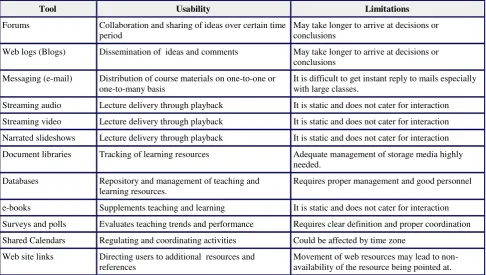
TABLE II
Asynchronous Tools, Usability and Limitations
Tool Usability Limitations
Forums Collaboration and sharing of ideas over certain time
period
May take longer to arrive at decisions or conclusions
Web logs (Blogs) Dissemination of ideas and comments May take longer to arrive at decisions or
conclusions
Messaging (e-mail) Distribution of course materials on one-to-one or one-to-many basis
It is difficult to get instant reply to mails especially with large classes.
Streaming audio Lecture delivery through playback It is static and does not cater for interaction
Streaming video Lecture delivery through playback It is static and does not cater for interaction
Narrated slideshows Lecture delivery through playback It is static and does not cater for interaction
Document libraries Tracking of learning resources Adequate management of storage media highly
needed.
Databases Repository and management of teaching and
learning resources.
Requires proper management and good personnel
e-books Supplements teaching and learning It is static and does not cater for interaction
Surveys and polls Evaluates teaching trends and performance Requires clear definition and proper coordination
Shared Calendars Regulating and coordinating activities Could be affected by time zone
Web site links Directing users to additional resources and
references
ISSN: 2319-8753
I
nternational
J
ournal of
I
nnovative
R
esearch in
S
cience,
E
ngineering and
T
echnology
(An ISO 3297: 2007 Certified Organization)
Vol. 2, Issue 11, November 2013
IV.COMPARATIVEANALYSISOFFEATURESFORMOODLEANDELLUMINATE
Asynchronous e-learning platform (MOODLE) which has Assignment, Forum, Wiki, Quizzes, Lessons, Choices, Public Chat, Internal mail and Glossary was used as a tool of analysis. A collaborative synchronous e-learning platform (Elluminate Live) that has White board, Public and Private Chat, Video, Audio, Application Sharing, Breakout Rooms, Power point Import, Polling, participant Sort, Emoticons, Close a Session and Hand Raise as tools was also used as tool. Windows operating system, Apache web server, My Structured Query Language (MySQL) and Hypertext Pre Processor (PHP) were used as the enabling resources. These four resources are known as WAMP platform. The WAMP platform provides necessary tools for the installation of MOODLE. Elluminate Live software is run on Java.
TABLE III
Comparative Features of Moodle and Elluminate
S/No Factor Moodle Elluminate
1. Mode of lecture
delivery
Mode is asynchronous Mode is synchronous
2. Flexibility Access to the teaching material can take
place at any time (24 hours of the day, 7 days a week) and from many locations
Access to the teaching material is on scheduled bases and can be from many locations
3. Time to reflect Rather than having to react immediately,
asynchronous systems allow the learner time to mull over ideas, check references, refer back to previous messages and take any amount of time to prepare a comment
Instantaneous reaction is
required in synchronous delivery
4. Cost-effective
technology
Text based asynchronous systems require little bandwidth and low end computers to operate, thus access, particularly global access is more equable
It requires a lot of graphics and as such large bandwidth is needed. Hence it is less cost-effective
5. Usage and application areas
Course delivery, extension training,
certification
Graduate course, supplementary course and group projects
6. Advantage Full features, authentication, rich
multimedia, global reach
Live voice and video to
desktops, high resolution for computer presentation
7 Disadvantage High Learning curve. No live voice and
video
ISSN: 2319-8753
I
nternational
J
ournal of
I
nnovative
R
esearch in
S
cience,
E
ngineering and
T
echnology
(An ISO 3297: 2007 Certified Organization)
Vol. 2, Issue 11, November 2013
V. OPERATINGENVIRONMENTS
A. MOODLE Platform
MOODLE is a free and open-source e-learning software platform, also known as a Course Management System, Learning Management System, or Virtual Learning Environment. Moodle is designed to help educators create online courses with opportunities for rich interaction. Its open source license and modular design mean that people can develop additional functionality.
It can scale from a single-teacher site to a University with 200,000 students. Moodle integrates with many third-party software programs and back-end systems so it works with tools that are already in place [6]. Moodle web application that runs on most platforms uses MySQL, Oracle or Microsoft SQL Server as back-end engine and PHP as front-end engine [7]. Moodle itself was developed to run on Linux, Windows, and Mac OS X. Moodle also uses the ADO db library for database abstraction, which means Moodle can use more than ten different brands of database [6]. Moodle runs without modification on Unix, Linux, FreeBSD, Windows, Mac OS X, NetWare and any other systems that support PHP and a database, including most webhost providers [6]. The operating environment in this work is the Microsoft operating system with Windows Server 2003 and Windows Vista as minimum reference examples.
1)Hardware Requirements for MOODLE:
For 50 concurrent users, the minimum hardware requirements are as follows: Processor — 500 MHz Pentium 3;
500 MHz UltraSPARC II (Solaris). Memory — 1GB of RAM.
Disk Space — 160 MB of free disk space.
2)Software Requirements for MOODLE:The software requirements of MOODLE are presented as follows:
Database software: MySQLis a relational database management system (RDBMS) that runs as a server providing multi-user access to a number of databases. MySQL database is the world's most popular open source database because of its fast performance, high reliability, ease of use, and dramatic cost savings [Robin Schumacher, Arjen Lentz (2007)]. MySQL is often used in free software projects that require a full-featured database management system and other software built on the LAMP software stack. Other databases that could be considered include Oracle, Microsoft SQL Server.
3) Web server software: This is a computer program that delivers (serves) content, such as web page, using the Hypertext Transfer Protocol. The term web server can also refer to the computer or virtual machine running the program. The primary function of a web server is to deliver web pages (HTML documents) and associated content (e.g. images, style sheets, JavaScripts) to clients. A client, commonly a web browser or web crawler, makes a request for a specific resource using HTTP and, if all goes well, the server responds with the content of that resource. The two web servers mostly used by Moodle are Apache and IIS. Apache Web Server is generally recognized as the world's most popular Web server (HTTP server). Originally designed for UNIX servers, the Apache Web server has been ported to Windows and other network operating systems(NOS). The Apache Web server provides a full range of Web server features, including Secure Socket Layer (SSL), and virtual domains. Apache also supports plug-in modules for extensibility. Apache is reliable, free, and relatively easy to configure. Apache is free software distributed by the Apache Software Foundation. The Apache Software Foundation promotes various free and open source advanced Web technologies.
ISSN: 2319-8753
I
nternational
J
ournal of
I
nnovative
R
esearch in
S
cience,
E
ngineering and
T
echnology
(An ISO 3297: 2007 Certified Organization)
Vol. 2, Issue 11, November 2013
use. The LAMP and WAMP architectures have become popular in the web industry as a way of deploying web applications. In WAMP, PHP is used alongside with Windows, Apache and MySQL. It runs in both 32-bit and 64-bit environments, but on Windows the only official distribution is 32-bit, requiring Windows 32-bit compatibility mode to be enabled while using IIS in a 64-bit Windows environment.
5) Java Script: is an object-oriented scripting language used to enable programmatic access to objects within both the client application and other applications. It is primarily used in the form of client-side JavaScript, implemented as an integrated component of the web browser, allowing the development of enhanced user interfaces and dynamic websites.
B.
Elluminate Platform
According to [7], [12] and [13] Elluminate is a world-class, real-time training, demonstration and collaboration environment that is powerful, flexible, and easy to use. Elluminate’s collaboration environment enables the delivery of live, online learning, training, coaching, mentoring, and meeting. Effectiveness is increased by engaging participants with the ability to talk over the Internet (with full, 2-way audio), exchange text messages, display live video, share whiteboards, multimedia files, and applications—all in one intuitive, graphical interface. The environment is easy to set up, easy to use, and customizable.
Elluminate is built specifically for live, multimedia collaboration. The Collaborative Communications Framework (CCF) automatically ensures that everything is in the right place at the right time. Whether on a dial-up modem or a high-speed LAN, the same superior quality, high performance, and dependability is delivered—with no lag time or garbled communication. So that focus can be on content, not technology.
The comparison carried out was based on 50 Concurrent Users using Windows 2003 Server (32 bit). It is noteworthy to point out that Elluminate will function well on other operating systems such as Mac OS X 10.4 (PowerPC and Intel), Solaris 10 (SPARC or x86), Red Hat Enterprise Linux (RHEL4) – v4 for x86, Novell SUSE Linux Enterprise Server 9 and 10.
1) Hardware Requirements:
For installations of 100 seats or less, the minimum requirements for the server are as follows:
Processor — 1.2 GHz Pentium 3 (Windows, Linux, or Solaris); 2 GHz G5 (Mac OS X and Mac OS X Server), 750 MHz UltraSPARC II (Solaris).
Memory — 512 MB of RAM.
Network — Static IP address with 1-2 Mbps outbound bandwidth for every 25 users.
Disk Space — 400 MB of free disk space. This does not include the optional space required for extended log files and session recordings. In general, log files grow slowly, but about 5-10 MB of disk space could be required for each recorded 1-hour session.
For installations that are to support more than 100 concurrent users, it is recommended that the Elluminate Live! Manager is installed on separate machines.
Minimum hardware requirements for clients’ system: Pentium III 500 MHz processor
256 MB RAM 20 MB free disk space
Soundcard (except for Macs) with speakers and microphone or headset 28.8 kbps Internet connection
ISSN: 2319-8753
I
nternational
J
ournal of
I
nnovative
R
esearch in
S
cience,
E
ngineering and
T
echnology
(An ISO 3297: 2007 Certified Organization)
Vol. 2, Issue 11, November 2013
C. MOODLE DATA PROCESSING FEATURES
Moodle features that can be used in online classroom include: assignments; chats; forums; glossaries; lessons; quizzes; wiki and blog.
1) Chatting in Moodle: The chat link appears on the course interface but user may want to arrange meetings in the chat room by email. The tutor has the option of making past chat sessions viewable by everyone. In any case, it is best to treat chat like email assuming that whatever users say may turn up later. If a user opens a chat in more than one browser at a time, user may encounter problems such as an echo that repeats every message, spontaneous ejection from chat, or disappearing icons.
2) User Profile: The Profile page is where users tell Moodle about themselves. Some of this information may be displayed to other students, so it is important to think about what one wants to include in the Profile page. The Profile page is accessed in the People block by clicking on the user name used in registering for the course in the list of all participants.Accurate information is required for each registered student by the course administrator or the teacher. Expected information includes the First name, Surname, Email address, and City/town.
3) Limitations of Moodle’s Data Processing Features
Moodle is an asynchronous learning management system. The only synchronous feature available in Moodle is the online chat which is limited in functionality. Moodle suffers the following setbacks:
Unable to provide immediate feedback to the students from teachers: Moodle uses internal mail (an email facility) as a means of communication and as such teachers may be faced with problem of bulk mails which may slow down feedback to students.
Unable to replicate the physical classroom model: Audio, video, emoticons and hand raising features that are natural features of physical classroom model are not available in Moodle.
Unable to reduce the feeling of isolation: The fact that students could not see other students or image that could represent the presence of other students and the teacher could make them feel isolated.
Unable to provide a forum where students can collaborate in real time at any time.
Could not foster a sense of community with the learners: Real time interaction with its opportunity to convey tone helps to develop group cohesion and the sense of being part of a learning community.
D. Elluminate Data Processing Features
Elluminate virtual classroom consists of four main windows and these are:
1) The Participants window: This provides a list of all Participants and Moderators in the session and their current permissions. Permissions range from speaking (Audio), sending Chat messages, entering text for Closed-Captioning, using the Whiteboard drawing tools, Graphing Calculator, Application Sharing, Video webcam, and File Loading permissions. This is also where one can view polling responses and the activity indicators for each participant, raise and lower hands, use the emotion indicators, and stepping away from the session. The Participants window provides one with an overview of what is happening within the session.
2) The Chat window: is where one can send and receive text messages. One can direct messages to one Participant, selected Participants, and Moderators, everyone in a particular room or everyone in all rooms. Messages can be filtered, time-stamped, and saved to track session communication.
ISSN: 2319-8753
I
nternational
J
ournal of
I
nnovative
R
esearch in
S
cience,
E
ngineering and
T
echnology
(An ISO 3297: 2007 Certified Organization)
Vol. 2, Issue 11, November 2013
4) The Whiteboard: is the main presentation window. This region is used to load presentations. One can also use the tools on the Whiteboard to draw or write. All the objects and images on the Whiteboard are dynamic and can be modified. One can print the Whiteboard screens or save them to a file to review later.
5) Class Moderation:The users of Elluminate virtual classroom are classified as Moderators and Participants. As a Moderator, one can use all the available Participant window features. Participants can use only a subset of the features. The Participants’ window can be used to assign permissions, sort the Participants’ list, view what is going on in the session; create, send, and distribute Participants and Moderators to breakout rooms; interact with the Participants, and view a user's profile.Setting Permission is absolutely controlled by the moderator. When participants first join the session, they may only be able to raise their hand and send to the Moderator a private text message depending on the session’s configuration. One may have to grant them permissions to use other features. The Moderator can withdraw Participant permissions at any time. To take away permission, appropriate permission icon next to the Participant’s name is clicked. To remove everyone’s permission simultaneously, one clicks on the column header for that permission. Depending on the session’s configuration, when one disconnects from the session, all Participant permissions may be removed to ensure that there is no unsupervised communication.
6) Limitations of Elluminate: Elluminate is a synchronous learning management system. It is a learning system that encourages real-time and collaborative teaching. In spite of all its beautiful features, it lacks non-recurrent feature (which is inconvenient for in-service learners), sometimes it is difficult to negotiate the lecture time between the lecturer and students, especially when it is one-to-multi points and involving time difference when one party is in another country.
VI.RECOMMENDATIONFORCHOICE/INTEGRATION
Having considered the various characteristics of Moodle and Elluminate as asynchronous and synchronous e-learning systems respectively, it has been observed that each performs remarkable well within their area of application.
The following issues are germane to guarantee the successful implementation of synchronous or asynchronous e-learning:
for cost-effective technology it is clear that choosing text based asynchronous systems require little bandwidth and low end computers to operate, thus access, particularly global access is more equable;
the synchronous platforms require a lot of graphics and as such large bandwidth is needed, hence, it is less cost-effective;
the mastery of associated technology in asynchronous systems requires high cost and a tedious learning curve with the absence of live voice and video;
the implementation of synchronous systems involves high cost and bandwidth problems;
the choice of equipment for live voice and video for desktops and high resolution for computer presentation required by the full features, authentication and rich multimedia might not be within the global reach;
there is the need for the provision of an exceptional delivery infrastructure with the aptitude and technical support to facilitate all communities of learners wishing to take part.
VII. CONCLUSION
ISSN: 2319-8753
I
nternational
J
ournal of
I
nnovative
R
esearch in
S
cience,
E
ngineering and
T
echnology
(An ISO 3297: 2007 Certified Organization)
Vol. 2, Issue 11, November 2013
requirements for each of the asynchronous and synchronous platforms. Teachers and students are to be obliged to have technical and cognitive skills in ICT so that they can develop into efficient users of the technical know-how. In this work, we considered MOODLE and Elluminate as examples of asynchronous and synchronous platforms respectively. We know there are other alternatives that may be better than these in terms of features. Our future research will be based on evaluating the resources available in a good number of synchronous and asynchronous platforms for both the open and non-open sources with a view of appraising technological breakthrough in this area of e-learning.
REFERENCES
[1] T.Waitsand L. Lewis,Distance Education at Degree-Granting Postsecondary Institutions: 2000-2001(NCES 2003-017). U.S.Department of Education. Washington, DC: National Center for Education Statistics,2003 .
[2] J.Repman, C.Zinskie,and R. Carlson, “Effective use of CMC tools in interactive online learning,”Computers in the Schools, vol. 22(1-2), pp. 57-69, 2005.
[3] C. J. Bonk andC. R. Graham, Handbook of blended learning: Global perspectives, local designs, San Francisco, CA: Pfeiffer Publishing, 2006. [4] K. J.Kim and C. J. Bonk, “The future of online teaching and learning in higher education: The survey says ...”Educause Quarterly, vol. 29(4),
pp. 22-30, 2006.
[5] J. Pulichino, (2005). The synchronous eLearning research report 2005. The eLearning Guild Research. [Online]. Available:http://www.elearningguild.com/research/archives/
[6] MOODLE (2005). Moodle for Teachers, Trainers and Administrators. [Online]. Available: http://serrc.org/moodle/mod/resource/view.php?id=355.
[7] A. I. Obasa,“The Development of an Integrated Virtual Classroom,” M. Tech thesis, Federal University of Technology, Akure, Nov.2010. [8] D.T. Akomolafe and A.A. Eludire, “TheRole of Information and Communication Technology in National Development” Journal of School of
Science, vol.(1), pp.102- 107, 2008.
[9] S.Hrastinski, (2008). A study of asynchronous and synchronous e-learning methods discovered that each support different purposes. [Online]. Available:http://net.educause.edu/ir/library/pdf/eqm0848.pdf
[10] A. I. Obasa, A.A. Eludire and Isaac Mbing, “The Architectural Design of an Integrated Virtual Classroom System,”Research Journal of Information Technology, vol. 3(1), pp. 43-48, 2011.
[11] G. Ali, F. A. Haolader, and K. Muhammad,“The Role of ICT to Make Teaching-Learning Effective in Higher Institutions of Learning in Uganda,”International Journal of Innovative Research in Science, Engineering and Technology, vol. 2(8), pp. 4061-4073, Aug. 2013. [12] S. Kaplan and J. L. Ashley, (2003). Beyond the Breakout Room: How Technology Can Help Sustain Community. [Online]. Available: http://www.asaecenter.org/knowledge/article.cfm?ID=2584.
[13] Elluminate Inc., (2004). Conducting Elluminate Live! Sessions ver.5. [Online]. Available: http://www.sfu.ca/oldlidc/elive/Documents/Conducting_ELive_Sessions_5.0.pdf