IJISET - International Journal of Innovative Science, Engineering & Technology, Vol. 4 Issue 3, March 2017 ISSN (Online) 2348 – 7968 | Impact Factor (2016) – 5.264
www.ijiset.com
Design Issues in E Commerce Web-App
Development
1Dr Simon Karume and Andrew Kipkebut 2
1
School of computer science and Bio-informatics, Department of computer science and I.T, Kabarak University-Kenya
2
School of computer science and Bio-informatics, Department of computer science and I.T , Kabarak University-Kenya
Abstract— The web app design industry is highly competitive, and to
get ahead in the race, designers need to keenly focus on being technical
as well as strategic. The Web is one of the most revolutionary
technolo-gies that changes the business environment and has a dramatic impact on
the future of electronic commerce (EC). The future of EC will accelerate
the shift of the power toward the consumer, which will lead to
funda-mental changes in the way companies relate to their customers and
com-pete with one another (Slywotzky, 2000). The immense popularity of the
Internet in recent years has been fueled largely by the prospect of
per-forming business on-line. More and more companies set up their own
corporate LANs by Intranet, apply Extranet and Internet to work
collab-oratively with their customers, suppliers, and partners. Many web
devel-opers use hypertext or hypermedia applications that adapt to some
"fea-tures" of their users, in other words it is the user that dictates a website
capabilities (Brusilovsky, 1996). Before developing a web App one
should keep several aspects in mind web accessibility, navigation, the
nature of content and security. This paper looks at the design issues in E
commerce web application development and brings up design issues and
some solutions to these issues.
Keywords: Design, E commerce, web App.
1
Introduction
Web App development refers to building a Dynamic web App
and deploying on the web for users to interact with. It requires
the use of scripting languages both at the server end (Back end)
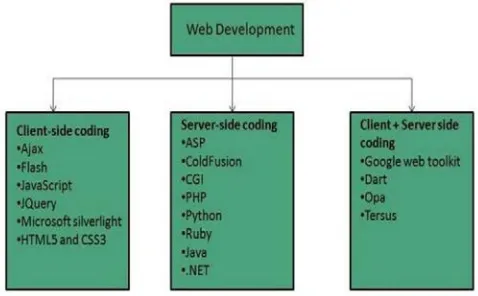
as well as at client end (Front end) as shown in the figure below,
For an E commerce web App development the emphasis is on
transaction processing.
Fig 1 Client and server side languages for Web app
Before developing a web App you should keep several aspects in
mind, the following are some the aspects you need to consider:-
What content to put on the web site? Who will host it?
How to make it interactive to the customers? How to code it?
How to create search engine friendly web site? How to secure the source code frequently?
Will the web site design display well in different
brows-ers?
Will the web site be available on different devices? Will the navigation menus be easy to use?
Will the web site load quickly? How easily will the site pages print?
How easily will visitors find important details specific to
the web site?
How easy is it to use the catalog component?
How is easily is it to use the shopping cart and the check
out process.
How effectively the style sheets be used on your web
sites
How effective is the web form on capturing customer
data.
All these aspects need to be considered in order to develop an
effective E commerce web app, if not taken into consideration it
is a catastrophe.
1.0
Problem statement
E commerce involve the paperless monetary transactions, it
lev-erages the unique features of the internet, however to maximize
conversions E commerce web app design issues needs to be
de-termined. An astounding number of online shopping cart are
reportedly abandoned at the payment stage and check out stage
(Cooper Smith , 2013) .It is important to anticipate and reduce
frustration from errors as mobile shoppers find it extremely
an-noying when a form wipes out the entire fields e.g. credit card
credentials when they inadvertently typed in wrong information
.On the other hand shoppers awareness of E shopping related
issues is naturally heightened at the payment stage (Jonathan,
G.P.G., 2003) it is important to go an extra mile in reassuring
them on this matter.
1.3 Justification
The ultimate findings of the research will add to the knowledge
and understanding of E commerce web app design issues and
ways to mitigate them. On the other hand it will also of great
value in that:
Explain the different challenges currently faced by E
commerce web App developers.
Offer developers with useful knowledge on ways of
handling these issues.
Most retailers are still having trouble providing a unified
shop-ping experience However some online shoppers would abandon
a transaction if the experience is not optimized, others won’t
recommend an E commerce web app that is poorly designed
(Amazon.com, 2013).Customers may abandon a website if they
have to wait for long before a page to loads .These are some of
the things designers should consider when designing web app
responsive.
1.4 Research objectives
1.4.1 General
To look at the design issues in E commerce app
develop-ment and device techniques and models in which these
is-sues can be mitigated.
1.4.2
Specific Objectives
1. Determine the key issues E commerce web App
devel-opment.
2. Analyze these issues
3. Evaluate the existing models/solutions.
4. Implement the adopted model.
1.4.3 Research Questions/Hypothesis:
1. What are the issues in E commerce web app?
2. How to analyze these issues?
3. How can a model be adopted?
4. How can the model be implemented?
2.0 LITERATURE
REVIEW
In recent years, there have been many tools (Content
manage-ment Systems) available for building an E commerce web
appli-cation. Web development tools help the developer to test and
de-bug the web sites. Today the web development tools come with
the web browsers as add-ons. Several companies have
dedicat-ed themselves to developing advance tools that make it easier for
programmers to use. All these resources are helpful however
there are issues that need to be looked at. Some of the common
issues that designers have to face during web app development
include the following:-
Website accessibility: The Web is basically designed to work
for all people, irrespective of the culture, language, location, or
physical or mental ability. However, one of the major challenges
a web designer faces is to enhance the accessibility of websites.
A good designer should ensure that the website is not only
acces-sible across the world but also its various features are fully
func-tional as well (J. Thatcher, P. Bohman, 2002).
Compatibility
with browsers: With the introduction of different browsers,
designers are constantly facing the challenge of building a
web-site which is compatible with almost all the major browsers.
Af-ter designing a website, it should be tested on all browsers to
en-sure that the website is completely functional. Achieving
who states that it requires support for (1) a wide variety of
hard-ware, softhard-ware, and network access, (2) diverse user populations
that differ on such dimensions as age, disabilities, disabling
con-ditions, and literacy, and (3) gaps in the knowledge of users.
Navigational structure: Navigational structure is one of the
vital aspects of any website, as the usability of the website is
based on an excellent navigational structure. Hence, in order to
avoid any such issues, designers have to ensure that they provide
a proper navigational structure to the users. Website navigation
has been seemed as of the most important design features across
many domains, including finance, e-commerce, entertainment,
education, government, and medical (Zhang et al. 2000). The
quality of Website design has been studied from both qualitative
and quantitative perspective (Guillermo et al. 2006; Luis et al.
2002; Webster et al. 2006). In literature, website design has been
approached from different aspects. Web engineering takes into
consideration a whole picture of modeling and enhancement.
From human computer interaction’s perspective, interface,
in-cluding graphical design, layout design and usability analysis
also play an important role in website design. System design
in-cluding hardware design, cache scheduling, etc. affect the
web-site performance, too. Besides, structure design, including
hyper-links configuration and information structural design, has a great
effect on the website navigation.
Positioning of content: Another prominent aspect of
a website is that the users should find it readable. While
design-ing the structure of the website, the designer should place the
content in such a manner that it enhances easy reading. In
addi-tion, use suitable colors when it comes to font.
Challenges in creating a responsive website
The process of creating a responsive website is a major challenge
for designers as it involves a wide array of devices, code
frame-works, scripts, and of course, the constant need to work in an
innovative way with clients to effectively manages the process.
Here are some of the major issues faced by designers while
build-ing a responsive website:
• When compared to a desktop site, building a responsive
website takes a significant amount of time.
• In responsive websites, the content should be prioritized
for mobile use. For smaller screens, the designer must
know precisely what matters, the devices that people
use, their circumstances, and their unique goals.
• Interaction in desktop sites and mobile devices are
dif-ferent.
• Responsive websites recognize media queries to assess
the screen size of every visitor and then displays the
layout accurately. The issue here is that old browsers,
particularly Internet Explorer version 8 and older, do not
recognize media queries.
• In responsive design, scaled images instantly lose
de-tails, and hence their meaning. This is because scaling
mainly happens depending on the size of the screen and
not on context.
On smaller devices, designing intuitive navigation menus
become
Web Usability Issue
Web usability is the ease of use of a website. Some
broad goals of usability are the presentation of
infor-mation and choices in a clear and concise way, a lack of
ambiguity and the placement of important items in
appro-priate areas (Nigel Bevan, 1998). Another important
ele-ment of web usability is ensuring that the content works on
various devices and browsers.Another concern for usability
is ensuring that the website is appropriate for all ages and
genders.They include :- Scalability, Visual Design,
Interac-tivity.
Application Request Processing
At a high level, a Web application can perform request processing
in two ways. With the post back approach, the browser primarily
communicates with the server using Web Forms post backs. A
popular alternative approach is to use RESTful service calls
be-tween the browser and the server (Fielding, Roy Thomas 2000)).
These two approaches each have advantages and disadvantages,
and your choice may impact how you address the design issues
.When choosing a request processing strategy, you should
sider how much control you require over the UI in your
applica-tion, your development and testing approach, and your
perfor-mance and scaling requirements.
The post back approach typically allows a forms-based
develop-ment experience, and uses rich server-side controls that render
the corresponding HTML, associated view state, and interaction
logic to the browser. Consider this approach if you developing a
forms-based Web application and require a rapid application
de-velopment (RAD) experience.
The REST-full approach typically allows finer-grained control
over the UI of your application, and provides more flexibility in
terms of navigation, testability, and separation of concerns.
Con-sider using this approach if your application requires flexible
navigation, fine control over its UI, may use alternate UI
render-ing technologies, or if you are usrender-ing a test-driven development
approach.
Regardless of the request processing strategy you choose, you
should ensure separation of concerns by implementing the
re-quest processing logic and application logic separately from the
UI. Several patterns help achieve this. In general, the
Model-View-Presenter (MVP) or similar patterns can be used in a Web
Forms post back approach to help provide a clean separation of
concerns. The Model-View-Controller (MVC) pattern is typically
used in a REST-full request processing approach.
Also consider the following guidelines when designing a request
processing strategy:
• Consider centralizing the common preprocessing and
post processing steps of Web page requests to promote
logic reuse across pages. For example, consider creating
an HTTP module, or a base class derived from the
ASP.NET Page class, to contain your common
prepro-cessing and post proprepro-cessing logic.
• Choose an appropriate approach or pattern for your UI
processing. Consider dividing UI processing into three
distinct roles—model, view, and controller/presenter—
by using MVC, MVP, or similar patterns. Avoid mixing
processing and rendering logic in your components.
• If you are designing views for handling large amounts of
data, consider giving the view access to the model by
us-ing the Supervisus-ing Presenter (or Supervisus-ing
Control-ler) pattern, which is a form of the MVP pattern. If your
application does not have a dependency on view state
and you have a limited number of control events,
con-sider using the MVC pattern.
• Consider using the Intercepting Filter pattern to
imple-ment the processing steps as pluggable filters when
ap-propriate.
• Ensure that you protect all sensitive data sent over the
network, especially over the Internet. Use secure
chan-nel protocols such as SSL, and consider encrypting and
digitally signing all highly sensitive data sent over both
internal and external networks.
Session Management
When designing a Web application, an efficient and secure
session management strategy is important for performance
and reliability. You must consider session management
fac-tors such as what to store, where to store it, and how long
information will be kept (Gunter Ollmann, 2007). Consider
the following guidelines when designing a
Session management strategy:
• Consider if you actually do need to store session state.
Using session state adds overhead to each page request.
• Ensure that you persist session data when required, but
consider using read-only sessions or disabling session
state altogether to improve performance where this is
appropriate.
• If you have a single Web server, require optimum
ses-sion state performance, and have a relatively limited
number of concurrent sessions, use the in-process state
store
• If you are storing state on a separate server, protect your
session state communication channel using techniques
such as SSL or IPSec.
• Prefer basic types for session data to reduce serialization
costs.
Designing an effective authentication strategy is important for the
security and reliability of your application. Improper or weak
authentication can leave your application vulnerable to spoofing
attacks, dictionary attacks, session hijacking, and other types of
attack (www.owasp.org). Consider the following guidelines
when designing:-
• Identify trust boundaries within Web application layers.
This will help you to determine where to authenticate
users.
• Enforce secure account management practices such as
account lockouts and password expirations, and strong
password policies that specify the minimum password
length and complexity.
• Use a platform- supported authentication mechanism
such as Windows Authentication when possible. Where
you decide to use Forms Authentication, take advantage
of the built-in support in ASP.NET instead of designing
a custom authentication mechanism. Consider using a
federated service or single sign on (SSO) if you want to
allow users to log on to several sites with a single set of
credentials.
• When you must store passwords in a database, do not
store them as plaintext; instead, store a hash (or salted
hash) of the password.
Authorization
Authorization determines the tasks that an authenticated identity
can perform, and identifies the resources that can be accessed.
Designing an effective authorization strategy is important for the
security and reliability of your application. Improper or weak
authorization leads to information disclosure, data tampering, and
elevation of privileges (J.D. Meier, Srinath Vasireddy et al 2004).
Defense in depth is the key security principle to apply to your
application's authorization strategy. Consider the following
guidelines when designing an authorization strategy:
• Authorize users as they cross all trust boundaries. Use
URL authorization for page and directory access control.
Access downstream resources using a trusted identity
based on the trusted subsystem model "Physical Tiers
and Deployment
• Consider the granularity of your authorization settings.
Building your authorization with too much granularity
will increase your management overhead; however,
us-ing fewer granularities may reduce flexibility.
3.0
METHODOLOGY
The research employs mixed methods to research . In this
re-search I have used stratified survey method to collect data from
online resources and books , I have categorized the critical
de-sign issues and the challenges faced by the dede-signers and
custom-ers from the survey data following by qualitative data
analy-sis.This research will help designers underastand the challenges
therefore formulate a good strategy prior to building an E
commerce website.
DATA CAPTURE
The objective of this research is to identify the design issues,
challenges which can crop up during E commerce web app
de-velopment. Consequently, the researcher tries to understand how
these significant issues can be mitigated to help organizations in
achieving their competitive advantage for online business. In
order to achieve this, both qualitative and quantitative approaches
were considered. The survey method was selected to collect data
from wide number of resources as mention above. According to
1m website the most popular E commerce software is magneto.
Magento is an open-source e-commerce platform written in PHP.
The software was originally developed by Varien Inc., a
US private company headquartered in Culver City, California,
with assistance from volunteers. Varien published the first
gen-eral-availability release of the software on March 31, 2008. Roy
Rubin, former CEO of Varien, later sold a substantial share of the
company to eBay, which eventually completely acquired and
then spun off the company. According to the research conducted
by aheadWorks in May 2015, Magento's market share among the
30 most popular e-commerce platforms is about 29.8% (Shatkov,
Dmitry (25 May 2015).
Fig 2: The most popular E commerce software(source,Magento)
.
Fig 3: Pie chart showing the most important factor in web design
( source, Hubspot)
Fig4: The breakdown of modern design
Fig 5: Most popular free shopping Cart
E commerce Web app development Life cycle
(ECWDLC)
ECWDLC is a methodology for understanding business
objec-tives of a system and designing an appropriate solution, it
in-volves all the steps that are good to take to build an attractive
effective ,interactive and responsive website. These steps are
shown in the following diagram , which Involves five
1.
Systems analysis/planning2. Systems design
3. Building the system/Coding
4. Testing
5. Deployment and maintenance
In System Analysis/Planning steps list the business objectives:
i.e the capabilities you want your E commerce web app to have,
System functionalities i.e list the web app capabilities needed to
achieve the business objectives and Information requirement that
the system must produce in order to achieve business objectives.
Table 1.0 System analysis: Business Objectives, system
function-ality and information requirements. (Kenneth Loudon, 2014).The
second step Systems Design: (Hardware and Software Platforms).
System design specification which describes the main
compo-nents of a system and their relationship to one another ,these
main components of system design are the Logical design (Data
flow diagrams, processing functions, databases) and the physical
design (Specifies actual physical, software components, models)
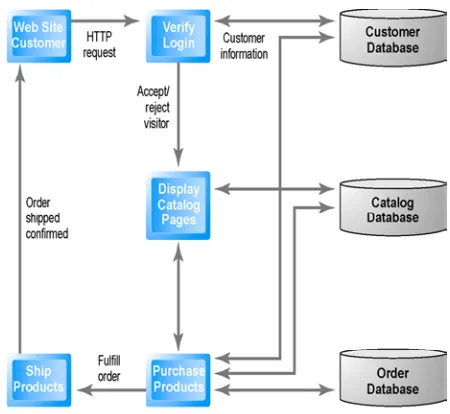
used to realize the logical design.The figure below shows a
typi-cal logitypi-cal design for a simple website.
Fig 6 A simple logical design for a typical E commerce website
(Kenneth Loudon, 2014).
Building a website which is the third step can be done either
in-house or outsourcing, whichever path it is taken the programmer
should be conversant with the web programming languages and
web app Tools required.
This code retrieves list of products from the database and
dis-plays in a grid with add to cart option in PHP
<?php
$product_array = $db_handle->runQuery("SELECT * FROM
tblproduct ORDER BY id ASC");
if (!empty($product_array)) {
foreach($product_array as $key=>$value){
?>
<div class="product-item">
<form method="post"
ac-tion="index.php?action=add&code=<?php echo
$prod-uct_array[$key]["code"]; ?>">
<div class="product-image"><img src="<?php echo
$product_array[$key]["image"]; ?>"></div>
<div><strong><?php echo
$prod-uct_array[$key]["name"]; ?></strong></div>
<div class="product-price"><?php echo
"$".$product_array[$key]["price"]; ?></div>
<div><input type="text" name="quantity" value="1"
size="2" /><input type="submit" value="Add to cart"
class="btnAddAction" /></div>
</form>
</div>
<?php }} ?>
Testing as a fourth step is an important phase.It involves
verify-ing that the e commerce website conforms with the User
re-quirements, in other words the system is doing what is suppose to
do.The following are some of the testing that can be done.
Unit testing
unit testing is a software testing method by which individual
units of source code, sets of one or more computer program
mod-ules together with associated control data, usage procedures, and
operating procedures, are tested to determine whether they are fit
for use( Kolawa, Adam; Huizinga, Dorota 2007). Intuitively, one
can view a unit as the smallest testable part of an application.Php
uses a unit tester called Phpunit and can be downloadable at
https://phpunit.de, others include Junit for Java, For example,
let’s say we get back an object from a method and we want to see
if it’s an instance of a particular class,This can be tested as
fol-lows
<?php
function testIsRightObject() {
$connObj = new RemoteConnect();
$returnedObject = $connObj->returnSampleObject();
$this->assertType('remoteConnect', $returnedObject);}
?>
The method was written to return the class itself, so this test
should pass.
Acceptance testing
acceptance testing is a test conducted to determine if the
require-ments of a specification or contract are met. In systems
engineer-ing it may involve black-box testengineer-ing performed on a system (for
example: a piece of software) (Black, Rex ,August 2009).
In software testing the ISTQB defines acceptance as: formal
test-ing with respect to user needs, requirements, and business
pro-cesses conducted to determine whether a system satisfies the
ac-ceptance criteria and to enable the user, customers or other
au-thorized entity to determine whether or not to accept the system.
Example
$I->amOnPage('/login');
$I->fillField('username', 'davert');
$I->fillField('password', 'qwerty');
$I->click('LOGIN');
$I->see('Welcome, Davert!');
On the browser the test can be performed as follows
start by creating a ‘Cept’ file in the tests/acceptance directory,
called SigninCept.php. The first lines can be written into it as
follows
<?php
$I = new AcceptanceTester($scenario);
$I->wantTo('sign in');
The $I object is used to write all interactions. The methods of
the $I object are taken from the PhpBrowser module.
Deployment and maintenance is the last step :- Maintenance is
ongoing process. Maintenance costs are Parallel to development
costs. It also involves Benchmarking. All these steps are done
iteratively (Larman, Craig (June 2003), when developing the app
all the stakeholders must be involved including the customer.
Web development tools
Web development tools help the developer to test and debug the
web sites. Today the webdevelopment tools come with the web
browsers as add-ons. All web browsers have built in tools for
this purpose. These tools allow the web developer to use
HTML, CSS and JavaScript etc. . The Following are the
com-mon features that every web development tool exhibits:-For
being a successful web developer, one should possess the
fol-lowing skills:Understanding of client and server side
script-ing.Creating, editing and modifying templates for a CMS or
inconsisten-cies.Conducting observational user testing.Testing for
compli-ance to specified standards such as accessibility standards in the
client region. Programming interaction with JavaScript, PHP,
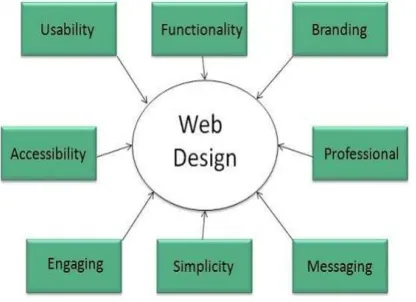
and Jquery etc. Web designing has direct link to visual aspect of
a web site. Effective web design is necessary to communicate
ideas effectively.
Fig 7: Elements of a Web design.
The following are the list of tools that can be used to make
effective web designs especially for E commerce.
Zend Framework (ZF) is an open source, object-oriented web
application framework implemented in PHP 5 and licensed under
the New BSD License (ZF Programmer's, 2009) . Zend
Frame-work features include: All components are fully object-oriented
PHP 5 and are E_STRICT compliant, which helps in the
devel-opment of building tests and writing codes in a bug-free and
crash-proof application manner (Gutmans, Andi 2005-10-27) .
Laravel is a free, open-source PHP web framework, created by
Taylor Otwell and intended for the development of web
applica-tions following the model–view–controller (MVC) architectural
pattern. Some of the features of Laravel are a modular packaging
system with a dedicated dependency manager, different ways for
accessing relational databases, utilities that aid in application
deployment and maintenance, and its orientation toward syntactic
sugar (Daniel Gafitescu, June 6, 2013).
Sublime Text: Sublime Text is a source code editor with Python
application programming interface. It's functionality can be
extended using plugins.
Code Igniter is an open-source software rapid development web
framework, for use in building dynamic web sites with PHP.
Code Igniter is loosely based on the popular model–view–
controller (MVC) development pattern. While controller classes
are a necessary part of development under Code Igniter, models
and views are optional (Cogniter.com).
Fig 8: shows a framework popularity
4.0
REFERENCES:[1] AvantGo and HTML Styles for Handheld Devices. [Online.
Available: http://avantgo.com/developer/ reference/
styleguide.html.] [Bordegoni et al., 1997] M. Bordegoni, G.
Faconti, S. Feiner, M.T. Maybury, T. Rist, S. Ruggieri, P.
Tra-hanias, M. Wilson. A standard reference model for intelligent
multimedia presentation systems. Computer Standards and
Inter-faces, Vol. 18, pp. 477-496, Elsevier Science, 1997.
[2] Boyle & Encarnacion] C. Boyle and A.O. Encarnacion.
MetaDoc: an adaptive hypertext reading system. User Modeling
and User-Adapted Interaction, Vol. 4, pp. 1-19, Kluwer academic
publishers, 1994.
[3] Brusilovsky, 1996 P. Brusilovski. Methods and Techniques of
Adaptive Hypermedia. User Modeling and User-Adapted
Inter-action, Vol. 4, pp. 21-45, Kluwer academic publishers, 1994.
[4] Brusilovsky et al., 1998, P. Brusilovsky, J. Eklund., E.
Schwarz. Web-based education for all: A tool for developing
adaptive course ware. Computer Networks and ISDN Systems
(Proceedings of Seventh International World Wide Web
ence), Vol. 30 (1-7), pp. 291-300, 1998.
[5] Cappel, J.J. and Myerscough, M.A. (1996), ``World Wide
Web uses for electronic commerce: toward a classification
scheme’’, http:// hsb.baylor.edu/ramsower/ais.ac.96/papers/
ai-sor1-3.htm.
[6] Clark, B. (1997), ``Welcome to my parlor . . .’’, Marketing
Management, Chicago, Vol. 5 No. 4, pp. 10-25. Duffy, J. (2000),
``Point of no return’’, CMA Management, March, pp. 32-7.
[7] De Bra and L. Calvi. Towards a Generic Adaptive
Hyperme-dia System. Proceedings of the Second Workshop on Adaptive
Hypertext and Hypermedia, pp. 5-11, 1998. De Bra et al., 1999,
[8] P. De Bra, G.J. Houben, H. Wu. AHAM: A Dexter-based
Ref-erence Model for Adaptive Hypermedia. Proceeding of the ACM
Conference on Hypertext and Hypermedia, pp. 147-156, 1999.
[9] [Halasz & Schwartz, 1994] F. Halasz and M. Schwartz. The
Dexter Hypertext Reference Model. Communications of the
ACM, Vol. 37, nr. 2, pp. 30-39, 1994.
[Hothi & Hall, 1998]
[10] J. Hothi and W. Hall. An Evaluation of Adapted
Hyperme-dia Techniques Using Static User Modeling. Proceedings of the
Second Workshop on Adaptive Hypertext and Hypermedia, pp.
45-50, 1998.
[11] Pilar da Silva et al., 1998] D. Pilar da Silva, R. Van Durm, E.
Duval, H. Olivié. Concepts and documents for adaptive
educa-tional hypermedia: a model and a prototype. Proceedings of the
Second Workshop on Adaptive Hypertext and Hypermedia, pp.