Volume 5, No. 5, May-June 2014
International Journal of Advanced Research in Computer Science
RESEARCH PAPER
Available Online at www.ijarcs.info
Time Based and Voice Based Messenger - An Android Application
Jashanpreet Singh
Research Student, Department Of IT Chandigarh Engineering College, Landran
Mohali, India
Karan Mahajan
Assistant Professor, Department Of IT Chandigarh Engineering College, Landran
Mohali, India
Abstract- The developed application is time and voice based. The phone automatically goes to the silent mode as soon as the application is opened and various mode options (Driving, In class etc) and voice recognition button is displayed to the user . The user can set manually the time or speak to set the desired mode with default time option of 2 hours. When the other person calls the user , the message is sent from the user phone to the caller that “I am busy and would call you after (y-x) hr )”, where( x is starting time limit and y is ending limit).
Keywords- : Android, permissions,Sdk,apk,Speech Recognition
I INTRODUCTION
Android is one of the emerging leading operating systems for smart phones as an open source system platform. Android is an operating system (OS) developed by the Open Handset Alliance (OHA) [1]. The Alliance is a coalition of more than 50 mobile technology companies ranging from handset manufactures and service providers to semiconductor manufacturers and software developers, including Acer, ARM, Google, eBay, HTC, Intel, LG Electronics, Qualcomm, Sprint, and T-Mobile[1]. The architecture of Android is shown in Figure 1.Android OS is based on Linux kernel. Linux understands only character and block devices such as Keyboards and disk drives [1] .
The Android operating system (OS) architecture is divided into 5 layers (fig. 1.) [2]. The application layer of Android OS is visible to end user, and consists of user applications. The application layer includes basic applications which come with the operating system and applications which user subsequently takes [2,3]. All applications are written in the Java programming language.
The application layer includes basic applications which come with the operating system and applications which user subsequently takes. All applications are written in the Java programming language. Framework is extensible set of software components used by all applications in the operating system[2,3].The next layer represents the libraries, written in the C and C + + programming languages, and OS accesses them via framework [2].
The last architecture layer of Android operating system is kernel based on Linux OS, which serves as a hardware abstraction layer. The main reasons for its use are memory management and processes, security model, network system and the constant development of systems [2,3].
II ANDROID SDK AND ECLIPSE GALILEO
The Android SDK provides you the API libraries and developer tools necessary to build, test, and debug apps for Android. Android Development Tools (ADT) is a plugin for the Eclipse IDE that is designed to give you a powerful, integrated environment in which to build Android applications[3,4].
ADT does the following things[4] – a. setting up of new Android projects b. Extends the capabilities of Eclipse. c. create application UI
d. Debug the application using Android SDK tools e. -Export .apk files for distributing the application Developing in Eclipse with ADT is highly recommended and is the fastest way to get started. With the guided project setup it provides, as well as tools integration, custom XML editors, and debug output pane, ADT gives you an incredible boost in developing Android applications [9].
III ANDROID PERMISSIONS
When the user installs an application through Android Market i.e. Google Play Store etc the user is presented with a list of permissions and is asked to allow or deny the access. The Advanced Battery application requires following permissions i.e. Location, Network Communication, phone calls and system tools [5].The permissions lists is shown in Fig 4. The moment the user clicks the OK button ,the application starts installing. The only way for users to not install the application after viewing the permissions is to use the physical back or home buttons on their phone[6] . The default permissions and groups in the Android SDK are detailed at Android's developer site[6,11] .
The Android Market provides every application with two installation pages[7]. The first page consists of description, user reviews ,screen shots and “Download” button. After pressing “Download” ,a final installation page is opened that includes application’s requested permissions (Fig 5) Permissions are displayed as a three-layer warning: a large heading that states each permission’s general category, a small label that describes the specific permission, and a hidden details dialog[7] .
IV SPEECH RECOGNITION
a. The speech recognizer converts the user's speech input into the corresponding words. If you require unusual acoustic conditions or you know that you have a vocabulary of a few thousand words or less, we can provide customized acoustic and language models with our own in-house recogniser to improve performance[2].
b. Semantic decoding: Before deciding how
the system should respond, it is important to work out what the user meant by what they said. There are always many ways to express the same thing in a conversation. Deciphering this meaning is the task of the semantic decoder. Vocal IQ has developed various machine learning approaches to learning the meaning of a sequence of words [2].
c. Dialog management: Deciding how to respond to each user input is the task of the dialog manager. By integrating everything that might have been said in the dialog, including possible errors, we have been able to show significant improvements in the decision making performance [2,5].
[image:2.595.315.555.311.758.2]d. Language generation: System prompts and responses to questions are designed by the application developer using simple template rules. These are then conveyed to the user via a text-to-speech engine [9,10].
e. Speech synthesis: Text-to-speech conversions can be done using engines from a number of vendors, or using our in-house synthesizer [12].
V TIME BASED AND VOICE BASED
APPLICATION FOR ANDROID –
In this application, both time based and voice based privileges are given to the user.The application automatically goes to the silent mode as soon as it is opened. The various mode options (Meeting, Driving, In class, Sleeping, Busy) is displayed to the user. A part from this there’s a microphone button and “View All Send Message ” button. The user can select the desired mode and upon selecting the modes time options is displayed. It includes both manual and default . In manual default option fixed time\ of 2 hours is selected i.e. on selecting the mode it will remain active for 2 hours and message “I am in meeting (mode selected) right now call u after 2 hours “ will be sent to the caller on the other hand in manual option, the user will be given the facility to enter his desired time limit in
messages sent to the caller. As soon as the back button is pressed in the application, it would turn the phone from silent mode to general.
VI FIGURES
Figure 1: Software Stack of Android [1]
Figure 3: Emulator for Eclipse[4]
Figure 4 : Android permission prompt during application install[5]
Figure 5: On the left, a screenshot displaying the application’s permission requests. On the right, the permission dialog that appears if a user clicks on
a permission warning [7].
[image:3.595.315.561.273.747.2]Figure 6: Basic Block Diagram of Speech Recogniser [2]
Figure 7: Installing APK file
[image:3.595.36.284.492.742.2]Figure 9: Modes option, Voice Recognition and View All send Message list
[image:4.595.314.560.53.814.2]Figure 10: Manual and Default option for Driving Mode
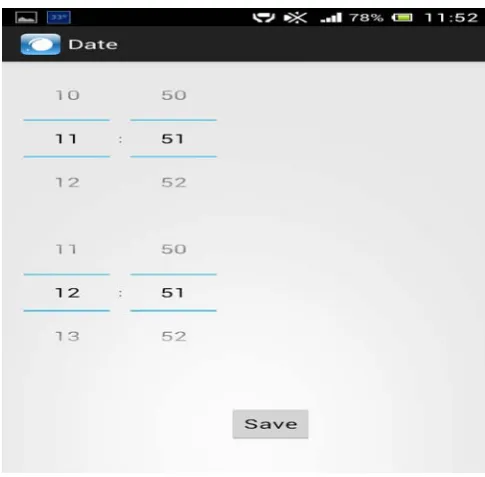
[image:4.595.37.279.306.515.2]Figure 11: Manual mode selected for Driving Mode
Figure 12: SMS sent to caller
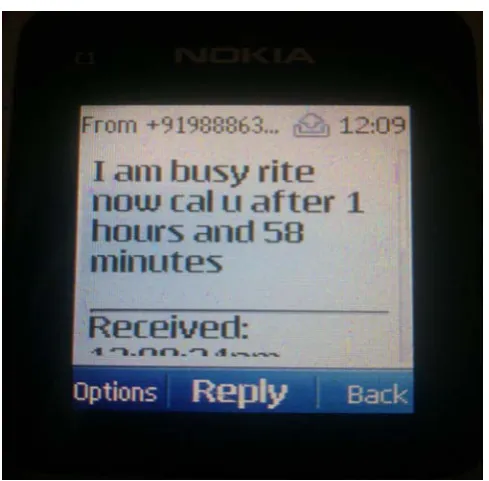
Figure 13: Received SMS by Caller
[image:4.595.35.278.533.771.2] [image:4.595.35.277.535.768.2]Figure 15: Busy Mode activated with voice Recognition for default timmer
[image:5.595.318.555.53.284.2]Figure 16: SMS sent to caller
[image:5.595.33.278.302.511.2]Figure 17: SMS Received by caller
Figure 18: Sent Message Box
VII CONCLUSION
The developed application is one of the latest researches in the Android Market. It includes time based modes and voice based functionality. The user just needs to give a voice command and say “Activate Busy Mode” , Busy mode with default time option (2 hours) would be activated and the user need not to pick the phone when the caller calls the user, auto message would be sent to the caller “I am busy , call you after 2 hours”. Also the user can manually set the time limits. This application saves a lot of time when the user is Driving , Busy in class etc.
VIII FUTURE SCOPE
The developed application is currently time and voice based. In future we would enhance the application by adding Mapping functionalities to it.
IX. REFERENCES
[1]. Jeff Lessard, Gary Kessler,”Android Forensics: Simplifying Cell Phone”,Publisher : Purdue University,2010,
[2]. Sanja Primorac and Mladen Russo, “Android application for sending SMS messages with speech recognition interface”, IEEE, pp-1763-1767, 21-25 May 2012 [MIPRO, 2012 Proceedings of the 35th International Convention].
[3]. Margaret Butler, “Android: Changing the Mobile Landscape”, Publisher: IEEE[Pervasive Computing IEEE], Vol 10,Issue 1,pp 4-7, March 2011
[image:5.595.35.280.530.770.2][8]. Elsa Friscira, Hendrik Knoche, Jeffrey Huang , “Getting in touch with text: Designing a mobile phone application for illiterate users to harness SMS”, pp 5, March 2012, Publisher:ACM[ Proceedings of the 2nd ACM Symposium on Computing for Development],(Article in a conference proceedings).
![Figure 1: Software Stack of Android [1]](https://thumb-us.123doks.com/thumbv2/123dok_us/696617.1077347/2.595.315.555.311.758/figure-software-stack-of-android.webp)
![Figure 3: Emulator for Eclipse[4]](https://thumb-us.123doks.com/thumbv2/123dok_us/696617.1077347/3.595.36.287.55.517/figure-emulator-for-eclipse.webp)