A Survey on Different Graphical Password
Authentication Techniques
Saranya Ramanan1, Bindhu J S2
PG scholar, Department of Computer Science, College of Engineering, Perumon, Kerala, India1
Associate Professor, Department of Computer Science, College of Engineering, Perumon, Kerala, India2
ABSTRACT: Nowadays, user authentication is an important topic in the field of information security. To enforce security of information, passwords were introduced. Text based password is a popular authentication method used from ancient times. However text based passwords are prone to various attacks such as dictionary attacks, guessing attacks, brute force attacks, social engineering attacks etc. Numerous graphical password schemes have been proposed so far as it improves password usability and security. In this paper, we conduct a comprehensive survey of the existing graphical password techniques. We can categorize these techniques into four: recognition-based, pure recall-based, cued-recall based and hybrid approaches. Here we analyze the strengths and drawbacks of each method. This survey will be particularly useful for researchers who are interested in developing new graphical password algorithms as well as industry practitioners who are interested in deploying graphical password techniques.
KEYWORDS: Graphical Password, Information Security, Images, Alphanumeric password, Usability, Security.
I. INTRODUCTION
In recent years, information security has been formulated as an important problem. Main area of information security is authentication which is the determination of whether a user should be allowed access to a given system or resource. In this context, the password is a common and widely authentication method.
A password is a form of secret authentication that is used to control access to data. It is kept secret from unauthorized users, and those wishing to gain access are tested and are granted or denied the access based on the password according to that.
Passwords are used from ancient times itself as the unique code to detect the malicious users. In modern times, passwords are used to limit access to protect computer operating systems, mobile phones, and others. A computer user may need passwords for many uses such as log in to personal accounts, accessing e-mail from servers, retrieving files, databases, networks, web sites, etc.
Normal passwords have some drawbacks such as hacked password, forgetting password and stolen password [2]. Therefore, strong authentication is needed to secure all our applications. Conventional passwords have been used for authentication but they are known to have problems in usability and security. Recent days, another method such as graphical authentication is introduced. Graphical password has been proposed as an alternative to alphanumeric
password. Psychological studies have shown that people can remember images better than text. Images are generally
easier to be remembered than alphabets and numbers, especially photos, which are even easier to be remembered than random pictures [6].
In this paper, we conduct a comprehensive survey of the existing graphical password algorithms. We will discuss the strengths and drawbacks of each method and also proposes future scope in this area. In this survey, we want to answer the following questions:
This survey will be beneficial to information security researchers and practitioners who are interested in finding an alternative to text-based authentication methods.
II. GRAPHICAL PASSWORDS
Graphical password is an alternative to alphanumeric passwords in which users click on images to authenticate themselves rather than typing alphanumeric words [3]. Graphical passwords are more memorable compared to the alphanumeric passwords, because it is easier to remember an image of flower than a set of alphabets and numbers.
Several psychological studies have recognized that human brains have apparently superior memory to recognize and recall visual information like photos as opposed to verbal or text based information [4]. Text is mentally represented as symbols which give a meaning which is associated with the text, as opposed to a meaning perceived based on the form of the alphabets.
Using images instead of characters will help the user to improve the security as the alphanumeric corpus size is limited. But in the case of graphical password, the size of the corpus is infinity if it is in the case of multiple numbers of images or if it is in the case of multiple points in a single image [5]. We can select only 26 alphabets and 10 numbers in the case of alphanumeric password, but in the case graphical password the corpus size is not limited.
III.GRAPHICAL PASSWORD METHODS
In this section, some existing graphical password methods are discussed. Graphical based password techniques have been proposed to solve the limitations of the conventional text based password techniques, because pictures are easier to remember than texts. It is referred as “Picture superiority effect” [13].
A literature survey of papers regarding graphical password techniques shows that the techniques can be categorized into four groups as follows (Fig.1):
Fig.1. Categorization of Graphical password authentication techniques
A. Recognition-Based Technique
In this category, users will select images, icons or symbols from a collection of images. At the time of authentication, the users need to recognize their images, symbols or icons which are selected at the time of registration among a set of images. Researches were done to find the memorability of these passwords and it shows that the users can remember their passwords even after 45 days [14].
B. Pure Recall-Based Technique
In this category, users have to reproduce their passwords without being given any type of hints or reminder. Although this category is very easy and convenient, but it seems that users can hardly remember their passwords. Still it is more secure than the recognition based technique.
Graphical Password
Recognition-
based Recall-based schemes Hybrid
C. Cued Recall-Based Technique
In this category, users are provided with the reminders or hints. Reminders help the users to reproduce their passwords or help users to reproduce the password more accurately. This is similar to the recall based schemes but it is recall with cueing.
D. Hybrid Schemes
In this category, the authentication will be typically the combination of two or more schemes. These schemes are used to overcome the drawbacks of a single scheme, such as spyware, shoulder surfing and so on.
IV.RECOGNITION BASED ALGORITHMS
Recognition-based systems are also known as cognometric systems [15]. These systems generally require that users
must memorize the portfolio of images during the process of password creation, and when logged in, the users must recognize their images from decoys. Exceptional ability of humans to recognize images previously seen made the recognition based algorithms more popular. Various recognition based systems have been proposed using different types of images, mostly like faces, icons, everyday objects, random arts, etc.
Déjà vu [22] was proposed by Dhamija et al., where users select a specific number of random art images from a set of images generated by a program in the registration phase. At the time of authentication, the system shows a set of images that contains both password images and decoy images. The user has to identify the password pictures from the challenge set of password images and decoy images. It is easy to store and transmit the random art images generated by small initial seeds and also the art images make it inconvenient to record or share with others. This system has several drawbacks such as hard to remember an obscure picture and the corpus size is much smaller than that of text based passwords.
Brostoff et al. proposed PassFaces [23], which is motivated by the fact that humans are familiar with the faces. In this system, users need to click on face images which are already selected in registration for several attempts. However, it has some serious security problems. PassFaces is vulnerable to shoulder surfing attacks and spyware because face images are clearly shown. Guessing attack is high with few authentication rounds as the probability of detecting correct faces is high. Also, there are some predictable images which users are more likely to select based on race, complexion and gender.
Another recognition based scheme, Story [24] which is similar to PassFaces only needs one round of authentication, but password pictures are a sequence of number of unique images that makes a story to enhance memorability. When users authenticate, users have to click the password pictures. The story needs the users to remember the order of images. So it makes the users difficult who are not using a story to guide the image selection to memorize the password. Studies show that, of the all incorrect password entries in Story, over 80% of them contained all the correct images, but with incorrect order. Therefore, the importance to “make a story” should be emphasized to users.
Cognitive Authentication [25] is another recognition based algorithm designed to resist shoulder-surfing and spyware. If a user stands on an image belonging to the portfolio, then the user will move right or move down until the bottom or right edge of the panel is reached, the label of column or row is stored and a multiple choice question which includes the label for the correct point of the path is displayed for each round. Cognitive authentication system computes the cumulative probability of the correct answer to ensure that was not entered by chance after each round. When probability is above a certain threshold, authentication is success. Threshold value enables the system to tolerate user errors up to some extent. An observer who stores any feasible number of successful authentication sessions cannot recover the user’s password by the conjectured brute-force or enumeration method.
V. PURE RECALL BASED ALGORITHMS
Pure recall-based graphical password systems are also referred to as drawmetric systems because users recall an outline
drawing on a grid that they created or selected during the registration phase. In these types of systems, users usually draw their password either on a grid or on a blank canvas. Memorability is difficult in case of recall is a difficult as retrieval is done without any reminders or cues.
The first graphical password system proposed in this category was Draw-A-Secret (DAS) [27]. In this, Users are asked to draw their password on a 2D grid through a stylus or mouse. The drawing can consist of one continuous pen stroke or preferably, several strokes separated by “pen-ups” that continue the next stroke in a different cell. To successfully log in, users must redraw the same path through the grid cells. The system stores the user-drawn password which is the sequence of coordinates of the grid cells passed through the drawing, to get an encoded DAS password. The length of the password will be the number of coordinate pairs across all strokes. Here, users are liberated from remembering any alphanumeric string as password. Still, there are some restrictions on drawing which reduce the usability of DAS, such as ensuring every stroke is off the grid lines and redrawing the password in the exact position.
One of the popular recall based system was then proposed by Varenhorst [9], Passdoodle, allowing users to generate a freehand drawing as a password. There will not be any visible grid in this. The doodle should consist of at least two pen-strokes placed anywhere on the screen and can be drawn using number of colors. Matching of passwords in Passdoodle is more complex than in DAS. In Passdoodle, the system begins to scale and stretch the doodle to a grid after reading the mouse input, and then compares the stretched doodle with the stored user password.
A system similar to Passdoodle was proposed by Weiss et al., PassShapes [10]. In PassShapes, geometric shapes are constructed from an arbitrary combination of eight different strokes. At the time of login, there is no grid and the password can be drawn in variable sizes or positions on the screen since only strokes and their order are considered in evaluation. Although PassShapes offers better memorability, its password space is relatively small since each stroke is generated from only 8 possible choices.
Syukri algorithm [11] is a pure recall based system in which authentication is conducted by having user drawing their signature using mouse or stylus. This technique consists of two stages, registration and verification. At the time of registration, users will be asked to draw their signature first with mouse, and then the system will extract the signature space and either enlarges or scale-down signature areas, rotates if needed. The information will be stored into the database later. The verification stage first takes the user input, and then extracts the parameters of the user’s signature. The system conducts verification using geometric average and a dynamic update of database. The main advantage of this approach is that there is no need to memorize one’s signature and signatures are hard to fake.
There are only two commercial products of pure recall based graphical password scheme are proposed till to date. First one is an unlock scheme which resembles a mini Pass-Go that has been used to unlock screens on Android smart phones. In this, the user can decide his own unlocking pattern by dragging his finger or stylus over several points in a
3×3 grid. Password space is only 218 bits, yet is sufficient for the phones which do not require a very high security level
but, the Android screen-unlock scheme is susceptible to “smudge attacks”[12], where attackers get the password from the smudges on the screen. Aviv, et al. conducts study on the feasibility of such smudge attacks on touch screens for Smart phones. Second one is in the Window 8 system; Microsoft introduces a new graphical password. The user is provided with an image firstly and then draws a set of gestures in that image provided. Three types of gestures offered include: straight lines, taps and circles. Any combination of those gestures can be used to create a password. However, one study declares that guessing the correct gesture set based on smudging is very difficult, attacks like hotspots and shoulder surfing remain as a matter of concern. The two products of the pure recall based graphical password scheme clearly demonstrate that commercial product schemes must be simple to operate, easy to remember and can apply to systems which don’t require a higher security level.
VI.CUED RECALL BASED ALGORITHMS
Cued-recall systems are also known as locimetric systems as it related to identifying specific locations. These systems
memorability as it is easier to memorize than pure recall based systems. This is a different memory task than simply recognizing an image as a whole. In these types of schemes, users are provided with an image so that they can choose points arbitrarily by clicking in the presented image as a password. For successful login, the user has to click on right click points in the correct order.
Cued-recall graphical password systems are in use from the Blonder’s scheme [1]. This was the first scheme proposed among graphical password systems. In this scheme, the user is required to click on the pre-selected areas of the previously selected image in a sequence to input the password. Blonder’s technique has many advantages over popular text based passwords. Main advantages are, people find images easier to remember than alphanumeric strings and such password schemes provides more security than text based passwords. However, Blonder’s technique also had some limitations such as predefined regions should be easily identifiable and the number of predefined regions is small, sometimes a few dozen in an image. The password may require many clicks to enhance the security, so it will become a tedious task for the users and it is more prone to shoulder surfing attacks when compared to text based passwords. Wiedenbeck et al., proposed PassPoints [7], by extending Blonder’s idea. This scheme also considered the limitations of the Blonder’s technique and tried to overcome some of its major drawbacks. Passpoints eliminated the predefined boundaries and allows any dynamic image to be used. The users can click on any place in the image arbitrarily to create a password as the password space is not limited. For a successful log in, the users have to click on the previously chosen click points within a specified tolerance level and also in the same order as in the time of registration. An image may contain thousands of potentially memorable click points, so the password space of this is quite large compared to Blonder’s scheme. However, some limitations existed even after Passpoints, as users find it difficult to ensure click points within tolerance level and increasing the tolerance level reduces the security.
Chiasson et al proposed Cued Click-Points (CCP) [8]. It was a variation of PassPoints. In this scheme, the next image is displayed based on the basis of the location of the previous click-point. Each image displayed after the first image is a function of the coordinates of the user click points of the present image. When the users click on an incorrect point on the image, then the next image displayed will be wrong. Without the knowledge of correct password, attackers may lead to incorrect images only. However, the users tend to select points within known hotspot regions.
Chiasson et al. proposed Persuasive Cued Click-Points (PCCP) [13], which includes persuasive feature to Cued Click- Points. More random passwords can be selected as the cued click points are persuasive. At the time of password creation, the images are slightly shaded except for a random small viewport area positioned on the image. In Persuasive Cued Click- Points, the users have to select a click-point within the viewport. Users can click on the “shuffle” button to reposition the viewport randomly until an ideal location is found by the user. At the time of login, the not shaded images are displayed usually. PCCP eliminates hotspot problem. And also enhances the usability up to an extent. However, shoulder surfing attacks remains as an issue in both CCP and PCCP.
Locimetric schemes are click-based graphical password schemes so these schemes are vulnerable to shoulder surfing attacks mainly as the position of the images in the password remains same in each login. A screen scraper can be used to find the exact location as the position of images doesn’t change. The screen scraper may is sufficient for hacking if the attacker knows when the user clicked the mouse. To resist these attacks we can use shields to cover to hide the entering of password.
VII. HYBRID SCHEMES
Hybrid schemes are the combination of two or more graphical password schemes. These schemes are introduced to overcome the limitations of a single scheme, such as hotspot problem, shoulder surfing, spyware, etc. Many single schemes on recognition-based and recall-based schemes are discussed and some of these schemes are combined to develop the hybrid schemes.
to choose the right template, place it on the correct location on the image then enter the characters visible through the holes from top to bottom. Memorability of the passwords in this scheme is higher than text based password as this scheme only requires users to remember the correct location of template on the image.
Gao et al. proposed a hybrid scheme [15] using CAPTCHA (Completely Automated Public Turing tests to tell Computer and Humans Apart). It retains all the advantages of graphical password schemes and CAPTCHA technology. During the registration phase, users select the images as their password images. For authentication, user is required to differentiate the password images from decoys and complete a test by recognizing and typing the CAPTCHA string below every password images. This scheme is almost impossible to break but still spyware may affect this Hybrid scheme.
Zhao and Li [16] proposed a Textual-Graphical Password Authentication scheme (S3PAS) to resist the shoulder surfing attacks. This scheme combines advantages of both textual and graphical passwords and is resistant to shoulder-surfing, spyware and hidden-camera attacks. At the time of registration, user has to select a string k as the original textual password. Password length may vary on different environments and for different security requirements. During login, user has to find the original password in the login image and then click inside the invisible triangles, called “pass-triangles”, created by the original password.
M. Éluard et al. proposed a hybrid scheme, “Click-a-secret” (CAS) [17] which combines both Locimetric and
Cognometric schemes. This scheme allows input and record a secret though interaction with an image. First, users have to create a personal image by replacing some specific regions of the original image. These regions are called as Gecu (Graphical Element Chosen by User). This region has a specific graphical element present in the original image. During registration, the user clicks on Gecu in the original image, which is then replaced by an alternate version. When the user thinks the current image is ideal to create the password, and then the user validates the personal image, thus make it more secure. This process is repeated for several rounds generating the user password. During the login stage, the user must click on Gecu in the first image, until the finds all of his or her personal images. This scheme offers high security compared to other hybrid scheme. However, the usability is not good due to the limitation of its reduced password space.
Gao et al. proposed another hybrid scheme PassHands [18], which is a combination of recognition-based graphical passwords and palm-based biometric technique. This scheme requires the processed palm images of human instead of usually using faces. During the login phase, nine identically sized processed sub-images of the palm are placed in a 3×3 grid at random where one of the images is a password image and the many decoy images to cover up. At the time of login, the users compare their left or right hand to the particular region with the generated image and then click on the password image. However, the usability still remains as an issue in PassHands compared to other schemes and also log in will become a tedious task as the hand comparison process needs more time.
Click Buttons according to Figures in Grids (CBFG) [21], is another hybrid scheme which is a combination of Locimetric, Cognometric and alphanumeric schemes. At the time of registration, the user is presented with four background images and ten icons. The users have to select one cell on each image as password cells and choose one icon as password icon. The user can click on any key til the icon is the password icon. Then the user has to click on the numeric key, then for each password cell. When the authentication of password cells is done, the users have to continue clicking the remaining keys to ensure that all the buttons are clicked. There are multiple background images in the CBFG, hence it provides a large password space compared to other hybrid schemes. However, hotspot problem can occur in password cell selection of CBFG. Since the sequence entered each time is in pure random manner, it is still a difficult task for the hacker to guess the user password even if he or she records the entire login process with a hidden camera.
VIII. SECURITY ATTACKS IN GRAPHICAL PASSWORD SCHEMES
A. Dictionary Attack
within the dictionary, then this attack will be successful. This attack is a specific type of the password brute forcing attack.
B. Guessing Attack
Many users tend to select their passwords based on their personal information like the name of their pets, house name, phone number, passport number, etc. In these cases, the attacker tries to guess the password by trying the main password possibilities based on the user’s personal information. Guessing attacks can be broadly classified into two categories: online password guessing attacks and offline password guessing attacks. In online password guessing attack, attacker tries to guess a password by manipulating the inputs of one or more oracles. In offline password guessing attack, attacker exhaustively searches for the password by manipulating the inputs of one or more oracles.
C. Shoulder Surfing Attack
Shoulder surfing attack refers to attack the user passwords by using direct observation techniques. Main direct observation technique is looking over someone's shoulder, to get the password. Shoulder surfing attack mostly occurs in public places because it is really easy in a crowd to stand near someone and look at them entering a password or any secret key.
D. Spyware Attack
Spyware is a type of malicious software which installed on computers with the aim of stealing secret information of users. Spyware attack is normally done by using a key logger or key listener. This malwares gathers information without user’s knowledge about gathering and leak this information to an outside source of attacker.
E. Social Engineering Attack
Social engineering is the attack, in which human gains the sensitive information from the human interaction. In this type of attack, attacker tries to obtain the information about an organization or computer systems from the user itself to act like an employee. The attacker doesn’t use any electronic techniques of hacking in this kind of attack as he or she uses only human intelligence and tricky conversation to get the information he wants. When attacker gets some of information from one source, then he or she may gather information from other sources within the same organization to get the complete information and add to his or her credibility.
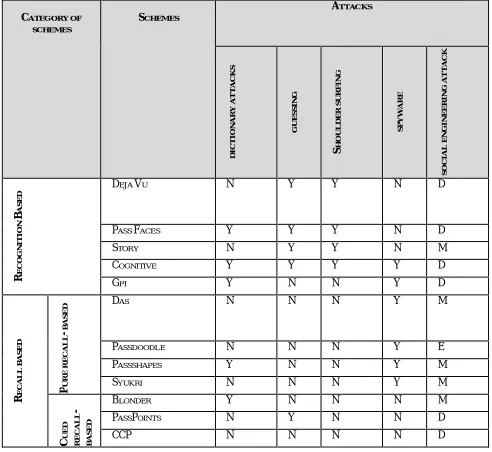
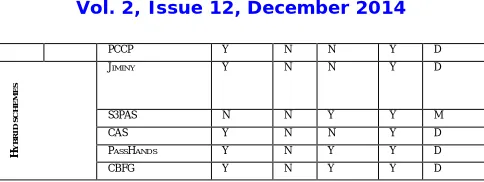
In the following section, we create the comparison table (Table I) for these attacks based on the survey.
TABLE I: THE ATTACK COMPARISON IN FOUR CATEGORIES OF GRAPHICAL PASSWORD
CATEGORY OF SCHEMES SCHEMES ATTACKS D IC T IO N A R Y A T T A C K S G U E S S IN G S H O U L D E R S U R F IN G S P Y WA R E S O C IA L E N G IN E E R IN G A T T A C K R E C O G N IT IO N B A S E D
DEJA VU N Y Y N D
PASS FACES Y Y Y N D
STORY N Y Y N M
COGNITIVE Y Y Y Y D
GPI Y N N Y D
R E C A L L B A S E D P U R E R E C A L L B A S E
D DAS N N N Y M
PASSDOODLE N N N Y E
PASSSHAPES Y N N Y M
SYUKRI N N N Y M
C U E D R E C A L L -B A S E D
BLONDER Y N N N M
PASSPOINTS N Y N N D
PCCP Y N N Y D
H
Y
B
R
ID
S
C
H
E
M
E
S
JIMINY Y N N Y D
S3PAS N N Y Y M
CAS Y N N Y D
PASSHANDS Y N Y Y D
CBFG Y N Y Y D
Table I summarizes the security of the different graphical password schemes we analyzed. ‘Y’ means Yes, that it is resistant to that form of attack. ‘N’ means No that the scheme is open to attack. In Social engineering attack, ‘E’ indicates Easy as the attack is highly effective. ‘M’ denotes Middle that difficulty has increased. ‘D’ denotes the attack is difficult.
IX.CONCLUSION
In this study, different algorithms from recognition-based, pure recall-based, cued recall-based, and hybrid schemes of graphical password authentication are reviewed and surveyed. During our research, we identify several drawbacks which can cause attacks. Therefore, it can be concluded that the common drawbacks on these graphical password methods and how to overcome these attacks. Then, we tried to survey on attack patterns and define common attacks in graphical password authentication methods. Finally we make a comparison table among various graphical password authentication techniques based on attack patterns.
REFERENCES
1. G. Blonder. “Graphical passwords”. United States Patent, 5,559,961, 1996.
2. Phen-Lan Lin, Li-Tung Weng and Po-Whei Huang, “Graphical passwords using images with random tracks of geometric shapes,” 2008 Congress on Images and Signal Processing. 2008.
3. De Angeli, L. Coventry, G. Johnson, and K. Renaud, “Is a picture really worth a thousand words? Exploring the feasibility of graphical authentication systems,” International Journal of Human-Computer Studies, vol. 63, no. 1-2, pp. 128–152, 2005.
4. Kirkpatrick, “An experimental study of memory,” Psychological Review, vol. 1, pp. 602–609, 1894.
5. S. Madigan, “Picture memory,” in Imagery, Memory, and Cognition: Essays in Honor of Allan Paivio, J. Yuille, Ed. Lawrence Erlbaum Associates, 1983, ch. 3, pp. 65–89.
6. http://www.iso.org/iso/catalogue_detail.htm.
7. S. Wiedenbeck, J. Waters, J. Birget, A. Brodskiy, and N. Memon. “PassPoints: Design and longitudinal evaluation of a graphical password system”. International Journal ofHuman-Computer Studies, 63 (1-2): 102-127, 2005.
8. S. Chiasson, P.C. van Oorschot, and R. Biddle. “Graphical password authentication using Cued Click Points”. InEuropean Symposium On
Research In Computer Security(ESORICS), LNCS 4734, September 2007, pp. 359-374.
9. Varenhorst, Passdoodles: “A lightweight authentication method”. MIT Research Science Institute, July 2004.
10. R. Weiss and A. De Luca, “PassShapes - utilizing stroke based authentication to increase password memorability”.
11. Ali Mohamed Eilejtlawi, “Study and development of a new graphical password system”, May 2008.
12. J. Aviv, K. Gibson, E. Mossop, M. Blaze, and J. M. Smith, “Smudge attacks on smartphone touch screens”. InUSENIX 4th Workshop on
Offensive Technologies, 2010. In NordiCHI, pp.383-392. ACM, October 2008.
13. S. Chiasson, A. Forget, R. Biddle, and P. C. van Oorschot. “Influencing users towards better passwords: Persuasive Cued Click-Points”. In
Human Computer Interaction (HCI), The British Computer Society, September 2008.
14. K. Renaud and E. Smith. Jiminy: “Helping user to remember their passwords”. Technical report, School ofComputing, Univ. of South Africa, 2001.
15. H.C.Gao, X.Y.Liu, S.D.Wang, R.Y.Dai. “A new graphical password scheme against spyware by using CAPTCHA”. In: Proceedings of the
symposium on usable privacy andsecurity, 15-17 July, 2009.
16. H. Zhao and X. Li, “S3PAS: A Scalable Shoulder-Surfing Resistant Textual-Graphical Password Authentication Scheme”, in 21st International
Conference on AdvancedInformation Networking and Applications Workshops, vol.2. Canada, 2007, pp. 467-472.
17. Eluard, M.; Maetz, Y.; Alessio, D.; , “Action-based graphical password: Click-a-Secret”, 2011 IEEEInternational Conference on Consumer
Electronics, 2011, pp.265-266.
18. H.C.Gao, L.C.Ma, J.H.Qiu and X.Y.Liu, “Exploration of a Hand-based Graphical Password Scheme”, Proceedings ofthe 4th international
conference on Security of informationand networks, 2011.
19. Paivio, T. Rogers, and P. C. Smythe, “Why are pictures easier to recall than words?” Psychonomic Science, vol. 11, no. 4, pp. 137–138, 1968.
20. R. Shepard, “Recognition memory for words, sentences, and pictures,”Journal of Verbal Learning and Verbal Behavior, vol. 6, pp. 156–163.
21. X.Y. Liu., J.H. Qiu., L.C. Ma., H.C. Gao., etc., “A Novel Cued-recall Graphical Password Scheme”, In sixthInternational Conference on
Image and Graphics (ICIG), pp.949-956, 2011.
22. Dhamija R. and Perrig A., “Déjà vu: A User Study Using Images for Authentication”, in Proceedings of 9th USENIXSecurity Symposium, 2000.
24. Davis, F. Monrose, and M. K. Reiter, “On user choice in graphical password schemes”, in Proceedings of the 13thUsenix Security Symposium. San Diego, CA, 2004.
25. Weinshall D., “Cognitive Authentication Schemes Safe against Spyware”. In IEEE Symposium on Security andPrivacy (S&P), 2006.
26. K. Bicakci, N. B. Atalay, M. Yuceel, H. Gurbaslar, and B. Erdeniz, “Towards usable solutions to graphical password hotspot problem”, In 33rd
Annual IEEE InternationalComputer Software and Applications Conference, 2009.
27. Jermyn, A. Mayer, F. Monrose, M. Reiter, and A. Rubin, “The design and analysis of graphical passwords”. In 8th USENIX Security
Symposium, August 1999.
BIOGRAPHY
Saranya Ramananis a Master of technology (M-tech) student in Computer Science Department, College of Engineering, Perumon. She received her Bachelor of Technology (B-tech) degree from Cochin University of Science and Technology. Her research interests are Image processing, Information forensics, Network security etc.