Implementation of Private Cloud based
Collaboration Platforms: AWS Amazon VPC
and OwnCloud
Prof. Jyotsna More, Kaushik Arvind Jadhav
Assistant Professor, Department of Information Technology, Xavier Institute of Engineering, Mumbai, India
Student, Department of Information Technology, Xavier Institute of Engineering, Mumbai, India
ABSTRACT: In modern times, Cloud Computing has become increasingly popular since it allows users to use various resources on an on-demand basis. Cloud provides users with innumerable lucrative features such as virtual machine instances, cheap computing capabilities, efficient file storage, so on and so forth. All these advantages have encouraged several professional and non-professional individuals, organizations and industries to engineer cloud based solutions for several business problems. Likewise, several tools are now available for developing a particular cloud based solution. One such cloud based solution is Private Cloud Computing. The paper aims to throw light on how to create a private cloud using two different cloud based collaboration platforms and compare them in terms of various parameters. The two private cloud based collaboration platforms discussed are Amazon Web Services (AWS) Virtual Private Cloud (VPC) and ownCloud
KEYWORDS: Cloud Computing; Private Cloud; Virtualization; VPC; ownCloud; AWS
I. INTRODUCTION
Cloud Computing has revolutionized the way organizations manage their businesses with the advent of Private Cloud Computing. Private Cloud Computing confers upon industries, a number of measurable benefits such as scalability, availability, security and efficiency at a cheaper price. The advent of several novel innovations such as high speed internet and smart devices have boosted the growth of Cloud Computing platforms.
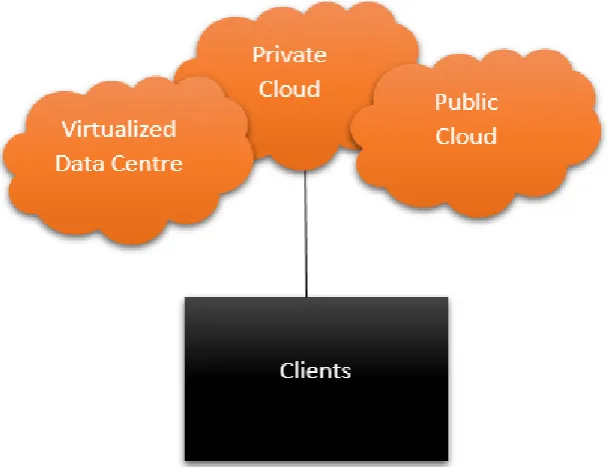
Fig 1. Cloud Connectivity.
II. RELATED WORK
In [1], the basic architecture of AWS Amazon VPC has been discussed. It also details fundamental concepts, functionality, features and use cases of AWS VPC. In [2], an overview of ownCloud has been provided and its software and hardware requirements have been discussed. The context also describes the technical architecture of ownCloud stack. In [3], authors performed a comparative study on I/O Performance between Compute and Storage Optimized Instances of Amazon EC2. Various features and modules of the EC2 instances have also been discussed. In [4], the authors detail the methodology used to deploy and extend on premise cloud storage on ownCloud. The parameters affecting the effectiveness of working and support of cloud based storage on ownCloud have also been discussed clearly by the author. In [5], a survey on building private cloud computing implementation tools has been conducted by the authors. In this survey, the authors clearly evaluate the effect of on premise parameters on private cloud computing. The authors offer an explanation for the varied nature of private cloud computing implementation tools as a function of their completeness and optimality.
III.PRIVATECLOUDCOMPUTING
Private Cloud Computing has the following advantages:
Security: Private cloud involves a single organization. This ensures that data is protected from unauthorized access and even clients in the same data centre cannot access such data.
Utility Model: Public clouds incorporate a pay as you use model where in customers are charged money according to only the resources that they have consumed. This turns out to be economic in the long run for individuals who require only a small portion of such services on a daily basis.
Hybrid Deployments: Even if a specific server is needed in order to run a high-speed application, it is possible to integrate hardware within the cloud.
Shared Hardware: Private Cloud allows the system to share its environment among different modules. This means that your server will share the same hardware, memory and corresponding agents as the other modules in the cloud.
Customizable: Private cloud offers the functionality to customize the performance of your network, storage and hardware devices as per the requirements of the user.
Self Managed: Private Clouds are self managed, meaning that they take care of certain trivial details of the server on their own. However, this can be a downside for developers who want to alter the nuances of the server to meet their own requirements.
Compliance: Since all the components in the cloud are connected to a single client, compliance and coordination among the individual components is easily achieved.IV.AWSAMAZON VPC
Amazon allows users to create an IPsec VPN connection between VPCs and customer networks which are far away from each other over the internet. This means that Amazon VPC permits users to launch Amazon Web Services (AWS) instances into an environment that you have defined. This virtual environment can be thought of as a conventional network that one would operate in his own data center, with an added advantage of a scalable infrastructure. It is a commercial cloud computing service that provides an isolated section of a cloud to individual users or groups of people. It allows a developer to create a virtual network for resources in an isolated section of the Amazon Web Services cloud. Amazon VPC allows a much better control of the network. A user can define network configurations such as route tables, internetwork gateways and subnets. Amazon VPC allows a developer to set rules on inbound and outbound traffic to Amazon Elastic Compute Cloud (EC2) instances and ACLs to allow or deny traffic to subnets.
V. OWNCLOUD
ownCloud is a cloud based platform that provides file hosting services that can be created and used via client server software provisioned by ownCloud. It allows users to create a private cloud and confers services similar to Dropbox. The server edition of ownCloud is open source, free of cost and allows users to store their files without charge on their own private server. ownCloud supports extensions such as online document editing, calendar and contact synchronization, and many more, that allow it to work as an efficient file hosting and private cloud platform.
Fig 3. ownCloud architecture[2]
VI.CREATING APRIVATE CLOUD
As discussed above, we are now aware that based on the advantages that different tools offer as well as the requirements and disadvantages of each of them, the right model needs to be selected so as to completely satisfy business needs. When a private cloud is to be created, one must decide on whether to create a Virtual Private Cloud (VPC) or their own Private Cloud. Each of these tools have their own pros and cons. Given below are the steps to be followed in order to implement Private Cloud Computing using two different tools: AWS Amazon VPC and ownCloud
A. Private Cloud using AWS Amazon VPC
Fig 4. AWS Sign In
Next, to create a VPC, click on the Services Tab. In the Services Tab, click on the VPC option. It will be redirected to the VPC Dashboard. To start using Amazon Web Services Private Cloud, it is necessary to first create a Virtual Private Cloud(VPC). So, on the Left Hand Side Panel, click on the VPCs. Next, click on Create VPC. Specify the credentials of the VPC. For our example, the IPV4 CIDR block is taken as: 10.0.0.0/26
Fig 5. VPC Creation
Next, it is needed to create subnets. A VPC will be divided into 4 Blocks or Subnets. So, create 4 Subnets, 2 Public Subnets and 2 Private Subnets. To do so, on the Left Hand Side Panel, click on Subnets. The IPV4 CIDR credentials for the subnets are taken as follows:
private-b 10.0.0.16/28 public-a 10.0.0.32/28 public-b 10.0.0.48/28
Fig 6. Subnets
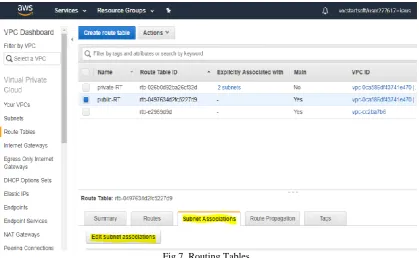
Now, it is needed to create Route Tables for the subnets. Create two Route Tables, one for private subnets and one for public subnets and associate them with their respective subnets.
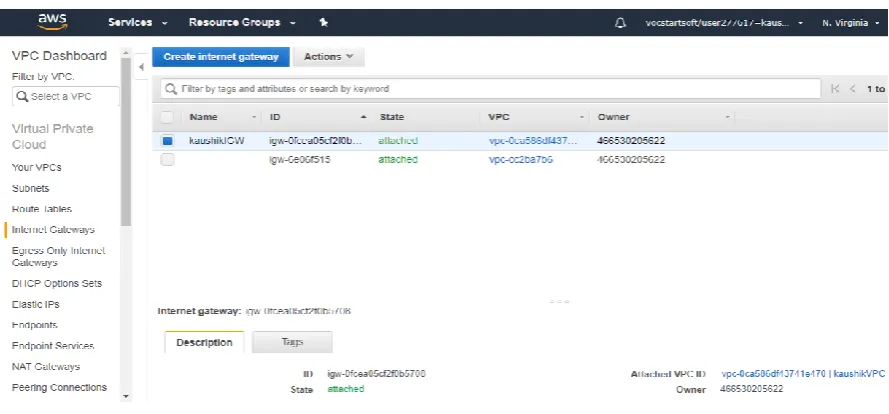
Now, create an Internet Gateway (IGW) and attach it to the VPC you had created earlier. Following this, it is mandatory to link the IGW with the Route Tables we had created earlier.
Fig 8. Internet Gateway Configuration
The next step is to create a NAT Gateway which allows us to host the VPC services for public subnets. To create a NAT Gateway, select the NAT Gateways option in the Left Hand Side tab and then, click on Create NAT Gateway. Select the Subnet ID of your First Public Subnet. An Elastic IP address(EIP) may be needed for the creation of your NAT Gateway. So, click on Create a new EIP. Next, click on Create a NAT Gateway. After successful creation, note down the NAT Gateway ID of your NAT Gateway. Now, we need to include a route to the NAT Gateway for our Private Subnets. So, click on Edit route tables. Then, select the Private Routing Table and in the Routes tab, click on Add another route. Specify the Destination as 0.0.0.0/0 and Target as the NAT Gateway ID of the NAT Gateway. Next, click on Save.
The NAT Gateway translates Private IPs to Public IPs. We will launch the NAT instance from within EC2 instances. You can also set up and configure ACLs and Security Groups if you want. When you are done, you can launch the instances. In order to check whether it is properly working, open Terminal and try to ping and finally, log in using the address of your VPC.
Fig 10. Instance Output
B. Private Cloud using AWS Amazon VPC
Open Terminal. Follow the instructions given on the official ownCloud website installation page and execute the respective commands in Terminal to install required packages like LAMP sever, curl, Apache and MariaDB. After all the packages are installed, restart Apache service. Now, create a database for ownCloud and grant all privileges on that particular database to the current user. In this case, the command used is: GRANT ALL ON owncloud.* to „owncloud‟ @ „localhost‟ IDENTIFIED BY „kaushik‟;
Fig 12. Configuring Apache and MariaDB
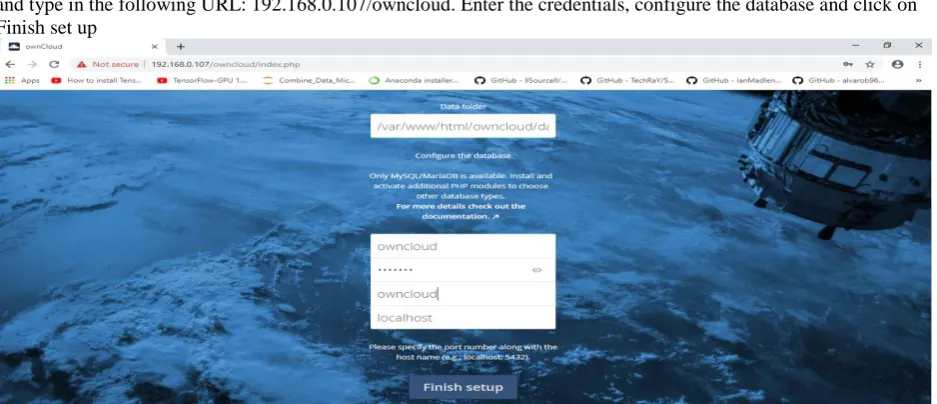
Now, it is possible to launch ownCloud in the Web Browser. But first, it is needed to get the IP address of the Ubuntu machine, that is, the address of the localhost. The ifconfig command can be used to determine the IP address of the machine. In thus case, the IP address turned out to be 192.168.0.107. Now, open the Web Browser and type in the following URL: 192.168.0.107/owncloud. Enter the credentials, configure the database and click on Finish set up
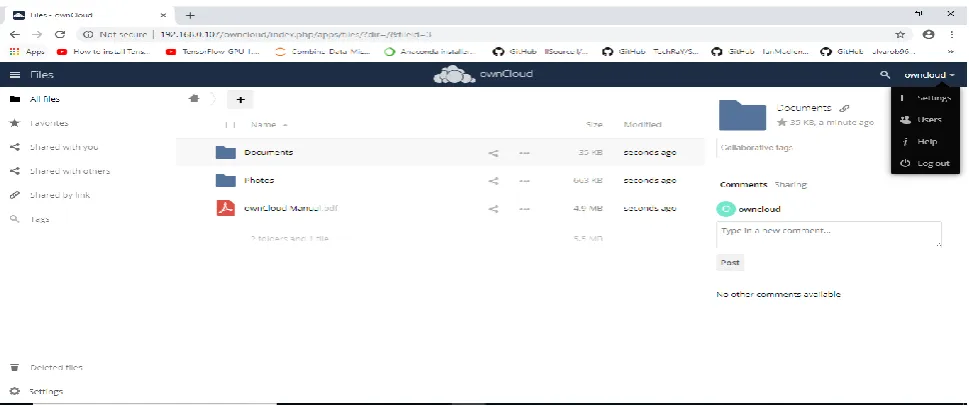
It is seen that one has successfully configured and set up ownCloud which can be accessed by the host machine as well as the virtual machine. Try uploading files to it and explore its features in order to gather data for its comparison with Amazon VPC.
Fig 14. ownCloud usage and data collection
VII. RESULTS
Table 6.1: Comparison Chart
Parameter AWS Amazon VPC ownCloud
Back End
Integration Not Feasible Feasible
Nature Assets are stored on shared resources in a
multi-tenant environment
Non-shared resources provisioned in a cloud infrastructure
Security Not as secure as ownCloud More Secure
Instance RAM Variable Fixed
Server OS Microsoft Windows, Linux, FreeBSD Linux only
Quality of Support
(QoS) Higher Lower
Mobility and
Scalability Higher Lower
Business size Preferred for Medium and Large
Businesses Preferred for Small Businesses
Ease of Use Easy Not Easy
Ease of Setup Easy Not Easy
User Experience Appealing Not Appealing
Table 6.1 displays the results of comparison between the two platforms obtained on the basis of data collected after they were set up and used. The concerned data was collected when the two private cloud platforms Amazon VPC and ownCloud were configured and used on the same machine for a period of 5 days. The parameters which formed the basis of comparison include back end integration, nature of the system, security, instance RAM, server OS, QoS, scalability, preferred business size, ease of use, user experience and associated costs of each model. It is seen that Amazon VPC has better quality of service and user experience whereas ownCloud offers more security. However, since ownCloud runs on an individual‟s private server, it is more preferred for small businesses in contrast to Amazon VPC. Amazon VPC also has the advantage of a user specified instance RAM over ownCloud where the RAM is fixed and predefined.
VIII. CONCLUSION
This paper presents an analysis of performance differences between two popular private cloud collaboration platforms, AWS Amazon VPC and ownCloud. We used standard PC benchmarks to obtain measurements and describe how each of the cloud platforms have their own pros and cons. It is observed that Amazon VPC provides better scalability and workability functionality whereas, ownCloud offers more secure usage. Also, VPC has better user experience and ease of setup whereas ownCloud leads in Back End Integration. Amazon VPC provides the freedom of choosing among many different instane RAM in contrast to the fixed RAM in ownCloud. ownCloud is open source and free to use whereas Amazon VPC has some costs associated with it. Therefore, it is safe to conclude that ownCloud is recommended for personal use and for small businesses while VPC is feasible for large enterprise businesses.
REFERENCES
1. https://docs.aws.amazon.com/vpc/latest/userguide/what-is-amazon-vpc.html 2. https://owncloud.com/overview/
3. Abu Awal Md Shoeb, Ragib Hasan, Md. Haque, and Meng Hu., A Comparative Study on I/O Performance between Compute and Storage Optimized Instances of Amazon EC2, Anchorage, AK, USA: 2014 IEEE 7th International Conference on Cloud Computing
4. Thomas Hildmann, Odej Kao, “Deploying and extending on-premise cloud storage based on ownCloud,” Madrid, Spain, 2014 IEEE 34th International Conference on Distributed Computing Systems Workshops (ICDCSW).
![Fig 3. ownCloud architecture[2]](https://thumb-us.123doks.com/thumbv2/123dok_us/1545528.1189602/4.595.154.443.305.482/fig-owncloud-architecture.webp)