CSEIT184307 | Published 25 Feb 2018 | January-February-2018[(4)3: 35-40]
International Journal of Scientific Research in Computer Science, Engineering and Information Technology © 2018 IJSRCSEIT | Volume 4 | Issue 3| ISSN: 2456-3307
35
Innovating iTwin Technology Advances an Overview
V.Sujitha1, M.Vijayakumar2
1Assistant Professor, Department of Computer Application, Sun Arts and Science College, Tamilnadu, India 2Assistant Professor, Department of Computer Application, ArunaVidya Arts and Science College, Tamilnadu,
India
ABSTRACT
USB flash drive is a data or information storage device that is used to storing the data. Cloud storage is mainly used to store the data on the middle server. USB stands for Universal Serial Bus, which is a kind of computer port, whichcan be used to attach equipment to a computer. An example of a USB is the interface used to upload pictures from a digital camera to a computer. In this research Paper, it is anticipated that a USB flash drive is a information storage device that abide of flash memory with an USB. A Cloud Storage wherever the data is store in the cloud that is distantly present and can be accessed as and when needed. But a problem of this USB is its tiny size due to which it can easily be misplaced. This is a difficulty if the data present in it is sensitive. In this Cloud Storage the data be capable of misused if the username and password of an account to contact the storage is hacked by someone. There are many drawback like some degree of storage, security, back up, temporary files. iTwin is a ‘limitless’ USB mechanism that permit users to access, change & exchange all their files & media whichever two online computers anywhere in the world. The simply limit is the size of your computer’s hard drive. iTwin is a innovative unfolding that permits remote file access without the any problems of the cloud and USB flash drives. It’s can be access as a USB with no exact installation. iTwin used by cryptographic protocols and algorithms. USB contains attributes like two directional file access, no temporary files.
Keywords:AES Advanced Encryption Standard, PC Personal Computer, USB Universal Serial Bus, VPN -Virtual Private Network
I.
INTRODUCTIONAccessing the data while you are far away from your PC, there is one option that is to construct use of high capacity USB storage device. But what if you told that, you could privacy access your PC or any other computer while you are travelling on the road? iTwin is a device that connect to your PC and it allows you to access files and devices that are linked to your home network remotely.
It looks similar as USB device and it is designed by union of two halves. One half is associated to your house or office PC and you have to carry other half
Indian named Lux Anantharaman. He has completed a Bachelors degree in Electrical and Electronic Engineering. He studied in IIT in Chennai and he completed a Masters degree from IISc in Bangalore. Lux was completing a part-time MBA at NUS Business School in Singapore, but he put studies on hold because of the potential of iTwin.
II.
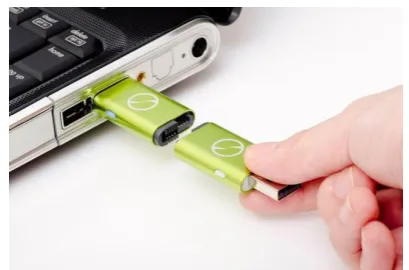
WORKING OF iTWINThe iTwin Connect is a device similar to a USB flash drive but, is designed with two USB connections. The iTwin device is very dense and it establishes a secure connection between two computers or a secure connection between one computer and the iTwin server. When you connect the iTwin Connect device to the main computer in your home or at office, the software is automatically installed configure the computer for remote connection.
Figure 1.Working of iTwin
When the device is disconnected from the main computer, you have to separate the two parts of the USB ports, which are separated in two separate USB devices. The two separate devices are very dense at less than two inches. Small size makes it convenient and easy to carry with you all the time. When you connect the second half to your laptop while travelling on the road, it will routinely install itself without any user interference. In addition, you can set up a special password that disables the device if you are going to lose it. This ensures you can lock down your files to avoid access by an illegal user.
Figure 2.iTwin Features
One of the best features of iTwin device is the ability to securely access your data by establishing a personal Virtual Private Network which is capable of managing several tasks. You can able to access all your files and data on your home or office PC by using Windows Explorer. Otherwise you can access definite files that are stored in desktop applications. As well as it is possible to access files from your isolated computer and save that files to the device that you are currently using, till both the devices are enabled with iTwin Connect device.
Figure 3.SplitingiTwin
III.
ADVANCED FEATURES OF iTWINA. Remote Desktop
experiencing computer problems without actually being seated in front of the PC.
By making use of isolated Desktop you can also start Windows Remote Desktop. This can be done with a single click which provides you the access to multiple different applications as well as the data enclosed in them on the remote PC.
B. Teleport Me
The Teleport Me feature is the secret browsing tool that enables you to surf the Internet lacking any limitations. Any websites that you open or any information that you transmit passes through the protected Virtual Private Network channel and uses the similar Internet connection that your house or workplace PC uses. If the main workstation cannot be left operating for some reason, Teleport Me is intended to connect to the iTwin dedicated network services to provide you a private connection. The company maintains dedicated servers all over the Europe, Asia Pacific and the United States.
The Teleport Me feature is a helpful tool, mainly if you are browsing the Internet on hotel or other types of public wireless networks where security is an important issue. Teleport Me takes care that your private information is protected from snooping eyes. It also ensures that no one is tracking your browsing movement. There are no browsing limits which denote that you can browse your social media accounts, can watch programs, and connect in any other activity you usually do online.
C. Office and Home Network Access
You can access approximately everything that is connected to your office or home network using
the iTwin connect device. This includes devices such as drives or network applications on an office network, or devices like media servers, cameras, and televisions on your home server. For accessing the network it does not require any set of connections and arrangement. It automatically makes a secure VPN to your network.
D. Secure AES 256-bit Encryption
Hardware grade security is provided in iTwin. AES (Advanced Encryption Standard) 256-bit encryption is a security technology adopted by the US government to defend top secret classified information. When every part of the iTwinConnect device is paired with one another, a unique encryption key is generated for each session to make sure all information is protected prior to being transmitted over the Internet.
You can also configure the two-factor authentication integrated with the iTwin Connect device. This enables you to setup an optional second password on the one half of the USB device which you bring with you. If you come about to lose this half of iTwin device, without using the second password it cannot be accessed.
E. No subscription or Contract promise
IV.
ITWIN BENEFITS AND ITS USAGEMost of the mobile professionals and individuals that want to access their files and information in spite of where they are, select cloud services for backing up and storing important documents. A cloud service is suitable and enables you to access your files from some device with an Internet connection. Many cloud service providers deploy security technologies to guarantee their customers that documents are securely transmitted and stored. On the other hand, not anything is one hundred percent perfect that means a device like iTwin Connect can help you cover up all of your bases in the event of data break or loss.
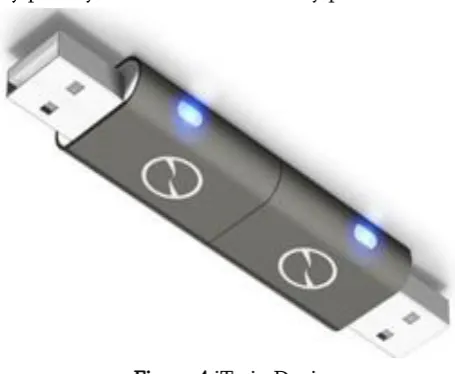
iTwin Connect device makes sure that your files reside private and protected. as you own the device, it is just functional when attached to the computer; it uses two-factor authentication and military grade security, as well as performs functions that we have discussed in this article. Even if you leave the main computer powered up so you can connect to it from any place, your data and records stay protected.
Figure 4.iTwin Device
iTwin Connect device also provides suitable browsing in any case of where you are positioned across the world. ‘Teleport Me’ feature enables you to select your continent even if you are travelling across the road. For example, if you live in the United States and you are travelling out of the country, you can select your continent as the US and still have the benefit of
the programs you watch in the US. This benefit may also work vice versa. If you are travelling in the US and enjoy shows in UK, you can set browsing tool to the UK and access each and every one of the shows programming outside of a specific geographic region.
iTwin Connect enables you to choose from locations in the United States, Europe or the Asia Pacific. This means you can grab up on your beloved shows and 256-bit cryptographic key is generated on-board the iTwin device. This cryptographic key is shared among the two halves of the iTwin device using the particular iTwin connector. The cryptographic key never leaves the device. All data and the device and not known to any other entity.
B. Two Factor Authentication
iTwin device provides 2-factor authentication for advanced security. Access to your data is provided based on two different factors: Something you have – your physical iTwin device.
optional however we suggest that you set the optional password throughout device initialization to protect your data and network in the event that you lose the device. The password set for your disconnected using the Remote Disable Feature. This is done by entering a unique disable code in the iTwin Disable Web Centre. The connection between the two halves of iTwinwill be disabled within 90 seconds and after that, it is impossible to gain access to your data via the lost device even if somebody finds it.
Figure 5. Example of iTwin
D. End –to-End Encryption
The shared cryptographic key stored in the two parts of the iTwin device are used to produce session keys which protect all information transmitted over the Internet using industrial strength AES-256 bit encryption.
E. Twin Trust Authentication
Every iTwin half has given a unique device ID and an linked device authentication key, adapted during manufacturing. Every iTwin device also carries certified public certificates of Twin Trust servers, inserted during manufacturing. Before allowing any data transfer, every iTwinis authenticated by iTwin's Twin Trust servers. After authenticating with Twin Trust, two halves of iTwin commonly authenticate each other using their previously shared AES 256 bit
crypto key. All communication between iTwin and Twin Trust server is secured using HTTPS protocol.
VI.
ITWIN ADVANTAGES One-time straight payment gives your lifetime access of the device.
The capability to disable the device remotely if it is lost or stolen.
There are no restrictions in terms of file size or type.
It has secure military grade AES encryption ensures secure file and data transport.
Personal VPN protects you on hotel as well as public Wi-Fi networks.
Two-factor authentication provides additional security.
Access to additional features such as your home or office network as well as the devices connected to it.
Stretchy and safe browsing allows you to maintain your usual browsing activities while you are travelling.
iTwin Connect is well-suited with both Windows and Mac devices.
VII.
iTWIN DISADVANTAGES iTwin connect device is 3.5 inches long in total that means when the parts are separated they
Require support for mobile devices.
VIII.
CONCLUSIONconnect device performs like to Peer to Peer access excluding the data is only being shared between you and your main computer. If you are travelling with a Windows device and your main computer is a Mac, you can still access your files since iTwin Connect will work with both systems.
The iTwin is a unbelievable solution for the house user who desires to access and Change their files remotely and securely. The iTwin bypasses the virtual world of cloud services to turn your physical storage into its own networking solution. The iTwinis simple to use and inexpensively solves the Drop box limitations. For peoples who want to maintain files up-to-date among two computers the iTwin is for them.
IX.
REFERENCES[1] http://www.seminarsonly.com/computer%20scie nce/itwin-seminar-report-ppt-pdf.php
[2] https://www.ijarcce.com/upload/2016/april-16/IJARCCE%2076.pdf
[3] data.conferenceworld.in/ICRTESM3/P1048-1054.pdf
[4]
http://www.ijirse.com/wp-content/upload/2016/02/530V.pdf