© 2019, IJCSMC All Rights Reserved 138 Available Online at www.ijcsmc.com
International Journal of Computer Science and Mobile Computing
A Monthly Journal of Computer Science and Information Technology
ISSN 2320–088X
IMPACT FACTOR: 6.017
IJCSMC, Vol. 8, Issue. 3, March 2019, pg.138 – 151
Authentication Aura to Secure
Graphical Password: The Case of
Android Unlock Pattern
Tamajit Bhattacharya; Pushpender Sharma; Ms. Sheetal Joshi; Dr. Shilpi Sharma
Computer Science & Amity University, India
[email protected], [email protected], [email protected], [email protected]
Abstract: Multi-Level Lock Application: Privacy Manager using Android Techniques is a concept of Android Application development using which device’s security is provided to all the Android users. The term Multi-level means multiple level of security (Type of lock) out of which any one can be activated according to user’s choice. Android is a forefront adaptable stage that was planned to be extremely open. Android applications make use of bleeding edge gear and programming, and also adjacent and served data, revealed through the phase to pass on progression and motivating force to buyers. Also there is default inbuilt security system that is provided by Android itself such as Pin password, Pattern password, picture password, etc. These all types of security passwords are very good in their work that is to protect the valuable data of customer. The First level is Touch Pattern, in this level user will select one or several points in some particular manner as a password. In Second level there is Pin password which is also derived from existing application but the algorithm behind this is way more different than that. In this password we use some digits as a password and certain indexes for all those digits given by the user.
Keywords– Security, Usability, Lock, Authentication, Pattern, Architecture
I. INTRODUCTION
Privacy Manager using Android Techniques is a concept of Android Application development using which device‟s security is provided to all the Android users [1]. The term Multi-level means multiple level of security (Type of lock) out of which any one can be activated according to user‟s choice.
© 2019, IJCSMC All Rights Reserved 139
Android is a propelled versatile stage that was planned to be really open. Android applications make usage of front line hardware and programming, and close-by and served data, revealed through the phase to pass on progression and impetus to clients [3]. To anchor that regard, the stage offers an application circumstance that ensures the security of customers, data, applications, the contraption, and the framework [4].
Tying down an open stage requires incredible security building and careful security programs. Android was arranged with multi-layered security that gives the versatility required to an open stage, while offering affirmation to all customers of the stage. Till now there are several applications that are already built for the security of android device. Also there is default inbuilt security system that is provided by Android itself such as Pin password, Pattern password, picture password, etc. These all types of security passwords are very good in their work that is to protect the valuable data of customer [5].
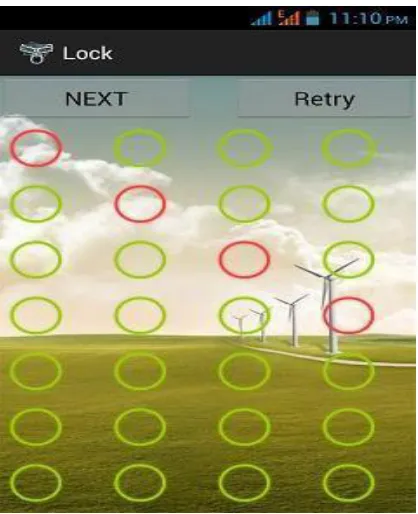
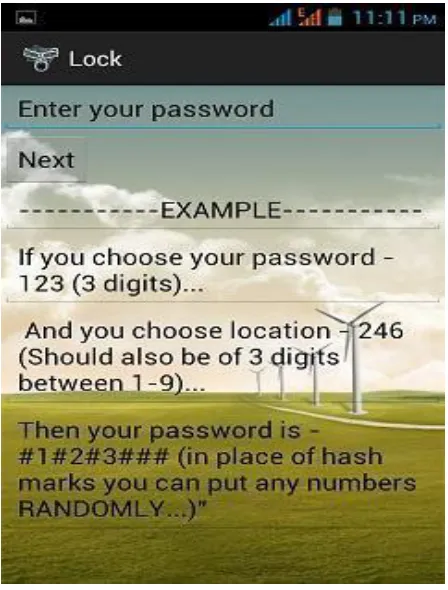
This Paper is totally based on the existing security apps but with the new algorithms and techniques. By this Paper we try to overcome the disadvantage that we have discussed in above paragraph. We design 3 levels out of which user can use any one of its choice. The First level is Touch Pattern, in this level user will select one or several points in some particular manner as a password. It is not like existing pattern password [6] in which user draw the gesture using those points because that gesture is easy to learn at once by the one who sees you drawing that at the time of unlock. But if you touch several points in some sequence it is difficult to notice all the points and in a correct sequence. In Second level there is Pin password which is also derived from existing application but the algorithm behind this is way more different than that. In this password we use some digits as a password and certain indexes for all those digits given by the user. After that what user has to do is that they have to type a password in which only some digits are checked for the confirmation by checking their respective positions/indexes and rest all other digits can be randomly typed by the user and those random digits can be as long as user wants them. By this way except some digits all the other digits are different every time that make it very difficult for the defaulter to crack it. In third level we create picture password in which we have to choose the correct image among four other pictures [7] [8] [10].
There are many application in the android market which provide security to the mobile i.e. the lock application which provide security to our devices through Pattern lock in which we have drawn a pattern to unlock the phone and there is also number password in which we have to enter the code to unlock devices. All of these provide security until no one seen you entering the pattern or the code in the phone if they see you entering the code then it is very easy for them to unlock your phone in your absence and steal your private information and misuse that information [11].
The application to be made is especially secure from existing application [8] as the application made outfits with various security features, which lets the customer to end up free from strain about their phone's security [10].
Various other new features of application to be developed are To provide different level of security.
Creative and user friendly interface.
© 2019, IJCSMC All Rights Reserved 140 II. LITERATURE REVIEW”
As per reference [1], the paper “Issues and Security Measures of Mobile Banking Apps” described the various issues and security measures in order to protect the Mobile Apps related to Banking sector. This paper inspects issues on the design, and some security issues of portable web managing an account applications. And afterward this will investigate some safety efforts to manage the related security challenges.
As per reference [2], the research „Android Application Development & its Security‟ described the android security framework and concluded that increased exposure of mobile phones is increasing the security risk. This paper analyzes the Android Platform and Android based portable applications advancement and its security. Further this will hope to investigate an Android application accessible in Google play store My Notepad. This application is utilized to spare notes by utilizing simple direct control.
As per reference [3], the research “Shoulder shuffling free graphical locker for Android Graphics Pattern Lock with Text Support for Android Devices” proposed a secure application Android Graphics Pattern Lock which is an improved infrastructure. This paper worked on Android devices which is a graphical pattern lock with text support. This paper will explore the making of more secured touch screen lock for android based systems by means of which user will get the facility to protect their password pattern guess by other people if the people monitoring while user unlocking their device in public place too.
As per reference [4], the paper “A study of Android application security” and introduced the ded decompiler, which generates the android application source code directly from the installation image. This paper looks to more readily comprehend advanced mobile phones application security by concentrate 1100 well known free Android Applications. This paper presents the ded decompiler which recoups Android application source code specifically from its establishment picture. They structure and execute a flat investigation of advanced cell applications dependent on static examination of 21 million lines of recouped code.
As per reference [5], the research “Image Password Based Authentication in an Android System” presented a list of most common behaviour patterns and investigated the possibilities to exploit the standard functionalities. This paper proposes picture secret word or graphical secret word based confirmation framework for android mobiles. Graphical passwords are acquainted as elective methods with printed passwords. This paper joins pictures with hues so as to produce session passwords for confirmation. This is the most essential component of picture secret phrase for example the secret phrase is set through a lot of different pictures.
© 2019, IJCSMC All Rights Reserved 141
As per reference [7], The paper on “Recovering Data from Password Protected Data Security Applications in Android Based Mobile Phones” in which they showed how to recover data from the password protected security apps using different methodologies. This paper implies that rather than simply handling the cell phones utilizing Standard Mobile crime scene investigation computerized devices it is constantly critical to perform manual Forensic examination. Standard versatile scientific instruments extricate a colossal measure of information however there is dependably a space for development. Regardless of whether a solitary essential record isn't removed this can demonstrate the culpability or guiltlessness of someone. The exploration inspects the examination of criminological pictures of the memory of cell phone gave striking yield.
As per reference [12], the research paper on “Secret Lock Anti Theft: Integration of App Locker & Detection of Theft using User Pattern” in which they showed that how the security in android based systems can be increased. This paper introduces the different techniques to anchor or bolt the portable utilizing client validation. Client will include various applications into the application for the anchored access. This paper proposes another way to deal with the burglary identification with the utilization of client designs with a Global Positioning System alongside the Short Message Service properties which helps in following the grabbed portable. The technique utilized is the Support Vector machine for User recognizable proof Property.
As per reference [13], the paper “Lockme - Android Security Application” described a number of attacks on Web View, either by malicious apps or against non-malicious apps. This paper builds up an application which will help client of android to make Admin and Guest accounts like other PC based working framework. Security gaps in Android Operating System happen because of the authorization based security demonstrate which isn't appropriately upheld amid framework plan.
III.METHODOLOGY Product Definition
An application needs a character: a personality that people review and relate to securit y. A thing with a character transforms into a brand. It causes it rise up out of the untidiness of things and names. A thing should be adaptable: with examples, time and changes in segment, the thing should fit acclimation to make it more relevant.
The application Multi level lock offers property for the user to easily understand the application and enjoy it. Unlock your phone in front of others and yet confident that no one can use my phone in my absence. Since it gives highlights which are straightforward by the client and benefit as much as possible from those highlights to get out the best security framework.
This item guarantees to change with time, inclines and receive new innovations to make it more pertinent and secure. The new innovations which come into the market, our item will without a doubt attempt to adjust to new condition and make it more secure for the client.
This Multilevel lock gives different highlights, which makes it simple to characterize the task in a basic way and make it simple for the client to get it.
© 2019, IJCSMC All Rights Reserved 142
To provide creative user friendly interface. Difficult to unlock the phone by others Active client bolster.
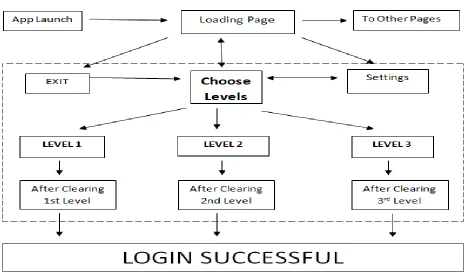
Fig 1 – Flowchart of Mobile App Lock System Performance
Since amazing execution is the thing that each undertaking requests, so improvement was finished utilizing the best programming and equipment. Utilizing this entire task could give the best support of clients, make the interface easy to understand, less tedious and no hang up issue.
Cost
Task was sent on android OS so there was no expense for the equivalent.
IV.OBSERVATION
Application Design is the procedure through which the necessities are converted into a portrayal of programming. When the application prerequisites have been examined and indicated, the product configuration incorporates three specialized exercises: structure, coding age and testing. The structure of framework is in particular shape i.e., venture is intelligently parcelled into different segments that perform different capacities and sub capacities. The plan stage prompts modules that show free practical attributes.
Current Status of the Project
© 2019, IJCSMC All Rights Reserved 143
A user also doesn‟t need any type of internet relation to sprint this development once the application is downloaded from Google Play Store. Currently this application is filled of astonishing characteristics listed below:
A simple transparent plan.
Quick overhaul as the size is very small. Instructions to use with example.
Three type of locking methods.
Interface is straightforward and utilize. It is easy to the point that a beginner can explore effortlessly and utilize our application.
Facility of Security Question in case user forget password.
New techniques are used in this lock app derived from the existing once.
Remaining Areas of Concern”
Regardless of the way that we have done our dimension best to make this endeavour as incredible and as screw up free as could be normal considering the present situation. Nevertheless, since there is constantly an expansion for more features, more redesigns, et cetera. There are as yet a couple of regions of concern which can be upgraded in the coming future. We can add boundless features to our undertaking.
Some of the areas of concern on which we can work upon are”
We can increase more levels so that user can have more choices to choose from.
We can make our application more adjustable by presenting new alternatives, for example, picture chooser for picture secret word later on. The more option the customer has, the better will be the yield of the application.
More beautiful interface can be built in future which at present is not possible because of lack of proper knowledge of Android programming.
There are some issues related to security of the app when the device is unlocked like this app can be uninstalled directly from the phone like other normal apps.
We can have our application for various OS i.e. right now it underpins Android OS. In coming future we can grow its use by supporting more number of OS like Windows, IOS and so on.
Technical and Managerial lessons learnt
While building up this venture we took in a ton. We got the chance to work upon and learn different new things in various advances. Chipping away at this venture reviewed our specialized aptitudes as well as shown us administrative abilities. The specialized gaining from this undertaking can be condensed in the accompanying focuses:
This venture helped us in reviewing our Java abilities as every one of the rationales are coded in JAVA. In this way we came to think about numerous capacities which we didn't know as of now.
© 2019, IJCSMC All Rights Reserved 144
measure of usefulness that it has. We figured out how much imagination can be connected with the assistance of Android Components utilizing Android SDK.
Specialized learning was by all account not the only result of this task. There was an extensive number of other administrative discovering that turned out amid this venture. Making this task shown us numerous things which will remain with us for the duration of our lives. A portion of the exercises scholarly are as per the following:
The best piece of a gathering venture is that we figure out how to function in a gathering. By dealing with this venture we figured out how to cooperate as a group. This not just made us prepared for our future when we will work in associations yet additionally helped us supplement one another. We took in the significance of solidarity. We additionally figured out how helping each other can improve us and how we can beat an issue effectively being joined together. Sharing our abilities and learning causes we enhance them.
This venture helped us in realizing how minute data winds up valuable for undertaking. On the off chance that we overlook any moment data that can prompt a major blunder in the undertaking.
We likewise figured out how to unhesitatingly confront any issue doesn't make a difference how enormous it is. We discovered that we should remain centred and we can without a doubt discover an answer for every issue.
V. PROJECT ROLES AND RESPONSIBILITIES TABLE 1: INDIVIDUAL PROJECT ROLES AND RESPONSIBILITIES
Role Responsibilities Participant(s)
Collection Collecting Information regarding the topic. Pushpender
Sharma
Report Making project report. Responsible for making
introduction, project objective, draw figures and
tables.
Pushpender
Sharma
Testing Testing of Code Pushpender
Sharma
TABLE 2: INDIVIDUAL PROJECT ROLES AND RESPONSIBILITIES
Role Responsibilities Participant(s)
Collection Collecting information regarding the topic Tamajit
© 2019, IJCSMC All Rights Reserved 145
Analysis Analysis of the collected data. Tamajit
Bhattacharya
Report Making project report. Responsibility of making
abstract, review of related works, literature review.
Tamajit
Bhattacharya
Testing Testing of Code Tamajit
Bhattacharya
TABLE 3: TEAM PROJECT ROLES AND RESPONSIBILITIES
Role Responsibilities Participant(s)
Report Made conclusion, future scope, project budget,
analyze risk assessment. Made research paper on
study and analysis of security algorithms.
Pushpender
Sharma and
Tamajit
Bhattacharya
Implementation Implementation of code and GUI. Pushpender
Sharma and
Tamajit
Bhattacharya
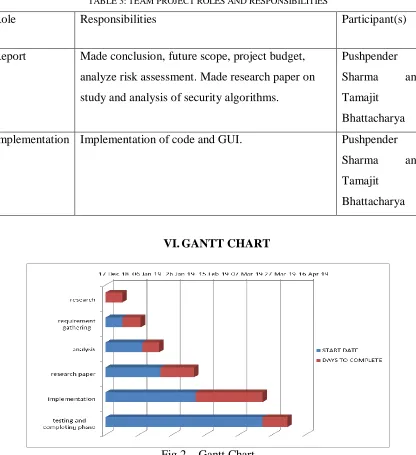
VI.GANTT CHART
© 2019, IJCSMC All Rights Reserved 146
VII. IMPLEMENTATION
Fig 3 - During installation of our Application on android devices
© 2019, IJCSMC All Rights Reserved 147
Fig 6 - When user switch on the level 2 lock Fig 7 – After locking Level 2 Lock
VIII. RESULT
This will control you through the use of our android application. It contains all the data about how to utilize Multi-level Locking Application. We have partitioned the assistance manual into 3 sections dependent on 3 modules of our task i.e. Level 1, Level 2 and Level 3. At the point when the application is first introduced and opened then it demonstrate an underlying screen on which there are 3 switches that actuate each level separately.
Testing the Project”
1. Level 1”
© 2019, IJCSMC All Rights Reserved 148 Tab 4: Testing Results of Level 1
Test Conditions Expected Result Actual Result Status
Doesn‟t select any point
in level first activity Doesn‟t Proceed Doesn‟t Proceed Pass
Doesn‟t match the password on confirm
screen
Automatically Transfer to select
the points again
Automatically Transfer to select
the points again Pass
Pressing Retry button
User again select the points
User again select
the points Pass
Activation of Lock
Lock is activated through toggle
button Lock is activated Pass
Exit button Exit from the App Exit from the App Pass
2. Level 2
Description: - When the user switch on the lock level 2. The appearing screen has text bar where user has entered his/her password. The user cannot leave that space blank after click next the user again get a text field where user have to enter the position(the digit of password and the position giving should be equal) and after that the test appears where user have test the password without testing the password user cannot move forward.
Tab 5: Testing Results of Level 2
Test condition Expected result Actual result Status
Password text field Not move forward Not move forward Pass
cannot be leaved and show error and show error
Blank
Position text field Not move forward Not move forward Pass
cannot be leaved and show error and show error
Blank
If Digits in password Not move forward Show error Pass
and number of and show error
position should not be same
Enter wrong Doesn‟t move Doesn‟t move Pass
password in test Forward Forward
Condition
3. Level 3
© 2019, IJCSMC All Rights Reserved 149 Tab 6: Testing Results of Level 3
Test condition Actual result Expected result Status
Position text field Not move forward Not move forward Pass
cannot be leaved and show error and show error
Blank
Doesn‟t select any Doesn‟t move to Doesn‟t move to Pass
point on image next step next step
Enter wrong Doesn‟t move Doesn‟t move Pass
password in test Forward Forward
Condition
IX.CONCLUSION
This will control you through the use of our android application. It contains all the data about how to utilize Multi-level Locking Application. We have partitioned the assistance manual into 3 sections dependent on 3 modules of our task i.e. Level 1, Level 2 and Level 3. At the point when the application is first introduced and opened then it demonstrate an underlying screen on which there are 3 switches that actuate each level separately.
Level 1: Switch ON Level 1
The screen consists of several circles. User has to touch some of the circles and click on Next button and then user have to confirm the circle by again touching the same circles in the same sequence and click Next and now user can activate the Level 1 lock through the Toggle button on the screen and then exit.
Level 2: Switch ON Level 2
The screen consists of text bar written enter your password there you have to enter your password and click next on the next screen you get another text bar written enter position for password digit i.e. on which position you have to enter your password digit (if password is of three digit then there are three position for each of digit of the password) and click next button on the next screen you have to test your password. After successfully tested the password you automatically transfer to the next screen where you have to activate the lock through toggle button and then press exit button.
Level 3: Switch ON Level 3
The screen consists of image where you have to touch and click on the next button. A text bar written enter number of touch there you have to enter number of touches for unlocking the phone and click next on the next screen there is a test screen where you have to test your password. You have to touch randomly on the screen number of times that you give on previous screen and out of those touch one touch should be correct which you choose on the previous screen. After successfully tested the password you have to activate the lock through toggle button and then press exit button.
X. X. FUTURE SCOPE”
© 2019, IJCSMC All Rights Reserved 150
Although all the main objectives according to SRS document have been achieved but still there is room for enhancement.
This application can be easily update in the future. And also include many more features for existing system.
We can enhance the multiple picture lock.
In future we enhance security to at least 8 digits lock. We are also working for voice based lock.
In near future we make it internet connectivity.
REFERENCES
[1] “Sameer Hayikader, Farah Nurafiqah Hanis Binti Abd Hadi, Jamaludin Ibrahim: Issues and Security Measures of Mobile Banking Apps. In Proceedings of the International Journal of Scientific and Research Publications” (2016).
[2] “Shubhankar Mukherjee, Prof. Jyoti Prakash, Deepak Kumar: Android Application Development & Its Security. In Proceedings of the International Journal of Computer Science and Mobile Computing” (2015).
[3] “Prof. V.J.Kadam, Taj Mohammad A. Raheman, Ajinkya Ajagekar, Sushant B. Patil: Shoulder Shuffling Free Graphical Locker for Android Graphics Pattern Lock with Text Support for Android Devices. In Proceedings of the International Journal of Advance Research in Computer Science” (2013).
[4] “William Enck. Damien Octeau, Patrick Mcdaniel, Swarat Chaudhari: A Study of Android Application Security. In Proceedings of 20th USENIX Conference on Security” (2011). [5] “Shrutika S. Yande, Renuka C. Walime: Image Password Based Authentication in an
Android System. In Proceedings of the International Journal of Computer Science and Mobile Computing” (2016).
[6] “R. Srilekha, D. Jayakumar: A Secure Screen Lock System for Android Smart Phones using Accelerometer Sensor. In Proceedings of International Journal of Science Technology & Engineering” (2015).
[7] “Hammad Riaz: Recovering Data from Password Protected Data Security Applications In Android Based Mobile Phones. In Proceedings of the International Arab Forensic Science and Forensic Medicine Conference” (2015).
[8] “Sajid Nabi Khan, Ikhlaq Ul Firdous: Review on Android App Security. In Proceedings of International Journal of Advances Research in Computer Science and Software Engineering” (2017).
[9] “P. D. Meshram, R. C. Thool: A Survey Paper on Vulnerabilities in Android OS and Security of Android Devices. In Proceedings of GCWCN” (2014).
[10] “Geumhwan Cho, Jun Ho Huh, Junsung Cho, Seongyeol Oh, Youngbae Song, Hyoungshick Kim: SysPal : System- guided Pattern Locks for Android. In Proceedings of IEEE Symposium on Security and Privacy” (2017).
[11] “M. Vedavyas, P. Kumara Swamy: Authentication in Android Smart Phones using Gestures and Security Pin. In Proceedings of International Journal of Engineering Research and Applications” (2013).
© 2019, IJCSMC All Rights Reserved 151
[13] “Sumaiya Patel, Darshana Thakur, Sujit Sherkar, Priyanka Dhamane: Lockme- Android Security Application. In Proceedings of International Journal of Computational Engineering Research” (2013).
[14] “Pratima Patel, Prof. Samir Ajani: The Digital Locking and Unlocking System Based on Android for Smart Phone. In Proceedings of International Journal of Advanced Research in Computer Science and Software Engineering” (2016).
[15] “Marian Harbach, Alexander De Luca, Serge Egelman: The Anatomy of Smartphone Unlocking. In Proceedings of International Journal of CHI Conference” (2016).