ABSTRACT
RAMASUBRAMANIAN, RAHUL. Exploring Virtualization Platforms for ARM-based Mobile Android Devices. (Under the direction of Frank Mueller.)
The advent of smartphones has revolutionized the mobile phone market. Currently,
ARM-based (Advanced RISC Machine) smartphones running the popular Android software stack
dominate the market. Mobile devices are increasingly becoming the primary interface between
a vast number of users and the Internet. Due to its growing popularity, these mobile platforms
are facing the same security threats that the x86 ISA (Instruction Set Architecture) based
sys-tems are subjected to. Recent attacks have shown that a number of security threats cannot be
addressed by sandboxing or Android’s existing philosophy of access right approval by users, nor
can they be addressed by ARM’s TrustZone hardware capabilities that only protect selected
peripheral devices.
Virtualization techniques have been explored a great deal in desktop (x86) platforms and
are widely accepted as a means to enhance OS (Operating System)/platform security. In this
thesis, we take an in-depth look at the various mobile virtualization techniques available to date,
which would help to investigate security threats faced by the Android ecosystem. We study the
various virtualization platforms that are available and evaluate their state of implementation
and their potential utility in a virtualization-based mobile security framework. We analyze
the advantages and disadvantages of each of these virtualization approaches and conclude with
c
Copyright 2011 by Rahul Ramasubramanian
Exploring Virtualization Platforms for ARM-based Mobile Android Devices
by
Rahul Ramasubramanian
A thesis submitted to the Graduate Faculty of North Carolina State University
in partial fulfillment of the requirements for the Degree of
Master of Science
Computer Engineering
Raleigh, North Carolina
2011
APPROVED BY:
Alexander Dean James Tuck
Frank Mueller
DEDICATION
BIOGRAPHY
Rahul Ramasubramanian was born in the city of Jamshedpur in India. He received his Bachelor
of Engineering degree in Electronics and Communications Engineering in 2005 from Siddaganga
Institute of Technology, Visvesvaraya Technological University, India. In fall of 2009, he joined
North Carolina State University as a graduate student. He has been working under the guidance
of Dr. Frank Mueller at the Systems Research Laboratory, Department of Computer Science
since Spring, 2010. His primary research interests lie in mobile virtualization systems and
security. Prior to joining NCSU, Rahul was a Senior Software Engineer working with various
ACKNOWLEDGEMENTS
I am thankful to my parents, family and the faculty and students of NCSU for all the support,
patience and love that they have provided to me. My special gratitude to Dr. Frank Mueller
TABLE OF CONTENTS
List of Tables . . . vii
List of Figures . . . .viii
Chapter 1 Introduction . . . 1
1.1 Overview of Security Threats in Android Platform . . . 2
1.1.1 Rootkit Attacks . . . 3
1.1.2 Permission Escalations . . . 3
1.1.3 Transmission of Private Data Surreptitiously by Applications . . . 4
1.2 ARM Virtualization and Mobile Security . . . 5
Chapter 2 Virtualization . . . 7
2.1 Important Concepts . . . 8
2.2 Different Types of Virtualization . . . 9
2.3 CPU Virtualization . . . 9
2.4 Virtualization Types . . . 10
2.4.1 Full Virtualization . . . 11
2.4.2 Paravirtualization . . . 11
2.4.3 Hardware-Assisted Virtualization . . . 12
2.5 Memory Virtualization . . . 14
2.6 Mobile Virtualization and Virtualization for ARM . . . 14
2.6.1 Security through Virtualization . . . 14
2.6.2 Maximizing the Utilization of the Cpu Cores Available . . . 15
2.6.3 Multiple Operating Systems Running on the Same Core . . . 16
2.7 Challenges for Virtualization on ARM . . . 16
Chapter 3 OKL4 . . . 17
3.1 The Microkernel Approach to Virtualization . . . 19
3.2 Virtualization with OKL4 . . . 19
3.3 Software Constructs in OKL4 . . . 20
3.3.1 Threads . . . 21
3.3.2 Addresses spaces . . . 21
3.3.3 Capabilities . . . 21
3.3.4 Data Types/Data Fields and Data Constructors . . . 21
3.3.5 Thread Scheduler . . . 22
3.3.6 Inter Process Communication . . . 22
3.3.7 Mutex . . . 23
3.3.8 Virtual Registers . . . 23
3.4 OKL4 Porting Efforts . . . 23
3.4.1 OkAndroid and OKL4 merging . . . 23
3.4.3 Problems and Issues faced in this Process . . . 24
Chapter 4 KVM on ARM . . . 26
4.1 KVM vs. Microkernels: A Closer Look . . . 27
4.2 The KVM/ARM Virtualization Approach . . . 29
4.2.1 CPU Virtualization in KVM/ARM . . . 29
4.2.2 Memory Virtualization . . . 30
4.3 Implementation Status . . . 32
Chapter 5 Virtualization with L4 . . . 33
5.1 L4: Specifications . . . 34
5.2 Components of the L4 Software Architecture . . . 34
5.2.1 Fiasaco Microkernel . . . 35
5.2.2 L4 Runtime Environment (L4RE) . . . 35
5.2.3 L4Linux . . . 35
5.2.4 L4 Services . . . 35
5.3 L4Linux/L4Android on L4 Microkernel . . . 36
5.3.1 Startup . . . 36
5.3.2 Device Management . . . 36
5.3.3 Low Level Memory Management . . . 37
5.3.4 Physical Memory . . . 37
5.4 L4Android . . . 37
5.5 L4Android/L4Linux Installation Efforts . . . 37
5.5.1 Target Hardware: ARM PB11MPCORE . . . 38
5.5.2 Android on PB11MPCORE . . . 39
5.5.3 L4Linux on PB11MPCORE . . . 41
5.5.4 L4Android on PB11MPCORE . . . 41
5.5.5 Current Status . . . 42
Chapter 6 Conclusion . . . 43
6.1 Feasibility of Today’s Mobile Virtualization Technologies . . . 43
6.2 Currently Working Aspects of Our Virtualization Effort . . . 44
6.3 Work Needed for Full Deployment . . . 44
6.4 Future Work . . . 44
References. . . 46
Appendix . . . 48
LIST OF TABLES
LIST OF FIGURES
Figure 1.1 Android Security threats overview (courtesy Google Inc.) . . . 2
Figure 1.2 Permissions in Android . . . 4
Figure 1.3 Virtualization in Mobile Architectures . . . 5
Figure 2.1 Virtualization Overview . . . 7
Figure 2.2 Various Processor Modes (Rings) in the x86 ISA . . . 9
Figure 2.3 Full Virtualization . . . 10
Figure 2.4 Paravirtualization . . . 11
Figure 2.5 Hardware-Assisted Virtualization . . . 12
Figure 2.6 Memory Virtualization . . . 13
Figure 2.7 Mobile Virtualization benefits . . . 15
Figure 3.1 HTC Dream Platform Architecture . . . 18
Figure 3.2 OKLINUX/OKL4 Architecture . . . 20
Figure 3.3 Thread Capabilities in OKL4 . . . 22
Figure 4.1 KVM Overview . . . 26
Figure 4.2 KVM Vs Microkernel . . . 28
Figure 4.3 CPU Virtualization . . . 30
Figure 4.4 Memory Virtualization . . . 31
Figure 5.1 PB11MPCORE Hardware Architecture (courtesy ARM) . . . 38
Chapter 1
Introduction
The advent of the HTC dream as the first commercial smartphone that deployed an Android
stack was a watershed moment in the mobile telephony business. The release of an open-source
mobile platform changed the dynamics of this industry in more than one way. Decrease in time
to market, availability of third party applications running on Dalvik Virtual Machine (build
once, deploy many times) and new commercialization opportunities have revolutionized the
mo-bile gadget industry. Due to these ground-breaking developments, the momo-bile telephone, which
till that point remained a simple communication device, transformed into an ubiquitous device
that connected a person to the vast digital world. Mobile phones also saw themselves moving
from being low performance, memory restricted devices to high powered, large memory
sys-tems. This led to a large proliferation of such devices in the consumer world and the subsequent
coining of the term ‘smartphones’ to describe them. Recent introduction of tablets running on
an Android stack have accelerated this proliferation and are seriously competing with
tradi-tional low-end desktops/laptops in the computatradi-tional device business. A vast majority of this
class of devices currently run on ARM-based hardware platforms. These ARM-based hardware
platforms have also evolved from being low powered (300 MHz) devices to very high powered
(1.2 GHz dual core) entities. These developments have made the ARM ISA the architecture of
ninety 90 % of smartphones worldwide. Smartphones have increasingly become the primary
interface between a vast number of users and the Internet. Due to this, smartphones now are
also being used to run applications that use/store sensitive information about the user.
Bank-ing applications, credit card purchases, personal information and emails are good examples of
such applications. Due to these developments, security threats that previously were restricted
to desktop environments are now increasingly being seen in the mobile environment.
1.1
Overview of Security Threats in Android Platform
Android security threats can be broadly discussed (but not restricted to) under the following
heads:
1. Rootkit attacks;
2. Permission escalations;
3. Transmission of private data surreptitiously by applications.
1.1.1 Rootkit Attacks
Rootkits are often deployed as loadable kernel modules (LKM) that infect the underlying
An-droid kernel and compromise the integrity of the whole AnAn-droid systems. They are notoriously
difficult to detect and equally difficult to disinfect. There are many well publicized root kits
that have been developed for the Android platform. These vary from simple proof of concept
key logger rootkits to sophisticated rootkits that gain full root access on the device. Once these
rootkits have compromised the Android kernel, all data that resides in the device is subject to
a security threat and can be easily stolen and sent to a desired destination as text messages or
Internet messages. They can also be used to make unauthorized phone calls, listen into user
calls and use the use the GPS connected device for unauthorized location detection. Other
rootkit attacks have also known to drain the battery very fast by initializing power exhaustive
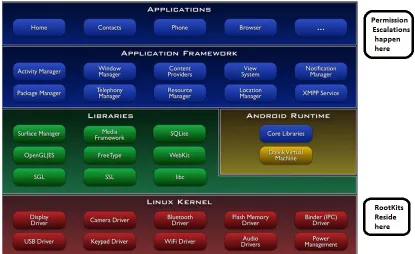
services like Bluetooth or GPS (Global Positioning System). Figure 1.1 highlights two of these
issues.
1.1.2 Permission Escalations
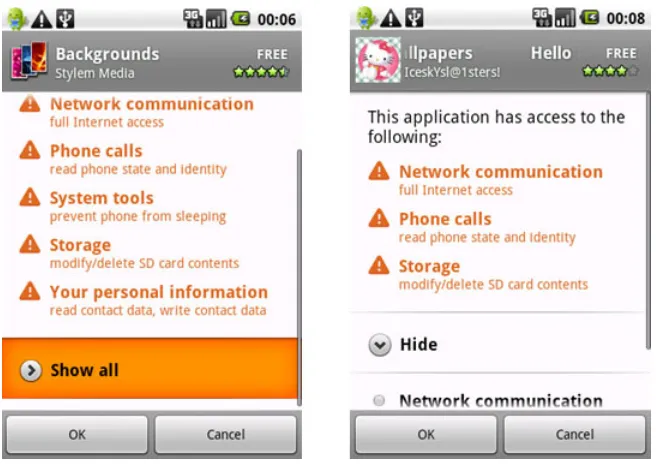
The Android security model defines a set of permissions that applications get access to at the
time of installation. The ability of any application to access any component or service is
pri-marily dependent on the set of permissions that is granted to it by the user. These permissions
are explicitly granted by the user at installation time. Since most users of smartphones are not
permissions [14] [13]. Since, more often than not, the user will grant them, this will lead to a
creation of security gap inadvertently by the user. This flaw can be used by malicious
applica-tions to snoop user data and steal it. Figure 1.2 depicts operation of permission escalaapplica-tions on
an Android device [2].
1.1.3 Transmission of Private Data Surreptitiously by Applications
Figure 1.2: Permissions in Android
A recent trend that is being observed is the plethora of applications that are attempting to
steal personal information from the user without user consent [21] [24]. Valid and seemingly
innocuous applications have been found to transmit personal information about the user (name,
email ID, GPS locations) without the user’s explicit knowledge. Many known applications of
1.2
ARM Virtualization and Mobile Security
Figure 1.3: Virtualization in Mobile Architectures
Virtualization is quite a well-known concept in the desktop/enterprise domain. A lot of
success has been achieved in the area of exploring virtualization as a security solution in the
desktop computing environment. Mobile virtualization is a relatively new concept that attempts
to utilize virtualization techniques in the mobile domain. The primary stumbling block to this
approach has been the lack of virtualization support on mobile architectures. Notwithstanding
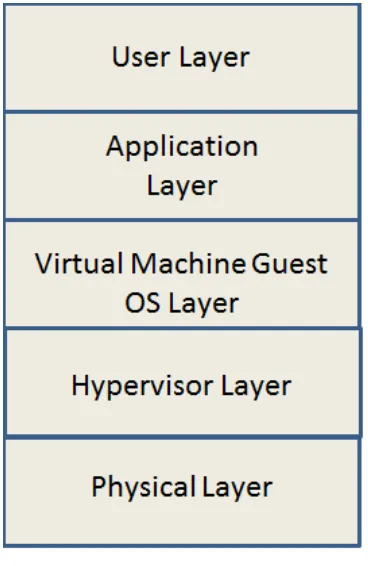
this, we have seen a few novel concepts emerge in the area of mobile virtualization. Figure 1.3
depicts the platform architecture of a typical virtualization system.
Most mobile virtualization platforms typically attempt to isolate computing resources from
that the applications have to the computational resources, thus enabling malware detection
capabilities. The isolation is achieved by inserting a virtual hypervisor layer between the
oper-ating system and the hardware. A guest operoper-ating system that runs on top of the hypervisor
layer can access the underlying hardware via paravirtualized system call only. This enables the
hypervisor layer to govern all the interactions that take place between operating systems (and
the layers above it) and the hardware [12]. Many policies and checks can be implemented in
the hypervisor layer to ensure that unauthorized access and data transmission are thwarted,
thus ensuring that the systems in question are not compromised.
In the next few chapters, we discuss the concept of virtualization and paravirtualization in
detail (Chapter 2), followed by a discussion of various mobile virtualization platforms currently
available (Chapter 3, 4, 5) and concluding with a some lessons learnt and suggestions for future
Chapter 2
Virtualization
Virtualization is a well-established concept [15] [20]. It was initially developed in the 1960’s
to address the shortcomings of third generation architectures and multiprogramming in the
IBM (International Business Machines) operating system [18]. Over the years, the technology
has matured to great extent and has found much use in enterprise/desktop computing systems
[3]. Virtualization has found many applications, e.g., providing a secure computing platform,
kernel debugging, server consolidation and support for multiple operating systems. In the last
decade, virtualization has also penetrated the embedded domain, which has opened up exciting
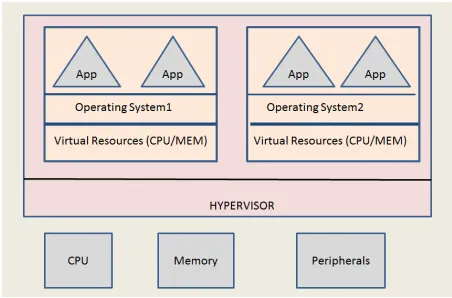
opportunities in that sector. Figure 2.1 depicts a typical organization of a virtualized system.
2.1
Important Concepts
Virtualization can be defined as a method that separates the services or a computing
environ-ment from its hardware components. This separation enables multiple operating environenviron-ments
to run on the same hardware, each isolated from the other one. Virtualization can also be
viewed as a software framework that simulates one machine’s instructions on another machine
[8]. Typically, virtualization services are implemented as a software layer that resides between
the operating system(s) and the underlying hardware. This layer then receives requests from
the operating system, executes them on the hardware before passing the results back to the
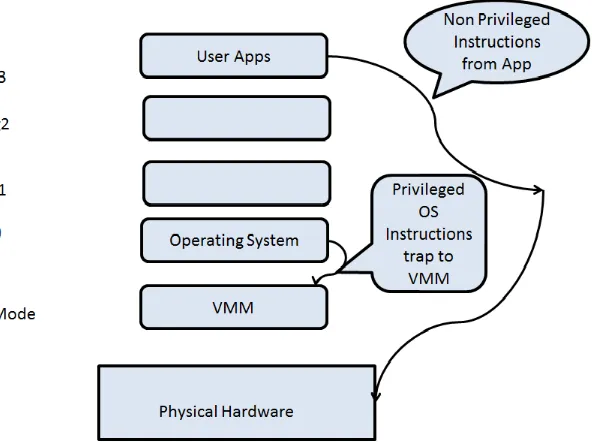
operating system. Such a layer is generally refered to as Virtual Machine Monitor (VMM). In
order to improve performance, only privileged instruction execution passes through the VMM
layer. All non-privileged instructions are directly executed on hardware. These privileged
instructions are typically instructions that access hardware components and change sensitive
system data structures. Privileged instructions are supported in modern architectures by
pro-cessor modes. The propro-cessor needs to be running in supervisor mode to be able to execute
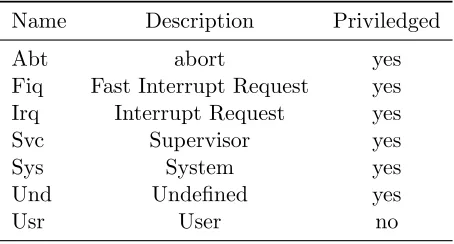
privileged instructions. Figure 2.2 and Table 2.1 depict the use of such modes for the x86 and
the ARM architectures respectively.
Table 2.1: Processor Modes In The ARM ISA
Name Description Priviledged
Abt abort yes
Fiq Fast Interrupt Request yes Irq Interrupt Request yes
Svc Supervisor yes
Sys System yes
Und Undefined yes
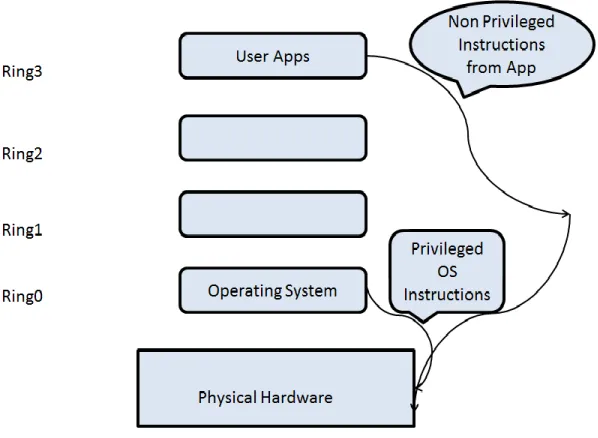
Figure 2.2: Various Processor Modes (Rings) in the x86 ISA
2.2
Different Types of Virtualization
System virtualization can viewed as a combination of CPU virtualization, memory virtualization
and device virtualization.
2.3
CPU Virtualization
The x86 ISA is the dominant architecture used in enterprise/desktop environments today. As
a result, it is very popular in the realm of virtualization. The x86 ISA has 4 different modes of
operation (ring0 to ring3), each of which provide different levels of privileges while operating in
that mode. Ring0 is the most privileged mode and is also referred to as the supervisor mode.
system runs in ring0 whereas user programs run in ring3. This ensure that the user mode
programs cannot affect overall system security even if the process context is compromised. It
is this ring system of security that is utilized to implement virtualization on the x86 ISA. In
this section we discuss different approaches to virtualization using the x86 ISA as reference
architecture. The approaches are:
1. Full Virtualization,
2. Paravirtualization, and
3. Hardware-assisted virtualization.
2.4
Virtualization Types
2.4.1 Full Virtualization
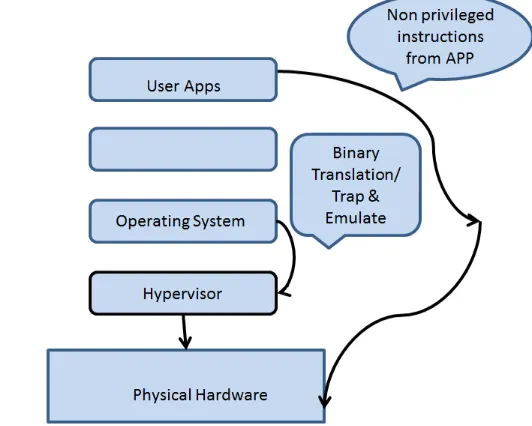
Full virtualization refers to a technique where an unmodified guest operating system runs in a
fully virtualized environment [9]. No changes to the guest operating system are required as it
is unaware that it is running in a virtualized setup. This is typically achieved by combining
techniques of binary translation and trap & emulate. Most privileged instructions of the x86
ISA, when run in the user mode, are trapped. The VMM uses this trap to catch the instruction
before execution and emulates it in the VMM. Some privileged instructions that cannot be
trapped in user mode are handled by a technique called binary translation [22]. In this
tech-nique, small blocks of instructions are translated into a new set of instructions that emulated
the translated blocks effect. The user-level instructions are directly executed on hardware to
improve performance. Figure 2.3 shows such a virtualization scheme.
2.4.2 Paravirtualization
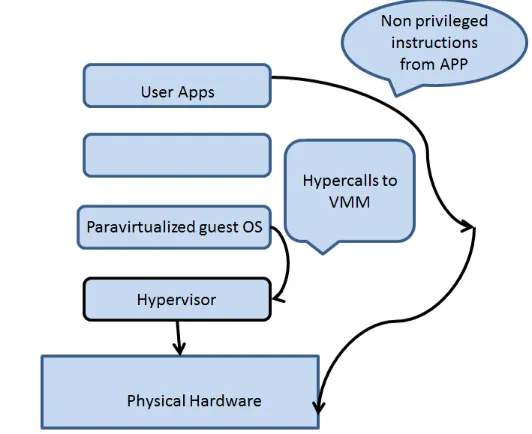
Paravirtualization refers to a technique where the guest operating system is modified.
Priv-ileged instructions are replaced with calls to the hypervisor called hypercalls. The hypervisor
layer provides a hypercall interface with services such as memory management, device usage and
interrupt management to the guest. This ensures that all privileged mode activities are moved
from the guest operating system to the hypervisor. Paravirtualization is usually faster than
full virtualization. The performance gains are primarily achieved due to the lack of dynamic
overheads associated with binary translation and trap & emulate. Since paravirtualization
re-quires changes to the guest operating system code to avoid calls to privileged instructions, it
obviates the need for trap & emulate and binary translation. Of course, this benefit comes
with the additional cost of maintaining a modified guest operating system, but these costs are
considered acceptable because paravirtualized systems are shown to deliver performance close
to native systems. Figure 2.4 shows such a virtualization scheme.
Due to the popularity of virtualization in industry today, hardware manufacturers are
pro-viding virtualization support at the hardware level. Intel and AMD (Advanced Micro Devices)
support virtualization technologies (VT-x and AMD-V, respectively), and ARM is expected to
provide virtualization support in the upcoming CORTEX A-15 ISA [10]. Typically, these new
architectures have a new mode of operation that is dedicated for the hypervisor. This mode,
also referred to as the root mode [22], allows the VMM to run with a higher privilege than the
supervisor mode of the processor.This concept can be understood by equating the ‘root mode’
to a privilage level ‘ring0 -1’. All the privileged instructions executed in the supervisor mode
are automatically trapped and control is passed to the hypervisor executing in root mode. The
state of the registers in the guest mode is saved for later context restoration. Hardware-assisted
virtualization thus removes the need for binary translation, paravirtualization and trap &
emu-late. This technique is relatively new and is considered expensive because of the cost involved in
frequently switching contexts for hypervisor execution. Figure 2.5 shows such a virtualization
scheme.
2.5
Memory Virtualization
Typically, modern operating systems provide virtual memory support, which enables process
to run on virtual memory abstractions. The virtual-to-physical memory translation is usually
performed by the MMU (Memory Management Unit). Such mappings are calculated in the TLB
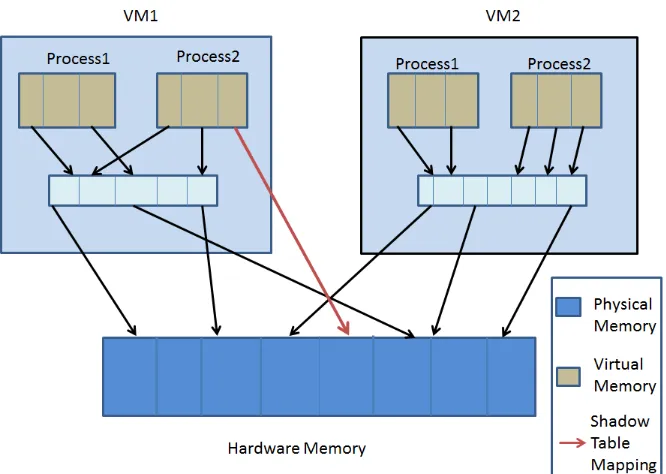
(Translation Look-aside Buffer). With virtualization, an extra layer of translation is needed.
The MMU has to be virtualized to support the guest operating system. The guest operating
system now maintains the mapping of virtual memory to the guest physical memory but has
no control over the actual physical memory. It is the responsibility of the VMM to actually
control the mappings of different guest physical memory to the actual hardware memory. The
VMM also utilizes the concept of shadow page tables to speed up the translations from guest
virtual addresses to actual physical addresses. Figure 2.6 pictorally depicts this concept.
2.6
Mobile Virtualization and Virtualization for ARM
Virtualization in embedded systems has emerged fairly recently. With the growth of complexity
in both hardware and software systems used in embedded systems today, virtualization is
increasingly becoming a valuable proposition. Typical benefits of virtualization on embedded
systems include (but are not restricted to) the following topics:
1. Security through Virtualization,
2. Maximize the utilization of CPU cores, and
3. Multiple Operating Systems running on the same core.
Figure 2.7 depicts these three benefits of mobile virtualization.
Figure 2.7: Mobile Virtualization benefits
phone can run on a isolated virtual machine, thus protecting them from any security breach
that occurs in other components.
2.6.2 Maximizing the Utilization of the Cpu Cores Available
Due to the divergent nature of the communication and application stack of today’s smartphones
(the communication stack is timing-sensitive and, the application stack is feature-rich), it is
common to run these two services on separate CPU cores. The communication stack is run
on a core hosting a real time operating system (e.g., REX) while the application stack is run
on a separate core hosting a feature rich operating system (e.g., Android). Virtualization can
obviate the need for two separate cores by running two different operating systems on a same
2.6.3 Multiple Operating Systems Running on the Same Core
Another advantage of running multiple operating systems on the same core is that it allows for
separate user profiles on the same hardware. It is a common sight to see people carry multiple
mobile phones for work and personal use. With virtualization, this can be achieved on a single
piece of hardware with the different operating systems running concurrently and in isolation
from one other. This significantly reduces the device clutter due to multiple phones and also
reduces the cost of maintaining multiple mobile devices.
2.7
Challenges for Virtualization on ARM
Today, ARM devices own approximately 90% percent of the market share in the mobile
tele-phone market segment and consequently are the single most important processor architecture
deployed in smartphones. In this section we discuss the challenges encountered when deploying
virtualization on current generation ARM devices. The primary issue that hinders
virtualiza-tion on ARM is the way sensitive instrucvirtualiza-tions of its ISA are executed. Sensitive instrucvirtualiza-tions
are a class of instructions in the ISA that can change the mode of operation of the processor
or access specific information regarding the state of various hardware resources in the system.
Such instructions thus have the capability of superseding the hypervisor. Since some of these
sensitive instructions do not trap when they are executed in user mode, the trap & emulate
method used to implement full virtualization is not achieve able in current ARM architectures.
Current methods of binary translation and other efforts to achieve full virtualization on ARM
are not mature and stable yet. Due to this, paravirtualization is the most reliable and popular
Chapter 3
OKL4
In the previous chapter, we saw how the ubiquity of smartphones has made it the latest target for
malware and other security-related attacks. We also explored virtualization and its potential
use to build a reliable and secure framework that helps to minimize these attacks. In this
chapter, we focus on one of the virtualization-based mobile solutions currently available. We
explore OKL4, one of the available mobile virtualization platforms. It is a Microkernel-based
embedded hypervisor, called a microvisor, which is well suited for mobile hardware platforms.
OKL4 currently supports a variety of architectures from X86 to ARM. This make it a good
choice as a hypervisor because most mobile architectures today run on different flavors of the
ARM architecture. The hardware platform used was the HTC Dream mobile phone, which has
a Qualcomm MSM7201A-based chipset as the underlying hardware platform. It was decided to
port OKLinux, which is a paravirtualized version of Linux, on the HTC (High Tech Computer
Corp.) Dream target platform (Figure 3.1). The goal was to port a paravirtualized guest
operating system running on top of OKL4. This would enable us to decouple the Operating
system and the hardware layer. Such architecture provides us with an effective mechanism to
intercept all accesses to the underlying hardware, thus enabling us to determine if hardware
operations being performed are malicious or not. Such a design paradigm enables us to have a
The inherent insulation of the monitoring framework makes sure that the monitor can also
detect if the core services of the guest operating system (kernel, etc.) have been compromised.
3.1
The Microkernel Approach to Virtualization
The concept of microkernels dates back to the 1980s [23] and typically refers to a minimalist
approach of operating system design. This design approach typically mandates that only a
minimum set of the most essential software constructs necessary to build a system be the part
of the operating system kernel. This approach is fundamentally different from the monolithic
kernel designs as seen in commercially popular operating systems like Linux. The software
constructs that are provided by the Microkernel are then utilized by elements outside of the
kernel to implement various services needed by the operating system. The typical kernel
soft-ware constructs that are provided are interprocess communications, virtual memory and shared
memory support. The primary goal of such a design is to reduce the number of lines of code
within the kernel, also known as the trusted computing base or the TCB. A smaller TCB results
in less vulnerabilitiy and fewer bugs in the operating system kernel, thus making it more
se-cure. In a Microkernel-based design, there is no difference between application code and system
software. Most system services, e.g., device drivers, are implemented as services outside the
kernel, and the Microkernel does not differentiate between these services and application code.
Such a design paradigm is essentially well-suited from an embedded system perspective because
traditionally the difference between applications and system services in embedded systems is
not very well defined.
3.2
Virtualization with OKL4
OKL4 is a product of Open Kernel Labs (OKLabs), which is a startup company in collaboration
with UNSW (University of New South Wales) and NICTA (National Information
Figure 3.2: OKLINUX/OKL4 Architecture
approach. Figure 3.2 depicts the architecture of a OKL4 based system. It is based on the
well-known Pistachio Microkernel. Due to this Microkernel approach to design, OKL4 has the
following inherent advantages:
1. The guest operating system is executed in a non-privileged mode.
2. It has a very highly performaning IPC service available.
3. Provides efficient sharing of system resources between guests.
4. It is open source.
5. It has a small memory footprint.
6. It ensures isolation and fault tolerance between guests.
constructs to run the guest in a less privileged mode. In this section, we briefly discuss the
various software constructs that are currently available in OKL4.
3.3.1 Threads
Threads are contexts of execution within an OKL4 environment. System calls provided by
OKL4 enable the creation and deletion of these threads. These threads can assume different
states similar to Linux processes.
3.3.2 Addresses spaces
OKL4 provides system calls to create and associate virtual address spaces to threads. Address
spaces also associate virtual addresses to addresses of memory mapped devices (ports, I/O, etc.).
These system calls can be used to create, initialize and associate memory mapped devices to
threads of execution via virtual mappings, and these mappings are controlled by the microvisor.
3.3.3 Capabilities
Capabilities are akin to permissions. These capabilities enable access control management.
Threads have capabilities associated with them that constrain their access to various system
resources. It can be thought of as a key or a token that allows access to a resource. Figure 3.3
depicts the thread capability model used in OKL4.
3.3.4 Data Types/Data Fields and Data Constructors
OKL4 provides these constructs to characterize different objects residing in the memory or
in virtual registers. These constructs are used to define the encoding of objects in term of a
sequence of bits an occasionally to impose additional restrictions such a range numeric values
Figure 3.3: Thread Capabilities in OKL4
3.3.5 Thread Scheduler
OKL4 has a pre-emptive scheduler that divides the execution time between different threads of
execution. A round robin algorithm is used to pre-emptively schedule various threads running
on OKL4.
3.3.6 Inter Process Communication
implemented in the system.
3.3.7 Mutex
OKL4 provides mutexes to manages resources contention among various threads.
3.3.8 Virtual Registers
Every thread of execution has access to a number of virtual registers it can utilize.
3.4
OKL4 Porting Efforts
3.4.1 OkAndroid and OKL4 merging
OKL4 follows a Microkernel based design. It provides an API (Application Programming
Interface) that acts as a layer of abstraction over the underlying architecture. The API layers
also serve as service providers. The services are broadly classified into timing, memory and
control services. This software architecture provides a robust programming environment that
enables applications to run in a secure and isolated space. Also, platform specific code in
OKL4 is separated out from the platform independent part. This ensures that the changes
required for porting OKL4 to various platforms remain restricted to a minimal number of
source files. The first part of our implementation required us to merge the changes made in the
OkAndroid source with the vanilla OKL4-3.0 source. The merging process involved adding a
platform specific source folder (in our case, the platform was called Trout), and changing many
of the configuration scripts, Makefiles and SConscripts inside OKL4 to tailor it to compile for
our hardware platform. Many of the scripts that were earlier written for Android platform
(components like bionic and binder IPC), had to be changed for a Linux specific build. One
of the other challenges was that OKL4 relied on older versions of the components of the Linux
build environment (perl, gcc, etc.). This required extensive changes to our build environment
3.4.2 OKLinux
OKLinux software architecture is very similar to a traditional Linux 2.6 kernel. The L4-specific
code resides mainly in the arch/l4 folder inside the kernel. Since OKLinux has not been ported
onto the MSM7200A platform yet, we had to add the mach-msm folder inside arch/l4/sys-arm
folder. The basic version of MSM-specific code was taken from the linux-next branch of the open
source kernel tree. Once we added this, we had to make many changes in the mach-msm folder
before we could attempt a build. The main changes arose due to the fact the different versions
of the Linux kernel were being merged (OKLinux is 2.6.24 and linux-next was 2.6.30). Due to
this, there were a lot of differences in the kernel APIs (mainly in the sections were memory and
page tables were getting initialized) and header files used by the MSM specific code. We had to
resolve these issues by modifying all headers and associated APIs in the MSM code to match
the requirements of OKLinux. After these changes were done, we also had to change most
of the Kconfig and Makefiles to incorporate the MSM source into the kernel build structure.
The next change was in the kernel folder of arch/l4. Since a new architecture was added, we
had to incorporate the interrupt and timer initialization calls of the new architecture in the
various setup and timer-related sources of OKLinux. Another important change affected the
L4 configuration files and required us to properly define all the correct environment variables
needed by OKLinux. Once these changes were incorporated and intermediate errors debugged,
compiling and linking the OKLinux kernel for the HTC dream target succeeded.
3.4.3 Problems and Issues faced in this Process
After compiling the sources for the OKL4/OkAndroid port on the HTC G1, we tried to build the
boot images for OKL4. The OKL4 system uses a tool called Elfweaver, which is used to merge
the various ELF files into a single ELF file. This ELF file is then used by the various OKL4
forward with OKL4. Image creation eventully failed because of a lack of support for virtual
driver for this specific hardware. Although OKL4 is open source, most of the sources that
affect smartphone-specific platforms such as the MSM platform, have not yet been released.
The image creation process fails because essential information needed by the image forming tool
is missing. This leads to errors such as physical memory pool indices going out of range. Since
these issues could not be resolved without proper driver support, we could not proceed further
create a workaing image of OKL4 running a virtualized version of Android on actual hardware.
One of the main issues with this porting effort was that the OKL4 Microkernel version 3.0 is
not a kernel targeted for virtualization. It is designed to be a virtualization solution instead.
Therefore, any upgrade of the guest operating system is a challenging task because it needs
Chapter 4
KVM on ARM
Machine), another virtualization technology, which takes a slightly different approach to
virtu-alization. KVM is a virtualization technology that is tied to the Linux kernel. It first appeared
in the Linux 2.6.20 distribution as a loadable kernel module. Figure 4.1 gives us an overview
of KVM.
The primary differentiating factor between KVM and other virtualization techniques is the
rather simplistic implementation approach used by KVM. In virtualization technologies today,
the virtual machine monitor largely implements all major services like the scheduler, memory
manager and timers. This results in a fairly large and complicated code base. KVM, on the
other hand, leverages the existing functionality in the Linux kernel and thus is comparatively
smaller and much less complex. It utilizes existing Linux code for services like scheduling,
memory management and timers. Another inherent advantage of KVM is that it uses hardware
virtualization techniques in modern processor architectures. Hence, KVM does not carry the
general performance overheads of the software virtualization techniques like paravirtualization.
These advantages make KVM an easier solution to deploy and maintain and is a reason why
KVM is becoming quite popular in the virtualization market.
The primary drawback of KVM is that currently it only supports modern architectures that
are virtualizable (x86 and AMD). Due to this, KVM is not the primary choice of virtualization
in the mobile ecosystem. In the next few sections, we will discuss KVM/ARM, which is an
approach to use KVM virtualization techniques on ARM-based architectures. We will study the
novel approach of light-weight paravirtualization, KVM’s approach to virtualization on ARM
architectures and the current state of implementation of KVM/ARM.
4.1
KVM vs. Microkernels: A Closer Look
Microkernel based virtualization technology (OKL4, L4-Fiasco) have a VMM that resides
di-rectly on top of the hardware resources. All operating systems then run on top of the VMM.
All hardware control mechanisms like CPU control, scheduling and memory management are
Figure 4.2: KVM Vs Microkernel
control the hardware. Each guest operating system that runs in such a setup is a separate
cell. It is thus isolated from the other guests. In the KVM based approach, the host is not a
hypervisor per say, but happens to be a Linux kernel running directly on top of the hardware.
The hypervisor is implemented as a kernel module and thus accesses the hardware through the
Linux kernel interface. The guest operating systems runs as a process on top of the host kernel.
These can be controlled by typical Linux commands like kill, ps, etc. Different guest operating
system instances are viewed as separate processes under the host kernel. Isolation amongst
various guest operating systems is achieved by both KVM and Microkernel based approaches.
In Microkernel-based and KVM-based techniques, the hypervisor does have direct access to the
4.2
The KVM/ARM Virtualization Approach
In this section we will discuss the following:
1. KVM/ARM attempts to overcome the issues with Virtualization on ARM based devices
and,
2. The approach taken to both CPU and memory virtualization.
4.2.1 CPU Virtualization in KVM/ARM
Any processor architecture is deemed to be virtualizable if all the sensitive instructions in its
ISA are also privileged. A sensitive instruction is typically defined as an instruction whose
effect is dependent on the processor’s mode of operation. A privileged instruction is defined as
an instruction that traps if it is executed in an incorrect mode. Therefore, when all instructions
that are sensitive are also privileged, then virtualization can be implemented using the trap
& emulate concept. The primary problem with the ARM architecture is that not all of the
sensitive instructions defined by its ISA are privileged. Such instructions primarily are special
loads and stores, status registers (CSPR and SPSR), some special data processing instructions
and memory access instructions. These instructions may behave differently, be ignored or may
be unpredictable when executed in user mode. These instructions do not trap when they are
executed in user mode. Due to this problem, the ARM instruction set architecture is inherently
not virtualizable.
Light-Weight Virtualization: KVM/ARM tries to solve the problems of virtualization in the ARM architecture by using light-weight paravirtualization. This technique involves making
some changes in the guest OS kernel to take care of sensitive non-privileged instructions. All
other user space instructions can be directly executed on hardware while the privileged
instruc-tions are taken care of by trap & emulate method. The changes to the guest operating system
are made by an automated script that replaces the necessary instructions with instructions that
Figure 4.3: CPU Virtualization
emulated. The automated script is based on using regular expressions to find such instructions
and the SWI instruction of the ARM ISA as a replacement. The information required to
emu-late is encoded (instruction replaced, operands) in this instruction’s data field and is used emu-later
in the interrupt handler. The changes made to the guest operating system are fully automated
and thus do not need intensive knowledge of the GUEST OS internals. Figure 4.3 shows all the
instructions og the ARM ISA that are of interest for virtualization.
4.2.2 Memory Virtualization
Memory virtualization is needed because we both the guest OS and host should be allowed
to have full access to the entire virtual memory space without interfering with each others
Figure 4.4: Memory Virtualization
refer to the actual physical memory of the system. Figure 4.4 illustrates this 4-level memory
management scheme. The mapping of guest virtual addresses to guest physical addresses is
handled by the memory manager of the guest operating system. The guest physical addresses
are then mapped onto the virtual memory space of the host kernel. Then, the host kernel’s
virtual memory manager maps these virtual addresses to actual physical (machine) address via
the host MMU.
Shadow Tables and Shared Pages: KVM/ARM manages the shadow page tables in the host kernel. These tables map the guest virtual addresses to actual physical addresses to speed up
the translation. Figure 4.4 also illustrates the concept of shadow tables. KVM/ARM establishes
this mapping on demand. Changes in the guest virtual page table must be accurately mapped
onto the shadow page table. This is taken care of by KVM/ARM because whenever the guest
changes the page table, it has to invalidate the TLB entry associated with that page. As this
is a privileged operation, it traps to the KVM/ARM module where appropriate changes to the
two entries in the table are initialized. One of them handles exceptions and another handles
the access API to the shared page. The ARM architecture mandates that any switches between
virtual address spaces are always done using a page that is mapped onto the same virtual
address in both addresses spaces. This shared page must always be hidden from the guest. If
the guest tries to access the page, it will trap, and then KVM/ARM will change the mapping
of the shared page to a different virtual address in both host and guest operating systems. The
page fault should then be handled in a normal fashion. KVM/ARM typically uses reserved
memory regions to map the shared page for Linux guests.
4.3
Implementation Status
Currently, the source code available for KVM/ARM does not boot fully. After building the
source code, we tried to boot the guest using QEMU emulation, but the boot process fails due
to CPU resets. It is known that the same issue occurs when KVM/ARM is run on the Texas
Instruments Beagle Board platform. Furthermore, the authors have also announced that they
are not supporting ARMv5-based platforms any longer and are concentrating their efforts on
porting KVM/ARM on to the ARM CORTEX15 platform, which is the first ARM platform
with hardware virtualization support. Reference boards for this platform will be available in
late 2011, and the authors of KVM/ARM claim that the port to the CORTEX15 architecture
Chapter 5
Virtualization with L4
In this chapter, we explore L4, which is one of the most well-known microkernels in academia
available today. L4, in many ways, was a key reason why the idea of microkernels resurfaced
after languishing for a while due to performance drawbacks of many first generation microkernels
like Mach [16]. After generating a lot of interest initially, due to their emphasis on security and a
small TCB, it was realized that the design of the first generation microkernels was fundamentally
flawed. The primary drawback of earlier microkernels like Mach and others was that of an
unacceptably high communication overhead due to a concept called in-kernel message buffering.
More than a 30% reduction in performance was observed in the MkLinux project, which was
an attempt to run paravirtualized Linux on top of Mach. The L4 project addressed many of
the performance bottlenecks from the design of first generation microkernels, and subsequently
demonstrated a paravirtualized Linux running on top of L4 which had runtime performances
comparable to native Linux. The L4 microkernel was proposed by Jochen Liedtke who first
developed the L3 and subsequently the L4 microkernel [19]. Jochen Liedtke describes the key
guiding principle behind microkernels thusly: “A concept is tolerated inside the microkernel only
if moving it outside the kernel, i.e., permitting competing implementations, would prevent the
implementation of the system’s required functionality”. L4 faithfully follows this key principle
rest of the services are implemented in form of servers outside the kernel. L4’s significant
improvement to overall system performance coupled with the key benefits of isolation, security
and resource reusability that L4 provides, has rekindled the interest in microkernels. These
properties also make L4 an excellent choice as a virtualization host for mobile platforms. In
the following sections, we take a closer look at the various attributes of L4 and describe our
attempts to paravirtualized the Android mobile operating system with L4 as a hypervisor.
5.1
L4: Specifications
Following the strict microkernel design principles, L4 exposes a very limited set of software
constructs that can be utilized to implement any number of services operating in user space.
Addresses spaces are provided by L4 to enforce isolation in an L4 subsystem. Tasks in L4 run in these isolated address spaces.
Tasksare basic entities that contain resources. Typically, they consist of an address space and a set of associated capabilities.
AFactoryis an entity used by applications to create new objects kernel capabilities. Applica-tions need to access these factories to create these capabilities, required to extend functionality.
IPC(Inter Processes Communication) gates are used to set up a secure communication mech-anism between tasks.
IRQ (Interrupt Response Queue) in L4 enables applications to access hardware interrupts. Virtual interrupts are made available to enable signaling amongst tasks.
A scheduler in L4 implements a scheduling policy to govern time sharing amongst tasks. Scheduler is also responsible for assigning threads to CPUs.
5.2.1 Fiasaco Microkernel
The Fiasco microkernel runs at the heart of the L4 system. It is a minimalist microkernel
providing all the basic services that cannot be provided outside of the kernel. It is a
pre-emptive real time kernel that supports hard priorities. This makes it an ideal microkernel for
embedded real-time systems.
5.2.2 L4 Runtime Environment (L4RE)
L4RE provides a basic set of runtime libraries and services that make application development
easier on the L4. Basic services include memory management, program loading, paging, I/O
(Input/Output) management, device management and GUI multiplexing. L4RE also provides
functional support in the form of a C library, Pthreads, C++ libraries, virtual file system
infrastructure and libsdl (low-level multimedia support).
5.2.3 L4Linux
L4Linux is a Linux kernel that has been paravirtualized to run on top of the L4 Microkernel
[17]. We discuss L4Linux in greater detail in the next section.
5.2.4 L4 Services
The services that run on the L4 microkernel and provide the basic environment for the
appli-cation to operate in are as follows:
MOE is the root task of L4. It is the first to be brought up and is responsible for bootstrapping
and service multiplexing. It multiplexes the services like scheduler, memory, CPU and VCONS
mentioned in previous sections. MOE is also responsible for bringing up the first program in
L4, the init process called NED.
NED is responsible for configuring and starting up the full L4 system. This responsibility was
moved to NED to make MOE less complicated. NED supports the script-based start-up of the
I/O is the device and platform manager in L4. It provides a centralized management of
periph-erals and resources. I/O provides the abstractions for device accesses by applications and also
delegates device accesses among applications.
MAG provides secure multiplexing of input hardware and graphics amongst applications.
FB-DRV provides the low level access and initialization of various graphics hardware on a
sys-tem.
RTC is the multiplexer for the real time clock hardware on the platform.
5.3
L4Linux/L4Android on L4 Microkernel
L4Linux is the paravirtualized version of the Linux operating system that runs on the L4
environment. L4Linux runs like any other application in L4, implying it runs only in the user
mode. All privileged instructions from the Linux kernel were replaced with hypercalls to the
L4 microkernel. These changes to Linux are restricted to the architecture-specific parts of the
Linux kernel. The architecture-independent parts of Linux remain unchanged. The changes are
primarily related to the following areas of the Linux kernel.
5.3.1 Startup
Since L4Linux operates as a user-level application on top of L4, it does not require initializing
the hardware and interacting with the BIOS (Basic Input Output System). Because of these
reasons, codes dealing with these activities have been bypassed in L4Linux.
5.3.2 Device Management
inter-5.3.3 Low Level Memory Management
Since application programs in L4 are not allowed to access the page table directly, the Linux
kernel is modified to avoid this. Instead, the L4 hypercalls are used.
5.3.4 Physical Memory
Some device drivers need to know the physical memory by their real addresses. This information
is needed by those device drivers that communicate with devices via DMA (Direct Memory
Access). Since L4Linux does not run on the hardware directly, this poses a problem. This
is resolved by modifying the Linux interface that the drivers use to map virtual addresses to
physical addresses.
5.4
L4Android
The popular Android operating system for smartphones by Google uses a slightly modified Linux
kernel at its core. It is a widely popular smartphone operating system that has revolutionized
the mobile phone market. The Android operating system is open source and freely available
for download. This makes it a very compelling choice for academic research on smartphones
technology. L4Android is an attempt to run this popular Android software stack on top of
L4Linux to achieve virtualization in smartphones. Since privileged instruction usage is restricted
to the kernel only, there are no virtualization-specific changes that need to be made to the
Android stack in order to run it on the L4 microkernel. The changes needed are already
existent in the L4Linux kernel. Hence, moving the L4Linux changes to the Android kernel
should be sufficient to ensure proper execution of Android on L4 Microkernel.
5.5
L4Android/L4Linux Installation Efforts
5.5.1 Target Hardware: ARM PB11MPCORE
The PB11MOCORE is a development board provided by ARM. It is an integrated development
board based on ARM SMP (Symmetric multi-processor). It has an 8MB flash memory to hold
FPGA (Field Programmable Gate Array) images. The board has features such as 256 MB
RAM (Random Access Memory) and an Ethernet controller IC. A detailed description of the
features of this board can be found in the Emulation Baseboard User Guide [6]. Figure 5.1
depicts the PB11MPCORE hardware architecture.
5.5.2 Android on PB11MPCORE
The first challenge during the board installation effort was to build and run Android natively
on the PB11MPCORE board. Android releases do not have support for this board. Our first
task was to locate and bring together a set of Android patches that would enable us to boot
Android on this board. The main challenge during this task was that, at the time of our
at-tempts to boot this board, there was no single source for all the required patches. We had to
search for these patches online and test to them see which of them worked. Moreover, most
of the patches available were spread across different versions of Android. Some patches were
against Android version 2.1 (also known as Eclair) and some of them were against Android
version 2.2 (also known as Froyo). We had to manually modify the source files and move all the
patches to Android version 2.2 (Froyo). The patches used for this process fall broadly under
these subsystems of Android.
1. Patches for Bionic:
These patches include changes required for the light-weight implementation of the C
library in Android known as Bionic.
2. Patches for Build:
These patches include changes to the build subsystem to accommodate the build process
for our board.
3. Patches for Dalvik:
Dalvik is the Virtual machine running within the Android subsystem. It provides an
execution environment for all the Android applications that user chooses to run on the
device. The Dalvik patches included changes to the Dalvik subsystem code pertaining to
our board.
4. Patches for Framework:
framework, telephony framework, etc.).
5. Patches for System Core:
These patches pertain to the changes needed in the core system libraries of Android.
6. Patches for Device:
Some patches were needed in the device folder of the Android subsystem to provide device
(PB11MPCORE) details for the image build process.
The primary purpose of these patches is to amend the TLS (Thread Local Storage) so that
it uses the kernel helper functions. They also add the required support for the ARMV6K
architecture, which is the architecture used in the PB11MPCORE board. Once these patches
were applied, we were able to completely compile and build Android for PB11MPCORE. The
next step in this process was to boot Android on this board. We decided to use the NFS
(Network File System) boot process in conjunction with the UBOOT (universal boot loader)
program to achieve this. A more detailed description of this process can be found in Appendix
1. The booting was successful and we managed to get the idle screen on Android after the boot
was completed. The problem we faced at this point was that the screen was locked and since
there was no mouse support available on Android, we had no way to unlock the screen. The
solution for this was using an application available for free download on the web, which could
be automatically launched after the boot process to ensure that the screen remained unlocked.
The problem with this app was that it needs the system to be rooted, which is usually not the
case in a regular Android build. This was overcome by a typical rooting binary available on the
web called Rangeagainstthecage [7]. This was a pre-built ARM binary, which we successfully
used to root the system and then unlock the screen. After this, we were able to use the
Android operating system on the ARM PB11MPCORE board. The keyboard was used to send
Subsequently, The ARM Linux community has released a set of patches for Android on
PB11MPCORE recently. These can be found at http://www.linux-arm.org/LinuxKernel/ LinuxAndroidPlatform/.
5.5.3 L4Linux on PB11MPCORE
The source files for L4Linux were available for download from the TU Dresden website [4],
which maintains the latest versions of L4Linux for various processor architectures. After initial
problems with like tool version mismatches, etc., we were able to successfully compile and
create L4Linux images for our board. We were also able to boot the L4Linux images on our
development board using UBOOT and we successfully started a bash shell with a command
prompt.
5.5.4 L4Android on PB11MPCORE
The next step in the process of booting Android on L4 microkernel was to patch the L4Linux
kernel to incorporate the required changes for Android. We managed to do this and successfully
build the L4Android kernel for PB11MPCORE. Figure 5.2 shows the architectural overview of
L4Android on PB11MPCORE.
5.5.5 Current Status
We are currently trying to debug some baud rate mismatch issues that we are facing in the
initial boot-up of the L4Android kernel. The problem stems from using UBOOT which requires
a different baud rate for its operations than the L4Android kernel. This is the last step in the
Chapter 6
Conclusion
6.1
Feasibility of Today’s Mobile Virtualization
Technologies
After exploring three available and largely open-source virtualization technologies, we come
to the conclusion that although this technology is here to stay, tedious work still needs to be
performed for most of them before they can be utilized as an open platform for mobile
virtu-alization. Firstly, OKL4, which is one of the first microkernel-based virtualization technologies
we studied, claims that they already have their technology running successfully in many
smart-phones today. Since the relevant source code is not in the public domain, adopting OKL4 as a
platform for virtualization research is far-fetched as of today.
Secondly, KVM/ARM is currently not mature for hardware deployment. Our efforts at trying
to boot KVM/ARM even on a simulator level was not successful due to the many bugs in the
current code. Moreover, the authors have told us that they are currently concentrating on
port-ing the code to ARM CORTEXA15 based devices and are not concentratport-ing on non-hardware
virtualizable ARM architectures for now. With a KVM/ARM port for ARM CORTEXA15 and
an appropriate board with the CORTEXA15 processor, one can possibly revisit KVM/ARM
platform for mobile virtualization research.
Thirdly, we look at L4 and its feasibility as a platform for mobile virtualization on ARM devices.
This platform is the most promising amongst the once we tried out. There are a number of
reasons for this. L4 is a fully open source software and is available in its entirety for downloads
form the TU Dresden website. There is active support and development of this platform in
the open domain and there is a lot of assistance in terms of mailing lists, documentation etc.
Due to this, we were able to successfully boot L4Linux and also covered a lot of distance in our
attempts to boot virtualized Android on our development board.
6.2
Currently Working Aspects of Our Virtualization Effort
We were able to successfully build, deploy and run L4Linux, a paravirtualized version of the
Linux kernel on our development board. We were also able to boot a widely popular mobile
operating system on our board after patching the source code with the required changes. The
changes in L4Linux to support Android booting are also complete.
6.3
Work Needed for Full Deployment
Currently, we are facing problems with the baud rate mismatching between UBOOT and the
patched L4Linux kernel. Once this is resolved, a successful boot of a virtualized Android is
possible on an ARM based device (PB11MPCORE). Apart from us, TU Dresden is also working
to resolve this issue and some progress is expected soon.
6.4
Future Work
the introduction of full virtualization support in ARM-based architectures with ARM
COR-TEXA15 based CPUs, virtualization should be ready to capture the mobile world. One of the
major applications of virtualization is seen in enterprise level applications for mobile devices.
With many corporations adopting mobile device like smartphones and tablets to enhance
pro-ductivity, information security is becoming vitally important. With geographic security not
being enforceable anymore, security aspects of virtualization increasingly seem to be the
pre-ferred solution to enable protection of data. Information security is of vital importance even
to non-corporate mobile users. With substantial financial and other critical data now residing
on mobile phones, virtualization gives us a powerful framework to develop security solutions
for mobile operating systems. Also, with the shrinking of space between personal and work
computing, virtualization helps in reducing the device clutter. Virtualization ensures that the
boundaries between work and personal computing can be maintained with different flavors of
operating systems running on a single device. Apart from this, virtualization also ensures that
the turnaround time and costs of deploying a mobile operating system is reduced because the
hypervisor layer takes care of most of the hardware management issues while the operating
system can provide better infrastructure services to applications. Thus, in time, mobile
vir-tualization may become a vitally important aspect of software in the mobile domain. Mobile
virtualization, like its desktop counterpart, has the potential to deliver transformational
solu-tions to the mobile ecosystem, effects of which may become visible very soon. Signs of this
can already be seen in form of activity in the startup world, with many new players already
jostling for space with established names. This is only going to intensify with proliferation and
enthusiastic adoption of mobile technologies by the populace at large. We hope that this will
lead to innovative virtualization-based solutions to the many complex issues that the mobile
REFERENCES
[1] About lua. http://www.lua.org/about.html.
[2] Comparison of android app permissions of popular backgrounds app versus jackeey wall-paper apps. http://www.androidtapp.com/.
[3] An introduction to virtualization. http://www.kernelthread.com/publications/ virtualization/.
[4] L4linux. http://os.inf.tu-dresden.de/L4/LinuxOnL4/.
[5] Okl4 microkernel programming manual. http://wiki.ok-labs.com/downloads/ release-pre-2.0/Okl4-progmanual.pdf.
[6] Realview platform baseboard for arm11 mpcore user guide. http://infocenter.arm. com/help/index.jsp?topic=/com.arm.doc.dui0351e/I1007079.html.
[7] Realview platform baseboard for arm11 mpcore user guide. http://forum. xda-developers.com/showthread.php?t=764950.
[8] Techoverview. http://virt.kernelnewbies.org/TechOverview/.
[9] Virtualization in xen 3.0. http://www.linuxjournal.com/article/8909.
[10] Virtualization is coming to a platform near you. http://www.arm.com/files/pdf/ System-MMU-Whitepaper-v8.0.pdf.
[11] Groer Beleg. Ecient virtualization on arm platforms.
[12] Geh Wynn Chow and Andy Jones. A framework for anomaly detection in okl4-linux based smartphones, 2008.
[13] William Enck and Patrick McDaniel. Understanding androids security framework, 2008.
[14] Shantanu Goel. Solving the android permissions and malware puzzle. http://tech. shantanugoel.com/2010/08/14/android-permissions-malware.htm.
[15] Robert P Goldberg. A survey of virtualization research. 1974.
[16] David B. Golub, Daniel P. Julin, Richard F. Rashid, Richard P. Draves, Randall W. Dean, Alessandro Forin, Joseph Barrera, Hideyuki Tokuda, Gerald Malan, and David Bohman. Microkernel operating system architecture and mach. In In Proceedings of the USENIX Workshop on Micro-Kernels and Other Kernel Architectures, pages 11–30, 1992.
[19] Jochen Liedtke. Improving ipc by kernel design. InIn 14th ACM Symposium on Operating System Principles (SOSP, pages 175–188, 1993.
[20] Susanta Nanda and Tzi cker Chiueh. A survey of virtualization technologies. Technical report, 2005.
[21] Dean Takahashi. Android wallpaper app that takes your data was downloaded by millions. http://venturebeat.com/2010/07/28/ android-wallpaper-app-that-steals-your-data-was-downloaded-by-millions/. [22] VMWare. Understanding full virtualization, paravirtualization, and hardware assist.
[23] Wikipedia. Mach (kernel). http://en.wikipedia.org/wiki/Mach_(kernel)l.
Appendix A
Steps to Build Android
A.1
Configuring and building Android and L4Linux for
PB11MPCORE
This appendix describes in detail the steps needed to build and boot a complete android system
running on top a virtualized L4Linux kernel with L4 microkernel as the hypervisor.
1. Configure and Build Android
In the first step, we download build and compile the android subsystem. The instructions
for doing can be found at http://source.android.com/source/initializing.html. Please be sure to follow the step precisely specially with reference to the correct tool
versions. Any mistakes here will lead to a lot of notorious bugs later.
2. Configure Linux kernel for ARM
In this step we configure and build the Linux kernel for Android. Firstly, download a copy
of Linux kernel version 2.6.33 which has been patched for ARM. This can be found in the
CVS repository of the systems lab at Dept of Computer Science, NCSU. Additionally,
newer version of the kernel will be progressively available athttp://linux-arm.org/.
Build this kernel with the following command:
make ARCH=arm CROSS COMPILE=arm-none-linux-gnueabi- uImage
The uImage we get at this step should be flashed into the PB11MPCORE after copying
them on to the memory card. Power on the board and in the command prompt and
switch to flash menu and burn the image using the following commands:
flash
write binary UIMAGE
list images
Copy the boot address associated with out uImage which will be the output of the last
command above.
4. Patch Android for PB11MPCORE
In this step we will patch and build the android sources that we downloaded in step
1. The patches can be downloaded into a separate from the CVS repositories of the
Systems Research Laboratory at Dept. of Computer Science, NCSU. The patches to be
downloaded are the following:
AndroidV2.2-arm-bionic.patch AndroidV2.2-arm-build.patch AndroidV2.2-arm-dalvik.patch AndroidV2.2-arm-frameworks-base.patch AndroidV2.2-arm-system-core.patch AndroidV2.2-device-arm.tar.bz2
The patches need to go to the folder names associated with the patch. For instance, to
apply the bionic patch, go to bionic folder inside the android source directory and run
the following command:
directory.
5. Building Android for PB11MPCORE
In the topmost level of the Android source directory, build Android for PB11MPcore
us-ing the followus-ing command:
make PRODUCT-ARMv6k-eng
This will build the Android operating system for PB11MPCORE board.
6. NFS Boot of Android
To boot Android via NFS, do the following:
cp ANDROID ROOT/out/target/product/BOARD NAME/root/*
/var/nfs4/armv7-board-fs
cp ANDROID ROOT/out/target/product/¡BOARD NAME/system/*
/var/nfs4/armv7-board-fs/system
Comment out the following in the init.rc file in your source files:
mount rootfs rootfs /ro remount
mount yaffs mtd@system /system
mount yaffs2 mtd@system /system ro remount
mount yaffs2 mtd@userdata /data nosuid nodev
mount yaffs2 mtd@cache /cache nosuid nodev
Change the following file to reflect the proper permissions for the nfs folder
/srv/nfs4/android-fs *(rw,sync,no root squash,no subtree check)
First connect the serial output of the board to a Linux based PC. In a terminal prompt,
run minicom. In the Boot monitor command prompt on the board, run the following
command:
flash run UBOOTRV
Uboot command prompt will be seen in the minicom output. In the UBOOT command