USE OF MATLAB TO UNDERSTAND BASIC
MATHEMATICS
Sanjay Gupta
P. G. Department of Mathematics, Dev Samaj College For Women, Punjab ( India )
ABSTRACT
In this paper, we talk about the ways in which computer technology can be used to understand basic mathematics. Matlab is a high-level mathematics package designed for doing numerical computations and graphic. Toolboxes are comprehensive collections of Matlab functions that extend the Matlab environment to solve and visualize particular classes of problems. In particular, starting with the Matlab desktop layout, we will illustrate eight topics in basic mathematics using Matlab: Matlab as a calculator, order of precedence, factoring and expanding polynomials, arrays, vectors and matrices, solution of system of linear equations, solution of simultaneous linear equations, operations on polynomials, solving polynomial equations, build-in Matlab functions and plotting.
Keywords - basic mathematics, computer technology, matlab, numerical analysis, toolbox.
I. INTRODUCTION
The use of computer technology in teaching mathematics has become a famous part of most preparatory
mathematics classes like calculus. A recently conducted research project [1, 2] examined the influences on
attitudes and learning of students who were using Matlab, and found that almost all students behaved positively
to Matlab for easy use of computation and graphing. In addition, the use of the Matlab software as a tool was
found to have a strong impact on the learning strategies adopted and on their confidence towards mathematics.
On the other hand, [3] found that students with high computer mathematics interaction realise that computers
improve mathematics knowledge by providing many examples allow user to focus on major facts by reducing
mechanical work, and find computers cooperative in connecting algebraic and geometric ideas. Matlab is a
high-level programming language with an interactive surroundings for numerical computation, visualization and
programming function. The name Matlab stands for “ Matrix Laboratory ”. Matlab software was invented by
Cleve Barry Moler for his students who were studying at the University of New Mexico so that they can use this
computing package easily in numerical analysis without writing Fortran. Since Matlab has dominant symbolic
math potential, therefore instead of making calculations on known numbers, we can make calculations on
symbolic expressions. Matlab features a family of application-specific solutions called Toolboxes. Toolboxes
are complete collections of Matlab functions usually known as M-files that extend the Matlab surroundings to
solve some particular classes of problems. Numerous research papers meticulous the learning process of
paper, we will talk about how to learn basic mathematics using symbolic toolbox of Matlab [6] and here we will
use the latest version R2016a of Matlab to illustrate the various aspects.
II. THE MATLAB DESTOP LAYOUT
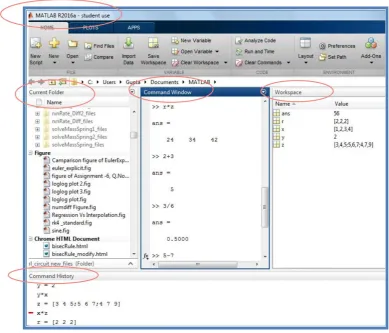
The Matlab layout is divided into four windows (indicated by ovals in Fig.1) :
1. Current Folder (Left) - It has a toolbar with your current directory shown. All your work will be saved in
this directory.
2. Command Window (Centre) - Where you will type in all commands after the double arrow “ >> ”
3. Workspace (Top right) - Which will show your current variables.
4. Command History (Bottom) - Showing a history of commands in the order you typed them.
At the top of the screen we will see tabs Home, Plots and Apps. When you start Matlab, it shows all modes
(menu items) in Home tab grouped by their functions. At the bottom of Home, Plots and Apps tabs, you will see
names of the functional groups for a particular tab.
Figure 1: Matlab desktop layout
III. BASIC MATHEMATICS TOPICS AIDED WITH MATLAB
3.1 Matlab as a Calculator
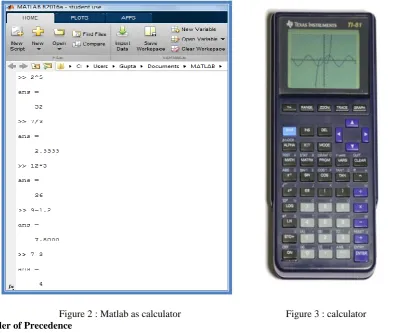
called ans. If you want to perform further calculations with the answer, you can use the variable ans rather than retype the answer.
Figure 2 : Matlab as calculator Figure 3 : calculator
3.2 Order of Precedence
It is essential to note the order in which algebraic expressions are calculated. This is called the order of
operations or the order of precedence. As you probably expect, multiplication and division are calculated before
any addition and subtraction. In general, the arithmetic operators in order of precedence from highest to lowest
level are shown in the following Table 1:
Table 1 : order of precedence
Precedence Operator Name of operator
1 ( ...) Parentheses
2 ^ Exponentiation
3 / Division
4 * Multiplication
5 + Addition
6 - Subtraction
Expressions can be evaluated from left to right using PEMDAS rule i.e. starting with parentheses, then use
power operation (exponentiation) having the highest order of precedence, followed by both multiplication and
division having equal precedence, followed by both addition and subtraction having equal precedence. Fig.4
Figure 4 : influence of parentheses on the arithmetic expressions
3.3 Factoring and Expanding Polynomials
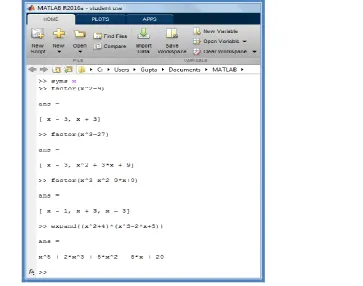
Using Matlab‟s Symbolic Math Toolbox, you can carry out algebraic or symbolic calculations such as factoring
polynomials. To perform symbolic computations, you must define the variable in the expression using the
command “syms x” to define x variable. Fig.5 shows how to factorize and the polynomial expression in Matlab
using the command “factor(expression)”.We can use the “expand(expression)” command to verify the result of
factoring.
3.4 Arrays, Vectors and Matrices
An array is a collection of values that are represented by a single variable name. One-dimensional arrays are
called vectors and two-dimensional arrays are called matrices.
3.4.1 Row and Column Vector
An array of dimension is called a row vector, whereas an array of dimension is called a column
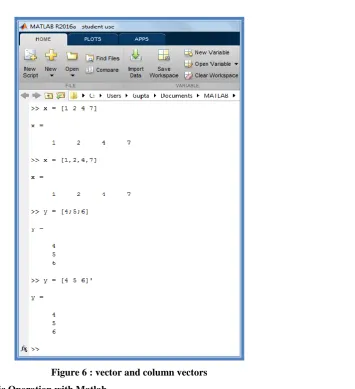
vector. The elements of vectors in Matlab are enclosed by square brackets and are separated by spaces or by
commas. So, a row vector may be defined as or .
Column vectors are created in a similar way, however, semicolon must separate the components of a column
vector. On the other hand, a row vector is converted to a column vector using the transpose operator. The
transpose operation is denoted by an apostrophe or a single quote . So, a column vector may be defined as
or .
Figure 6 : vector and column vectors
3.4.2 Matrix Arithmetic Operation with Matlab
A matrix is an array of numbers. To type a matrix into MAT LAB, you must
separate elements in a row with spaces or commas
use a semicolon to separate rows
end the matrix with another square bracket, ].
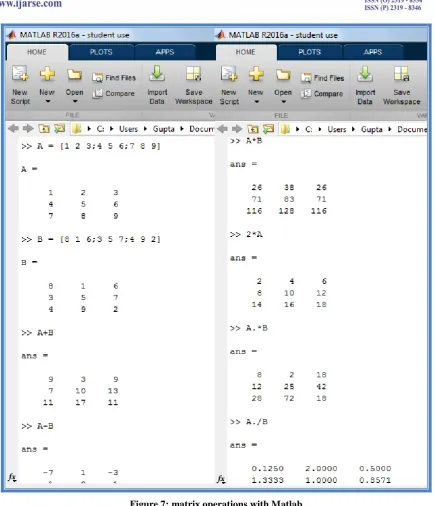
To enter a matrix type, in Matlab.
MATLAB allows arithmetic operations : addition( + ), subtraction( − ), multiplication( ∗ ) and power( ^ ) to be
carried out on matrices. Thus,
A+B or B+A is valid if A and B are of the same size.
A*B is valid if number of columns in A is equal to number of rows in B. A^2 is valid if A is square and equals A*A.
α*A or A*α multiplies each element of A by scalar α.
On the other hand, array arithmetic operations are done element-by-element. For this, the period character is
used which distinguishes the array operations from the matrix operations. However, since the matrix and array
operations are the same for addition (+) and subtraction (−), therefore the operators and are not used.
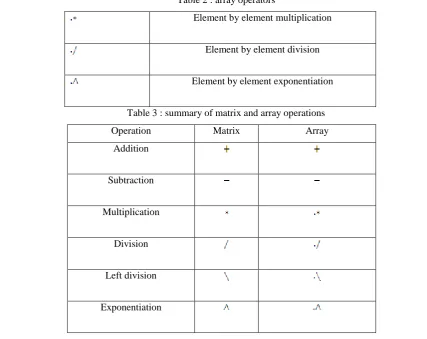
The list of array operators is shown below in Table 2.
Table 2 : array operators
Element by element multiplication
Element by element division
Element by element exponentiation
Table 3 : summary of matrix and array operations
Operation Matrix Array
Figure 7: matrix operations with Matlab
3.5 Solution of Simultaneous Linear Equations
Solving a system of simultaneous linear equations is easy in Matlab. Solving a set of equations on a computer is
nowadays as basic as doing arithmetic additions using a calculator. Let's see how easy Matlab makes this task.
Consider the following set of equations
-6x - 2y + 2z = 15
-3x + 4y - 3z = 13
2x + 4y - 7z = -9
In the matrix form the system of linear equations can be written as
where is the coefficient matrix ,
is the column vector of unknown and is the column vector of
known constants. So, we can solve these linear equations in Matlab with the command (Note that the
symbol is different from the ordinary division sign).we can test the result by performing the command
and Matlab answer will be the column vector as shown in Fig.8 below.
Figure 8 : Solving a system of linear equations
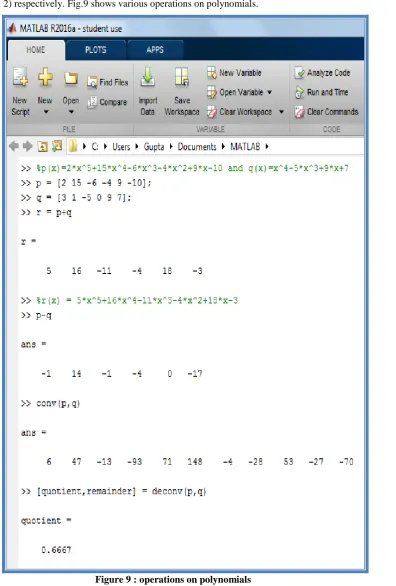
3.6 Operations on Polynomials
In Matlab, a polynomial is represented by an array (row vector) of its coefficients in descending order. For
instance, polynomial is represented by the vector and the polynomial
is represented by the vector .If any coefficient in the polynomial is
missing, then we must enter zeros in the appropriate place(s) in the vector. We can add or subtract two
divide two polynomials by using the command “conv(polynomial 1, polynomial 2) and “deconv(polynomial
1,polynomial 2) respectively. Fig.9 shows various operations on polynomials.
Figure 9 : operations on polynomials 3.7 Solving Polynomial Equations
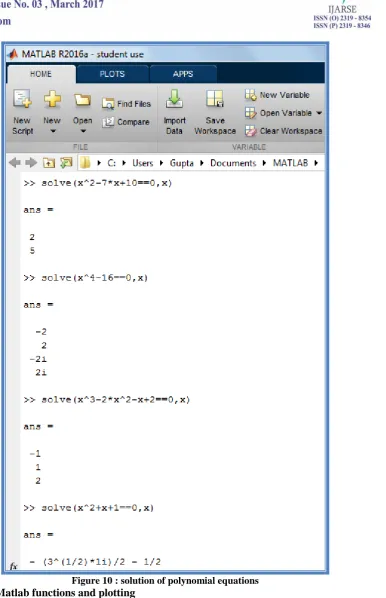
Figure 10 : solution of polynomial equations
3.8
Built-in Matlab functions and plotting
Matlab has the same build - in functions that you see in scientific calculators. A few examples are sin(x), cos(x),
tan(x), log(x), sqrt(x), and exp(x). Matlab also recognizes the inverse trigonometric functions. For instance, the
Figure 11 : Matlab build – in functions
Figure 12 : Plotting functions
IV. CONCLUSION
In this paper, we study how to use computer technology in education. Especially, how to understand basic
mathematics using Matlab software through eight selected topics. In our future study, we will judge the
REFERENCES
[1] P. Cretchley, C. Harman, N. Ellerton, G. Fogarty, Computation, exploration, visualisation : Reaction to
Matlab in first-year Mathematics, Delta 99 Proceedings, Australian Symposium on Modern Undergraduate
Mathematics, 1999, 81-86.
[2] P.Cretchley, C.Harman, N.Ellerton, G.Fogarty, MATLAB in early undergraduate mathematics: an
investigation into the effects of scientific software on learning, Mathematics Education Research Journal,
12(3), 2000, 219-233.
[3] P. Galbraith, C. Haines and M. Pemberton, Making the difference, edited by J. M. Truran and K. M. Truran
(Sydney: Mathematics Education Research Group of Australasia Inc.), 1999, 215-222.
[4] P. K. Dunn and C. Harman, Calculus demonstrations using MATLAB, International Journal of
Mathematical Education in Sciences and Technology, 33(4), 2002, 584–596.
[5] S. Kadry, Performance Evaluation of Using Excel to Study Calculus, International Journal of Research &
Reviews in Computer Science; Mar2011, Vol. 2 Issue 2, 2011, 278.
[6] Symbolic Math Toolbox User’s Guide (2006), The MathWorks, Inc. (www.mathworks.com)
[7] C. Moler, numerical computing with matlab ( Natick, MA, Electronic edition, The MathWorks, Inc., 2004)
[8] J. Michael Fitzpatrick & Akos Ledeczi , Computer Programming with Matlab (e-book, Fitzle LLC, Ist
revised pdf edition, 2015)
[9] Laurene V. Fausett, applied numerical analysis using matlab (India, Pearson Education, 2nd edition, 2009)
[10] Steven C. Chapra, applied numerical methods with matlab for engineers and scientists (India, McGraw Hill
Education, 3rd edition, 2012)
[11] Kanti Bhushan Datta, Matrix and Linear Algebra Aided with Matlab (India, PHI, 3rd Revised edition 2016)