PAAS: Demystified
Siddharth Jaiswar
Principal Architect, Syntel’s Cloud Labs Syntel Limited
Building No. 4, Mindspace Thane Belapur Road, Airoli, Navi Mumbai,
Maharashtra, 400708, India
ABSTRACT
In most of the private cloud implementation scenarios we came across IAAS as the sole way of implementing cloud. In IAAS, the concept of very high scalability, reliability, availability and on demand provisioning is limited to hardware/virtual machines. Though implementing IAAS qualifies an organization to call itself as cloud enabled, there needs to be a PAAS that augments the clouds efficiency to maximize the bang for the buck. It would also propel the organization further up in the cloud maturity index. This paper discusses the various options that exist in making these PAAS implementations and the benefits and drawbacks of using these categories of PAAS. This will also help organizations to make an informed choice of PAAS that meets their requirements.
General Terms
PAAS, Ideal PAAS Platform, Custom PAAS, Reference Architecture for Applications in Custom PAAS, COTS implementations of PAAS
Keywords
PAAS, Ideal PAAS Platform, Custom PAAS, Reference Architecture for Applications in Custom PAAS, COTS implementations of PAAS
1.
PAAS DEFINED
There are no consistent definitions of PAAS available. This definition varies from one provider of PAAS platform to the other. However the most comprehensive definition is provided by Wikipedia which says:
Platform as a service (PAAS) is the delivery of a computing platform and solution stack as a service. PAAS offerings facilitate deployment of applications without the cost and complexity of buying and managing the underlying hardware and software and provisioning hosting capabilities, providing all of the facilities required to support the complete life cycle of building and delivering web applications and services entirely available from the Internet.
PAAS offerings may include facilities for application design, application development, testing, deployment and hosting as well as application services such as team collaboration, web service integration and marshalling, database integration, security, scalability, storage, persistence, state management, application versioning, application instrumentation and developer community facilitation. These services may be provisioned as an integrated solution over the web.
In simple terms PAAS provides a runtime environment for Cloud applications the second statement in the definition where, it refers to the non-necessity of buying software and hardware and all services being available from internet is more from a public cloud perspective. In the context of private cloud, one would still need to buy hardware and
software to build the private cloud infrastructure, but PAAS will help manage and utilize it in a manner that meets cloud standards. In the next section we shall discuss cloud standards, which any PAAS platform has to implement. Also in private cloud scenario these services might be available through intranet or other means.
After looking at PAAS platforms available today it looks like most of the true PAAS platforms are around providing a runtime environment for applications developed for Cloud. However some PAAS providers target the development environment and provide the whole solution stack that can be used to build, test, deploy and manage code in the cloud. Those providing development and testing services look more like SAAS where they are offering their development or testing tools on the cloud. This is still a topic of debate but in this whitepaper we shall consider the PAAS as a runtime environment for Cloud applications while we discuss the requirements and architecture of a PAAS platform.
2.
REQUIREMENTS OF A PAAS
PLATFORM
As discussed earlier, the main objective of PAAS is to improve the efficiency of the cloud so that cost benefits obtained by implementing a cloud are maximized. Keeping this objective in mind following are the requirements of an ideal PAAS platform:
High Scalability and On Demand Provisioning
IAAS provides scaling and on demand provisioning of hardware. In terms of cloud this scaling can theoretically be till the last hardware resource is available in cloud. Similar to this PAAS is expected to scale applications across the hardware and the extent of scaling should be till the last hardware resource is available for deployment. This type of scaling gives the users of PAAS a feeling of infinite scalability. Also the application provisioning should be on demand not requiring any IT intervention thus automating the task of application deployment and delivery.
High Availability
High Reliability
Reliability is most of the times used interchangeably with availability. Though the motive of both of them is to provide fail-over, there is a very fine line that distinguishes one from the other. Let me try to explain the difference by giving an example. Let’s take the example of a business service that calculates federal and state taxes applicable to an individual. Let’s say it is deployed in a cloud which provides only availability. In this scenario whenever there is a request for tax calculation the cloud will ensure that some service is always up and running that will receive this request. But after receiving the request let’s say due to other processes running of the same computing environment the service takes a long time to respond and the request times out. The initiator of the request would see an error page. Now had the cloud been reliable it would sense that this service is not responding in the specified time and would have tried to execute it in another computing environment and would have definitely provided the user a response and not an error. PAAS platforms should provide this reliability for all services/components deployed and running under them.
Optimal Usage
One of the requirements of any Cloud computing platform is optimal usage of resources. In the case of PAAS the optimization is specifically with respect to resources being utilized for application execution. To apply optimization of resources the PAAS platform should have components that monitor the application execution and usage. One more purpose of monitoring is to provide chargeback to the users. The second reason might/might not be required in all scenarios but the former one is definitely required.
Let us see how this requirement differs from its applicability to a traditional deployment. In traditional deployments applications are load balanced using traditional hardware and software load balancers that monitor a few application servers and distribute the load using various load balancing strategies like round robin, least recently used etc. In the PAAS context since PAAS is the runtime for the individual services of an application, load balancing should be more granular. Here PAAS should monitor each service/component within the application based on different parameters for e.g. number of requests being serviced, CPU usage of the VM running the machine etc. and then decide on the best candidate to service the incoming request. PAAS is spread across the cloud hence this load balancing should not be limited to a few machines but the entire cloud where the PAAS exists. The other scenario where PAAS can provide optimization and has distinction from a traditional deployment is that of a service orchestration. Wherever services are being executed in a workflow/process based manner, PAAS should keep track of the current state of the workflow/process and ensure that work completed during execution of a process is not wasted if the process fails rather than starting the process all over. This would salvage the computing lost due to failure and thus improve the efficiency of the cloud.
Auto- Scaling
The on-demand scenario could be based on a user request or in response to an increased load. In the latter scenario the cloud because of its elastic nature expands
and adds more resources to meet the increased demand. This requires the PAAS to auto scale the applications in the newly added computing resources.
Admin /Management Console & Reports
PAAS platforms should include some form of a user interface through which all application components/services can be tracked/monitored. In case of Private cloud this UI may be integrated with the IAAS monitoring/tracking tool. Also this UI should have a provision for requesting for additional deployments of applications/services along with access control for the same. PAAS platforms should also have reporting capabilities to provide statistics related to application usage, execution and provisioning. If Reporting capabilities are not present in the form of UI then at least there should be APIs or web service interfaces that users of PAAS can use to build their own reports out of PAAS.
Multi OS and Multi Language Support
An organization might have different OS and applications written using different languages. PAAS platforms should provide runtimes which can run on multiple OS (Windows, Linux etc.) and should be able to run applications created in different languages (Java, .Net, C++ etc).
3.
PAAS- BARE BONES
The requirements discussed in the section above comprises of both required and nice to have features. Out of the required features, organizations can choose to do a partial implementation of these features to meet their requirements of PAAS. This is because each organization might have varying requirements w.r.t scaling, availability, reliability etc. Let’s see what could form the bare bones of a home grown PAAS platform, by revisiting each of the requirements mentioned above and trying to figure out which of these would have to be mandatorily implemented and to what extent:
High Scalability and on Demand Provisioning: This is one of the basic requirements of PAAS and has to be implemented. However the scope of scalability could be adjusted per application to cover certain percentage of the cloud. Provisioning of applications has to be on-demand and without human intervention. Without implementing these two requirements implementing PAAS would become futile.
High Availability: This requirement is also important but depending on the implementing organization’s needs one could go for finite points of failure. This means the custom PAAS components that provide availability are finite and if all of them fail, there is a possibility of failure to accept request.
High Reliability: Similar to the availability requirement this too can have finite points of failure rather than infinite controllers providing infinite (scope entire cloud) reliability.
Optimal Usage: This implementation could be confined to load balancing. Only thing to be kept in mind is that to give the cloud advantage it has to be granular and should load balance individual services rather than the runtimes that these services run on.
Rest of the requirements may or may not be implemented in a custom PAAS and would depend on the specific needs of the implementing organization.
4.
REFERENCE ARCHITECTURE FOR
[image:3.595.80.530.101.350.2]APPLICATIONS IN CUSTOM PAAS
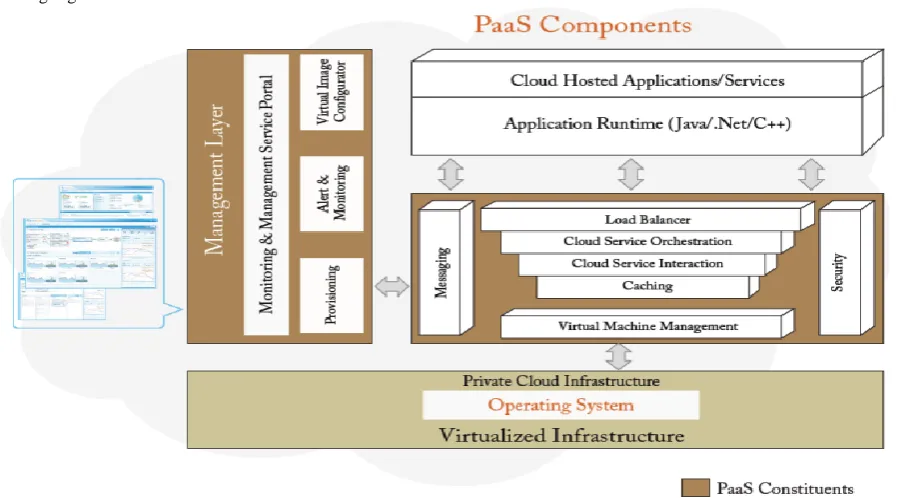
Figure 1: Logical reference architecture for a custom PAAS solution
The above diagram depicts a typical logical reference architecture for a custom PAAS solution. The components/constituents of a PAAS platform depicted above represent the implementation of the minimal requirements discussed in the previous section. There are two major groups of components/services that form the building blocks of a minimalistic custom PAAS. These are the Communication layer and Management layer. The Communication layer is responsible for meeting the availability, reliability and optimization requirements of the applications running on cloud. The Management layer comprises of components/services that provide provisioning and management capabilities, thereby catering to scalability, on-demand and reporting requirements of the custom PAAS. The scale of deployment of these components across the cloud can decide the extent of failover provided by this architecture. This means if these components are finite in number, one will get finite scalability, reliability, availability etc. Let’s have a closer look at the each of these layers in the custom PAAS Platform:
4.1
Communication Layer
As the name suggests, it consists of components/services that manage communication between the requests coming from the outer world to the business services/components deployed in the cloud runtime. These components/services ensure the fail-safety of the applications and optimize the execution of these applications initiated through these requests. The following are the key components of this layer:
Load Balancer: This component keeps track of all application services and number of request being serviced by each of them.. This component handles availability, reliability and optimal usage aspect of the services. Some of the key features to be implemented are:
An http/https listener that can handle any http/https request entering the cloud.
Configurable rules to specify rules related to routing of web requests to application service instances. For e.g. a rule which says route the request to a service that has least CPU utilization.
Synchronization between various instances of load balancers across the cloud to ensure non duplication of execution and availability through redundancy of instances.
A registry of currently running services and log/trace of each execution.
A way of registering services with the load balancer to ensure availability and reliability of individual services.
Cloud Service interaction: Services deployed in the cloud do not have a permanent address as they might move from one VM to another. This calls for a component in PAAS that knows at a given point of time where all these service instances are running.. Cloud Service interaction component ensures the interaction with these services do not fail thereby guaranteeing availability. The Load balancer discussed above always interrogates the Cloud Service interaction component to get a list of addresses of services deployed in the cloud. Following are the key features to be implemented for this component:
A reliable central registry of services and their endpoints/addresses.
A poller that ensures the validity of each address. A configurable pool of services with settings for
threshold.
A service creator that creates services on increase in demand keeping threshold in check.
Cloud Service Orchestration: One of the application service usage scenarios is where multiple services have to be invoked to complete a business process. As discussed in the section on requirements of PAAS, optimal usage of resources is one of the key requirements. Hence the cloud service orchestration ensures that during the execution of a process work completed after each execution is conserved and reused later when the process has to be restarted in the event of failure. Here are the key features required to be implemented to build this component:
Temporary cloud storage to store intermediate state of a business process.
A way to define a workflow/process.
A pool of choreographers with ability to take over each other’s responsibility in the event of failure.
Caching: This simply put is a common cache for the entire cloud. The only difference from a traditional cache is that it may not reside on a single virtual machine and could be redundant to ensure maximum reliability of the cache. The key features for its implementation are:
Ability to cache objects in multiple locations Ability to update all cache locations
Ability to configure number of cache locations.
Use reliable messaging to synchronize cache across the cloud.
Messaging: This similar to the cache is a reliable messaging component. It is able to operate from multiple virtual machines. This ensures there is no single point of failure and services can easily communicate with each other even if one of these VMs fail. Here are the key features that need to be kept in mind when implementing this component:
Redundant Queues and Queue manager with synchronization between all of them to eliminate duplicate consumption of queues without compromising on reliability.
Ability to broadcast messages across the cloud.
Virtual Machine Management: This component forms the mediation between the underlying virtualization solution and the application services. An example scenario of usage of this component is the load balancer could use it to query a virtual machine for its CPU utilization. Following are the key features to be implemented for this component:
Ability to interface with multiple (at least a couple) virtualization engines.
Security: Depending on the security policy of the organization this could be a federation service that talks to an on premise identity service or could be an identity service on its own exclusively for the cloud. Following are the key features to be implemented for this component:
A federation engine that creates security token based on identity service interaction.
A cloud storage to store identity information in case of identity service inside cloud.
A UI to create identities in case of identity service inside cloud.
4.2
Management Layer
This layer provides monitoring and management capabilities to the PAAS. Most of the components here have an overlap with IAAS implemented for the cloud.
Provisioning: This component provisions application services based on on-demand request made through the portal. This provisioning engine may be coupled with the VM provisioning engine so that an integrated provisioning component can be created. The key features for its implementation are:
Ability to deploy application services on provisioned VMs.
Use a cloud store to get application images to be deployed on VMs.
Alert and Monitoring: This component specifically monitors the execution of the application services and alerts the stakeholders if there are failures. This again can be part of the organizational monitoring tool for the cloud. Following are the key features to be implemented for this component:
Ability to send e-mail alerts and online messages to dashboard in event of failure of application services.
Monitor health (CPU Usage, inactivity etc.) of individual services through well-defined interfaces.
Monitor process execution and provide ways to intervene in the execution of the process.
Image Configuration: This should ideally be part of the IAAS where once can define standard virtual machine images for the cloud. However in the pure IAAS implementation these images would have no correspondence to application services. The key features for its implementation are:
A reliable cloud store that allows storage of application images as blobs.
Provision to create new images and map them to VM profiles.
Management and Monitoring Service Portal: This consists of a dashboard for monitoring application services and UI to provision new services. Following are the key features to be implemented for this component:
Simple intuitive user interface with different menus and screens for different roles.
Application provisioning request screen.
Application event and health check screens for admin. Reporting capabilities related to execution of application
services in cloud.
5.
COTS IMPLEMENTATIONS OF
PAAS
With Cloud adoption gaining momentum a lot of PAAS providers have come up in the recent past. Some of these providers are big players like Google, Microsoft, Salesforce and VMware and there are some small ones like Gridgain, Appistry etc. Some of these platforms are closed offerings where these PAAS platforms are only available on the providers datacenters like for example Microsoft Azure. Some of these are available to be deployed in one’s private cloud infrastructure or any other infrastructure. Most of the PAAS vendors today concentrate mainly on providing deployment and application provisioning services. Let’s have a look at some of these providers:
Windows Azure: It is a cloud services operating system that serves as the development, service hosting and service management environment for the Windows Azure Platform. These are some of the important features of this platform:
Provides on-demand compute and storage to host, scale, and manages Web applications on the Internet through Microsoft® data centers.
Supports applications developed using .Net, Java etc. Supports popular standards and protocols including
SOAP, REST, XML, and PHP.
Provides Windows Azure Table storage, which is a non-relational scalable data storage alternative for applications hosted in Azure.
Provides SQL Azure which is the scale out version of SQL Server for people who prefer to use RDBMS for data storage with the limitation of data size not exceeding 50 GB.
Currently the Windows® Azure platform is only available in Microsoft Data Centers as part of their public cloud offering. Also applications deployed in Azure become locked into the platform making their porting to any other platform difficult.
Google App Engine: Google App Engine makes it easy to build an application that runs reliably, even under heavy load and with large amounts of data. App Engine includes the following features:
Dynamic web serving, with full support for common web technologies
Persistent storage with queries, sorting and transactions Automatic scaling and load balancing
APIs for authenticating users and sending email using Google Accounts
A fully featured local development environment that simulates Google App Engine on your computer
Task queues for performing work outside of the scope of a web request
Scheduled tasks for triggering events at specified times and regular intervals
Applications deployed in Google App Engine run in a secure sandbox environment that provides limited access to the underlying operating system. Just like Azure the Google App Engine is available only through Google data centers. There are also portability concerns relating to moving away from
App engine because of the various proprietary/closed APIs of app engine, especially the datastore.
Force.com: It is a cloud computing platform as a service system from Salesforce.com that developers use to build multi-tenant applications hosted on their servers as a service. This is the platform on which the Salesforce.com CRM SAAS application runs. The same platform has been extended for use to other cloud application. Developers do not provision CPU time, disk, or instances of running operating systems. Instead, Force.com provides a custom application platform centered on the relational database. Listed are some important features of Force.com:
Provides users a cloud-based environment for the rapid development of Web applications and sites.
Provides Apex and VisualForce languages for implementation of applications business logic and user interface respectively.
Provides SOQL for querying the relational database. Prebuilt application services which can be directly
included into the application.
Like the earlier two PAAS platforms discussed above this one is also a closed platform and not portable easily
Cloud Foundry: It is an open source PAAS offering from VMware allowing easy deployment of cloud applications using Spring for Java developers, Rails and Sinatra for Ruby developers, Node.js and other JVM frameworks including Grails. The following are features of Cloud Foundry:
It includes a self-service application execution engine, an automation engine for application deployment and lifecycle management,
It includes a scriptable command line interface (CLI), Provides integration with development tools to ease
development and deployment processes
Provides an open architecture for quick development framework integration, application services interface and cloud provider interface.
No vendor lock in allowing for deployment on any cloud (both public and private).
Provides a micro cloud version deployable on single desktop/laptop for development.
Appistry: It comprises of three products: Appistry Cloud IQ Engine, Appistry Cloud IQ Manager and Appistry Cloud IQ Storage. Together these three product bring together the capabilities of PAAS. Some of the salient features of this platform are:
Ability to scale application across the cloud synchronizing versions throughout without any downtime using the Appistry Cloud IQ Manager.
High reliability and availability of applications guaranteed by Appistry Cloud IQ Engine.
Reliability and availability of file system on the cloud by using the Appistry Cloud IQ Storage product.
Supports Java and .Net based applications.
Provides proprietary APIs for service interactions but also provides means to avoid vendor lock in using Spring framework.
It currently does not support any web protocol for deployment of web services directly inside its cloud fabric.
6.
CONCLUSION
PAAS can have varying implementations. There are many implementations available and one has to carefully inspect the target deployment (public or private), and the specific organizational needs to decide on the PAAS platform. In simple scenarios a custom PAAS implementation would be suitable and in more complex scenarios a COTS product would be better. The common requirement to be fulfilled by all PAAS platform is to provide a runtime that is more available, reliable, scalable and optimized as compared to a traditional application runtime environment. Also the concept of a cloud runtime for applications is the primary or key requirement and all other things are secondary. Any PAAS that does not offer this is not a true PAAS.
7.
ACKNOWLEDGMENTS
Riaz Kapadia, Director – Client Solutions : For his insights and reviews on the overall journey and considerations within each phase of the Cloud Maturity Model.
Yusuf Rangwala- Principal Architect (Syntel Cloud Labs)-For his reviews and inputs related to Azure PaaS
8.
REFERENCES
[1] http://en.wikipedia.org/wiki/Platform_as_a_service
[2] http://www.forceprepare.com/forcedotcom.html
[3] http://en.wikipedia.org/wiki/Google_App_Engine
[4] http://www.springsource.com/products/cloud
[5] http://www.neovise.com/paas-providers