© 2016, IRJET | Impact Factor value: 4.45 | ISO 9001:2008 Certified Journal
| Page 1735
Analysis of Various I/O Methods for Large Datasets in C++
Kushaagra Moghe
1and Hemang Sarkar
21,2
Mathematics and Computing Engineering, Delhi Technological University, New Delhi, 110042, India
---***---Abstract -
As the size of a dataset increases, the selection ofsuitable input and output methods for reading and writing the data becomes more and more important. This is mainly on account of the variations in the speeds at which different I/O methods function in C++. The Operating System and the processor of the machine substantially affect these speeds too. In this paper, the variations due to the OS (Windows or Linux) and the size and type (numbers or characters) of the dataset are analysed. The analysis is done on very large random text files generated by using a PRNG (pseudo random number generator). When dealing with huge datasets, time becomes an important constraint and so using the results of this analysis, a suitable input/output method can be selected depending on the type of the file (numeric or character), the operating system of the machine and the size of the data set.
Key Words: ASCII, CLOCKS_PER_SEC, freopen, PRNG, stdin, stdout
1.
INTRODUCTION
C++ is a cross-platform object oriented programming language and has ubiquitous uses in a lot of facets of the modern tech world. Reading from a file and writing to a file are one of the most used features in any programming language, thus minimising the time taken in these two is of immense importance.
2. I/O IN C++
Due to its backward compatibility with C, we can use the various cstdio functions for reading and writing in C++ too. In the experiments performed, we compare the speeds of the functions in cstdio and the iostream objects in C++. We also incorporate custom Fast I/O functions in the analysis.
2.1 Input methods
The standard input stream is the default pre-connected communication channel for data. This input stream is known as stdin and by default is directed from the keyboard. In our experiments, we redirect stdin using the freopen function to access the data files within the system.
In this paper, we compare the speeds of the various input methods for reading numbers and characters from a file.
2.2 Output methods
The standard output stream is the default communication channel for rendering output from the computer program. This output stream also known as stdout directs the data to the text console. We use freopen to redirect this data stream to write directly to data files.
In this paper, we compare the speeds of the various output methods for writing numbers and characters to a file.
2.3 Fast Input/Output methods
1. Fast cin and cout- By default iostream objects and cstdio streams are synchronized and this makes cin and cout comparatively slower than scanf and printf. To resolve this we toggle this synchronization off using:
This considerably improves the speed performance of cin and cout.
© 2016, IRJET | Impact Factor value: 4.45 | ISO 9001:2008 Certified Journal
| Page 1736
The corresponding function for printing numbers is:We have an option of using getchar_unlocked which is faster than scanf and getchar but is deprecated in Windows. It is a thread unsafe version of getchar and there is no input stream lock check in this.
3. EXPERIMENT
We perform the experiment on two different machines with the following specifications:
1. Intel i5-3230M CPU @ 2.60 GHz with 8.00 GB RAM and x64 based processor running Windows 10 Professional edition.
2. Intel i5-4210U CPU @ 1.70 GHz X4 with 4.00 GB RAM and x64 based processor running Ubuntu 16.04 LTS.
3. Compiler used- GNU GCC following the C++11 ISO C++ standard on Code Blocks IDE version 16.01.
3.1 Random Datasets
We use rand( ) function defined in the header <cstdlib> which is a PRNG (pseudo random number generator). We write the text generated to .txt files. The rand( ) function needs to be seeded in order to produce better results. This is done as:
The time( ) function is defined in the header <ctime> which returns the current calendar time and this current time is used as a seed to the rand( ) function.
For writing to text files, we use the freopen( ) function as:
For reading from text files, we use the freopen( ) function as:
The freopen function with mode “w” (for writing) redirects whatever we print to the file specified as the first argument instead of the text console.
Similarly, if we specify the second argument as “r” (for reading), stdin is redirected to take data from the file specified as the first argument instead of the keyboard.
For the numeric text files, we generate random numbers between 0 and 1018 digit by digit and store them in an appropriate sized array. For the character text files we generate random characters whose ASCII values lie between 32 and 122.
3.2 Time measurement
To accurately measure the time taken to only read or write (and not include the time taken to open the file and other parts of the code), we use:
clock_t is a clock type which represents clock ticks of the processor. The clock( ) function returns the approximate processor time used by the process. We make two calls to this function- once before we start printing and once after the printing is done. The difference between these values instances gives us the approximate processor time consumed for printing to the file.
CLOCKS_PER_SEC is a constant macro which gives us the number of processor clock ticks per second. We need to divide the processor time consumed by CLOCKS_PER_SEC to get the time taken to execute the for loop (in seconds). The resultant double value thus printed gives us the approximate time duration of the printing process in seconds.
In a similar way, we can find the time taken to read values from a .txt file.
3.3 Results
© 2016, IRJET | Impact Factor value: 4.45 | ISO 9001:2008 Certified Journal
| Page 1737
average. We perform this for each input and output methodin both Windows 10 and Ubuntu 16.04.
We tabulate and graphically present the results below:
3.3.1 Reading Numbers
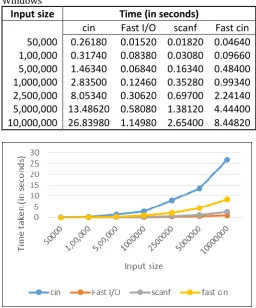
Table -1: Comparison of reading speeds of numbers in Windows
Input size
Time (in seconds)
cin
Fast I/O
scanf
Fast cin
50,000 0.26180
0.01520 0.01820 0.04640
1,00,000 0.31740
0.08380 0.03080 0.09660
5,00,000 1.46340
0.06840 0.16340 0.48400
1,000,000 2.83500
0.12460 0.35280 0.99340
2,500,000 8.05340
0.30620 0.69700 2.24140
5,000,000 13.48620 0.58080 1.38120 4.44400
10,000,000 26.83980 1.14980 2.65400 8.44820
Chart -1: Comparison of reading speeds of numbers in Windows
Table -2: Comparison of reading speeds of numbers in Ubuntu
Input size
Average Time (in seconds)
cin
Fast I/O
scanf
Fast cin
50,000 0.03178 0.00860 0.01298 0.00868
1,00,000 0.05862 0.01516 0.02344 0.01986
5,00,000 0.24178 0.07120 0.10752 0.07958
1,000,000 0.46200 0.13656 0.19674 0.14560
2,500,000 1.09602 0.31594 0.44304 0.32644
5,000,000 2.16820 0.59710 0.85402 0.62276
10,000,000 4.31768 1.18746 1.70668 1.22172
Chart -2: Comparison of reading speeds of numbers in Ubuntu
3.3.2 Printing Numbers
Table -3: Comparison of printing speeds of numbers in Windows
Input size
Time (in seconds)
cout
printf
Fast I/O
Fast cout
50,000 0.0402 0.0158
0.0220
0.0534
1,00,000 0.0812 0.0406
0.0406
0.1092
5,00,000 0.3962 0.1782
0.1826
0.4878
1,000,000 0.7940 0.3728
0.3640
0.9254
2,500,000 1.8974 0.8912
0.9066
2.6892
5,000,000 3.8000 1.7842
1.8094
5.0388
10,000,000 7.5390 3.5684
3.5592
9.8254
[image:3.595.306.561.79.271.2] [image:3.595.34.291.200.509.2] [image:3.595.305.562.378.684.2]© 2016, IRJET | Impact Factor value: 4.45 | ISO 9001:2008 Certified Journal
| Page 1738
Table -4: Comparison of printing speeds of numbers inUbuntu
Input size
Time (in seconds)
cout
printf
Fast I/O Fast cout
50,000 0.00878 0.00838 0.01114
0.01014
1,00,000 0.01658 0.01484 0.02332
0.01710
5,00,000 0.06052 0.05684 0.09102
0.05960
1,000,000 0.11642 0.11220 0.17912
0.11554
2,500,000 0.28018 0.27194 0.43306
0.28312
5,000,000 0.56304 0.53592 0.87418
0.55424
10,000,000 1.13344 1.08044 1.72802
1.13020
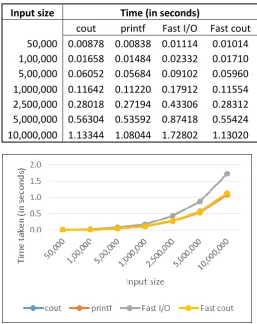
Chart -4: Comparison of printing speeds of numbers in Ubuntu
3.3.3 Reading Characters
Table -5: Comparison of reading speeds of characters in Windows with input size in millions
Input
size
Time (in seconds)
cin
Fast cin
scanf
cin.get getchar
1
0.553
0.363
0.213
0.447
0.010
5
2.698
1.703
0.842
2.245
0.037
10
5.440
3.317
1.570
4.572
0.088
25 13.966
8.223
3.188
11.399
0.232
50 31.330
15.386
6.322
25.218
0.457
75 45.039
22.096
9.515
33.317
0.631
100 62.577
29.921
12.654 47.396
0.940
Chart -5: Comparison of reading speeds of characters in Windows
Table -6: Comparison of reading speeds of characters in Ubuntu with input size in millions
Input size
Time (in seconds)
cin
scanf getchar cin.get Fast cin
1 0.117 0.053
0.014
0.049
0.019
5 0.503 0.207
0.055
0.199
0.085
10 0.977 0.391
0.107
0.382
0.168
25 2.503 0.913
0.235
0.979
0.413
50 4.666 1.824
0.453
1.858
0.812
75 7.144 3.708
0.650
2.838
1.194
100 9.672 5.778
0.868
3.631
1.637
[image:4.595.305.564.80.255.2] [image:4.595.34.292.131.456.2] [image:4.595.304.569.338.687.2]© 2016, IRJET | Impact Factor value: 4.45 | ISO 9001:2008 Certified Journal
| Page 1739
3.3.4 Printing Characters
Table -7: Comparison of printing speeds of characters in Windows with output size in millions
Input size
Time (in seconds)
cout
fast cout
printf
putchar
1
0.294
0.209
0.081
0.034
5
1.355
1.250
0.437
0.184
10
2.911
2.481
0.898
0.384
25
8.082
6.030
2.097
0.915
50 17.179
11.312
4.178
1.810
75 24.263
16.032
6.211
2.824
100 34.057
20.139
8.199
3.584
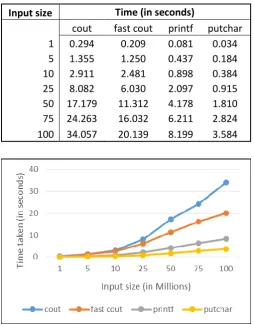
Chart -7: Comparison of printing speeds of characters in Windows
Table -8: Comparison of printing speeds of characters in Ubuntu with output size in millions
Input size
Time (in seconds)
printf
putchar
cout
fast cout
1 0.0378
0.0123
0.0378
0.0335
5 0.0508
0.0502
0.1601
0.1336
10 0.0995
0.0967
0.3234
0.2621
25 0.2445
0.2391
0.7992
0.6460
50 0.4890
0.4936
1.5468
1.3183
75 0.7228
0.7111
2.3009
1.9275
100 0.9642
0.9400
3.0448
2.5274
Chart -8: Comparison of printing speeds of characters in Ubuntu
4. INFERENCE ANALYSIS
From the results we observe that scanf and printf are faster than cin and cout respectively. This is mainly because the iostream I/O functions maintain synchronization with the C I/O functions. This synchronization can be toggled off and that has been done in the case of Fast cin and Fast cout which considerably improves the performance.
We also infer that getchar and putchar are faster than scanf and printf respectively. Due to this, the custom Fast I/O functions which are implemented using getchar and putchar become very fast themselves.
The relationship between the size of data and the time taken to read/write it does not exactly follow a linear relationship. Counterintuitively, the relationship seems to be of exponential type as the size of the data set increases. In general, we observe that Ubuntu has a better I/O speed in C++ than Windows. cin and cout in Ubuntu outperform cin and cout in Windows by a huge margin. Since Ubuntu is more lightweight than Windows, this gives it an edge in terms of speed. Windows tends to have additional codes to support legacy software so that it retains backward compatibility with older versions of itself.
The running time of a program depends on how much of the processor is being currently occupied by other processes. This plays a major role in deciding the speed at which programs execute.
5. CONCLUSIONS
[image:5.595.302.561.57.260.2] [image:5.595.35.290.161.487.2]© 2016, IRJET | Impact Factor value: 4.45 | ISO 9001:2008 Certified Journal
| Page 1740
REFERENCES
[1] Bjarne Stroustrup, The C++ Programming Language, 3rd edition, Addison-Wesley Pearson Education, 2002. [2] Brian Kernighan, Dennis Ritchie, The C Programming
Language, 2nd edition, Pearson Education, 2015.
[3] Standard C++ Library reference:
http://www.cplusplus.com/reference/ Cpp Reference Documentation.