2016 International Conference on Wireless Communication and Network Engineering (WCNE 2016) ISBN: 978-1-60595-403-5
Design and Implementation of the File Auto-forwarding
System Based on Android Platform
Jian LI
*and Chuan-chang LIU
State Key Laboratory of Networking and Switching Technology, Beijing University of Posts and Telecommunications, Beijing 100876, China
*Corresponding author
Keywords: Android, Auto-forwarding, Kernel, Security.
Abstract. With the rapid development and promotion of intelligent devices, smart phones play a more and more important role in all aspects of people's lives. Meanwhile, Android operating system gradually occupies the dominant position of the smart phone market due to its mobility, strong computing power and a variety of communications capabilities. Although the existing smart devices or applications on the smart device provide users with a variety of file transfer methods, the user may also need the system-level automatic file transfer function in some specific situations, for example, the police who carry out latent tasks may need a secret and pre-configured strategy to automatically transfer the evidence files which were photographed by the smart device to other devices in order to obtain the evidence. And these are not available in the existing smart devices. In order to address these problems, this paper designs and implements the file auto-forwarding system based on Android platform. Through the modification of Android kernel, the Android system has the function of auto-forwarding files according to the configuration to meet the needs of specific users.
Introduction
With the rapid development of intelligent devices, smart phones with mobility, powerful computing power, and a variety of communication capabilities provide convenience for all aspects of people's lives. At the same time, more and more developers of mobile application develop excellent applications to make full use of the ability of smart phones to provide personalized services. However, there are some specific groups of people who need supports at the operating system level to facilitate their works. Taking polices as an example, in order to catch criminals and protect people's safety, the police who carry out latent tasks often need to use smart devices to obtain important evidences like record files, which need to be automatically transferred to other devices according to pre-configured policies in case of being discovered by criminals. This requires a smart phone or mobile operating system to provide system-level support to prevent revealed easily. However, the existing smart phone or mobile operating system does not have this feature.
System Architecture
Main Function
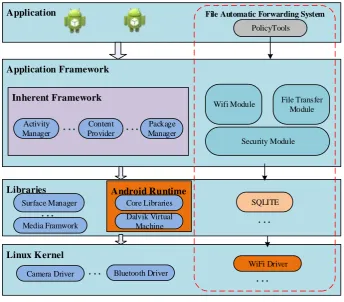
The main function of this system is the automatic file transfer. We designed and implemented a set of such a file auto-forwarding system that a mobile phone tries to establish a WiFi hotspot, open the file receiving mode. The other phone automatically connects to the specified WiFi hotspot and transfer the files in the specified folder. Because this system is designed for specific groups of people, we do a lot of work to ensure the confidentiality and security of file transfers.
Architecture
Application
Application Framework
Libraries
Linux Kernel
Surface Manager
Media Framwork
. . .
Camera Driver . . . Bluetooth Driver
Inherent Framework
Activity Manager
Package Manager Content
Provider
. . . . . .
Android Runtime
Dalvik Virtual Machine Core Libraries
File Automatic Forwarding System
WiFi Driver PolicyTools
SQLITE
Wifi Module File Transfer Module
Security Module
[image:2.595.126.471.214.516.2]. . . . . .
Figure 1. System Architecture.
The system works as follows:
1) The file auto-forwarding system has been compiled and we got two sets of ROM. Respectively,
one is named Android client-side ROM, another is named Android server-side ROM.
2) Android client-side ROM can automatically connect the specified WiFi, automatically open the
file transfer client for file transfer.
3) Android server-side ROM can automatically establish a WiFi hotspot, automatically open the file
transfer server to receive files, and write files to the hidden area of SD card.
4) Users can make some settings by using PolicyTools.
5) Users can use the PolicyTools of Android server-side ROM to set the name and password of the
WiFi hotspot which will be established.
6) Users can use the PolicyTools of Android client-side ROM to set the name and password of the
WiFi hotspot which will be connected, the time to start the connection, the directory of files to be transferred.
PolicyTools
start transferring files, the name and password of the WiFi which the phone will connect, and the folder where the files are in which will be transferred on the phone with the client ROM.
WiFi Module
The final implementation of file auto-forwarding system based on Android Platform requires that the phone which receives files can turn on WiFi wireless hotspot automatically. The phone which sends files can automatically scan and connect the specific hotspot that meets the conditions, and can automatically complete the data transmission.
In order to better protect the privacy of users, the system requires that when using WiFi module for data forwarding, the system interface has no changes; in other words, the system interface does not display any WiFi connection-related icons. At the same time, in the normal use of WiFi network for a variety of network operations, the system interface shows the WiFi connection icons normally. Therefore, it is necessary to study the Android platform and the technology of system interface control. The developers should master how to control firmware level system interface, design and implement the interface of firmware level system interface. By the means of generating a system interface control interface, we can use the use the SDK to protect user privacy. It means that the developers need to read the source code of WiFi module of the Android kernel and make appropriate changes to meet the above requirements.
File Transfer Module
To implement the data auto-forwarding system, the file transfer module will be ported to the Android kernel, and built with the Android source code together to generate a new ROM. The phone with the server-side ROM will automatically open the file transfer server, and be ready to receive files. The phone with the client-side ROM will automatically connect to server and transfer the files to the phone with the server-side ROM.
Design and Implementation
Android Kernel Layer Development
All of the development will be based on the Android source code. Expand or add new modules to implement the function of the system, and then compile to get a new ROM file. Users do not need to install any external applications, so even if the user's mobile phone will be checked, and the one who checks will not find the phone any different from the normal mobile phone.
Implementation of Policy Tools
The user can preconfigure the system by the user pre-configured module. Two Android ROM have both modified the Calculator application which is built with Android system. When users open the Calculator application and type "6÷0", the file transfer server-side will pop up settings wizard, where you can set the name and password of WiFi hotspot. After you click "OK" button, the phone will automatically establishes the specific WiFi hotspot. The file transfer client-side will pop up settings wizard, where you can set when to start to transfer the file, the name and password of the WiFi hotspot which you want to connect, and the folder where the file is in. After you click "OK" button, the file transfer client will automatically start to transfer the files of the folder which you chose at the specified time you set.
Extend the WiFi Module of Android
expansion of the original WiFi module of the Android kernel. This technology is one of the means of protecting user privacy.
By reading the Android WiFi connection-related source code, we made some changes of the WiFi connection module. And we do that like this before the file sender connects the specified WiFi, the sender will send a special broadcast which the underlying WiFi connection module has been registered. If the WiFi connection module receives the broadcast, the connection icons will not be displayed. In this way, the phone looks as normal even if the phone has connected to the WiFi successfully.
Add the File Transfer Module to the Android Kernel
We finally decided to use FTP protocol as the file transfer protocol. A mobile phone can automatically open the FTP server, waiting to receive files. Another phone can automatically open the FTP client, connect to the FTP server and transfer the specified files according to the configuration. The file transfer module will be ported to the Android kernel, and built with the Android source code together to generate a new ROM.
Coordination
On the other hand, we use BroadcastReceiver to coordinate the work between components. We defined some broadcast implementations, such as com. bupt. ftpServer.start which is used to start the FTP server in the server-side ROM and make the server ready to receive the files. Through BroadcastReceiver, we can divide the system into several components, and we use BroadcastReceiver to coordinate the work between the various components, so that the whole system would work orderly.
Implementation of Hidden Area
At the same time, we also implemented a set of write and read module of hidden area in SD card using C language. We designed a custom directory structure of hidden area, and implemented a special program that can write files to the hidden area. We also implement a special program install by PC to read out the files. Because we write files by bytes and directly write to block of the SD card. The files or directory will not show on the phone or PC. It is very difficult to find there is such a special hidden area. When the file transfer server-side receives the files, it will call the write program to write files to the hidden area.
Encryption
The transferred file will be encrypted.
Data Self-destroy
Usage Scenarios
PolicyTools
Pre-configure
Transfer files File Transfer
Module WiFi Module
PolicyTools
Pre-configure
File Transfer Module WiFi Module
[image:5.595.84.494.76.273.2]Server-side Android ROM Client-side Android ROM
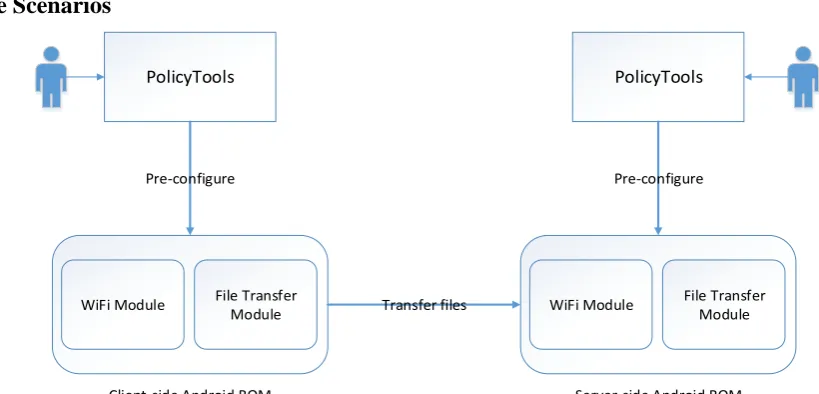
Figure 2. User Scenario.
The typical usage scenarios of the system can be described as follows:
1) The first police who carries out latent tasks uses the phone with client-side ROM obtaining
evidence which will be stored as files.
2) The second police using the phone with server-side ROM sets the name and password of the WiFi
hotspot which will be established and the phone is ready to receive files.
3) The first police using the phone sets the name and password of the WiFi hotspot which will be
connected, the timer when to start to transfer files and the directory of files to be transferred.
4) At a certain time, the first police meets with the second police. The timer starts, the phone of the
first police will transfer the files of evidence to the phone of the second police. The second police’s phone receives the files, and then encrypting and writing the files to the hidden area.
5) A complete usage scenario of the system ends.
Summary
In this paper, we described how we designed and implemented the file auto-forwarding system based on Android platform. The main user of the system is the journalists or human rights workers who work in the war zones. In order to protect them, during the design and implement of the system, we take a lot if factors into account. So, we chose to directly modify the source code of Android and took various means to make the process of file transfer could not be found by others which would improve the concealment and security of the system. After continued efforts, we implemented the system successfully and the system could be used in the actual environment.
References
[1] Stubblefield A, Ioannidis J, Rubin A D, A key recovery attack on the 802.11 b wired equivalent privacy protocol (WEP), ACM transactions on information and system security (TISSEC), 2004, 7(2): 319-332.
[2] Tews E, Weinmann R P, Pyshkin A, Breaking 104 bit WEP in less than 60 seconds, Springer-Verlag, 2007.
[3] Alliance W F. Wi-Fi Protected Access: Strong, standards-based, interoperable security for today’s Wi-Fi networks. Retrieved March. 2003, 1(2004): 23-29.
[4] Karim Yagbmour, Embedded Android, 2013.