www.ijraset.com Vol. 2 Issue VII, July 2014
ISSN: 2321-9653
I N T E R N A T I O N A L J O U R N A L F O R RE S E A R C H I N A P PL I E D SC I E N C E
AN D E N G I N E E R I N G T E C H N O L O G Y (I J R A S E T)
Querying on GPS Data Using MySQL
Reena Kathuria, Rainu Nandal
University Institute of Engineering and Technology, M .D. University, India
Abstract - This paper focuses on the study of Moving Object Database (MOD) and their location management by tracking their locations and stores these locations in database. In this paper we want to retrieve that location data using a query language. This concept is based on real-world data, stored in spatio-temporal database. And this real-world data is captured by GPS system that may be a hardware or a software system installed in a PC, Laptop or we can use GPS enabled Mobile-Phones for receiving the signal data. Today is the world of GPS and there are many applications based on this. Here the focus is on tracking location of vehicle using GPS and retrieve this information using a query language. This is an emerging field which places lot of contribution in DBMS with the aspects of the real world.
Keyword–Moving Object databases (MOD), GPS, GPS receiver software, Track log file, Query Language SQL, Map Data.
I. INTRODUCTION
With the advances in positioning technologies such as GPS and rapid developments of wireless communication devices, it is now possible to track continuously moving objects such as vehicles, users of wireless devices and goods. A wide range of applications related to moving objects have been developed. For instance, in an intelligent traffic control system, if we store information about locations of vehicles, congestion may be alleviated by diverting some vehicles to alternate routes and taxis may be dispatched quickly to passengers. Like this there are many other applications of MOD.
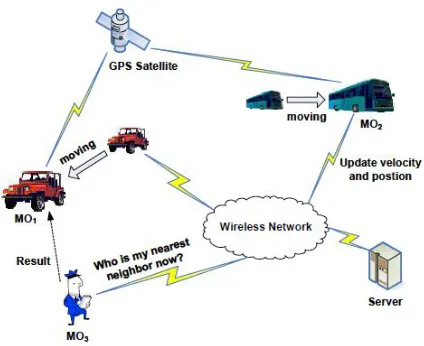
In MOD applications the database are usually generated by the moving objects themselves. Each moving object equipped with GPS, updates its database location using a wireless network. This introduces the communication component. Furthermore there is a trade-off between communication and imprecision in the sense that the higher the communication cost in moving objects database the lower the imprecision and vice versa.[21][19][23]
In this example (Fig. 1) non-static entities like vehicles and pedestrians are abstracted as moving objects. They obtain positioning information with GPS (Global Positioning System) receivers installed (hardware or software), and are able to communicate via wireless network with the server, sending queries to and receiving results from it. The server is
[image:2.612.311.523.415.588.2]responsible for managing moving object information and processing queries from mobile users. By employing the industry standard JDBC for the data access, our server can also support providing services for other application interfaces such as the Web.
Fig. 1 an example of Moving Object Applications
One of the differences between moving objects and static objects is that the locations of moving objects vary over time. In order to represent moving objects in the database, it is inevitable to employ a large volume of updates. And this is crucial issue in the approach of storing locations of moving objects is to maintain up-to date information about the locations of moving objects. In this paper we will present the solution for this problem using the new technology GPS. [1][3]
[image:3.612.35.284.407.637.2]Actually the moving objects can change their location discretely or continuously. [9][14] In this paper we focus on continuously changing objects and real time position of objects. One possibility is that we can store the different positions of moving object at different time i.e by taking snapshots and second is by acquiring the real time position of object. [19] We can store the different location of moving object in database using GPS method. All these locations are store on central server by using GPS hardware or software. In case of hardware there is some internal memory and that stored data in memory card can be retrieved easily by using USB port of our system and in case of GPS software installed in our laptop, or we are using GPS enabled mobile phone, GPS data is stored on server or in some cache provided by that software. GPS provides continuous changing locations and these updated locations of object are stored in database. The user can query the location data using user interface. There are number of user interface for querying like Navicat, a user interface for MySQL(latest version 11.0). But here we are using phpMyAdmin as a user interface in WAMP server. Here is simple representation of moving object:
Fig. 2 Representation of a moving object [21]
When we talk about moving objects two important abstractions are moving point, representing an entity for which only the time dependent position is of interest, and moving region, representing an entity for which also the time dependent shape and extent is relevant. Examples of moving points are cars, trucks, air planes, ships, mobile phone users; examples of moving regions are forest fires, deforestation of the Amazon rain forest, oil spills in the sea, armies, epidemic diseases, hurricanes, and so forth. In this paper we will work on 3-D (2D+time) moving points. [11]
There are two flavors of such databases. The first, which we call the location management perspective, represents information about a set of currently moving objects. Basically one is interested in efficiently maintaining their locations and asking queries about the current and expected near future positions and relationships between objects. The second we call the spatio-temporal data perspective; here the complete histories of movements are represented. We can also query on histories of movement of objects stored by GPS System. We will present this case in our paper. The goal in the design of GPS System for moving objects is to be able to ask any kind of questions about such movements, perform analyses, and derive information, in a way as simple and elegant as possible. Yet such queries must be executed efficiently. [7][24]
A. Storage of Moving Point
In this paper our main focus is on continuously moving objects i.e moving points. A Moving Point (MPoint) is the basic abstraction of a physical object moving around in the plane or a higher-dimensional space, for which only the position, but not the extent, is relevant. It is defined either as a continuous function from time into the 2D plane, or as a poly line in the three-dimensional (2D + time) space. When talking about the motion of humans or animals in space, that movement can easily be modeled and handled as a series of observations of moving points, represented as tuples of t, x and y coordinates. Examples of moving point entities are cars, aircraft, ships, mobile phone users, terrorists, or polar bears. [19]
(a) (b)
Fig. 3 a) Discretely changing point (b) Continuously changing point
In the continuous moving objects, the route of a moving object O is specified by giving the starting address or (x, y) coordinate (start_point), the starting time and the ending address or (x, y) coordinate (end_point).
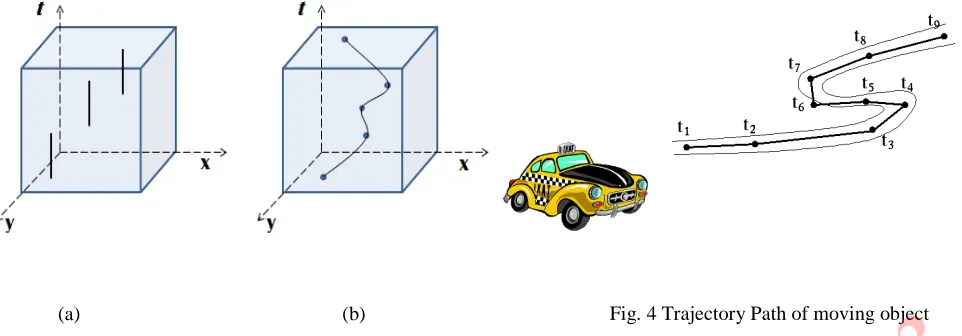
Trajectory/ Route:Trajectory is defined as a series of 3-tuple records consisting of the position (Latitude, Longitude), along with the temporal information (when the moving object was at the location). The stream of points defines a path or trajectory of a moving object over a period of time. [18]
These location-computing techniques allow us to gather successive location updates of an object, which can be either a user or a device, to produce a sequence of locations that collectively form the trajectory for that object. (A trajectory segment for an object moving in 2-D physical space is essentially a line in 3-D space, with time as one of the dimensions.) In the last few years, we have seen a rapid increase in the deployment of location-sensing devices and applications. As a result, we will soon be faced with the task of managing large volumes of trajectory data. For example, if one were to continually collect GPS sensor readings from a fleet of trucks, then in a short amount of time one would have a large volume of trajectory data. Such trajectory data sets can be useful in safety research such as analysis of factors that contribute to accidents.
[image:4.612.37.518.30.198.2]To overcome the problem of storage, the position of object can be represented as a function of time (it changes as the time passes, even without an explicit update).Each coordinate of a trajectory is a linear function of the time variable t, and the trajectory may change speed and direction at finitely many time instants.
Fig. 4 Trajectory Path of moving object
III. GPS: LOCATION TRACKING
Tracking moving objects is one of the most common requirements for many location-based applications. The location of a moving object changes continuously but the database location of the moving object cannot update continuously. The cost of updating data increases with the frequency updating the data. GPS technology is quickly enabling numerous new Location Based Service (LBS) applications, including tracking fleets of vehicles, navigating ships and aeroplanes, and tracking wildlife. Another popular application of this technology is in cellular phones with embedded GPS sensors. [5]
Fig. 5 Architecture of the MOD updating System [12]
A. How GPS Works?
Vehicles equipped with GPS devices transmit their positions to a computer using either radio communication links or cellular phones. At the central site, the data is processed and utilized. They obtain positioning information with GPS (Global Positioning System) receivers installed, and are able to communicate via wireless network with the server, sending queries to and receiving results from it. The server is responsible for managing moving object information and processing queries from mobile users. In case of GPS hardware, signals are received from a satellite system. A signal is transmitted from each satellite in the direction of the
Earth. This signal is encoded with the “Navigation Message,” which can be read by the user’s GPS receivers. We have described how the GPS satellites construct the GPS signals. Actually, the receiver also generates GPS-like signals internally. The receiver knows precisely what the transmitted. GPS signal is supposed to look like at any given time. [27]
GPS tracking devices (tell us “where” we are), come in
different flavours. They will always contain a GPS receiver, and GPS software, along with some way of transmitting the resulting coordinates. GPS phones, for example, use existing mobile phone technology and tend to use radio waves to transmit their location to a tracking centre. The tracking centre can then use that information for co-ordination or alert services. A GPS tracking system, for example, may be placed in a vehicle, on a cell phone, or on special GPS devices, which can either be a fixed or portable unit. GPS works by providing information on exact location. It can also track the movement of a vehicle or person. [6]
A GPS tracking system can work in various ways. From a commercial perspective, GPS devices are generally used to record the position of vehicles as they make their journeys. Some systems will store the data within the GPS tracking system itself (known as passive tracking) and some send the information to a centralized database or system via a modem within the GPS system unit on a regular basis (known as
active tracking) or 2-Way GPS. An active GPS tracking system is also known as a real-time system as this method automatically sends the information on the GPS system to a central tracking portal or system in real-time as it happens. [29]
To fully understand how GPS tracking works, you should have a basic understanding of triangulation. In short, this method requires at least three active satellites but can view as many as twelve simultaneously. On the ground, a GPS tracking device receives signals from the GPS satellites whereby each satellite knows the exact distance from the other satellites in its proximity. Depending on the time it takes for a signal to reach the device from each satellite, the GPS receiver can calculate its exact location on the ground. [25]
Now the question is: how communication between system and user takes place? The communication between the user and the system is established by the three methods via a GSM mobile phone, GPRS, Internet. GSM and GPRS are developed for cellular mobile communication. A GPRS connection with unlimited duration of connectivity is charged only for the data package transfers and adopted in several mobile remote control/access systems. GPRS becomes a cost-effective. First of all GPRS connection has been established, queried data can be relayed to the client via a SQL server. In this system, a reliable bidirectional Point-to-Point Protocol (PPP) link for real-time control via a GSM network is formed. The GPS receiver continuously tracks the vehicle and sends position to the SMS vehicle Position Unit. It will send to the SMS module through cellular operator. [30]
In order to achieve interaction with the Vehicle position tracking system from the outside, the other option is to use the Internet. An Internet Google map is constructed as an interactive interface where commands can be submitted by the client to change and also monitor the status of the Vehicle navigation system.
GPS trajectory of this dataset is represented by a sequence of time-stamped points, each of which contains the information of latitude, longitude, height, speed and heading direction, etc. These trajectories were recorded by different GPS loggers or GPS-phones.
B. GPS Software
There is a number of GPS software that we can use for location tracking. Today is the world of GPS and there is a lot of development in techniques and GPS software. And there are a variety of vehicle tracking devices available to purchase online. Some will only use GPS satellites in order to transmit their location; others can use mobile networks such as GSM/GPRS coverage and then switch to a satellite connection when a mobile network is not available. Fleet management software has a number of functions related to the efficient running and maintenance of a fleet of vehicles. Most fleet management software comes with GPS technology as well, so we can track in real-time the location of our vehicles 24 hours a day, the speed they are travelling, if they're stationary or not etc. The global positioning capacity is also a good anti-theft feature as well.
There are two parts in GPS system: Client GUI and Server GUI. The server GUI displays all moving objects on the map. The client GUI simulates a client end-device used by the users. Some examples of GPS software (for location tracking) used for PC or Laptop are: [42] [43] [44] [45]
Easy GPS
Expert GPS
Imap builder
GPS Babel
Cyber Tracker
RoboGEO
Cyber GPS
Google Map with GPS
Map downloader
GPS Track Maker
If our mobile is GPS enabled then we can use some software or applications in our mobile phone for location tracking. Some examples are given below: [41] [42]
GPS art
Around Me
Track IT
Map Me
SPOTON
C. Track-Log File
When we record tracks, it requires a GPS Receiver with the ability to save our location information. A GPS Receiver is a device which allows you to accurately pinpoint our position, by receiving radio signals from GPS satellites. GPS receivers automatically records data into their memory according to elapsed time or distance moved. These points are called track-points. The device can be forced to record additional data, generally with additional information, at user discretion. These user recorded points are called waypoints. A track file is a list of sequential coordinates that's created as a GPS unit moves along with the vehicle. Each line in the file is a point in 3-D space, containing latitude, longitude, and (usually) time and elevation
Now the thing is how track log is generated? When we turn our GPS unit on, clear out any previous data points, and then ride the trail. As we reach the end of the trail, we can save the track data to a file within the GPS unit, or we can download the active track to our computer. This is the case when we are tracking using GPS hardware in our vehicle. Here is an example of Track Log file generated by Google Map downloader (version 7.60):
1) Example of log file
Project: E:\newtask..gmid.egmd
Now time is: 29-06-2014 20:10:39
[MapsType]
MapsType=1
Left Longitude input= 2.33871459960938
Right Longitude input= 2.340087890625
Top Latitude input= 48.8502581959675
Bottom Latitude input= 48.8493545222104
MinX = 4149
MinY = 2818
MaxX = 4149
MaxY = 2818
Left Longitude download=2.3291015625
Right Longitude download=2.373046875
Bottom Latitude download=48.8357974586773
All images' scope information are saved to E:\newtask..gmid_list.txt
Total count of images would be downloaded: 1
Download threads count: 1
Zoom level: 13
path: E:\
Start downloading...
~~~~~~~~~~~~~~~~~~~~~~~~~~~~~~~~~~
T1:seq=1,gs_4149_2818_13.jpg OK
T1 Finished.
---Task Stopped!
Now time: 29-06-2014 20:10:44
Log file has been saved as E:\newtask.gmid_log.txt
IV. CREATE GOOGLE MAP
There are number of software that is used for map creation by providing parameters (Lat, Long etc.) values to this software. But there is other way for map creation. We can create map manually by using HTML and show the created map in browser. [16][38]
A. Map with Single Marker
<!DOCTYPE html>
<html>
<head>
<style type="text/css">
html { height: 100% }
body { height: 100%; margin: 0; padding: 0 }
#map-canvas { height: 100% }
</style>
<script type="text/javascript"
src="https://maps.googleapis.com/maps/api/js?key=API_KEY
">
</script>
<script type="text/javascript">
function initialize() {
var mapOptions = {
center: new google.maps.LatLng(29.397, 76.644),
zoom: 8 };
var map = new
google.maps.Map(document.getElementById("map-canvas"),
mapOptions);
var marker = new google.maps.Marker({
position: new google.maps.LatLng(29.345,76.012),
map: map
});
}
google.maps.event.addDomListener(window, 'load', initialize);
</script>
</head>
<body>
<div id="map-canvas"/>
</body>
[image:7.612.20.537.137.662.2]</html>
B. Map with Multiple Markers
<!DOCTYPE html>
<html>
<head>
<title>Multiple Markers Google Maps</title>
<script
src="http://ajax.googleapis.com/ajax/libs/jquery/1.9.0/jquery. min.js">
</script>
<script
src="https://maps.googleapis.com/maps/api/js?v=3.11&sensor =false" type="text/javascript">
</script>
<script type="text/javascript">
// check DOM Ready
$(document).ready(function() {
// execute
(function() {
// map options
var options = {
zoom: 5,
center: new google.maps.LatLng(29.909736, 76.522109),
// centered INDIA
mapTypeId: google.maps.MapTypeId.TERRAIN,
mapTypeControl: false
};
// init map
var map = new
google.maps.Map(document.getElementById('map_canvas'), options);
var southWest = new google.maps.LatLng(20.744656, 70.005966);
var northEast = new google.maps.LatLng(29.052234, 82.243685);
var lngSpan = northEast.lng() - southWest.lng(); var latSpan = northEast.lat() - southWest.lat();
// set multiple marker
for (var i = 0; i < 50; i++) {
// init markers
var marker = new google.maps.Marker({
position: new google.maps.LatLng(southWest.lat() + latSpan * Math.random(), southWest.lng() + lngSpan *
Math.random()),
map: map,
title: 'Click Me ' + i
});
// process multiple info windows
(function(marker, i) {
// add click event
google.maps.event.addListener(marker, 'click', function() {
infowindow = new google.maps.InfoWindow( content: 'Hello, World!!'
});
infowindow.open(map, marker);
});
})
(marker, i);
}
});
});
</script>
</head>
<div id="map_canvas" style="width: 800px;
height:500px;"></div>
</body>
</html>
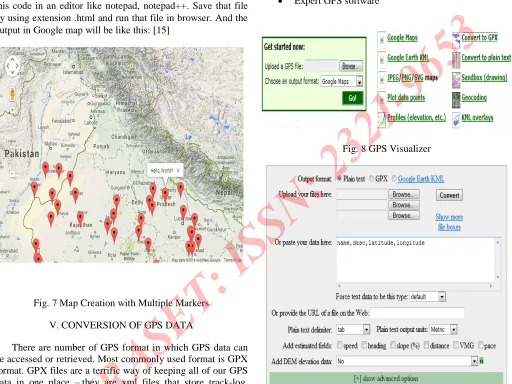
In this example we have created a map centered India and having created multiple markers at different locations. Map type may be TERRAIN, SATELLITE or ROADMAP. Write this code in an editor like notepad, notepad++. Save that file by using extension .html and run that file in browser. And the output in Google map will be like this: [15]
Fig. 7 Map Creation with Multiple Markers
V. CONVERSION OF GPS DATA
There are number of GPS format in which GPS data can be accessed or retrieved. Most commonly used format is GPX format. GPX files are a terrific way of keeping all of our GPS data in one place –they are xml files that store track-log, waypoint & route information in one convenient format. When we download the file, in .gpx format, and open it with our GPS software. Most of the time, our software will open a GPX-format file without a problem. If our GPS unit doesn't use specific data that's contained in the file, it will usually ignore that data. But it may ask you if you want to convert the file. There are some other formats in which GPS data can be stored like: [29] [34]
KML (Keyhole Markup Language ) for Google Earth
SHP for GIS
GPX for GPs receiver
CSV for Excel
Text format
There are number of software and web sites that can convert the GPX version of the track log file. Or we can find a conversion utility. The conversion utility will translate the file from basic GPX to an alternate format. These utilities can be downloaded, free, from multiple sites. Just do a web search for "GPX conversion utility" adding your GPS unit brand's name. Examples of some other software are:
Visualizer website
GPS Babel software
[image:9.612.35.547.173.557.2] Expert GPS software
[image:9.612.294.546.187.564.2]Fig. 8 GPS Visualizer
Fig. 9 GPS Visualizer Conversion Facility
we've been, plan where you're going, or quickly visualize geographic data.
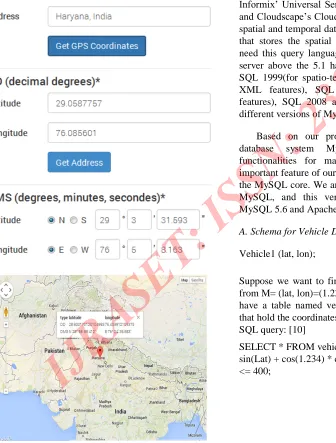
If we have an address value and from this address we want to get GPS coordinates (Longitude, Latitude), there is a tool for GPS coordinate conversion. We can also start to convert the latitude and longitude by clicking on the map, which will pre-fill the fields with the GPS coordinates of the location we clicked on. In any case, the address will not be geocoded automatically. If we want to convert the GPS coordinates into an address, you have to click on the button "Get Address" below the decimal coordinates. For example if we enter the address, Haryana, India here and click on the
“Get GPS Coordinates” button then we get the Latitude and
[image:10.612.56.392.217.660.2]Longitude value and these values are shown in map form.
Fig. 10 Coordinates in Map Form
VI. MYSQL SPATIAL TEMPORAL QUERIES
There are number of database system that can be used for spatial and temporal data. For example Oracle and PostGIS are good for spatial data. But in this paper our main focus is on point data type that stores spatio-temporal information of moving object. Here, in our example point is any vehicle that is moving. And MySQL is good for point data type. Hence we will query using MySQL. [2]
There are many versions of MySQL server and most recent is MySQL5.x. We will use MySQL server for SQL 1999 queries and all the versions above MySQL 5.1, supports SQL 1999 queries. SQL 1999 that is object-oriented in nature and is the foundation for several object-relational database
management system (including Oracle’s ORACLE8, Informix’ Universal Server, IBM’s DB2 Universal Database, and Cloudscape’s Cloudscape, among others). It handles both
spatial and temporal data. Because our main focus is on MOD that stores the spatial and temporal information, hence we need this query language. Most recent versions of MySQL server above the 5.1 handle both spatial and temporal data. SQL 1999(for spatio-temporal support), SQL 2003(used for XML features), SQL 2006(for better storage of XML features), SQL 2008 and SQL 2011, all are supported by different versions of MySQL server and Oracle server. [4]
Based on our proposal, we extend an open source database system MySQL to provide the required functionalities for managing moving objects. The most important feature of our system is that we do not infiltrate into the MySQL core. We are using WAMP server version 2.5 for MySQL, and this version of WAMP support PHP 5.5, MySQL 5.6 and Apache 2.4.
A. Schema for Vehicle Data
Vehicle1 (lat, lon);
Suppose we want to find places within a distance d=400 km from M= (lat, lon)=(1.234, 0.123) in a database. Given that we have a table named vehicle1 with columns ‘Lat’ and ‘Lon’ that hold the coordinates IN RADIANS, then we could use this SQL query: [10]
Now that we have computed the bounding coordinates (latmin, lonmin)=(1.2393, -1.8184) and (latmax, lonmax)=(1.5532,
0.4221), we can use them in an SQL query. In the following, it is assumed that latitude and longitude, both in radians, are stored in two separate columns. [17][13]
There are different ways to combine the filter using the bounding coordinates with the formula for the great circle distance in an SQL statement: [15]
Simply combining the conditions with AND:
SELECT * FROM vehicle1 WHERE
(Lat => 1.2393 AND Lat <= 1.5532) AND (Lon >= -1.8184 AND Lon <=0.4221) AND acos(sin(1.3963) * sin(Lat) + cos(1.3963) * cos(Lat) * cos(Lon - (-0.6981))) <= 0.1570;
Most query optimizers are smart enough to perform an index scan to quickly find places satisfying [10]
(Lat >= 1.2393 AND Lat <= 1.5532) AND (Lon >= -1.8184 AND Lon <= 0.4221)
and evaluate the formula for the great circle distance for each remaining candidate result only.
The pre-filter in the WHERE clause and the more specific formula in a HAVING clause:
SELECT * FROM Places WHERE (Lat >= 1.2393 AND Lat <= 1.5532) AND (Lon >= -1.8184 AND Lon <= 0.4221)
HAVING acos(sin(1.3963) * sin(Lat) + cos(1.3963) * cos(Lat) * cos(Lon - (-0.6981))) <= 0.1570;
The pre-filter in a sub-query:
SELECT * FROM (
SELECT * FROM Places WHERE (Lat >= 1.2393 AND Lat <= 1.5532) AND (Lon >= -1.8184 AND Lon <= 0.4221)) WHERE acos(sin(1.3963) * sin(Lat) + cos(1.3963) * cos(Lat) * cos(Lon - (-0.6981))) <= 0.1570;
VII. INTEGRATING GPS AND MySQL
Global Positioning System (GPS)-enabled mobile phones can be carried by the user whenever and wherever he or she travels, and provide the opportunity for recording an
individual’s transportation behavior for any mode of
collection, which allows for extended deployment of the survey. Real-time data connectivity also introduces new services to the traveler such as highly targeted traffic alerts
based on the user’s real-time location and predicted destination. These services help to reduce traffic congestion while providing the user an incentive to allow their travel
behavior to be monitored. In our case we haven’t used any
GPS hardware. All things will be done using software. Here we are using GPS software installed in our laptop or we can use GPS enabled mobile phones for obtaining information from vehicle. The complete process will be like this: [8] [12] [25] [29]
A. Import GPS Data in MySQL Database
1) Switch on the GPS software on that we have installed in our system or carried laptop at the start of the part of the journey that we want to map. We can also use GPS enabled mobile phones.
2) Clear any track recorded previously i.e stored in cache provided by the software, especially if the previous step recorded many false points.
3) Now obtain the tracking information i.e track log data in .gpx format.
4) convert that .gpx file into .csv (comma separated values) so that we can import this file into MySQL database.
5) Import the .csv file into MySQL database using import option in PHPMySQL Admin (WAMP server).
6) Save the data in MySQL database in tabular form.
B. Export GPS Data to Map
This is the reverse process of the above where data in MySQL database is exported to .csv form.
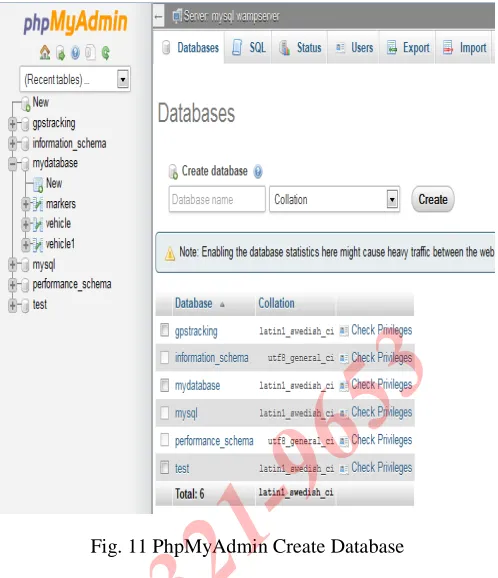
[image:12.612.298.547.24.313.2]1) Build a database in MySQL. We are using here phpMyAdmin for creating database. First of all create database by providing new database information like name and click on create database. We can also create by using MySQL console by giving some commands. We have created here a database by name ‘mydatabase’.
Fig. 11 PhpMyAdmin Create Database
2) Now create the table in the database by clicking on create table. Give the table name and no. of columns and click on
‘Go’. We have created here three tables by name ‘markers’,
‘vehicle’, and ‘vehicle1’.
[image:12.612.296.585.419.637.2]3) Select the table created from left side panel and click on the required table. Now click on Export button above (as shown in fig. 13)
Fig. 13 PhpMyAdmin Table Data
4) After clicking on export button there is ‘Export method and
‘Rows’ option. Choose ‘Dump all rows’.Choose the ‘output’
and ‘Format’ option in which form we want the MySQL data. Here we are exporting to .csv format. Finally click on ‘Go’as shown in fig. 14. Now a dialog box will be opened to save the file in .csv format, just click on ‘Ok’as shown in fig. 15.
Fig. 14 Export Data to .CSV Format
Fig. 15 File in .CSV Format
[image:13.612.34.547.27.630.2]6) To show this exported data in map form, import this file in a mapping software like Google Earth etc.
VIII. SHOWING GPS DATA IN MAP
There are number of mapping software available in market that shows the real-time location of moving object in map. Google-Earth is a similar kind of software in which we can import the GPX file that is obtained from GPS hardware or any software installed in our laptop. There are two ways to import your GPS data into Google Earth: [34]
Import an existing GPS data file
Import data directly from your GPS device (Real-time tracking) [26]
[image:14.612.39.299.340.594.2]Google Earth will show the GPX file imported in map form from where we can get the location information i.e at what time where we were or tracking information of any vehicle. If we have not any GPS device we can create the GPX file manually (not real-time). From the 'Tools' menu in Google Earth software, select GPS. The “GPS Import” window appears.
Fig. 16 Google Earth Import from File
A. Real Time GPS Tracking
If we connect our portable computer to a GPS device (GPS Hardware), we can view GPS information in real time. For example, if we have our GPS device connected to our laptop while we are travelling, we can capture our location
and track our progress in Google Earth. To do this: [31] [33] [28]
1. Connect the GPS device and portable computer and from
the ‘tool’ menu select the GPS import option.
2. In the GPS dialog box, click the 'Realtime'tab.
3. Select the appropriate options:
Select protocol: If we're not sure what to use, choose
“NMEA”.
Track point import limit: The track point import limit option defines the number of positions that are saved and drawn on the screen. A smaller number can result in faster data, but a less accurate depiction of our journey, while a larger number can mean the opposite.
Polling interval (seconds): The polling interval is how often Google Earth collects data from the GPS device.
Automatically follow the path: Check this option to turn on the 3D viewer center and follow the current real-time GPS track. [35]
There are numerous web sites from where we can download the maps required and there are a number of software also that create the map manually. And after that we can convert these created maps in GPX format by using conversion software. There are some ways that can be used for map creation like:
Google-Earth software
Imap builder software
Satellite Map Downloader software
GPS Track Editor software
Google Map website
GPS Visualizer website
Excel table and Fusion table
B. Satellite Map Downloader
The zoom parameter defines the image precision. Select a path to save the project and downloaded images, then click button "Download", OK, start downloading now. When downloading, the log window will display the downloading process. When finished, the log will be saved to a file.
Possible Parameters Values:
1. Left Longitude: -180<value<180, for East, the value is positive, for West, the value is negative.
2. Right Longitude:-180<value<180, for East, the value is positive, for West, the value is negative.
3. Top Latitude: -85<value<85,for North, the value is positive, for South, the value is negative.
4. Bottom Latitude:-85<value<85, for North, the value is positive, for South, the value is negative.
[image:15.612.298.546.29.249.2]5. Zoom: defines the image precision, the max zoom is 19. (For trial version, the max zoom is 13)
[image:15.612.32.278.304.603.2]Fig.17 Google Map Downloader
Fig. 18 Show Parameters in Map form
IX. CONCLUSION
Today is the world of GPS where this technology is used for navigation and tracking the location of moving objects. There are multiple applications of this technology today. Before this technology it was difficult to store the location of continuously moving object because of uncertainty of location of moving object. In that case we can use prediction method but less accuracy was there.
Now with GPS it is feasible to store the location of moving object in database. We can store the historical locations and can retrieve these locations later. There is another option also, store the real-time locations in database and retrieve them at same time.
In this paper our main focus is on moving point not moving region. Moving point here is vehicle whose location information we want to track by using GPS. Location information can be obtained by any software or hardware. Here we are using software installed in PC or Laptop. The location data obtained through software can be converted in any form by using some conversion software. And to view the location of vehicle we can show this data retrieved by GPS software in map form.
REFERENCES
[1] Cotelo Lema, J.A., Forlizzi, L., Güting, R.H., Nardelli, E., and Schneider, M. (2003). Algorithms for Moving Object Databases. The Computer Journal, 46(6), 680-712.
[2] Erwig, M., Güting, R.H., Schneider, M., and
Vazirgiannis, M. (1999). Spatio-Temporal Data Types: An Approach to Modeling and Querying Moving Objects in Databases. GeoInformatica 3, 265-291.
[3] Forlizzi, L., Güting, R.H., Nardelli, E., and Schneider, M. (2000). A Data Model and Data Structuresfor Moving Objects Databases. Proc. ACM SIGMOD Conf. (Dallas, Texas, USA), 319-330.
[4] Güting, R.H., Böhlen, M.H., Erwig, M., Jensen, C.S., Lorentzos, N.A., Schneider, M., and Vazirgiannis, M. (2000). A Foundation for Representing and Querying Moving Objects in Databases.ACM Transactions on Database Systems 25, 1-42.
[5] Wolfson, O., Chamberlain, S., Dao, S., Jiang, L., and Mendez, G. (1998). Cost and Imprecision in Modeling the Position of Moving Objects. Proc. 14th Int. Conf. on Data Engineering (ICDE,Orlando, Florida), 588-596.
[6] Wolfson, O., Sistla, A.P., Chamberlain, S., and Yesha, Y. (1999). Updating and Querying Databases that Track Mobile Units. Distributed and Parallel Databases 7, 257-387.
[7] Wolfson, O., Xu, B., Chamberlain, S., and Jiang, L. (1998). Moving Objects Databases: Issues and Solutions. Proc. 10th Int. Conf. on Scientific and Statistical Database Management (SSDBM, Capri, Italy), 111-122.
[8] A. Civilis, C. S. Jensen, J. Nenortait˙e, and S. Pakalnis. Efficient tracking of moving objects with precision guarantees. In Proc. Int. Conf. on Mobile and Ubiquitous Systems: Networking and Services, pages 164–173, 2004.
[9] R. H. Güting, and M. Schneider, Moving Objects Databases, Elsevier Inc., 2005.
[10]P. Laube, and S. Imfeld, “Analyzing Relative Motion
within Groups of Trackable Moving Point Objects,”
Information Systems, 2002.
[11]M. Erwig and M. Schneider.Spatio-temporal predicates. IEEE Transactions on Knowledge and Data Engineering, 14(4):881.901, 2002.
[12]A. Civilis, C. S. Jensen, J. Nenortaite, and S. Pakalnis. Efficient tracking of moving objects with precision guarantees. DB Technical Report TR-5, 2004.
[13]Cindy Xinmin Chen, “Data Model and Query Languages of Spatio-Temporal Information”,University of California, Los Angeles, 2001
[14]J. Su, H. Xu, and O. Ibarra. Moving objects: Logical relationships and queries. In Proc.I nt. Sym. On Spatial and Tempporal Databases, pages 3–19, 2001.
[15]M. Hadjieleftheriou, G. Kollios, D. Gunopulos, and V. J. Tsotras. On-line discovery of dense areas in spatio-temporal databses. In Proc. SSTD, pages 306–324, 2003.
[16]Y. Li, J. Han, and J. Yang. Clustering moving objects. In Proc. KDD, pages 617–622, 2004.
[17]D. Papadias, Y. Tao, P. Kalnis, and J. Zhang. Indexing spatio-temporal data warehouses. In Proc. ICDE, pages 166–175, 2002.
[18]D. Pfoser and C. S. Jensen. Querying the trajectories of on-line mobile objects. In Proc. ACM Int. Workshop on Data Eng. for wireless and mobile access, pages 66–73, 2001.
[19]Z. Song and N. Roussopoulos.Hashing moving objects. In Proc. MDM, pages 161–172, 2001.
[20]Y. Tao, C. Faloutsos, D. Papadias, and B. Liu. Prediction and indexing of moving objects with unknown motion patterns. In Proc. ACM SIGMOD, pages 611–622, 2004.
[21 ]R.H. Güting, M.H. Böhlen, M. Erwig, C.S. Jensen, N.A. Lorentzos, M. Schneider, and M. Vazirgiannis, A Foun-dation for Representing and Querying Moving Objects. ACM Transactions on Database Systems, 25(1): 1-42, 2000.
[22]J. A. Cotelo Lema, L. Forlizzi, R. H. Güting, E. Nardelli, M. Schneider, Algorithms for Moving Objects Databases, The Computer Journal, 46(6), 2003.
[23]Dieter Pfoser and Christian S. Jensen: Capturing the Uncertainty of Moving-Object Representations. SSD’99 LNCS 1651, pp. 111-131, 1999 (CH-99-2).
[24]Wolfson O., Jiang L., Chamberlain S., and Dao S.,
“Location Management in Moving Object Databases,” in Proceedings of The 2ed International Workshop on Satellite-Based Information Services, Hungary, pp. 422-432, 1997.
[25]M. Schneider, S.-S. Ho, T. Chen, A. Khan, G. Viswanathan, W. Tang, and W. T. Liu, “Moving Objects Database Technology for Ad-Hoc Querying and Satellite
[26]M.H. BoÈhlen and C. Jensen. Seamless Integration of Time into SQL. Dept. of Computer Science, Aalborg University, Technical Report R-96-49, 1996.
[27]I. A. Getting.The Global Positioning System. IEEE Spectrum, 30(12):36–47, 1993.
[28]W. G. Aref, S. E. Hambrusch, and S. Prabhakar. Information management in a ubiquitous global positioning environment. Technical Report 00-006, Department of Computer Sciences, Purdue University, West Lafayette, Indiana, February 2000.
[29]BJ. E.Marca, C. R. Rindt,M. Mcnally, and S. T. Doherty,
“A GPS enhanced in-vehicle extensible data collection
unit,” Inst. Transp.Studies, Univ. California, Irvine, CA,
Uci-Its- As-Wp-00-9, 2000.
[30]M. A. Al-Taee, O. B.Khader, and N. A. Al-Saber,
“Remote monitorig of vehicle diagnostics and location using a smart box with Global Positioning System and
General Packet Radio Service,” in Proc. IEEE/ACS AICCSA May 13–16, 2007, pp. 385–388
[31]Sean J. Barbeau, Miguel A. Labrador, Alfredo Perez, Philip Winters, Nevine Georggi, David Aguilar, Rafael
Perez. “Dynamic Management of Real-Time Location Data on GPS-enabled Mobile Phones,” UBICOMM 2008
– The Second International Conference on Mobile Ubiquitous Computing, Systems, Services, and Technologies, Valencia, Spain, September 29 – October 4, 2008.
[32]R.H. Güting, How to Build Your Own Moving Objects Database System. Keynote at the 8th Intl. Conf. on Mobile Data Management (MDM 2007), Mannheim, Germany, 1-2. Short paper, Slides of the presentation
[33]J. S. Greenfeld. Matching gps observations to locations on a digital map. In Proc. of the 81th Annual Meeting of the Transportation Research Board, 2002.
[34]D. Aguilar, S. Barbeau, M. Labrador, A. Perez, R. Perez,
and P. Winters, “Quantifying the position accuracy of real-time multi-modal transportation behavior data collected using gps-enabled mobile phones,” Transportation Research Record: Journal of the Transportation Research Board, no. 1992, pp. 54–60, October 2007.
[35]A. Leonhardi, C. Nicu, and K. Rothermel, “A map-based dead-reckoning protocol for updating location
information,” in Proceedings of the 16th
IEEE International Parallel and Distributed Processing Symposium, 2000, pp. 193–200
[36]O. Wolfson, A. Sistla, S. Chamberlain, and Y. Yesha,
“Updating and querying databases that track mobile
units,” Distributed and Parallel Databases, vol. 7, no. 3, pp. 257–387, 1999.
[37]Narin Persad-Maharaj, Sean J. Barbeau, Miguel A. Labrador, Philip L. Winters, Rafael Perez, Nevine Labib
Georggi. “Real-time Travel Path Prediction using
GPS-enabled Mobile Phones,” 15th World Congress on
Intelligent Transportation Systems, New York, New York, November 16-20, 2008
[38]Liao L., Patterson, D.J., Fox, D., Kautz, H., Building Personal Maps from GPS Data. IJCAI MOO05, Springer Press(2005), 249-265
[39] Microsoft. Geolife gps trajectories.
http://research.microsoft.com/en-us/downloads/b16d359d-d164-469e-9fd4 daa38f2b2e13/default.aspx.
[40]Aroundme,
http://www.tweakersoft.com/aroundme.html
[41]Global positioning systems,
http://en.wikipedia.org/wiki/gps, 2011. http://local.google.com/ http://www.webmapsolutions.com/ http://www.trackingtheworld.com/ http://www.gpsinsight.com/gps-tracking http://www.defendtech.com/security-surveillance/how-does-gps-tracking-work/
[42]Position Logic Software
http://www.positionlogic.com/
[43]Robogeo Software
http: //www.robogeo.com/
[44]Expert GPS software
http://www.expertgps.com
[45]SQL 2011
http://en.wikipedia.org/wiki/SQL:2011
http://www.gps2003.com/install-gps-navigator-to-laptop-netbook-pc
http://www.laptopgpsworld.com/698-google-maps-gps-software-navigator-laptop.
[47]Mobility Technology. “Traffic Pulse Technology.”, http://www.mobilitytechnologies.com/ntdc/.
http://www.1st-at-gps-tracking.com/
http://www.maps-gps-info.com/fgpfw.html
[48] GPS Coordinate Converter
![Fig. 2 Representation of a moving object [21]](https://thumb-us.123doks.com/thumbv2/123dok_us/8587707.862915/3.612.35.284.407.637/fig-representation-of-a-moving-object.webp)
![Fig. 5 Architecture of the MOD updating System [12]](https://thumb-us.123doks.com/thumbv2/123dok_us/8587707.862915/5.612.33.261.29.187/fig-architecture-mod-updating.webp)