Interlude: Process API
ASIDE:INTERLUDES
Interludes will cover more practical aspects of systems, including a par-ticular focus on operating system APIs and how to use them. If you don’t like practical things, you could skip these interludes. But you should like practical things, because, well, they are generally useful in real life; com-panies, for example, don’t usually hire you for your non-practical skills.
In this interlude, we discuss process creation in UNIXsystems. UNIX
presents one of the most intriguing ways to create a new process with a pair of system calls: fork()andexec(). A third routine,wait(), can be used by a process wishing to wait for a process it has created to complete. We now present these interfaces in more detail, with a few simple examples to motivate us. And thus, our problem:
CRUX: HOWTOCREATEANDCONTROLPROCESSES
What interfaces should the OS present for process creation and con-trol? How should these interfaces be designed to enable ease of use as well as utility?
5.1 The
fork()
System Call
Thefork()system call is used to create a new process [C63].
How-ever, be forewarned: it is certainly the strangest routine you will ever call1. More specifically, you have a running program whose code looks
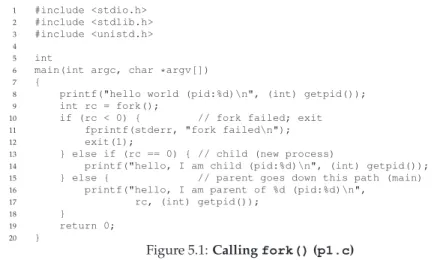
like what you see in Figure 5.1; examine the code, or better yet, type it in and run it yourself!
1Well, OK, we admit that we don’t know that for sure; who knows what routines you call when no one is looking? Butfork()is pretty odd, no matter how unusual your routine-calling patterns are.
1 #include <stdio.h> 2 #include <stdlib.h> 3 #include <unistd.h> 4
5 int
6 main(int argc, char *argv[]) 7 {
8 printf("hello world (pid:%d)\n", (int) getpid()); 9 int rc = fork();
10 if (rc < 0) { // fork failed; exit 11 fprintf(stderr, "fork failed\n"); 12 exit(1);
13 } else if (rc == 0) { // child (new process)
14 printf("hello, I am child (pid:%d)\n", (int) getpid()); 15 } else { // parent goes down this path (main) 16 printf("hello, I am parent of %d (pid:%d)\n",
17 rc, (int) getpid());
18 }
19 return 0; 20 }
Figure 5.1:Callingfork()(p1.c)
When you run this program (calledp1.c), you’ll see the following: prompt> ./p1
hello world (pid:29146)
hello, I am parent of 29147 (pid:29146) hello, I am child (pid:29147)
prompt>
Let us understand what happened in more detail inp1.c. When it first started running, the process prints out a hello world message; in-cluded in that message is itsprocess identifier, also known as aPID. The process has a PID of 29146; in UNIXsystems, the PID is used to name the process if one wants to do something with the process, such as (for example) stop it from running. So far, so good.
Now the interesting part begins. The process calls thefork()system call, which the OS provides as a way to create a new process. The odd part: the process that is created is an (almost)exact copy of the calling pro-cess. That means that to the OS, it now looks like there are two copies of the programp1running, and both are about to return from thefork()
system call. The newly-created process (called thechild, in contrast to the creatingparent) doesn’t start running atmain(), like you might expect
(note, the “hello, world” message only got printed out once); rather, it just comes into life as if it had calledfork()itself.
You might have noticed: the child isn’t anexactcopy. Specifically, al-though it now has its own copy of the address space (i.e., its own private memory), its own registers, its own PC, and so forth, the value it returns to the caller offork()is different. Specifically, while the parent receives the PID of the newly-created child, the child is simply returned a 0. This differentiation is useful, because it is simple then to write the code that handles the two different cases (as above).
2 #include <stdlib.h> 3 #include <unistd.h> 4 #include <sys/wait.h> 5
6 int
7 main(int argc, char *argv[]) 8 {
9 printf("hello world (pid:%d)\n", (int) getpid()); 10 int rc = fork();
11 if (rc < 0) { // fork failed; exit 12 fprintf(stderr, "fork failed\n"); 13 exit(1);
14 } else if (rc == 0) { // child (new process)
15 printf("hello, I am child (pid:%d)\n", (int) getpid()); 16 } else { // parent goes down this path (main) 17 int wc = wait(NULL);
18 printf("hello, I am parent of %d (wc:%d) (pid:%d)\n", 19 rc, wc, (int) getpid());
20 }
21 return 0; 22 }
Figure 5.2:Callingfork()Andwait()(p2.c)
You might also have noticed: the output is notdeterministic. When the child process is created, there are now two active processes in the sys-tem that we care about: the parent and the child. Assuming we are run-ning on a system with a single CPU (for simplicity), then either the child or the parent might run at that point. In our example (above), the parent did and thus printed out its message first. In other cases, the opposite might happen, as we show in this output trace:
prompt> ./p1
hello world (pid:29146) hello, I am child (pid:29147)
hello, I am parent of 29147 (pid:29146) prompt>
The CPUscheduler, a topic we’ll discuss in great detail soon, deter-mines which process runs at a given moment in time; because the sched-uler is complex, we cannot usually make strong assumptions about what it will choose to do, and hence which process will run first. This non-determinism, as it turns out, leads to some interesting problems, par-ticularly inmulti-threaded programs; hence, we’ll see a lot more non-determinism when we studyconcurrencyin the second part of the book.
5.2 The
wait()
System Call
So far, we haven’t done much: just created a child that prints out a message and exits. Sometimes, as it turns out, it is quite useful for a parent to wait for a child process to finish what it has been doing. This task is accomplished with thewait()system call (or its more complete siblingwaitpid()); see Figure 5.2 for details.
In this example (p2.c), the parent process callswait()to delay its
execution until the child finishes executing. When the child is done,
wait()returns to the parent.
Adding await()call to the code above makes the output determin-istic. Can you see why? Go ahead, think about it.
(waiting for you to think .... and done)
Now that you have thought a bit, here is the output: prompt> ./p2
hello world (pid:29266) hello, I am child (pid:29267)
hello, I am parent of 29267 (wc:29267) (pid:29266) prompt>
With this code, we now know that the child will always print first. Why do we know that? Well, it might simply run first, as before, and thus print before the parent. However, if the parent does happen to run first, it will immediately callwait(); this system call won’t return until the child has run and exited2. Thus, even when the parent runs first, it
politely waits for the child to finish running, thenwait()returns, and then the parent prints its message.
5.3 Finally, The
exec()
System Call
A final and important piece of the process creation API is theexec()
system call3. This system call is useful when you want to run a program
that is different from the calling program. For example, callingfork()
inp2.cis only useful if you want to keep running copies of the same program. However, often you want to run adifferentprogram;exec()
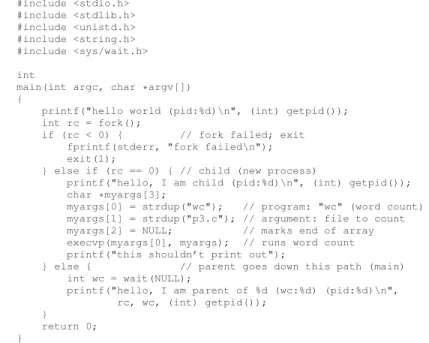
does just that (Figure 5.3, page 5).
In this example, the child process callsexecvp()in order to run the programwc, which is the word counting program. In fact, it runswcon the source filep3.c, thus telling us how many lines, words, and bytes are found in the file:
prompt> ./p3
hello world (pid:29383) hello, I am child (pid:29384)
29 107 1030 p3.c
hello, I am parent of 29384 (wc:29384) (pid:29383) prompt>
2There are a few cases wherewait()returns before the child exits; read the man page for more details, as always. And beware of any absolute and unqualified statements this book makes, such as “the child will always print first” or “UNIXis the best thing in the world, even better than ice cream.”
3Actually, there are six variants ofexec():execl(),execle(),execlp(),execv(), andexecvp(). Read the man pages to learn more.
2 #include <stdlib.h> 3 #include <unistd.h> 4 #include <string.h> 5 #include <sys/wait.h> 6
7 int
8 main(int argc, char *argv[]) 9 {
10 printf("hello world (pid:%d)\n", (int) getpid()); 11 int rc = fork();
12 if (rc < 0) { // fork failed; exit 13 fprintf(stderr, "fork failed\n"); 14 exit(1);
15 } else if (rc == 0) { // child (new process)
16 printf("hello, I am child (pid:%d)\n", (int) getpid()); 17 char *myargs[3];
18 myargs[0] = strdup("wc"); // program: "wc" (word count) 19 myargs[1] = strdup("p3.c"); // argument: file to count 20 myargs[2] = NULL; // marks end of array 21 execvp(myargs[0], myargs); // runs word count 22 printf("this shouldn’t print out");
23 } else { // parent goes down this path (main) 24 int wc = wait(NULL);
25 printf("hello, I am parent of %d (wc:%d) (pid:%d)\n", 26 rc, wc, (int) getpid());
27 }
28 return 0; 29 }
Figure 5.3:Callingfork(),wait(), Andexec()(p3.c)
Thefork()system call is strange; its partner in crime,exec(), is not
so normal either. What it does: given the name of an executable (e.g.,wc), and some arguments (e.g.,p3.c), itloadscode (and static data) from that executable and overwrites its current code segment (and current static data) with it; the heap and stack and other parts of the memory space of the program are re-initialized. Then the OS simply runs that program, passing in any arguments as theargvof that process. Thus, it doesnot
create a new process; rather, it transforms the currently running program (formerlyp3) into a different running program (wc). After theexec()
in the child, it is almost as ifp3.cnever ran; a successful call toexec()
never returns.
5.4 Why? Motivating The API
Of course, one big question you might have: why would we build such an odd interface to what should be the simple act of creating a new process? Well, as it turns out, the separation offork()andexec()is
essential in building a UNIXshell, because it lets the shell run codeafter
the call tofork()butbeforethe call toexec(); this code can alter the
environment of the about-to-be-run program, and thus enables a variety of interesting features to be readily built.
TIP: GETTINGITRIGHT(LAMPSON’SLAW)
As Lampson states in his well-regarded “Hints for Computer Systems Design” [L83], “Get it right. Neither abstraction nor simplicity is a substi-tute for getting it right.” Sometimes, you just have to do the right thing, and when you do, it is way better than the alternatives. There are lots of ways to design APIs for process creation; however, the combination
offork()andexec()are simple and immensely powerful. Here, the
UNIXdesigners simply got it right. And because Lampson so often “got it right”, we name the law in his honor.
The shell is just a user program4. It shows you apromptand then
waits for you to type something into it. You then type a command (i.e., the name of an executable program, plus any arguments) into it; in most cases, the shell then figures out where in the file system the executable resides, callsfork()to create a new child process to run the command, calls some variant ofexec()to run the command, and then waits for the command to complete by callingwait(). When the child completes, the
shell returns fromwait()and prints out a prompt again, ready for your
next command.
The separation offork()andexec()allows the shell to do a whole
bunch of useful things rather easily. For example: prompt> wc p3.c > newfile.txt
In the example above, the output of the programwcisredirectedinto the output filenewfile.txt(the greater-than sign is how said
redirec-tion is indicated). The way the shell accomplishes this task is quite sim-ple: when the child is created, before callingexec(), the shell closes standard outputand opens the filenewfile.txt. By doing so, any out-put from the soon-to-be-running programwcare sent to the file instead of the screen.
Figure 5.4 shows a program that does exactly this. The reason this redi-rection works is due to an assumption about how the operating system manages file descriptors. Specifically, UNIXsystems start looking for free file descriptors at zero. In this case, STDOUT FILENO will be the first available one and thus get assigned whenopen()is called. Subsequent writes by the child process to the standard output file descriptor, for ex-ample by routines such asprintf(), will then be routed transparently to the newly-opened file instead of the screen.
Here is the output of running thep4.cprogram: prompt> ./p4
prompt> cat p4.output 32 109 846 p4.c prompt>
4And there are lots of shells;tcsh,bash, andzshto name a few. You should pick one, read its man pages, and learn more about it; all UNIXexperts do.
2 #include <stdlib.h> 3 #include <unistd.h> 4 #include <string.h> 5 #include <fcntl.h> 6 #include <sys/wait.h> 7
8 int
9 main(int argc, char *argv[]) 10 {
11 int rc = fork();
12 if (rc < 0) { // fork failed; exit 13 fprintf(stderr, "fork failed\n"); 14 exit(1);
15 } else if (rc == 0) { // child: redirect standard output to a file 16 close(STDOUT_FILENO);
17 open("./p4.output", O_CREAT|O_WRONLY|O_TRUNC, S_IRWXU); 18
19 // now exec "wc"... 20 char *myargs[3];
21 myargs[0] = strdup("wc"); // program: "wc" (word count) 22 myargs[1] = strdup("p4.c"); // argument: file to count 23 myargs[2] = NULL; // marks end of array 24 execvp(myargs[0], myargs); // runs word count 25 } else { // parent goes down this path (main) 26 int wc = wait(NULL);
27 }
28 return 0; 29 }
Figure 5.4:All Of The Above With Redirection (p4.c)
You’ll notice (at least) two interesting tidbits about this output. First, whenp4is run, it looks as if nothing has happened; the shell just prints the command prompt and is immediately ready for your next command. However, that is not the case; the programp4did indeed callfork()to create a new child, and then run thewcprogram via a call toexecvp(). You don’t see any output printed to the screen because it has been redi-rected to the filep4.output. Second, you can see that when wecatthe output file, all the expected output from runningwcis found. Cool, right? UNIXpipes are implemented in a similar way, but with thepipe()
system call. In this case, the output of one process is connected to an in-kernelpipe(i.e., queue), and the input of another process is connected to that same pipe; thus, the output of one process seamlessly is used as input to the next, and long and useful chains of commands can be strung together. As a simple example, consider the looking for a word in a file, and then counting how many times said word occurs; with pipes and the utilitiesgrepandwc, it is easy — just typegrep foo file | wc -l
into the command prompt and marvel at the result.
Finally, while we just have sketched out the process API at a high level, there is a lot more detail about these calls out there to be learned and digested; we’ll learn more, for example, about file descriptors when we talk about file systems in the third part of the book. For now, suffice it to say that thefork()/exec()combination is a powerful way to create and manipulate processes.
ASIDE:RTFM — READTHEMANPAGES
Many times in this book, when referring to a particular system call or library call, we’ll tell you to read themanual pages, orman pagesfor short. Man pages are the original form of documentation that exist on UNIXsystems; realize that they were created before the thing calledthe webexisted.
Spending some time reading man pages is a key step in the growth of a systems programmer; there are tons of useful tidbits hidden in those pages. Some particularly useful pages to read are the man pages for whichever shell you are using (e.g.,tcsh, orbash), and certainly for any system calls your program makes (in order to see what return values and error conditions exist).
Finally, reading the man pages can save you some embarrassment. When you ask colleagues about some intricacy of fork(), they may simply reply: “RTFM.” This is your colleagues’ way of gently urging you to Read The Man pages. The F in RTFM just adds a little color to the phrase...
5.5 Other Parts Of The API
Beyondfork(),exec(), andwait(), there are a lot of other inter-faces for interacting with processes in UNIXsystems. For example, the
kill()system call is used to sendsignalsto a process, including
direc-tives to go to sleep, die, and other useful imperadirec-tives. In fact, the entire signals subsystem provides a rich infrastructure to deliver external events to processes, including ways to receive and process those signals.
There are many command-line tools that are useful as well. For exam-ple, using thepscommand allows you to see which processes are run-ning; read theman pagesfor some useful flags to pass tops. The tool
topis also quite helpful, as it displays the processes of the system and how much CPU and other resources they are eating up. Humorously, many times when you run it,topclaims it is the top resource hog; per-haps it is a bit of an egomaniac. Finally, there are many different kinds of CPU meters you can use to get a quick glance understanding of the load on your system; for example, we always keepMenuMeters(from Raging Menace software) running on our Macintosh toolbars, so we can see how much CPU is being utilized at any moment in time. In general, the more information about what is going on, the better.
5.6 Summary
We have introduced some of the APIs dealing with UNIXprocess cre-ation:fork(),exec(), andwait(). However, we have just skimmed the surface. For more detail, read Stevens and Rago [SR05], of course, particularly the chapters on Process Control, Process Relationships, and Signals. There is much to extract from the wisdom therein.
References
[C63] “A Multiprocessor System Design” Melvin E. Conway
AFIPS ’63 Fall Joint Computer Conference New York, USA 1963
An early paper on how to design multiprocessing systems; may be the first place the termfork()was used in the discussion of spawning new processes.
[DV66] “Programming Semantics for Multiprogrammed Computations” Jack B. Dennis and Earl C. Van Horn
Communications of the ACM, Volume 9, Number 3, March 1966
A classic paper that outlines the basics of multiprogrammed computer systems. Undoubtedly had great influence on Project MAC, Multics, and eventuallyUNIX.
[L83] “Hints for Computer Systems Design” Butler Lampson
ACM Operating Systems Review, 15:5, October 1983
Lampson’s famous hints on how to design computer systems. You should read it at some point in your life, and probably at many points in your life.
[SR05] “Advanced Programming in the UNIXEnvironment” W. Richard Stevens and Stephen A. Rago
Addison-Wesley, 2005
All nuances and subtleties of usingUNIXAPIs are found herein. Buy this book! Read it! And most importantly,live it.
ASIDE:CODINGHOMEWORKS
Coding homeworks are small exercises where you write code to run on a real machine to get some experience with some of the basic APIs that modern operating systems have to offer. After all, you are (probably) a computer scientist, and therefore should like to code, right? Of course, to truly become an expert, you have to spend more than a little time hacking away at the machine; indeed, find every excuse you can to write some code and see how it works. Spend the time, and become the wise master you know you can be.
Homework (Code)
In this homework, you are to gain some familiarity with the process management APIs about which you just read. Don’t worry – it’s even more fun than it sounds! You’ll in general be much better off if you find as much time as you can to write some code5, so why not start now?
Questions
• Write a program that callsfork(). Before callingfork(), have the main process access a variable (e.g.,x) and set its value to some-thing (e.g., 100). What value is the variable in the child process? What happens to the variable when both the child and parent change the value ofx?
• Write a program that opens a file (with theopen() system call) and then callsfork()to create a new process. Can both the child and parent access the file descriptor returned byopen()? What happens when they are writing to the file concurrently, i.e., at the same time?
• Write another program using fork(). The child process should
print “hello”; the parent process should print “goodbye”. You should try to ensure that the child process always prints first; can you do thiswithoutcallingwait()in the parent?
• Write a program that calls fork() and then calls some form of
exec()to run the program/bin/ls.See if you can try all of the
variants ofexec(), includingexecl(), execle(), execlp(),
execv(), execvp(),andexecvP(). Why do you think there
are so many variants of the same basic call?
• Now write a program that useswait()to wait for the child process to finish in the parent. What doeswait()return? What happens if you usewait()in the child?
5If you don’t like to code, but want to become a computer scientist, this means you need to either (a) become really good at the theory of computer science, or (b) perhaps rethink this whole “computer science” thing you’ve been telling everyone about.
Write a slight modification of the previous program, this time
us-ingwaitpid()instead ofwait(). When wouldwaitpid()be
useful?
• Write a program that creates a child process, and then in the child closes standard output (STDOUT FILENO). What happens if the child callsprintf()to print some output after closing the descriptor?
• Write a program that creates two children, and connects the stan-dard output of one to the stanstan-dard input of the other, using the