Mitigating External Threats in Wireless Local Area
Networks
Tope Olufon, Carlene E-A Campbell, Stephen Hole, Kapilan Radhakrishnan and Arya Sedigh
School of Applied Computing, University of Wales Trinity Saint David, United Kingdom [email protected], [email protected], [email protected]
Abstract: As computer networks become more critical to
enterprises, it is inevitable that efficient security policies are designed, case in point: wireless networks, in order to effectively ensure the confidentiality, availability, and integrity of the data traversing these networks. The primary objective of this paper is to appropriately simulate an enterprise network, and evaluate the threats, and possible mitigation approaches applicable. An analysis of an enterprise WLAN (Wireless Local Area Network) was carried out, to identify relevant vulnerabilities, and possible countermeasures against these threats. The primary threats analysed were those possible by an external adversary. Upon identification of said threats, a security model was developed, so as to improve enterprise network security, and ensure the levels are optimum. In addition, a number of the principles involved are applicable to non-wireless networks.
Keywords: WLAN, Wireless, Security, WPA 2, IEEE 802.11.
1.
Introduction
The last decade in the field of computer networks has seen many changes, and new challenges. A significant number of these can be attributed to the increase in the utilization of wireless computer networks globally. Our coffee shops, airports, schools, and even our homes often have access to a wireless network of some kind. The constantly expanding size of interconnected devices [1-2], increases the likelihood of valuable information traversing a wireless network at some point.
It can be said that wireless networks are everywhere. From recombinant DNA (Deoxyribonucleic Acid) research labs, to home kitchens, they are utilized by hundreds of millions of people across the globe [3]. Broadcasted over a specified geographical area, anyone with a wireless adapter can pick up a signal and connect.
The seeming availability of wireless networks for everyone and anyone is a major source of concern for most Network and Security professionals. While wireless networks have brought panoply of benefits with them, they have unique safety issues [4-6]. This is owing primarily to the fact that the transmission medium in itself is easily accessible to anyone and has a relatively simple installation procedure. It can be deduced from the aforementioned statement that wireless networks were designed with simplicity as a primary focus. However, it should be noted that, as with most things in the world of computing, ease of use often results in compromised security, as a case in point: wireless networks.
Despite the various encryption standards that have been developed over the years, Wireless networks are still being compromised. It is a harsh reality that hackers are constantly on the prowl, and will always be a threat to information security. A case of worthy note is the security breach of a group of Companies in 2007 [7] and a survey [8], which was tied to lax wireless security policies. It is reported that 45.6 million payment card details were stolen. In addition, certain news articles reported that the breach could cost the company 1.billion USD (United States Dollars). In November 2013, a wireless network was hacked and its public wireless network had to be deactivated, which can be equated to a denial of service attack of sorts [9-10]. A 2013 report published by a security institute [11], put the cost of data breaches for companies across nine countries at 136 million USD for the aforementioned year alone. The above instances are just a few of a constantly mushrooming trend. It cannot be over stated that wireless security, is now more than ever a critical issue. A disconcerting number of people feel simply configuring a password properly secures a network. While passwords do in fact play a role in network security, it must be noted that a determined attacker can get past such barriers, especially if the passwords do not meet established security specifications. Wireless network security, as a branch of network security, requires a rather different pattern of reasoning. This is as a result of the fact that radio waves [12] being their most common mode of transmission, unlike Ethernet LANs (Local Area Networks) which require a physical connection medium, cannot be restricted. This makes wireless networks more of a target than their counterparts, i.e. Ethernet networks. The rapid adoption of wireless networks over the last few years [13] has made it imperative that mitigation techniques are constantly being developed and improved, ergo, a crucial step in developing effective security countermeasures is to identify the flaws in a network’s security policies.
2.
Problem Formulation
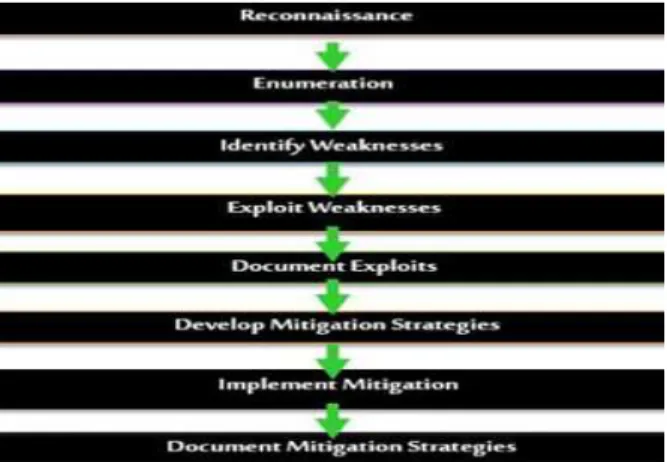
Prior to deploying a penetration testing lab [14], appropriate provisions must be made to accommodate the range of threats to be tested for; this requires a considerable amount of planning. As iterated previously, a properly carried out penetration test can provide invaluable information to security professionals about areas lacking in security within their network. A standard penetration test follows the sequence [14-15] outlined below:
1. Reconnaissance [16]—The focus of this phase is to gather as much data about the target network, there are a number of tools and techniques available to carry this out, and some of them will be discussed, and tested in a later chapter. It is good practice to obtain publicly available information, such as that over the internet, before choosing to obtain information directly from the network. This can provide considerable insight into the security standards already in place, as the internet is a public domain, and inherently insecure. Information gathered during the reconnaissance phase can help identify what parts of the network are most vulnerable. Furthermore, it will aid in simulating practical attack scenarios, and preferring like solutions.
2. Enumeration [17]—Enumeration is the first step in the actual attack on the network. It requires one to connect to the target node by establishing a connection to it, upon completion of reconnaissance. Enumeration involves establishing null connections, and obtaining data about things such as: domain names, hardware and software information, such as operating system version, or currently installed programs, user account information, access ports, and these are but to name a few. 3. Exploitation [18]—In this phase, attacks based on the data gathered are carried out. The objective is to gain as much access as possible to the network.
4. Documentation [19]—A record of the vulnerabilities found is made.
5. Mitigation [19]—Solutions based on the vulnerabilities identified are proffered.
6. Documentation [19]—A record of the mitigation steps taken is made.
Figure 1: Penetration Testing Steps.
Figure 1 shows the steps involved in carrying out a penetration tests. While the steps seem to be sequential, this is not always the case, as some steps might have to be carried out repeatedly/alongside others.
2.1 Setting Up a Penetration Testing Laboratory
For all intents and purposes previously discussed, a test bed, simulating an enterprise network will be used, as previously stated. With the aforementioned precautions in place, it is now required to make a selection of the hardware, and software components required. The following sections will discuss this.
2.1.1 Required Resources
Wireless access points: As the network in question to be attacked is a wireless network, it goes without saying that the most important component in the quest for identifying security flaws is a wireless access point.
• Targets with Wi-Fi (Wireless Fidelity) compliant network cards: As the results obtained from this test,
are meant to be relevant to enterprise environments, a number of clients will be connected to the access point, with a simulation of standard network activity; as such they are required to possess functional industry standard network cards
• The Attack Source Computer: The source computer
is required to have a wireless network adapter that can support packet injection, and sniffing. In addition it must be identifiable by the operating system used to carry out the attack, i.e Backbox Linux.
• Backbox Linux: Backbox is a Linux based operating
system designed for carrying out penetrations tests, and digital forensics. All the programs required to carry out the penetration test are contained in Backbox Linux. It comprises tools such as: Aircrack-ng, Kismet, Nmap, Ettercap, Wireshark, wids.py. Which are used for reconnaissance, infiltration, and cleaning up in no particular order.
2.1.2 Attacks to be Carried Out
• DoS (Denial of Service) Attacks: MDK3, which is a
DoS tool, that is included in Backbox, will be used to carry out denial of service attacks, via deauthentication.
• WPA (Wi-Fi Protected Access) 2 Hacking: The
Aircrack suite, and Pyrit will be used to carry out attacks against WPA2, which is the the protocol used to secure wireless communications in the scenarios described. These are also included in the Backbox operating system.
• Phishing Attacks: An evil twin access point will be
setup, and a deauthentication carried out, tricking vulnerable users into divulging the password.
2.2 Design and Implementation
tested with different levels of the said protocols ability. An HTTP (Hyper Text Transfer Protocol) server exists on the network and will be the target of the denial of service attack target. This test will be carried out from two perspectives, the first being that of the attacker, and the other being that of the security professionals in charge of the network professional. It should be noted that more emphasis will be placed on the latter perspective, as there is a higher emphasis on mitigation in this paper.
2.2.1 Prerequisites
An understanding of the Linux operating system is required, as this is the primary OS in which most tests are carried out. In addition, an understanding of Apache, MySQL, and PHP are required, as these are the web server, and programming environments used where relevant.
3.
Attacking WLANs
The WPA2 protocol has a number of modes, with those of focus WPA-2 PSK (Pre-shared Key), and WPA Enterprise as mentioned previously. A dictionary attack will be carried out against WPA2-PSK, and subsequently a brute force attack, however, owing to the available resources a full scale brute force attack will not be carried out and as such only a proof of concept will be provided.
3.1 Attacking WLAN Authentication
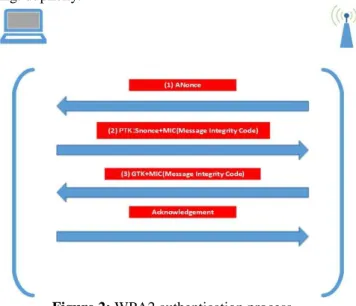
In most home networks, WPA2-PSK is deployed as standard scheme for wireless security. WPA2-PSK is vulnerable to dictionary attacks as a result of its authentication mechanism, which exploits a flaw in the way WPA2 authentication works, and this will be explained shortly [20]. Authentication occurs based on a key known as the PTK (Pairwise Transient Key) to encrypt sessions between the client, and access point. The said key comprises the pre shared key, and the following five parameters: SSID (Service Set Identifier), the ANonce (this is a random integer sent by the AP (Access Point) to the device requesting to connect), the SNonce (Also a random integer, but generated by the client in response to the ANonce), the client MAC (Media Access Control) address, and the BSSID (Basic Service Set Identifier). This is called a 4 way handshake, an illustration is provided in figure 2.
Figure 2 is an illustration of the WPA2 authentication process, and the steps involved are as follows:
1) The AP sends an ANonce to the client upon receipt of a connection request.
2) The client sends a SNonce+ a random integer.
3) The AP constructs a GTK (Group Temporal Key) from this, and sends it with another randomly generated integer.
4) The client responds with an acknowledgement of this value.
An adversary eavesdropping on a network is able to obtain all four parameters mentioned, leaving only the pre shared key unknown. A dictionary attack tries a range of words included in a previously compiled list, and tries it against the captured
file till there is a match. The password has been configured on the access point used, is a nine character dictionary word, this being: duplicity.
Figure 2: WPA2 authentication process.
3.1.1 Dictionary Attack
To carry out this attack, we need to identify the MAC address of the target access point, to do that we would require airmon-ng, which is included in the aircrack suite, which in turn is one of the programs included in the operating system used i.e. Backbox. First of all, the wireless card, card has to be switched to monitor mode, enabling us to scan the network, and obtain relevant information.
1) Identify Network Interfaces: The “ifconfig” tool provides information about the available network adapters, sample output is provided below.
Figure 3: Screenshot of ifconfig’s output.
2) Put adapter in monitor mode, and scan for networks:
airmon-ng is run against the adapter, subsequently
putting the adapter in monitor mode, so as to facilitate information gathering. The syntax, and output of this command is provided in the figure below.
Figure 4: Output of “airmon-ng start wlan0”.
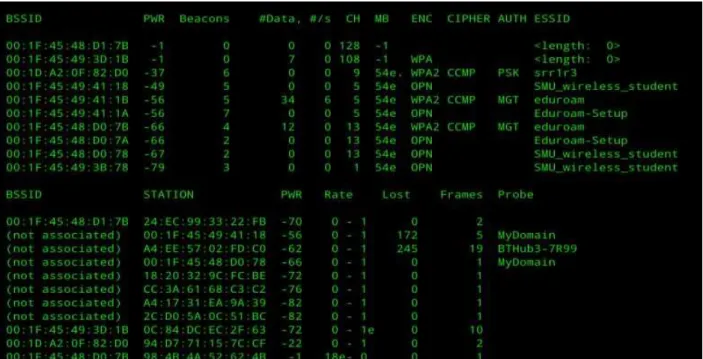
Figure 4 indicates that a virtual interface has been created, this is mon0, “airodump-ng mon0” will then be run on this to scan for networks. The output is provided in figure 17.
The information in figure 5 provides information about the wireless networks available, for this step all that is needed are the SSID, and BSSID of the access point, and the MAC address of a connected client.
With the information obtained in the preceding step we know the SSID of the network is: srr1r3, it is on channel 9, and the BSSID is: 00:1D:A2:0F:82:D0.
3) An airodump capture is initiated, this dumps the packets sent to the access point into a specified filed, and these packets will include the WPA2 authentication handshake. The command is: “airodump-ng --bssid 00:1D:A2:0F:82:D0 --channel 9 --write wpacapture mon0”. Output
provided by the command is shown in figure 6.
•--bssid is the MAC address of the AP.
•wpacapture is the name of the file into which
packets will be dumped.
Figure 6: Output of the airodump command.
The information in figure 6 shows that packets are being dumped into the specified file. It should be noted that this particular output is dynamic, and as such this is only a representation of an instant in the relevant timeframe.
4) A deauthentication attack is run against an already connected client. This forces it to re-join the network, and subsequently the WPA handshake packets are dumped into the airodump file. The syntax, and output is provided in figure 7
•-0 specifies a deuthentication attack.
•1 is the number of times the attack is to be
carried out.
•-a specifies the MAC address of the targeted
client.
Figure 7 presents the output of the attack run against a legitimate client, forcing them to reconnect to the network, and providing the capture file.
5) Once the file has been obtained, a dictionary attack would be carried out, based on a list of previously generated words. These lists can be downloaded from the internet, and vary in size, from a few megabytes, to several gigabytes in size. It should be noted however, that prior to downloading a word list, regional considerations should be made to increase the chances of success, for example, a dictionary containing millions of English words will most likely be ineffective on an access point located in Norway. The tool utilized in this attack is pyrit. The syntax, and output of the command is presented in figure 8
•-r indicates the source of the captured file.
•-i specifies where to retrieve possible passwords
from.
•wordlist.txt is the name of the dictionary file
used in this scenario.
•attack_passthrough indicates it is a dictionary
attack.
In figure 8, pyrit was used to crack the dictionary file, and took 80004 PMKs (Pairwse Master Key), at 1277 PMKs per second. This equates to 62.65 seconds (80004 ÷ 1277) in total to crack the key.
Depending on the dictionary, the capacity of the computer, and location of the word in the dictionary, this attack could take a few minutes to a few hours. There are also cloud based services that provide WPA2 cracking functionality.
In this attack, pyrit used a word list to crack the packet by trying every word in that list. While it may seem secure to use a combination of two words, these lists become more versatile, and moreover, there are a number of programs that generate a combination of words, in addition to the specified word list. In the next section, an attack without a dictionary would was carried out on WPA2, this is known as a brute force attack.
3.1.2 Brute Force Attack
tries every possible combination available within the range of specified characters. This is often effective against relatively short passwords. A case study will be used to demonstrate the effectiveness of a brute force attack.
In this scenario an attacker assumes the characters used to secure an access point are numeric. The attacker also assumes they are between 9 digits long. Then this information is fed to pyrit, via a program known as crunch. Crunch then generates combinations, and pyrit hashes these combinations against the captured packets, till a match is found. The table below illustrates the number of possibilities, based on the possible combinations of a nine character long password.
Table 1. The relationship of a password’s structure, to the
number of attempts in total needed to compute it.
Password Structure Possible Combinations
Numeric 1,000,000,000
Lower Case Alphabets 5,429,503,678,976
Mixed Case Alphabets 2,779,905,883,635,712
Numbers and Lower Case Alphabets 101,559,956,668,416
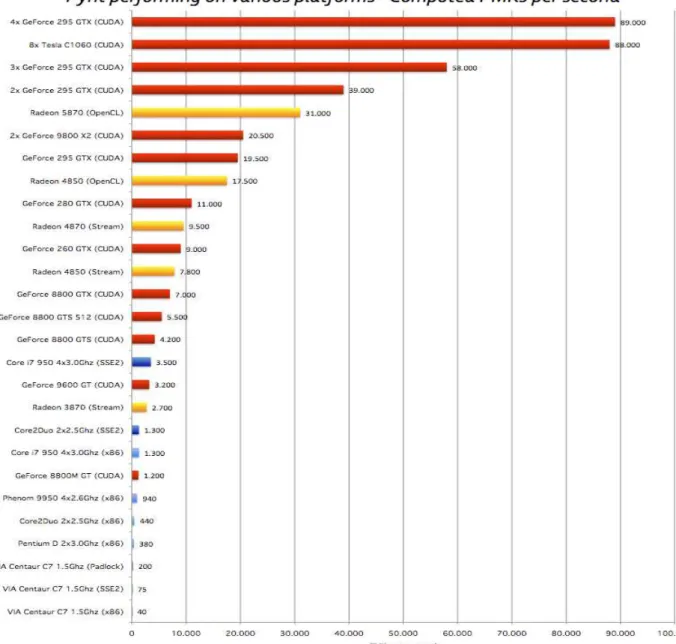
It should be noted that this is a very processor intensive task, and high end systems are often used to accelerate the cracking process. For example, pyrit uses the GPU (Graphics Processing Unit) of the computer, or computers attempting to break the encryption, as they are several times more powerful than CPU (Central Processing Unit)s. However, pyrit requires a GPU to be an Nvidia model, and as such the full capability of the attack cannot be demonstrated, as the author has access only to Intel GPUs. To demonstrate the attack however, a range of 10 possible characters was specified, and pyrit had run with these variables in a distributed computing environment comprising 16 computers, this speeds up the cracking process, but does not make it nearly as fast as a GPU.
In figure 9, it can be seen that speeds vary from 40 keys a second, to as high as 89,000 keys a second. The resources available to demonstrate a brute force attack are Intel processors, and as such, each computer is capable of trying an average of 3,200 combinations per second. To test this attack, 16 computers have been configured as pyrit nodes, subsequently forming a cluster. The aforementioned cluster makes the average number of possible combinations 51,200 per second (3,200 × 16).
The following parts will show the command syntax, and screenshots of pyrit running. In addition, resource usage statistics will be shown, so as to provide a clear understanding of the resource utilization of this attack.
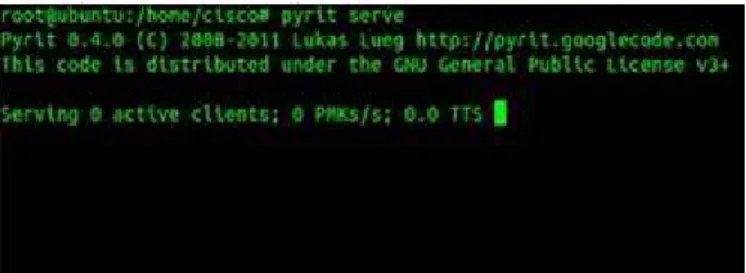
1) The pyrit servers have to be configured to share their resources. The syntax, and output of the command is provided in figure 10.
Figure 10: Output of the “pyrit serve” command.
Figure 10 shows the server is running, but has no clients carrying out any tasks at the time this screenshot was taken.
The client computer has to be configured to use the processors of the servers, to achieve this, their IP (Internet Protocol) addresses have to be specified as servers in the pyrit configuration file. The variable for this is “rpc_knownclients”. The syntax of the command used to access the file is: “nano
~/.pyrit/config”, and sample output is provided in
figure 11.
The IP addresses in figure 11 are those of the servers used in carrying out this attack
2) As alluded to previously, a brute force attack is very similar to a dictionary attack, with the primary difference being the absence of a word list. In light of the previous statement, step one to five are identical to that of a dictionary attack, and as such there is an assumption the capture has been obtained in this section, and the name of the captured file is “2.cap”. Once the file has been obtained, an attack would be carried out, based on a range of possibilities. For this attack there is an assumption that it is a nine character long numeric password, bringing the number of possible combinations to 1,000,000,000. The password in this scenario is: “137653410”, and he tools utilized in this attack are pyrit, and crunch. Crunch creates word combinations, based on a specified range, of characters, and assumed password length. The syntax, and output of the command are presented in figure 12.
• 9 9 indicates that the combinations created should
be not less or more than 9 characters.
• All switches used in pyrit were the same in the previous scenario, with the exception being “-i” as a wordlist is not specified. However possible passwords are based on what crunch outputs. Figure 12 shows that at an average of 48,979 keys per second, it took crunch, and pyrit 26,581,329 combinations to find a match, totalling an estimated nine minutes.
a sharp increase of processor utilization on the servers after pyrit was started.
It can be deduced from this information that very powerful hardware is required to carry out a full scale dictionary attack with any chance of success.
3.2 Denial of Service Attacks
The previous attacks have focused on cracking wireless authentication mechanisms. In this section, a denial of service attack, using deauthentication broadcast packets, was carried out on a wireless access point, effectively causing communication to cease on the WLAN.
It should be recalled that in the preceding attacks, deauthentication attacks were run against specific clients to force them to reauthenticate against the access point. However, the goal of this attack is to force all clients to reauthenticate infinitely, hereby halting communication on the network. A deauthentication attack was carried out against this access point, kicking all clients off the network repeatedly. The tool used for this attack is MDK3.
1) The wireless interface card is put in monitoring mode with airmon-ng, subsequently creating a virtual interface. This being “mon1” for this scenario. 2) Airodump-ng is used to obtain information about the
target (The target in this scenario is the same AP used in the previous attacks).
3) The MAC address of the target AP is saved in a text-file, in this case the file name is called “target”. 4) The attack is launched with MDK3, and the relevant
switches are specified
The output of the command is provided in figure 13.
• mon1: The network interface used to launch the attack
• d: Specifies a deauthentication attack
• b: specifies a bssid, which is followed by the text file
containing that information.
• c: specifies the channel of the target access point, which
is followed by the relevant value
Figure 14 shows the syntax, and output of the mdk3 command, where the MAC addresses specified is that of the access point.
3.3Evil Twin Attacks
An evil twin attack, also known as an association attack, or Wi-Fi phishing, involves an assumption of gullibility on the target’s part. In an evil twin attack, a fake access point is setup, in close proximity to the victim. The then target is forced to leave the network with the aireplay tool, via a fake deauthentication request, as described previously. Depending on the tech savviness of the target, they may or may not connect to the spoofed access point. However, in the event that they do, they will be redirected to a fake login page, which will then steal their WLAN credentials. The source code of the website, and database are included in appendix a, and b respectively. The following will outline the steps made to carry out this attack. This attack is commonly deployed against WPA2 Enterprise.
1) A virtual interface is created with airmon-ng as shown previously. The relevant interface for the attack is
mon0.
2) airodump-ng is used to obtain information about the target (The target is the same as in the previous attacks). Figure 15 is airodump’s output.
Figure 15 shows the access point’s MAC address is:
00:1D:A2:0F:82:D0, and that of the connected client is: 94:D7:71:15:7C:CF.
3) A fake login page is created, and set to write passwords to a database. The programming languages used to create the web page, and database are: PHP, and MySQL respectively. The webserver used is apache. The page name is index.php; the database name is wpa2, and the table is wpa2. Figure 16 shows a fake login page, masquerading as an AP authentication portal and the database administration page, with empty username, and password columns.
4) The DHCP (Dynamic Host Configuration Protocol) server service of the host system is configured with a text editor, to use addresses from the 192.168.2.0/24 range, and the text editor used is geany for this scenario. The server used in this case is dhcp3, and the configuration command sysntax is: geany
/etc/dhcp3/dhcpd.conf. Figure 16 is a screenshot of
the configuration file.
Figure 17: DHCP3 configuration file.
Figure 17 shows the contents of the dhcp configuration file, with options such as the default gateway, address pool, DNS (Domain Name Service) servers, and lease time specified.
5) The clone access point is started with the airbase command on mon0 with the following command:
“airbase-ng -e "srr1r3" -c 9 -a 00:11:22:33:44:55 mon0”, where -e is the SSID, -c is the channel and –a
is the desired MAC address. Figure 18 shows the AP created with the airbase command using the parameters stated in step 5.
6) The tap interface created by the airbase command is configured with the ifconfig tool, and a route is added for the subnet mentioned previously. The relevant commands are as follow:
“ifconfig at0 up”
“route add -net 192.168.2.0 netmask 255.255.255.0 gw 192.168.2.1”
“dhcpd -d -f -cf /etc/dhcp3/dhcpd.conf at0”
In figure 19, the commands activate the virtual interface created by airbase, and assign an IP address, a route is added, and the dhcp server is set to run on that interface.
7) The network routes are flushed and a new route added, redirecting all http traffic to the web server. The relevant commands are as follow:
“iptables –flush”
“iptables --table nat –flush” “iptables --delete-chain”
“iptables --table nat --delete-chain”
“iptables --table nat --append
POSTROUTING --out-interface eth0 –j MASQUERADE”
“iptables --append FORWARD --in-interface at0 -j ACCEPT”
“echo 1 > /proc/sys/net/ipv4/ip_forward” “iptables -t nat -A PREROUTING -p tcp
--dport 80 -j DNAT --to-destination
192.168.2.1”
“iptables -t nat -A POSTROUTING -j MASQUERADE”
8) A deauthentication attack is run using aireplay, as described in the dictionary attack.
9) In the event a user unknowingly connects to the spoofed access point, as a result of being unable to connect to the legitimate one, the attacker is notified via airbase, and the victim is redirected to the login page. Upon a login attempt, the credentials are written to the specified database, and they are redirected to another page. The attacker will then stop the spoofing attack, allowing them to associate with their network as normal. Figure 20 is a screenshots of airbase’s output once a client connects.
Figure 21: Database after a successful evil twin attack.
Figure 21 shows the target’s username and password. The former being User1 and the latter is 1xy43dz21. It can be deduced from the relative complexity of said password, that using a strong password is hardly effective against this attack, as the focus is not on cracking encryption, but on social engineering. This has being an exploitation of human flaws.
4.
Evaluation and Mitigation
4.1 Attacks against WPA 2 Authentication
Due to the fact that the heavy crunching involved in this attack can be carried out offline, i.e. without proximity to the wireless network, it is virtually impossible to detect these
attacks. However, the attack can be rendered impractical by avoiding dictionary words, and using sufficiently convoluted passwords. An attempt at cracking a WPA2 handshake file, with the setup used previously, in this case the password is: wverty4!.op092/?”{}Ulv. The password in this scenario is sixteen characters long, and comprises a mix of lower and upper case alphabets, digits, and special characters. This creates a possibility of 26 possible lowercase alphabets, 26 uppercase alphabets, 10 possible digits, and 35 possible special characters, equating to 85 different possibilities for each character in the password. With the length of the password comprising 16 characters, these make the number o
of possible combinations
7,425,108,623,606,394,726,715,087,890,625 (85^16). With a high performance pyrit cluster of fifty computers, and each trying 89,000 keys per second equalling 4450000 keys a second, it will still take 3174588538131443 millenniums to try every possible combination, rendering this type of attack highly impractical. The following figures provide statistics of pyrit attempting to crack said complex password over a period of 21 hours.
In figure 22, the linux “top” command was issued, and it outputs a number of values, with the relevant column being:
“PID”. That column show’s pyrit’s process ID as “3216”, this
will be instrumental in finding out how long the process has been running.
Figure 23: Output of the ps command for PID 3216.
In figure 23, the linux “ps” tool was used with the “o”,
“etime”, and “p” switches to find out how long pyrit has been
running for. The information provided indicates an approximate 21 hours. Figure 24 shows the number of combinations tried in that timeframe.
The output illustrates the ineffectiveness of a brute force attack against a properly designed password.
Using centralized authentication will also mitigate unauthorized access, as the authentication file cannot be captured with conventional monitoring methods. However, authentication mechanisms, such as MSCHAPv2 (Microsoft Challenge Handshake Protocol Version 2) are vulnerable to dictionary attacks, in the event the password is captured via a phishing attack.
4.2 Denial of Service Attacks
point being DoS attacks. As of this writing, it is not possible to prevent denial of service attacks, as the bands on which WLANs operate on are unlicensed, therefore anyone can connect to them. However, it is possible to detect denial of service attacks with an IDS (Intrusion Detection System). The following is an analysis of Seversalive’s output, which is a network monitoring tool.
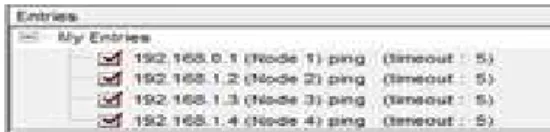
For this demonstration, Serveralive, has been configured to test connectivity of the access point’s wireless interface, and three other nodes on the network, via ICMP (Internet Control Message Protocol) packets sent every 4 seconds. These nodes are specified with their IP addresses. In the event a response is not received on the first attempt, a counter goes up for that node. If a response is not received on the second attempt, an audio file is played. On a third failure, a longer sounding audio file is played, indicating the node is down. These settings are customizable to a large extent. The following figures show the node states prior to the attack, and after launch.
Figure 25: The list of devices to be monitored, where timeout
is the length of time before a single ping expires.
In figure 26, a range of devices were monitored with ICMP pings by the serveralive program. Each ping times out after five seconds, and is regarded as a failed ping. There have been a total of 20 - 21 pings to each node, with all of them marked as successful, and each node is identified as being up.
In figure 27 each node is marked as having ten failed pings, and this will trigger an alert, prompting the network administrator (s) to carry out the necessary remedial actions. The outputs above foreshadow the capabilities of properly configured, and more robust activity monitoring tools. The following section outline steps to determine if it is a deauthentication attack, and how to mitigate this attack. Upon the observation of network anomalies, the next step is to determine if it is a deuthentication attack. The tool used to achieve this goal is “wids.py”, which is a python script used to identify odd network activity. Upon installation, the wids tool is run via the “wids.py” command, and the relevant output is “Did not detect any suspicious activity”. The syntax and output of the command prior to launching the attack is shown in figure 28.
In figure 28, the network monitoring script did not detect any suspicious activity, before launching the attack. Conversely, figure 29 shows a different notification after the attack.
In figure 29, a deauthentication flood is detected by wids, and mitigation steps can be taken. The following will discuss techniques used to mitigate the effects of this attack, based on the information provided by this tool.
Using multiple properly configured access point do go a long way in mitigating these attacks, as wireless clients will switch to a different AP if their current one is unavailable. In addition, deploying honeypots across the wireless network prove useful in confusing the attacker.
It should be noted however, that the tools used to demonstrate intrusion detection in this part are very rudimentary, and as such do not show the full range of IDS capabilities. High end IDSes provide more effective mitigation techniques, with some being able to pin point the location of the attack, making it possible to take appropriate action, based on the security policies, and legal statutes in place.
4.3 Evil Twin Attacks
Owing to the nature of this attack, it is also almost impossible to prevent, as it can be carried out from any location within the access point’s signal boundaries. However, they can be detected, and halted in their tracks with an intrusion detection system. Figure 30 is the output of wids.py upon the detection of a rogue access point.
Figure 30: Output of wids.py upon detecting a potentially
malicious access point.
In figure 30, wids.py identified one concern after identifying a network with an identical SSID cropping up spontaneously. Upon identifying the threat, the location of the access point can be located if prompt action is taken. The tool used in this case is an Android application: Wigle Wi-Fi Wardriving, which sorts access points based on proximity. Figure 29 is the output of the previously mentioned tool, when located a few feet from the access point.
Figure 31: Output of Wigle Wifi Wardriving.
In figure 31, the available access points are listed, with sorting based on distance, and the nearest are put at the top of the list. Based on the information obtained above, the culprit can be apprehended and appropriate action taken.
the tools used here are rather rudimentary, and as such only proof of concepts were provided in this paper.
4.4. Network Security Model
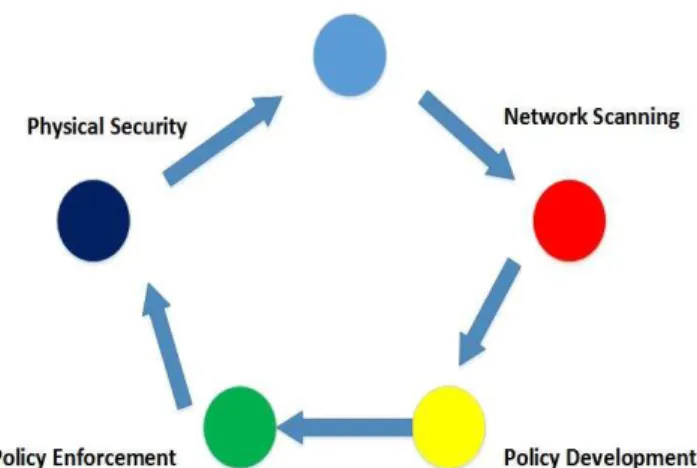
Based on the experiments carried out, a model has been developed to achieve optimum security within enterprise wireless networks, and they are presented in figure 32.
Figure 32 is an illustration of the network security model as developed by the author of this paper. This recommendation is based on the extensive testing carried out in this paper, and the results obtained; it is called the FDM model. The following is an overview of its constituents:
• Wireless Authentication
Often is the first port of call when seeking to improve security, and for good reason. However sometimes a password configured in the access point is not effective enough. It is recommended that network authentication is centralized, and even then it is recommended to implement PEAP (Protected Extensible Authentication Protocol) or stronger, as technologies such as MSCHAPv2 have been shown to be vulnerable to dictionary attacks. This paper proves the effectiveness of complicated passwords against dictionary, and bruteforce attacks due to the amount of processing involved.
Figure 32: FDM Model for penetration testing.
However, this may not always be the case, as computers are constantly evolving, and as such the resources required to crack complex passwords quickly may be readily available in the near or far future. Therefore, it is recommended to change passwords frequently, rendering computed passwords useless.
• Network Scanning
Due to the dynamic nature of wireless networks, nodes can join, and leave at any time. In light of this, it can be inferred that malicious users may be included in nodes. Deploying an intrusion protection system is highly recommended; this will increase the chances of spotting attacks such as deauthentication floods, and rogue access points, as demonstrated in this article. In addition, it is considered good practice to enumerate authorized access points, so as to quickly detect when a rogue is in the vicinity.
• Establish Firm Policies
The BYOT (Bring Your Own Technology) trend is more than likely here to stay, and as such security provisions should be made to accommodate this. Keeping employees, and other network users informed about the relevant threats is critical, as less tech savvy users can prove invaluable to adversaries. In addition, clear acceptable use policies must be defined, as to what is, and is not allowed on the network.
• Physical Security
While this paper focused on attacks from relatively remote locations. Physical security should not be overlooked, as it can be very detrimental in the event an unsavoury element acquires access to a core hardware device on the network. An example of such would be if an attacker obtains access to an authentication server, and manages to reconfigure for their purposes. Real time alerting, and monitoring systems should be deployed wherever possible.
The steps above emphasise that network security is not a onetime process, but a constantly revolving, and evolving one, as threats are similarly dynamic.
The FDM network security model was developed to encompass key aspects of network security. As shown already, it utilizes five key aspects of information assurance these being: physically locking down network devices, employing powerful authentication mechanisms, creating strict policies, employing strict policies, and constant network monitoring to identify, and halt security breaches before they cause any damage. Based on the aspects covered it can be said with reasonable certainty that any enterprise keenly interested in ensuring the availability, and integrity of their data will do well to adopt this model, as it was shown to be highly effective after the experiments conducted. Furthermore, an unacceptable number of organizations have been shown to be lacking in one or more of the areas covered within said model.
5.
Conclusions and Future Work
In an ideal world, it would be possible to completely lock down a network, achieving iron clad security. However, the harsh reality is that we do not live in one, as demonstrated in varying instances within this paper. This paper has focused and demonstrated on effective techniques to secure networks and testing the wireless networks. One of them is developing an understanding of how WLANs can be compromised, and the mechanisms used to do same. Based on the experiments carried out, and the results obtained, a model has been developed to achieve optimum security within enterprise wireless networks. This model, as iterated previously reduces to the barest minimum the potential for security breaches within wireless networks.
• Analyse various methods with which a wireless network implementing the strongest wireless security encryption mechanisms can be compromised.
• Show the various data categories that can be stolen from users on the wireless network.
• Provide an analysis of what happened while trying to hack into the wireless network.
• Make recommendations to improve network security. However, there were some limitations, such as the absence of industry standard network monitoring software. These limitations were overcome with proof of concept scripts, and foreshadowed the capabilities of more robust tools.
All recommendations made are of worthy note, as they are applicable to all WLANs. However of high importance is the FDM model, as it is applicable not just to wireless local area networks, but to traditional Ethernet networks, wireless sensor networks, and even areas not too closely related to wireless networking, such as software development. The aspect relevant to said area is that of physical security, as source code within the hands of unauthorized users can occur, if located on improperly secure systems, and this can prove detrimental to any enterprise.
It cannot be overemphasized that the constant evolution of security solutions is required to remain a step ahead against threats/attacks, both deliberate and accidental.
The model proposed by this paper’s author seeks to address security issues within wireless networks. However, these issues can only be mitigated to a certain degree, and as such must be constantly improved. More research will be made in eliminating threats posed by careless or uninformed users, such as those vulnerable to evil twin attacks. The areas of policy creation and authentication are particularly relevant, as they are the major aspects involved in granting network access. In addition, the author of this paper hopes to device mechanisms for mitigating deauthentication attacks. A proposed solution is making a deathentication request require acknowledgement, based on a previously configured key, or checksum. Hereby requiring the attacker to know the said value needed to carry out the attack. Furthermore, a reengineering of the WPA 2 protocol is to be attempted, making it possible for it to accept any value as a password, and sent over plain text, hereby increasing the efficacy of an evil twin attack. The overall goal of all this, is to show that nothing is completely secure. The only way to ensure the integrity and availability of data to a reasonable degree is to constantly challenge our existing security solutions, identifying them, and seeking to evolve these solutions constantly.
References
[1] Cisco, “Global Mobile Data Traffic Forecast Update,” Cisco Visual Networking Index, San Jose, CA, pp. 1-40, 2013.
[2] P. Lee, D. Stewart and C. Calugar-Pop, “Technology, Media & Telecommunications Predictions.” London: Deloitte report, pp. 1-60, 2014.
[3] L. Uden, L.S.L. Wang, T.-P. Hong, H.-C. Yang and I.-H. Ting, “Intelligent Data Analysis and Management,” The 3rd International Workshop on Intelligent Data Analysis and Management, Berlin: Springer, pp. 112, , 2013. [4] HKSAR, “Wireless Networking Security”, The
Government of the Hong Kong Special Administrative Region Report., Hong Kong, 2010.
[5] R. V. Kleunen, “Wireless Security Risks and the need for certification including a LIVE Demonstration.” Globeron Pte Ltd, Singapore, pp. 11-15, 2013.
[6] M.D. Aime, G. Calandriello and A. Lioy, "Dependability in Wireless Networks: Can We Rely on WiFi?," Security & Privacy, IEEE , vol.5, no.1, pp.23,29, Jan.-Feb. 2007 [7] N.R.D. Haggerty and R. Chandrasekhar, “Security Breach
at TJX,” Ivey Publishing: Case (Library), 2008
[8] D. A. Kindy and A. K. Pathan, "A Detailed Survey on various aspects of SQL Injection in Wen Applications: Vulnerabilities, Innovative Attacks and Remedies A Survey," I. J. Communication Networks and Information Security, Vol. 5, No.2, pp. 80-92, 2012.
[9] J. Leyden, “HACK ATTACK, turns off public Wi-Fi 2013,” European Parliament report [Online] The
Register, 2013.
http://www.theregister.co.uk/2013/11/26/eu_parliament_p ublic_wifi_suspended.
[10] Z. Whittaker, “European Parliament's network hacked; public Wi-Fi shutdown 2013,” [Online] ZDNet, 2013. http://www.zdnet.com/european-parliaments-network-hacked-public-wi-fi-network-shutdown-7000023733/. [11] Ponemon Institute, “2013 Cost of Data Breach Study,”
Ponemon Institute© Research Report, Traverse City, MI, 2013.
[12] T.A. Taiey, “Internetworking Wireless Technology: An Introduction” in All in One for Beginners (EBook, 13 Exam Engines, and Flash Cards): The Complete One-Week Preparation for the CISCO CCENT/CCNA ICND1 Exam 640-822 with Three Simulated CISCO Exams, 1st ed., USA: ThaarTechnologies, pp. 571-582, 2011. [13] N. Meghanathan, "A Survey on the Communication
Protocols and Security in Cognitive Radia Networks," I. J. Communication Networks and Information Security, Vol. 5, No. 1, pp. 19-38, 2013.
[14] A. Sedigh, K. Radhakrishnan, C. Campbell "Trust Evaluation of the Current Security Measures Against Key Network Attacks," MAGNT Research Report, Vol. 2, No.4, pp. 161-171, 2014.
[15] A. J. Beecroft, “Passive Fingerprinting of Computer Network Reconnaissance Tools,” M.S. thesis, Naval Postgraduate School, Monterey, CA, pp. 3-7, 2009. [16] J. Faircloth, “Reconnaissance” in Penetration Tester's
[17] J. Faircloth, “Scanning and Enumeration” in Penetration Tester's Open Source Toolkit, 3rd Ed., USA: Elsevier Inc., pp. 110-115, 2011.
[18] J. Broad and A. Bindner, “Introduction to the Penetration Test Lifecycle” in Hacking with Kali: Practical Penetration Testing Techniques, USA: Elsevier Inc., pp. 85-88, 2014.
[19] J. Broad and A. Bindner, “Reports and Templates” in Hacking with Kali: Practical Penetration Testing Techniques, USA: Elsevier Inc., pp. 181-184, 2014. [20] S. Onno, R. Gelloz, O. Heen and C. Neumann,
“User-Based Authentication for Wireless Home Networks”, Consumer Electronics - Berlin (ICCE-Berlin), 2012 IEEE International Conference on , vol., no., pp.218,220, 3-5 Sept. 2012
Figure 5: Output of the “airodump-ng mon0” command.
Figure 8: Ouput of the “pyrit –r wpacapture-01.cap –I wordlist.txt attack_passthrough” command.
Figure 11: Client configuration file.
Figure 12: Output of the pyrit command.
Figure 13a: Processor utilization of server one before starting pyrit on the client.
Figure 14: Output of the “mdk3 mon1 d –b target –c 9” command.
Figure 15: Output of airodump.
Figure 16: Spoofed web page, and MySQL administration web interface.
Figure 19: DHCP server activation.
Figure 20: Airbase’s client association notification.
Figure 22: “Pyrit’s process ID via “top” command.
Figure 26: States of node one to four prior to carrying out the attacks, where up is the number of successful pings.
Figure 28:Wids.py did not detect suspicious activity.