Transforming Data Center Economics and Performance
via Flash and Server Virtualization
How OCZ PCIe Flash-Based SSDs and VXL Software Create a Lean,
Mean & Green Data Center
Allon Cohen, PhD White Paper
1
Introduction
A new breed of flash-based data center architectures is unleashing the full potential of server virtualization. As more enterprises and cloud providers deploy virtualized PCIe flash-based SSDs into their environments, CAPEX (capital expenditure) and OPEX (operating expenses) are reduced as the data center gets transformed into a lean, mean and green environment.
Server virtualization enables multiple virtual server loads to run concurrently on a single physical host which not only increases utilization of server CPU and memory resources, but also simplifies deployment, high availability (HA) and maintenance of the server loads as well. This virtualized approach of partitioning server resources has radically changed data center economics for the better by delivering a reduction in server CAPEX and OPEX.
Since their inception, server CPUs and RAM modules quickly grew to support virtualized server environments and the increase in associated workloads, but it soon became apparent that the hard disk drive (HDD) storage aspect of the IT environment was lagging behind. While all other components in the data center are silicon-based, HDDs are the only mechanical devices with rotating disks. As a result, HDDs have physical limitations and simply cannot keep pace with growing server workloads in virtualized environments, impeding cost savings as well as the potential benefits that virtualization can achieve. As detailed in this white paper, the combination of host-based flash and storage virtualization alleviate the storage issues that bog down virtualized server deployments, creating a new power and cost-efficient extreme performance data center.
Introduction
How Legacy Storage Architectures Impede Virtualization Unleashing Host-Based PCIe Flash in Virtual Environments OCZ’s Z-Drive R4 PCIe SSDs and VXL Software
Optimal Deployment of PCIe Flash in Virtual Server Environments The Transformed Data Center
Conclusion 1
2 3 4 5 6 7
2 3 4 5 6 7 8
2
How Legacy Storage Architectures Impede
Virtualization
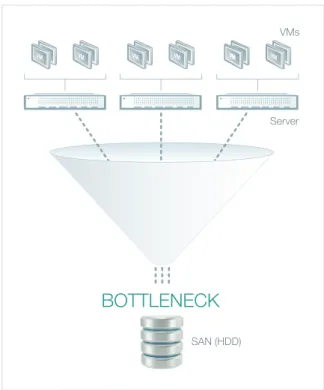
When server virtualization is added to an IT environment, all application data is typically placed in external repositories, or storage area networks (SANs), to retain the ability of dynamically running any application load from any data center server. While servers can handle millions of input/output operations per second (IOPS), a typical HDD can only deliver between a hundred and two hundred IOPS performance. Therefore, as more virtual servers were added to data centers, the HDDs within the SAN simply could not keep up with the server workload demands. See Figure 1.
As many applications run together, their combined storage access requests are blended by the virtualization layer creating very random access to disks or what is known as the ‘I/O blender effect.’ For this reason, server virtualization requires strong random access capabilities that are a major problem for HDDs whose physical heads need to continuously jump from one location to another.
The performance disparity between server and HDDs has been quite evident, and to overcome this (before the advent of flash technology), IT departments would be forced to buy tens of thousands of HDDs just to satisfy the server IOPS performance demands. As each SAN and its hundreds of HDDs continued to grow, significantly more power and associated cooling was also required, which in turn, drove up data center total cost of ownership (TCO). To make matters worse, since mechanical HDDs are prone to failure, complex high availability schemes were required to handle single HDD and storage array failures. These schemes further increased the number of HDDs that was necessary to keep the system running and required advanced software at the SAN layer, which added even more costs to the data center.
To address the effect that virtualization has on HDD storage, IT professionals limited the number of virtual machines (VMs) they placed on each host system, and in some cases, even refrained from placing sensitive loads (such as databases or email) in the virtual environment fearing that the data access patterns would be hampered by mixing its I/O with other VMs. In these
BOTTLENECK
VMs
Server
SAN (HDD)
Figure 1: Concurrently running multiple virtual machines (VMs) in a virtualized environment will cause heavy randomization of data access towards the SAN
virtualization has on HDD storage. Up until recently, any virtualization that attempted to reduce server OPEX and CAPEX were offset by the increased costs associated with HDD SANs. Unfortunately, HDD storage had become an inhibitor of virtualization, blocking enterprises and cloud providers from realizing its true benefits and associated cost savings.
3
Unleashing Host-Based PCIe Flash in Virtual
Environments
For every instance that data is requested from a different location in HDD storage, the mechanical head of the HDD needs to move, limiting the drive’s physical ability to quickly read random data. An HDD typically spins at a rate of 7,200 to 15,000 rotations per minute (RPM), therefore to read data, the HDD head disengages from the current track, moves to the new location track and then reengages at the new location. Each movement takes time and the read/ write IOPS performance, as well as its latency, slows down considerably until the data is found and accessed.
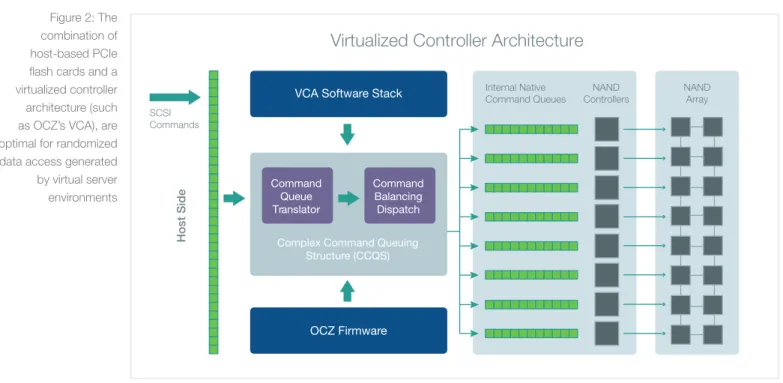
In contrast to HDD storage, flash memory technology, having no moving parts, handles random data access effortlessly, making it a superior enabler of virtualization. A single PCIe host-based flash SSD can deliver random IOPS performance to connected VMs that is comparable to large SAN arrays with thousands of HDDs incorporated. When virtualization access technology is added to the equation, such as OCZ’s Virtualized Controller Architecture™ (VCA), the flash controller can efficiently distribute the random loads between all NAND cells on the host-based PCIe card. See Figure 2.
A single PCIe host-based
flash SSD can deliver
random IOPS performance
to connected VMs that is
comparable to large SAN
arrays with thousands of
HDDs incorporated.
SCSI Commands
Host Sid
e
VCA Software Stack
OCZ Firmware Complex Command Queuing
Structure (CCQS)
Internal Native
Command Queues ControllersNAND
Command Queue Translator
Command Balancing Dispatch
NAND Array
Virtualized Controller Architecture
Figure 2: The combination of host-based PCIe flash cards and a virtualized controller architecture (such as OCZ’s VCA), are optimal for randomized data access generated by virtual server environments
4
OCZ’s Z-Drive R4 PCIe SSDs and VXL
Software
To achieve the leanest, meanest and greenest virtualized server environment, OCZ’s successful 4th generation Z-Drive R4 PCIe card provides a compact, power-efficient solid-state solution that fits directly into a server’s PCI Express slot to increase server application performance while delivering fast and reliable access to data without burdening host CPU and memory resources. When combined with OCZ’s VXL software, any OCZ PCIe-based Z-Drive R4 model enables the delivery of a complete virtual performance system for enterprise customers looking to efficiently distribute flash resources across VMs as a means to maximize performance of key applications.
In addition, VXL software enables Z-Drive R4 PCIe cards to be virtualized as a highly available network resource. It achieves this through its ‘SAN-less Data Center’ mode that enables the flash to be exposed to any VM in a virtualized cluster without negating any of the virtualization capabilities of the hypervisor layer (such as end-to-end mirroring, high availability, dynamic VM migration from one server to another [VMware vMotion™ support] and fault tolerance to server and flash failures). This flash-only level performance sets the precedence for an all-silicon SAN-less data center that delivers all the benefits of virtualization without the need for costly backend HDD SANs.
VXL software uses Z-Drive R4 PCIe cards to distribute the flash between VMs based on need while making sure that no VM inefficiently occupies flash when it can be better used elsewhere in the environment and that the flash cache is optimally utilized at all times regardless of how many VMs are running concurrently. Even though the flash cache resource is located in one server, it can be shared across multiple servers making VXL the only fast cache and virtualization software that can deliver this unique capability. This approach provides the highest return on investment (ROI) in a virtualized environment where many VMs share the same flash and often do not reach peak workload requirements concurrently.
VXL software does not require guest agents within the application VM, and through hypervisor connectivity, works with any operating system supported by a virtualization platform including Windows, Linux, OpenSolaris and FreeBSD. This is in contrast to other cache software solutions that require agent or driver
VXL software uses Z-Drive
R4 PCIe cards to distribute
the flash between VMs
based on need while
making sure that no VM
inefficiently occupies flash
when it can be better used
elsewhere.
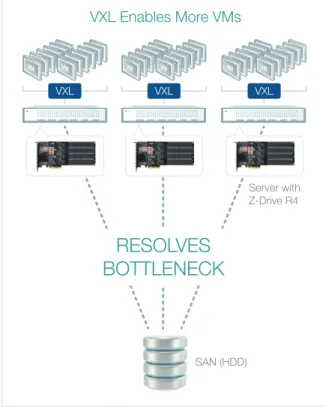
deployed at the host layer of virtual servers, VXL software can run up to ten times the number of VMs and can keep up with the random I/O requirements of all the VMs in the system, overcoming the I/O blender effect. See Figure 3.
5
Optimal Deployment of PCIe Flash in
Virtual Server Environments
Flash memory is ideally suited for server virtualization. However, it is the way the two are combined that ultimately drives how lean, mean and green the data center will become. The approach developed by OCZ Technology is to bring the power of flash to virtualized environments so that all of the ROI benefits of virtualization in reduced CAPEX and OPEX are only enhanced whenever flash is used by a VM. To do this, OCZ treated the flash as another virtual resource and created a central virtual appliance that works with the hypervisor to dynamically distribute the flash according to need, inside and outside of the physical server. By combining the power of storage virtualization and PCIe flash
caching, and by working centrally with the hypervisor rather than with each local VM, OCZ developed a solution that takes advantage of the power of flash without losing any of the benefits associated with virtualization. See Figure 4.
Since VXL software works with the hypervisor directly, rather than introducing specific drivers, OCZ’s approach becomes transparent to both the VM operating system and to the hypervisor. The caching and storage virtualization is handled in the self-contained central VXL virtual appliance and designed to run in VMware ESX, Microsoft Hyper-V, or Citrix Xen virtualization platforms to deliver these benefits to all three. More so, through storage virtualization, VXL software can even present host-based flash to servers in heterogeneous virtualization environments running any of the hypervisors in parallel. The VMs are transparently accelerated and continue to function normally as they would in virtual environments. As a result, VXL
Server with Z-Drive R4 SAN (HDD) VXL VXL VXL
RESOLVES
BOTTLENECK
VXL Enables More VMs
Figure 3: Virtualization powered by OCZ VXL Software and Z-Drive R4 PCIe SSDs
VMware
(ESX) Microsoft(Hyper-V) Citrix(Xen)
Host Server
VM-1 VM-2 VM-3 OCZ VXL
Much less data required from SAN
SAN (HDD)
Z-Drive R4
What is VXL? VXL is Flash Caching and Storage Virtualization software Unleashes Virtualization full potential by dissolving HDD storage bottlenecks How Does it Works? Monitors VM data requests to/from external SAN Keeps critical data in Z-Drive R4 inside the server SAN by 90%
Figure 4: Combining the power of flash with the power of virtualization using OCZ VXL software and OCZ Z-Drive R4 PCIe SSDs
software becomes the catalyst for virtual environments to reap all the benefits of flash while enabling virtualization of the most demanding workloads.
6
The Transformed Data Center
The combination of OCZ’s Z-Drive R4 PCIe SSD with VXL software transforms the data center into a lean, mean and green operation by providing these key enablers for virtualization:
1. Increased Server Utilization – By eliminating the storage bottlenecks associated with server virtualization, the combination of OCZ’s hardware and software solutions increase the number of VMs that can run on the host infrastructure by a factor of ten. This capability eliminates inefficient use of server resources and allows enterprise IT departments and cloud providers to grow the data center without excessive CAPEX, while providing higher quality of service (QoS) to end users. Since VXL enables the virtualization of workloads that previously required their own separate infrastructures, further CAPEX and OPEX reductions are achievable.
2. Reduced SAN Costs – In a flash-accelerated data center, most VM storage requirements are addressed by flash-based PCIe cards at the virtualization layer. VXL provides the storage virtualization services required by the virtualized environment, at the host layer rather than at the SAN, while the Z-Drive R4 PCIe card easily generates the IOPS performance requested by each VM. This capability eliminates the need to deploy costly, high end SANs with heavy virtualization services at the SAN layer.
In its place, cost-efficient commodity storage can be deployed for capacity, with the desired I/O performance and storage virtualization enabled by OCZ’s VXL software and Z-Drive R4 PCIe SSDs. This reduces the number of HDDs required as I/Os no longer need to be generated by thousands of concurrently running spindles. Thus, not only is the CAPEX reduced considerably, but also the power and cooling requirements associated with high end SAN arrays.
3. Highly Efficient Flash Utilization - VXL software virtualizes data center flash resources so they can be efficiently distributed between all VMs in the environment. A single VXL and Z-Drive R4 PCIe card can service multiple
The combination of
OCZ’s Z-Drive R4 PCIe
SSD with VXL software
transforms the data
center into a lean, mean
and green operation.
for acceleration. No agents or drivers need to be installed and guest VM configuration changes do not require special treatment for accelerated VMs. Since all virtualization capabilities (e.g., vMotion, HA, VMware snapshots, fault tolerance, etc.) are maintained, there is no need to create specialized procedures for the maintenance of accelerated VMs. Since the acceleration
is transparent to the VM guest operating system, the accelerated VMs can be treated exactly as their non-accelerated counterparts resulting in a simpler, easier-to-manage maintenance process and high availability infrastructure, as well as reduced operating costs.
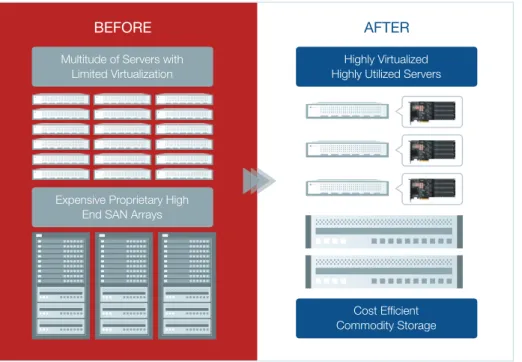
As illustrated in Figure 5, the combined OCZ VXL software with Z-Drive R4 PCIe SSDs provides increased server utilization, reduced SAN costs, highly-efficient flash utilization, and reduced maintenance costs resulting in a lean,
high-performance green data center that is able to fully benefit from server and storage virtualization.
6
Conclusion
To alleviate the storage issues that bog down even the most state-of-the-art virtualized server deployments, OCZ’s host-based Z-Drive R4 PCIe flash SSD, in combination with its VXL storage virtualization and caching software, unleashes the full potential of server virtualization and is a natural evolution for this infrastructure. The integration of these hardware and software capabilities provides a perfect match for the storage requirements in such environments, boosting these infrastructures with flash performance without losing any of the capabilities that virtualization brings to the data center.
As more and more enterprises and cloud providers are exposed to the uniquely powerful combination of PCIe flash and software virtualization provided by the Z-Drive and VXL, a transformation in the way data is stored and handled in virtualized environments becomes evident. With higher server utilization and the ability to use cost-efficient commodity storage for capacity, CAPEX and OPEX will be reduced as the data center gets transformed into a leaner, meaner and greener environment.
Multitude of Servers with Limited Virtualization
Expensive Proprietary High End SAN Arrays
BEFORE
Highly Virtualized Highly Utilized Servers
Commodity Storage
AFTER
Contact us for
more information
OCZ Storage Solutions 6373 San Ignacio Avenue San Jose, CA 95119 USA
P 408.733.8400
E [email protected] W ocz.com/enterprise
VISIT OCZ ENTERPRISE EMAIL SALES TEAM
Disclaimer
OCZ may make changes to specifications and product descriptions at any time, without notice. The information presented in this document is for informational purposes only and may contain technical inaccuracies, omissions and typographical errors. Any performance tests and ratings are measured using systems that reflect the approximate performance of OCZ products as measured by those tests. Any differences in software or hardware configuration may affect actual performance, and OCZ does not control the design or implementation of third party benchmarks or websites referenced in this document. The information contained herein is subject to change and may be rendered inaccurate for many reasons, including but not limited to any changes in product and/or roadmap, component and hardware revision changes, new model and/or product releases, software changes, firmware changes, or the like. OCZ assumes no obligation to update or otherwise correct or revise this information.
OCZ MAKES NO REPRESENTATIONS OR WARRANTIES WITH RESPECT TO THE CONTENTS HEREOF AND ASSUMES NO RESPONSIBILITY FOR ANY INACCURACIES, ERRORS OR OMISSIONS THAT MAY APPEAR IN THIS INFORMATION.
OCZ SPECIFICALLY DISCLAIMS ANY IMPLIED WARRANTIES OF MERCHANTABILITY OR FITNESS FOR ANY PARTICULAR PURPOSE. IN NO EVENT WILL OCZ BE LIABLE TO ANY PERSON FOR ANY DIRECT, INDIRECT, SPECIAL OR OTHER CONSEQUENTIAL DAMAGES ARISING FROM THE USE OF ANY INFORMATION CONTAINED HEREIN, EVEN IF OCZ IS EXPRESSLY ADVISED OF THE POSSIBILITY OF SUCH DAMAGES.