Guide to IP Layer Network
Administration with Linux
Version 0.4.4
Martin A. Brown
SecurePipe, Inc. (http://www.securepipe.com/)
Network Administration
by Martin A. Brown
Published 2003-04-26
Copyright © 2002, 2003 Martin A. Brown
This guide provides an overview of many of the tools available for IP network administration of the linux operating system, kernels in the 2.2 and 2.4 series. It covers Ethernet, ARP, IP routing, NAT, and other topics central to the management of IP networks.
Revision History
Revision 0.4.4 2003-04-26 Revised by: MAB added index, began packet filtering chapter Revision 0.4.3 2003-04-14 Revised by: MAB ongoing editing, ARP/NAT fixes, routing content Revision 0.4.2 2003-03-16 Revised by: MAB ongoing editing; unreleased version
Revision 0.4.1 2003-02-19 Revised by: MAB major routing revision; better use of callouts Revision 0.4.0 2003-02-11 Revised by: MAB major NAT revs; add inline scripts; outline FIB Revision 0.3.9 2003-02-05 Revised by: MAB fleshed out bonding; added bridging chapter Revision 0.3.8 2003-02-03 Revised by: MAB move to linux-ip.net; use TLDP XSL stylesheets Revision 0.3.7 2003-02-02 Revised by: MAB major editing on ARP; minor editing on routing Revision 0.3.6 2003-01-30 Revised by: MAB switch to XSLT processing; minor revs; CVS Revision 0.3.5 2003-01-08 Revised by: MAB ARP flux complete; ARP filtering touched Revision 0.3.4 2003-01-06 Revised by: MAB ARP complete; bridging added; ip neigh complete Revision 0.3.3 2003-01-05 Revised by: MAB split into 3 parts; ARP chapter begun Revision 0.3.2 2002-12-29 Revised by: MAB links updated; minor editing
Revision 0.3.1 2002-11-26 Revised by: MAB edited: intro, snat, nat; split advanced in two Revision 0.3.0 2002-11-14 Revised by: MAB chapters finally have good HTML names Revision 0.2.9 2002-11-11 Revised by: MAB routing chapter heavily edited
Revision 0.2.8 2002-11-07 Revised by: MAB basic chapter heavily edited
Revision 0.2.7 2002-11-04 Revised by: MAB routing chapter finished; links rearranged Revision 0.2.6 2002-10-29 Revised by: MAB routing chapter continued
Revision 0.2.5 2002-10-28 Revised by: MAB routing chapter partly complete
Revision 0.2.3 2002-09-30 Revised by: MAB
minor editing; worked on tools/netstat; advanced routing Revision 0.2.2 2002-09-24 Revised by: MAB
formalized revisioning; finished basic networking; started netstat Revision 0.2.1 2002-09-21 Revised by: MAB
added network map to incomplete rough draft Revision 0.2 2002-09-20 Revised by: MAB incomplete rough draft released on LARTC list Revision 0.1 2002-08-04 Revised by: MAB rough draft begun
Table of Contents
Introduction...i
Target Audience, Assumptions, and Recommendations ...i
Conventions...i
Bugs and Roadmap ... ii
Technical Note and Summary of Approach ... ii
Acknowledgements and Request for Remarks ... ii
I. Concepts ...i
1. Basic IP Connectivity...1
IP Networking Control Files ...1
Reading Routes and IP Information ...2
Sending Packets to the Local Network ...4
Sending Packets to Unknown Networks Through the Default Gateway ...5
Static Routes to Networks...6
Changing IP Addresses and Routes...7
Changing the IP on a machine ...7
Setting the Default Route...9
Adding and removing a static route ...9
Conclusion ...10
2. Ethernet ...12
Address Resolution Protocol (ARP)...12
Overview of Address Resolution Protocol...12
The ARP cache ...15
ARP Suppression ...17
The ARP Flux Problem...17
ARP flux prevention witharp_filter...18
ARP flux prevention withhidden...19
Proxy ARP ...20
ARP filtering ...20
Connecting to an Ethernet 802.1q VLAN ...21
Link Aggregation and High Availability with Bonding ...22
Link Aggregation ...22
High Availability...23
3. Bridging ...25
Concepts of Bridging...25
Bridging and Spanning Tree Protocol ...25
Bridging and Packet Filtering...25
Traffic Control with a Bridge ...25
ebtables ...25
4. IP Routing ...26
Introduction to Linux Routing...26
Routing to Locally Connected Networks ...29
Sending Packets Through a Gateway ...30
Operating as a Router ...31
Route Selection...31
Summary ...34
Source Address Selection ...34
Routing Cache ...35
Routing Tables ...37
Routing Table Entries (Routes)...39
The Local Routing Table ...41
The Main Routing Table ...43
Routing Policy Database (RPDB) ...43
ICMP and Routing...45
MTU, MSS, and ICMP ...45
ICMP Redirects and Routing ...45
5. Network Address Translation (NAT) ...48
Rationale for and Introduction to NAT...48
Application Layer Protocols with Embedded Network Information ...50
Stateless NAT with iproute2 ...51
Stateless NAT Packet Capture and Introduction ...51
Stateless NAT Practicum...52
Conditional Stateless NAT ...53
Stateless NAT and Packet Filtering ...54
Destination NAT with netfilter (DNAT) ...56
Port Address Translation with DNAT ...56
Port Address Translation (PAT) from Userspace...57
Transparent PAT from Userspace ...57
6. Masquerading and Source Network Address Translation...58
Concepts of Source NAT ...58
Differences Between SNAT and Masquerading ...58
Double SNAT/Masquerading ...58
Issues with SNAT/Masquerading and Inbound Traffic...58
Where Masquerading and SNAT Break ...58
7. Packet Filtering ...59
Rationale for and Introduction to Packet Filtering ...59
History of Linux Packet Filter Support...59
Limits of the Usefulness of Packet Filtering...60
Weaknesses of Packet Filtering ...61
Complex Network Layer Stateless Packet Filters...61
General Packet Filter Requirements ...61
The Netfilter Architecture...62
Packet Filtering with iptables...62
Packet Filtering with ipchains ...62
Packet Mangling with ipchains ...62
Protecting a Host ...62
Protecting a Network ...63
Further Resources ...63
8. Statefulness and Statelessness...65
...65
Statelessness of IP Routing ...65
...65
II. Cookbook...66
9. Advanced IP Management ...67
Multiple IPs and the ARP Problem ...67
Multiple IP Networks on one Ethernet Segment ...67
Breaking a network in two with proxy ARP ...67
Multiple IPs on an Interface ...68
Multiple connections to the same Ethernet ...69
Multihomed Hosts ...69
Binding to Non-local Addresses...69
10. Advanced IP Routing ...70
Introduction to Policy Routing ...70
Overview of Routing and Packet Filter Interactions ...70
Using the Routing Policy Database and Multiple Routing Tables ...71
Using Type of Service Policy Routing...72
Using fwmark for Policy Routing...72
Policy Routing and NAT ...72
Multiple Connections to the Internet ...72
Outbound traffic Using Multiple Connections to the Internet ...73
Inbound traffic Using Multiple Connections to the Internet ...75
Using Multiple Connections to the Internet for Inbound and Outbound Connections .77 11. Scripts for Managing IP ...79
Proxy ARP Scripts...79
NAT Scripts ...82
12. Troubleshooting ...90
Introduction to Troubleshooting ...90
Troubleshooting at the Ethernet Layer ...90
Troubleshooting at the IP Layer ...90
Handling and Diagnosing Routing Problems ...90
Identifying Problems with TCP Sessions ...90
DNS Troubleshooting...90
III. Appendices and Reference ...91
A. An Example Network and Description ...92
Example Network Map and General Notes...92
Example Network Addressing Charts ...92
B. Ethernet Layer Tools ...94
arp ...94
arping...95
ip link ...96
Displaying link layer characteristics with ip link show ...96
Changing link layer characteristics with ip link set ...97
Deactivating a device with ip link set ...98
Activating a device with ip link set ...99
Using ip link set to change the MTU ...100
Changing the device name with ip link set ...100
mii-tool...104
C. IP Address Management ...107
ifconfig ...107
Displaying interface information with ifconfig ...107
Bringing down an interface with ifconfig ...108
Bringing up an interface with ifconfig...108
Reading ifconfig output ...109
Changing MTU with ifconfig ...109
Changing device flags with ifconfig ...110
General remarks about ifconfig ...111
ip address...111
Displaying interface information with ip address show ...111
Using ip address add to configure IP address information ...112
Using ip address del to remove IP addresses from an interface ...113
Removing all IP address information from an interface with ip address flush ...114
Conclusion ...114
D. IP Route Management...116
route ...116
Displaying the routing table with route...116
Reading route’s output ...117
Using route to display the routing cache...118
Creating a static route with route add...119
Creating a default route with route add default ...121
Removing routes with route del...121
ip route...123
Displaying a routing table with ip route show...123
Displaying the routing cache with ip route show cache...125
Using ip route add to populate a routing table ...127
Adding a default route with ip route add default...128
Setting up NAT with ip route add nat ...128
Removing routes with ip route del...129
Altering existing routes with ip route change ...130
Programmatically fetching route information with ip route get ...131
Clearing routing tables with ip route flush ...131
ip route flush cache ...132
Summary of the use of ip route...132
ip rule ...133
ip rule show...133
Displaying the RPDB with ip rule show...133
Adding a rule to the RPDB with ip rule add ...134
ip rule add nat ...135
ip rule del ...136
E. Tunnels and VPNs ...138
Lightweight encrypted tunnel with CIPE ...138
GRE tunnels with ip tunnel ...138
All manner of tunnels with ssh...138
PPTP ...138
F. Sockets; Servers and Clients ...139
telnet...139 nc ...139 socat ...140 tcpclient ...141 xinetd ...141 tcpserver ...141 redir...142 G. Diagnostics ...143 ping...143
Using ping to test reachability...144
Using ping to stress a network...146
Recording a network route with ping ...146
Setting the TTL on a ping packet ...147
Setting ToS for a diagnostic ping ...148
Specifying a source address for ping...149
Summary on the use of ping...149
traceroute ...149
Using traceroute ...150
Telling traceroute to use ICMP echo request instead of UDP...151
Setting ToS with traceroute ...151
Summary on the use of traceroute...151
mtr...151
netstat...151
Displaying socket status with netstat ...151
Displaying the main routing table with netstat ...154
Displaying network interface statistics with netstat ...155
Displaying network stack statistics with netstat ...155
Displaying the masquerading table with netstat ...155
tcpdump...155
Using tcpdump to view ARP messages ...156
Using tcpdump to see ICMP unreachable messages ...156
Using tcpdump to watch TCP sessions...157
Reading and writing tcpdump data...157
Understanding fragmentation as reported by tcpdump...158
Other options to the tcpdump command...158
tcpflow...159
tcpreplay ...159
H. Miscellany ...160
ipcalc and other IP addressing calculators ...160
Some general remarks about iproute2 tools ...160
Brief introduction to sysctl ...161
I. Links to other Resources ...162
Links to Documentation ...162
Linux Networking Introduction and Overview Material ...162
Masquerading topics ...163
Network Address Translation ...163
iproute2 documentation ...164
Netfilter Resources...164
ipchains Resources...165
ipfwadm Resources ...165
General Systems References...165
Bridging ...166
Traffic Control...166
IPv4 Multicast...167
Miscellaneous Linux IP Resources...167
Links to Software ...168
Basic Utilities...168
Virtual Private Networking software ...168
Traffic Control queueing disciplines and command line tools...169
Interfaces to lower layer tools ...169
Packet sniffing and diagnostic tools...169
J. GNU Free Documentation License ...171
PREAMBLE...171
APPLICABILITY AND DEFINITIONS...171
VERBATIM COPYING ...172
COPYING IN QUANTITY...172
MODIFICATIONS ...173
COMBINING DOCUMENTS ...174
COLLECTIONS OF DOCUMENTS...175
AGGREGATION WITH INDEPENDENT WORKS ...175
TRANSLATION...175
TERMINATION ...176
FUTURE REVISIONS OF THIS LICENSE ...176
ADDENDUM: How to use this License for your documents ...176
Reference Bibliography and Recommended Reading ...178
List of Tables
2-1. Active ARP cache entry states ...15
4-1. Keys used for hash table lookups during route selection ...33
5-1. Filtering an iproute2 NAT packet with ipchains...54
A-1. Example Network; Network Addressing...92
A-2. Example Network; Host Addressing ...93
B-1. ip link link layer device states...98
B-2. Ethernet Port Speed Abbreviations...104
C-1. Interface Flags ...110
C-2. IP Scope under ip address ...112
G-1. Possible Session States in netstat output ...153
H-1. iproute2 Synonyms ...161
List of Examples
1-1. Sample ifconfig output ...21-2. Testing reachability of a locally connected host with ping...4
1-3. Testing reachability of non-local hosts...5
1-4. Sample routing table with a static route ...6
1-5. ifconfig and route output before the change...7
1-6. Bringing down a network interface with ifconfig ...8
1-7. Bringing up an Ethernet interface with ifconfig...8
1-8. Adding a default route with route...9
1-9. Adding a static route with route ...10
1-10. Removing a static network route and adding a static host route ...10
2-1. ARP conversation captured with tcpdump3...13
2-2. Gratuitous ARP reply frames ...13
2-3. Unsolicited ARP request frames ...14
2-4. Duplicate Address Detection with ARP ...14
2-5. ARP cache listings with arp and ip neighbor ...15
2-6. ARP cache timeout...16
2-7. ARP flux ...17
2-8. Correction of ARP flux withconf/$DEV/arp_filter...18
2-9. Correction of ARP flux withnet/$DEV/hidden...20
2-10. Bringing up a VLAN interface ...21
2-11. Link aggregation bonding ...22
2-12. High availability bonding ...23
4-1. Classes of IP addresses...27
4-2. Using ipcalc to display IP information...29
4-3. Identifying the locally connected networks with route ...29
4-4. Routing Selection Algorithm in Pseudo-code ...33
4-5. Listing the Routing Policy Database (RPDB) ...33
4-6. Typical content of/etc/iproute2/rt_tables...38
4-7. unicast route types ...39
4-10. nat route types ...40
4-11. unreachable route types ...40
4-12. prohibit route types...41
4-13. blackhole route types...41
4-14. throw route types ...41
4-15. Kernel maintenance of thelocalrouting table...42
4-16. unicast rule type...43
4-17. nat rule type ...44
4-18. unreachable rule type...44
4-19. prohibit rule type ...44
4-20. blackhole rule type ...45
4-21. ICMP Redirect on the Wire14...46
5-1. Stateless NAT Packet Capture3...51
5-2. Basic commands to create a stateless NAT ...52
5-3. Conditional Stateless NAT (not performing NAT for a specified destination network)...53
5-4. Using an ipchains packet filter with stateless NAT ...54
5-5. Using DNAT for all protocols (and ports) on one IP...56
5-6. Using DNAT for a single port ...56
5-7. Simulating full NAT with SNAT and DNAT ...56
7-1. Blocking a destination and using theREJECTtarget, cf. Example D-17 ...63
10-1. Multiple Outbound Internet links, part I; ip route ...73
10-2. Multiple Outbound Internet links, part II; iptables...74
10-3. Multiple Outbound Internet links, part III; ip rule ...75
10-4. Multiple Internet links, inbound traffic; using iproute2 only5...77
11-1. Proxy ARP SysV initialization script...79
11-2. Proxy ARP configuration file ...80
11-3. Static NAT SysV initialization script ...82
11-4. Static NAT configuration file...86
B-1. Displaying the arp table with arp ...94
B-2. Adding arp table entries with arp...95
B-3. Deleting arp table entries with arp ...95
B-4. Displaying reachability of an IP on the local Ethernet with arping...95
B-5. Duplicate Address Detection with arping...96
B-6. Using ip link show ...97
B-7. Using ip link set to change device flags...97
B-8. Deactivating a link layer device with ip link set ...98
B-9. Activating a link layer device with ip link set ...99
B-10. Using ip link set to change device flags...100
B-11. Changing the device name with ip link set ...100
B-12. Changing broadcast and hardware addresses with ip link set...101
B-13. Displaying the ARP cache with ip neighbor show...102
B-14. Displaying the ARP cache on an interface with ip neighbor show...102
B-15. Displaying the ARP cache for a particular network with ip neighbor show...102
B-16. Entering a permanent entry into the ARP cache with ip neighbor add ...102
B-17. Entering a proxy ARP entry with ip neighbor add proxy ...103
B-18. Altering an entry in the ARP cache with ip neighbor change ...103
B-21. Detecting link layer status with mii-tool ...104
B-22. Specifying Ethernet port speeds with mii-tool --advertise...105
B-23. Forcing Ethernet port speed with mii-tool --force ...105
C-1. Viewing interface information with ifconfig ...107
C-2. Bringing down an interface with ifconfig...108
C-3. Bringing up an interface with ifconfig...108
C-4. Changing MTU with ifconfig ...109
C-5. Setting interface flags with ifconfig...110
C-6. Displaying IP information with ip address...111
C-7. Adding IP addresses to an interface with ip address ...112
C-8. Removing IP addresses from interfaces with ip address ...113
C-9. Removing all IPs on an interface with ip address flush ...114
D-1. Viewing a simple routing table with route...116
D-2. Viewing a complex routing table with route...117
D-3. Viewing the routing cache with route ...118
D-4. Adding a static route to a network route add ...119
D-5. Adding a static route to a host with route add ...120
D-6. Adding a static route to a host on the same media with route add...120
D-7. Setting the default route with route ...121
D-8. An alternate method of setting the default route with route ...121
D-9. Removing a static host route with route del ...122
D-10. Removing the default route with route del ...122
D-11. Viewing the main routing table with ip route show ...124
D-12. Viewing the local routing table with ip route show table local ...124
D-13. Viewing a routing table with ip route show table ...125
D-14. Displaying the routing cache with ip route show cache ...126
D-15. Displaying statistics from the routing cache with ip -s route show cache ...126
D-16. Adding a static route to a network with route add, cf. Example D-4...127
D-17. Adding aprohibitroute with route add ...127
D-18. Usingfromin a routing command with route add ...127
D-19. Usingsrcin a routing command with route add ...128
D-20. Setting the default route with ip route add default...128
D-21. Creating a NAT route for a single IP with ip route add nat...129
D-22. Creating a NAT route for an entire network with ip route add nat...129
D-23. Removing routes with ip route del11...130
D-24. Altering existing routes with ip route change ...130
D-25. Testing routing tables with ip route get ...131
D-26. Removing a specific route and emptying a routing table with ip route flush...131
D-27. Emptying the routing cache with ip route flush cache ...132
D-28. Displaying the RPDB with ip rule show ...133
D-29. Creating a simple entry in the RPDB with ip rule add13...134
D-30. Creating a complex entry in the RPDB with ip rule add ...135
D-31. Creating a NAT rule with ip rule add nat ...135
D-32. Creating a NAT rule for an entire network with ip rule add nat...135
D-33. Removing a NAT rule for an entire network with ip rule del nat ...136
F-1. Simple use of nc...139
F-4. Using nc as a server ...139
F-5. Delaying a stream with nc...140
F-6. Using nc with UDP ...140
F-7. Simple use of socat ...140
F-8. Using socat with proxy connect...140
F-9. Using socat perform SSL...140
F-10. Connecting one end of socat to a file descriptor...140
F-11. Connecting socat to a serial line ...140
F-12. Using a PTY with socat ...140
F-13. Executing a command with socat ...141
F-14. Connecting one socat to another one ...141
F-15. Simple use of tcpclient ...141
F-16. Specifying the local port which tcpclient should request...141
F-17. Specifying the local IP to which tcpclient should bind...141
F-18. IP redirection with xinetd ...141
F-19. Publishing a service with xinetd...141
F-20. Simple use of tcpserver...142
F-21. Specifying a CDB for tcpserver...142
F-22. Limiting the number of concurrently accept TCP sessions under tcpserver ...142
F-23. Specifying a UID for tcpserver’s spawned processes ...142
F-24. Redirecting a TCP port with redir...142
F-25. Running redir in transparent mode...142
F-26. Running redir from another TCP server...142
F-27. Specifying a source address for redir’s client side ...142
G-1. Using ping to test reachability ...144
G-2. Using ping to specify number of packets to send ...145
G-3. Using ping to specify number of packets to send ...145
G-4. Using ping to stress a network ...146
G-5. Using ping to stress a network with large packets ...146
G-6. Recording a network route with ping...147
G-7. Setting the TTL on a ping packet...148
G-8. Setting ToS for a diagnostic ping ...148
G-9. Specifying a source address for ping ...149
G-10. Simple usage of traceroute...150
G-11. Displaying IP socket status with netstat ...152
G-12. Displaying IP socket status details with netstat...153
G-13. Displaying the main routing table with netstat...154
G-14. Displaying the routing cache with netstat ...154
G-15. Displaying the masquerading table with netstat...155
G-16. Viewing an ARP broadcast request and reply with tcpdump...156
G-17. Viewing a gratuitous ARP packet with tcpdump ...156
G-18. Viewing unicast ARP packets with tcpdump ...156
G-19. tcpdump reporting port unreachable ...156
G-20. tcpdump reporting host unreachable ...156
G-21. tcpdump reporting net unreachable ...157
G-22. Monitoring TCP window sizes with tcpdump...157
G-25. Writing tcpdump data to a file...158
G-26. Reading tcpdump data from a file ...158
G-27. Causing tcpdump to use a line buffer...158
G-28. Understanding fragmentation as reported by tcpdump ...158
G-29. Specifying interface with tcpdump ...158
Introduction
This guide is as an overview of the IP networking capabilities of linux kernels 2.2 and 2.4. The target audience is any beginning to advanced network administrator who wants practical examples and explanation of rumoured features of linux. As the Internet is lousy with documentation on the nooks and crannies of linux networking support, I have tried to provide links to existing documentation on IP networking with linux.
The documentation you’ll find here covers kernels 2.2 and 2.4, although a good number of the examples and concepts may also apply to older kernels. In the event that I cover a feature that is only present or supported under a particular kernel, I’ll identify which kernel supports that feature.
Target Audience, Assumptions, and Recommendations
I assume a few things about the reader. First, the reader has a basic understanding (at least) of IP addressing and networking. If this is not the case, or the reader has some trouble following my networking examples, I have provided a section of links to IP layer tutorials and general introductory documentation in the appendix. Second, I assume the reader is comfortable with command line tools and the Linux, Unix, or BSD environments. Finally, I assume the reader has working network cards and a Linux OS. For assistance with Ethernet cards, the there exists a good Ethernet HOWTO(http://www.tldp.org/HOWTO/Ethernet-HOWTO.html).
The examples I give are intended as tutorial examples only. The user should understand and accept the ramifications of using these examples on his/her own machines. I recommend that before running any example on a production machine, the user test in a controlled environment. I accept no responsibility for damage, misconfiguration or loss of any kind as a result of referring to this documentation. Proceed with caution at your own risk.
This guide has been written primarily as a companion reference to IP networking on Ethernets. Although I do allude to other link layer types occasionally in this book, the focus has been IP as used in Ethernet. Ethernet is one of the most common networking devices supported under linux, and is practically ubiquitous.
Conventions
This text was written in DocBook (http://www.docbook.org/) with vim (http://vim.sourceforge.net/). All formatting has been applied by xsltproc (http://xmlsoft.org/XSLT/) based on DocBook
(http://docbook.sourceforge.net/projects/xsl/) and LDP XSL stylesheets
(http://www.tldp.org/LDP/LDP-Author-Guide/usingldpxsl.html). Typeface formatting and display conventions are similar to most printed and electronically distributed technical documentation. A brief summary of these conventions follows below.
The interactive shell prompt will look like
[root@hostname]#
for the root user and
for non-root users, although most of the operations we will be discussing will require root privileges. Any commands to be entered by the user will always appear like
{ echo "Hi, I am exiting with a non-zero exit code."; exit 1 } Output by any program will look something like this:
Hi, I am exiting with a non-zero exit code.
Where possible, an additional convention I have used is the suppression of all hostname lookup. DNS and other naming based schemes often confuse the novice and expert alike, particularly when the name resolver is slow or unreachable. Since the focus of this guide is IP layer networking, DNS names will be used only where absolutely unambiguous.
Bugs and Roadmap
Perhaps this should be called things that are wrong with this document, or things which should be improved. See thesrc/ROADMAPfor notes on what is likely to be forthcoming in subsequent releases. The internal document linking, while good, but could be better. Especially lame is the lack of an index. External links should be used more commonly where appropriate instead of sending users to the links page.
If you are looking for LARTC topics, you may find some LAR topics here, but you should try the LARTC page (http://lartc.org/) itself if you have questions that are more TC than LAR. Consult Appendix I for further references to available documentation.
Technical Note and Summary of Approach
There are many tools available under linux which are also available under other unix-like operating systems, but there are additional tools and specific tools which are available only to users of linux. This guide represents an effort to identify some of these tools. The most concrete example of the difference between linux only tools and generally available unix-like tools is the difference between the traditional
ifconfig and route commands, available under most variants of unix, and the iproute2 command suite,
written specificially for linux.
Because this guide concerns itself with the features, strengths, and peculiarities of IP networking with linux, the iproute2 command suite assumes a prominent role. The iproute2 tools expose the strength, flexibility and potential of the linux networking stack.
Many of the tools introduced and concepts introduced are also detailed in other HOWTOs and guides available at The Linux Documentation Project (http://www.tldp.org/) in addition to many other places on the Internet and in printed books.
Acknowledgements and Request for Remarks
As with many human endeavours, this work is made possible by the efforts of others. For me, this effort represents almost four years of learning and network administration. The knowledge collected here is in
large measure a repackaging of disparate resources and my own experiences over time. Without the greater linux community, I would not be able to provide this resource.
I would like to take this opportunity to make a plug for my employer, SecurePipe, Inc.
(http://www.securepipe.com/) which has provided me stable and challenging employment for these (almost) four years. SecurePipe is a managed security services provider specializing in managed firewall, VPN, and IDS services to small and medium sized companies. They offer me the opportunity to hone my networking skills and explore areas of linux networking unknown to me. Thanks also to SecurePipe, Inc. for hosting this cost-free on their servers.
Over the course of the project, many people have contributed suggestions, modifications, corrections and additions. I’ll acknowledge them briefly here. For full acknowledgements, see
src/ACKNOWLEDGEMENTSin the DocBook source tree. • Russ Herrold, 2002-09-22 • Yann Hirou, 2002-09-26 • Julian Anastasov, 2002-10-29 • Bert Hubert, 2002-11-14 • Tony Kapela, 2002-11-30 • George Georgalis, 2003-01-11 • Alex Russell, 2003-02-02 • giovanni, 2003-02-06 • Gilles Douillet, 2003-02-28
Please feel free to point out any irregularities, factual errors, typographical errors, or logical gaps in this documentation. If you have rants or raves about this documentation, please mail me directly at
Chapter 1. Basic IP Connectivity
Internet Protocol (IP) networking is now among the most common networking technologies in use today. The IP stack under linux is mature, robust and reliable. This chapter covers the basics of configuring a linux machine or multiple linux machines to join an IP network.
This chapter covers a quick overview of the locations of the networking control files on different distributions of linux. The remainder of the chapter is devoted to outlining the basics of IP networking with linux.
These basics are written in a more tutorial style than the remainder of the first part of the book. Reading and understanding IP addressing and routing information is a key skill to master when beginning with linux. Naturally, the next step is to alter the IP configuration of a machine. This chapter will introduce these two key skills in a tutorial style. Subsequent chapters will engage specific subtopics of linux networking in a more thorough and less tutorial manner.
IP Networking Control Files
Different linux distribution vendors put their networking configuration files in different places in the filesystem. Here is a brief summary of the locations of the IP networking configuration information under a few common linux distributions along with links to further documentation.
Location of networking configuration files • RedHat (and Mandrake)
• Interface definitions/etc/sysconfig/network-scripts/ifcfg-*
(http://www.redhat.com/support/resources/howto/sysconfig.html)
• Hostname and default gateway definition/etc/sysconfig/network
(http://www.redhat.com/support/resources/howto/sysconfig.html)
• Definition of static routes/etc/sysconfig/static-routes
(http://www.redhat.com/support/resources/howto/sysconfig.html)
• SuSe (version >= 8.0)
• Interface definitions/etc/sysconfig/network/ifcfg-*
(http://sdb.suse.de/en/sdb/html/mmj_network80.html)
• Static route definition/etc/sysconfig/network/routes
(http://sdb.suse.de/en/sdb/html/mmj_network80.html)
• Interface specific static route definition/etc/sysconfig/network/ifroute-*
(http://sdb.suse.de/en/sdb/html/mmj_network80.html)
• SuSe (version <= 8.0)
• Debian
• Interface and route definitions/etc/network/interfaces
(http://documents.made-it.com/Debian_Internet_Server/Debian_Internet_Server-5.html)
• Gentoo
• Interface and route definitions/etc/conf.d/net(http://www.gentoo.org/doc/en/rc-scripts.xml) • Slackware
• Interface and route definitions/etc/rc.d/rc.inet1
(http://www.slackware.com/config/network.php)
The format of the networking configuration files differs significantly from distribution to distribution, yet the tools used by these scripts are the same. This documentation will focus on these tools and how they instruct the kernel to alter interface and route information. Consult the distribution’s documentation for questions of file format and order of operation.
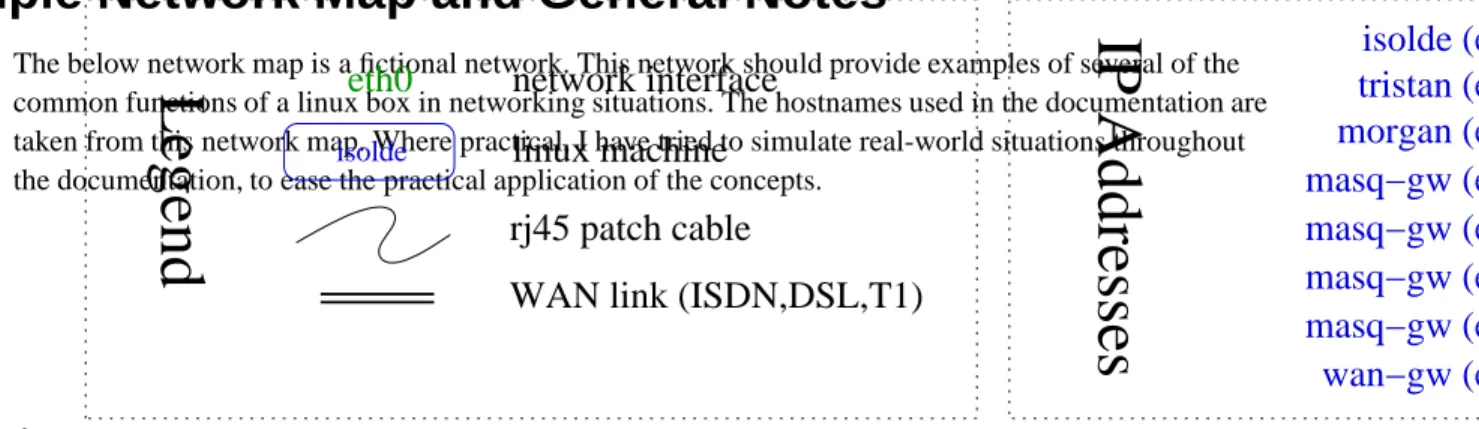
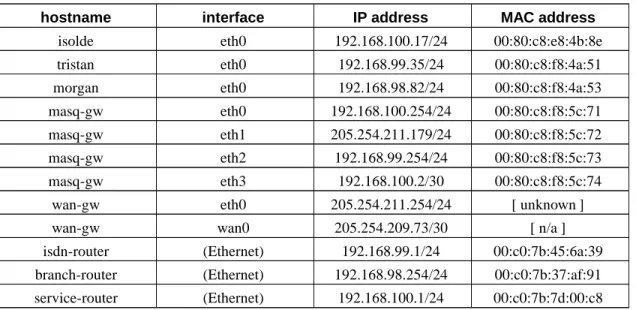
For the remainder of this document, many examples refer to machines in a hypothetical network. Refer to the example network description for the network map and addressing scheme.
Reading Routes and IP Information
Assuming an already configured machine named tristan, let’s look at the IP addressing and routing table. Next we’ll examine how the machine communicates with computers (hosts) on the locally reachable network. We’ll then send packets through our default gateway to other networks. After learning what a default route is, we’ll look at a static route.
One of the first things to learn about a machine attached to an IP network is its IP address. We’ll begin by looking at a machine named tristan on the main desktop network (192.168.99.0/24).
The machine tristan is alive on IP 192.168.99.35 and has been properly configured by the system administrator. By examining the route and ifconfig output we can learn a good deal about the network to which tristan is connected1.
Example 1-1. Sample ifconfig output
[root@tristan]# ifconfig
eth0 Link encap:Ethernet HWaddr 00:80:C8:F8:4A:51
inet addr:192.168.99.35 Bcast:192.168.99.255 Mask:255.255.255.0 UP BROADCAST RUNNING MULTICAST MTU:1500 Metric:1
RX packets:27849718 errors:1 dropped:0 overruns:0 frame:0 TX packets:29968044 errors:5 dropped:0 overruns:2 carrier:3 collisions:0 txqueuelen:100
RX bytes:943447653 (899.7 Mb) TX bytes:2599122310 (2478.7 Mb) Interrupt:9 Base address:0x1000
inet addr:127.0.0.1 Mask:255.0.0.0 UP LOOPBACK RUNNING MTU:16436 Metric:1
RX packets:7028982 errors:0 dropped:0 overruns:0 frame:0 TX packets:7028982 errors:0 dropped:0 overruns:0 carrier:0 collisions:0 txqueuelen:0
RX bytes:1206918001 (1151.0 Mb) TX bytes:1206918001 (1151.0 Mb)
[root@tristan]# route -n Kernel IP routing table
Destination Gateway Genmask Flags Metric Ref Use Iface 192.168.99.0 0.0.0.0 255.255.255.0 U 0 0 0 eth0
127.0.0.0 0.0.0.0 255.0.0.0 U 0 0 0 lo
0.0.0.0 192.168.99.254 0.0.0.0 UG 0 0 0 eth0
For the moment, ignore the loopback interface (lo) and concentrate on the Ethernet interface. Examine the output of the ifconfig command. We can learn a great deal about the IP network to which we are connected simply by reading the ifconfig output. For a thorough discussion of ifconfig, see the Section called ifconfig in Appendix C.
The IP address active on tristan is 192.168.99.35. This means that any IP packets created by tristan will have a source address of 192.168.99.35. Similarly any packet received by tristan will have the destination address of 192.168.99.35. When creating an outbound packet tristan will set the destination address to the server’s IP. This gives the remote host and the networking devices in between these hosts enough information to carry packets between the two devices.
Because tristan will advertise that it accepts packets with a destination address of 192.168.99.35, any frames (packets) appearing on the Ethernet bound for 192.168.99.35 will reach tristan. The process of communicating the ownership of an IP address is called ARP. Read the Section called Overview of Address Resolution Protocol in Chapter 2 for a complete discussion of this process.
This is fundamental to IP networking. It is fundamental that a host be able to generate and receive packets on an IP address assigned to it. This IP address is a unique identifier for the machine on the network to which it is connected.
Common traffic to and from machines today is unicast IP traffic. Unicast traffic is essentially a
conversation between two hosts. Though there may be routers between them, the two hosts are carrying on a private conversation. Examples of common unicast traffic are protocols such as HTTP (web), SMTP (sending mail), POP3 (fetching mail), IRC (chat), SSH (secure shell), and LDAP (directory access). To participate in any of these kinds of traffic, tristan will send and receive packets on 192.168.99.35. In contrast to unicast traffic, there is another common IP networking technique called broadcasting. Broadcast traffic is a way of addressing all hosts in a given network range with a single destination IP address. To continue the analogy of the unicast conversation, a broadcast is more like shouting in a room. Occasionally, network administrators will refer to broadcast techniques and broadcasting as "chatty network traffic".
Broadcast techniques are used at the Ethernet layer and the IP layer, so the cautious person talks about Ethernet broadcasts or IP broadcast. Refer to the Section called Overview of Address Resolution Protocol in Chapter 2, for more information on a common use of broadcast Ethernet frames.
IP Broadcast techniques can be used to share information with all partners on a network or to discover characteristics of other members of a network. SMB (Server Message Block) as implemented by Microsoft products and the samba (http://samba.org/) package makes extensive use of broadcasting
techniques for discovery and information sharing. Dynamic Host Configuration Protocol (DHCP (http://www.isc.org/products/DHCP/)) also makes use of broadcasting techniques to manage IP addressing.
The IP broadcast address is, usually, correctly derived from the IP address and network mask although it can be easily be set explicitly to a different address. Because the broadcast address is used for
autodiscovery (e.g, SMB under some protocols, an incorrect broadcast address can inhibit a machine’s ability to participate in networked communication2.
The netmask on the interface should match the netmask in the routing table for the locally connected network. Typically, the route and the IP interface definition are calculated from the same configuration data so they should match perfectly.
If you are at all confused about how to address a network or how to read either the traditional notation or the CIDR notation for network addressing, see one of the CIDR/netmask references in the Section called General IP Networking Resources in Appendix I.
Sending Packets to the Local Network
We can see from the output above that the IP address 192.168.99.35 falls inside the address space 192.168.99.0/24. We also note that the machine tristan will route packets bound for 192.168.99.0/24 directly onto the Ethernet attached to eth0. This line in the routing table identifies a network available on the Ethernet attached to eth0 ("Iface") by its network address ("Destination") and size ("Genmask").
Destination Gateway Genmask Flags Metric Ref Use Iface 192.168.99.0 0.0.0.0 255.255.255.0 U 0 0 0 eth0
Every host on the 192.168.99.0/24 network should share the network address and netmask specified above. No two hosts should share the same IP address.
Currently, there are two hosts connected to the example desktop network. Both tristan and masq-gw are connected to 192.168.99.0/24. Thus, 192.168.99.254 (masq-gw) should be reachable from tristan. Success of this test provides evidence that tristan is configured properly. N.B., Assume that the network administrator has properly configured masq-gw. Since the default gateway in any network is an important host, testing reachability of the default gateway also has a value in determining the proper operation of the local network.
The ping tool, designed to take advantage of Internet Control Message Protocol (ICMP), can be used to test reachability of IP addresses. For a command summary and examples of the use of ping, see the Section called ping in Appendix G.
Example 1-2. Testing reachability of a locally connected host with ping
[root@tristan]# ping -c 1 -n 192.168.99.254
PING 192.168.99.254 (192.168.99.254) from 192.168.99.35 : 56(84) bytes of data.
192.168.99.254 ping statistics
---1 packets transmitted, 0 packets received, ---100% packet loss
PING 192.168.99.254 (192.168.99.254) from 192.168.99.35 : 56(84) bytes of data. 64 bytes from 192.168.99.254: icmp_seq=0 ttl=255 time=238 usec
192.168.99.254 ping statistics
---1 packets transmitted, ---1 packets received, 0% packet loss round-trip min/avg/max/mdev = 0.238/0.238/0.238/0.000 ms
Sending Packets to Unknown Networks Through the Default
Gateway
In the Section called Sending Packets to the Local Network, we verified that hosts connected to the same local network can reach each other and, importantly, the default gateway. Now, let’s see what happens to packets which have a destination address outside the locally connected network.
Assuming that the network administrator allows ping packets from the desktop network into the public network, ping can be invoked with the record route option to show the path the packet travels from tristan to wan-gw and back.
Example 1-3. Testing reachability of non-local hosts
[root@tristan]# ping -R -c 1 -n 205.254.211.254
PING 205.254.211.254 (205.254.211.254) from 192.168.99.35 : 56(84) bytes of data.
205.254.211.254 ping statistics
---1 packets transmitted, 0 packets received, ---100% packet loss
PING 205.254.211.254 (205.254.211.254) from 192.168.99.35 : 56(84) bytes of data. 64 bytes from 205.254.211.254: icmp_seq=0 ttl=255 time=238 usec
RR: 192.168.99.35 ➊ 205.254.211.179 ➋ 205.254.211.254 ➌ 205.254.211.254 192.168.99.254 ➍ 192.168.99.35 ➎ 192.168.99.254 ping statistics
---1 packets transmitted, ---1 packets received, 0% packet loss round-trip min/avg/max/mdev = 0.238/0.238/0.238/0.000 ms
➊ As the packet passes through the IP stack on tristan, before hitting the Ethernet, tristan adds its IP to the list of IPs in the option field in the header.
➋ This is masq-gw’s public IP address.
➌ Our intended destination! (Anybody know why there are two entries in the record route output?)
➍ This is masq-gw’s private IP address.
➎ And finally, tristan will add its IP to the option field in the header of the IP packet just before the packet reaches the calling ping program.
By testing reachability of the local network 192.168.99.0/24 and an IP address outside our local network, we have verified the basic elements of IP connectivity.
To summarize this section, we have:
• identified the IP address, network address and netmask in use on tristan using the tools ifconfig and
route
• verified that tristan can reach its default gateway
• tested that packets bound for destinations outside our local network reach the intended destination and return
Static Routes to Networks
Static routes instruct the kernel to route packets for a known destination host or network to a router or gateway different from the default gateway. In the example network, the desktop machine tristan would need a static route to reach hosts in the 192.168.98.0/24 network. Note that the branch office network is reachable over an ISDN line. The ISDN router’s IP in tristan’s network is 192.168.99.1. This means that there are two gateways in the example desktop network, one connected to a small branch office network, and the other connected to the Internet.
Without a static route to the branch office network, tristan would use masq-gw as the gateway, which is not the most efficient path for packets bound for morgan. Let’s examine why a static route would be better here.
If tristan generates a packet bound for morgan and sends the packet to the default gateway, masq-gw will forward the packet to isdn-router as well as generate an ICMP redirect message to tristan. This ICMP redirect message tells tristan to send future packets with a destination address of 192.168.98.82 (morgan) directly to isdn-router. For a fuller discussion of ICMP redirect, see the Section called ICMP Redirects and Routing in Chapter 4.
The absence of a static route has caused two extra packets to be generated on the Ethernet for no benefit. Not only that, but tristan will eventually expire the temporary route entry3for 192.168.98.82, which
means that subsequent packets bound for morgan will repeat this process4.
To solve this problem, add a static route to tristan’s routing table. Below is a modified routing table (see the Section called Changing IP Addresses and Routes to learn how to change the routing table).
Example 1-4. Sample routing table with a static route
[root@tristan]# route -n Kernel IP routing table
Destination Gateway Genmask Flags Metric Ref Use Iface 192.168.99.0 0.0.0.0 255.255.255.0 U 0 0 0 eth0 192.168.98.0 192.168.99.1 255.255.255.0 UG 0 0 0 eth0
127.0.0.0 0.0.0.0 255.0.0.0 U 0 0 0 lo
0.0.0.0 192.168.99.254 0.0.0.0 UG 0 0 0 eth0
According to this routing table, any packets with a destination address in the 192.168.98.0/24 network will be routed to the gateway 192.168.99.1 instead of the default gateway. This will prevent unnecessary ICMP redirect messages.
These are the basic tools for inspecting the IP address and the routes on a linux machine. Understanding the output of these tools will help you understand how machines fit into simple networks, and will be a base on which you can build an understanding of more complex networks.
Changing IP Addresses and Routes
This section introduces changing the IP address on an interface, changing the default gateway, and adding and removing a static route. With the knowledge of ifconfig and route output it’s a small step to learn how to change IP configuration with these same tools.
Changing the IP on a machine
For a practical example, let’s say that the branch office server, morgan, needs to visit the main office for some hardware maintenance. Since the services on the machine are not in use, it’s a convenient time to fetch some software updates, after configuring the machine to join the LAN.
Once the machine is booted and connected to the Ethernet, it’s ready for IP reconfiguration. In order to join an IP network, the following information is required. Refer to the network map and appendix to gather the required information below.
• An unused IP address (Use 192.168.99.14.) • netmask (What’s your guess?)
• IP address of the default gateway (What’s your guess?) • network address5(What’s your guess?)
• The IP address of a name resolver. (Use the IP of the default gateway here6. )
Example 1-5. ifconfig and route output before the change
[root@morgan]# ifconfig eth0
eth0 Link encap:Ethernet HWaddr 00:80:C8:F8:4A:53
inet addr:192.168.98.82 Bcast:192.168.98.255 Mask:255.255.255.0 UP BROADCAST RUNNING MULTICAST MTU:1500 Metric:1
RX packets:0 errors:0 dropped:0 overruns:0 frame:0 TX packets:0 errors:0 dropped:0 overruns:0 carrier:0 collisions:0 txqueuelen:100
RX bytes:0 (0.0 b) TX bytes:0 (0.0 b) Interrupt:9 Base address:0x5000
[root@morgan]# route -n Kernel IP routing table
Destination Gateway Genmask Flags Metric Ref Use Iface 192.168.98.0 0.0.0.0 255.255.255.0 U 0 0 0 eth0
127.0.0.0 0.0.0.0 255.0.0.0 U 0 0 0 lo
The process of readdressing for the new network involves three steps. It is clear in Example 1-5, that morgan is configured for a different network than the main office desktop network. First, the active interface must be brought down, then a new address must be configured on the interface and brought up, and finally a new default route must be added. If the networking configuration is correct and the process is successful, the machine should be able to connect to local and non-local destinations.
Example 1-6. Bringing down a network interface with ifconfig
[root@morgan]# ifconfig eth0 down
This is a fast way to stop networking on a single-homed machine such as a server or workstation. On multi-homed hosts, other interfaces on the machine would be unaffected by this command. This method of bringing down an interface has some serious side effects, which should be understood. Here is a summary of the side effects of bringing down an interface.
Side effects of bringing down an interface with ifconfig • all IP addresses on the specified interface are deactivated and removed
• any connections established to or from IPs on the specified interface are broken7
• all routes to any destinations through the specified interface are removed from the routing tables • the link layer device is deactivated
The next step, bringing up the interface, requires the new networking configuration information. It’s a good habit to check the interface after configuration to verify settings.
Example 1-7. Bringing up an Ethernet interface with ifconfig
[root@morgan]# ifconfig eth0 192.168.99.14 netmask 255.255.255.0 up [root@morgan]# ifconfig eth0
eth0 Link encap:Ethernet HWaddr 00:80:C8:F8:4A:53
inet addr:192.168.99.14 Bcast:192.168.99.255 Mask:255.255.255.0 UP BROADCAST RUNNING MULTICAST MTU:1500 Metric:1
RX packets:0 errors:0 dropped:0 overruns:0 frame:0 TX packets:0 errors:0 dropped:0 overruns:0 carrier:0 collisions:0 txqueuelen:100
RX bytes:0 (0.0 b) TX bytes:0 (0.0 b) Interrupt:9 Base address:0x5000
The second call to ifconfig allows verification of the IP addressing information. The currently configured IP address on eth0 is 192.168.99.14. Bringing up an interface also has a small set of side effects.
Side effects of bringing up an interface • the link layer device is activated
• the requested IP address is assigned to the specified interface
Use ping to verify the reachability of other locally connected hosts or skip directly to setting the default gateway.
Setting the Default Route
It should come as no surprise to a close reader (hint), that the default route was removed at the execution ofifconfig eth0 down. The crucial final step is configuring the default route.
Example 1-8. Adding a default route with route
[root@morgan]# route -n Kernel IP routing table
Destination Gateway Genmask Flags Metric Ref Use Iface 192.168.99.0 0.0.0.0 255.255.255.0 U 0 0 0 eth0
127.0.0.0 0.0.0.0 255.0.0.0 U 0 0 0 lo
[root@morgan]# route add default gw 192.168.99.254 [root@morgan]# route -n
Kernel IP routing table
Destination Gateway Genmask Flags Metric Ref Use Iface 192.168.99.0 0.0.0.0 255.255.255.0 U 0 0 0 eth0
127.0.0.0 0.0.0.0 255.0.0.0 U 0 0 0 lo
0.0.0.0 192.168.99.254 0.0.0.0 UG 0 0 0 eth0
The routing table on morgan should look exactly like the initial routing table on tristan. Compare the routing tables in Example 1-1 and Example 1-8.
These changes to the routing table on morgan will stay in effect until they are manually changed, the network is restarted, or the machine reboots. With knowledge of the addressing scheme of a network, and the use of ifconfig and route it’s simple to readdress a machine on just about any Ethernet you can attach to. The benefits of familiarity with these commands extend to non-Ethernet IP networks as well, because these commands operate on the IP layer, independent of the link layer.
Adding and removing a static route
Now that morgan has joined the LAN at the main office and can reach the Internet, a static route to the branch office would be convenient for accessing resources on that network.
A static route is any route entered into a routing table which specifies at least a destination address and a gateway or device. Static routes are special instructions regarding the path a packet should take to reach a destination and are usually used to specify reachability of a destination through a router other than the default gateway.
As we saw above, in the Section called Static Routes to Networks, a static route provides a specific route to a known destination. There are several pieces of information we need to know in order to be able to add a static route.
• the address of the destination (192.168.98.0) • the netmask of the destination (255.255.255.0)
• EITHER the IP address of the router through which the destination (192.168.99.1) is reachable • OR the name of the link layer device to which the destination is directly connected
Example 1-9. Adding a static route with route
[root@morgan]# route -n Kernel IP routing table
Destination Gateway Genmask Flags Metric Ref Use Iface 192.168.99.0 0.0.0.0 255.255.255.0 U 0 0 0 eth0
127.0.0.0 0.0.0.0 255.0.0.0 U 0 0 0 lo
0.0.0.0 192.168.99.254 0.0.0.0 UG 0 0 0 eth0
[root@morgan]# route add -net 192.168.98.0 netmask 255.255.255.0 gw 192.168.99.1 [root@morgan]# route -n
Kernel IP routing table
Destination Gateway Genmask Flags Metric Ref Use Iface 192.168.99.0 0.0.0.0 255.255.255.0 U 0 0 0 eth0 192.168.98.0 192.168.99.1 255.255.255.0 UG 0 0 0 eth0
127.0.0.0 0.0.0.0 255.0.0.0 U 0 0 0 lo
0.0.0.0 192.168.99.254 0.0.0.0 UG 0 0 0 eth0
Example 1-9 shows how to add a static route to the 192.168.98.0/24 network. In order to test the reachability of the remote network, ping any machine on the 192.168.98.0/24 network. Routers are usually a good choice, since they rarely have packet filters and are usually alive.
Because a more specific route is always chosen over a less specific route, it is even possible to support host routes. These are routes for destinations which are single IP addresses. This can be accomplished with a manually added static route as below.
Example 1-10. Removing a static network route and adding a static host route
[root@morgan]# route del -net 192.168.98.0 netmask 255.255.255.0 gw 192.168.99.1 [root@morgan]# route add -net 192.168.98.42 netmask 255.255.255.255 gw 192.168.99.1 [root@morgan]# route add -host 192.168.98.42 gw 192.168.99.1
SIOCADDRT: File exists [root@morgan]# route -n Kernel IP routing table
Destination Gateway Genmask Flags Metric Ref Use Iface 192.168.99.0 0.0.0.0 255.255.255.0 U 0 0 0 eth0 192.168.98.42 192.168.99.1 255.255.255.255 UGH 0 0 0 eth0
127.0.0.0 0.0.0.0 255.0.0.0 U 0 0 0 lo
0.0.0.0 192.168.99.254 0.0.0.0 UG 0 0 0 eth0
This should serve as an illustration that there is no difference to the kernel in selecting a route between a host route and a network route with a host netmask. If this is a surprise or is at all confusing, review the use of netmasks in IP networking. Some collected links on general IP networking are available in the Section called General IP Networking Resources in Appendix I.
Conclusion
This chapter has introduced the simplest uses of ifconfig and route to view and alter the IP configuration of a host. To reiterate the minimum requirements to create an IP network between two machines:
Requirements for Two Hosts on the Same Ethernet to Communicate Using IP
• Each host must have a good connection to the Ethernet. Verify a good connection to the Ethernet with
mii-tool, documented in the Section called mii-tool in Appendix B.
• Each host must share IP network space. Practically, this means that each host should have the same network address, netmask, and broadcast address8.
• Each host must have a unique IP address.
• Neither host must block the other’s IP packets. (Host based packet filtering may hinder connections!) This concludes the tour of basic host networking and IP layer configuration as well as some basic tools available to the linux user. For further documentation on these tools, other tips, tricks, and more advanced content, keep reading!
Notes
1. For BSD and UNIX users, the idiom netstat -rn may be more familiar than the common route -n on a linux machine. Both of these commands provide the same basic information although the
formatting is a bit different. For a fuller discussion of these, see either the Section called netstat in Appendix G or the Section called route in Appendix D. For access to all of the routing features of the linux kernel, use ip route instead.
2. An incorrect broadcast address often highlights a mismatch of the configured IP address and netmask on an interface. If in doubt, be sure to use an IP calculator to set the correct netmask and broadcast addresses.
3. If the machine is a linux machine, then the temporary route entry is stored in the routing cache. Consult the Section called Routing Cache in Chapter 4 for more information on the routing cache. 4. It is quite reasonable to ignore ICMP redirect messages from unknown hosts on the Internet, but
ICMP redirect messages on a LAN indicate that a host has mismatched netmasks or missing static routes.
5. The network address can be calculated from the IP address and netmask. Refer to the Section called ipcalc and other IP addressing calculators in Appendix H. Especially handy is the variable length subnet mask RFC, RFC 1878 (http://www.isi.edu/in-notes/rfc1878.txt).
6. Many networks are configured with the name resolution services on a publicly connected host. See the Section called DNS Troubleshooting in Chapter 12.
7. It is possible for a linux box which meets the following three criteria to maintain connections and provide services without having the service IP configured on an interface. It must be functioning as a router, be configured to support non-local binding and be in the route path of the client machine. This is an uncommon need, frequently accomplished by the use of transparent proxying software.
8. Technically, the two hosts simply need to have routes to each other, but we are discussing the simplest case here, so we’ll leave this for a discussion of shared media.
Chapter 2. Ethernet
The most common link layer network in use today is Ethernet. Although there are several common speeds of Ethernet devices, they function identically with regard to higher layer protocols. As this documentation focusses on higher layer protocols (IP), some fine distinctions about different types of Ethernet will be overlooked in favor of depicting the uniform manner in which IP networks overlay Ethernets.
Address Resolution Protocol provides the necessary mapping between link layer addresses and IP addresses for machines connected to Ethernets. Linux offers control of ARP requests and replies via several not-well-known/procinterfaces;net/ipv4/conf/$DEV/proxy_arp,
net/ipv4/conf/$DEV/medium_id, andnet/ipv4/conf/$DEV/hidden. For even finer control of ARP requests than is available in stock kernels, there are kernel and iproute2 patches.
This chapter will introduce the ARP conversation, discuss the ARP cache, a volatile mapping of the reachable IPs and MAC addresses on a segment, examine the ARP flux problem, and explore several ARP filtering and suppression techniques. A section on VLAN technology and channel bonding will round out the chapter on Ethernet.
Address Resolution Protocol (ARP)
Address Resolution Protocol (ARP) hovers in the shadows of most networks. Because of its simplicity, by comparison to higher layer protocols, ARP rarely intrudes upon the network administrator’s routine. All modern IP-capable operating systems provide support for ARP. The uncommon alternative to ARP is static link-layer-to-IP mappings.
ARP defines the exchanges between network interfaces connected to an Ethernet media segment in order to map an IP address to a link layer address on demand. Link layer addresses are hardware addresses (although they are not immutable) on Ethernet cards and IP addresses are logical addresses assigned to machines attached to the Ethernet. Subsequently in this chapter, link layer addresses may be known by many different names: Ethernet addresses, Media Access Control (MAC) addresses, and even hardware addresses. Disputably, the correct term from the kernel’s perspective is "link layer address" because this address can be changed (on many Ethernet cards) via command line tools. Nevertheless, these terms are not realistically distinct and can be used interchangeably.
Overview of Address Resolution Protocol
Address Resolution Protocol (ARP) exists solely to glue together the IP and Ethernet networking layers. Since networking hardware such as switches, hubs, and bridges operate on Ethernet frames, they are unaware of the higher layer data carried by these frames1. Similarly, IP layer devices, operating on IP
packets need to be able to transmit their IP data on Ethernets. ARP defines the conversation by which IP capable hosts can exchange mappings of their Ethernet and IP addressing.
ARP is used to locate the Ethernet address associated with a desired IP address. When a machine has a packet bound for another IP on a locally connected Ethernet network, it will send a broadcast Ethernet frame containing an ARP request onto the Ethernet. All machines with the same Ethernet broadcast address will receive this packet2. If a machine receives the ARP request and it hosts the IP requested, it
will respond with the link layer address on which it will receive packets for that IP address. N.B., the
arp_filtersysctl will alter this behaviour somewhat.
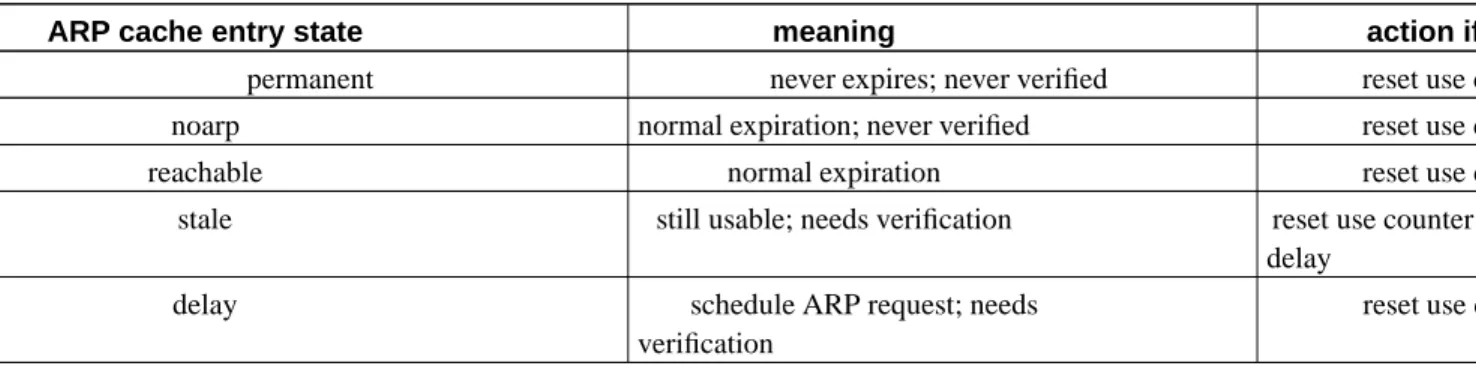
Once the requestor receives the response packet, it associates the MAC address and the IP address. This information is stored in the arp cache. The arp cache can be manipulated with the ip neighbor and arp commands. To learn how and when to manipulate the arp cache, see the Section called arp in Appendix B.
In Example 1-2, we used ping to test reachability of masq-gw. Using a packet sniffer to capture the sequence of packets on the Ethernet as a result of tristan’s attempt to ping, provides an example of ARP in flagrante delicto. Consult the example network map for a visual representation of the network layout in which this traffic occurs.
This is an archetypal conversation between two computers exchanging relevant hardware addressing in order that they can pass IP packets, and is comprised of two Ethernet frames.
Example 2-1. ARP conversation captured with tcpdump3
[root@masq-gw]# tcpdump -ennqti eth0 \( arp or icmp \) tcpdump: listening on eth0
0:80:c8:f8:4a:51 ff:ff:ff:ff:ff:ff 42: arp who-has 192.168.99.254 tell 192.168.99.35 ➊ 0:80:c8:f8:5c:73 0:80:c8:f8:4a:51 60: arp reply 192.168.99.254 is-at 0:80:c8:f8:5c:73 ➋ 0:80:c8:f8:4a:51 0:80:c8:f8:5c:73 98: 192.168.99.35 > 192.168.99.254: icmp: echo request (DF) ➌ 0:80:c8:f8:5c:73 0:80:c8:f8:4a:51 98: 192.168.99.254 > 192.168.99.35: icmp: echo reply ➍
➊
This broadcast Ethernet frame, identifiable by the destination Ethernet address with all bits set (ff:ff:ff:ff:ff:ff) contains an ARP request from tristan for IP address 192.168.99.254. The request includes the source link layer address and the IP address of the requestor, which provides enough information for the owner of the IP address to reply with its link layer address.
➋
The ARP reply from masq-gw includes its link layer address and declaration of ownership of the requested IP address. Note that the ARP reply is a unicast response to a broadcast request. The payload of the ARP reply contains the link layer address mapping.
The machine which initiated the ARP request (tristan) now has enough information to encapsulate an IP packet in an Ethernet frame and forward it to the link layer address of the recipient
(00:80:c8:f8:5c:73).
➌➍ The final two packets in Example 2-1 display the link layer header and the encapsulated ICMP packets exchanged between these two hosts. Examining the ARP cache on each of these hosts would reveal entries on each host for the other host’s link layer address.
This example is the commonest example of ARP traffic on an Ethernet. In summary, an ARP request is transmitted in a broadcast Ethernet frame. The ARP reply is a unicast response, containing the desired information, sent to the requestor’s link layer address.
An even rarer usage of ARP is gratuitous ARP, where a machine announces its ownership of an IP address on a media segment. The arping utility can generate these gratuitous ARP frames. Linux kernels will respect gratuitous ARP frames4.
Example 2-2. Gratuitous ARP reply frames
[root@tristan]# arping -q -c 3 -A -I eth0 192.168.99.35 [root@masq-gw]# tcpdump -c 3 -nni eth2 arp
tcpdump: listening on eth2
06:02:50.626330 arp reply 192.168.99.35 is-at 0:80:c8:f8:4a:51 (0:80:c8:f8:4a:51) 06:02:51.622727 arp reply 192.168.99.35 is-at 0:80:c8:f8:4a:51 (0:80:c8:f8:4a:51) 06:02:52.620954 arp reply 192.168.99.35 is-at 0:80:c8:f8:4a:51 (0:80:c8:f8:4a:51)
The frames generated in Example 2-2 are ARP replies to a question never asked. This sort of ARP is common in failover solutions and also for nefarious sorts of purposes, such as ettercap
(http://ettercap.sourceforge.net/).
Unsolicited ARP request frames, on the other hand, are broadcast ARP requests initiated by a host owning an IP address.
Example 2-3. Unsolicited ARP request frames
[root@tristan]# arping -q -c 3 -U -I eth0 192.168.99.35 [root@masq-gw]# tcpdump -c 3 -nni eth2 arp
tcpdump: listening on eth2
06:28:23.172068 arp who-has 192.168.99.35 (ff:ff:ff:ff:ff:ff) tell 192.168.99.35 06:28:24.167290 arp who-has 192.168.99.35 (ff:ff:ff:ff:ff:ff) tell 192.168.99.35 06:28:25.167250 arp who-has 192.168.99.35 (ff:ff:ff:ff:ff:ff) tell 192.168.99.35 [root@masq-gw]# ip neigh show
These two uses of arping can help diagnose Ethernet and ARP problems--particularly hosts replying for addresses which do not belong to them.
To avoid IP address collisions on dynamic networks (where hosts are turning on and off, connecting and disconnecting and otherwise changing IP addresses) duplicate address detection becomes important. Fortunately, arping provides this functionality as well. A startup script could include the arping utility in duplicate address detection mode to select between IP addresses or methods of acquiring an IP address.
Example 2-4. Duplicate Address Detection with ARP
[root@tristan]# arping -D -I eth0 192.168.99.147; echo $? ARPING 192.168.99.47 from 0.0.0.0 eth0
Unicast reply from 192.168.99.47 [00:80:C8:E8:1E:FC] for 192.168.99.47 [00:80:C8:E8:1E:FC] 0.702ms Sent 1 probes (1 broadcast(s))
Received 1 response(s) 1
[root@tristan]# tcpdump -eqtnni eth2 arp tcpdump: listening on eth2
0:80:c8:f8:4a:51 ff:ff:ff:ff:ff:ff 60: arp who-has 192.168.99.147 (ff:ff:ff:ff:ff:ff) tell 0.0.0.0 0:80:c8:e8:1e:fc 0:80:c8:f8:4a:51 42: arp reply 192.168.99.147 is-at 0:80:c8:e8:1e:fc (0:80:c8:e8:1e:fc) [root@masq-gw]# ip neigh show
Address Resolution Protocol, which provides a method to connect physical network addresses with logical network addresses is a key element to the deployment of IP on Ethernet networks.