Programmable
Soldering Station
LS 50
User Manual
List of contents Page Introduction ... 2 Proper Use ... 2 List of Contents ... 3 Safety Instructions ... 4 Description of Functions ... 5
Brief Summary of Instructions for Use ... 6
Instructions for Use ... 6
1. Setting up ... 6
2. Switching on ... 7
3. Adjusting the set point temperature with the ,,+”/ ,,-” keys ... 7
4. Selecting one of the programmed set point temperatures ... 7
5. Modifying the programmed set point temperatures ... 8
6. Manual standby function ... 8
7. Timer-controlled standby function ... 10
8. Automatic power-off function ... 11
9. Disabling the power bar-chart ... 11
10. Switching over between °C and °F ... 12
11. Calibrating the temperature reading by software ... 12
12. Potential equalization ... 13
13. Attaching a new soldering tip ... 13
Handling ... 14 Maintenance ... 14 Disposal ... 16 Troubleshooting... 16 Technical Data ... 16 Introduction
Dear customer, First of all we should like to thank you for purchasing this product.
You have, with this soldering station, acquired a product whose design and construction are completely state-of-the-art. To ensure safe operation, you as the user must always observe these Operating Instructions
Proper Use
● This soldering station is intended exclusively for the purposes of
soldering and unsoldering electrical and electronic components on printed circuit boards and modules, for solder-coating conductive patterns and cable ends, and for manufacturing cable connectors.
● It is not allowed to use the soldering station to heat liquids or plastics. ● The soldering station may only be used indoors, i.e. not in the
open air. Contact with dampness or humidity, e.g. in a bathroom etc., must be avoided under all circumstances.
● Use other than that described above will result in damage to this
product and involves the risk of hazards such as short-circuit, fire, electric shock, etc. The case must not be opened and no part of the product may be modified or converted.
● The appliance is not intended for use by young children or infirm
persons without supervision.
● Do not leave the packaging material Iying around. In the hands of
children, plastic film / bags, polystyrene foam, etc. may become a dangerous toy.
● In commercial premises, the accident prevention regulations of the
Association of Industrial Professional Associations with respect to electrical systems and operating equipment must be observed.
● In schools, training institutions, and hobby and self-help workshops,
use of any device operated via mains power must always be supervised by responsible and properly trained personnel.
● Warning- The soldering iron must be placed on its stand when not
in use.
Description of Functions
The LS 50 soldering station is made for excellent soldering convenience. Thanks to its processor control it has been possible to implement a wide variety of useful features, e.g. the direct selection of up to three programmable set point temperatures, the standby and automatic power-off functions, plus a liquid-crystal display (LCD). Particularly in day-to-day operation, the user quickly learns to appreciate the advantages of a soldering station with special convenience features of this nature.
With the LS 50 it is possible not only to adjust the set point temperature by means of the „+” / „-” keys but also to program up to three temperatures (or, alternatively, two temperatures plus a standby temperature) which can be quickly selected at the touch of a button. The soldering station can thus be prepared on an individual, task-Safety Instructions
● The warranty will become void in the event of any damage caused
by failure to observe these Operating Instructions. We cannot accept any liability for consequential damage.
● We cannot accept any liability for damage to property or physical
injury caused by improper use or failure to observe the Safety Instructions. The warranty will become void in such cases.
● For reasons of safety and of certification no conversion or
modification of the soldering station is permitted.
● The only power source permitted is an approved mains socket
(230-240 volts / 50 Hz) properly installed and connected to the public power supply grid.
● Please ensure that the soldering station is set up, switched on,
and operated in a proper, workmanlike and technically correct way, always carefully observing these Operating Instructions.
● If you have any doubt regarding the connection, safety measures
or operation of this device, please contact a specialist.
● Having switched the soldering station on, never leave it unattended
in this condition.
● Never use the soldering station in the proximity of any easily
inflammable, ignitable or combustible substances or gases.
● Soldering releases vapours that represent a health hazard. ● Always ensure that the workplace is well ventilated or use a suitable
extractor system.
● Always be sure to protect your eyes and body from solder splashes
by wearing suitable goggles and clothes.
● Always ensure when setting up the soldering station that the mains
2. Switching on
The soldering station can be switched on by means of the „Power” switch. The processor then performs a segment test, i.e. all 108 segments are activated for approximately two seconds.
This is followed by the heat-up phase. The soldering iron heats up until it reaches the set point temperature in effect just before the device was switched off the last time. The LCD shows the current actual temperature in the main display section and the „Power” bar-chart (which can be disabled) indicates the heat being supplied to the soldering iron; (see Figure 1). As soon as the set point temperature is reached, the soldering iron is maintained constant at this temperature. Figure 1
C
Power3. Adjusting the set point temperature with the „+” / „-” keys The set point temperature can be adjusted inter alia by means of the „+” and „-” keys.
As soon as one of these keys is pressed, the main display section (see Figure 1) changes to show the set point temperature. This set point temperature can then be jogged up or down in steps of 1° each time the key in question is pressed. If the key is pressed and held down, the set point temperature is incremented / decremented initially in 1° steps for the first 10 digits and then subsequently in 10° steps. As soon as the desired value is reached, the key must be released. The main display section, after approximately three seconds, switches back to showing the current actual temperature.
4. Selecting one of the programmed set point temperatures The feature with the programmed set point temperatures provides real soldering convenience. For different soldering jobs the most suitable temperatures can be selected quickly and conveniently at the push of standby and automatic power-off functions. The standby / automatic
power-off timer can be adjusted in 5-minute steps up to a maximum of 9 hours and 55 minutes. On expiry of this programmed timeout the LS 50 automatically sets the preprogrammed standby temperature or switches off completely. The standby mode can of course be activated and deactivated at any time at the push of a button.
The soldering iron on the LS 50 operates with 48 W. It can thus heat up to the desired working temperature very quickly and with plenty of power in reserve. The processor determines the current actual temperature via the integrated temperature sensor and regulates the power of the soldering iron accordingly. As and when necessary a new soldering tip can be attached very easily and quickly by simply undoing the screw connector.
Brief Summary of Instructions for Use
1. Set up the device and insert the soldering iron plug in the DIN socket on the station.
2. Switch on by means of the ,,Power” switch.
3. Adjust the set point temperature as desired by pressing the „+”/„-” keys.
4. You can select one of the programmed set point temperatures by pressing the appropriate „T1” /„T2”/„T3”key.
5. You can modify a programmed set point temperature by pressing and holding down the appropriate „T1” / „T2”/ „T3” key and, while doing so, adjusting by means of „+” or „-”.
Instructions for Use
In order to ensure that the device is used properly and as intended, please be sure, before using the device, to read through these Operating Instructions and Safety Instructions carefully and completely. 1. Setting up
First the device must be set up at your workplace and connected to a mains socket. The plug from the soldering iron must then be inserted in the DIN socket located on the front of the station. The solder sponge must be laid in the stand and moistened.
C
Power Standby StandbyC
Power Standby Prog C/F Power Figure 3The device is shipped with the manual standby function disabled. If you prefer to have this function enabled, the LS 50 must first be switched to programming mode. To do so, press keys „T1”, „T2” and „T3” together at the same time. When the LS 50 is in programming mode, this is indicated by the ,,Prog” segment; (see Figure 4).
Figure 4
Now in programming mode the manual standby function can be enabled by pressing key „T1". The arrow segment appears above this key; (see Figure 5). Pressing „T1” again disables the function again and the arrow segment disappears. After a period of three seconds after the last time a key was pressed the LS 50 quits programming mode automatically and returns to normal display.
Figure 5 a button. The device is shipped with the following set point temperatures
already programmed: 150 °C, 300 °C, and 400 °C.
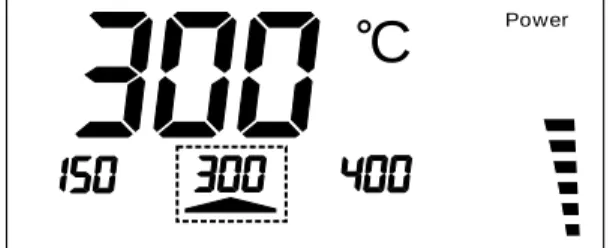
These programmed set point temperatures are indicated above the keys „T1”, „T2” and „T3” in the display. When one of these keys is pressed, the assigned temperature is used as the set point. After one of these keys has been pressed, the main display section shows the assigned temperature for approximately three seconds and then switches back to showing the current actual temperature.
An arrow above one of these keys signals that the assigned programmed temperature has been activated as set point; (see Figure 2).
Figure 2
C
Power5. Modifying the programmed set point temperatures
If you prefer to have different set point temperatures programmed, these can easily be modified. To do so, the key below the temperature you wish to change (T1, T2, T3) must be pressed and held down. While this key is held down, the assigned temperature can be adjusted up or down by pressing the „+” / „-” key. As soon as you release the keys, the new temperature value is saved.
8. Automatic power-off function
It is also possible to program the LS 50 so that the soldering iron, after a programmable timeout, automatically switches off. The LS 50 indicates this by displaying „OFF” in the main display section. As soon as any key is pressed, the device quits the power-off mode.
The device is shipped with the power-off function disabled. If you prefer to have this function enabled, the LS 50 must first be switched to programming mode. To do so, press keys „T1”, „T2” and „T3” together at the same time. When the LS 50 is in programming mode, this is indicated by the „Prog” segment; (see Figure 4). Now in programming mode the power-off function can be enabled by pressing and holding down key „T2”. The power-off timeout can now be adjusted in 5-minute steps up to a maximum of 9 hours and 55 minutes by means of the „+”/„-” keys; (see Figure 7).
Figure 7
If the power-off timeout is set to „0”, the power-off function is disabled again and the timeout display disappears. After a period of three seconds after the last time a key was pressed the LS 50 quits programming mode automatically.
Notice: After programming the Automatic Power-Off time the programmed data only becomes valid after switching the solder station off and then back on.
9. Disabling the „power” bar-chart
The „power” bar-chart display can be disabled. To do so, the LS 50 must first be switched to programming mode by pressing keys „T1”, „T2” and „T3” together at the same time; (see Figure 4). Now in programming mode the „power” bar-chart can be disabled by pressing key „T2”. The arrow segment above this key disappears; (see Figure 8). Pressing „T2” again re-enables the bar-chart display. After a period of
C
PowerStandby
Prog
C/F Power
7. Timer-controlled standby function
The timer-controlled standby function has the effect of lowering the working temperature automatically after expiry of a programmable timeout. This timeout is calculated from the last time a key was pressed. If the standby period has been programmed e.g. as one hour, the soldering station switches to standby mode exactly one hour after the last time a key was pressed. In this condition, as soon as any key is pressed, the soldering station quits standby mode again.
The device is shipped with the timer-controlled standby function disabled. If you prefer to have this function enabled, the LS 50 must first be switched to programming mode. To do so, press keys „T1”, „T2” and „T3” together at the same time. When the LS 50 is in the programming mode, this is indicated by the „Prog” segment; (see Figure 4).
Now in programming mode the timer-controlled standby function can be enabled by pressing and holding down key „T1”. The standby timeout can now be adjusted in 5-minute steps up to a maximum of 9 hours and 55 minutes by means of the „+”/ „-” keys; (see Figure 6). If the standby timeout is set to „0”, the timer-controlled standby function is disabled again and the timeout display disappears.
After a period of three seconds after the last time a key was pressed the LS 50 quits programming mode automatically.
Notice: After programming the standby time the programmed data only becomes valid after switching the solder station off and then back on.
Figure 6
C
Power Standby Prog C/F PowerFor this purpose you should use a measuring unit with stable operation up to a temperature of at least 350 °C.
In order to activate calibration mode, you must, during the switching-on process, press key „T1”. „CAL 20” appears in the display together with the soldering iron temperature, which should correspond to room temperature. If the soldering iron is still warm, you must first allow it to cool down to room temperature before proceeding further.
Having ensured that the soldering iron has cooled down to approximately 20 °C, you must confirm this by pressing key „T1”. Now key „T2” must be pressed. In the display „CAL 350” appears. The LS 50 begins to heat up the soldering iron to 350 °C. If there is a discrepancy between the display on the connected temperature measuring unit and the LS 50 display, the latter can now be calibrated by pressing the „+” / „-” keys. If both displays agree, you should now press key „T3”. This concludes the calibration process. The new calibration data is saved to the non-volatile memory on the LS 50. 12. Potential equalization
For soldering work on critical components the potential at the soldering tip should be adapted to the circuit potential by operating via the „Potential Equalization” socket. The voltage difference must be no more than maximum 42 V.
13. Attaching a new soldering tip
The soldering tip can be replaced very easily and quickly thanks to the soldering irons quick-action screw connector. If the soldering iron is cold, the screw connector can be undone directly on the shank. The sleeve can then be moved forward and withdrawn. The soldering tip is
F
PowerStandby
Prog
C/F Power
three seconds after the last time a key was pressed the LS 50 quits programming mode automatically.
Figure 8
10. Switching over between
°
C (Celsius) and°
F (Fahrenheit) If you prefer to have the temperature displayed in °F, the LS 50 must first be switched to programming mode by pressing keys „T1”, „T2” and „T3” together at the same time; (see Figure 4). Now in programming mode the temperature displays can be switched over to °F by pressing key „T3”. The arrow segment above this key disappears; (see Figure 9). By pressing „T3” again the temperature displays can be switched back to °C. After a period of three seconds after the last time a key was pressed the LS 50 quits programming mode automatically.Figure 9
C
Standby Prog C/F Powerconditions, or
- the device has been subjected to heavy stress during transportation.
Before carrying out cleaning or maintenance on the device, please be sure to observe the following Safety Instructions:
● When opening covers or withdrawing parts, live electric components
may be exposed.
● Therefore, before carrying out any maintenance or repair, the device
must be disconnected from all voltage sources.
● Even after the device has been disconnected from all voltage
sources, it is always possible that capacitors in the device may still be charged.
● Repair may only be carried out by a specialist aware of the
associated risks and familiar with the relevant directives.
● If it becomes necessary to change a fuse, please note that only
fuses of the type and rated current indicated may be used as replacements.
● Makeshift repair of the defective fuse or bridging the fuse holder
are not permitted.
● The LS 50 is fitted with a slow-blowing fine-wire 1 A fuse. In the
event of a failure, this can be easily exchanged but before doing so, the device must first be disconnected from the 230 V mains voltage supply.
To access the fuse the fuse-holder on the underside of the device must be unscrewed using a screw-driver turning in the direction indicated by the arrow. Once this is open, the fuse can be removed and replaced with a new one of the same type. Then carefully screw the fuse cap back again into the fuse-holder.
Only after this whole process has been completed can the device be returned to operation.
● To clean the device use only a dry linen cloth. If the device is
unusually dirty, the cloth may be very slightly moistened. Never use any cleaning agent that may contain solvents. Ensure that absolutely no humidity is allowed to penetrate inside the device. Handling
● Never switch on your soldering station immediately after bringing
it from a cold room into a warm room. The resulting condensation may in worst case circumstances actually lead to the device being damaged beyond repair.
● Allow the soldering station in its non-switched-on condition to first
attain ambient room temperature.
● So long as the device is switched on, always ensure that the case
is sufficiently ventilated and never allow the device to be covered up.
● Place the soldering station on a flame-resistant, fire-retardant
base-pad in such a way that air can circulate freely in the case.
● The soldering station must not be placed in a damp, humid location.
It must not be exposed to natural precipitation or splashing water, to dust, or to prolonged direct sunlight.
● Avoid subjecting the device to heavy mechanical stress. Do not
place the device on an uneven or unstable base. If the device falls over, staff might be injured.
● If you are using the original soldering iron stand LA 50, the soldering
iron must be inserted in the receptacle as far as it will go.
● The soldering iron attains working temperatures in the range from
150 °C up to 450 °C. Contact with any of its metallic parts may cause serious burns to people or animals.
Maintenance
● Check the soldering station at regular intervals with regard to its
technical safety, e.g. Iooking for damage to the mains cable or the case.
● If you suspect that the device is no longer safe to use, it must be
kept switched off and secured against being switched on again unintentionally. The mains plug must be withdrawn from the power socket.
● It can be assumed that the device is no longer safe to use if any of
the following applies:
- the device is visibly damaged, - the device has ceased to function,
Disposal
In the event that the LS 50 has become unusable, it must be disposed of in accordance with the applicable statutory regulations.
Troubleshooting
You have, with this soldering station, acquired a product whose design and construction are completely state-of-the-art and whose operation is completely reliable.
Do not open the device yourself. It contains no parts needing maintenance. In the event of failure please send the device to our service centre. Opening the device yourself first involves the risk of electric shock and second will automatically invalidate the warranty for this product.
In the event of the soldering station becoming in any way defective, it must be disconnected immediately from the mains power supply and secured against being switched on again unintentionally.
Please ensure that the Safety Instructions are observed at all times. Technical Data
Soldering temperature: ... 150 °C to 450 °C Resolution: ... 1 °C Soldering iron: ... 24V / 48W Power supply: ... 230 -240 V / 50Hz / 70VA Dimensions, soldering station: ... 110 x 120 x 135 mm (W x H x D) Dimensions, soldering iron: ... 200 x 30 mm