Getting Started with Symantec™ Data Loss Prevention
Guide to Successful Data Loss
Prevention Risk Reduction: Part 1
Who should read this paper
Who should read this paper
Symantec™ Data Loss Prevention customers who are in the process of
deploying or have already deployed the solution in their organization,
and are ready to begin the Risk Reduction process.
APER:
TARTED WITH S
YMANTE
C™ D
AT
Content
Introduction and Purpose . . . 1
Phase 1: Planning . . . 2
Assign the Right Staff. . . 2
Target Areas of Highest Risk . . . 3
Targeting Confidential Information . . . 4
Targeting High-Risk/Exposure Points. . . 5
Define the Incident Response Process . . . 5
Enabling the Initial Response Structure . . . 6
How Initial Incident Response Works . . . 7
Establish Success Metrics and Milestones for the First 90 Days . . . 8
Tracking Risk-Reduction Metrics. . . 8
Tracking Operational Metrics . . . 9
Develop Employee Outreach and Communication Plans . . . 9
Assess Current Program. . . 9
Plan for Communication at Key Points. . . 10
Phase 2: Deployment . . . 10
Confirm Hardware Sizing and Deployment Topology . . . 10
Determine Integration with Existing Infrastructure . . . 10
Prepare to Leverage Exact Data Match (EDM), Indexed Document Match (IDM), and Directory Group Match (DGM) . . . 11
Deploy and Optimize Performance . . . 11
Introduction and Purpose
Organizations everywhere rely on high-speed networks and mobile computing to easily share and access information at all levels.
Unfortunately, this wide open world also presents new challenges for data protection. Whether those challenges are related to maintaining compliance in the tightly regulated financial services, insurance and retail industries, or protecting intellectual property in the highly competitive high-tech and manufacturing industries, companies need to know where their confidential information is stored, how it is being used, and how best to prevent its loss.
The first step to long-term, sustainable data protection is recognizing these challenges, and committing to an enterprise-wide initiative, involving people, processes and technology, to address this risk head-on. Once the decision is made to address this risk, organizations need a clearly defined plan for success, with specific steps, tasks, resources, and objectives to reach their short and long term goals.
Comprehensive, clearly-defined, business-focused DLP programs achieve greater risk reduction, faster and with fewer resources, by integrating Symantec Data Loss Prevention into their existing security program and leveraging the software to promote enterprise-wide initiatives that drive change across the organization. These successful programs share five common attributes:
• Executive-level involvement. Support to protect data and change business processes and employee behavior must come from the top. • A prioritized approach. Confidential data can take many forms and be anywhere in an organization, targeting the most critical data first
proves value immediately.
• Business owner involvement. The information needed to identify new threats, keep policies current, and fix broken business processes must come from those closest to the data.
• A trained Incident Response Team (IRT). Clearly defined roles, responsibilities, and procedures drive consistency and organizational buy-in.
• Employee education. Visibility into employee behavior allows focused training on primary risk areas, and real-time enforcement of company data protection policies promotes a culture of security.
The two companion documents, Getting Started with Symantec™ Data Loss Prevention (Part 1) and Symantec™ Data Loss Prevention Risk
Reduction Approach (Part 2) walk you through how to design your DLP program to incorporate these five characteristics. Together, both
documents collect the best practices developed through 150+ Symantec Data Loss Prevention deployments across a wide variety of customer environments and industry verticals. They illustrate how to create the right mix of people, processes, and technology, and apply that mix across six project phases. Companies that have followed this methodology and leveraged the expertise and best practices outlined in these documents have consistently achieved measurable risk reduction within 90 days.
In the first two phases – Planning and Deployment – your goal is to lay the groundwork and infrastructure for long term success. This is the most critical period in your DLP rollout, because your success in the future will depend on the work completed here. In the first two phases you will ensure that:
• Your most critical data is identified and protected
• Your system is deployed, operational, and providing maximum coverage based on your goals • Policies are correctly configured to capture incidents of interest and minimize false positives • Incident responders are trained, and fully prepared to address policy violations
The goal of this document is to prepare you to achieve these objectives. Your Symantec Data Loss Prevention Solution Specialist will guide you through the process.
The four Risk Reduction phases – Baseline/Visibility, Remediation, Notification, and Prevent/Protect – are where you achieve and measure results. In these phases you will:
• Fine-tune policies
• Identify and change business processes contributing to risk
• Expand, modify, and automate remediation efforts to achieve the greatest impact with the fewest resources • Begin real-time notification to employees when their actions cause risk
• Prevent and protect critical data from leaving the organization without impacting business as usual • Collect specific metrics to demonstrate and document risk reduction over time.
The Risk Reduction Approach covers the four phases of risk reduction, describes the key tasks in each phase, and prepares you to achieve the objectives listed above. Depending on the services you purchased, Symantec Data Loss Prevention consultants may provide support on site or on an advisory basis.
Phase 1: Planning
The focus of the Planning Phase is establishing the framework for the long-term DLP program, including the following key tasks: • Assign the right staff
• Target areas of highest risk
• Define the incident response approach
• Establish success metrics and milestones for the first 90 days • Develop employee outreach and communication plans
Customers who incorporate these key elements at the very beginning of the implementation, instead of after the software is deployed, develop a comprehensive, organization-wide DLP program that results in rapid achievement of their risk reduction goals.
Assign the Right Staff
Assign the Right Staff
Developing a comprehensive DLP program requires solid leadership and input from key stakeholders across the organization. A strong, dedicated Project Manager is critical. When supported by an executive-level sponsor, and appropriately-staffed Technical and Business Enablement Teams, the Project Manager can drive the cross-functional and cross-organizational involvement needed to define and prioritize the data and policies to be protected, identify the most appropriate staff to review and respond to incidents, determine the proper remedial actions, promote business-unit level responsibility for reducing organization-wide risk, and encourage a culture of security. Table 1, below, outlines the key roles and responsibilities required for a successful implementation.
TTable 1: Staffing f
able 1: Staffing for a Successful Deployment
or a Successful Deployment
Executive Sponsor
• DLP champion; involved in Risk Assessment and Symantec Data Loss Prevention purchase • CISO, CIO
• Help get the right people involved and committed; drive Incident Response Team and Steering Committee formation; lead Steering Committee
Project Manager
• Drive project plan, achieve product roll-out goals and objectives
• Preferred: Risk, Privacy, Information Security; Second Choice: Project Management Office, Business, IT • Make sure the right people stay involved; priorities are correctly set; involves Executive Sponsor as needed
Technical Team • Responsible for technical tasks (system architecture design and implementation)
• Representatives from Messaging, Network Infrastructure, Information Security, System Administration, Web Proxy, Server Management, Desktop Management, Audit, DBA, LDAP Administrator
• Technical Team Lead(Technical Architect) should be assigned to make sure the right people stay involved and the milestones are achieved
Business Enablement Team
• Responsible for business enablement tasks (policies, employee communication, incident response, metrics and reporting)
• Representatives from Human Resources, Legal, Compliance, Privacy, Risk, Investigations, Forensics, key business stakeholders
• Business Team Leadshould be assigned to make sure the right people stay involved and the milestones are achieved
TTar
arget Areas of Highes
get Areas of Highest Risk
t Risk
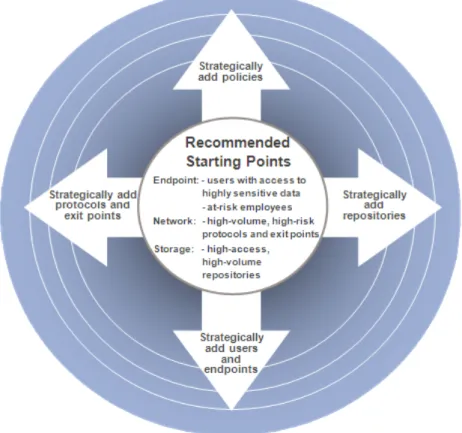
Confidential data can take many forms and exist anywhere in an organization. Taking the time up front to identify what is most critical to protect as well as the riskiest exit or exposure points and focusing on those will prove value immediately. By prioritizing confidential information and exit/exposure points, you can structure your roll-out to address the most critical risks first, and then expand from there to full coverage, as indicated in the graphic below.
Figure 1: Risk
Figure 1: Risk-Based T
-Based Tar
argeting
geting
TTar
argeting Confidential Inf
geting Confidential Information
ormation
There are common types of confidential data that companies prioritize for protection, based on the company type. For example, financial services, insurance, and retail companies put a premium on compliance with key regulations, such as Gramm-Leach-Bliley (GLBA), and Payment Card Industry (PCI) standards. These companies choose to protect structured data such as credit card numbers, social security numbers, etc.
Manufacturing and High Tech companies typically focus on protecting intellectual property such as unstructured formulas, technical designs, source code, and manufacturing procedures, etc. When identifying critical intellectual property, consider what provides your competitive edge as well as new products and services about to be launched.
Companies can usually come up with a long list of all the different types of confidential data that they need to protect. To help prioritize which data to focus on first, Symantec recommends detailing the impact of data loss for each scenario you are considering.
Examples include: heavy fines, loss of customer confidence, loss of trade secrets, loss of competitive advantage, negative impact to brand, customer attrition, etc. Some types of data loss will have multiple consequences. Then rate the severity of each consequence on a scale of one to five, with one indicating low severity (little overall business impact) and five indicating high severity (significant financial or
competitive advantage impact). Input from business units and executive-level sponsors is critical during this exercise. With the input of those closest to the data and those guiding the business, this exercise should provide the perspective needed to select the three to five policies to implement first, as well as an idea of the subsequent policies and order of deployment.
TTar
argeting High-Risk
geting High-Risk/Expo
/Exposure P
sure Points
oints
Customers who purchase multiple Symantec Data Loss Prevention products must decide how to approach their overall solution rollout. Each product addresses a different risk, and how you target your high risk exit and exposure points will be determined by which products are being deployed and when they will be deployed. A key guideline is high volume + high access = high risk, and we recommend addressing the areas of highest risk first.
Those who purchase Symantec™ Data Loss Prevention Network Monitor and Symantec™ Data Loss Prevention Network Prevent for Email and/ or Web will need to target high risk exit points, where large volumes of email messages and web traffic leave the company. Network Monitor and Prevent servers are typically deployed close to the outbound edge of the network to capture all traffic, and before the encryption gateway or the proxy/NAT device to ensure that Symantec Data Loss Prevention is able to both detect the violation and reconcile the original sender of the message.
Symantec™ Data Loss Prevention Network Discover purchasers will need to identify their high risk data repositories, again determined by assessing which have higher volume and higher access. Our recommended prioritization approach is to address your high-volume centralized fileshares and centralized data repositories (e.g. Windows® File Servers, Lotus® Notes, Sharepoint™, Documentum™, etc) first.
Because the Symantec Data Loss Prevention Agent, a key part of both the Endpoint Discover and Endpoint Prevent products, is deployed via standard agent deployment software (e.g., Altiris® or SMS), customer size (e.g. number of endpoints) determines the way the rollout is targeted. Smaller customers, those with up to 10,000 users, can easily deploy to all endpoints within two to three months, usually less. However, targeting users is key for very large Endpoint Discover and/or Endpoint Prevent roll-outs. One approach is to target Endpoint deployments to staff with access to highly sensitive data (e.g. Finance or Human Resources department) or at-risk employees (e.g. staff with high turnover, as in a call center, or about to be terminated) first, before expanding to the remaining endpoints. Another option is to target a pilot group of users that is a representative cross-section of all business units and workstation images (Windows desktops) within the company.
Global rollouts are typically phased. Financial services, insurance, and retail companies, seeking compliance with key regulations, typically deploy in the US first, to allow fine tuning of policies and processes, before expansion to countries with more stringent privacy requirements, as well as language considerations. High tech and manufacturing companies, focused on intellectual property protection, typically deploy in the US, followed shortly thereafter to international manufacturing locations.
This targeted approach allows companies to break down the problem of protecting confidential data into manageable pieces and focus on the ones that most directly impact the business.
Define the Incident Response Process
Define the Incident Response Process
90 percent of DLP is incident response. Symantec Data Loss Prevention's highly customizable workflow and manual and automated incident remediation options allow companies to quickly route incidents to the right people at the right time for the right response. By determining the initial incident response structure, and training the Incident Response Team (IRT) members on the system prior to software deployment, companies can take advantage of the natural momentum that typically happens at the beginning of the project. Table 2, below, describes Symantec's four-day instructor-led Symantec Data Loss Prevention Administration course, which covers policy management and detection, response management, user and role administration, reporting, workflow, and incident response.
TTable 2: F
able 2: Fan-In and F
an-In and Fan-Out Procedures
an-Out Procedures
Target Audience Course Description
DLP System Administrators
responsible for DLP application maintenance and operations as well as troubleshooting DLP servers
Provides fundamental knowledge and hands-on lab experience to configure and administer the Symantec Data Loss Prevention Enforce platform, including policy management and detection, response management, user and role administration, reporting, workflow and incident response. Additionally, the student will be introduced to the six Symantec Data Loss Prevention detection servers: Network Monitor and Network Prevent, Network Discover and Network Protect, Endpoint Prevent and Endpoint Discover and deployment best practices.
This training is strongly recommended before deployment so that the project team will be ready to begin base-lining incidents immediately, ensuring no lag between "go-live" and full system use. With proactive training, companies can immediately begin addressing their DLP risks and increasing Symantec Data Loss Prevention system automation to help keep resource needs low.
Enabling the Initial Response Structure
Enabling the Initial Response Structure
Typically, IRTs use Symantec Data Loss Prevention in one of two ways, as depicted in Figure 2.
In theFan-out Response Structure, a small group, usually Information Security personnel, serves as first responders for all incidents and
escalates critical incidents through defined channels to appropriate personnel (e.g. Forensics, Legal, Compliance, Human Resources) for further investigation or resolution. The first responder pool is small and focused and the escalation responder pool is larger and more distributed.
In theFan-in Response Structure, individual business units (e.g. Finance, Marketing, Product Development, etc.) appoint select staff to serve as first responders for the incidents related to their business unit and escalate critical incidents to appropriate personnel for further investigation or resolution. The first responder pool is large and distributed and the escalation responder pool is smaller and more focused. Most customers choose the Fan-out Response approach for their initial deployments. This approach allows the Information Security Team to closely monitor the configured policies, workflow, and incident response processes and modify them as needed to improve performance.
How Initial Incident Response W
How Initial Incident Response Works
orks
Within both response structures, there are typically three levels of response: first responders, escalation responders, and investigators. • First responderslog into Symantec Data Loss Prevention on a regular basis to review their incident queue. Initially, first responders
remediate incidents manually through Symantec Data Loss Prevention or outside of it (phone call, email etc.), and then mark the incidents as closed (resolved or dismissed) within Symantec Data Loss Prevention.
• Escalation respondersandinvestigatorsmay log into Symantec Data Loss Prevention to review their incident queues, but more commonly are sent automatic email alerts or automated reports when an incident requires their attention. The escalation and
investigation responders also manually remediate incidents either through Symantec Data Loss Preventionor outside of it and then mark them as closed or launch investigations outside of Symantec Data Loss Prevention.
Figure 3: Incident Lif
Figure 3: Incident Lifec
ecycle
ycle
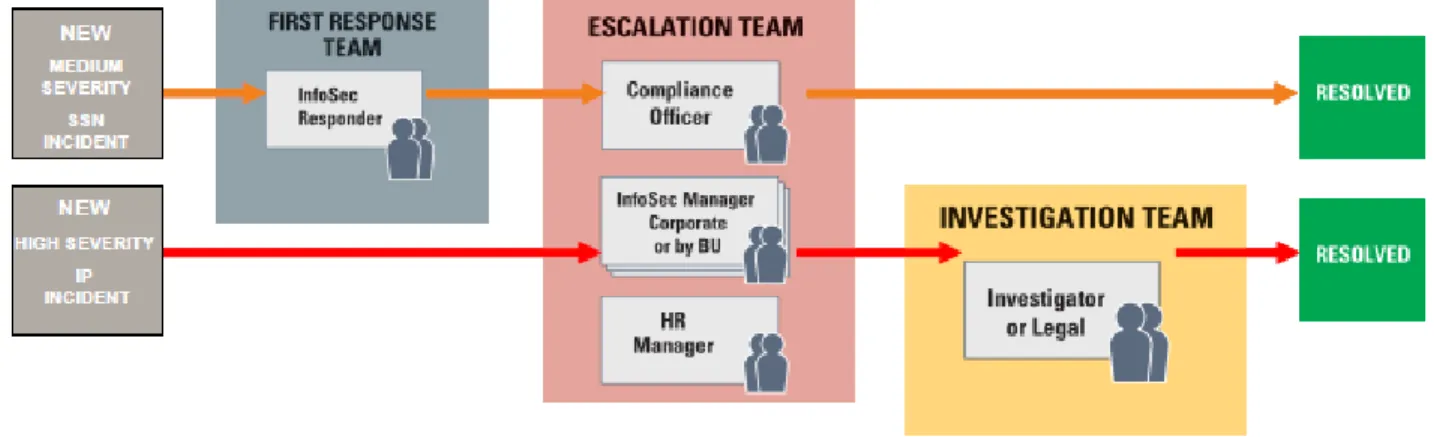
Figure 3, above, depicts the incident lifecycle. Please note that most incidents will not go through all stages of the lifecycle. As depicted in Figure 4, below, Symantec Data Loss Prevention can be configured to automatically route incidents to the correct responder. This is usually driven by incident severity, which is also configurable, by policy, and by business unit.
Figure 4: Sample Incident W
Figure 4: Sample Incident Workflow
orkflow
As Figure 4 illustrates, Symantec Data Loss Prevention routes new, medium-severity incidents to the First Response Team and new, high-severity incidents to the Escalation Team. The responder reviews the incident, and if they determine that they cannot resolve or dismiss it, then they escalate it to the next level. For the First Responder, the next level is the Escalation Team. For the Escalation Responder, the next level the Investigation Team. In this example, the incidents are also routed by policy. The SSN incident that the First Responder reviewed was escalated to the Compliance Officer in the Escalation Team. The high severity IP incident was automatically routed to the Information Security Manager in the Escalation Team. The Information Security Manager determined that the incident needed further investigation, and escalated it to the Investigation Team to investigate and resolve.
It is best to follow a similar, straightforward workflow when beginning with the product. As the deployment progresses and the IRT members become more comfortable with how the system detects and handles incidents, common manual response processes can be codified as automated responses within the Symantec Data Loss Prevention solution and workflow can be expanded. The earlier companies begin using the system for incident response, the earlier they can take advantage of automation for policy enforcement and incident resolution.
Es
Establish Success Metrics and Miles
tablish Success Metrics and Milestones f
tones for the Firs
or the First 90 Da
t 90 Days
ys
Defining and tracking key metrics helps quantify and demonstrate risk reduction over time, as well as identify areas needing additional attention. Setting clear goals for the first 90 days and beyond will help maintain project momentum and ensure the entire team stays focused on the same goals. Well-defined success metrics make it easier for Executive Sponsors to ensure that appropriate resources are enabled to address critical risks.
Symantec recommends selecting one to three risk reduction metrics and one to three operational metrics and tracking these over the first 90 days. After 90 days, expand the metrics to cover more areas of risk reduction and system operations and continue to demonstrate success. Regular review schedules will support long-term planning for continuous improvement initiatives.
TTracking Risk
racking Risk-Reduction Metrics
-Reduction Metrics
Risk reduction metrics should be reported regularly to the Steering Committee, who will monitor overall, company-wide risk reduction, and to the individual business units, who will focus on risk reduction within their business unit. Configure Symantec Data Loss Prevention to automatically email these reports to the appropriate personnel on a scheduled basis.
• Percentage decline in incidents by policy and business unit • Percentage decline in incidents across all business units
• Percentage decline in incidents due to broken business processes • Percentage decline in incidents due to employee oversight • Top violating business units
Examples of business unit-focused risk reduction metrics include: • Top violating senders
• Top incident recipients • Number of incidents per policy
• Percentage of incidents of "High" severity
• Average size of new or un-reviewed incident queue
TTracking Operational Metrics
racking Operational Metrics
The right operational metrics will provide insight into where the system is working well and where additional focus can improve performance. Examples of operational metrics include:
• Percentage false positives for each policy
• Average queue size for "new" or un-reviewed incidents for each IRT member
• Percentage of exit points covered (compare against plan for coverage of all exit points) • Percentage of repositories covered (compare against plan for coverage of all data repositories) • Percentage of end points covered (compare against plan for coverage of all end points)
As part of our 90-day and 180-day Health Check and Tune-up process, we will request specific information related to key operational metrics in order to better focus the site visit.
Develop Employee Outreach and Communication Plans
Develop Employee Outreach and Communication Plans
Symantec Data Loss Prevention automates enforcement of company security policies, providing companies with an effective way to change employee behavior and extend the value of the solution. Symantec Data Loss Prevention customers have seen up to a 90 percent drop in incident volume within a week of beginning automated notifications of policy violation. However, achieving these benefits without alienating employees requires careful planning and proactive communication. It is never too early to begin thinking about what, when, and how to communicate with employees and what resources should be provided to encourage a culture of security. Companies that inform their employees proactively about the importance of a DLP solution achieve better results, more quickly, because the entire organization, not just a handful of employees, plays an active role in addressing risk and preventing exposure.
Assess Current Program
Assess Current Program
The first step is to review the current data protection policies and training programs and make sure the policies adequately protect confidential information and are being effectively communicated to employees. It is important to involve Legal, HR, and other appropriate departments to understand the legal rights of the company and employees within each country of operation. It is also important to assess the
Based on this understanding, develop proper messaging, frequency, and delivery channels. Many companies make their Symantec Data Loss Prevention deployment a key part of a larger communication campaign around the importance of data protection. Consider, at a minimum, developing an internal web site to post data protection policies, FAQs, scenario-based examples, and contacts for additional questions. Review and update the data protection training program on a regular basis, at least annually.
Plan f
Plan for Communication at K
or Communication at Key P
ey Points
oints
Symantec recommends communication at certain key points during the Deployment, Notification and Prevent/Protect Phases. For companies choosing a big educational push, kicking off the campaign prior to Deployment is recommended to allow time to address concerns. It is also important to ensure Symantec Data Loss Prevention policies align clearly with company data protection policies at this time. Prior to enabling automated email notifications in the Notification Phase, remind employees of the previously-communicated data protection policies. Ensure the automated email notifications align with and reinforce the overall messaging around data protection. Remind employees of policies again before enabling Prevention/Protection and ensure the prevent/protect messages reflect the approved messaging.
Phase 2: Deployment
All of the requirements gathered in the planning phase are leveraged in the deployment phase. The deployment phase focuses on setting up the product infrastructure, including software installation and testing. It also includes configuration of the initial policies, reporting, and initial incident response workflow to allow for day-to-day system operation by the project team.
Having a solid understanding of the business requirements and which products will be deployed first will help you effectively plan and execute. Key elements include:
• Confirm Hardware Sizing and Deployment Topology • Determine Integration with Existing Infrastructure
• Prepare to Leverage Exact Data Match, Indexed Document Match, Directory Group Matching • Deploy and Optimize Performance
Confirm Hardware Sizing and Deployment T
Confirm Hardware Sizing and Deployment Topolog
opologyy
Scoping the proper amount of hardware to provide sufficient coverage for future and expected near-term growth is critical to project success. Whether you are deploying network monitoring, network storage, or endpoint products, provisioning the right number and configuration of servers is essential.
Considerations include:
• Number of servers required to cover exit and exposure points • Oracle database planning, including backup and recovery
• Business continuity requirements, including high availability and fail-over planning • Use of EDM, IDM, or DGM detection technologies
• Planned-for employee growth, including network storage or traffic volumes
Determine Inte
Determine Integration with Exis
gration with Existing Infras
ting Infrastructure
tructure
Directory, LDAP, proxy log files, DNS systems, or other internal data sources. Information retrieved from these systems can be used to automatically route incidents to the appropriate responders, execute remediation actions, and compile and deliver effective reports.
Additionally, if you are deploying Symantec™ Data Loss Prevention Network Prevent for Email, you will need to integrate with your messaging MTAs for blocking, and your gateway encryption engine for more secure message delivery.
Prepare to L
Prepare to Leverage Ex
everage Exact Data Match (EDM), Index
act Data Match (EDM), Indexed Document Match (IDM), and Director
ed Document Match (IDM), and Directory Group Match (DGM)
y Group Match (DGM)
Symantec Data Loss Prevention's True Match™ detection technologies, EDM for structured data, such as customer and employee information, IDM for unstructured data such as financial and design documents, and DGM for granular application of policies to groups within an
organization, provide much higher accuracy than more common detection technologies, such as regular expressions. They are more advanced than standard keyword and/or pattern match policies, but pay off exponentially in terms of accuracy and false positive rates of close to zero. Symantec strongly encourages customers to identify data sources for the initial policies, determine how often the DLP indexes should be updated, and develop processes for making sure Symantec Data Loss Prevention automatically indexes the most recent data for optimal results.
Deploy and Op
Deploy and Optimiz
timize P
e Perf
erformance
ormance
Technical deployment of the Symantec Data Loss Prevention system typically takes less than a week for most customers, depending on how many products are deployed. For those customers deploying the entire suite, Symantec recommends installing all product infrastructure up front, and then following a phased approach for enabling each of the products.
After deployment, connectivity testing, and initial system set-up (policies, roles, users, reports, etc.), we recommend beginning immediate system tuning, including:
• Filtering (protocol and traffic filtering for data in motion, file filtering for data at rest and data at the endpoint) • Server management
• Scan scheduling • Report scheduling • Alert setup
Taking the time to optimize the system immediately after deployment will make sure you are focusing your efforts on what matters to the organization from day one, so you can address any issues early on.
Conclusion
The requirements for a successful DLP program go beyond merely deploying the software, setting up a few policies, and addressing whatever risks are identified as they come up. Customers who have taken that approach struggle to even set solid risk reduction goals, much less achieve them, do not realize the value they have purchased and, most importantly, continue to leave their organizations open to significant data loss risk. By following the process and completing the key tasks outlined in this document, you will have set the stage for long-term risk reduction and success. Be sure to read Symantec™ Data Loss Prevention Risk Reduction Approach (Part 2) for recommendations on achieving, measuring, and communicating your risk reduction accomplishments.
About Symantec
Symantec protects the world’s information, and is a
global leader in security, backup, and availability
solutions. Our innovative products and services
protect people and information in any environment
– from the smallest mobile device, to the enterprise
data center, to cloud-based systems. Our
world-renowned expertise in protecting data, identities,
and interactions gives our customers confidence in
a connected world. More information is available at
www.symantec.com
or by connecting with
Symantec at
go.symantec.com/socialmedia.
For specific country offices
and contact numbers, please
visit our website.
Symantec World Headquarters
350 Ellis St.
Mountain View, CA 94043 USA
+1 (650) 527 8000
1 (800) 721 3934
www.symantec.com
Copyright © 2013 Symantec Corporation. All rights reserved. Symantec, the Symantec Logo, and the Checkmark Logo are trademarks or registered trademarks of Symantec Corporation or its affiliates in the U.S. and other countries. Other names may be trademarks of their respective owners. 1/2013 21282417