Veritas™ Cluster Server
Release Notes
Windows Server 2003, Windows Server
2008
The software described in this book is furnished under a license agreement and may be used only in accordance with the terms of the agreement.
Product version: 5.1 Service Pack 2 Document version: 5.1.SP2.2
Legal Notice
Copyright © 2010 Symantec Corporation. All rights reserved.
Symantec, the Symantec logo, Veritas, Veritas Storage Foundation, CommandCentral, NetBackup, Enterprise Vault, and LiveUpdate are trademarks or registered trademarks of Symantec corporation or its affiliates in the U.S. and other countries. Other names may be trademarks of their respective owners.
The product described in this document is distributed under licenses restricting its use, copying, distribution, and decompilation/reverse engineering. No part of this document may be reproduced in any form by any means without prior written authorization of Symantec Corporation and its licensors, if any.
THE DOCUMENTATION IS PROVIDED "AS IS" AND ALL EXPRESS OR IMPLIED CONDITIONS, REPRESENTATIONS AND WARRANTIES, INCLUDING ANY IMPLIED WARRANTY OF MERCHANTABILITY, FITNESS FOR A PARTICULAR PURPOSE OR NON-INFRINGEMENT, ARE DISCLAIMED, EXCEPT TO THE EXTENT THAT SUCH DISCLAIMERS ARE HELD TO BE LEGALLY INVALID. SYMANTEC CORPORATION SHALL NOT BE LIABLE FOR INCIDENTAL OR CONSEQUENTIAL DAMAGES IN CONNECTION WITH THE FURNISHING,
PERFORMANCE, OR USE OF THIS DOCUMENTATION. THE INFORMATION CONTAINED IN THIS DOCUMENTATION IS SUBJECT TO CHANGE WITHOUT NOTICE.
The Licensed Software and Documentation are deemed to be commercial computer software as defined in FAR 12.212 and subject to restricted rights as defined in FAR Section 52.227-19 "Commercial Computer Software - Restricted Rights" and DFARS 227.7202, "Rights in Commercial Computer Software or Commercial Computer Software Documentation", as applicable, and any successor regulations. Any use, modification, reproduction release, performance, display or disclosure of the Licensed Software and Documentation by the U.S. Government shall be solely in accordance with the terms of this Agreement.
Symantec Corporation 350 Ellis Street
Mountain View, CA 94043
Technical Support
Symantec Technical Support maintains support centers globally. Technical Support’s primary role is to respond to specific queries about product features and functionality. The Technical Support group also creates content for our online Knowledge Base. The Technical Support group works collaboratively with the other functional areas within Symantec to answer your questions in a timely fashion. For example, the Technical Support group works with Product Engineering and Symantec Security Response to provide alerting services and virus definition updates.
Symantec’s support offerings include the following:
■ A range of support options that give you the flexibility to select the right amount of service for any size organization
■ Telephone and/or Web-based support that provides rapid response and up-to-the-minute information
■ Upgrade assurance that delivers software upgrades
■ Global support purchased on a regional business hours or 24 hours a day, 7 days a week basis
■ Premium service offerings that include Account Management Services For information about Symantec’s support offerings, you can visit our Web site at the following URL:
www.symantec.com/business/support/index.jsp
All support services will be delivered in accordance with your support agreement and the then-current enterprise technical support policy.
Contacting Technical Support
Customers with a current support agreement may access Technical Support information at the following URL:
www.symantec.com/business/support/contact_techsupp_static.jsp
Before contacting Technical Support, make sure you have satisfied the system requirements that are listed in your product documentation. Also, you should be at the computer on which the problem occurred, in case it is necessary to replicate the problem.
When you contact Technical Support, please have the following information available:
■ Hardware information
■ Available memory, disk space, and NIC information ■ Operating system
■ Version and patch level ■ Network topology
■ Router, gateway, and IP address information ■ Problem description:
■ Error messages and log files
■ Troubleshooting that was performed before contacting Symantec ■ Recent software configuration changes and network changes
Licensing and registration
If your Symantec product requires registration or a license key, access our technical support Web page at the following URL:
www.symantec.com/business/support/
Customer service
Customer service information is available at the following URL:
www.symantec.com/business/support/
Customer Service is available to assist with non-technical questions, such as the following types of issues:
■ Questions regarding product licensing or serialization
■ Product registration updates, such as address or name changes
■ General product information (features, language availability, local dealers) ■ Latest information about product updates and upgrades
■ Information about upgrade assurance and support contracts ■ Information about the Symantec Buying Programs
■ Advice about Symantec's technical support options ■ Nontechnical presales questions
Documentation
Your feedback on product documentation is important to us. Send suggestions for improvements and reports on errors or omissions. Include the title and document version (located on the second page), and chapter and section titles of the text on which you are reporting. Send feedback to:
Support agreement resources
If you want to contact Symantec regarding an existing support agreement, please contact the support agreement administration team for your region as follows:
Asia-Pacific and Japan
Europe, Middle-East, and Africa
Veritas Cluster Server for
Windows Release Notes
This document includes the following topics: ■ Introduction
■ New features and changes in release 5.1 SP2
■ New features and changes in release 5.1SP1
■ New features and changes in release 5.1 AP1
■ New features and changes in release 5.1
■ License policy
■ No longer supported
■ Installation requirements
■ Software limitations
■ Known issues
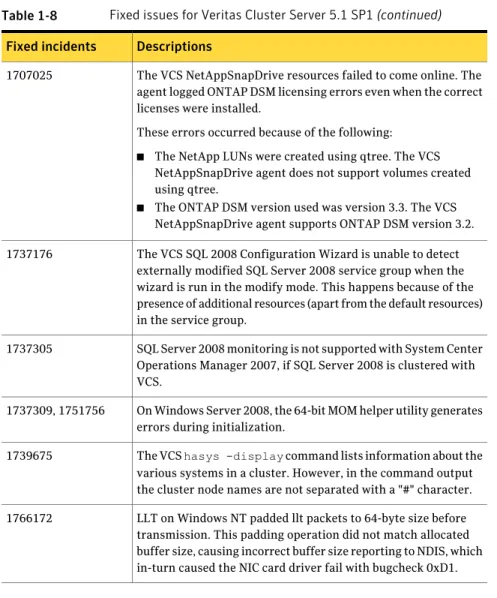
■ Fixes and enhancements for 5.1 SP2
■ Fixes and enhancements for 5.1 SP1
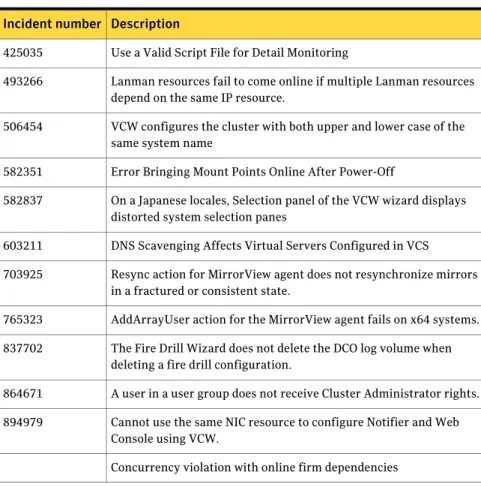
■ Fixes and enhancements for 5.1 AP1
■ Fixes and enhancements for 5.1
Introduction
This document provides important information regarding Veritas Cluster Server (VCS) for Windows, VCS enterprise agents for Network Appliance SnapMirror, VCS application agent for Microsoft Exchange, and VCS database agent for Microsoft SQL. Please review this entire document before using this product. The information in the Release Notes supersedes the information provided in the product documents.
You can download the latest version of this document from
http://www.symantec.com/docs/TECH59755
For general information about VCS for Windows and Veritas Storage Foundation and High Availability Solutions for Windows, see the following Web site:
http://www.symantec.com
For the latest information on updates, patches, and software issues regarding this release, see the following TechNote:
http://www.symantec.com/docs/TECH59755
For any install/upgrade failures refer to following technote for information on how to recover from failures.
http://www.symantec.com/docs/TECH76129
New features and changes in release 5.1 SP2
This section describes the changes introduced in VCS for Windows release 5.1 Service Pack 2.
New application version support
VCS 5.1 SP2 introduces support for the following new application versions: ■ Exchange Server 2010
■ Exchange Server 2010 SP1 ■ Exchange Server 2007 SP3 ■ Oracle 11gR1 and 11gR2
■ Microsoft SharePoint Server 2010 ■ SQL Server 2008 R2
■ Network Appliance Data ONTAP 7.3.3
Veritas Cluster Server for Windows Release Notes
Introduction
■ Data ONTAP DSM for Windows MPIO 3.3, 3.3.1 ■ Network Appliance SnapDrive 6.1, 6.2
■ Network Appliance SnapManager for SQL 2.1, 5.0 ( 2.0 or later versions) ■ Network Appliance SnapManager for Exchange 3.2 and later versions
New Operating System support
VCS 5.1 SP2 introduces support for the following operating systems: ■ Windows Server 2008
■ Windows Server 2008 R2
Support for Microsoft SharePoint Server 2010
This release includes support for HA and DR configurations of Microsoft SharePoint Server 2010. High availability support involves monitoring and recovery support for SharePoint 2010 applications and high availability support for SQL Server databases used by SharePoint Server 2010. VCS provides a new agent for SharePoint Server 2010 that monitors the Web Applications, Service Applications, and services configured in the SharePoint Server farm. VCS also provides a new configuration wizard for configuring SharePoint Server 2010 service groups.
Refer to the Veritas Storage Foundation and High Availability Solutions HA and
Disaster Recovery Solutions Guide for SharePoint Server 2010 for information on
configuring HA and DR for SharePoint Server 2010.
Refer to the SQL Server Agent Implementation Guides for information on configuring HA and DR for SQL Server.
Support for Microsoft Exchange Server 2010
This release provides High Availability (HA) and Disaster Recovery (DR) support for Exchange Server 2010 mailbox database. VCS provides a new database agent for Exchange 2010 that monitors the mailbox databases configured on shared storage. VCS also provides a new configuration wizard for configuring the Exchange 2010 database service group.
For more details refer to, Veritas Cluster Server Implementation Guide for Microsoft
Exchange 2010
9 Veritas Cluster Server for Windows Release Notes
Support for NetApp vFiler
VCS 5.1 SP2 introduces support for NetApp vFilers.
Support for Microsoft SQL Server 2008 R2
This release includes support for HA and DR configurations for Microsoft SQL Server 2008 R2. Use the existing VCS SQL Server 2008 agents to configure both SQL Server 2008 and SQL Server 2008 R2. The VCS SQL Server 2008 Configuration Wizard is enhanced to support selection of the SQL Server version during configuration. Use the wizard to configure service groups for both SQL Server 2008 and SQL Server 2008 R2.
Refer to the Veritas Cluster Server Implementation Guide for Microsoft SQL Server
2008 and 2008 R2 for instructions on how to configure HA and DR for SQL Server
2008 R2 in a VCS environment.
Changes to SQL Server 2008 agent
The SQL Server 2008 Database Engine agent is enhanced to address an issue where SQL databases are not accessible after service group failovers if the user account specified for the SQL services (SQL Server service, SQL Server Agent service) does not have local administrator privileges on all the cluster nodes that are part of the SQL service group.
A new optional attribute called SQLClusterAccount is added to the SQL Server 2008 Database Engine agent. Use this attribute if the SQL Server services account is not a member of the local Administrators group on the cluster nodes in the service group. You can specify either a domain group or the SQL Server service name for this attribute. The agent assigns this account with Full Control privileges to the SQL Server databases and log files. You can specify this attribute while configuring the SQL Server service group using the VCS SQL Server 2008 Configuration Wizard.
Support for configuring up to eight private network links for LLT
The VCS Cluster Configuration Wizard (VCW) now supports configuring up to eight private network links for LLT over Ethernet or LLT over the User Datagram Protocol (UDP) layer.To configure the network links for LLT over UDP, use the Edit Ports button on the Private Network Configuration panel of the wizard to specify the UDP ports for the links.
Veritas Cluster Server for Windows Release Notes
New features and changes in release 5.1 SP2
Support for removing the faulted node from a cluster
While removing a node from a cluster, if the validation checks failed for the node you wanted to remove, you were required to rectify the cause of failure and then proceed to remove the node. However, VCS Cluster Configuration Wizard now enables you to remove the failed node, without rectifying the cause of failure.
Note:You must proceed to remove the failed node only if the node is permanently unavailable, due to any hardware or Operating System related issues, that can be resolved only by reinstalling the Operating System.
New features and changes in release 5.1SP1
This section describes the changes introduced in VCS for Windows version 5.1 Service Pack 1.
This release also includes the changes introduced in the release VCS 5.1 Application Pack 1 (AP1).
See“New features and changes in release 5.1 AP1”on page 15.
New application version support
VCS 5.1 SP1 introduces support for new application versions, including: ■ Exchange 2007 SP2
■ SQL Server 2008 SP1 ■ SQL Server 2005 SP3
■ Enterprise Vault 8.0 SP1 and SP2
Client support
VCS introduces support for client components on the following operating systems: ■ Windows XP SP3
■ Windows 7
New Enterprise Vault option
There is a new Enterprise Vault (EV) Cluster Setup Wizard installation option available from the product installer.
11 Veritas Cluster Server for Windows Release Notes
Support for qtree in NetAppSnapDrive
The VCS NetAppSnapDrive agent now support qtree. The configuration wizards supports discovery of qtree volumes.
Note that the VCS NetAppSnapMirror agent does not support qtree volumes.
Enhancements to NetAppSnapMirror agent
The NetAppSnapMirror agent is modified to include the following changes: ■ A new attribute, SyncMode, is added to the agent. You can use this attribute
to configure the replication mode. In addition to earlier supported
asynchronous mode of replication, the NetAppSnapMirror agent now supports semi-synchronous and synchronous modes of replication.
■ A new attribute, VisibilityFrequency, is added to the agent. You can use this attribute to control how often the source snapshot is visible on the destination mirror.
See the Veritas Cluster Server Bundled Agents Guide for more information.
Access Based Enumeration support for FileShare and
CompositeFileShare
Access based enumeration support has been added for FileShare and
CompositeFileShare agents. FileShare configuration wizard supports options to enable/disable Access based enumeration as well as Client Cache Type.
Synchronous and Semi-synchronous replication support in
NetAppSnapMirror agent
In addition to earlier supported Asynchronous mode of replication, the NetAppSnapMirror agent now supports Semi-synchronous and Synchronous modes of replication.
VCS Application Manager (VAM) utility
VCS provides a new utility, VCS Application Manager (VAM), that lets you manage applications in the virtual server context. Use VAM to launch application management tools and system management tools in the virtual server context. You can launch the VAM utility from the Windows Start menu. (click Start > Programs > Symantec > Veritas Cluster Server > Configuration Tools > Application Manager)
Veritas Cluster Server for Windows Release Notes
New features and changes in release 5.1SP1
See the Veritas Cluster Server Administrator’s Guide for more information.
Wizard for configuring MSMQ service group
VCS now provides a wizard that you can use to configure Microsoft Message Queuing (MSMQ) service groups. You can launch the wizard from the Solutions Configuration Center (SCC).
VCS HAD Helper Service user account privileges modified
The privileges required by the VCS HAD Helper service user account have been modified. The hadhelper utility now does not assign the following privilege to the VCS helper service user account:
■ Increase scheduling priority
VCS SQL Server 2008 management pack for SCOM 2007
VCS provides a management pack for SQL Server 2008. You can use the management pack to monitor SQL 2008 instances configured under VCS in a Systems Center Operations Manager (SCOM) 2007 monitoring environment. This management pack is supported on SCOM 2007 SP1 and R2 versions. Contact Symantec Technical Support for more information about the management packs.
Process agent changes
A new attribute, LanmanResname, is added to the Process agent. You can use this attribute to configure the agent to monitor processes in the context of the virtual name specified in the Lanman resource.
Enhancements in FileShare and CompositeFileShare agents
The FileShare and CompositeFileShare agents are modified to include the following changes:
■ Support for the Windows access-based enumeration option is added to the agents. The File Share Configuration Wizard provides options to enable or disable access-based enumeration.
■ The File Share Configuration Wizard now includes option to define the value of the attribute Client Cache Type.
13 Veritas Cluster Server for Windows Release Notes
■ A new function, ForceControl, is added to the agents. You can use ForceControl to restore the properties of file shares as per what is defined in the VCS configuration. The agent overwrites all changes made to the file share properties, irrespective of whether they were made externally or from within VCS, and resets them to what is defined in the VCS configuration. .
■ The AutoControl attribute is modified. You can now use this attribute to define the agent behavior when share properties are modified when the FileShare or CompositeFileShare resource is online.
■ The IgnorePermissions attribute is deprecated. You can use the AutoControl attribute instead..
■ A new attribute, ShareComment, is added to the agents. You can use this attribute to add comments to the file share resource
See the Veritas Cluster Server Bundled Agents Guide for more information about the FileShare and CompositeFileShare agents.
See the Veritas Cluster Server Administrator’s Guide for more information about the File Share Configuration Wizard.
PrintShare agent changes
The PrintShare agent is modified to retain the comments that were added to the printers. When the printers are added to the print share service group, VCS retains the comments and adds a VCS tag to it.
VCS Exchange Server Setup Wizard changes
While installing Exchange 2003 in a VCS environment, the VCS Exchange Server Setup Wizard performs certain operations on the Exchange Domain Servers object in Active Directory (AD). The wizard uses the logged-on user account context to perform these AD operations; therefore the logged-on user account is required to have the privileges to update AD objects.
AD update privileges are generally assigned to Domain Administrators and this may create a problem in environments where there are security restrictions on the privileges available to users in the domain.
The VCS Exchange Server Setup Wizard is now modified to use either the logged-on user account context or the VCS Helper Service user account context to perform the required AD updates. The wizard uses the VCS Helper Service account if the logged-on user account does not have the required privileges.
Note that for the wizard to perform the AD operations using the VCS Helper Service user account, the Exchange Domain Servers object in the AD must be
Veritas Cluster Server for Windows Release Notes
New features and changes in release 5.1SP1
managed by the VCS Helper Service user account (Managed By tab on the Object Properties window).
Support for provisioned Exchange Server 2007 installations
Provisioning a server allows Exchange to be installed later by using delegated setup. This procedure allows a delegated account to install Exchange Server in the domain without being a member of the Exchange Organization Administrators group.
This release supports Exchange Server 2007 installations performed by delegated account.
Microsoft VHD support
This release is qualified on operating systems running on physical (hosts) and virtual (guests) machines based on Microsoft’s Virtual Hard Disk (VHD) virtualization file format.
New features and changes in release 5.1 AP1
This section describes the changes introduced in Veritas Cluster Server for Windows 5.1 Application Pack 1.
Support for Microsoft SQL Server 2008
VCS 5.1 Application Pack 1 for Windows supports HA and DR configurations for Microsoft SQL Server 2008. Refer to the Veritas Cluster Server Implementation Guide for Microsoft SQL Server 2008 for instructions on how to configure a new HA and DR environment for SQL 2008.
Folder level mount point support in SnapDrive
VCS 5.1 Application Pack 1 for Windows provides folder level mount point support with NetApp SnapDrive. NetApp SnapDrive agent supports drive and volume mount points by configuring the attribute MountPath. You can create cascading volume mount points by mounting one mount point on another mount point. In such a case, you must specify the complete path in the MountPath attribute. For example,
MountPath = "T:\Volume1\Volume2"
The VCS application and service group configuration wizards allow selection of folder mount points.
15 Veritas Cluster Server for Windows Release Notes
MPIO support using iSCSI
VCS 5.1 Application Pack 1 for Windows now supports multipath I/O connections using iSCSI. You can configure multipathing in your storage environment using the supported iSCSI initiator. When MPIO is configured using iSCSI, only one initiator entry is added to the Initiator attribute of the NetAppSnapDrive agent.
VCS MOM 2005 management pack for SQL 2008
VCS 5.1 Application Pack 1 for Windows includes a VCS Management Pack for Microsoft SQL Server 2008. This management pack is for Microsoft Operations Manager 2005. The management pack file (.akm) is integrated with the Application Pack 1 package but you will need to import it separately. There is no change in the procedures for using this VCS management pack. Refer to the Veritas Storage Foundation and High Availability Solutions Management Pack Guide for Microsoft Operations Manager 2005 for instructions on how to use this management pack to monitor SQL 2008 using Microsoft Operations Manager (MOM) 2005 in a VCS environment.
Changes to the VCS NetAppSnapDrive agent
In VCS 5.1 Application Pack 1 for Windows, the VCS NetAppSnapDrive agent has been modified to include support for NetApp SnapDrive version 6.0 release. In SnapDrive 6.0 support for Common Internet File System (CIFS) protocol has been deprecated. As a result, the VCS NetAppSnapDrive agent attribute ShareName need not be configured if you are using SnapDrive 6.0. The VCS NetAppSnapDrive agent ignores this attribute if SnapDrive 6.0 is used. In addition, the
NetAppSnapDrive agent has been modified to address performance issues in cases where multiple NetApp LUNs are configured simultaneously in a service group.
Changes to the VCS wizards
The VCS application and service group configuration wizards provide an option (Advanced button on the Network Configuration panel or the virtual server configuration panel) to add the virtual server name to the Active Directory. The wizards discover all the Organization Units (OU) in the domain and populate them in a drop-down list. You specify an OU by selecting the OU name from the drop-down list.
This functionality is enhanced in the application pack. The wizards now allow you to type the Organization Unit name or search the OU name in the domain using the Windows "Find Organizational Units" dialog box. This makes searching and specifying an OU significantly easier in cases where there are a large number of Organizational Units in the domain and where the OU structure is deeply nested.
Veritas Cluster Server for Windows Release Notes
New features and changes in release 5.1 AP1
You can type the OU details in the format
"CN=Computers,DC=domainname,DC=com". If you wish to search for an OU, you can click the ellipsis button and specify the search criteria in the Windows "Find Organizational Units" dialog box.
New features and changes in release 5.1
The features and updates described below are introduced in Veritas Cluster Server for Windows version 5.1.
Veritas Cluster Server Management Console 5.1 available
The Veritas Cluster Server Management Console 5.1 software disc is included with this release of VCS.
Refer to the VCS Management Console Implementation Guide for installation, upgrade, and configuration instructions.
See the Symantec Support website for information on platform updates and future releases of VCS Management Console.
Client support on Windows Vista
VCS introduces support for client components on Windows Vista, including Vista SP2.
Configuration Checker enhancements
The following are Configuration Checker enhancements:
■ Better differentiation between pre-installation and post-installation checks ■ Improved check descriptions and reports
BlackBerry Enterprise Server support
You can use the VCS GenericService agent to configure BlackBerry Enterprise Server (BES) in a VCS environment. In this release, support for BES is limited to the following:
■ BES can be set up in an active-passive configuration only. In an active-passive configuration, the active node hosts the configured BlackBerry server. The second node is a dedicated redundant server able to take over the configured server if the active node fails.
17 Veritas Cluster Server for Windows Release Notes
■ BES can be configured only with a SQL database. There is no support for BES with a Microsoft Database Engine (MSDE) database.
See the Veritas Cluster Server Administrator’s Guide for configuration instructions.
VCW support for configuring VCS LLT over UDP
You can configure LLT over the User Datagram Protocol (UDP) layer while configuring the cluster using the VCS Cluster Configuration Wizard (VCW). VCW provides the necessary configuration options required for using LLT over UDP. See the Veritas Cluster Server Administrator’s Guide for more information.
Support for Oracle on 64-bit Windows servers
This release supports Oracle on 64-bit Windows Server operating systems.
License policy
Each copy of Veritas Cluster Server including all options and agents, whether used on a physical Server or within a virtual machine, must be licensed according to the conditions set forth in the sections below. Each Licensed Software license specifies the number of instances of the Licensed Software you may run on a particular Server at one time.
Table 1-1lists VCS editions and the additional licensing terms that apply.
Table 1-1 VCS licensing terms
VCS licensing terms Microsoft Operating System
Edition
A separate license for the licensed software is required for each virtual or physical server, where the software is installed.
■ Server Edition
■ Standard Edition
■ Web Edition
For each license, you may run one instance of the licensed software on one physical server and up to four
simultaneous instances of the licensed software on virtual servers located on the physical server.
■ Advanced Edition
■ Enterprise Edition
For each license, you may run one instance of the licensed software on one physical server and an unlimited number of virtual servers located on the physical server Datacenter Edition
Veritas Cluster Server for Windows Release Notes
License policy
No longer supported
This section provides the list of non-supported items for Veritas Cluster Server for Windows 5.1 SP1.
Symantec Live Update client is no longer installed and supported
Symantec Live Update client is no longer installed and supported as a part of Veritas Cluster Server for Windows.Discontinued support for VCS Cluster Management Console (Single
Cluster Mode)
Support for the VCS Cluster Management Console (Single Cluster Mode) is discontinued in 5.1 SP2. The VCS VRTSWebApp agent has been deprecated and is uninstalled during the upgrade. Also, the VCS Cluster Configuration Wizard (VCW) no longer provides the option to configure the Cluster Manager service components.
If VRTSWebApp resource is configured in ClusterService group, after upgrading to 5.1SP2 the resource fails to get probed and thus the ClusterService group would fail to come online in the cluster. You must manually delete the VRTSWebApp resource from the ClusterService group. Use the Cluster Manager (Java Console), the command line (hares -delete), or the Veritas Operations Manager (VOM) to remove the resource.
Veritas Cluster Server 5.1 SP1 does not support Windows Server 2000
Veritas Cluster Server 5.1 SP1 no longer supports Windows Server 2000. Therefore Exchange Server 2000 and Microsoft Operations Manager (MOM) 2000 are also no longer supported.VCS no longer includes agents and configuration wizards for NetBackup
VCS does not include agents and configuration wizards for NetBackup. Refer to the NetBackup documentation for information on clustering support for NetBackup.Symantec License Inventory Management (SLIM)
The Symantec License Inventory Management (SLIM) agent is no longer shipped with VCS. The SLIM agent is removed automatically during upgrades from 5.0.
19 Veritas Cluster Server for Windows Release Notes
Installation requirements
VCS is supported on Windows-certified network servers containing one or more processors. VCS 5.1 SP1 supports clusters of up to 32 nodes.
Supported hardware
Refer to the Hardware Compatibility List on the Symantec Support Web site to determine the approved hardware.
http://www.symantec.com/docs/TECH138719
The compatibility list contains information about supported hardware and is updated regularly. Before installing or upgrading VCS, review the current compatibility list to confirm the compatibility of your hardware and software.
Supported software
Veritas Cluster Server (VCS) 5.1 SP2 for Windows including the VCS Application Agent for Microsoft Exchange or the VCS Database Agent for Microsoft SQL, supports the following applications and operating systems.
The requirements for operating system and application support shown below supersede those requirements listed in the product documentation.
Also, for updates on software supported, see
http://www.symantec.com/docs/TECH138722
Note:All VCS nodes must run the same Windows operating system and service pack level as well as the same VCS version and service pack level. Also you must install the operating system in the same path on all systems and make sure that the same drive letter is available on all nodes and the system drive has adequate space for the installation.
Supported operating systems
VCS supports the following Windows operating systems.
Your server must run one of the following operating systems to install the VCS server components:
■ Windows Server 2003 (32-bit): Standard Edition, Enterprise Edition, or Datacenter Edition (SP2 required for all editions)
■ Windows Server 2003 R2 (32-bit): Standard Edition, Enterprise Edition, or Datacenter Edition (SP2 required for all editions)
Veritas Cluster Server for Windows Release Notes
Installation requirements
■ Windows Server 2003 (32-bit): Web Edition: fully supports SFW and supports only file share for SFW HA (SP2 required for all editions)
■ Windows Server 2003 for 64-bit Itanium (IA64): Enterprise Edition or Datacenter Edition (SP2 required for all editions)
■ Windows Server 2003 x64 Editions (for AMD64 or Intel EM64T): Standard x64 Edition, Enterprise x64 Edition, or Datacenter x64 Edition (SP2 required for all editions)
■ Windows Server 2003 x64 R2 Editions (for AMD64 or Intel EM64T): Standard x64 R2 Edition, Enterprise x64 R2 Edition, or Datacenter x64 R2 Edition (SP2 required for all editions)
■ Windows Server 2008 x86, x64: Standard Edition, Enterprise Edition, Datacenter Edition, Web Edition, Small Business Sever (SP1 or SP2 required for all editions)
Note:This release of VCS supports Windows Server 2008 without Hyper -V x86, x64: Standard Edition, Enterprise Edition, Datacenter Edition (SP1 or SP2 required for all editions).
■ Windows Server 2008 for IA Systems (IA64) (SP1 or SP2)
■ Windows Server 2008 R2 x64: Standard Edition, Enterprise Edition, Datacenter Edition, Web Edition.
Note:This release of VCS supports Windows Server 2008 R2 without Hyper-V x64: Standard Edition, Enterprise Edition, Datacenter Edition.
■ Windows Server 2008 R2 for IA Systems (IA64)
Your system must run one of the following operating systems to install the VCS client software:
■ Any one of the operating system versions, editions, and architectures that the Server Components are supported on.
■ Windows XP x86, x64 (SP3 required)
■ Windows Vista x86, x64: Ultimate edition, Business Edition, Premium edition (SP1 or SP2 required)
■ Windows 7
21 Veritas Cluster Server for Windows Release Notes
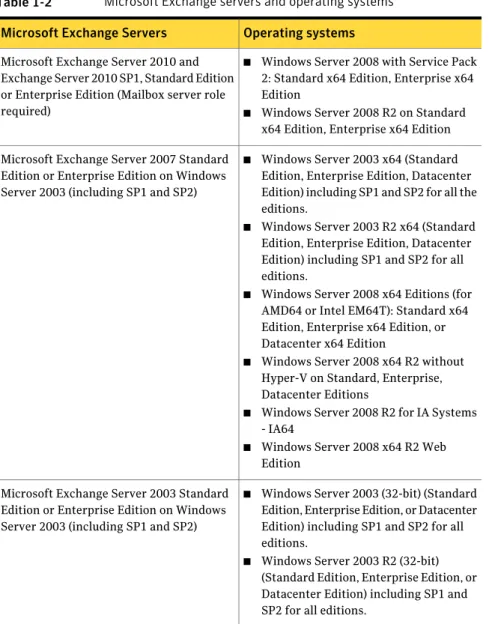
Microsoft Exchange servers and their operating systems
Table 1-2lists the supported Microsoft Exchange servers and the corresponding operating systems
Table 1-2 Microsoft Exchange servers and operating systems
Operating systems Microsoft Exchange Servers
■ Windows Server 2008 with Service Pack 2: Standard x64 Edition, Enterprise x64 Edition
■ Windows Server 2008 R2 on Standard x64 Edition, Enterprise x64 Edition Microsoft Exchange Server 2010 and
Exchange Server 2010 SP1, Standard Edition or Enterprise Edition (Mailbox server role required)
■ Windows Server 2003 x64 (Standard Edition, Enterprise Edition, Datacenter Edition) including SP1 and SP2 for all the editions.
■ Windows Server 2003 R2 x64 (Standard Edition, Enterprise Edition, Datacenter Edition) including SP1 and SP2 for all editions.
■ Windows Server 2008 x64 Editions (for AMD64 or Intel EM64T): Standard x64 Edition, Enterprise x64 Edition, or Datacenter x64 Edition
■ Windows Server 2008 x64 R2 without Hyper-V on Standard, Enterprise, Datacenter Editions
■ Windows Server 2008 R2 for IA Systems - IA64
■ Windows Server 2008 x64 R2 Web Edition
Microsoft Exchange Server 2007 Standard Edition or Enterprise Edition on Windows Server 2003 (including SP1 and SP2)
■ Windows Server 2003 (32-bit) (Standard Edition, Enterprise Edition, or Datacenter Edition) including SP1 and SP2 for all editions.
■ Windows Server 2003 R2 (32-bit) (Standard Edition, Enterprise Edition, or Datacenter Edition) including SP1 and SP2 for all editions.
Microsoft Exchange Server 2003 Standard Edition or Enterprise Edition on Windows Server 2003 (including SP1 and SP2)
Veritas Cluster Server for Windows Release Notes
Installation requirements
Microsoft SQL servers and their operating systems
Table 1-3lists the supported Microsoft SQL servers and the corresponding operating systems.
Table 1-3 Microsoft SQL Servers and operating systems
Operating systems Microsoft SQL Servers
Windows Server 2003 (32-bit) Standard Edition, Enterprise Edition, or Datacenter Edition (SP1 required for all editions, SP2 supported)
Windows Server 2003 R2 (32-bit) Standard Edition, Enterprise Edition, or Datacenter Edition
Microsoft SQL Server 2000 Standard Edition or Enterprise Edition (SP4 required)
Windows Server 2003 for Itanium-based systems: Enterprise Edition or Datacenter Edition (SP1 required for all editions, SP2 supported)
Microsoft SQL Server 2000 (64- bit) Enterprise Edition
Windows Server 2003 x64 Editions: Standard x64 Edition, Enterprise x64 Edition, or Datacenter x64 Edition (SP1 required for all editions, SP2 supported)
Windows Server 2003 x64 R2 Editions: Standard x64 R2 Edition, Enterprise x64 R2 Edition, or Datacenter x64 R2 Edition (SP1 required for all editions, SP2 supported) Microsoft SQL Server 2000 Standard Edition
or Enterprise Edition (SP4 required for all editions)
23 Veritas Cluster Server for Windows Release Notes
Table 1-3 Microsoft SQL Servers and operating systems (continued)
Operating systems Microsoft SQL Servers
Windows Server 2003 (32-bit) Enterprise Edition or Datacenter Edition (SP1 required for all editions, SP2 supported)
Windows Server 2003 R2 (32-bit) Standard Edition, Enterprise Edition, or Datacenter Edition (SP2 supported for all editions) Windows Server 2003 Standard x64 Edition, Enterprise x64 Edition, or Datacenter x64 Edition (SP2 supported for all editions) Windows Server 2003 x64 R2 Editions: Standard x64 R2 Edition, Enterprise x64 R2 Edition, or Datacenter x64 R2 Edition (SP2 supported for all editions)
Windows Server 2008 including SP1 and SP2 (32-bit) Standard Edition, Enterprise Edition, or Datacenter Edition
Windows Server 2008 x64 R2 without Hyper-V on Standard, Enterprise, Datacenter Editions
Windows Server 2008 R2 for IA Systems -IA64
Windows Server 2008 x64 R2 Web Edition Microsoft SQL Server 2005, (32- bit)
Standard Edition or Enterprise Edition (SP1, SP2 and SP3 for all editions)
Veritas Cluster Server for Windows Release Notes
Installation requirements
Table 1-3 Microsoft SQL Servers and operating systems (continued)
Operating systems Microsoft SQL Servers
Windows Server 2003 for Itanium-based systems: Enterprise Edition or Datacenter Edition (SP1 required for all editions, SP2 supported)
Windows Server 2003 Standard x64 Edition, Enterprise x64 Edition, or Datacenter x64 Edition (SP2 supported for all editions) Windows Server 2003 x64 R2 Editions: Standard x64 R2 Edition, Enterprise x64 R2 Edition, or Datacenter x64 R2 Edition (SP2 supported for all editions)
Windows Server 2008 for 64-bit Itanium (IA64)
Windows Server 2008 x64 Editions (for AMD64 or Intel EM64T): Standard x64 Edition, Enterprise x64 Edition, or Datacenter x64 Edition
Windows Server 2008 x64 R2 without Hyper-V on Standard, Enterprise, Datacenter Editions
Windows Server 2008 R2 for IA Systems -IA64
Windows Server 2008 x64 R2 Web Edition Microsoft SQL Server 2005, (64- bit)
Standard Edition or Enterprise Edition (SP1, SP2 and SP3 for all editions)
25 Veritas Cluster Server for Windows Release Notes
Table 1-3 Microsoft SQL Servers and operating systems (continued)
Operating systems Microsoft SQL Servers
Windows Server 2003 (32-bit) Standard Edition, Enterprise Edition or Datacenter Edition (SP2 required)
Windows Server 2003 R2 (32-bit) Standard Edition, Enterprise Edition, or Datacenter Edition (SP2 required)
Windows Server 2003 for Itanium-based Systems Enterprise Edition or Datacenter Edition (SP2 required for both)
Windows Server 2003 Standard x64 Edition, Enterprise x64 Edition, or Datacenter x64 Edition (SP2 required)
Windows Server 2003 x64 Editions (for AMD64 or Intel EM64T): Standard x64 R2 Edition, Enterprise x64 R2 Edition, or Datacenter x64 R2 Edition (SP2 required) Windows Server 2008 (32-bit) Standard Edition, Enterprise Edition, Datacenter Edition, or Web Edition (SP2 required) Windows Server 2008 x64 R2 without Hyper-V on Standard, Enterprise, Datacenter Editions
Windows Server 2008 R2 for IA Systems -IA64
Windows Server 2008 x64 R2 Web Edition Microsoft SQL Server 2008, 32-bit Standard
Edition or Enterprise Edition or Web Edition (including SP1)
Veritas Cluster Server for Windows Release Notes
Installation requirements
Table 1-3 Microsoft SQL Servers and operating systems (continued)
Operating systems Microsoft SQL Servers
Windows Server 2003 for Itanium-based Systems Enterprise Edition or Datacenter Edition (SP2 required for both)
Windows Server 2003 Standard x64 Edition, Enterprise x64 Edition, or Datacenter x64 Edition (SP2 required) Windows Server 2003 x64 Editions (for AMD64 or Intel EM64T): Standard x64 R2 Edition, Enterprise x64 R2 Edition, or Datacenter x64 R2 Edition (SP2 required)
Windows Server 2003 x64 Editions (for AMD64 or Intel EM64T): Standard x64 R2 Edition, Enterprise x64 R2 Edition, or Datacenter x64 R2 Edition (SP2 required) Windows Server 2008 (32-bit) Standard Edition, Enterprise Edition, Datacenter Edition, or Web Edition (SP2 required) Windows Server 2008 x64 R2 without Hyper-V on Standard, Enterprise, Datacenter Editions
Windows Server 2008 R2 for IA Systems -IA64
Windows Server 2008 x64 R2 Web Edition Microsoft SQL Server 2008 (64-bit Standard
Edition or Enterprise Edition or Enterprise IA64 Edition or Web Edition (including SP1)
27 Veritas Cluster Server for Windows Release Notes
Table 1-3 Microsoft SQL Servers and operating systems (continued)
Operating systems Microsoft SQL Servers
Windows Server 2003 for Itanium-based Systems Enterprise Edition or Datacenter Edition (SP2 required for both)
Windows Server 2003 Standard x64 Edition, Enterprise x64 Edition, or Datacenter x64 Edition (SP2 required)
Windows Server 2003 x64 Editions (for AMD64 or Intel EM64T): Standard x64 R2 Edition, Enterprise x64 R2 Edition, or Datacenter x64 R2 Edition (SP2 required) Windows Server 2008 (32-bit) Standard Edition, Enterprise Edition, Datacenter Edition, or Web Edition (SP2 required) Windows Server 2008 x64 R2 without Hyper-V on Standard, Enterprise, Datacenter Editions
Windows Server 2008 R2 for IA Systems -IA64
Windows Server 2008 x64 R2 Web Edition Microsoft SQL Server 2008 R2
Note that, Microsoft SQL Server 2000 and Microsoft SQL Server 2005 can exist in the same cluster but cannot operate on or fail over to the same system. If you use both applications in a cluster, select a distinct set of systems for the SystemList attribute of each application’s service group. Similarly, Microsoft SQL Server 2005 and Microsoft SQL Server 2008 can exist in the same cluster and operate on or fail over to the same systems. However, only one default instance can exist on a system at one time. Additional instances that operate on or fail over to that system must be named instances. The number of named instances is limited only by the normal limit of instances for that version of SQL Server.
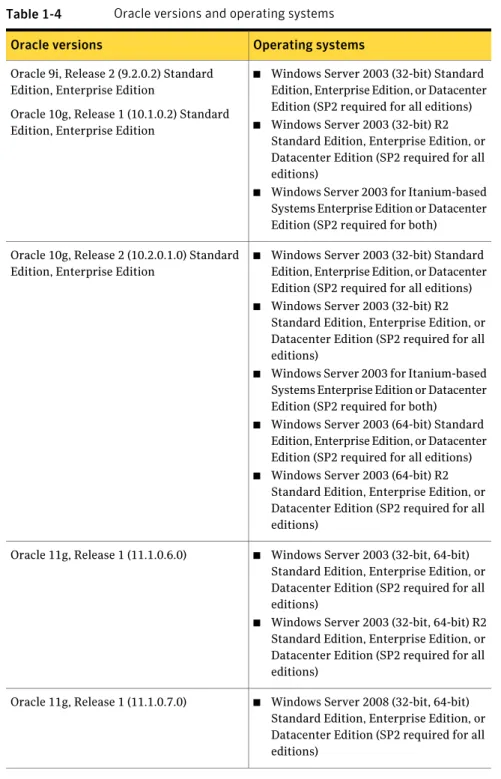
Oracle versions and their operating systems
Table 1-4lists the supported Oracle versions and the corresponding operating systems.
Veritas Cluster Server for Windows Release Notes
Installation requirements
Table 1-4 Oracle versions and operating systems
Operating systems Oracle versions
■ Windows Server 2003 (32-bit) Standard Edition, Enterprise Edition, or Datacenter Edition (SP2 required for all editions)
■ Windows Server 2003 (32-bit) R2 Standard Edition, Enterprise Edition, or Datacenter Edition (SP2 required for all editions)
■ Windows Server 2003 for Itanium-based Systems Enterprise Edition or Datacenter Edition (SP2 required for both) Oracle 9i, Release 2 (9.2.0.2) Standard
Edition, Enterprise Edition
Oracle 10g, Release 1 (10.1.0.2) Standard Edition, Enterprise Edition
■ Windows Server 2003 (32-bit) Standard Edition, Enterprise Edition, or Datacenter Edition (SP2 required for all editions)
■ Windows Server 2003 (32-bit) R2 Standard Edition, Enterprise Edition, or Datacenter Edition (SP2 required for all editions)
■ Windows Server 2003 for Itanium-based Systems Enterprise Edition or Datacenter Edition (SP2 required for both)
■ Windows Server 2003 (64-bit) Standard Edition, Enterprise Edition, or Datacenter Edition (SP2 required for all editions)
■ Windows Server 2003 (64-bit) R2 Standard Edition, Enterprise Edition, or Datacenter Edition (SP2 required for all editions)
Oracle 10g, Release 2 (10.2.0.1.0) Standard Edition, Enterprise Edition
■ Windows Server 2003 (32-bit, 64-bit) Standard Edition, Enterprise Edition, or Datacenter Edition (SP2 required for all editions)
■ Windows Server 2003 (32-bit, 64-bit) R2 Standard Edition, Enterprise Edition, or Datacenter Edition (SP2 required for all editions)
Oracle 11g, Release 1 (11.1.0.6.0)
■ Windows Server 2008 (32-bit, 64-bit) Standard Edition, Enterprise Edition, or Datacenter Edition (SP2 required for all editions)
Oracle 11g, Release 1 (11.1.0.7.0)
29 Veritas Cluster Server for Windows Release Notes
Table 1-4 Oracle versions and operating systems (continued)
Operating systems Oracle versions
■ Windows Server 2008 (32-bit, 64-bit) Standard Edition, Enterprise Edition, or Datacenter Edition (SP2 required for all editions)
■ Windows Server 2008 R2 (32-bit, 64-bit) Standard Edition, Enterprise Edition, or Datacenter Edition
Oracle 11g R2
Supported Enterprise Vault versions
The supported version of Enterprise Vault is 8.0 SP1 and SP2.
Supported Sharepoint versions
■ Microsoft SharePoint Server 2003 Standard or Enterprise edition. ■ Microsoft SharePoint Server 2007 Standard or Enterprise edition.
Supported Blackberry Enterprise Server
The supported version of Blackberry Enterprise (BES) is 4.1.5
Supported Network Appliance applications
The supported versions of Network Appliance applications are as follows: ■ Network Appliance Data ONTAP 7.3, 7.3.2, 7.3.3
■ Network Appliance SnapDrive 4.1, 4.2.1, 5.0, 6.0, 6.0.2, 6.1, and 6.2 ■ Network Appliance SnapManager for SQL 2.0, 2.1 and 5.0
■ Network Appliance SnapManager for Exchange version 3.2 with exchange Server 2003
■ Network Appliance SnapManager for Exchange 4.0, 5.0, 6.0 with Exchange Server 2007
■ Microsoft iSCSI software initiator version 2.03 and later versions ■ Data ONTAP DSM for Windows MPIO 3.1, 3.2, 3.3, 3.3.1
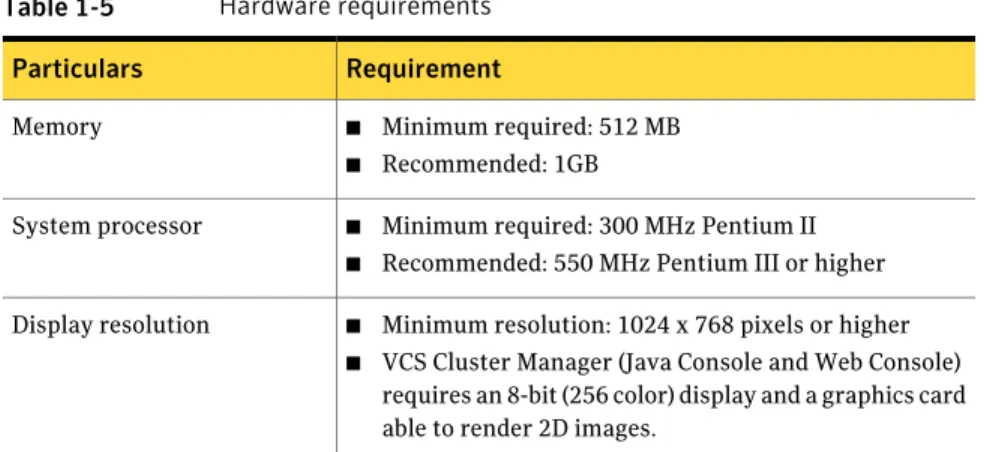
Hardware requirements
Table 1-5lists the hardware requirements
Veritas Cluster Server for Windows Release Notes
Installation requirements
Table 1-5 Hardware requirements
Requirement Particulars
■ Minimum required: 512 MB
■ Recommended: 1GB Memory
■ Minimum required: 300 MHz Pentium II
■ Recommended: 550 MHz Pentium III or higher System processor
■ Minimum resolution: 1024 x 768 pixels or higher
■ VCS Cluster Manager (Java Console and Web Console) requires an 8-bit (256 color) display and a graphics card able to render 2D images.
Display resolution
Supported client operating systems
The following client operating systems are supported: ■ Windows XP Professional (SP2 or higher required)
■ Windows Vista (32-bit) (SP2 supported): Business, Enterprise, and Ultimate editions
■ Windows Vista (64-bit) (SP2 supported): Business, Enterprise, and Ultimate editions
■ Windows 7
VMware ESX server support
VMware ESX 3.0 or higher is required for installing and configuring VCS on VMware virtual machines.
Firewall and anti-spyware considerations
Disable spyware monitoring and removal software before installing this product. You must disable firewalls to enable discovery of the local client. On systems running Windows Server 2003 SP1, you must disable the Windows Firewall or configure it to allow exceptions to the Remote Administration and File and Printer Sharing services.
Software limitations
This section covers Veritas Cluster Server limitations.
31 Veritas Cluster Server for Windows Release Notes
For a complete list of known issues as well as other late-breaking news,
http://www.symantec.com/docs/TECH59755
Unable to restore user database using SnapManager for SQL
While restoring the user database using SnapManager, user needs to select the checkbox which specifies that the snapshot was taken on other machine. The user is also required to select the system name. When this option is selected, it is possible to restore the database.
UUID files are always installed to the default installation path
During product installation, you can specify a different installation path than the default.
However, the installation process installs the UUID files in the following default path regardless of where the other binaries are installed.
C:\Program Files\Veritas\UUID\bin
SnapDrive service fails to start after uninstalling VCS
When VCS is uninstalled and the system is rebooted, the SnapDrive service fails to start with a logon failure.
Workaround: Reset the password for the SnapDrive service account and then start the SnapDrive service.
Limitation on SnapManager for Exchange
The Exchange Setup Wizard for VCS supports Network Appliance SnapManager for Microsoft Exchange (SME) with the restriction that MTA data, transaction logs, and registry replication information must be on the same LUN.
Undocumented commands and command options
VCS contains undocumented commands and command options intended for development use only. Undocumented commands are not supported for external use.
Veritas Cluster Server for Windows Release Notes
Software limitations
Cannot connect to the other LUNs on the NetApp Filer from the node
on which the Exchange service group is online
If an Exchange 2003 service group (along with the NetAppFiler and
NetAppSnapDrive resources) is online on a node, you will not be able to connect to the other LUNs on the filer using the SnapDrive plugin from the Windows Computer Management console.
You will be able to connect to the other LUNs only if MSExchangeSA and all resources above it are taken offline.
SnapDrive resources fail to offline for a standalone Exchange Server
in a VCS environment (797915)
In a standalone Exchange 2003 SP1 cluster configuration, if you take the Exchange service group offline, the NetAppSnapDrive resources fail to go offline.
Workaround: Rename the Microsoft iSCSI Initiator such that the initiator name does not contain any reference to the system name.
Windows Safe Mode boot options not supported (1234512)
The Windows Safe Mode boot options are not supported. VCS services and wizards fail to run if Windows is running in Safe Mode.
Service group offline alerts remain unresolved on a MOM 2005 server
(1217601)
In a VCS cluster with a MOM 2005 monitoring environment, the VCS state monitoring script logs service group offline alerts. These alerts are logged only if the service group is offline on the cluster node that has highest priority in the SystemList attribute of that service group. However, if the service group is brought online on the node again, the offline alerts logged earlier do not get resolved. You must manually resolve the service group offline alerts on the MOM 2005 server.
File shares on Windows Server 2008 are not accessible using the virtual
IP address (1214494)
File shares configured in VCS can be accessed using the virtual server name (ShareName attribute) or the virtual IP address on Windows Server 2003 systems. However, on Windows Server 2008, you are unable to access file shares using the virtual IP address. This is a restriction in the operating system.
33 Veritas Cluster Server for Windows Release Notes
You can access file shares using the virtual server name.
Security issue when using Java-GUI and default cluster admin
credentials (1188218)
While configuring the cluster using the VCS Cluster Configuration Wizard (VCW) if you do not choose the secure mode (Use Single Sign-on option) on the Configure Security Service Option panel, VCW creates a user with user name as admin and password as password. The user credentials are auto-populated in the respective fields, by default. This user has administrative privileges to the cluster.
Symantec recommends that you create a different user instead of accepting the default values.
VCW does not support configuring broadcasting for UDP
VCW does not provide options to configure broadcasting information for UDP. You can configure broadcasting for UDP by manually editing thellttabfile. Refer to the Veritas Cluster Server Administrator’s Guide for more information.
All servers in a cluster must run the same operating system
All servers in a cluster must run the same operating system. You cannot mix 32-bit (x86), x64, or IA64 Windows operating systems within a cluster.
Cluster Manager (Java Console)
The following are Cluster Manager (Java Console) software limitations.
Latest version of Java Console for VCS is required
Cluster Manager (Java Console) from previous VCS versions cannot be used to manage VCS 5.1 SP2 clusters. Symantec recommends always using the latest version of Cluster Manager.
Running Java Console on a non-cluster system is recommended
Symantec recommends not running Cluster Manager (Java Console) for an extended period on a system in the cluster.
Service group dependency limitations
The following are Service group dependency software limitations.
Veritas Cluster Server for Windows Release Notes
Software limitations
No failover for some instances of parent group
In service groups in which the group dependency is configured as parallel parent/failover child, online global, remote soft or firm, the parent group may not online on all nodes after a child group faults.
System names must not include periods
The name of a system specified in the VCS configuration file,main.cf, must not be in the fully qualified form; that is, the name must not include periods. The name in main.cf must be consistent with the name used in the llthosts.txtfile.
Incorrect updates to path and name of types.cf with spaces
The path of thetypes.cffile, as referenced in themain.cf, updates incorrectly if the path contains spaces. For example, C:\Program Files\, would update incorrectly. Running a combination of thehacfcommandshacf -cmdtocfand hacf -cftocmdtruncates the path of thetypes.cffile and updates themain.cf file with the truncated path.
Lock by third-party monitoring tools on shared volumes
Some third-party monitoring tools (such as Compaq Insight Manager) hold an exclusive lock or have an open file handle on the shared volumes they monitor. This lock may prevent VCS from offlining a service group that includes the volume as a resource. VCS requires a lock on resource in a service group when taking the group offline.
Workaround: Symantec recommends adding a custom resource as the topmost parent for an affected service group. Use the custom resource to manage onlining, monitoring, and offlining of the third-party monitoring tool.
Schedule backups on online nodes
If you are scheduling backups in a VCS cluster, schedule them on the node on which the service group is online. If the Exchange virtual server fails over to another node, you must set up the backup schedule again on the new node.
Undefined behavior when using VCS wizards for modifying incorrectly
configured service groups (253007)
If you use the VCS wizards to modify service groups that are incorrectly configured through the VCS Cluster Manager (Java Console), the wizards fail to modify the service groups. This may also result in undefined behaviors in the wizards.
35 Veritas Cluster Server for Windows Release Notes
MirrorView agent resource faults when agent is killed (508066)
If all of the parent resources of the MirrorView Agent are offline when the MirrorView Agent is killed, or has crashed, then the resource will fault once the MirrorView Agent has automatically restarted. This behavior only occurs if all of the parent resources of the MirrorView agent are offline before the MirrorView Agent being killed, or crashing.Exchange virtual servers are shown as non-reachable in the Exchange
Service Manager (333108)
In a clustered Exchange 2003 configuration, the following issue is observed: Exchange virtual servers were displayed as non-reachable in the Exchange Service Manager (ESM) under tools, monitoring, and status, if the Routing Group Master is configured on the Exchange cluster nodes.
Workaround: Symantec recommends that you configure the Routing Group Master on a standalone Exchange Server.
Cluster address for global cluster requires resolved virtual IP
The virtual IP address must have a DNS entry if virtual IP is used for heartbeat agents.
Systems in a cluster must have same system locale setting
VCS does not support clustering of systems with different system locales. All systems in a cluster must be set to the same locale.
Virtual fire drill not supported in Windows environments
The virtual fire drill feature available from the VCS command line and the Cluster Manager (Java console) is not supported in Windows environments.
Cluster Manager consoles do not update GlobalCounter
To avoid updating Cluster Manager views with unnecessary frequency, the Java and Web Console do not increment the GlobalCounter attribute of the cluster.
Veritas Cluster Server for Windows Release Notes
Software limitations
Symantec Product Authentication Service does not support node
renaming
Symantec Product Authentication Service (earlier known as Veritas Security Services) does not support renaming nodes.
WAN cards are not supported
The VCS Configuration Wizard (VCW) does not proceed with network card discovery if it detects a WAN card.
VCS DiskReservation (DiskRes) and Mount (Mount) agents supported
only on Windows Server 2003
The VCS DiskReservation (DiskRes) and Mount (Mount) agents that can be used to manage the shared disks and volumes that are managed using Windows Logical Disk Manager (LDM) are supported only on Windows Server 2003.
Known issues
This section describes the known issues in VCS release 5.1 SP2.
For a complete list of known issues as well as other late-breaking news, see
http://www.symantec.com/docs/TECH59755
Installer may fail during uninstallation
This issue occurs when you try to remove 5.1 SP2 from the cluster nodes. The Veritas Product Installer (VPI) may fail with an msi error. (2137388)
The installer post-uninstall summary panel may display the following error: Error 1704.An installation for Microsoft Windows SDK for Windows Server 2008 Samples (6001.18000.367) is currently suspended. You must undo the changes made by that installation to continue. Do you want to undo those changes? Product: <product msi module name>
The VPI logs may additionally contain the following message:
Error 1712.One or more of the files required to restore your computer to its previous state could not be found. Restoration will not be possible. Product: <product msi module name>
Workaround
37 Veritas Cluster Server for Windows Release Notes
Close VPI and then reboot the system where the uninstallation has failed. After the system reboots, run the uninstallation again.
Installation may intermittently fail on one or more systems (1673123,
2144673)
VCS installation may intermittently fail on one or more systems. You may see the following error in the logs:
Action start 17:13:13: InstallFinalize.
DEBUG: Error 2356: Couldn't locate cabinet in stream: Data1.cab.
Internal Error 2356. Data1.cab
Workaround: If this problem occurs, exit the installer and then launch the installer again and continue reinstalling.
Upgrading to a permanent license, using the License Management
option requires you to remove all the demo license keys (2143557)
Using the License Management option, if you choose to upgrade the VCS license key to a permanent license, you must remove all the VCS demo licenses. Additionally,
While upgrading the license key to a permanent license using the License Management option, the wizard may display "invalid license key" error, inspite of entering the valid key.
Workaround:
Close the error and relaunch the wizard.
Error while switching global service groups using Veritas Operations
Manager (VOM) 3.0
The following issue may occur if you are using Veritas Operations Manager (VOM) 3.0 for administering VCS global service groups configured in secure clusters. (2084898)
If you try to switch global service groups between clusters, the operation fails with the following error:
VCS WARNING V-16-1-50824 Command (hagrp -switch <servicegroupname> <targetsystemname> <targetclustername>) failed. At least Group Operator privilege required on remote cluster <targetclustername>.
Veritas Cluster Server for Windows Release Notes
Known issues
Workaround
VOM uses the Veritas Storage Foundation Messaging Service to run VCS commands. This service runs in the Local System account context. Configure this service to run in the Domain Administrator account context and then perform the switch operation.
Change the service account on each of the managed hosts in the clusters.
Perform the following steps on each of the cluster nodes (managed hosts):
1
Open the Windows Services MMC snap-in.2
Right-click Veritas Storage Foundation Messaging Service and then click Properties.3
Click the Log On tab and do the following:■ Click This account, click Browse, and in the Select User dialog box specify a user account that has Domain Administrator privileges.
■ Click OK.
4
Type the account password in the Password and Confirm password fields and then click OK.5
Proceed with the service group operations.On a Windows Server 2008 or 2008 R2 node, installer may fail to restart
the services after the installation is complete (2140506)
The product installer may fail to restart the services, if the logged on user account does not have the required administrative privileges on the cluster node. This issue occurs even if you choose to log on using the User Access Control (run as administrator) option.
hastop.exe command prompt may remain open when the installer fails
to stop HAD (2141297)
While upgrading to or repairing the 5.1SP2 installation, the product installer stops the required services. While stopping HAD, a command prompt "hastop.exe" may launch. If HAD fails to stop in defined time out, the installer stops and does not proceed with the installation. However, the command prompt "hastop.exe" remain open.
Leaving the command prompt open may lead to handle leak. Workaround:
You must manually close the command prompt.
39 Veritas Cluster Server for Windows Release Notes
SharePoint 2010 resource faults with an initialization error
After configuring the SharePoint service group, the VCS SharePoint 2010 agent resource (SharePointServer) may fault.(2102270)
The SharePoint 2010 agent log may contain the following messages: VCS ERROR V-16-10051-13583
SharePointServer:<SharePointcomponentname>:monitor:Provider Initialization failed [4, 0x800705AF]
VCS ERROR V-16-20083-105
SharePointServer:<SharePointcomponentname>:monitor:Provider Initialization failed [4, 0x800700A4].
Workaround
From the Windows Services MMC snap-in, restart the Windows Management Instrumentation (WMI) service and then probe the SharePoint 2010 resource. This is a known Microsoft issue and a hotfix was not available at the time of this release.
MSMQ resource fails to come online if the MSMQ directory path
contains double byte characters
The VCS MSMQ resource may fail to come online and may eventually fault if the MSMQ directory path contains Double Byte Character Set (DBCS) characters. (584162, 2121635)
The MSMQ agent log may contain the following message:
V-16-2-13066 Agent is calling clean for resource (MSMQresourcename) because the resource is not up even after online completed.
The Windows Event Viewer may display the following message:
The logger files cannot be initialized (Error: 0x800700003) The file <filename> in the <MSMQdirectory> folder is corrupted or absent. To start the Message Queuing service without loosing consistency, you must correct or recover this file...
Workaround
This is a limitation from Microsoft. Do not use DBCS characters in the MSMQ directory paths.
Veritas Cluster Server for Windows Release Notes
Known issues
Cannot create or map LUNs on a node where an Exchange 2003 service
group is brought online (1444066)
If an Exchange 2003 service group is brought online on a node, the NetApp SnapDrive 6.0 instance takes a lot of time to connect to the NetApp filer. After the connection is established, you may not be able to create or map LUNs on the node. This happens because the computer host name is changed to the Exchange virtual computer name when the Exchange service group comes online. The SnapDrive instance still uses the physical host name to connect to the filer. Workaround:
Restart the NetApp SnapDrive service from the services console after the Exchange 2003 service group comes online.
VCS uninstallation halts and displays an error message; uninstall
continues after clearing the message
During VCS for Windows uninstallation, the installer halts while uninstalling the Symantec Service Management Framework component and displays the following error message:
Shell error: not found
Uninstallation continues after clearing the error message.
Mount resource fails to bring file share service group online (1266158)
If you are using Windows Logical Disk Manager (LDM) for shared storage, you may encounter problems while bringing service groups online or switching service groups. Create file share service group and try to bring it online. Mount resource fails to bring the file share service group online or switch the service group. Workaround:Set the attribute AutoFSClean of Mount resource agent to 1. The default value is 0. The agent cleans the file system by running Chkdsk/X on the volume being brought online.
Caution:Cleaning a file system may result in loss of data.
41 Veritas Cluster Server for Windows Release Notes
Mount agent may go in unknown state on virtual machines (1262346)
On virtual machines having VCS for Windows installed while configuring the Mount agent, node may go in an unknown state. This happens because the attribute PartitionNo is Global and is seen differently on the shared disks.Workaround:
Perform the following steps
1
Take the service group offline.2
Rescan the disks from all the nodes.3
To retrieve information about the PartitionNo, type the following at the command prompt:C:\>havol -getdrive -details
The information about the disk is retrieved and stored in a text file in the same path from where you executed the command.
4
Edit the attribute PartitionNo from Global to Per System. Assign the value for PartitionNo from the disk details retrieved in the above step.Resource fails to online after failover on secondary
During a migrate or failover on the secondary, the NetAppSnapDrive resources fail to come online.
Workaround:
Mount the LUNs manually using the SnapDrive GUI or CLI and then probe the resources.
Exchange Setup Wizard messages
During preinstallation steps, the Exchange Setup wizard for VCS renames a node to the Exchange virtual server name. Installing Microsoft Exchange on the node then adds the virtual server name to the Exchange Domain Servers group. During post-installation steps, the setup wizard restores the original name to the node and removes the Exchange virtual server name from the Exchange Domain Servers group.
Veritas Cluster Server for Windows Release Notes
Known issues
VCS Configuration Wizard may fail to add nodes or reconfigure a cluster
with an online Exchange service group (263698)
If an Exchange 2003 service group is online in a cluster, the VCS Configuration Wizard may fail to add a node to the cluster or reconfigure the cluster.
Workaround:
Take the Exchange service group offline and run the VCS configuration Wizard to add the node.
Error when reconfiguring cluster or creating the ClusterService group
if an Exchange 2003 service group is online (1171088)
If an Exchange 2003 service group is online and you run the VCS Cluster Configuration Wizard (VCW) to reconfigure the cluster or create the ClusterService group, VCW may fail to discover the network adapters on the cluster nodes. Workaround:
Perform the following steps:
1
Take all the ExchService resources in the Exchange 2003 service group offline.2
From the Services MMC snap-in, restart the WMI service.3
Run VCW to perform the required tasks.4
Bring the ExchService resources online.Global group fails to come online on the DR site with a message that
it is in the middle of a group operation (1795151)
When the node that runs a global group faults, VCS internally sets the MigrateQ attribute for the group and attempts to fail over the global group to another node within the local cluster. The MigrateQ attribute stores the node name on which the group was online. If the failover within the cluster does not succeed, then VCS clears the MigrateQ attribute for the groups. However, if the groups have dependencies which are more than one-level deep, then VCS does not clear the MigrateQ attribute for all the groups.
This defect causes VCS to misinterpret that the group is in the middle of a failover operation within the local cluster and prevents the group to come online on the DR site. The following message is displayed:
VCS Warning V-16-1-51042 Cannot online group global_group. Group is in the middle of a group operation in cluster local_cluster.
43 Veritas Cluster Server for Windows Release Notes