A web database application was developed using Oracle8i with the Java and XML components. The purpose was to test whether these different technologies can work together to build a simple business application and bring it to the web using the Oracle built in Java technology, and to have its data displayed dynamically using the Extensible Markup Language technology. Problems were found when trying to use JavaServer Pages with the Oracle XML SQL Utility.
Technologies examined include Java stored procedures, JavaServer Pages, XSQL, the Oracle XML SQL Utility, XML, and XSLT. Oracle 8I version 8.1.7 was used.
Headings:
Relational Database - Oracle8I, XML, Java Stored Procedures, PL/SQL, JSP Web Development - Scripting Languages, Java, JSP, XSQL
Web-enabled Database
by Angela K. W. Hon
A Master’s paper submitted to the faculty of the School of Information and Library Science of the University of North Carolina at Chapel Hill
in partial fulfillment of the requirements for the degree of Master of Science in
Information Science.
Chapel Hill, North Carolina April, 2001
Approved by:
________________________________
TABLE OF CONTENTS
Introduction ………..………3
Literature Review ……….6
Methodology ………....12
Results ………..14
Installation ………14
Designing the Banking Schema ………...14
Designing and Programming the Business Rules ………15
User Interface Design and Programming ……….20
Evaluation ………32
Conclusion ………...………35
REFERENCES ...……….37
APPENDIX A - Banking Database Entity Relationship Diagram………..…………40
APPENDIX B - Banking Database Tables………41
APPENDIX C - Schema DDL and DML SQL Statements………..42
APPENDIX D - PL/SQL Packages and Triggers for Table Transaction…………...45
APPENDIX E - Java Stored Procedures………...53
APPENDIX F - Package Specification and Body for Java Stored Procedures……..59
APPENDIX G - PL/SQL Stored Procedure for Interest Calculation.………61
APPENDIX H - QueryIDBean – Java Database Query Bean……….63
APPENDIX I - DBConnection – Java Connection Class……….65
APPENDIX J - Retrieve_account_htm.jsp………66
APPENDIX K - Last_five_trans.jsp………...69
APPENDIX L - Trans_style.xsl………..70
APPENDIX M - Last_trans.jsp………..71
APPENDIX O - Last_five_dep.jsp……….73
APPENDIX P - Selectall.xsql………..74
APPENDIX Q - Current_account.xsl………75
INTRODUCTION
Can a database be readily made web-enabled with the necessary business rules and data transformation for the Internet using the newly integrated Java and XML tools available in the Oracle 8i database management system?
The integration of Sun’s Java and the Extensible Markup Language in the Oracle database management system has created a new way to develop web enabled database applications and to deliver information. Oracle Corporation was the first database vendor to integrate the Java Virtual Machine with their database server, called JServer (Patzer, 2001). Version 8.1.4 was the first to offer the ability to “java-enable” your database (North, 1999). For example, Java programmers who are unfamiliar with Oracle’s
proprietary PL/SQL language, can write stored procedures and functions in Java and load those procedures and functions directly into their database schema. In addition, Oracle has extended its support to application development with Java servlets and JavaServer Pages. As Patzer states, “whatever you can do with Java (non-visual, of course), you can do within Oracle (2001)”.
presentation and to allow for the easier exchange of information over the Internet. Since there are no XML predefined tags, but rules to create a tagging system, it allows for industries to define their own markup languages and to share that tagging system with others in order to better exchange information. The adoption of XML by the World-Wide Web Consortium, the governing body of Internet language standards, was the first steps toward having a common format for Internet information exchange (Oracle Corp., 1999).
Oracles, hearing the demands of the market for better XML support in enterprise database servers, have enabled their database systems to handle storage of XML-formatted data, querying of XML data and extraction of data as XML, and the ability to access XML documents using the Document Object Model (Higgins, 2000).
Steve Muench, in his book Building Oracle XML Applications, states, “XML emerged in the in the age of Java and has been nearly inseparable from it (2000a, p. 174)”. Muench adds that it is no surprise that Oracle has brought together Java and XML, which many have said are “portable code” and “portable data”, respectively, together with Structured Query Language and gained much attention from developers (2000). Much of the XML infrastructure in Oracle is available for Java. With JServer, XML processing can be completed within the server instead of outside of it by command line (Muench, 2000).
available by Oracle. A great deal of the literature available, including white papers from Oracle Corporation and Sun Microsystems, online magazines such as XMLmag and Java Enterprise Developer, imply the ease of using Java and XML to web-enable database applications, but little documents have been found on the difficulties of building these applications. Surely, there are complexities involved when trying to tie various technologies to work together in harmony.
This project is important because it can show whether or not a simple business application can be easily built and brought to the web using the Oracle built in Java technology, and to have its data displayed dynamically using the Extensible Markup Language technology. Since the Oracle Java/XML implementation is relatively new, there will probably be many other database vendors following suit with their rendition. It is important to establish early on if the technologies are capable of doing what are
LITERATURE REVIEW
Yang, Linn, and Quadrato (1998) recognizes the need for technologies to provide a better way to bring dynamic content to the Internet. Yang et al. (1998) states that the
“deterministic factor of a successful website” is its content, and to get dynamic content, databases must be involved. Yang et al’s (1998) paper is primarily about their effort to study the different types of Java Database Connectivity (JDBC) drivers and their endeavor of incorporating web development as part of a Computer Science database course. Their paper is limited in that it studied the mechanism by which to connect to a database, but they did not study the application languages that would implement those drivers. Having drivers does not create dynamic content. They are rather just a bridge to getting data. However, their goal of using technology to bring dynamic data to the web is similar to this project’s goal, and it reaffirms the need to examine the technologies
available to students and developers alike to make the transition from the static to dynamic Web easier.
Basu, 2001)”. This project attempted to accomplish a goal similar to Aslam’s (1998). His goal was to show his students that designing web-based query processing is possible in a short amount of time. The goal of this project is to show whether or not technologies that are purported to be easy to use to build web-based query processing, truly work.
One might wonder why Java is the selected technology for Oracle and this project. As many web programmers who have experienced writing pages with dynamic data, the technology most widely used is the Common Gateway Interface, or CGI (McDonald, 1999). As McDonald (1999) notes, CGI can become a burdensome technology on the web-hosting machine, mainly because each call to the CGI creates a new process of the executable. Resources on the machine can quickly be consumed when many calls are made to the CGI script. The attractiveness of Java is that a call to a Java Servlet does not create new processes. Rather, a separate thread handles each call to the Java Servlet, instead of a new process (McDonald, 1999). As McDonald notes, a call to the servlet can establish a database connection, and that connection can be held between client requests. This persistent nature is ideal for database transactions because of the lack of overhead costs of constantly having to open and close a connection.
introduce JSP as the technology that can separate them in coding. Whereas Java Servlets are usually coded with both content and presentation, JSP separates the two (Prasad et al, 2001) by using other technologies such as Java Beans to handle the dynamic generation of content. However, while servlets are actual Java code that an ordinary web developer might not be able to develop, JSP works as scripts, similar to PHP, and is supposedly easier to manipulate for the non-Java programmer. Dissimilar to PHP, though, is the ability to embed Java code and Java Beans directly into the script. This presents a problem with Prasad et al.’s (2001) suggestion that JSP is for the non-Java web developer. How does one effectively use JSP without knowing Java? Prasad et al.’s (2001) solution is to have a Java programmer develop those components. For a lone developer unfamiliar with Java but desiring to use the Oracle 8i platform and its web components, it may become a less achievable goal. Prasad et al. (2001) claim that Oracle’s implementation of the JSP specification is the best in the market. Even with the program extensions provided, such as Java Beans for connection, and Oracle’s JSP Markup Language to make development even simpler, there is still a learning curve to overcome for Java, as learned from this project. The ease of JSP may not readily be there for non-Java programmers. Many of Prasad et al.’s examples illustrating the use of a bean or of a built in class still require a certain amount of Java knowledge, albeit not as much as having to develop a servlet. Again, since the primary objective of this paper is to promote the Oracle products, one must be wary of all the claims.
for years in the publishing industry to define document formats and to create documents (Treese, 1998). However, its strict and complex nature never gained popularity among web developers. Instead, the beneficial features of SGML were used in order to create the specification for XML (Bosak, 1996). The World Wide Web Consortium’s purpose in creating specifications for XML was “to enable the delivery of self-describing data structures of arbitrary depth and complexity to applications that require such structure” (Bosak, 1996). Many industries are now either developing or have developed XML standards for tagging their content data in order to share them with others in their
industry. Though Bosak’s paper was written in 1996, most of the desired results of XML are still being sought today. It will be interesting to see, though, when any of the desired outcomes of XML technologies will have an effect on the way people use the Internet.
Muench (2001), Oracle’s proclaimed XML Evangelist, lists many reasons for the drive to provide more dynamic data on the Internet. Consumers, businesses, and infomediaries are all demanding more and faster access to data (Muench, 2001). Relational databases today are continuously trying to meet the demand, but as Muench (2001) asserts, E-commerce sites are still hitting the wall when it comes to integration with legacy systems and their data. Many are looking towards platform-independent XML as the key to solving the data integration problem. As Muench (2001) states, when data is needed for a certain application, database views can be used to transform the data into the XML
of the data out there today are still sitting in systems that are not conducive to receiving and delivering XML. XML may provide the key to integration with new data, but does not solve the problem with interaction with legacy data.
Smith and Poulter (1999) state that XML should not be seen as the “cure-all for system interoperability” and that it has its limitations. Since XML is purely specification, and the implementation of the XML specification is up to the individual, so-called XML standards for certain industries isolate them from others not using the same standard. Smith and Poulter (1999) raise many concerns, but the main concern regarding XML standards development is the need to bring together e-commerce participants “to create a global environment providing significant interoperability between the systems used by all engaged (p. 110)” using the same ontology. This paper is significant to this project in that it details some ideas not previous thought of regarding the need for a common ontology in order to effectively use XML as a sharing mechanism. This project demonstrated the ability to create XML and display the data, but Smith and Poulter (1999) make a case for the necessity of not arbitrarily creating XML, which is a very important principle to remember.
METHODOLOGY
The technologies that were tested in this project include Oracle’s PL/SQL, Java, XML, and XSLT. For Java, specifically, Java stored procedures, JavaServer Pages, and Java Servlets were tested. As for XML, XSQL pages and the Oracle XML SQL Utility were used. HTML forms were also used.
To prepare for development, Microsoft Windows 2000, Oracle 8i version 8.1.7 Personal Server, and Oracle JDeveloper 3.1 were installed.
In order to test the different technologies, a schema was set up in Oracle for a banking database. After defining the banking schema and pinpointing the necessary business rules, tables were created with the necessary keys.
The first test of Java came with the design and development of the scripts to uphold the business rules. Java stored procedures were used in combination with Oracle’s PL/SQL language for database triggers and packages. As a counterpoint to Java, a PL/SQL stored procedure was created for one of the business rules.
A mockup was created for the user interface. With the mockup, decisions regarding what technologies were to be used were made for each page. Application development
The methodology chosen is appropriate for this project because it attempts to use both the Java and XML technologies available with Oracle8i, but at a skill level suitable for low and mid-level web application developers with some Java experience. It attempts to discover if a database can be made readily available for the web using tools provided in Oracle 8i, Oracle’s database for the Internet (Oracle Corp., 1999). Many supporters of Oracle imply the ease of transforming data stored in a database to dynamic content on the web. The methodology chosen seeks to verify this claim.
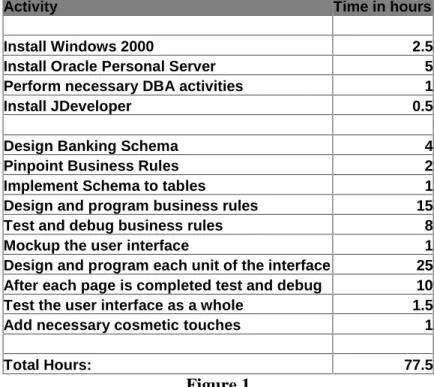
Figure 1 shows the timeline followed for the development portion of this project:
Activity Time in hours
Install Windows 2000 2.5
Install Oracle Personal Server 5 Perform necessary DBA activities 1
Install JDeveloper 0.5
Design Banking Schema 4
Pinpoint Business Rules 2
Implement Schema to tables 1 Design and program business rules 15 Test and debug business rules 8 Mockup the user interface 1 Design and program each unit of the interface 25 After each page is completed test and debug 10 Test the user interface as a whole 1.5 Add necessary cosmetic touches 1
Total Hours: 77.5
RESULTS
Installation
Before any development could be done, some systems and database administration duties were performed. Windows 2000 Professional was installed on a laptop. Windows 2000 was chosen because the version of Oracle Server and JDeveloper attained required Windows NT or 2000.
After the Windows 2000 installation completed, Oracle 8i version 8.1.7 Personal Server was installed on the laptop. The database server software was downloaded from the Oracle Technology Network site at http://technet.oracle.com. All components of the server were installed, including the Apache Web Server with the JServer component. After installation was complete, the Oracle Database instance was set up and was called “ORCL”. A schema was created for this project called “Project” and was given all the necessary rights for development.
Finally, JDeveloper was installed to act as the integrated development environment. JDeveloper has its own internal web server used for testing purposes.
Designing the Banking Schema
automatically accumulate interest on a monthly basis. The business rules of the schema were established.
The banking database schema consisted of eight entities (see Appendix A). The database holds data regarding bank clients, their checking and checking types, saving accounts and interest rate information, and transaction and transaction type information. Based on the relationships between the entities and the business rules pinpointed by the database functionality, 11 tables resulted (see Appendix B). Using SQL and Oracle’s SQL *Plus, the 11 tables and the necessary keys to relate all the tables together were created (see Appendix C).
Designing and Programming the Business Rules
With the tables created, the next step was to design and program the necessary database triggers, procedures, and functions to uphold the business rules of the database.
The business rules for this database are the following:
1. If a client makes a transaction, the appropriate amount has to be credited or subtracted from the account balance.
2. If the transaction causes the checking account to fall below the minimum allowed balance, continue with the transaction, then add another transaction that penalizes the account for falling below the minimum.
4. An account can retrieve and deposit money with an “ATM”. Create an ATM fee transaction each time any transaction is completed by an ATM.
5. Each first of the month, calculate each savings account's interests, insert a new interest transaction, and update the associated account’s balance.
The first four business rules were upheld by a combination of PL/SQL triggers and Java stored procedures and functions (see Appendix D).
A database trigger contains code that is fired off whenever certain data manipulation language (DML), such as insert, update, or delete, is used on a table. The trigger can perform a myriad of operations, including retrieving and inserting information in other tables, and returning programmer-defined errors when certain conditions are met. It can also call other functions and procedures to run.
A Java stored procedure is a Java method that does not return a value. A stored procedure contains code that is compiled and stored in the database and can be called from any other program within the schema to run its code. A Java stored function is similar to the Java stored procedure except that it returns a value.
public static void depositUpdateBal (float transAmount, String accountNum) throws SQLException {
String sql = "UPDATE account SET balance = balance + ?, last_update = sysdate " + "WHERE account_number = ?";
try {
Connection conn = DriverManager.getConnection("jdbc:default:connection:"); PreparedStatement prst = conn.prepareStatement(sql);
prst.setFloat (1, transAmount); prst.setString (2, accountNum); prst.executeUpdate();
prst.close(); }
catch (SQLException e) {
System.err.println (e.getMessage()); }
}
Figure 2
A prepared SQL statement is created, with question marks holding the places for bind1 variables that are passed when the procedure is called. Using an internal JDBC2 default connection, the procedure opens a connection with the database. It uses the default connection because it is assumed that the database schema it is called from is the same as the one this procedure is stored in. After creating the connection, each bind variable is replaced with the actual argument passed. Finally, it executes the SQL statement and closes the JDBC connection.
In order to use Java stored procedures and functions, they have to be loaded into the database schema. Figure 3 shows the command to run to load the java classes.
C:\$DocDir> loadjava –u project/masters@localhost:1521:orcl -v –r –t javacode.class
Figure 3
After the classes were loaded, the stored procedures and functions were published in the Oracle data dictionary. Using Oracle PL/SQL packages, call specifications were written (see Appendix F). There are two parts to a package, a package head and a package body. The package head contains the information about the contents of the body but no code (PL/SQL Programming, 1997). The package body contains the code that was specified in the package header. To publish Java stored procedures and functions, they are mapped to their equivalent PL/SQL counterparts (Java Stored Procedures Developer’s Guide, 1999). Figure 4 shows a package header and body for Figure 2’s procedure.
CREATE OR REPLACE PACKAGE banking_mgmt AS
PROCEDURE deposit_update_bal (trans_amount NUMBER, account_num VARCHAR2); END banking_mgmt;
CREATE OR REPLACE PACKAGE BODY banking_mgmt AS
PROCEDURE deposit_update_bal (trans_amount NUMBER, account_num VARCHAR2) AS LANGUAGE JAVA
NAME ’Banking.depositUpdateBal(float, java.lang.String)’; END banking_mgmt;
Figure 4
Since they are mapped to their PL/SQL counterparts, Java stored procedures can be called in any PL/SQL code as if a PL/SQL stored procedure were being called. Figure 5 shows a snapshot of the trigger that calls the above stored procedure.
IF (v_account_type = ’CHECKING’) then
IF (v_transaction_type = ’counter deposit’) then
banking_mgmt.deposit_update_bal (v_amount, v_account_number); Figure 5
As a counterpoint to the Java stored procedures, a PL/SQL stored procedure was created for business rule 5 (see Appendix G). A Java version was attempted but after much debugging and testing, it still did not work properly. The amount of time needed to develop the PL/SQL procedure was far less than developing in Java. PL/SQL was more straightforward since it is a procedural language. As the PL/SQL version shows, there are multiple SQL statements executed, and a “for” loop is used to iterate through all the savings accounts to calculate the interest for each. As for the PL/SQL version, unlike Java, no JDBC connection is necessary, nor is it necessary to publish a call specification for this procedure. Since PL/SQL is native to Oracle, no additional work was necessary to use this procedure. Both types of procedures are compiled and stored in the database. The DBMS_JOB package was used to schedule the procedure to run every thirty days starting at the beginning of the month.
User Interface Design and Programming
The next step in development was to create the user interface mockup for the front end. Using the mockup, the entry point to the database and the subsequent interactions between the user and the database were determined. For a project of this scale, user interaction was limited to making transactions and retrieving account information from the database.
The first page was the entry point. Here, a client would enter their account number and social security number to identify them to the database. If the database were able to retrieve the account, the client would be brought to the next page that showed them their current balance. This page would also allow them to make other decisions on their account by clicking on certain buttons. Each button is part of a form that has their account and social security numbers hidden. Depending on the button they chose, they could either create a new transaction or get information on their past transactions.
Figure 6
For the interaction with the database, the first attempt was to create a JavaServer Page (JSP) that used a Java Bean, named QueryIDBean, to query the database (see Appendix H), and return the results in XML format. A Java Bean is really a Java class with a set of methods that can be called by Servlets and JSP. QueryIDBean used another Java class called DBConnection (see Appendix I) to connect to the database via JDBC. Other bean methods include querying the database and moving through the resultset. Without the classes, the code to connect to a database and move through records would have been embedded in the JSP itself.
passed to the forms that would be created by the stylesheet. There is a language called JML that Oracle developed as the JSP markup language, which may have this interaction. However, it was difficult to set up in terms of the web server and JDeveloper. In order to avoid the possibility of upgrading, a different approach to this problem was taken.
Rather than returning XML, as previously hoped for the account data, JSP was embedded in an HTML page (see Appendix J). The Java bean was still used and it returned the data in an HTML formatted table, as shown in Figure 7. Within the same JSP page, session variables were used to pass the account and social security numbers to the other forms.
Figure 7
database connection class, prepared a SQL statement, then instantiated a new OracleXMLQuery instance (see Appendix K), part of the Oracle XML SQL Utility (XSU). This utility can be used both inside the Oracle server and outside by command line. It is intended to provide a rich layer of services to work with results of SQL queries in XML and to process incoming XML documents for insertion into the database schema (Muench, 2000).
The OracleXMLQuery class has many additional methods, which were used, such as setting the maximum number of rows returned, creating the XML returned document, and setting the stylesheet to use for the XML data returned.
Using Microsoft’s Internet Explorer 5.0, the JSP was run without a stylesheet set and was found to work with the XSU. The browser returned a resultset in XML canonical form. A XSLT stylesheet was applied to try to transform the XML data into HTML (see
Appendix L). However, when the JSP was run again through IE5, a blank page returned. When the source was viewed, it was found that the XML data was there, but the
stylesheet did not work. The resources used for this project all indicated that XSLT stylesheets worked with a browser such as IE 5.0.
In an attempt to make the stylesheets work, the web browser was upgraded to version IE5.5. That did not improve the parsing situation. Since XML and XSLT
side-by-side mode, both versions of the parser were available for use. Again, this did not work. The Parser was then installed in replace mode, to remove the older version. The XSLT stylesheets worked. However, the JSP pages that utilized the Oracle XML SQL Utility stopped working. The XML was being returned not well formed. The XML declaration was appearing on the second line of the XML file, while it was necessary for the declaration to be on the first line of the form. According to Muench (2001), this was a common problem with JavaServer Pages, though he did not mention a way to fix the problem with the XSU.
After having attempted two JSPs using the XSU, the parsing problems caused its
abandonment. Instead, a JSP script not using the XSU, named last_trans.jsp, was created. In the body of the JSP, a while loop was used in order to return the XML in canonical form (see Appendix M) using QueryIDBean. Granularity was lost though, in comparison to the XSU. Some features, such as limiting the number of rows to return were not available using JSP.
Figure 8
The template style was used for the XSLT stylesheet. Instead of creating a single root node at the top of the stylesheet, and telling the stylesheet to do everything below it for each matching XML element, a template treats each element individually and applies different transformations to each one. A similar script, which retrieved only deposit transactions (see Appendix O), was transformed by the single-root node template, trans_style.xsl. The results were the same, but the template style allowed more flexibility.
Developer’s Guide for XML, XSQL utilizes the XML Parser for Java version 2 and the XML SQL Utility for generating XML pages for SQL queries (2000). Anyone with SQL knowledge can create an XSQL page. It is intended to hide all the complexities involved including the creation of a connection to the database, querying the database, and
returning the resultset, all of which a Java developer would have to worry about if they were developing Java servlets or JSPs.
Independent of what type of DML was to be executed, a database connection needed to be defined in the XSQLConfig.xml file. This file holds all the necessary configuration information for XSQL servlets. Figure 9 shows the entry created in order to setup a connection o the schema “project”.
<connection name="banking"> <username>project</username> <password>masters</password>
<dburl>jdbc:oracle:thin:@localhost:1521:ORCL</dburl> <driver>oracle.jdbc.driver.OracleDriver</driver> </connection>
Figure 9
Since it is an XML page, all entries have to be well-formed. When a connection to the database is needed in an XSQL servlet, the connection tag’s name attribute would be used to identify the appropriate connection.
The past deposit transaction XSQL script, last_five_dep.xsql, contained an SQL
an explicit loop in order to produced the XML for each resultset row, as figure 10 shows. Only the SQL statement was necessary.
<?xml version="1.0" ?>
<?xml-stylesheet type="text/xsl" href="trans_style.xsl"?>
<xsql:query connection="banking" rowset-element="Transactions" row-element="Transaction" max-rows="5" xmlns:xsql="urn:oracle-xsql">
SELECT to_char(transaction_date, ’MM-DD-YYYY’) as "Date", transaction_type as "Type", amount as "Amount", transaction_id as "ID", comments as "Comments"
FROM transaction
WHERE account_number = {@acc_id} AND transaction_type = ’counter deposit’ OR transaction_type = ’atm deposit’
</xsql:query>
Figure 10
The XSU looped through the resultset behind the scenes. This is an added bonus for non-programmers who are unfamiliar with control structures such as loops and conditional statements. The resultset columns were defined the same way as the tags for
last_trans.jsp in the SQL select statement, so the same trans_style.xsl was applied in order to transform the query results HTML. Although explicitly using one of the classes of the XSU did not work in one of the previous pages, the XSU worked fine running in the background for the XSQL servlets. This made evident that the problems with the XSU must have been related to its use in a JavaServer Page.
As the previous three scripts showed, the SQL select statements can contain an alias for each column, as in XSQL. In the JSP scripts, how the resultsets were tagged was
in the resultset. When no columns are specified in an XSQL, the XSU returns the resultset using the table attribute names for the tags. This allows for faster querying. Using one of the templates already used by another page above, this page was
transformed into an HTML table, demonstrating that creating the most general template allowed for a variety of pages to utilize it. This was one of the simplest pages to create.
Another attempt at using the combination of Java and XML was with the “counter deposit” page. This page contained a form that passes the account number and
transaction amount to an XSQL servlet page that would complete the deposit transaction.
In order to do an XSQL insertion, an XML stylesheet was created (see Figure 11) to turn the form parameter values into XML canonical form with tags named after the attributes in the transaction table.
<?xml version="1.0" ?>
<ROWSET xmlns:xsl="http://www.w3.org/1999/XSL/Transform" xsl:version="1.0"> <xsl:for-each select="request/parameters">
<ROW>
<TRANSACTION_TYPE><xsl:value-of select="type"/></TRANSACTION_TYPE> <AMOUNT><xsl:value-of select="amount"/></AMOUNT>
<CLIENT_SSN><xsl:value-of select="ssn"/></CLIENT_SSN>
<ACCOUNT_NUMBER><xsl:value-of select="acc_id"/></ACCOUNT_NUMBER> </ROW>
</xsl:for-each> </ROWSET>
Figure 11
the database table. The table attribute names were necessary in order to insert each value into the correct column.
Figure 12
the error message, also formatted in a table (see figure 14). Appropriately, the error message returned in figure 14 came from one of the triggers created for the business rule implementation.
Figure 14
A second page similar to the deposit was created, but a QueryIDBean was used to get the option values for a select list within the form (see Appendix R) with a complex SQL query. As with any scripting language, this was easy to do with JSP.
As the scripts showed, there was an added layer of complexity for using XSQL and JSP with XML. Instead of using one script to create a form and gather form parameter values to insert into a database, a developer has to first spend time creating an XSQL script with the DML statement, and then transform the form parameter values into XML, before any data can be inserted into the database.
Evaluation
The criteria used to evaluate the results of this project, and whether if it was successful, are shown in figure 15:
Time how much was spent debugging and solving
problems versus actual development
Problems what types of problems were encountered
Complexity of the pages both for development and product – how complex was it to build the pages, and how complex were the resulting pages
Figure 15
In terms of the web pages, problems encountered with the Oracle XML SQL Utility and the Microsoft parser slowed down development dramatically. The XSU was purported to work in many of the resources. Finding an explanation from Oracle was difficult. No documentation was found to note problems with JSP and the XSU. Muench (2001) answered a forum question regarding this problem, but when asked to explain how to fix it, no answer was given. Time was also spent finding software fixes at the Microsoft and Oracle site. At the time of development, the version of the XML Development Kit, which contained all the parsers and utilities including the XSU, installed with the Oracle server was the latest available. Upgrading the Microsoft software also took time and deduction since installing the parser in different modes caused different results with the pages. Debugging the code for the classes was considered, but forsaken because of the time it would take and the high probability that the problem was not within the class.
Since XML was used in most of the scripts, time was spent creating XSLT stylesheets for transformations of data going to and coming from the database. It is understandable to have to transform data coming from the server to a web friendly format, but transforming to insert data added extra layers of work. In this type of situation, the ability to use XML seemed like more added work than a benefit.
CONCLUSION
Based on the criteria used for evaluation, and the actual product, it can be said that building a Java/XML web database may be a little more difficult than alleged to be. A few problems were faced when it came to compatibility with parsers and versions with XML. Since XML is considered to be a relatively young “language”, and many of the software industry is scrambling to be the first and the best in implementing it with their software products, many disparities still arise when trying to use it across different platforms. One glaring problem was illustrated when trying to use Sun Microsystem’s JSP technology in conjunction with Microsoft’s XML Parser and the Oracle database server.
Another difficulty was the necessity of Java programming experience, even for JSP. Indeed it is a scripting language, but its effective use required knowledge of Java on the part of the developer. Although the Java programs written for the development of this project were not too complex, an understanding of basic Java and JDBC programming were still necessary.
Both XSQL and JSP worked nicely for this project. After getting past some of the programming problems, pages became easier and faster to develop. The reusable nature of the Java Bean and connection class contributed to the accelerated pace. Some of Aslam’s (1998) fears regarding Java should be alleviated with the outcome of this project. Java’s JSP technology allows the power of the language to be used in the form of an easier scripting language.
Interaction with Oracle was fast and seamless. Though only a subset of the technologies offered by Oracle were used in this project, the results still showed that the tools did indeed work together to bring dynamic content to the web.
REFERENCES
• Aslam, S. (1998). Web-Based Query Processing in a Database Course Project. Proceedings of the Twenty-Ninth SIGCSE Technical Symposium on Computer Science Education, 297 – 301.
• Bosak, J. (1997). XML, Java, and the Future of the Web. World Wide Web Journal, 2(4), 219 – 227.
• Higgins, S. (2000). Oracle8i Application Developer’s Guide – XML, Release 3 (8.1.7). Oracle Corporation.
• Koch, G., Loney., K. (1997). Oracle8: The Complete Reference. California: Osborne/McGraw-Hill.
• McDonald, B. (1999). Using Java Servlets with Database Connectivity. Linux
Journal Interactive, 1999.
• Mohseni, P. (1999). An Introduction to XML for Java Programmers [Online]. Available:
http://www.xmlmag.com/upload/free/features/xml/1999/01win99/pmwin99/pmwi n99.asp. (February 11, 2001).
• Muench, S. (2000a). Building Oracle XML Applications. California: O’Reilly.
• Muench, S. (2000b). Using XML and Relational Databases for Internet
Applications [Online]. Available:
• Muench, S. (2001). Oracle Technology Network XML Forum – XML SQL Utility – declaration error [Online]. Available:
http://technet.oracle.com/support/bboard/discussions.htm. (March 27, 2001).
• North, K. (1999). Oracle: Powered by XML and Java [Online]. Available: http://www.xmlmag.com/upload/free/features/xml/1999/01win99/knwin99/knwin 99.asp. (February 11, 2001).
• Oracle Corporation. (1999). Oracle’s XML-Enabled Internet Platform for Business-to-Business E-Commerce [Online]. Available:
http://technet.oracle.com/tech/xml/info/index2.htm?Info&htdocs/xml_bwp.html. (February 11, 2001).
• Patzer, A. (2000). Retrieving XML Data Using Java Stored Procedures in
Oracle8i [Online]. Available:
http://www.pinnaclepublishing.com/JE/Jemag.nsf/WebIndexOfFreeTipes/EC921 0705871439A85256919005B4FAD?opendocument. (February 11, 2001).
• Prasad, S. G., & Kunisetty, S. K., & Basu, Julie. (2001). Developing Web
Applications Using Servlets and JavaServer Pages on the Oracle Internet Platform [Online]. Available: http://technet.oracle.com/tech/java/servlets/pdf/424.pdf. (February 11, 2001).
• Sun Microsystems. (2000). Developing XML Solutions with JavaServer Pages Technology [Online]. Available:
http://java.sun.com/products/jsp/html/JSPXML.html. (February 11, 2001).
• Treese, W. (1998). Putting It Together: What’s All the Noise About XML. NetWorker, 2(5), 27 – 29.
• Urman, S. (1997). Oracle8 PL/SQL Programming. California: Osborne/McGraw-Hill.
• Yang, A., & Linn, J., & Quadrato, D. (1998). Developing Integrated Web and
APPENDIX A
APPENDIX B
Banking Database Tables
Client (ssn varchar2(9), last_name varchar2(30), first_name varchar2(30), middle_name varchar2(30), street_address varchar2(25), city varchar2(20), state varchar2(2), zip varchar2(9), phone_number varchar2(10), date_created date)
Transaction (transaction_id number, transaction_type varchar2(25) (FK from
Transaction_Type), amount number, transaction_date date, comments varchar2 (100), client_ssn (FK from Client), account_number (FK references account))
Transaction_Type (transaction_type varchar2(25), fee number (5,2));
Account (account_number varchar2(15), balance number, creation_date date, last_update date, type varchar2(8), client_ssn varchar2(9) (FK from client), account_type
varchar2(8))
Savings_Account (account_number varchar2(15) (FK from account), current_total_interest number)
Savings_Interest_Rate (year varchar2(4), month varchar2(2), rate_percent number) Interest_Calculated_By (savings_account_number (FK from Savings_Account), year (FK from Savings_Interest_Rate, month (FK from Savings_Interest_Rate), date_calculated date, amount number)
Checking_Account (account_number varchar2(15) (FK from account), checking_type (FK from Checking_Type))
APPENDIX C
Schema DDL and DML SQL Statements TABLES
create table CLIENT (ssn varchar2(9) primary key, last_name varchar2(30) not null, first_name varchar2(30) not null, middle_name varchar2(30), street_address varchar2(25) not null, city varchar2(20) not null, state varchar2(2) not null, zip varchar2(10) not null, phone_number varchar2(10), date_created date not null);
create table TRANSACTION (transaction_id number primary key, transaction_type varchar2(50) not null, amount number not null, transaction_date date not null, comments varchar2 (100), client_ssn varchar2(9) not null, account_number varchar2(15) not null);
create table TRANSACTION_TYPE (transaction_type varchar2(25) primary key, fee number (5,2) not null);
create table ACCOUNT (account_number varchar2(15) primary key, creation_date date not null, balance number not null, client_ssn varchar2(9) not null, last_update date, account_type varchar2(8));
create table SAVINGS_ACCOUNT (account_number varchar2(15) primary key, current_total_interest number);
create table CHECKING_ACCOUNT (account_number varchar2(15) primary key, checking_type varchar2(15) not null);
create table SAVINGS_INTEREST_RATE (year number(4), month number(2), rate_percent number(3,3) not null, primary key (year, month));
create table INTEREST_CALCULATED_BY (savings_account_number varchar2(15), year number(4),month number(2), date_calculated date not null, amount number not null, primary key (savings_account_number, year, month));
create table CHECKING_TYPE (type varchar2 (15) primary key, minimum_balance number not null, below_min_fee number not null);
VIEWS
create or replace view fee_trans as select * from transaction;
APPENDIX C (cont.)
alter table transaction add constraint check_amount CHECK (amount > 0); alter table transaction add constraint type_fk_trans foreign key (transaction_type) references transaction_type;
alter table transaction add constraint ssn_fk_trans foreign key (client_ssn) references client;
alter table transaction add constraint accnum_fk_trans foreign key (account_number) references Account;
alter table account add constraint clientssn_fk_acc foreign key (client_ssn) references Client;
alter table account add constraint check_acctype CHECK (account_type IN (’CHECKING’, ’SAVINGS’));
alter table savings_account add constraint accnum_sav_fk foreign key (account_number) references account;
alter table checking_account add constraint accnum_ch_fk foreign key (account_number) references account;
alter table checking_account add constraint ct_fk_checktype foreign key (checking_type) references checking_type;
DATA INSERTIONS
insert into transaction_type values (’counter deposit’, 0); insert into transaction_type values (’new account’, 0); insert into transaction_type values (’atm deposit’, 1.50); insert into transaction_type values (’check’, 0);
insert into transaction_type values (’counter withdrawal’, 0); insert into transaction_type values (’atm withdrawal’, 1.50); insert into transaction_type values (’atm fee’, 0);
insert into transaction_type values (’below minimum balance collegiate’, 25.00); insert into transaction_type values (’below minimum balance personal’, 25.00); insert into transaction_type values (’below minimum balance free’, 30.00); insert into transaction_type values (’below minimum balance express’, 40.00); insert into checking_type values (’collegiate’, 100.00, 25.00);
insert into checking_type values (’personal’, 250.00, 25.00); insert into checking_type values (’free’, 150.00, 30.00); insert into checking_type values (’express’, 50.00, 40.00);
insert into checking_account values (’82736673’, sysdate, 0, ’987654321’, ’personal’); insert into savings_interest_rate values (2001, 03, .035);
APPENDIX C (cont.)
insert into savings_interest_rate values (2001, 07, .032); insert into savings_interest_rate values (2001, 08, .012);
insert into client (ssn, last_name, first_name, middle_name, street_address, city, state, zip, phone_number, date_created) values (‘987654321’, ‘Hon, ‘Angela’, ‘K’, ‘2345 Drive’, ‘new york’, ‘ny’, ‘11111’, ‘7877658754’, sysdate);
insert into account (account_number, creation_date, balance, client_ssn, last_update, account_type) values (‘1234’, sysdate, 0, ‘987654321’, sysdate, ‘CHECKING’); insert into account (account_number, creation_date, balance, client_ssn, last_update, account_type) values (‘7890’, sysdate, 0, ‘987654321’, sysdate, ‘SAVINGS’);
insert into checking_account (account_number, checking_type) values (‘1234’, ‘free’); insert into transaction (transaction_type, amount, transaction_date, client_ssn,
APPENDIX D
PL/SQL Package and Triggers for Table Transaction CREATE OR REPLACE PACKAGE trans_var_pack AS
--Declare externally visible (global) variables
v_transaction_ids transaction.transaction_id%TYPE; v_transaction_types transaction.transaction_type%TYPE; v_amounts transaction.amount%TYPE;
v_transaction_dates transaction.transaction_date%TYPE; v_ssns transaction.client_ssn%TYPE;
v_comments transaction.comments%TYPE;
v_account_numbers transaction.account_number%TYPE; v_account_types account.account_type%TYPE;
END trans_var_pack;
CREATE OR REPLACE TRIGGER RTRANS_TRIGGER BEFORE INSERT or UPDATE on transaction
--instead of INSERT on checking_transaction --Must use an instead of trigger on object views FOR EACH ROW
DECLARE NewID number; v_balance number;
v_acc_type account.account_type%TYPE; BEGIN
IF inserting THEN
--if the transactions are anything other than deposits, make sure the balance will be above
--zero after the transactions. Get the account type to determine if checking or savings
--get the account type
SELECT account_type INTO v_acc_type FROM account
WHERE account_number = :new.account_number; --checking account
IF ((v_acc_type = ’CHECKING’) AND
APPENDIX D (cont.)
SELECT balance INTO v_balance FROM account
WHERE account_number = :new.account_number; IF (v_balance - :new.amount < 0) THEN
RAISE_APPLICATION_ERROR (-20008, ’The checking account has a balance of $’ || v_balance ||
’. The transaction will cause it to fall below 0. Please withdraw less or deposit more money ’ || ’before continuing.’);
END IF;
--savings account
ELSIF ((v_acc_type = ’SAVINGS’) AND ((:new.transaction_type != ’counter deposit’) AND (:new.transaction_type != ’atm deposit’))) THEN
SELECT balance INTO v_balance FROM account
WHERE account_number = :new.account_number; IF (v_balance -:new.amount < 0) THEN
RAISE_APPLICATION_ERROR (-20009, ’The savings account has a balance of $’ || v_balance ||
’. The transaction will cause it to fall below 0. Please withdraw less or deposit more money ’ ||
’before continuing.’); END IF;
END IF;
select trans_seq.nextval into NewID from dual; :new.transaction_id := NewID;
:new.transaction_date := sysdate;
--capture all the values for the record that will be inserted trans_var_pack.v_transaction_ids := :new.transaction_id; trans_var_pack.v_transaction_types := :new.transaction_type; trans_var_pack.v_amounts := :new.amount;
trans_var_pack.v_transaction_dates := :new.transaction_date; trans_var_pack.v_ssns := :new.client_ssn;
APPENDIX D (cont.)
--assign the account type value to the global variable to be used in the after insert --trigger
trans_var_pack.v_account_types := v_acc_type; --use the debug package to see what is being passed debug.reset;
debug.debug (’transid ’, trans_var_pack.v_transaction_ids); debug.debug (’transtype ’, trans_var_pack.v_transaction_types); debug.debug (’acc_type ’, trans_var_pack.v_account_types); else IF UPDATING
:new.transaction_id := :old.transaction_id; END IF;
END RTRANS_TRIGGER;
--Statement level trigger for transaction table
CREATE OR REPLACE TRIGGER STRANS_TRIGGER AFTER INSERT ON transaction
--AFTER INSERT ON checking_transaction
--can’t use regular triggers on views, have to use instead of triggers. Can’t use instead of --triggers here, so must resort to a long statement level trigger on transaction
DECLARE
v_transaction_id transaction.transaction_id%TYPE; v_transaction_type transaction.transaction_type%TYPE; v_amount transaction.amount%TYPE;
v_transaction_date transaction.transaction_date%TYPE; v_ssn transaction.client_ssn%TYPE;
v_comments transaction.comments%TYPE;
v_account_number transaction.account_number%TYPE; v_account_type account.account_type%TYPE; new_trans_type transaction.transaction_type%TYPE; new_fee transaction_type.fee%TYPE; atm_fee transaction_type.fee%TYPE; cur_balance account.balance%TYPE; min_balance checking_type.minimum_balance%TYPE; check_type checking_type.type%TYPE;
APPENDIX D (cont.)
--Get the values for all the variables, except v_comments, from the global variables v_transaction_id := trans_var_pack.v_transaction_ids;
v_transaction_type := trans_var_pack.v_transaction_types; v_amount := trans_var_pack.v_amounts;
v_transaction_date := trans_var_pack.v_transaction_dates; v_ssn := trans_var_pack.v_ssns;
v_account_number := trans_var_pack.v_account_numbers; v_account_type := trans_var_pack.v_account_types; debug.debug (’transaction_id ’, v_transaction_id); debug.debug (’trans_type ’, v_transaction_type); debug.debug (’amount ’, v_amount);
debug.debug (’trans_date ’, v_transaction_date); debug.debug (’ssn ’, v_ssn);
debug.debug (’account_number ’, v_account_number);
--Start the if statements. The transaction_type will be checked to instigate the --appropriate actions.
--check if a checking transaction or a savings transaction IF (v_account_type = ’CHECKING’) THEN
--counter_deposit just update the account balance IF (v_transaction_type = ’counter deposit’) THEN
banking_mgmt.deposit_update_bal (v_amount, v_account_number); --atm_deposit get the current charge for the atm_deposit
ELSIF (v_transaction_type = ’atm deposit’) THEN atm_fee := banking_mgmt.get_fee (’atm deposit’); --if fee does not return an error, insert a new transaction --into the transaction table for charging the fee
--then, update the account balance with the deposit amount subtracting the fee IF (atm_fee != -1) THEN
new_trans_type := ’atm fee’;
banking_mgmt.insert_trans (v_account_number, new_trans_type, v_ssn, atm_fee, ’ref transaction ’ || v_transaction_id);
banking_mgmt.deposit_update_bal_fee (v_amount, atm_fee, account_number);
ELSE RAISE_APPLICATION_ERROR (-20001, ’Could not retrieve the fee for an atm deposit transaction’);
APPENDIX D (cont.)
--if counter withdrawal or check or atm, check if account current balance is above --minimum. if so, do nothing but update account. If not, charge a fee, then update --the balancewith the withdrawal and the fee
ELSIF ((v_transaction_type = ’counter withdrawal’) OR (v_transaction_type = ’check’) OR (v_transaction_type = ’atm withdrawal’)) then
--first, if this is an atm transaction, charge the fee and subtract the amount IF (v_transaction_type = ’atm withdrawal’) THEN
atm_fee := banking_mgmt.get_fee (’atm withdrawal’); --make sure fee isn’t minus 1, or raise app error IF (atm_fee != -1) THEN
--insert a new fee transaction new_trans_type := ’atm fee’;
banking_mgmt.insert_trans (v_account_number, new_trans_type, v_ssn, atm_fee, ’ref transaction ’ || v_transaction_id);
--just reduce the balance by the fee first, the actual transaction amount will be --reduced in the outer if block
banking_mgmt.reduction_update_bal (atm_fee, v_account_number); --raise app error
ELSE RAISE_APPLICATION_ERROR (-20002, ’Could not retrieve the fee for an ATM transaction’);
END IF; END IF;
--get current balance
cur_balance := banking_mgmt.get_balance (v_account_number); debug.debug (’current balance ’, cur_balance);
--get account type minimum balance
min_balance := checking_mgmt.get_minimum (v_account_number); debug.debug (’minimum balance ’, min_balance);
APPENDIX D (cont.)
IF ((cur_balance - v_amount) < min_balance) THEN
--get penalty fee for being below minimum allowed balance min_fee := checking_mgmt.get_min_fee (v_account_number); debug.debug (’min fee ’, min_fee);
--get checking type
check_type := checking_mgmt.get_check_type (v_account_number); debug.debug (’check type’, check_type);
IF ((min_fee != -1) AND (check_type IS NOT NULL)) THEN --insert a new penalty fee transaction
new_trans_type := ’below minimum balance ’ || check_type;
banking_mgmt.insert_trans (v_account_number, new_trans_type, v_ssn, min_fee, ’ref transaction ’ || v_transaction_id);
--update the checking account’s balance
banking_mgmt.reduction_update_bal_fee (v_amount, min_fee, v v_account_number);
ELSE RAISE_APPLICATION_ERROR (-20003, ’Could not retrieve the appropriate fee for falling below minimum balance or the account checking type’); END IF;
--current balance greater than min balance
ELSIF ((cur_balance - v_amount) >= min_balance) THEN --just deduct the transaction amount from the current balance
banking_mgmt.reduction_update_bal (v_amount, v_account_number); END IF;
--raise app error if either current balance or minimum balance is minus 1
else RAISE_APPLICATION_ERROR (-20004, ’Could not retrieve information regarding the account current balance and minimum allowed balance’);
END IF;
END IF;
APPENDIX D (cont.)
--counter deposit, just update balance
banking_mgmt.deposit_update_bal (v_amount, v_account_number); ELSIF (v_transaction_type = ’atm deposit’) THEN
--atm deposit, insert a new fee transaction, then update balance atm_fee := banking_mgmt.get_fee (’atm deposit’);
--if fee does not return an error, insert a new transaction --into the transaction table for charging the fee
--then, update the account balance with the deposit amount subtracting the fee IF (atm_fee != -1) THEN
new_trans_type := ’atm fee’;
banking_mgmt.insert_trans (v_account_number, new_trans_type, v_ssn, atm_fee, ’ref transaction ’ || v_transaction_id);
banking_mgmt.deposit_update_bal_fee (v_amount, atm_fee, v_account_number);
ELSE RAISE_APPLICATION_ERROR (-20005, ’Could not retrieve the fee for atm deposit transaction’);
END IF;
ELSIF (v_transaction_type = ’atm withdrawal’) THEN
--atm withdrawal, get the fee, insert new fee transaction, then update balance atm_fee := banking_mgmt.get_fee (’atm withdrawal’);
--if fee does not return an error, insert a new transaction --into the transaction table for charging the fee
--then, update the account balance with the deposit amount subtracting the fee IF (atm_fee != -1) THEN
new_trans_type := ’atm fee’;
banking_mgmt.insert_trans (v_account_number, new_trans_type, v_ssn, atm_fee, ’ref transaction ’ || v_transaction_id);
banking_mgmt.reduction_update_bal_fee (v_amount, atm_fee, v_account_number);
ELSE RAISE_APPLICATION_ERROR (-20006, ’Could not retrieve the fee for an atm withdrawal transaction’);
END IF;
ELSIF (v_transaction_type = ’counter withdrawal’) THEN --counter withdrawal, update balance
APPENDIX D (cont.)
ELSIF (v_transaction_type = ’savings check’) THEN
--using checks from the savings account costs a nominal fee, get fee, insert new --transaction then update balance
--get the fee for savings check transaction
new_fee := banking_mgmt.get_fee (’savings check’); --if fee does not return minus 1, insert a new transaction IF (new_fee != -1) THEN
new_trans_type := ’savings check’;
banking_mgmt.insert_trans (v_account_number, new_trans_type, v_ssn, new_fee, ’ref transaction ’ || v_transaction_id);
--update the account balance
banking_mgmt.reduction_update_bal_fee (v_amount, new_fee, v_account_number);
ELSE RAISE_APPLICATION_ERROR (-20007, ’Could not retrieve the fee for a savings check transaction’);
END IF; END IF; END IF;
APPENDIX E
Java Stored Procedures import java.sql.*;
import java.io.*;
import oracle.jdbc.driver.*;
public class Banking extends Object {
public static void depositUpdateBal (float transAmount, String accountNum) throws SQLException
{
String sql = "UPDATE account SET balance = balance + ?, last_update = sysdate " + "WHERE account_number = ?";
try {
Connection conn = DriverManager.getConnection("jdbc:default:connection:"); PreparedStatement prst = conn.prepareStatement(sql);
prst.setFloat (1, transAmount); prst.setString (2, accountNum); prst.executeUpdate();
prst.close(); }
catch (SQLException e) {
System.err.println (e.getMessage()); }
}
public static void depositUpdateBalFee (float transAmount, float fee, String accountNum) throws SQLException
{
String sql = "UPDATE account SET balance = balance + ? - ?, last_update = sysdate"+ " WHERE account_number = ?";
try {
Connection conn = DriverManager.getConnection ("jdbc:default:connection:"); PreparedStatement prst = conn.prepareStatement(sql);
prst.setFloat (1, transAmount); prst.setFloat (2, fee);
prst.setString (3, accountNum); prst.executeUpdate();
prst.close(); }
catch (SQLException e){
System.err.println (e.getMessage()); }
APPENDIX E (cont.)
public static void reductionUpdateBal (float transAmount, String accountNum) throws SQLException
{
String sql = "UPDATE account SET balance = balance - ? " + "WHERE account_number = ?";
try {
Connection conn = DriverManager.getConnection("jdbc:default:connection:"); PreparedStatement prst = conn.prepareStatement(sql);
prst.setFloat (1, transAmount); prst.setString (2, accountNum); prst.executeUpdate();
prst.close(); }
catch (SQLException e){
System.err.println (e.getMessage()); }
}
public static void reductionUpdateBalFee (float transAmount, float fee, String accountNum) throws SQLException
{
String sql = "UPDATE account SET balance = balance - ? - ?, last_update = sysdate" + " WHERE account_number = ?";
try {
Connection conn = DriverManager.getConnection("jdbc:default:connection:"); PreparedStatement prst = conn.prepareStatement(sql);
prst.setFloat(1, transAmount); prst.setFloat(2, fee); prst.setString(3, accountNum); prst.executeUpdate(); prst.close(); }
catch (SQLException e){
System.err.println (e.getMessage()); }
}
public static float getBalance (String accountNumber) {
String sql = "SELECT balance FROM account WHERE account_number = ?"; float balance =0;
try {
APPENDIX E (cont.)
PreparedStatement prst = conn.prepareStatement(sql); prst.setString (1, accountNumber);
ResultSet rset = prst.executeQuery(); while (rset.next())
{
balance = rset.getFloat(1); }
rset.close(); prst.close(); return balance; }
catch (SQLException e) {
System.err.println (e.getMessage()); return -1;
} }
public static float getFee (String type) {
String sql = "SELECT fee from Transaction_Type where transaction_type = ?"; float fee = 0;
try {
Connection conn = DriverManager.getConnection("jdbc:default:connection:"); PreparedStatement prst = conn.prepareStatement(sql);
prst.setString (1, type);
ResultSet rset = prst.executeQuery(); while (rset.next())
{
fee = rset.getFloat(1); }
rset.close(); prst.close(); return fee; }
catch (SQLException e) {
System.err.println (e.getMessage()); return -1;
} }
APPENDIX E (cont.)
float feeAmount, String newComments) {
String sql = "Insert into fee_trans (transaction_type, amount, transaction_date, " + "client_ssn, comments, account_number) values (?, ?, sysdate, ?, ?, ?)";
try{
Connection conn = DriverManager.getConnection("jdbc:default:connection:"); PreparedStatement prst = conn.prepareStatement(sql);
prst.setString (1, transType); prst.setFloat (2, feeAmount); prst.setString (3, clientSsn); prst.setString (4, newComments); prst.setString (5, accountNum); prst.executeQuery();
prst.close(); }
catch (SQLException e) {
System.err.println (e.getMessage()); }
APPENDIX E (cont.)
import java.sql.*; import java.io.*;
import oracle.jdbc.driver.*;
public class Checking extends Object {
public static float getMinimum (String accNum) {
String sql = "SELECT minimum_balance FROM checking_type WHERE type IN " + "(SELECT checking_type FROM checking_account WHERE account_number = ?)"; float minBal = 0;
try {
Connection conn = DriverManager.getConnection ("jdbc:default:connection:"); PreparedStatement prst = conn.prepareStatement(sql);
prst.setString(1, accNum);
ResultSet rset = prst.executeQuery(); while (rset.next())
{
minBal = rset.getFloat(1); }
rset.close(); prst.close(); return minBal; }
catch (SQLException e) {
System.err.println (e.getMessage()); return -1;
} }
public static float getMinFee (String accNum) {
String sql = "SELECT below_min_fee FROM checking_type WHERE type IN " + "(SELECT checking_type FROM checking_account WHERE account_number = ?)"; float fee = 0;
try {
Connection conn = DriverManager.getConnection("jdbc:default:connection:"); PreparedStatement prst = conn.prepareStatement(sql);
APPENDIX E (cont.)
ResultSet rset = prst.executeQuery(); while (rset.next())
{
fee = rset.getFloat(1); }
rset.close(); prst.close(); return fee; }
catch (SQLException e) {
System.err.println (e.getMessage()); return -1;
} }
public static String getCheckType (String accNum) {
String sql = "SELECT checking_type FROM checking_account WHERE account_number =?";
String checkType = ""; try {
Connection conn = DriverManager.getConnection("jdbc:default:connection:"); PreparedStatement prst = conn.prepareStatement(sql);
prst.setString (1, accNum);
ResultSet rset = prst.executeQuery(); while (rset.next())
{
checkType = rset.getString(1); }
rset.close(); prst.close(); return checkType; }
APPENDIX F
Package Specification and Body for Java Stored Procedures CREATE OR REPLACE PACKAGE banking_mgmt AS
PROCEDURE deposit_update_bal (trans_amount NUMBER, account_num VARCHAR2);
PROCEDURE deposit_update_bal_fee (trans_amount NUMBER, fee NUMBER, account_num VARCHAR2);
PROCEDURE reduction_update_bal (trans_amount NUMBER, account_num VARCHAR2);
PROCEDURE reduction_update_bal_fee (trans_amount NUMBER, fee NUMBER, account_num VARCHAR2);
FUNCTION get_balance (account_number VARCHAR2) RETURN NUMBER; FUNCTION get_fee (type VARCHAR2) RETURN NUMBER;
PROCEDURE insert_trans (account_num VARCHAR2, trans_type VARCHAR2, client_ssn VARCHAR2, fee_amount NUMBER, new_comments VARCHAR2); END banking_mgmt;
CREATE OR REPLACE PACKAGE BODY banking_mgmt AS
PROCEDURE deposit_update_bal (trans_amount NUMBER, account_num VARCHAR2) AS LANGUAGE JAVA
NAME ’Banking.depositUpdateBal(float, java.lang.String)’;
PROCEDURE deposit_update_bal_fee (trans_amount NUMBER, fee NUMBER, account_num VARCHAR2) AS LANGUAGE JAVA
NAME ’Banking.depositUpdateBalFee(float, float, java.lang.String)’;
PROCEDURE reduction_update_bal (trans_amount NUMBER, account_num VARCHAR2) AS LANGUAGE JAVA
NAME ’Banking.reductionUpdateBal (float, java.lang.String)’;
PROCEDURE reduction_update_bal_fee (trans_amount NUMBER, fee NUMBER, account_num VARCHAR2) AS LANGUAGE JAVA
NAME ’Banking.reductionUpdateBalFee (float, float, java.lang.String)’;
FUNCTION get_balance (account_number VARCHAR2) RETURN NUMBER AS LANGUAGE JAVA
NAME ’Banking.getBalance (java.lang.String) return float’;
FUNCTION get_fee (type VARCHAR2) RETURN NUMBER AS LANGUAGE JAVA NAME ’Banking.getFee (java.lang.String) return float’;
PROCEDURE insert_trans (account_num VARCHAR2, trans_type VARCHAR2, client_ssn VARCHAR2, fee_amount NUMBER, new_comments VARCHAR2) AS LANGUAGE JAVA
NAME ’Banking.insertTrans (java.lang.String, java.lang.String, java.lang.String, float, java.lang.String)’;