R E S E A R C H
Open Access
An integrated practice system for learning
programming in Python: design and
evaluation
Peter Brusilovsky
1*, Lauri Malmi
2, Roya Hosseini
1, Julio Guerra
3, Teemu Sirkiä
2and Kerttu Pollari-Malmi
2*Correspondence:[email protected] 1School of Computing and Information, University of Pittsburgh, 135 N. Bellefield Ave., Pittsburgh, PA 15260, USA Full list of author information is available at the end of the article
Abstract
Over the past decades, computer science educators have developed a multitude of interactive learning resources to support learning in various computer science domains, especially in introductory programming. While suchsmart contentitems are known to be beneficial, they are frequently offered through different login-based systems, each with its own student identification for giving credits and collecting log data. As a consequence, using more than one kind of smart learning content is rarely possible, due to overhead for both teachers and students caused by adopting and using several systems in the context of a single course. In this paper, we present a general purpose architecture for integrating multiple kinds of smart content into a single system. As a proof of this approach, we have developed the Python Grids practice system for learning Python, which integrates four kinds of smart content running on different servers across two continents. The system has been used over a whole semester in a large-scale introductory programming course to provide voluntary practice content for over 600 students. In turn, the ability to offer four kinds of content within a single system enabled us to examine the impact of using a variety of smart learning content on students’ studying behavior and learning outcomes. The results show that the majority of students who used the system were engaged with all four types of content, instead of only engaging with one or two types. Moreover, accessing multiple types of content correlated with higher course performance, as compared to using only one type of content. In addition, weekly practice with the system during the course also correlated with better overall course performance, rather than using it mainly for preparing for the course final examination. We also explored students’ motivational profiles and found that students using the system had higher levels of motivation than those who did not use the system. We discuss the implications of these findings.
Keywords: Introductory programming education, CS1, Python, Multiple content types, Student motivation, Student performance, Classroom study
Introduction
Over the last 15 years, researchers and practitioners in the field of computer sci-ence education put a lot of efforts to develop and explore advanced types of interactive learning content such as problem solving with automatic assessment (Hsiao et al.2010; Ihantola and Karavirta2011; Ihantola et al.2010), interactive program visualization and algorithm animation (Shaffer et al.2007; Sorva et al.2013), intelligent
tutoring systems (Kumar2005; Mitrovic2003), and adaptive electronic textbooks (Davi-dovic et al.2003; Kavcic2004; Weber and Brusilovsky2001). Within the field, these types of content are frequently referred as “smart content” (Brusilovsky et al.2014) due to its ability to offer individual guidance and feedback, complementing those traditionally pro-vided by instructors. Classroom and lab studies with different kinds of smart content have demonstrated their benefits for student learning that resulted in better learning out-comes (Davidovic et al.2003; Hosseini et al.2016; Hsiao et al.2010; Kavcic2004; Kumar 2005; Mitrovic2003). Yet, practical impact of these systems in the learning process has been much lower than expected (Naps et al.2002). The main problem here is that the major fraction of smart content use was expected to come from non-mandatory (and not graded) student practice outside the classroom. In other words, the majority of smart con-tent was developed to help students in mastering new topics after they were presented in class, assessing their knowledge, and getting ready to work on graded assignments and projects.
As it has been discovered in several studies, this non-mandatory practice context fre-quently failed to engage students to work with the smart content (such as program visualization) outside the classroom despite the efforts to convince them that this work will strongly benefit their knowledge (Naps et al.2002). Only a fraction of students usually explored the non-mandatory content and many of those who tried dropped their practice after a few attempts. The engagement problem has been long recognized by researchers in the field of computer science education (CSE) who explored several approaches to better engage students to work with practice content. For example, for the case of algorithm ani-mation, better retention and better learning results were obtained by engaging students in more interactive work with the visualization, instead of simply viewing an animation (Hundhausen et al. 2002; Naps et al.2000). For the case of self-assessment problems, it has been found that personalized guidance and progress visualization could signifi-cantly increase the amount and regularity of student practice as well as learning outcomes (Brusilovsky and Sosnovsky2005; Hsiao et al.2010).
In this paper, we further investigate the problem of student work with non-mandatory smart content by introducing and exploring the idea of an integrated practice sys-tem that provides an organized unified access to multiple types of smart practice content. It is a plausible hypothesis that student learning and engagement can be increased if students can use multiple different types of smart content to learn. On the one hand, it would provide wider opportunities for students to explore and prac-tice domain knowledge. On the other hand, since students often have preferred types of learning activities, the availability of multiple content types would provide more opportunities for students to focus on things that they consider to be beneficial for their learning.
education (CSE) systems and environments, with each one usually offering one kind of smart content that support one aspect of CSE, for example, collections of animated algorithms (Shaffer et al. 2007), program visualizations (Sorva et al. 2013), practice systems offering one kind of programming problem (Hsiao et al. 2010; Ihantola and Karavirta2011; Kumar2005), systems for automatic assessment of programming assign-ments (Ihantola et al. 2010), and many others. As a result, the only option to use a wider variety of smart content in e-learning is a parallel use of several different login-based systems.
Unfortunately, using multiple separate learning environments in a single course is tiresome for instructors and confusing for students. Modern browsers, of course, provide some help here by remembering user names and passwords, as well as providing bookmarks to access content. However, even with such help, both stu-dents and teachers would still need to execute different content in separate tabs and/or switch between multiple bookmarks to access interactive content in a chap-ter. As a recent study shows (Sheshadri et al. 2018), students rarely work across platforms in a single session even if the use of each platform is required for the course. From students’ point of view, it is simply not relevant to recognize that one is using several different platforms, but they should be able to focus only on the content itself.
Another technical argument for the benefits of integration is data logging. Modern interactive learning contents allow to log student interaction data in great depth and apply this information to better understand the learning process and students’ progress. Yet, to make full use of this, collecting and analyzing data from multiple independent systems is considerably complex compared with integrated access and data logging. It is simply difficult to keep track of available exercises scattered throughout various places and to monitor learning progress over multiple systems.
The ACM ITiCSE working group on the use of smart content in computer science education (Brusilovsky et al.2014) argued that the problems could be resolved by a soft-ware infrastructure that can seamlessly integrate multiple kinds of smart content while supporting centralized data collection about student progress. Following this approach, we present two contributions in this paper. Firstly, our team developed Python Grids, an open integrated practice system for learning Python. To build this system, we imple-mented an infrastructure for smart content integration that enabled us to use multiple kinds of smart content developed by different providers that reside on different servers worldwide. Secondly, the developed integrated system enabled us to explore an impor-tant open research question: How does using multiple types of smart content benefit learning, as compared to using just one type of content? To answer this question, we ran a classroom study in two different programming courses with over 600 enrolled students.
Previous work
As this paper presents two types of contributions, we discuss first relevant previous work related to technological developments of integrating multiple types of smart learning con-tent. Thereafter, we discuss related empirical work of evaluating the use and impact of such content.
Integrating smart content
The encapsulation of smart content into various systems has been long recognized as an obstacle both for re-using smart content and integrating multiple kinds of smart con-tent within a single system. It has emerged as a new form ofinteroperabilitychallenges in computing systems, and it is becoming one of the major issues for both academia and industry when developing new content and learning management systems. The interop-erability of content means that the content isreusable, i.e., the same content can easily be used in multiple environments. Over the last 15 years, many researchers and practition-ers have attempted to address the problem of smart content interoperability in the area of learning technology. In the middle of 2000, several infrastructures, such as Knowled-geTree (Brusilovsky2004), MEDEA (Trella et al.2005), and APeLS (Conlan and Wade 2004) were proposed by different research teams for integrating multiple kinds of smart content into a single system. These infrastructures also recognized and supported other aspects of working with smart content, such as data collection, learner modeling, and personalization. Later, an IMS LTI standard (IMS Global Learning Consortium 2010) emerged as an approach to support some aspects of smart content integration into LMS. LTI defined a standard way of launching online activities and sending the grade back to the learning management system. Nowadays, mainstream learning management systems, such as Moodle and Blackboard, support LTI-embedded content. While the LTI stan-dard ignored the critical problem of learner data collection, it did help to develop more advanced infrastructures for smart content integration.
In a parallel research stream in the area of CSE research, several researchers have attempted to create learning environments that provide access to multiple kinds of smart content. Among the most notable of these efforts, we should mention Problets (Kumar 2005) and Ville (Rajala et al.2007), which took opposite approaches to integrating diverse content. Problets offered a large collection of different assignments related to several dif-ferent programming languages with loose integration: links to all of the problets were provided on a dedicated Web page (http://problets.org). While this system made problets highly reusable, each problet expected a separate login for data collection. In contrast, Ville (Rajala et al.2007) integrated examples, pop-up questions, and program visualiza-tions for different programming languages into an LMS style system with a single log-in, but it lacks advanced content offered by other systems and had no opportunities to re-use its own content outside of the system.
cases, researchers developed simple interoperability protocols specifically to support their infrastructures (Brusilovsky2004; Karavirta et al.2013).
The Python Grids system presented in this paper could be considered as an integration of the two streams of research mentioned above. On the one hand, it could be con-sidered as another attempt to assemble multiple kinds of smart content for the needs of computer science education. On the other hand, it is an exploration of an infras-tructure for reusing smart content that follows the guidelines established by the ITiCSE working group (Brusilovsky et al.2014). By using several interoperability protocols, it inte-grates several types of smart learning content that were independently developed by two research teams.
Evaluating the impact of smart content
There is multitude of research carried out in developing and evaluatingsingletype of smart learning content, such as program visualization (Sorva et al.2013) and algorithm visualization (Shaffer et al. 2007), or automatic assessment of programming exercises (Ihantola et al.2010). Based on the meta-study results of (Hundhausen et al.2002), which highlight the importance of students’ engagement and activity with the content, Naps et al. developed an engagement taxonomy (Naps et al.2002) to differentiate between various types of student activities with the content. The basic version covered six lev-els of engagement:non-viewing andviewing were the lowest levels where the student can just see something (or nothing) without any interaction. In therespondinglevel, the system can pose questions to students to direct their attention to some aspects of the visualization, and in thechanginglevel, students can explore the system behavior, e.g., by providing their own input data. In the highest levels, students cancreatenovel con-tent with the system orpresentand explain it to others. This taxonomy and some of its further developments, for example by Myller et al. (2009), have widely guided evaluation research, especially in algorithm visualization research but also elsewhere. However, these studies frequently focus on evaluating the impact of one type of content only, whereas in this research, we are interested in the impact of multiple types of smart learning content.
Another branch of research has focused on the development and evaluation ofebooks. Substantial part of research on ebooks focuses on analyzing how students and instructors use the standard ebook features, like table of contents, navigation options, bookmarks, etc. (Chong et al.2009), as well as comparing students’ experiences with ebooks versus traditional printed books. This research falls out of scope of our work, because it does not consider interactive elements in thebook contents. However, within the domain of com-puter science education, an increasing volume of research focuses on ebooks enriched by various kinds of smart content (Alvarado et al.2012; Ericson et al.2015a,b,2016; Fouh et al.2014; Sirkiä and Sorva2015). Among the types of smart content used in these ebooks are CodeLens program visualizations, ActiveCode widgets for editing and executing code, and Parson’s problems, i.e., constructing code by drag-and-dropping code lines into the correct order. These types of smart content are based on the technologies developed by Ihantola and Karavirta (2011); Guo (2013); Miller and Ranum (2012).
tasks outside the classroom sessions and students’ performance in the mid-term exam or one quiz set in the ebook. Using ActiveCode widgets or watching videos did not have any significant correlation with performance measures. The authors speculated that regular use of CodeLens was the factor contributing to the higher learning gains. In a further study, Ericson et al. (2015a) analyzed how several hundreds of high school and college students had used various interactive components of the book. Here, the focus of the study was how much different components were used, and there was no comparison with the learning results.
Ericson et al. (2015b) explored usability issues of interactive components on three dif-ferent ebook platforms (Runestone, Zyante, and CS Circles). This was followed by a small-scale evaluation study where 10 teachers used an ebook to learn programming. The results implied that in pre/post-test comparison, teachers who used more interac-tive components performed better. This was encouraging, but due to the small number of participants, the results were only tentative. In a further larger scale study (Ericson et al. 2016), they, however, analyzed only log data on how teachers used the material, as well as carried out a qualitative analysis of teachers’ feedback on using the book. Based on these results, they suggested several design principles for ebooks. No analysis of learning results was reported.
Other relevant studies of using multiple types of interactive content include the work of Fenwick et al. (2013). They built an interactive book for programming using Apple’s iBook Author application. The focus of analysis was more on the technical feasibility of the authoring process, and the collected data included only student feedback. Sirkiä and Sorva (2015) carried out a very detailed analysis of how students used program visual-ization widgets in a programming ebook. While the book included also other types of interactive elements, this study focused only on how animations were used.
In summary, our literature review suggests that there is a considerable need for further research on how students use online materials integrating multiple types of smart content and how this usage is related to their learning results. The study reported in this paper provides some more insight in this direction.
The Python Grids system
The Python Grids is an integrated practice system that provides access to four types of interactive practice content for learning the Python language: annotated examples, animated examples, semantic code assessment problems, and code con-struction problems (known as Parson’s problems). We present below each of them separately. Thereafter, we explain how the students access the interactive content by using the Mastery Grids interface which provides a personalized access to the practice content and progress tracking (Loboda et al. 2014). Finally, we discuss the characteristics of the provided interaction types from the perspective of learning programming.
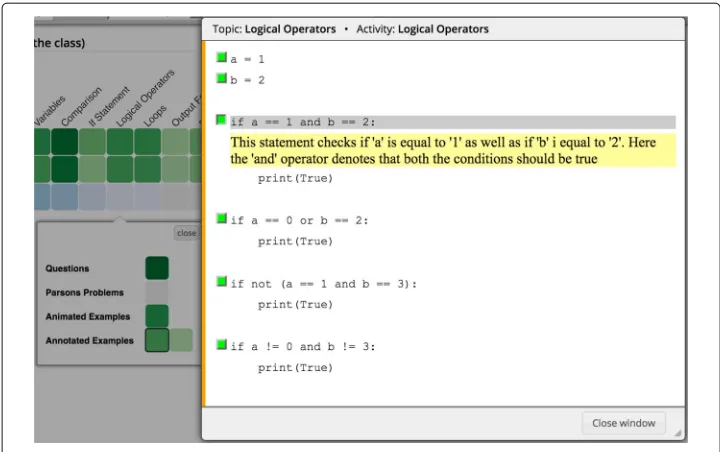
Annotated examples
Fig. 1An instance of an annotated example in the Python Grids system. Here, the student has clicked on the third line and an explanation is shown below the line that demonstrates the result of executing this line in the example program
Each explanation emphasizes important concepts in the line or the result of the line being executed.
Annotated examples are delivered by the WebEx system (Brusilovsky et al.2009). All interactions of students with these examples are reported to the user modeling server by the WebEx system. The reported data includes information about each code line of an example that the student has viewed, along with the timestamp of those activities. We use this data in our analysis to evaluate the usage of examples and their impact on student performance.
Animated examples
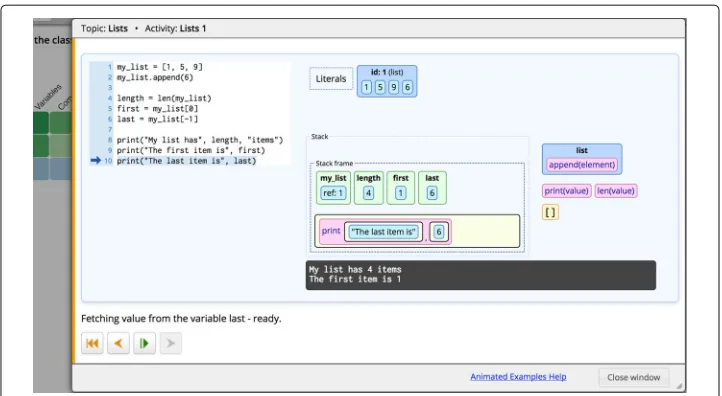
Animated examples (Fig.2) provide an expression-level visualization of the code execu-tion. The aim of these examples is to visually demonstrate how various programming constructs are executed by showing how each execution step changes the program state. These examples are implemented with the Jsvee library (Sirkiä2018) and are delivered using the Acos content server (which will be explained in the next section).
Python semantics problems
Semantic problems are parameterized exercises that test student comprehension of pro-gram execution by asking them about the output of the given propro-gram or the final value of a specific variable after the program is executed. These problems are generated by the QuizPET (Quizzes for Python Educational Testing) system, which is a re-design of QuizJET, an earlier Java-focused system (Hsiao et al. 2010). Since these exercises are parameterized, students can practice the same problem several times, each time with randomly selected values for the problem’s parameter.
Fig. 2An animated example in the Python Grids system. The right panel shows the state of the stack frame and the output printed in the console when the program execution reaches the last line of the example
answer is submitted, QuizPET evaluates it and presents feedback to the student, along with the correct answer. Figure3b shows the feedback presented to the student when the answer is evaluated as correct. The student can repeat the same problem with different parameter values by clicking on the “Try Again” button.
Parson’s problems
Parson’s problems are code construction exercises in which students do not need to type code. This type of smart content was originally introduced by Parsons and Haden (2006) asParson’s Puzzleswhere a limited number of code fragments is presented in a random order. Each fragment may contain one or more lines of code. To solve the puzzle, the student must construct the described program by putting the fragments in the correct order. This kind of exercises became quite popular and are now more frequently called Parson’s problems (Ihantola and Karavirta2011; Ericson et al.2015a).
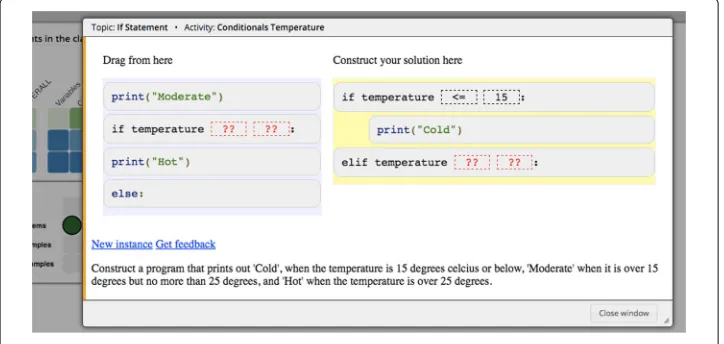
Figure4shows an instance of Parson’s problems in the Python Grids system. At the bottom, there is a description of the code that should be constructed. The exercise is solved by dragging and dropping the required code fragments from left to right in the correct order.
Parson’s problems in Python Grids are implemented with a JavaScript Js-parsons library3implemented by Ihantola and Karavirta (2011) and delivered by the Acos server (Sirkiä and Haaranen2017). On top of the original implementation, Js-parsons requires students to indent their code correctly. Therefore, the fragments must not only be in the correct order, but must also correctly indented. This is an important aspect in Python because the indentation has a semantical meaning. Instead of solely giving the feedback based on the positions of the fragments, Js-parsons exercises have unit tests that validate the correct runtime behavior.
In addition, the Js-parsons library supports distractors, i.e., all the given code fragments may not be necessary for the solution. Distractors make the unwanted trial-and-error approach more difficult because the extraneous fragments increase the possible number of combinations and force the student to think more. When the task is completed, the distractors remain in the left side and only the correct fragments are part of the solution.
The fragments may also contain toggleable elements which are shown as gaps. For these fragments, the student must select, for example, the correct operator or variable name to fill the gap (see the segmented squares with question marks “??” in Fig.4).
The Mastery Grids interface for personalized content access
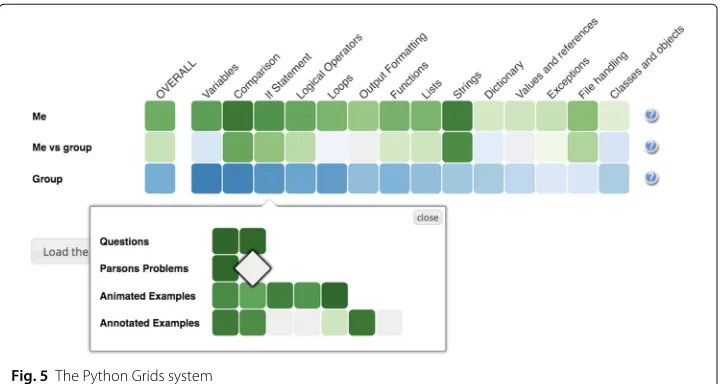
Two important values of an integrated practice system are the ability to access several types of content through the same interface and the ability to offer a unified progress tracking. In Python Grids, a unified access and progress tracking is provided by Mastery Grids, a personalized content access interface withopen social student modeling(Loboda et al.2014). The Mastery Grids interface (Fig.5) supports students by visualizing their topic-by-topic progress and comparing it with other students in the class. It visualizes a course as a grid oftopic cells, which are ordered as they are covered in the course and are colored according to the level of student progress within each topic. In the current version of Python Grids, the progress of an activity or a topic is computed as the proportion of completed activities, i.e., the color density of an example activity indicates the fraction of explored annotations or animations. The color density of a problem cell indicates whether it has been solved correctly or not. The color of the topic indicates the cumulative amount of work with all activities in the topic. The darkest color indicating a fully completed topic. Each time the student completed an activity, its topic cell darkens proportionally. In Fig.5, the first row represents the progress of the current student with a green color of a different intensity. The third row represents the progress of a reference group (for example, the rest of the class) with a blue color of a different intensity. In both cases, a darker color indicates a higher level of progress within a topic. The middlecomparison row visualizes the difference between the student and the group, namely, cells here will be green if the student has a higher level of progress than the group, and blue if she is behind the group. The color intensity shows the magnitude of differences. If student progress is equal to group progress, the topic cell is shown in neutral gray.
By clicking on a topic, the student can open thecontent collectionfor the topic, which is shown as a grid ofactivity cellsorganized in rows representing different types of con-tent. In Fig.5, the student has clicked on the topicIf Statementand opened a content
collection with 16 content items in it: two semantic problems, two Parson’s problems, five animated examples, and seven annotated examples. Clicking in anactivity cellopens the corresponding learning activity in an overlaid window, as shown in Figs.1, 2, 3and4. The following subsections provide more details about each of the four types of activities used in Python Grids. Once the student has completed the activity, the activity window is closed and student progress for the activity and its topic is immediately updated in the Mastery Grids interface.
Characteristics and pedagogy of the provided content
The types of content support students’ learning both incode comprehensionandcode con-struction. In the annotated examples, students can choose the code lines where they feel they need an explanation and dismiss explanation provided for other lines. Explanations describe the line of code and its role in the whole example, and in this way support knowl-edge towards both code comprehension and construction. Animated examples target code comprehension only; they provide dynamic information instead of static explana-tion. The student can browse code execution step by step forwards and backwards and visually explore how the program state changes and expressions are evaluated and in which order code lines are executed. The third type, semantic code assessment problems, provides a different type of activity, where the student has to provide answers to questions by tracing code execution. This supports code comprehension. The final type, Parson’s problems, focuses on training code construction skills. The student has to build a work-ing program by draggwork-ing and droppwork-ing given code lines into a correct order and chooswork-ing appropriate operators and operands in expressions. Naturally, these problems also train code comprehension.
Our basic pedagogical idea combines these resources as follows. When the student starts to work with a new concept, he/she can first obtain the general idea of the con-cept by reading the annotated examples and opening the explanations when needed. Thereafter, the student can enhance his/her understanding by viewing how the concept concretely works in animated examples. Next, the student can test his/her understanding of the concept with the semantic code assessment problems and correct possible miscon-ceptions. Finally, solving Parson’s problems is the first step to extend the skills from code comprehension to code construction. Ideally, the student would start solving the com-pulsory programming exercises only after finishing all four types of voluntary practice content.
From another perspective, both types of examples present visual and descriptive explanations, while problems offer self-assessment. In Table1, we summarize this cate-gorization in a 2×2 table with two dimensions: interaction (exploratory or assessment) and support (comprehension or construction).
Finally, all these types of content also provide support for different levels of student engagement in terms of the engagement taxonomy presented in Naps et al. (2002). The
Table 1Characteristics of the different types of content in Python Grids
Comprehension Construction
Explanatory Animated examples Annotated examples
Annotated examples
first two types (annotated and animated examples) work inviewing level, the third one (semantic code assessment problems) in responding level, and the final one (Parson’s problems) inconstructing level.
Integrating multiple kinds of smart content: architecture and protocols
This section explains the server side of Python Grids: its underlying architecture that makes the integration of several types of smart content possible. As explained in the “Introduction” section, Python Grids is an attempt to implement the vision of the ACM ITiCSE working group on the use of smart content in computer science education (Brusilovsky et al.2014). It brings together several types of smart learning content that are independent of the host system, fully re-usable, and hosted by different physical servers that are, in fact, located in different countries. We already mentioned that the animated examples and Parson’s problems are hosted on the Acos server4located in Espoo, Finland. Acos2017is designed to provide the same smart learning content to multiple learning management systems that use differentinteroperability protocolsand can host multiple types of content. Semantic problems and annotated examples are served by specialized QuizPET and WebEx content servers, respectively, that are located in Pittsburgh, USA. In this context, the Mastery Grids interface works as anaggregatorthat contains links to the content that are hosted in different content servers and transparently delivers the selected content to the students. The students might not be aware of which external system actu-ally provides each type of content—what they see is a holistic Python Grids system with the Mastery Grids interface with diverse learning content.
The ability to provide such transparent access to multiple kinds of reusable content while supporting data collection and personalization is supported by the Python Grids infrastructure, which is a considerable extension of the original KnowledgeTree frame-work (Brusilovsky2004). Python Grids introduces communications protocols based on JSON, the ability of integrated monitoring of knowledge and progress (progress on the content), and independence of the learner model (user model) server.
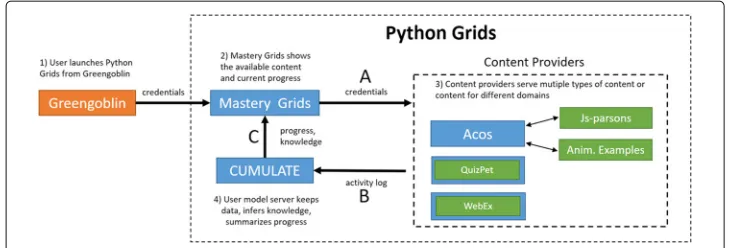
The infrastructure includes several types of components that inter-operate by using standardized communication protocols (Fig.6). The main types of components are smart content servers as mentioned above, learning portals such as the Python Grids front-end with the Mastery Grids interface, and student modeling servers, such as the CUMULATE (Yudelson et al.2007).
Three communication protocols support the smooth co-operation between the inde-pendent components within the Python Grids system. The first content invocation protocol (the arrow labeled with letter A in the Fig. 6) defines how a learning con-tent item could be invoked from a specific server by a portal (i.e., from the Mastery Grids interface). The protocol is implemented as an HTTP GET request to the content provider, which identifies the requested activity and also passes the user’s credentials: user identifier, session identifier, and group (class) identifier. The content is loaded into aniframe, and there is no further direct communication between the content interface and the Mastery Grids interface. This first protocol imposes a requirement on the con-tent provider: single concon-tent items should load independently into an iframe through a unique URL.
Fig. 6An overview of the different components in the Python Grids system and the communication that occurs between them. The arrows indicate the direction of the communication. For example, Mastery Grids never communicates with Greengoblin, but animated examples have two-way communication with Acos. The explanations give an overview of how information is transferred when a student visits Python Grids and uses the content provided by an external server. The orange box represents the learning management system in Finland which gives access to Python Grids, blue boxes are servers located in Finland and the USA, and green boxes represent different content types. Note that QuizPET and WebEx content types are shown inside a small blue box, which indicates that there is a dedicated server that hosts only this type of content
server. Interactive content generates learning eventsbased on user actions. For exam-ple, each time a student moves to the new line in the Jsvee animations, Jsvee will send an event to Acos, which will deliver the event to the student modeling server CUMU-LATE using the learner modeling protocol. QuizPet problems and WebEx examples send learning data as a flow of events directly to the student modeling server. CUMULATE uses the flow of learning events to calculate the knowledge progress on several levels that range from the whole topic to an individual content item. Since each type of content may require a different approach to compute the progress that a student has made on it, the student model needs to know how learning events can be processed to estimate knowl-edge progress. A set of services in the CUMULATE user model has been developed to provide such computations for all four types of content in the Python Grids system.
The flow or educational events sent to CUMULATE contain only as much informa-tion as is necessary to keep track of learning progress. In addiinforma-tion to this “integrated” log, different content servers might keep their own detailed log data that can be used for spe-cialized data analysis. For example, Jsvee animations track how many seconds students spend at each animation step, how students proceed with the animation, and other perti-nent information. In addition to sending learning events to the student modeling server, Acos provides a mechanism to store arbitrary logging events to the server instead of send-ing them forward. In this case, the log files can be extracted from the Acos server when the data is needed. The second protocol imposes the reporting requirement over the con-tent servers: they must comply with the protocol to log learning event information to the student modeling server.
the server-side intelligence for the Python Grids, sends a knowledge query to the student modeling server CUMULATE.
Note that although the choice or KnowledgeTree framework (Brusilovsky2004) as a basis for Python Grids implementation caused us to use the original KnowledgeTree pro-tocols, by their nature, these protocols are similar to protocols used in other distributed e-learning systems. For example, CUMULATE protocols for reporting student perfor-mance and requesting student knowledge are similar to the protocols used by other user modeling servers such as PERSONIS (Kay et al.2002) or LDAP-UMS (Kobsa and Fink 2006). An attempt to standardize the performance reporting protocol has been recently made by ADL in its xAPI standard (AdvancedDistributedLearningLab), and a popular standard for single sign-on content invocation protocol has been suggested by IMS (IMS Global Learning Consortium2010).
With this data flow design, the components have their own tasks that make them highly re-usable. For example, the main task for smart content providers is to deliver smart con-tent activities and maintain student interactions with them. The concon-tent does not have to worry about authentication, storing grades, or logging interaction data because there is a predefined interface of how to communicate with the other parts of the system. As a result, the architecture is fully open. New content servers could be easily added to offer other kinds of smart content just by implementing content invocation, and event reporting protocols (Acos server (Sirkiä and Haaranen2017) provides an example of a new content server integration). Once a content server is connected to the architecture, all content available on this server are easily connected to a portal. Specifically, Mas-tery Grids interface offers a authoring tool for instructors, which supports the process of topic-level course structuring and drag-and-drop content assignment to specific top-ics (Chau et al.2017). Moreover, different portals could be designed to maintain different types of interfaces with students, such as a more traditional “folder” interface of learning management systems, or electronic books such as Open DSA (Fouh et al.2014).
The presence of standard communication protocols also simplifies the integration of Python Grids with other learning systems. For example, in the context of the study presented below, Aalto University students accessed the Python Grids system from Greengoblin, a local learning management system, which is shown as orange box in Fig. 6. The link to the Python Grids non-mandatory practice content was placed in the bottom of the front page of the Greengoblin interface. The integration between the Greengoblin system and Python Grids was implemented through a simple GET request, which authenticates the student to Python Grids and loads it in a separate window.
A study of an integrated practice system
Our main research question here is:How does using multiple types of smart content benefit learning, as compared to using just one type of content?To investigate this closer, we looked at the following subquestions:
• RQ1. How do students use practice content offered by the Python Grids?
• RQ2. How is their content usage profile (how much and what type of content they use, and when) connected to their progress and learning results in the course?
Based on previous experience of giving the course, we anticipated that the large student cohort in a service course includes students with quite different motivation towards programming. Moreover, the different motivations of the students may have a specially strong impact in the engagement with Python Grids because this system is offered as a voluntary and complementary system. Therefore, we collected data from stu-dents’ motivational profiles to better interpret the results to respond to the following subquestion:
• RQ3. How is students’ motivational profile related to their learning results and usage profile?
This section presents the details of the study while the next section examines the most important results. We emphasize here that while these research questions could also be explored without integrating smart content together, our setting provides some unique advantages. Firstly, from students’ perspective, an integrated system is easier to use, when all resources can be accessed in a uniform way, without logging into several systems sepa-rately. On the other hand, without student identity information, gained through the login access, this study would be impossible to carry out. Secondly, integrating the content allows easy logging of all data and activities compared with collecting data from several separate systems.
Designing the study
The study was carried out in fall 2015 at Aalto University in Finland. Python Grids was offered as a practice system to students who were enrolled in the introductory program-ming course, named “CSE-A1111 Basic Course in Programprogram-ming Y1.” This course is a typical CS1 service course for students who are not Computer Science majors. Most of the students who take this course are not even Computer Science minors and will only take one to two programming courses in their university career. This basic course is com-pulsory for the School of Engineering and the School of Electrical Engineering. Normally, students will take this course during the first fall semester of their bachelor’s degree stud-ies. The programming language used in the course is Python, and the course focuses on procedural programming. The contents of the course include all basic structures like vari-ables, selection statements and loops, functions, parameters, lists, and handling text files. Only the basics of object-oriented programming are covered in the course.
and less than 8% for watching animated code examples and solving Parson’s problems. The mandatory exercises are split into nine rounds. To pass the course, the student has to obtain about 50–60% of the maximum points of each round, except the last one that contains problems in object-oriented programming. This implies that passing the course does not require that students should correctly solve all exercises, but that they have some freedom in choosing their assignments if they do not aim at getting the highest grades. Regardless of this, we call all these exercises mandatory exercises to contrast them with practice content, which are additional voluntary learning resources.
All mandatory exercises were accessed through the Greengoblin course management system, which is shown in Fig.6. All four types of Python practice content reviewed in the “The Python Grids system” section were accessed through the Python Grids system, using the interface shown in Fig. 5. As mentioned above, Python Grids was accessible from Greengoblin through a direct link. In total, the learning materials in Python Grids included 37 semantic problems, 32 Parson’s problems, 39 animated code examples, and 59 annotated code examples, which were all organized into 14 topics. If the student solved 15 voluntary problems or examples, he/she received a 3% bonus to his/her exercise points. The purpose of the bonus was to encourage the students to practice with the Python Grids system.
Our study followed a pre/post-test experimental design to examine the effect of the practice system on student learning. Students were asked to take a pretest and a post-test at the beginning and end of the course, respectively. Each test contained 10 Python prob-lems, covering the following topics: variables, arithmetic expressions and assignment, if statement, loops with while and for statements, lists and indexing, functions and param-eters, strings, reading a text file, handling exceptions, and basics of classes, objects, and methods. The student was either asked to give the final value of a certain variable in the end of the given code fragment or predict the output of the code fragment. Post-test problems were isomorphic to the pretest.
The achievement-goal questionnaire is a 12-question survey that measures Goal-Orientation, a fundamental motivational factor in self-regulated learning experiences (Elliot and Murayama2008). Goal-Orientation is comprised of four factors that are not exclusive: themastery approachorientation is related to the motivation of mastering the learning content (“My goals is to learn as much as possible”);mastery avoidanceis related to the avoidance of failing to learn (“My aim is to avoid learning less than I possibly could”);performance approachrelates to motivation to perform, score, or do better than others (“My goal is to perform better than the other students”); andperformance avoid-anceis being motivated to avoid to fail, score under the minimum, or do worse than others (“My aim is to avoid doing worse than others”). Each factor has three questions. Ques-tions are measured on a 7-point scale with extremes labeled as “Not at all true of me” and “Very true of me” and a middle point “Unsure.” While the focus of this paper is not the study of motivational factors, these measures are important to help explain usage patterns and engagement with learning content.
Collected data
The study included data from 675 students who participated in the mandatory exercises and obtained a non-zero amount of points in at least one of the nine exercise rounds; 563 of them received enough points from the mandatory exercises to pass the course, and 552 students passed both the exercises and the exam. Out of those students, 424 took both the pretest and test. There were 25 students whose performance in the post-test was lower than the prepost-test (negative learning gain). Following a common argument that negative learning does not occur during an active learning process, we hypothesized that these students may not have taken the post-test seriously or had already very high pretest which gives little room to show learning in the post-test given the limitations of the instrument (small set of questions). Indeed, from these 25 discarded cases, 7 were students with very high pretest (above 0.75), and 15 students with lower pretest were not active in Python Grids. Only 3 students were active in the system and have low pretest. At the end, following similar studies with less reliable assessment (Colt et al.2011), we decided to remove 25 negative learning gain cases, i.e., for analyses that include pretest and post-test (or learning gain), we only consider 399 students.
The collected data on compulsory exercises included not only the points that students obtained from the exercises, but also the hours they spent while coding the compulsory exercises. The sum of median time the students reported for mandatory exercises was 41.4 h. This number was obtained by calculating the median separately for each problem (accounting for only those students who submitted the solution to the problem) and then summed the medians together. For novice students (i.e., those who had no programming experience at all at the beginning of the course), the sum of the medians increased to 46.6 h. In our data, we found only one extreme case, where the self-reported time was too extreme (2196 h). We treated that number as an outlier and thus excluded it from any analysis related to exercise efficiency.
system that was offered as voluntary and complementary practice resource. As such, we understand that many students may have not been engaged with the system because of many reasons other than the system itself, such as lack of time to work with voluntary content, poor motivation to learn programming, or self-confidence that there is no need for additional training.
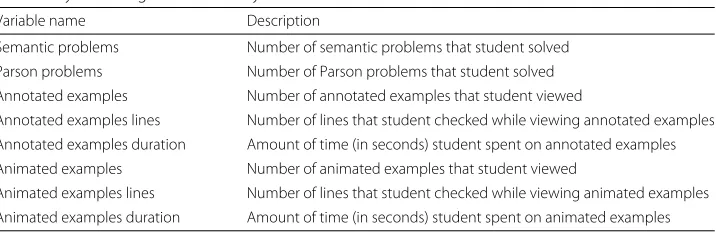
We summarized the collected data on the usage of Python Grids using the variables listed in Table2. We measured usage of practice contents (semantic and Parson problems) by counting the number of problems that students solved correctly. Both problem types had a distribution close to normal for the number of problems solved, with the average ratio of solved problems being M = 0.50 and SE = 0.01 for semantic problems and M=0.59 and SE=0.01 for Parson problems.
For annotated and animated examples, the amount of work with examples could be counted as the number of accesses to examples and the “depth” of access, which is critical for “instructional” content. To see whether these two aspects should be treated separately, we looked at the correlation between the number of examples viewed (access to examples) and the number of example lines viewed (depth of access), and we found that the corre-lation was very high for both the annotated examples and animated examples (ρ=0.98, p<0.0001). Additionally, to make sure that students worked with examples and did not just quickly click through the example lines without reading the annotations or reflect-ing on what the example visualized, we looked at the correlation between the number of examples viewed and the amount of time students spent on working with the examples. Again, we found the correlation to be very high for each example type (annotated exam-ples:ρ = 0.82,p < 0.0001; animated examples:ρ = 0.92,p < 0.0001). This suggests that when accessing examples, students worked with them and did not just click through them. As a result, one of the measures of the work with examples is sufficient for later analysis; we selected the number of accesses.
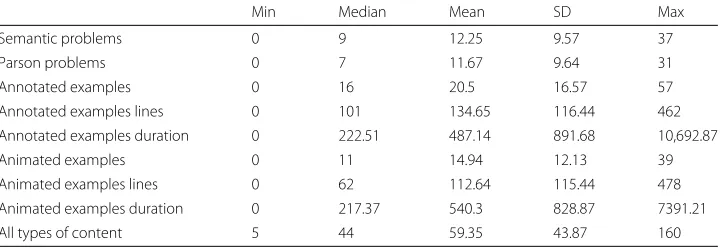
The summary statistics of all system usage variables are shown in Table3for the active students. On average, students worked with more than 10 learning materials from each smart content type. The last row in the table shows the total usage of practice content regardless of content type; and it shows that, on average, students practiced with about 59 learning materials (i.e., about 35% of all available learning materials in the system counting semantic problems, Parson’s problems, animated and annotated examples). It is notewor-thy that this number is about four times more than the number of problems that students had to solve to get the 3% bonus points. Thus, this data suggests that there were groups of students who were truly engaged by the system and who practiced with the system beyond any extra-credit incentives.
Table 2System usage variables in Python Grids
Variable name Description
Semantic problems Number of semantic problems that student solved Parson problems Number of Parson problems that student solved Annotated examples Number of annotated examples that student viewed
Annotated examples lines Number of lines that student checked while viewing annotated examples Annotated examples duration Amount of time (in seconds) student spent on annotated examples Animated examples Number of animated examples that student viewed
Animated examples lines Number of lines that student checked while viewing animated examples
Table 3Summary statistics for usage of smart content by active students who either solved five problems or worked with examples at least for 5 min (N = 298)
Min Median Mean SD Max
Semantic problems 0 9 12.25 9.57 37
Parson problems 0 7 11.67 9.64 31
Annotated examples 0 16 20.5 16.57 57
Annotated examples lines 0 101 134.65 116.44 462
Annotated examples duration 0 222.51 487.14 891.68 10,692.87
Animated examples 0 11 14.94 12.13 39
Animated examples lines 0 62 112.64 115.44 478
Animated examples duration 0 217.37 540.3 828.87 7391.21
All types of content 5 44 59.35 43.87 160
Data analysis
As stated in our research questions in the “A study of an integrated practice system” section, the goal of our data analysis was to understand how students use practice con-tent offered by the Python Grids, how their concon-tent usage profile is connected to their progress and learning results in the course, and how their motivational profile can be used to interpret the results. The following paragraph provides a summary of our data analy-sis connecting it with the research questions. In addition, Table4provides an overview of the data analysis, illustrating the method that we used to answer each of our research questions and pointing to sections where the corresponding analysis is provided.
After introducing the performance measures in the “Performance measures” section, the “Were all types of smart content helpful?” section examines connections between the use of each type of content and performance. The goal is to search for evidence that all types of learning material are valuable before deepening into more compli-cated analyses. The “Were students using multiple types of smart content?” section targets the research questionHow do students use practice content offered by the Python Grids? by looking at to which extent students did use multiple types of content. The
Table 4Overview of the data analysis Research
question
Goal Method Section
RQ1 Understanding how students use practice content
Session-based analysis “Were students using multiple
types of smart content?” section
Cluster-based analysis “The value of practicing with multiple types of smart
content” section
RQ2 Understanding how usage profile is connected to students’ progress and learning results
Regression-based analysis “Were all types of smart content
helpful?” section
Regression-based analysis for comparison of learning outcomes between clusters that represent usage profile
“The value of practicing with
multiple types of smart
content” section
RQ3 Understanding how students’ motivational profile is related to their usage profile and learning results
ANOVA analysis for comparison of motivational profile between clusters that represent usage profile
“The impact of student motivation
on using multiple types of smart
“The value of practicing with multiple types of smart content” section addresses the research questionHow is their content usage profile (how much and what type of con-tent they use, and when) connected to their progress and learning results in the course? using two cluster analyses grouping students by their pattern of usage of multiple content and by their pattern of usage of the practice system towards the term. The “The Impact of Student Motivation on Using Multiple Types of Smart Content” section explores the relation between system usage and learning motivation addressing the research question How is students’ motivational profile related to their learning results and usage profile? In these analyses, we relate motivational variables with the different clusters discovered in the “The value of practicing with multiple types of smart content” section. Finally, the “Profiles of students who did not use the system” section analyses data about the students who did not use the practice system at all. We think this section is important in the con-text of our classroom study where students made their own decisions whether to use our system and to which extent.
Performance measures
The performance measures that we used in our analysis included (1)learning gain, which is defined as the ratio of the actual gain (post-test score minus pretest score) to the maximum possible gain (maximum achievable post-test score minus pretest score); (2) exercise pointsthat a student received from nine rounds of mandatory exercises; (3) exer-cise efficiency; and (4)exam points, which a student received from the compulsory final exam.
Exercise efficiency is a measure that connects the total points gained by a student in the mandatory exercises and the amount of time that the student spent on coding exer-cises. The exercise points represent a student’s performance on mandatory exercises, and the time that the student spent on the coding part of these exercises approximates her/his mental effort. The mental effort is defined as the total amount of controlled cog-nitive processing in which a subject is engaged. Measures of mental effort can provide information on the cognitive costs of learning, performance, or both. We calculated the efficiency based on the approach of Paas and Van Merriënboer (1993). More specifically, we transformed both mandatory exercise points and the time students spent on manda-tory coding exercises to standardizedzscores (represented byPz andMz, respectively)
and then combined thezscores in the following manner to obtain the exercise efficiency score:
E= Pz√−Mz
2 (1)
The sign of the efficiency score depends on the relation between the total points that a student obtained from mandatory exercises (i.e., student’s performance in manda-tory exercises) and the time that a student spent on the coding part of those exercises (i.e., invested mental effort on mandatory coding exercises). IfPz−Mz ≥ 0, thenEis
non-negative; otherwise,Eis negative. A zero/positive/negative efficiency represents the same/higher/lower performance on mandatory exercises in relation to invested time on the mandatory coding exercises; thus, the greater the value of the exercise efficiency, the more efficient a student was on mandatory exercises.
Table 5Summary statistics for performance measures
Min Median Mean SD Max
Learning gain (N=399) 0 0.56 0.52 0.29 1
Exercise points (N=640) 270 5360 4842.55 1485.18 6160
Exercise efficiency (N=639) −2.25 0.23 0.07 0.63 0.92
Exam points (N=552) 18 85 79.82 15.71 100
Were all types of smart content helpful?
We conducted multiple regression analysis to estimate the potential impact of using the practice system on four performance measures that we mentioned in the “Performance measures” section. To control for any effect of a student’s prior knowledge, we included the pretest score as an additional factor in the regressions. For the regressions that were fitted for learning gains, we could not directly use the pretest score as a control variable, because learning gain was derived from the pretest score itself. The analysis has two parts.
First, we examine the role of having entered the system (about the half of students did not use the practice system at all) on each performance measure. For these, we create the dummy variablehas-activityindicating if the student has at least one content activity viewed. Regressions were run building two models. The first model only includes pretest as predictor. The second model adds thehas-activitydummy variable which takes value 1 if the student viewed at least one activity, and 0 otherwise. The value 0 served as the reference group. This model allows us to see the additional contribution ofhas-activityto explain the variance of the dependent variable. Results of the second model are reported in Table6, showing that all models are significant and in all cases both pretest and has-activity are significant predictors (for learning gain, there was only one model). Table6 also shows the standardized coefficient values (in parentheses) which shows that has-activityhas an even stronger impact than pretest. These results clearly show that students who entered the system performed higher than their peers who did not use the practice system, regardless of their level of prior knowledge.
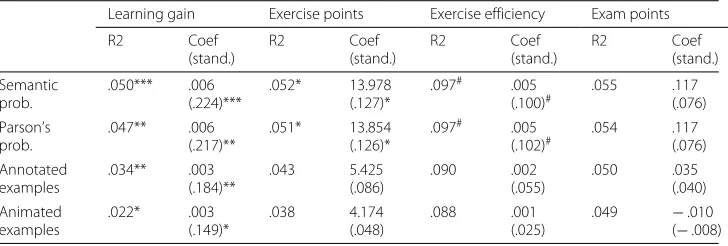
To further investigate whether each type of content is related to performance increase, we fitted another series of multiple regression models using the data of the students who entered the system. Regressions models were run as in the previous series of regressions, but now, only the students that had at least done an activity (view an example, solve a problem) in the practice system were considered. Table7shows the results of the regres-sion analyses. The estimates for the influence of each smart content type on the learning gain, exercise points, effectiveness score, and exam points are shown in the first, sec-ond, third, and fourth columns of this table, respectively. Overall, each individual content type in Python Grids was found to be a significant factor for the increase in learning
Table 6The predictive influence of attempting an activity (has-activity) in the system, controlling for the effect of pretest
Learning gain Exercise points Exercise efficiency Exam points
ModelR2 .023** .140*** .151*** .092***
Pretest coef. (stand.) – 876 (.125)** .61 (.207)*** 15.886 (.209)***
Has-activity coef. (stand.) .090 (.153)** 1022 (.344)*** .394 (.315)*** 6.631 (.205)***
Table 7Regression estimates (standardized coefficients) for the impact of each type of smart content on students performance
Learning gain Exercise points Exercise efficiency Exam points
R2 Coef (stand.) R2 Coef (stand.) R2 Coef (stand.) R2 Coef (stand.) Semantic prob. .050*** .006 (.224)*** .052* 13.978 (.127)*
.097# .005
(.100)# .055 .117 (.076) Parson’s prob. .047** .006 (.217)** .051* 13.854 (.126)*
.097# .005
(.102)# .054 .117 (.076) Annotated examples .034** .003 (.184)** .043 5.425 (.086) .090 .002 (.055) .050 .035 (.040) Animated examples .022* .003 (.149)* .038 4.174 (.048) .088 .001 (.025)
.049 −.010
(−.008)
Significance is marked with ***p<.001, **p<.01, *p<.05,#p<.1
gain. Action-focused content (semantic and Parson’s problems) showed stronger rela-tionship than the instructional content (annotated and animated examples). For example, each semantic problem or Parson’s problem solved accounts for 0.6% of the learning gain (range between 0 and 1). Each instructional content (examples) accounted for roughly the half of these values. The positive effect of problems decreases for exercise points and dis-appears for other performance measures. No relationship was found between examples and other performance measures.
Furthermore, a regression analysis on learning gain was conducted adding each type of content following a stepwise approach. The goal is to see if all types of content are showing one or more effects. Only the number of parameterized semantic problems entered the regression model (βparameterizedprob = .006, pparameterizedprob < .001), and
other types of content did not add predictive power (pparsonprob =.482,pexamples=.669,
panimated = .856). Among all content types, the amount of practice on parameterized semantic problems yielded stronger relationship with the learning gain.
These results demonstrate that using the practice system is positively related with performance and that the effect is stronger for self-assessment content (semantic and Parson’s problems). However, it is still not evident whether it is just the total volume or thediversity of the accessed content that matters. To further investigate the extent to which higher performance is influenced by accessing multiple types of smart content in the system, the rest of this section examines whether students used multiple con-tent types (the “Were students using multiple types of smart content?” section) and also how student performance was affected by the usage of multiple types of smart content (“The value of practicing with multiple types of smart content” section).
Were students using multiple types of smart content?
This subsection examines to what extent students practiced with multiple, rather than single types of smart content. To answer this question, we grouped the usage sessions of all students based on diversity of content types in those sessions. A session was defined as a sequence of consecutive activities of students where each activity occurred within 90 min of its preceding activity.
content type. Figure7shows the distribution of session types by visualizing the ratio of various combinations of content types that students used during their practice sessions. As the figure shows, the majority of sessions were dedicated to practicing with multiple content types. There were 221 (22.7%) sessions with a single content type, 171 (17.6%) sessions with two content types, 114 (11.7%) sessions with three content types, and 466 (47.9%) sessions with all four content types.
Based on this observation, in less than 1/4 of the sessions, which included interactions with learning activities, students used a single smart content type, while in more than 3/4 of those sessions, students explored at least two types of content. And, more importantly, the number of sessions in which students interacted with all types of content is about twice the number of sessions where only one content type was used. Further compar-ison of single-content and multi-content sessions indicated that multi-content sessions (M=1.55, SE=0.19)were significantly more frequent than the single-content sessions (M = 0.46, SE = 0.1), Wilcoxon Signed-Ranks Z-statistic = 48,124,p < 0.001. These results demonstrate that students had a significant tendency to work with multiple kinds of content within the same session. This provides good evidence in favor of integrating multiple kinds of smart content in one system, as supported by Python Grids.
Table8presents the relationships between the performance of students who logged into the system and the number of sessions where students used no content (0), one content type (1), at least one content type (1+), and two or more content types (2+). As the table shows, the number of sessions in each case is not correlated with the prior knowledge of students that is measured by the pretest score. This is an important finding, as it rules out the issue of experience-based selection bias. We also observed that there is no correlation between the number of sessions where none or one smart content type was used and any of the performance measures. On the contrary, there was a significant positive correla-tion between the number of sessions with multiple content types (1+, 2+) and all of the performance measures.
We also looked into students’ practice time in sessions where students accessed dif-ferent numbers of smart content types. Figure8shows the average amount of time (in seconds) that students spent in sessions where they practiced with zero (0), one (1), and two or more (2+) content types. As the figure shows, on average, the amount of time students spent in sessions where no content types were accessed was very short, usu-ally less than a minute(M = 46.63 s, SE = 7.59). The average length of sessions where student practiced with only a single type of content was just a bit higher at 1.7 min
Fig. 7Distribution of session types for a total of 972 sessions in Python Grids. The session type is defined based on the types of smart content that students used in a session. In each session type,E1,E2,P1, andP2
Table 8Spearman correlation of student performance and number of sessions where students worked with zero (0), one (1), at least one (1+), and two or more (2+) content types
Number of content types used in session
Performance measure 0 1 1+ 2+
Pretest score (N=471) 0.03 0.04 0.05 0.03
Learning gain (N=320) −0.01 0.05 0.15∗∗ 0.19∗∗∗
Exercise points (N=485) −0.02 0.08 0.23∗∗∗ 0.24∗∗∗
Exercise efficiency (N=485) −0.04 0.06 0.20∗∗∗ 0.21∗∗∗
Exam points (N=439) −0.09 0.03 0.21∗∗∗ 0.22∗∗∗
∗∗p<.01;∗∗∗p<.001
(M= 104.74 s, SE=17.13). On the other hand, the amount of time that students spent on sessions where they practiced with multiple types of content (2+) was much higher, about 34 min on average(M =2057.94 s, SE= 152.23). Apparently, working with mul-tiple content types was considerably more engaging, as students kept practicing about 20 times longer than in the sessions where they worked with only a single content type. This is another evidence that points to the importance of integrating multiple types of smart content within the practice systems.
Overall, our results highlight that students appreciated and benefited from the pres-ence of multiple content types in Python Grids. On the one hand, they clearly preferred practicing with diverse content types. On the other hand, practicing with multiple smart content types was associated with higher course performance for students, regardless of their prior levels of knowledge.
The value of practicing with multiple types of smart content
So far, we found that students, on average, had more sessions that included practicing with multiple types of smart content. While this clearly tells us about student preferences, it does not confirm an educational value of practicing with multiple types of content. In this section, we attempt to discover patterns of student work with practice content of dif-ferent types and, ultimately, discover the impact of difdif-ferent practice patterns on student learning and performance. In the following, we look at two kinds of practice patterns with smart content. The “Value of practice with different combinations of smart content types” section attempts to discover and examinetype-relatedpatterns, i.e., how much students
practiced with different types of smart content. The “Value of practice in different peri-ods during the course” section examinestime-relatedpatterns, i.e., how early or late in the course students practiced with smart content. We show how each discovered practice pattern could impact student learning and performance in the course.
Value of practice with different combinations of smart content types
In the previous sections, we examined the educational value and appeal of different types of smart content considered in isolation. However, it could be a specific combination of content types, not individual types, that made students most engaged and/or efficient. In this section, we attempted to discover the most typical patterns of practice with different types of smart content. A content use pattern of a specific student can be represented as a vector of length 4 where each position represents how many times each content type (semantic problems, Parson problems, annotated examples, and animated examples) over the course duration. Since the number of possible content combination is too large (espe-cially when distinguishing different usage balances within each pair of content types), the best way to find the most typical usage patterns is to cluster students based on their con-tent use patterns. We conducted hierarchical clustering with the average-linkage method6 and cosine similarity as a measure of proximity between student usage of multiple content types. All students in the course(N =675)were clustered into four main groups, based on their practice styles (activities): one large group with no usage of the system (cluster inactive), two small groups with usage of a single content type (clusteranimations, clus-terproblems), and one large group with usage of multiple types of content (clustermix). Table9shows the usage of each type of smart content across these groups in Part (a).
Clusterinactiveconsisted of 339 students that did not practice with the system, mean-ing that they never logged in, or that they logged in but did not access any content materials. Clustermixwas also a large group, which consisted of 296 students who worked on all types of smart content in a balanced way and had an average of more than 10 attempts on each type. Clusteranimationsconsisted of 25 students who mainly practiced with animated examples: the average attempts on animated examples was about 11, while some content types had fewer than 3 attempts. Clusterproblemswas the smallest group;
Table 9Summary of smart content usage and student performance across groups with different practice styles
Cluster
inactive (N= 339)
Cluster mix (N= 296)
Cluster animations (N= 25)
Cluster problems (N=15)
(a) Content usage Mean (SE) Mean (SE) Mean (SE) Mean (SE)
Semantic probs. 0 (0) 11.9 (0.56) 2 (0.74) 7 (2.52)
Parson probs. 0 (0) 11.59 (0.56) 2.6 (0.79) 0.4 (0.34)
Annotated ex. 0 (0) 20.61 (0.96) 1.72 (0.54) 0.87 (0.73)
Animated ex. 0 (0) 14.3 (0.71) 11.2 (2.02) 0.4 (0.4)
(b) Performance measure
Pretest score 0.17 (0.01) 0.22 (0.01) 0.2 (0.05) 0.18 (0.06)
Learning gain 0.46 (0.02) 0.57 (0.02) 0.37 (0.06) 0.47 (0.08)
Exercise points 4110.74 (97.49) 5369.01 (61.14) 5045.88 (220.11) 5162.8 (328.61) Exercise efficiency −0.21 (0.04) 0.28 (0.03) 0.12 (0.1) 0.19 (0.15)
Exam points 76.05 (1) 83.49 (0.83) 75.64 (4.36) 80.93 (4.19)