Copyright © 2010-2011, Usability Professionals’ Association and the authors. Permission to make digital or hard copies of all or part of this work for personal or classroom use is granted without fee provided that copies are not
Software Implementations
Jen Hocko MathWorks, Inc. 3 Apple Hill Drive Natick, MA 01760 USA
Abstract
Beginning in 2008, the author’s IT department started looking at Commercial Off-The-Shelf (COTS) products as an alternative to custom developed applications. Over the next two years, the company would transition from a “build” to “buy” philosophy, and it would be necessary to evolve the role of usability specialists to help incorporate user-centered design practices into both COTS evaluations and
implementations. This case study describes how the author contributed to an enterprise-wide implementation of
Microsoft SharePoint, as well as some of the challenges faced and lessons learned. It also suggests other ways that
usability specialists can participate in COTS implementations.
Keywords
Introduction
To enable efficient and cost effective business operations, IT organizations often have to make decisions about whether to develop custom built software or to purchase best-of-breed, Commercial Off-The-Shelf (COTS) products. This decision is often driven by how IT answers several questions, including the following questions:
What is the cost of building and maintaining a custom application vs. one that is purchased?
o When new business or regulatory requirements dictate changes or expanded functionality, how much effort does that require from IT?
o How much maintenance can be done by the business areas who own the processes, rather than IT resources?
Can IT build an application that enables typical business operations (e.g., Help Systems, Learning Management Systems, etc.) better than companies who are dedicated to doing just that?
Would building custom software provide the company with any long-term, strategic or competitive advantage? That is, is there sufficient value in doing something different from other companies? (Webster, 2008)
Often the answers to these questions lead to decisions to evaluate and purchase COTS products, which was precisely what happened in the author’s organization.
In January 2008, the author was asked by the Finance Business area and IT to evaluate the usability of several COTS products they were considering to replace an outdated, custom-built Expense Reporting System. The project team cared about how a new system would impact the organization’s 2,000+ users worldwide and wanted to ensure they selected a product that offered the best possible user experience. After some preliminary research, the author discovered that other usability practitioners were also thinking about this challenge (Larson, 2008; Sherman, 2008). The goal at this time was how to work usability activities into the COTS evaluation process.
The author combined the organization’s existing development process with industry-standard user-centered design methods to create a detailed methodology that compared the usability of COTS products being considered for purchase (Hocko, 2009). Over the next two years, several usability specialists at our organization applied this methodology to a number of COTS
evaluation projects and worked to refine it based on project teams’ feedback and challenges faced. Today, each stage of this methodology is incorporated into the IT department’s official hardware/software vendor selection process, and usability is considered as a factor in the overall procurement process. There is also a lightweight version available for project teams without the time or resources to utilize the full methodology (Larson, Hocko, & Bye, 2010). While pleased and encouraged by the results of these efforts to include usability in product evaluations, the author now faces a different challenge: How can usability specialists add value to COTS implementations? How do usability specialists keep project teams thinking about end-users when these teams are encouraged to use purchased products out-of-the-box and to configure them?
This case study describes the author’s involvement in a Microsoft SharePoint implementation (including some challenges and lessons learned), then describes some other ways that usability specialists might add value to COTS implementations that may have less similarities to typical web development projects.
Case Study: The Microsoft SharePoint Implementation
Setting the Stage for Usability Involvement
In early 2008, the author’s company decided to purchase Microsoft Office SharePoint Server (MOSS) to replace a custom-built application that enabled staff to share and collaborate with each other on project-related artifacts, such as Word documents and Excel spreadsheets. The organization was also planning on replacing department and team intranet pages with SharePoint pages, because they would be more easily maintainable by end-users. Because it was a forgone conclusion that SharePoint would be purchased, the implementation project team’s initial objective was to discover the benefits and limitations of the technology and decide how best to proceed with a company-wide migration.
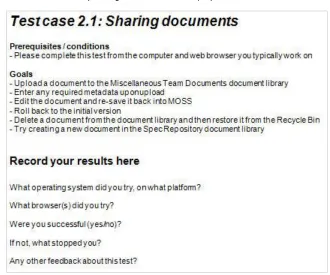
To start, the implementation team focused on running a pilot rollout. Test cases intended to exercise and get feedback on specific SharePoint features were documented and distributed to two teams in the Development department. Although the test cases were not explicitly written as use cases with end-user goals, they were based on some tasks users were expected to do with SharePoint in the future (see Figure 1 for an example).
Figure 1. Example SharePoint test case
After several weeks there was little response from the teams. The author offered to help the SharePoint implementation team collect feedback by
administering a preliminary survey in SharePoint to get participants into the system and to learn more about their team and how they worked today,
observing a subset of participants while they worked through the high priority test cases (along with another usability specialist), and
administering a follow up survey to gauge participants’ thoughts after having tried SharePoint and to explore whether they felt it would improve how they work.
In total seven participants were observed for 60-90 minutes each. The participants were from a variety of functional roles (engineering, quality engineering, documentation, technical
marketing, etc.) and had no prior SharePoint experience.
require the most change to participants’ current workflow. We also uncovered several aspects of SharePoint that caused participants frustration or confusion—most were primarily due to basic usability issues and users incorrect assumptions about the product’s conceptual model. Usability specialists’ discoveries existed at a level far deeper than what demos could elicit. In fact, most demos of SharePoint garnered positive reactions, while observations of actual use led to questions like, “Are you really going to make me use this?” and negative feedback such as “an overwhelming and unintuitive interface.”
As a result of the pilot rollout feedback, the SharePoint implementation team (which now included a usability specialist) adopted the following strategy:
Recommended that an initial implementation include only a subset of SharePoint features (document management, search, etc.) that were most valuable to users. Planned a phased rollout, which would start with the IT department and then proceed
through other departments based on business need and enthusiasm. This action-oriented process would allow the team to learn from the challenges of an actual rollout and revise processes and support as necessary (Vilpola, 2008).
Formed some preliminary thoughts around
o how to set up a SharePoint taxonomy (including how to centralize the growing and disparate international office content),
o what the various site templates might look like, and o content standards for the organization.
The SharePoint implementation team also talked about the best ways to help departments migrate their content into SharePoint. The team created the concept of a SharePoint Liaison—a person who would help department-specific project teams
learn the basics of SharePoint and be the first contact for support questions (i.e., technical trainer/support role),
understand other SharePoint-related projects, as well as technical and organizational decisions that affected the department’s migration and/or workflows (i.e., program manager/change management role), and
structure and design the new sites (i.e., user researcher/information architect/interaction designer role).
The SharePoint Liaisons in our organization were most often usability specialists, for several reasons:
Our internal usability specialists already interfaced with users in many business areas while working on custom built applications.
Because of the pilot, the SharePoint implementation team started to see how usability specialists could add value to their migration efforts.
The SharePoint implementation team understood that there would be many site re-design efforts as part of the migration.
Like any user-centered design project, having an early “seat at the table” helped usability specialists get up to speed more quickly with the technology’s opportunities and constraints, and helped influence the overall migration process so that it kept the focus on users and their goals.
Piloting a UCD-Infused Migration Process
The first significant migration project involved helping our System Services department migrate to SharePoint by working with them to design a new company-facing website. It was a simple project—simply a front-end to the department’s existing knowledge base and to the help system, where staff could request assistance with technical problems or questions. The author introduced and worked with the department’s project team to complete a typical user-centered design (UCD) process for the company-facing site:
3. Brainstorm on design concepts and create possible design solutions.
4. Conduct usability testing using paper and early SharePoint prototypes, and iterate on the designs as necessary.
5. Finalize the implementation in SharePoint and release to staff.
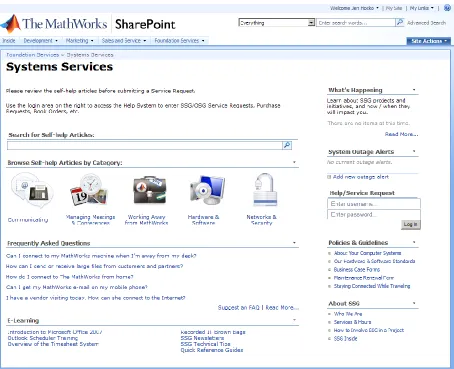
After five months, the department project team, executive management team (including the CEO), and staff seemed pleased with the new SharePoint design (shown in Figure 2). The project was successful, though there were some inevitable challenges and lessons learned from going through the process the first time.
Figure 2. Systems Services’ company-facing site in SharePoint
Early Challenges and Realizations
The following sections discuss some of the early challenges we faced and realizations we had while working through the process.
Recognizing the COTS implementation as a change management problem
Although feedback about the System Services company-facing site was positive, the SharePoint implementation team was concerned about how long the project took to complete. There were several causes:
No prior experience with the UCD process (department project team).
Little interaction with the department’s executive management and difficulty getting on the executive management team’s schedule.
No clear decision maker during the design process or delegated owner to maintain the site after launch.
Several unanticipated tasks that took a lot of time to complete (e.g., worldwide content inventory).
While these factors are often recognized when a UCD process is used to develop custom
applications, they were not, at first, seen as applying to a COTS implementation like SharePoint. There were also additional factors that the author believes could arise more frequently in COTS implementations in general:
No clear internal resource for understanding what could and could not be done (via configuration or customization). The department project team, SharePoint
implementation team, and SharePoint Liaison were all learning together.
Unanticipated issues understanding where all the integration points were, and in trying to connect SharePoint to the legacy Help System.
Different understandings of the SharePoint migration project’s priority (department project teams gave it a lower priority).
Different understandings of what it meant to “complete” the project. (The SharePoint implementation teams’ understanding of the length of their involvement differed from that of the department project teams).
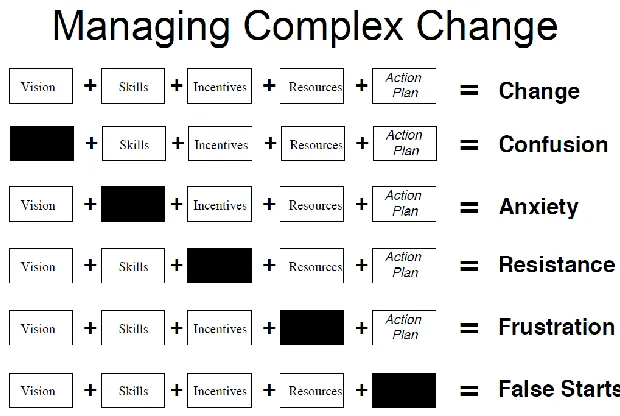
Most of these factors align with documented change management issues (rather than specific problems with SharePoint technology or the UCD process), as shown in Figure 3.
Figure 3. Managing complex change from Knoster, Villa, and Thousand (2000)
Creating and sustaining a solid information architecture
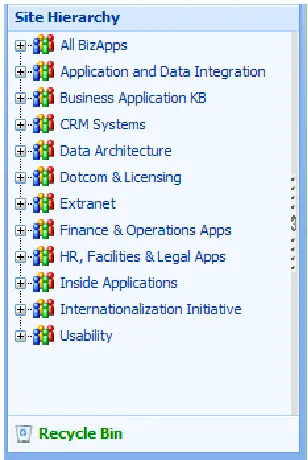
In addition to recognizing that SharePoint migrations required attention to change management processes as much as custom development projects that included UCD do, the author also quickly learned that revamping each departments’ information architecture would require a greater level of effort and guidance from usability specialists than originally expected. For example, some SharePoint sites initially went live without support from a usability specialist, and received negative feedback from staff. This feedback was enough to halt user adoption and the department’s migration, and so the author was called in to investigate what the problems were. After conducting a few interviews, it was discovered that users were confused by the creation of both company-facing and internal sites for a single department (when there was no need for the separation given the user base’s information needs), as well as mixed-model items appearing in the left navigation bar’s Site Hierarchy (e.g., application, team, and project names in one list). (See Figure 4. Note that the Systems Services company-facing site design
customized their site to hide the left navigation bar and therefore did not encounter this issue.)
Figure 4. Business applications’ Site Hierarchy in SharePoint
Where the site divisions were concerned, it became clear that a “one size fits all rule” would not suffice; usability specialists were needed to help project teams understand when the intended audiences’ information needs differed enough to warrant separate sites, and when one hybrid site organized effectively for all audiences would do. Sub-sites (which showed in the left navigation bar’s Site Hierarchy by default unless customized to be hidden) also needed to have a coherent underlying model to be understandable to target users.
The SharePoint implementation teams’ original vision—basing the top two levels of the hierarchy on organizational structures (i.e., Division > Department) and then leaving it up to the department project teams to organize their team and project sub-sites as they wished— meant that SharePoint Liaisons had to provide more guidance about how to create solid site hierarchies. In addition, departments needed to know how to structure their content to make their site hierarchies maintainable and scalable over time.
To address these concerns, the author created two Microsoft Word document templates and added them to the overall migration process:
New Site Hierarchy Documentation template—helped project teams rationalize and communicate their site’s new structure and change process to others so it could be effectively maintained.
Figure 5 shows parts of the Current Information Architecture Evaluation template.
Figure 5. Current Information Architecture Evaluation template
Although any UCD development effort might involve information architecture work,
documentation, and plans for maintaining the structure, the SharePoint implementation team also had long-term goals of obsoleting the SharePoint Liaison function. Therefore, the author created each of these templates in two versions: one for SharePoint Liaison-guided migration projects and one for self-service migration projects. Obviously the level of detail required was more involved when self-service requirements were added, because we also needed to educate project teams about how to create and sustain a solid information architecture.
Managing consistency while forgoing customizations
Although the content standards initially discussed by the SharePoint implementation team were replaced with the idea that liaisons could help the organization manage consistency across departments, the sites being designed evolved and ran into challenges.
Figure 6. Human Resources company-facing site: Benefits & Perks section
Because these customizations resulted in increased user confusion and frustration, the SharePoint implementation team ultimately returned to the original plans and constructed department, team, and project site templates and guidelines. The templates added some links to important content in the left navigation bar and advised departments to allow SharePoint to populate the rest. This way, end-users would see the persistent navigation they expected, but would also have the opportunity to learn how SharePoint leverages this area without everyone interfering with the conceptual model by doing their own thing.
The Revised Implementation Process
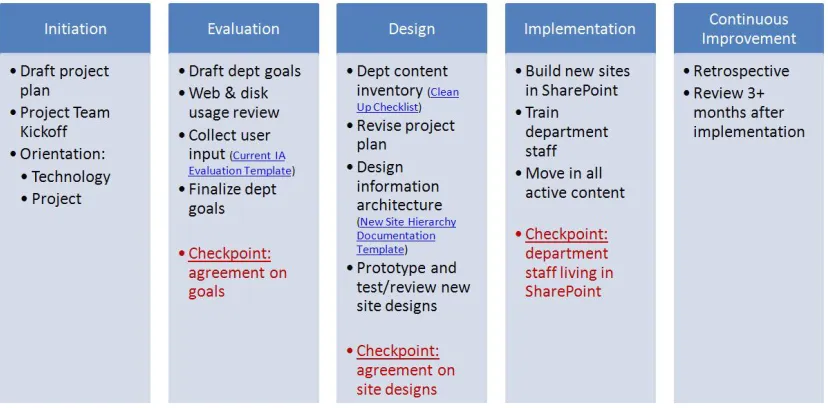
Figure 7. Improved process for SharePoint migrations
Table 1 describes some helpful tips for some of the trickier stages described in Figure 7. These tips are consistent with what usability professionals might expect of any UCD project, but still apply to a COTS implementation.
Table 1. Helpful Tips for a Typical UCD Process
Stage Tips
Initiation It often is not possible to have an accurate project plan before doing a content inventory and gathering statistics/user input on the existing site(s).
Evaluation Get agreement on company strategic and department-level goals from all stakeholders.
Access to a package like Omniture SiteCatalyst can be useful for determining which content is and is not being accessed.
Design Clean house: decide what content to keep, archive, or delete; do not just move existing content to a new location. (The evaluation should help with this.) Work with the project team and executive sponsor to focus and scope the project
realistically. (If the executive sponsor is not on the project team, meet with them at designated checkpoints.)
Ask some of the difficult questions to inform a new design, such as, How does the department want people to communicate and work together? How do they want to present and organize information? How do they want to maintain content over time?
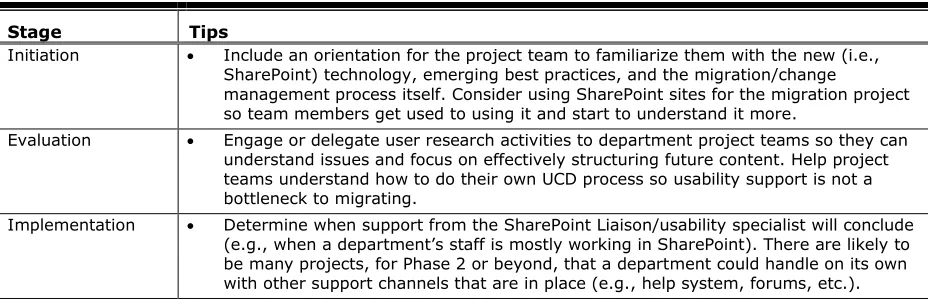
Table 2. Helpful Tips for Stages of the SharePoint Migration Process
Stage Tips
Initiation Include an orientation for the project team to familiarize them with the new (i.e., SharePoint) technology, emerging best practices, and the migration/change
management process itself. Consider using SharePoint sites for the migration project so team members get used to using it and start to understand it more.
Evaluation Engage or delegate user research activities to department project teams so they can understand issues and focus on effectively structuring future content. Help project teams understand how to do their own UCD process so usability support is not a bottleneck to migrating.
Implementation Determine when support from the SharePoint Liaison/usability specialist will conclude (e.g., when a department’s staff is mostly working in SharePoint). There are likely to be many projects, for Phase 2 or beyond, that a department could handle on its own with other support channels that are in place (e.g., help system, forums, etc.).
The Final Push Toward a Distributed Implementation Model
Earlier it was stated that the SharePoint implementation team had hoped to eventually retire the role of SharePoint Liaison. It was also stated that there were versions of the Current Information Architecture Evaluation and New Site Hierarchy Documentation templates that could be used for self-service department migrations. Unfortunately, the SharePoint implementation team had not been successful in moving migration projects solely to the departments—there was something about these projects that seemed to require hands-on consulting work.
A year and a half after migration projects began (and after the SharePoint implementation team had solidified the process shown in Figure 7), it was time for the Development department to move to SharePoint. The Development department consists of over 40% of the company’s staff—engineers, quality engineers, documentation, product usability, etc.—and has teams of people dedicated to tooling and training for development-specific programs. We were pleased to have access to these resources to help with the Development migration effort.
A Development into SharePoint (DiSP) team—consisting of two program managers, a tools manager, a development university manager, and two members of the original SharePoint implementation team (including the author)—created a new plan. We created training and tooling around a slightly revised process and leveraged program managers who were already embedded in development teams. These program managers acted as SharePoint Liaisons, though everyone in Development would have more resources available to them, and therefore require less hands-on support.
This was a good idea in theory—in practice the Development department and the DiSP team struggled. Some likely contributing factors included the following:
Executive management control of and disagreement about site hierarchies, driven by the fact that Development consists of 14 product groups and four business areas that operate differently (i.e., unclear vision and complexity). Additionally, there was little use of the existing document templates around evaluating existing information architectures or creating new site hierarchies (i.e., lack of skills).
Program manager training and tooling being developed and refined at the same time many migration projects were already underway (i.e., unclear action plan and lack of skills).
o Possibly as a result of lack of or poorly developed technical and migration process skills for many program managers being asked to help their teams move into SharePoint.
Fewer than expected users of the training and tooling provided by the DiSP team (i.e., lack of incentives and resources).
Should the SharePoint implementation team have encouraged the Development department to migrate to SharePoint following the original, more guided process, one product area at a time? In hindsight, some think so. Were the program managers just going through the typical learning pains of SharePoint later than we would have liked? It was possible. Was there not enough motivation or executive support behind the move to SharePoint? This was also a possibility. Or, were there simple tweaks that could have been made to reinvigorate the project? Only time will tell what changes the DiSP team makes, and how Development will complete their migration. But it is clear that change management issues continue to affect the progress and success of the SharePoint implementation.
The Future of Usability in COTS Implementation Projects
Even without the multitude of roles embedded in the idea of a SharePoint Liaison (see the Setting the Stage for Usability Involvement section), it is clear that usability specialists, information designers, information architects, and UI designers can all find a place helping internal staff build effective SharePoint sites for use within and outside an organization. In fact, a SharePoint implementation is a lot like a large web development effort—it simply has some unfamiliar technical limitations.
Table 3. Usability Involvement in Other COTS Implementation Projects
COTS Implementation Project
Current & Planned Usability Involvement
Patent Tracking System Mapping out business processes and workflows for a variety of user roles (e.g., inventor, attorney, etc.).
Working with stakeholders to standardize terminology (e.g., in lists of values and queries).
Help System Creating high level end-user workflows that allow staff to seamlessly interact with this system and the recently purchased ERP System, which handles purchase requisitions.
Creating mockups of forms that will be used to gather information about different types of requests, and working with consultants to determine
o what is possible to do with configuration vs. customization, and o what requires re-implementation during upgrades.
Conducting a card sort to create user-understood categories and subcategories that will be used to display appropriate forms and route requests to the appropriate agents.
ERP System* Financials module:
Contributing to the design of a SharePoint list, used by worldwide Finance staff to collect data about their current requirements and business processes.
Reviewing proposed UI changes to custom applications where there are integration points.
Expense/Procurement modules:
Participating in user acceptance tests (UATs) and providing feedback based on industry-standard usability heuristics (Nielsen, 2005). Annotating printouts of existing screens to suggest workflow and UI
improvements, and working with consultants to determine
o what is possible to do with configuration vs. customization, and o what requires re-implementation during upgrades.
Participating in a design review after UI configuration changes are complete to offer any additional usability feedback.
Conducting usability testing with the resulting UIs to gather real end-user feedback and to provide input into training and communication materials. Learning Management
System Creating low-fidelity (Balsamiq) mockups illustrating how screens should appear to end-users. Working with the vendor to understand how close the application of existing
style sheets and configuration changes would enable us to get to that design. * If additional ERP System modules are purchased in the future, it is also possible that usability
specialists will be involved in deciding whether the COTS product’s out-of-the-box user interface is “good enough” for use by the intended user base. Although the criteria for this assessment are not yet clear, a “no” answer could mean that usability specialists re-design specific custom applications (which would leverage the ERP system’s back-end business logic and therefore be more flexible).
Recommendations and Practitioner’s Take Away
For usability practitioners whose organizations are increasingly considering COTS product purchases, this author recommends the following:
Getting involved early in product evaluations—this is the best opportunity to identify and assess usability issues of products on the market, potentially influence a
procurement decision, and help project teams understand potential issues that could impact user adoption. Also, being involved in the evaluation portion of a COTS project paves the way for usability to be included in the implementation portion once a procurement decision has been made.
Helping your organization create, refine, and consistently use processes and tools that incorporate usability and user-centered design considerations for COTS evaluation and implementation projects. Then, even when usability departments can not fully staff COTS evaluation and/or implementation projects, some aspects of usability will still be included. Working these processes and tools into usability departments’ service frameworks and/or the overall IT process documentation is a must for wide-spread buy-in and communication. As discussed above, working with vendors who do not have usability practitioners may also help them understand and attend to usability issues more in the future.
Clearly establishing and frequently communicating how usability can add value to COTS projects. (This is especially true for COTS implementation projects, when out-of-the-box “configuration” appears simple at first glance and the perceived need for usability may be low.) Having a good understanding of
o the unique needs and challenges inherent in COTS evaluation and implementation projects (including the change management emphasis described in the Recognizing the COTS implementation as a change management problem section);
o the typical reasons why some more popular types of COTS implementation projects (e.g., ERP systems) fail, and the critical factors that have been identified as required for successful implementations (Plant & Willcocks, 2007; Kumar, Maheshwari, & Kumar, 2002; Sumner, 2000); and
o the company-specific risks or concerns that worry project team members can help usability practitioners align skills previously associated with custom application development to this new world of software procurement and configuration.
Conclusion
In conclusion, the author encourages usability practitioners who are initially excluded from (or feel they can not add much value to) COTS evaluation and implementation projects to think more carefully about how their existing skills and methods can be modified to help end-users with these often complex software packages. These software packages typically affect a wide variety of people who are given little training, and directly impact the bottom line of
organizations. Because they can be difficult to customize, they require more creative ideas for working around usability issues. For these reasons, usability practitioners can and should involve themselves in these types of projects and be able to demonstrate value.
Acknowledgements
References
Hocko, J. (2009, June). Evaluating the usability of third-party applications. In UPA 2009: Bringing Usability to Life conference proceedings. Portland, OR.
Knoster, T. P., Villa, R. A., & Thousand, J. S. (2000). A framework for thinking about systems
change.In R. A. Villa & J. S. Thousand (Eds.) Restructuring for Caring and Effective
Education: Piecing the Puzzle Together (pp. 93-128). Baltimore: Paul H. Brookes Publishing Co.
Kumar, V., Maheshwari, B., & Kumar, U. (2002). An investigation of critical management issues in ERP implementation: Empirical evidence from Canadian organizations. Technovation 23 (2003) 793-807.
Larson, J. (2008). Absent, ill-defined, and devalued: Usability in technology research firm
software evaluations. UPA User Experience Magazine, 7(1).
Larson, J., Hocko, J., & Bye, R. (2010). User centered procurement: Evaluating the usability of
“off-the-shelf software”. UPA User Experience Magazine, 9(1).
Neilsen, J. (2005). Ten usability heuristics. Retrieved August 13, 2010 from http://www.useit.com/papers/heuristic/heuristic_list.html.
Plant, R., Willcocks, L. (2007, Spring). Critical success factors in international ERP
implementations: A case research approach. Journal of Computer Information Systems,
XLVII, (3), 60-71.
Sherman, P. J. (2008, December). The user experience of enterprise software matters.
Retrieved August 9, 2010, from UXMatters (http://www.uxmatters.com/mt/archives/2008/ 12/the-user-experience-of-enterprise-software-matters.php).
Sumner, M. (2000). Risk factors in enterprise-wide/ERP projects. Journal of Information Technology, 15, 317-327.
Vilpola, I. (2008). Applying user-centered design in ERP implementation requirements analysis. Tempere University of Technology, Publication 739, 35-38.
Webster, B. (2008). Buy vs. build software applications: The eternal dilemma. Retrieved August 27, 2010 from http://www.baselinemag.com/c/a/Application-Development/Buy-vs-Build-Software-Applications-The-Eternal-Dilemma/.
About the Author
Jen Hocko
Jen has been a web developer, technical writer, and interaction designer at both large and small organizations.