Abstract — This work is part of a first phase of the project “DOMAIN SPECIFIC MODELING FOR THE LEARNING OBJECTS BUILD PLATFORM-INDEPENDENT " and seeks to make a comparison between Open Source LMS to get a first approximation of common modules them, and then start building the ontology compatible with all LMS studied, for that reason this paper is organized as follows: 1.Select Tools to work. 2. Contextualization of LMS tools to work. 3. Leaning Objects. 4. Structure of the LMS. 5. LMS ratings. 6. Creating the map of knowledge for each LMS. 7. Comparison between the LMS modules modeled and 8. Conclusions.
Key Words — MDA, MDE, DSL, Ontology, LMS, maps of knowledge. Learning Objects.
I. INTRODUCTION
his work is part of the research line in Model Driven Engineering (MDE) of the Phd Programme in Computer Engineering of the University of Oviedo, Spain, the name of the project is “DOMAIN SPECIFIC MODELING FOR THE LEARNING OBJECTS BUILD PLATFORM-INDEPENDENT" and is looking for domain specific modeling for the construction of learning objects platform-independent, the stages of this project are: 1. Generate an ontology for modeling courses under a standard, 2. Using the ontology generated for create a Domain Specific Languages (DSL), 3.
Manuscript received October 30, 2010 This article is part of the thesis Ph.D. program of Informatic Engineering from University of Oviedo.
Carlos E. Montenegro- Marin works at Distrital University of Bogotá, Colombia in the Computing Systems area, currently he is research member of GIIRA group, and studying phd program in Computer Science Engineering at Oviedo University. (The contact number is 034-600361753; e-mail: cemontengrom@ udistrital.edu.co).
Juan Manuel Cueva-Lovelle, Director of the Informatic Departament of the Oviedo University and Directror of the this project (The contact number is 034-985103396; e-mail: cueva@ uniovi.es)
Oscar Sanjuan, Proffesor of the Informatic Departament of the Oviedo University and Directror of the this project (The contact number is 034-985103326; e-mail: osanjuan@ uniovi.es)
Paulo A. Gaona-García is with the Distrital University, Bogotá, Colombia. The area of knowledge is Networks and communications. He is the main researcher of GIIRA group. (The contact number is 057-31 8007755; e-mail: pagaonag@ udistrital.edu.co).
Finally with Model Driven Engineering (MDE) and applying the appropriate transformations are achieved from a platform independent model a module deployed into a LMS built on a standard.
This work is part of the first stage of the project and the aim is to make a comparison between all LMS to work to get a first approximation of the common modules between them, and then start building of the ontology compatible with all LMS.
II. ANALYZEOFTOOLS
At present there are many Learning Management Systems (LMS), these LMS usually taking some form of standardization in its construction, according to [1] there are more of the 101 standards, regulations or recommendations regarding the e-learning, developed by 23 different organizations, we will conduct a detailed study to analyze from the standpoint of computing, the content of some Virtual Learning Platforms (LMS) to define a comparison table between them, the main criterion for selecting the platforms is the adoption of GPL licensing and open source, this condition with the aim of facilitate the analysis of his behavior and its modules. For the selection of virtual learning platforms, were used the studied realized in the thesis doctoral [2] for the definition of a universal learning platform, open and scalable approaches in social, political, economic and educational, with a view to identify from these points of view, tools that have evolved hand in these contexts, as well as from the methodological point of view the work of [3] to identify mechanisms that support the learning process of students in these environments work. In the same way it took into account reports by the group [4] SIG Open-Source Software for Education in Europe, which is funded by the e-learning program of the European Commission in consortium of several research groups and European universities, which present functional studies of computer free platforms, using a methodology developed by this project and sheltered by the ISO IEC 9126, identifying patterns of evaluation through elements such as: functionality, usability, reuse, efficiency, maintainability and portability, these platforms must support standards in your development and specifications of content, that is an issue of paramount importance to the goal we wish to
T
Modeling and Comparison Study of Modules
in Open Source LMS Platforms with
Cmapstool
Carlos E. Montenegro-Marin
1, Juan Manuel Cueva-Lovelle
2, Oscar Sanjuan
2, Paulo A. Gaona-Garcia
11
Engineering Faculty, Distrital University, Bogotá, Colombia.
2
study end.
From the standpoint of the movement and use of free software, it pays to rescue the working done by [5] which presents important factors, this factors together with previous work concerning from the standpoint of allowing computer content define the following platforms of study: DotLRN, SAKAI, ATutor, Claroline and Moodle, which for purposes of collaborative work by the group [4] represent a good degree of acceptance and a good evaluation in most communities and working groups devoted to topics related to management course content and strategies in learning.
III. CONTEXTUALIZATION OF LMS TOOLS TO WORK.
A. Sakai
This project originated at the University of Michigan and Indiana University, which later joined the MIT and Stanford University, along with other organizations and foundations in 2004. It is an LMS, which from the beginning has worked under IMS standards, which puts him in a favorable position relative to other LMS, this is because some of the masterminds of Sakai are the institutions carrying out these standards. Sakai provides a modular structure built to specifications of Java code which aims to integrate training and communication capabilities.
B. Atutor
This platform started as an initiative of the University of Toronto in 2002 in their school Adaptive Technology Resource Centre (ATRC). According to studies by the group [4] the development of this platform has paid particular attention to accessibility, becoming the only LMS that meets the accessibility specifications mandated by the W3C by standard WCAG 1.0 Level AA , which indicates the ability of the platform to allow entry to people with disabilities.
C.Claroline
It was a project sponsored by the University of Louvain in Belgium in 2000. It is considered a project for work on the approach of training through e-learning strategy and collaborative work using e-working strategy to be presented also as a content management system CMS.
According to the results obtained from the group [4] many universities appreciate the collaborative learning environment enabling teachers and educational institutions to create and manage Web-based courses. The tools provided by the system are many and give users the possibility of establishing a variety of learning scenarios.
D.Moodle
This project is one that has been more accepted in most academic and research community worldwide. As one of the first projects under the initiative GNU which gave its creator Martin Dougiamas. its host in the community was so good, that from the start began to adapt methodologies from the pedagogical point of view, social constructivism works and
tries to implement some recommendations of the standards. Structurally is a platform that has all the characteristics apply to the development of components that allow interoperability with different levels of functionality to work. Its same name describe him as a Module Object-Oriented Dynamic Learning Environment
E. DOTLRN
DotLRN or .LRN was initially developed by MIT. DotLRN is currently supported by a worldwide consortium of educational institutions, nonprofit organizations, enterprises and open source developers. DotLRN is appropriate for learning and research communities, it has management skills courses, online communities, content management and learning. Consortium member institutions working together to support progress of each, to accelerate and broaden adoption and development of dotLRN.
IV. LEARNING OBJECTS
It is not easy to find a definition of what a Learning Object but McGreal Roy in [6] dares to define them as educational resources that can be used in any technology to support education, a learning object allows and facilitates the use of educational content through internationally accepted standards and specifications to achieve interoperability and reusability in different applications and different learning environments.
Andreas Holzinger in his article entitled Multimedia Learning Systems based on IEEE Learning Object Metadata (LOM) [7] defines the structure of the LOM into three parts one element at the top called the root, which contains additional sub-elements called branches and these in turn have other sub-elements called leaves they no longer have anything else, has this hierarchical structure is called a tree, graphically displayed in Figure 1.
LEAVES BRANCHES
ROOT
Base
General
Title LangStringType
CatalogeEntry
LifeCycle
Version, Status
Language “de”
String “Basiswissen Multimedia”
Catalogue “ISBN”
Entry “3-8023-1856-0”
Figure 8 A hierarchical model of LOM given by the IEEE based in [7], Source Author
V. STRUCTURE OF A LMS
According to McGreal Roy [6] learning experiences
certificate or diploma is considered as a program, Figure 2 shows the proposed plan.
Module Lesson
Lesson Componet
Componet
Course
Module
Programme Course
Eg. Simulation
Topical unit
Reusable Learning Object
Information Objects
Learning
Objects
Granularity
Figure 9 Granularity of learning objects, based in [6], Source Author
In the work “Package and Visualization of SCORM LO into OpenSource LMS’s” [8] performed a content packaging under SCORM 1.2 on the ReLOAD software and then imported the package from Dokeos, ATutor, ILIAS and Moodle, one of the conclusions of this work is that the use of content publishers still not easy enough, because the concepts of learning objects and standards are not widely known, also the editor in ReLOAD software, is in English, and although there is the option to change into other languages, is inadequate as it modifies only a few terms. All this makes building, editing and packaging of digital learning content in SCORM, it remains underutilized.
EduTools is an entity that offers independent reviews at LMS platforms, comparisons between LMS and consulting services to help decision making in e-learning, about what LMS selecting according your need[9], the Table 1 show the result of the query made in the portal Edutools.com, with the filter Instructional Design Tools and Instructional Standards Compliance belonging to the area of Content Development Tools, there is evidence of the existence of design tools that help instructors creating learning sequences and adoption of standards in the selected LMSs, all the LMS have standards adopted, but each implements the standard according to your needs, and this is causing compatibility problems between them, to end this chapter in the Wiki [10] speak of the problem that concerns us "problem Integration of LMS components, interoperability across multiple LMS".
Product Name Content Development Tools
Instructional Design Tools
Instructional Standards Compliance
Claroline 1.8.1 IMS Content
Packaging 1.1.3, IMS Content Packaging 1.1.4, IMS QTI 2.0, SCORM 1.2, SCORM 1.3
dotLRN/OpenACS Instructors can organize learning objects, course tools, and content into learning sequences that are reusable.
IMS Content Packaging 1.1.3, IMS Content Packaging 1.1.4, IMS QTI 1.2.1, IMS Enterprise 1.1, SCORM 1.2
Moodle 1.9 Instructors can organize learning objects, course tools, and content into learning sequences that are reusable. Instructors can create linear learning sequences organized hierarchically by course, lesson, and topic. Instructors can reuse courses as templates for future lessons.
AICC IMS Content Packaging 1.1.3 IMS, Content Packaging 1.1.4, IMS QTI 1.2.1, IMS Enterprise 1.1, SCORM 1.2, SCORM 1.3
Sakai Community Release 2.5
Instructors can organize learning objects, course tools, and content into learning sequences that are reusable. Instructors can create linear learning sequences organized hierarchically by course, lesson, and topic. Instructors can reuse courses as templates for future lessons.
IMS Content Packaging 1.1.4, IMS QTI 1.2.1, IMS QTI 2.0, SCORM 1.3
ATutor 1.6.3 Instructors can organize learning objects, course tools, and content into learning sequences that are reusable. Instructors can create linear learning sequences organized hierarchically by course, lesson, and topic. Instructors can reuse courses as templates for future lessons.
IMS Content Packaging 1.1.3, IMS Content Packaging 1.1.4, IMS QTI 1.2.1, IMS Metadata 1.2.2, IMS Metadata 1.3, SCORM 1.2
Table 3 Product Comparison [9]
VI. RATINGS OF THE LMS
method was to work with each of the platforms and through its use and management, determine the taxonomy of their components, to the work of layout was decided to use a software tool that would provide easy graphical representation through maps and of freely distributed at this stage basically studied two; FreeMind [11] [13] and CmapTools [12], CmapTools finally opted for offering more ease for collaborative work Web, which has a variety of formats for exporting the map and a good number of projects such as [14] [15] [16] [17] [18], worked with her. To work with this tool is defined the following pattern:
The relations between the LMS and the first elements are "resources."
Concepts: The names of the concepts should always begin with an uppercase letter if the name is composed by more than one word the second, third and nth word must be written all in lowercase, to make the description of the component, this should be performed in the same component after his name and in parentheses, for example: "This is a concept (component description)" The concepts identified functional modules of the LMS and all concepts that are leaves (terminal concepts) must correspond to elements of the GUI (Graphical Interface User) that the user accessed directly, this elements were classified according to Table 2.
Text box (Caja de texto)
Explorator (Explorador)
Calendar date (Dato calendario)
Event (Evento)
Combo box (Menu desplegable )
View (Vista) Text area (Área de texto)
Link (Vinculo)
Non editable text area (Area de texto no editable)
Button (Boton)
Radio button (Boton de opcion)
Color palette (Paleta de colores)
Tree (Arbol) Check button (Boton de chequeo)
List (Lista) Calendar (Calendario)
Table 4 Concepts leaves (terminals) in an LMS, Source Author
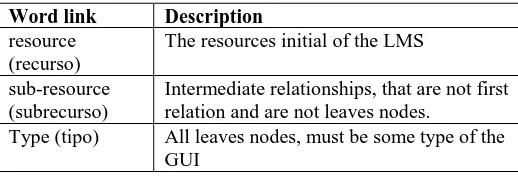
Word Link: The name of the linking words should always be lowercase and no spaces, for example: "thisisalink". We define three types of links in accordance with the following assumptions: all leaves nodes must be of some type of the GUI (tipo). The resources (recursos) and sub-resource (subrecursos) must be composed of other sub-resource (subrecursos) or leaves nodes. The resources initial of the LMS will be called resources (recursos) and thereafter will be called sub-resource (subrecursos). The Table 3 classifies the links.
Word link Description
resource (recurso)
The resources initial of the LMS
sub-resource (subrecurso)
Intermediate relationships, that are not first relation and are not leaves nodes.
Type (tipo) All leaves nodes, must be some type of the GUI
Table 5 linking words for classification of LMS, Source Author
The actions of accept (ok, aceptar) and Cancel (Cancelar) are in all the moment and are not modeling in this case, but must be considered.
Since all LMS offer a variety of users, this work use the teacher user or equivalent.
A.Creating the map of knowledge for each LMS
Below are showing very generic global maps of each LMS to ascertain their generic structure, it is clarified that this article are not show all maps, because it is a job too many long and not is the purpose. the work is identify the modules of LMS based on acquired knowledge and experience, of having worked with each, finally determine the common modules between the LMS studied.
1)Knowledge map for Atutor
Atutor mainly used PHP for the development, the assembly for testing was done with a Apache Web server, PHP and a database engine MySQL, the browser used for testing was Firefox3.
ATutor offers a page that contains the next modules: My Courses, Browse courses, Profile, Preferences, Networking, Inbox, Find and Help. These modules in turn lead to others modules, the main view of the map can be displayed in Figure 3.
Figure 10 Initial knowledge map of Atutor, Source Author.
Atutor – Level 0
Level 1 Level 2 Level 3
My courses
Course
My tests and surveys Directory
Groups Forums
Networking
Photo Gallery Site Map
Photo Gallery Student Tools
Glossary Content Explorer
Chat Links Forums Quiz FAQ Groups Reading list File Storage Test and task Photo Gallery Directory Search in repository Site map My Monitoring Administrator
File Administrator Announcements Chat
Contents Backup Quiz
Email Course Statistics Test and Quiz Forums Glossary Groups Course tools Student tools Registration Reading list FAQ Properties Test and task Tasks Course
creation Browse
Courses Profile Preferences Networking Inbox
Search Help
Table 6 Atutor modules, Source Author.
2)Knowledge map for Claroline
Claroline mainly used PHP for the development, assembly for testing was done with a Apache Web server, PHP and a database engine MySQL, the browser used for testing was Firefox3.
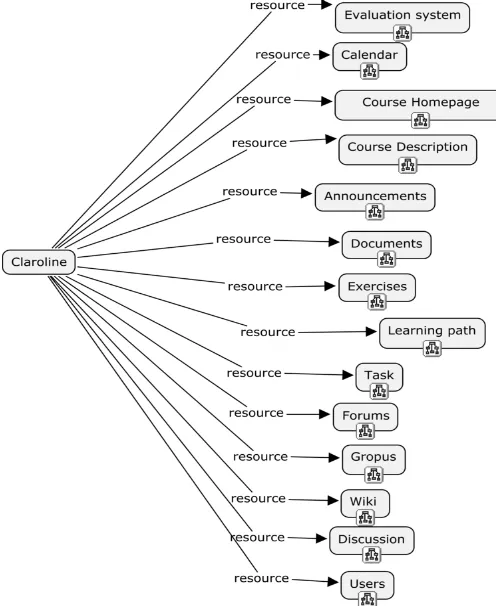
course, Course description, Announcements, Documents, Exercises, Learning Path, Jobs, Forums, Groups, Wiki, Discussionand and Users, the main view of the map can be visualized in Figure 4.
Figure 11 Initial knowledge map of Claroline, Source Author.
The Claroline modules obtained are shown in Table 5, which shows the hierarchy tree of each module.
Claroline Level 0 Evaluation System Calendar
Course Homepage Course Description Announcements Documents Exercises Learning path Task
Forums Groups Wiki Discussion Users
Table 7 Claroline modules, Source Author.
3)Knowledge map for Moodle
Moodle mainly used PHP for the development, assembly for testing was done with a Apache Web server, PHP and a
database engine MySQL, the browser used for testing was Firefox3.
Moodle, shows at the beginning a page that contains the modules of:categories of courses, online users and site administration, the main view of the map can be visualized in Figure 5.
Figure 12 Initial knowledge map of Moodle, Source Author.
The Moodle modules obtained are shown in Table 6, which shows the hierarchy tree of each module.
Moodle Level 0
Level 1 Level 2
Home
Add resources
Insert Tag
Compose a text page Compose a Web page Files or Web link Deploying IMS Content Package
Add activity
Data Base Chat Browse Questions Quiz Forums Glossary Topic Scorm
Advanced File Uploading Upload File
Activity offline Wiki
Courses categories Online Users Site
Administration
Table 8 Moodle modules, Source Author
4)Knowledge map for DotRLN
DotRLN, used a database engine PostgreSQL, a Web AOL Server (American On Line), upper this is mounted Open ACS (Architecture Community System), this is the heart that offers funtions to upper layers and finally above all is LRN, the operating system is Ubuntu server, the
the browser used for testing was Firefox3.
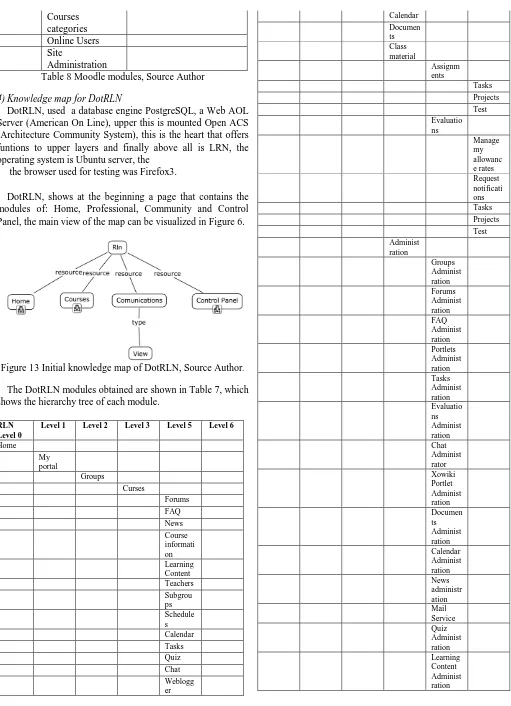
DotRLN, shows at the beginning a page that contains the modules of: Home, Professional, Community and Control Panel, the main view of the map can be visualized in Figure 6.
Figure 13 Initial knowledge map of DotRLN, Source Author.
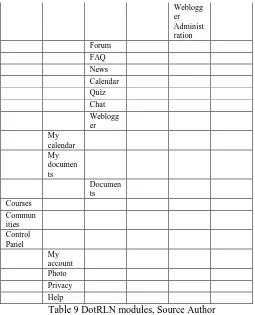
The DotRLN modules obtained are shown in Table 7, which shows the hierarchy tree of each module.
RLN Level 0
Level 1 Level 2 Level 3 Level 5 Level 6
Home
My portal
Groups
Curses
Forums FAQ News Course informati on Learning Content Teachers Subgrou ps Schedule s Calendar Tasks Quiz Chat Weblogg er
Calendar Documen ts Class material
Assignm ents
Tasks Projects Test Evaluatio ns
Manage my allowanc e rates Request notificati ons Tasks Projects Test Administ
ration
Weblogg er Administ ration Forum
FAQ News Calendar Quiz Chat Weblogg er My
calendar My documen ts
Documen ts Courses
Commun ities Control Panel
My account Photo Privacy Help
Table 9 DotRLN modules, Source Author
5)Knowledge map for Sakai
Sakai is Java based. by this Sakai is multiplatform, for its functioning is recommended to install java SE 6, Apache Tomcat (Version 5.5.30) as servlet container, the database engine MySQL 5.1 and the driver of connection to the database data, the browser used for testing was Firefox3.
Sakai, shows at the beginning a page that contains the modules of: Home, My communications, My tools with Resources, Portfolios, News, Web content, Search, and Evaluation System, y My settings with Profile2, Membership, Preferences, Account and Site setup, the main view of the map can be visualized in Figure 7.
Figure 14 Initial knowledge map of Sakai, Source Author.
The Sakai modules obtained are shown in Table 8, which shows the hierarchy tree of each module.
Sakai Level 0 Level 1 Home
Menssage of the day My workspace information Recent announcements Calendar
Message y forums notification My
communications
Calendar Announcements Help
My tools
Resources Portfolios News Web content Search
Evaluation system My settings
Profile2 Membership Preferences Account Site setup
Table 10 Sakai modules, Source Author
mode teacher, was made a comparison process between the modules of the LMS's, and finally generating Table 8 , which shows a first approximation of potential modules compatible into LMS's and a generic name for them.
Comparison Modules LMS Generic Atutor Clarolin
e
Moodle RLN Sakai
File manager File Administ rator Documen ts Add resources Documen ts Resource s Announce ment Announc ements Announc ements
Home Announc
ement
Help Help Help Help Help Help
Chat Chat Chat Chat
Manageme nt Curricula
Contents Add
resource Class material Resource s Add activity Learning contents Educationa l Design Administ ration Learning path Site Administ ration Control panel Portfolios Preferenc es
Course Course Course
claroline
Module Curse Portfolios
Authentica tion
Directory Users Users Teachers Accounts
Survey Quiz Quiz
Evaluation System Tests and Quiz Evaluatio n System Question s Evaluatio ns Evaluatio n System Question s
Forums Forums Forums Forums Forums Messages
and Forums
Glossary Glossary Glossary
Groups Groups Groups Groups
Work Group Networki ng Commun ities Profile2
FAQ FAQ FAQ
Activity calendar
calendar Activities My calendar
Calendar
News News News
Wiki Wiki Wiki
Rating system
Test and task
Exercises Module Evaluates Event
Task Advance
d File Uploadin g Test Upload File Projects Task Administra tion Preferenc e
Yes Site
Administ ration Control Panel Members hip (Site administr ation) Compariso n Modules LMS
Table 11 Comparison modules LMS, Source Author
The table 9 displays the generic modules File Management, Help, Management Course, Courses, Users, Systems evaluation, Forums, Jobs and Platform
Management, in a first comparative exist in all LMS's.
VIII. CONCLUSIONS
All LMS's have a similar core, this is the management of courses and activities treated there, and somehow these activities are associated with a calendar.
All LMS's have differents users but essentially have three that are the platform administrator, teacher and student. is very important to clarify that the teacher should not be responsible for managing the platform, your mission in the LMS is managing your course, these tasks are often confused.
All Platforms work with internet orientation, have a database for storage, and a web server to be deployed.
As much as there is some similarity between the modules of LMS's platforms, each of the LMS's implemented and managed in a particular your module, for example the module of user or forums. This implies that modules are different between platforms.
This work is the foundation and gives free rein to the possibility of constructing ontology for modeling courses based a standard.
REFERENCES
[1] G. J. R. Hilera and M. R. Hoya. (2010). ESTÁNDARES DE
E-LEARNING: GUÍA DE CONSULTA [Digital]. 1. Available: http://www.cc.uah.es/hilera/GuiaEstandares.pdf
[2] V. J. M. Márquez, "Estado del arte del eLearning. Ideas para la
definición de una plataforma universal.," Ortega, Ramírez Juan Antonio DEA, Departamento de Lenguajes y Sistemas Informáticos, Universidad de Sevilla, Sevilla - Spain, 2007.
[3] R. J. B. Vélez, "Arquitectura para la Integración de las Dimensiones de
Adaptación en un Sistema Hipermedia Adaptativo," Fabregat, Gesa Ramón DEA, Departament de Electrònica, Informàtica i Automàtica, Universidad de Girona, Girona, 2007.
[4] O. S. f. E. i. E. Grupo SIGOSSEE / JOIN. (2005). Evaluación de las
plataformas LMS [Internet]. Available:
http://www.ossite.org/join/sp/lms
[5] C. M. C. Llorente, "Moodle como entorno Virtual de Formación al
alcance de Todos," Red de revistas cientificas de América Latina y el Caribe, España y Portugal vol. XV, March 2007.
[6] R. McGreal, "Learning Objects: A Practical Definition," International
Journal of Instructional Technology and Distance Learning vol. 1, 2004.
[7] A. Holzinger, et al., "Multimedia Learning Systems based on IEEE
Learning Object Metadata (LOM)," in World Conference on Educational Multimedia, Hypermedia and Telecommunications 2001, Norfolk, VA, 2001, pp. 772-777.
[8] G. L. A. ÁLVAREZ, et al., "Empaquetamiento y Visualización de
Objetos de Aprendizaje SCORM en LMSs de Código Abierto," ed. Valdivia: Universidad Austral de Chile, 2006, p. 10.
[9] EduTools. (2010, October). CMS: Product Comparison System.
Available: http://www.edutools.info/item_list.jsp?pj=4
[10] http://www.edutools.info/compare.jsp?pj=4&i=624,560,562,616,621
[11] PBworks. (2007, October). Estándares eLearning. Available:
http://internet-educativa.pbworks.com/Est%C3%A1ndares-eLearning
[12] D. Polansky. (2010, October). FreeMind - free mind mapping software
Available: http://freemind.sourceforge.net/wiki/index.php/Main_Page
[13] I. CmapTools. (2010, October). IHMC CmapTools. Available:
http://cmap.ihmc.us/
[14] L. R. Chien, et al., "A Visual Lambda-Calculator Using Typed
on Computer and Electrical Engineering, Y. Xie, et al., Eds., ed Los Alamitos: Ieee Computer Soc, 2008, pp. 250-255.
[15] M. A. Rodriguez, et al., THE USE OF AN INNOVATION
CLASSROOM A Perspective in the Introduction of ICT in Elementary Schools. Setubal: Insticc-Inst Syst Technologies Information Control & Communication, 2009.
[16] D. Roy and Ieee, Using Concept Maps for Information
Conceptualization and Schematization in Technical Reading and Writing Courses: A Case Study for Computer Science Majors in Japan. New York: Ieee, 2008.
[17] çJ. Brine, et al., Using moodle and other software tools in EFL courses
in a Japanese IT university. Los Alamitos: Ieee Computer Soc, 2007.
[18] A. J. Canas, et al., "Concept maps: Integrating knowledge and
information visualization," in Knowledge and Information
Visualization: Searching for Synergies. vol. 3426, S. O. Tergan and T. Keller, Eds., ed Berlin: Springer-Verlag Berlin, 2005, pp. 205-219.
[19] A. J. Canas, et al., "Using WordNet for word sense disambiguation to
support concept map construction," in String Processing and Information Retrieval, Proceedings. vol. 2857, M. A. Nascimento, et al., Eds., ed Berlin: Springer-Verlag Berlin, 2003, pp. 350-359.
![Figure 8 A hierarchical model of LOM given by the IEEE based in [7], Source Author](https://thumb-us.123doks.com/thumbv2/123dok_us/9717843.1955130/2.612.312.567.485.613/figure-hierarchical-model-given-ieee-based-source-author.webp)
![Figure 9 Granularity of learning objects, based in [6], Source Author](https://thumb-us.123doks.com/thumbv2/123dok_us/9717843.1955130/3.612.46.318.60.303/figure-granularity-learning-objects-based-source-author.webp)