University of New Orleans University of New Orleans
ScholarWorks@UNO
ScholarWorks@UNO
University of New Orleans Theses and
Dissertations Dissertations and Theses
8-6-2009
Taintx: A System for Protecting Sensitive Documents
Taintx: A System for Protecting Sensitive Documents
Patrice Dillon
University of New Orleans
Follow this and additional works at: https://scholarworks.uno.edu/td
Recommended Citation Recommended Citation
Dillon, Patrice, "Taintx: A System for Protecting Sensitive Documents" (2009). University of New Orleans Theses and Dissertations. 976.
https://scholarworks.uno.edu/td/976
This Thesis is protected by copyright and/or related rights. It has been brought to you by ScholarWorks@UNO with permission from the rights-holder(s). You are free to use this Thesis in any way that is permitted by the copyright and related rights legislation that applies to your use. For other uses you need to obtain permission from the rights-holder(s) directly, unless additional rights are indicated by a Creative Commons license in the record and/or on the work itself.
Taintx: A System for Protecting Sensitive Documents
A Thesis
Submitted to the Graduate Faculty of the University of New Orleans in partial fulfillment of the requirements for the degree of
Master of Science In
Computer Science Information Assurance
by
Patrice Dillon
B.S. Dillard University, 2004
August, 2009
Acknowledgements
I have to thank God for getting me through this. I would like to thank my parents John Dillon,
Viola Dillon and Gloria Singleton you guys don’t know what you mean to me. My brother and
sister, John and Shonell we will always be the three musketeers. To Tynia Turner a wonderful
person that has always been supportive, I truly appreciate everything. To all of my friends,
thanks for putting up with my constant neglect and naming me “Pathesis.” To Dr. Gloria C. Love
thanks for always helping me with any and everything. I could not end this without saying a very
big thank you to the best Linux Hacker I know Dr. Golden Richard III. Thank you for being very
Table of Contents
List of Figures ...vi
Abstract ... vii
Chapter 1 ... 1
Introduction ... 1
Rationale of the Study ... 2
Statement of the Problem ... 2
Purpose of the Study... 3
Importance of the Study ... 4
Research Approach ... 5
Chapter 2 ... 5
The Linux Kernel ... 5
Inode Attributes ... 7
File System Administration ... 10
Design of Taintx... 9
The Scheduler ... 10
The task_struct... 10
Configuration of Taintx ... 11
Processes ... 16
Directory Entry ... 17
Dentry ... 18
Pathname Operations ... 19
Pathname Lookup ... 19
Path_lookup function ... 20
Link_path_walk function ... 21
System Calls ... 23
Open System Call ... 24
Chapter 3 ... 27
Results ... 27
Limitations of the Study ... 27
Related Work ... 28
Future Work ... 29
Conclusion ... 30
Bibliography ... 31
List of Figures
Figure 1 : Linux kernel Diagram... 6
Figure 2: Inode Structure ... 7
Figure 3: Struct task_struct ... 11
Abstract
Across the country members of the workforce are being laid off due to downsizing. Most of
those people work for large corporations and have access to important company documents.
There have been several studies suggesting that employees are taking critical information after
learning they will be laid off. This becomes an issue and a threat to a corporation’s security.
Corporations are then placed in a position to make sure sensitive documents never leave the
company. In this study we build a system that is used to assist corporations and systems
administrators. This system will prevent users from taking sensitive documents. The system used
in this study helps to maintain a level of security that is not only beneficial but is a crucial part of
managing a corporation, and enhancing its ability to compete in an aggressive market.
Keywords
Linux
Linux Kernel
System Call
Scheduler
Process ID (PID)
Inode
Chapter 1: Introduction
The taintx system is designed to present a reliable solution for securing documents on a Linux
system. This system attempts to provide companies with a secure way to share documents with
employees, while preventing the documents from being copied outside of a protected area.
There are several ways that a systems administrator can prevent users from viewing documents,
such as placing group rights on documents and placing read only rights on any given document
within an organization. While all of these methods are useful, none of these implementations
address the issue of giving a user typical read and write privileges, while preventing that user
from taking critical documents. Recently, there has been a surge in employees taking sensitive
information from companies. The Ponemon Institute, a Tucson, Ariz.-based privacy and
management research firm, said almost 60 percent of workers who were either shown the door or
quit, left with proprietary company information. The survey included queries of 945 adults
nationwide who were fired, laid off, or switched jobs in the last 12 months. Additionally, a
survey commissioned by the data loss prevention department of Symantec, found that 45 percent
of respondents took non-financial business information; 39 percent, customer contact lists; 35
percent, employee records; and 16 percent, financial information (MCALEAVY, 2009). This
presents a problem because these sensitive documents are being shared with competitors. The
taintx system has been developed to prevent a typical system user from removing critical data
from a workstation. The system developed in this study allows files and directories to be placed
in a protected area. The files that have been placed in the protected area can be read and written
to just like any other document on a Linux system. The taintx system prevents users from saving
file that is not in the protected area or emailing critical files that are associated with the protected
area. The system that is used in this particular study will be beneficial to corporations as well as
to their employees. Many employees have fallen into the habit of taking documents home to edit.
While this practice may be within company policies, it could easily foster a work environment
where employees mistakenly take documents that could be considered sensitive. This system will
protect users from making such innocent mistakes that could possibly cost them their jobs.
Rationale of the Study
Although there are a number of ways to prevent documents from being copied or extracted on
some commercial operating systems, there is no direct study using the Linux operating system.
One example of this type of system is PdfGuard. PdfGuard is a copy protection product that
encrypts pdf files. After the pdf files have been encrypted, only viewing privileges are permitted
(zappersoftware, 2004). Our study involves modifying the Linux kernel and making adjustments
that will allow documents to be used for viewing and editing purposes only, within a restricted
directory. By making this possible on a Linux machine, this study acknowledges the vast amount
of Linux users and the need of corporations to protect their critical documents on an open
system.
Statement of Problem
In recent years, there has been a tremendous amount of growth in the number of companies that
use Linux based systems. There are several reasons why companies have started using the Linux
operating system. While most companies admit that their use of Linux is due to the extremely
the Linux system. In a recent interview, Orbitz cites Linux as a competitive advantage, “Orbitz
is a company that leverages open-source projects in its production environment and isn't afraid to
be public about it. We currently use over 750 Linux machines in our production environment.
Our web servers are Apache running on Linux, our application servers are proprietary servlet
engines running on Linux and the back-end “booking engine” is comprised entirely of Java
services running on Linux. Lastly, the software that does the low fare searching that is one of the
key differentiators between Orbitz and our rivals also is running on Linux.” (Searls, 2003).
Many companies are losing critical documents due to insufficient security. There are several
different reasons that would motivate an employee to take documents from a company. Studies
have shown that employees who have been fired are more likely to take confidential information.
In a survey that polled workers who had been laid off over the past 12 months, 59 percent
admitted to stealing company data, while 67 percent used their former company’s confidential
information to find a new job. Most of this behavior is considered to be “emotional in a time of
stress.” (Messmer). There are several ways that an employee can steal a company’s information.
The most commonly used methods are to remove documents using a CD, diskette, USB or
sending the documents in an email. The removal of confidential data from companies has proven
to be a major issue. This study implements a system that prevents the removal of critical
documents by restricting a user’s ability to copy them outside a designated, protected area. For
this reason an increased need of system security has become very important.
Purpose of the Study
These days, companies are focusing on finding different methods to properly secure their most
depth look at the field of computer security. There are systems in place to help companies secure
their data. These systems are built solely for popular operating systems. Organizations that use
less popular systems or operating systems for which commercial software is not typically
developed, such as Linux, do not have the same options when it comes to properly securing
documents.
Importance of the Study
The taintx system involves modifying the Linux kernel to implement a restricted area in the
filesystem in which documents can be viewed or edited, but not copied outside of the restricted
area. We undertook this study because data that has been shared with employees can have
detrimental effects on a company if shared with outside parties. Losing sensitive data could cost
companies millions of dollars. This study describes the implementation of our system, called
taintx, which reserves a protected space inside of the file system for processing of sensitive
documents. This space will be called the protected area in the remainder of the thesis and this
protected area will be used to hold all sensitive data. When a process accesses any data inside the
protected area, it will become a tainted process. Tainted processes will not have access to certain
system calls within the Linux system and restricted access to others, in order to prevent
disallowed copying of sensitive documents.
Research Approach
The objective of this study is to provide an area of the Linux file system that can securely store
considered “tainted” (in the sense that it marks entities that come in contact with it) and any
process that accesses content in the protected area will become tainted as well. Similarly, when a
parent process becomes tainted the child process becomes tainted also. A tainted process will
only be granted rights to open and edit files in the protected area. If a tainted process accesses
content outside of the protected area, no create or write access will be granted to that process. A
tainted process will also be prohibited from writing to a file that was previously opened before
the process became tainted, regardless of its initial file access rights.
Chapter 2:
The Linux kernel
Linux has recently become a very popular operating system. The system was first built by Linus
Torvalds. The Linux kernel is a member of the family of UNIX like operating systems that are
open source. The source code for the Linux kernel is written mostly in the C programming
language (with some critical portions in assembler) and has thousands of contributors. Recently,
the popularity of the Linux system has exploded. There are many benefits to using an open
source system. The operating system itself is free and there are thousands of free software
downloads that accompany the system. While Linux has become known for being one of the
most secure operating systems available today, Linux systems are so open that they sometime
lack the proper security that may be necessary for a system administrator. The Linux kernel is
essentially the brains of the operating system. Without the kernel, applications would not be able
to effectively communicate with hardware. Things such as process scheduling, memory
management and handling system calls are all important functions that are carried out by the
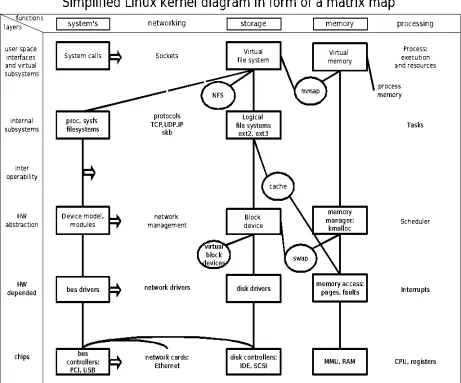
Figure 1 : Linux kernel Diagram
The Linux operating system contains several different components, but for the purpose of this
study we will focus on the command shell, the file system and the kernel. There are many
different files that are supported by the Linux kernel. The main three file types are regular file,
directory and symbolic links. The information that is necessary for the file system to handle these
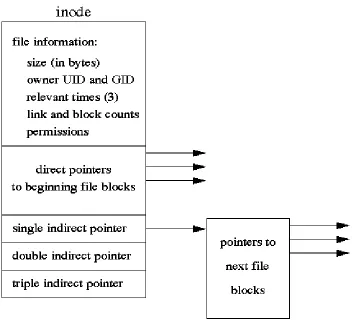
files is stored in a data structure that is known as an inode. An inode is assigned to each file and
Figure 2: Inode Structure
Essentially, an inode represents the information needed by the kernel to manipulate a file or
directory (Love, 2005). For the purpose of this study we utilize inodes to provide a method of
identifying the directory representing the protected area, via its unique inode number. Processes
accessing pathnames that pass through the protected area become tainted, which impacts their
ability to copy, write, and create files.
Inode Attributes
An inode is required to provide these standard attributes. We are concerned primarily with the
unique number associated with each inode.
• Number of hard link associated with the file
• File length in bytes
• Device ID (an identifier of the device containing the file)
• UID of the file owner
• User group ID of the file
• Several timestamps that specify the inode status change time, the last access time, and the last
modify time
File System Administration
In the Linux file system there are several file permissions that can be set by a Linux
administrator. Each file has information in its inode regarding the permissions that have been
given to the file. The information that gives the set permissions for a particular file is called the
mode of a file. The mode is divided into three basic sections.
• User (owner) permissions
• Group (group owner) permissions
• Other (everyone on the Linux system) permissions.
An administrator can assign these three different permissions to a given file. Those permissions
are read, write and execute. Read allows a user to open and read the contents of the file. This
permission also allows a user to list the contents of the directory. Write allows the reader to
open, read and edit the contents of the file. This permission also allows the user the ability to add
or remove files to and from the directory. Execute allows the user the ability to execute a given
work with directory contents. These basic access rights can prevent a group or an individual from
viewing files that should not be viewed by them or files that are not beneficial to their particular
area of work. Although setting file permissions is a great way to give access only when deemed
necessary, these permissions do not prevent users from copying documents, for example, from a
workstation to a removable storage device.
For the purpose of this study, a user will have arbitrary read, write, and execute permissions for
files both inside and outside the protected area. The taintx system is not built to simply take away
the rights of the users; this system will allow read and write permissions to given files inside of
the protected area in the usual manner, while preventing the files from being copied outside of
the protected area.
Design of the Taintx System
The interface to the taintx system is housed inside of the /proc file system. The /proc file system
is a virtual file system inside of the Linux kernel. This virtual file system provides information
on processes that are currently running on a Linux system and resides only in memory. The
/proc file system also allows information to be written to virtual files to communicate with the
Linux kernel. The /proc file system is enormously powerful. It allows the users to view the
system as the kernel views the system and to easily communicate configuration information to
The Scheduler
The scheduler in the Linux kernel is responsible for making sure that the correct processes are
running when they are needed. In a multitasking operating system such as Linux, the scheduler
decides which process to run. These processes are selected in a manner that will best utilize
system resources or meet necessary computational deadlines. Most modern operating systems
provide preemptive multitasking. Preemptive multitasking allows the scheduler to decide which
process should stop running or which process should start or continue running. In preemptive
multitasking, a process is given a certain amount of CPU time. This time is referred to as a time
slice. A time slice helps prevent one process from utilizing all of the system resources. A process
is considered expired when the time slice is out. There are two algorithms that are used inside the
scheduler, the time-sharing algorithm and the real-time algorithm. The time-sharing algorithm is
based upon fair preemptive scheduling. The real-time algorithm is based on giving priority to
more important task.
The Task_Struct
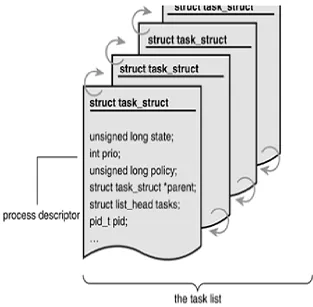
The Linux kernel stores the list of processes that are scheduled in a circular doubly linked list
called the task list. Inside the list each element in the given task list is a process descriptor of the
type struct task_struct. The process descriptor contains all the information about a specific
process. The struct task_struct is defined in the include file “sched.h”. For the purpose of this
study we initialize a new flag in the task_struct, called the “tainted flag”. This will allow us to
Figure 3: Struct task_struct
Configuration of taintx
In order to handle configuration of the taintx system, we introduce several new files in the /proc
filesystem. We then install handlers for access to these files so that configuration information
can be queried and supplied. The following code defines the handlers for our new /proc
filesystem entries, so that reads and writes to these files can be trapped and processed. The code
is straightforward. The core_initcall(taintx_init) function call causes the kernel to execute the
taintx_init() function during kernel initialization. The following code appears in the kernel
static int __init taintx_init(void) { proc_mkdir("taintx", 0);
if(!(taintx_pid_proc_file = create_proc_entry( "taintx/pid", 0644, NULL))) {
printk(KERN_ALERT "Error: Could not initialize/proc/taintx/pid\n");
printk(KERN_INFO "All /proc/taintx* entries removed\n");
return 0; }
taintx_pid_proc_file->read_proc = taintx_proc_read; taintx_pid_proc_file->write_proc = taintx_proc_write; taintx_pid_proc_file->owner = 0;
taintx_pid_proc_file->uid = 0; taintx_pid_proc_file->gid = 0;
taintx_pid_proc_file->data = (void *)TAINTX_PID; return 0;
}
core_initcall(taintx_init);
We use the file /proc/taintx/pid to allow manually tainting a process (by PID) and to query the
last manually tainted file. The taintx_proc_read function handles querying of the last manually
tainted PID. The /proc/taintx/pid file is primarily for testing purposes, since the taintx system
automatically taints processed based on their accesses to files in the protected area. The code for
handling querying of manually tainted PIDs is listed below.
int taintx_proc_read(char *buffer,char **buffer_location, off_t offset, int buffer_length,int *eof, void *data) {
struct task_struct *p=find_task_by_pid(taintx_pid); int ret=0;
if (! offset > 0 && (int)data == TAINTX_PID) { if (!p) {
We must also handle writes against the files in the /proc filesystem. The function
taintx_proc_write function tracks write access to the pid file inside of the taintx directory. The
code is provided below. One particularly interesting portion is the use of the copy_from_user()
function, to copy a buffer that describes the PID of the process to be manually tainted. This
buffer does not reside in the kernel and the kernel must use copy_from_user to copy the buffer
contents to the kernel before access. Another interesting section of the code is the use of
find_task_by_pid() function to locate the process descriptor of the process to be manually
tainted.
int taintx_proc_write(struct file *file, const char *buffer, unsigned long count, void *data) {
int ret=0; char c[10];
struct task_struct *p;
if ((int)data == TAINTX_PID) { ret=count;
if (copy_from_user(c, buffer, 9)) { ret = -EFAULT;
}
taintx_pid=simple_strtol(c, 0, 10); p=find_task_by_pid(taintx_pid);
if (p) {
p->taintx=1;
printk("PID %d will be tainted.\n", taintx_pid); }
else {
printk("Didn't taint: no such PID %d\n", taintx_pid);
}
return ret; }
To configure the location of the protected area, we introduce an additional file in the /proc
filesystem, /proc/taintx. This file contains the pathname of the protected area.
function handles read accesses against /proc/taintx/dir. Only allows users with root privileges the
ability to modify the location of the protected area. The code for the taintx_proc_read_dir
function follows. The implementation of this function is straightforward.
int taintx_proc_read_dir(char *buffer,char**buffer_location, off_t offset, int buffer_length,int *eof, void *data) { int ret=0;
if (! offset > 0 && (int)data == TAINTX_DIR) { ret=sprintf(buffer, "%s\n", taintx_dir); }
return ret; }
The function taintx_proc_write_dir handles writes against /proc/taintx/dir to allow setting the
pathname for the protected area. As for handling writes against /proc/taintx/pid, the buffer that
contains the pathname does not reside in the kernel’s address space and therefore
copy_from_user must be used before access. Each time the protected area is changed, the
path_lookup function (described in further detail below) is called to determine and store the
inode number of the protected directory. Three parameters are passed to path_lookup, including
taintx_dir, which is a pointer to the pathname of the protected directory. The second parameter
is a flag, LOOKUP_DIRECTORY, indicating that the last component of the pathname must be a
directory. The final parameter is a pointer to a nameidata structure. After the pathlookup
function is performed the taintx_inode is set to the directory entry’s inode number, stored in the
nameindata structure.
int taintx_proc_write_dir(struct file *file, const char *buffer, unsigned long count, void *data) {
int ret=0;
struct nameidata nd; char buf[100];
int i;
taintx_inode=0;
printk("Handling /proc/dir...about to copy_from_user()\n");
ret=count;
if (copy_from_user(taintx_dir, buffer, count)) { ret = -EFAULT;
printk("copy_from_user() failed\n"); }
else {
// clean pathname taintx_dir[count-1]=0;
for (i=0; i < count; i++) {
if (taintx_dir[i] == '\n') { taintx_dir[i] = 0; }
}
taintx_trace=1;
sprintf(buf, "Using tainted directory \"%s\"\n",taintx_dir);
printk(buf);
path_lookup(taintx_dir, LOOKUP_DIRECTORY, &nd); taintx_trace=0;
printk("Back from path_lookup(), settinginode.\n");
taintx_inode= nd.dentry->d_inode->i_ino; sprintf(buf, "Just set inode to
%ld\n",taintx_inode); printk(buf); } } return ret; }
As with the handlers for /proc/taintx/pid, a handler installation function must be written. This
version of the taintx_init() is placed inside of the kernel source file for pathname processing.
Again, a core_initcall(taintx_init) is placed at the end of the source file to insure that the function
executes when the kernel boots.
static int __init taintx_init(void) { proc_mkdir("taintx", 0);
if (! (taintx_dir_proc_file =
create_proc_entry("taintx/dir", 0644, NULL))) {
printk(KERN_INFO "All /proc/taintx/dir entries removed\n");
return 0; }
taintx_dir_proc_file->read_proc = taintx_proc_read_dir; taintx_dir_proc_file->write_proc = taintx_proc_write_dir; taintx_dir_proc_file->owner = 0;
taintx_dir_proc_file->uid = 0; taintx_dir_proc_file->gid = 0;
taintx_dir_proc_file->data = (void *)TAINTX_DIR; taintx_dir[0]=0;
return 0;
}
Processes
fork() is a system call that allows a process to create a new process, called a child process. The
child process initially executes the same code as the parent process, but the parent and child
processes are assigned unique PID values. Each process may create many child processes but
will have only one parent process, except for the very first process which has no parent. The first
process, called
process inherits most of its attributes, such as open files, from its parent. In fact in Unix, a child
process is created (using
with a different program (using
• The child process has a unique process ID.
. A child process is attributed
with the following characteristics.
• The child process ID also does not match any active process group ID.
• The child process has its own copy of the parent's file descriptors. Each of the child's file
descriptors refers to the same open file description with the corresponding file descriptor of the
parent.
• The child process has its own copy of the parent's open directory streams. Each open directory
stream in the child process may share directory stream positioning with the corresponding
directory stream of the parent.
• The child process may have its own copy of the parent's message catalogue descriptors.
• File locks set by the parent process are not inherited by the child process.
In the taintx system, we modify fork () and exec() to force processes to inherit the “tainted”
status of their parent. This means that restrictions imposed on a process because it has accessed
files in the protected area are also imposed on any child processes that are created.
Directory Entry
In the Linux kernel, a pathname is composed of a set of directory entries, possibly terminated
with a file entry. Each directory entry is represented by a single structure called a dirent. In the
taintx system, we use the dentry to track the inode associated with each component of a
pathname. In particular, we track the inode of the directory that implements the protected area
and during pathname processing, we track inodes of pathname components to see if a pathname
refers to a file or directory inside of the protected area. This information is valuable to our
system because it gives us a way to identify when a process must be tainted, based on access to a
Dentry
When a file system resolves each element of a path name and reaches the end of the path which
is stored into a dentry object, the kernel then caches the dentry object and stores it away into the
dentry cache. Each dentry object may be in one of the four states:
Free: The dentry object contains no valid information and is not used by the virtual file system.
The corresponding memory area is handled by the slab allocator.
Unused: The dentry object is not currently used by the kernel. The d_count usage counter of the
object is 0, but the d_inode field still points to the associated inode. The dentry object contains
valid information and cannot be discarded.
In use: The dentry object is currently used by the kernel. The d_count usage counter is positive,
and the d_inode field points to the associated inode object. The dentry object contains valid
information and cannot be discarded.
Negative: The inode associated with the dentry does not exist, either because the corresponding
disk inode has been deleted or because the dentry object was created by resolving a pathname of
a nonexistent file. The d_inode field of the dentry object is set to NULL, but the object still
remains in the dentry cache, so that further lookup operations to the same file pathname can be
quickly resolved. The term “negative” is somewhat misleading, because a negative value is not
Pathname Operations
A file’s pathname is used to identify the file in the context of a system call, such as open() or
mkdir(), to initiate a file operation. For the purpose of this study we will utilize the kernel’s
pathname lookup functions to determine when a process has entered the directory named by the
/proc/taintx/dir entry. The link_path_walk() function is used to determine the unique inode
number for the directory associated with the protected area. This inode number is stored and
checked whenever any pathname lookup operations are performed in the kernel. The next section
gives a brief overview of the pathname lookup function and its components.
Pathname Lookup
Using the path_lookup function, the virtual file system maps a particular pathname to an inode
corresponding to the final component or 2nd
An absolute pathname is one that begins with a forward slash “/”. This indicates that the search
actually starts from the directory that is identified by current->fs->root, which is the root
directory of the process. If a pathname is relative, it indicates that the search starts from a
directory that is identified as current->fs->pwd, which is the current working directory of a
process. For each pathname component, the inode for that component is looked up. This process to last component, depending on the value of a flag.
In a path_lookup the path name is broken down into a sequence of directories and possibly a
single file; only the last component in a path can represent a file. All other components in the
pathname must be directories. In the first component of the path lookup, the process checks to
is repeated until the full path name is resolved. The path_lookup function receives three
parameters:
• name: A pointer to the file pathname to be resolved
• flags: The value of flags indicates how the pathname lookup should proceed—that is, whether
the inode corresponding to the pathname being looked up should refer to the final pathname
component or the 2nd
• nd: The address of the nameidata data structure, which stores the results of the lookup operation.
The nd structure contains information that is used in the pathname lookup procedure.
to last component (in the case of a file creation, where the inode for the
parent directory of the file being created is needed). Other behavior of the function can also be
controlled by the flags parameter.
path_lookup() Function
The path_lookup operation begins its process by initializing the nd structure. The
current->fs->lock is acquired for the read or write process. The path lookup operation then goes through the
process of determining if the initial directory is absolute or relative after the path lookup
established the type of directory. It increases the usage counters and stores the address in
nd->mnt and nd->dentry. After the current-> fs->lock-> read or write semaphore is released then the
total_link_count field in the descriptor of the current process is set to 0. The next process in the
path lookup operation is tremendously important to this particular study. The link_path_walk
function is the primary function of the path_lookup and it is in link_path_walk() that we perform
link_path_walk Function
The link_path_walk process begins by initializing look_up flags variables with nd->flags. Before
the first component of the pathname all leading slashes are passed over. A value of 0 is given
back if the left over path is empty. When the depth fields of the nd descriptor are positive, a
lookup_follow flag is set.
The pathname that has been passed is then broken down into distinct components. The function
then checks the permissions of the inode corresponding to each component as the path is walked.
When the name of the component is equal to “..” the function climbs to the parent directory. If
the follow_mount option is set, function on the last resolved component is used, then the process
will not be allowed to climb. If the nd->mnt file system is the namespace root file system then
the process is allowed to climb and the follow_mount function is called upon for the last resolved
component. If the last resolved directory is not the root directory of a mounted file system then
the function must basically climb to the parent directory. nd->dentry is then checked by the
follow_mount function to see if it is a mount point. If nd->dentry is a mount point then
lookup_mnt will be invoked to search the root directory of the mounted file system in the dentry
cache. The nd->dentry and nd->mnt is then updated with the object address that corresponds to
the mounted file system. This operation is repeated which will essentially invoke the
follow_mount() function. It is then necessary to climb the parent directory because it is a
possibility that the process could start the pathname lookup from a directory that is included in a
file system that has been hidden by another file system that is mounted over the parent directory.
The lookup_continue flag in the nd->flag is then set. This lets the system know that there is a
next component that has to be analyzed. do_lookup is then invoked. This function derives the
mounted file system object of the component are pointed to from the dentry and mnt fields. After
the follow_mount() function is checked, the system then checks for symbolic links.
At this point of the pathname lookup function, all of the components of the original pathname
have been resolved besides the last one. If the name of the last component is “.” execution is
terminated and will return a 0 value. If the name of the last component is “..” the system will
then climb to the parent directory. If the name of the last component is not “.” or “..” the
directory entry must be looked up in dentry cache. The follow_mount() function is then used to
check if the last component of the system is a mount point. The system returns an error if no
inode is associated with the dentry object. If the last component has an inode, the
lookup_directory flag is set to check whether the inode has a custom lookup method. The
nd->dentry and nd->mnt are returned as the last component, if the system does not return an error.
Most importantly, because we already know that the link_path_walk function retrieves the inode
number of each directory it walks through, we place a small piece of code inside the function that
will compare the inode number of the protected area’s directory against the current inode number
(for the current pathname component). If this condition is met, then a flag in the current process’
process descriptor is set to indicate that the process is tainted (via contact with data in the
protected area). A brief snip of the code is provided below; taintx_inode is the inode for the
protected area, current is a pointer to the current process’ descriptor, and inode->i_ino is the
inode for the current pathname component.
If (taintx_inode != 0 && current && taintx_inode == inode->i_ino) {
nd->taintx=1;
if (current->taintx) {
else {
printk("Tainted Process!! \n ");
current->taintx=1;
}
}
System Calls
System calls in the Linux system gives applications access to hardware and operating system
resources that would not normally be available. These system calls provide a way to securely
give rights to system resources and to a given application or a user. By accepting or denying
request, the system calls provide a level of security that protects the user from harming the
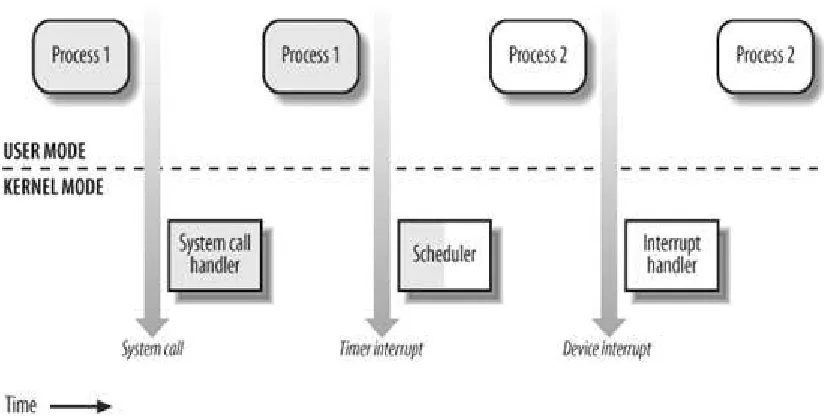
system. When a Linux system is in user mode it cannot access kernel data structures. A process
that is in user mode can issue a system call that will transition into kernel mode. After the system
call is satisfied the process then returns to user mode.
In order to properly implement the taintx system there are certain system calls that must be
monitored to prevent content from the protected area from being copied to an unprotected area of
the file system. If a user enters this protected area and has the rights to move the documents out
of the protected area or to copy data to a file outside of the protected area then the system would
not be useful. In the open.c and namei.c source files within the kernel, we make adjustments to
appropriate system calls that will prevent a process from moving critical data out of the protected
area. In the read_write.c file we make adjustments to the kernel that will prevent the tainted
Figure 4: Transition between User and Kernel Mode
Open System Call
One system call that must be monitored is the open system call, sys_open. Essentially, tainted
processes are not allowed to open files with write permissions outside of the protected area.
When a file is opened by a tainted process outside of the protected area the taintx system will
deny that process from saving any information to that file. Most of the work that is performed by
sys_open() is done inside of filp_open(). Inside of filp_open, open_namei() is called.
Open_namei() is a helper function of filp_open that is found in namei.c. The open_namei()
function does a simple pathname lookup and checks file permissions. We insert code to perform
further checks, namely, to determine if write access is being requested by a tainted process to a
file inside of the protected area. If the content is inside of this area, then access is allowed. If the
write access is to a file outside the protected area, then the access is denied. If a process is not
system only checks open operations on regular files (checked with the S_ISREG macro, below).
Consider the following code snippet, which performs the checks discussed above when a file is
opened.
if ((flag &
/* write access requested */
(FMODE_WRITE | O_CREAT | O_APPEND)) && /* S_IS_REG checks for regular file */
S_ISREG(nd->dentry->d_inode->i_mode) && current && /* process is tainted and file being opened is outside protected area...
*/
current->taintx && ! nd->taintx) {
sprintf(buf, “Access IS DENIED on \"%s\"\n", pathname); printk(buf);
error=-EACCES; goto exit; }
Write System Call
Unfortunately, preventing a process from opening with write access or creating files outside of
the protected area after it has become tainted (both conditions handled via modification of the
open system call, discussed above) is not enough. A process may have files outside of the
protected area already opened with write access before
To prevent the tainted process from writing to a file that is not in the protected area, the
sys_write function is modified to check the pathnames corresponding to files being written by
tainted processes. If any write operation is detected to a file outside of the tainted area, the
system call fails and an error is returned. We don’t currently restrict writes to standard output or
standard error.
it becomes tainted. To solve this
problem, we modify the write system call, the code for which is contained in the read_write.c
Our check works as follows: We check whether the file descriptor involved in the write is
greater than 2 (to eliminate standard output and standard error restrictions). We then use a
kernel function for looking up the absolute pathname of the parent directory of the file being
written to. Once this pathname is obtained, the path_lookup function is called to determine if the
path traverses the protected directory. Because we don’t want to prevent write access to files
that are not considered regular files, we again use the S_ISREG macro. The conditions that are
checked to determine if write access is allowed are illustrated in the code snippet below:
if (fd > 2 && ! file->taintx) { char buf[300];
char *p;
struct nameidata nd;
/* assume no taint for file */ nd.taintx=0;
/* get pathname of file being written to */
p=d_path(file->f_dentry, file->f_vfsmnt, buf, 299); /* does the pathname traverses the protected area? */
path_lookup(p, LOOKUP_DIRECTORY, &nd); file->taintx = nd.taintx;
}
if (fd < 3 || !S_ISREG(file->f_dentry->d_inode->i_mode) || ! current || ! current ->taintx || file->taintx){ ret = vfs_write(file, buf, count, &pos);
file_pos_write(file, pos); }
else {
printk(“WRITE DENIED!\n"); ret=-EACCES;
Chapter 3:
Results
The taintx proof of concept goes inside of the Linux file system and creates a protected area that
has not been provided by any other system. This system will taint any process that comes across
the protected area. After a process has become tainted, it is prevented from accessing the open
and write system calls. Taintx accomplishes the task of providing a systems administrator a
secure place to store sensitive information. By tainting a process that moves into the protected
area, we are able to prevent that process from writing critical information to documents that are
outside of the protected area. The taintx system will provide a secure place that allows users to
make changes to documents without moving them from the system. This study proves that it is
possible to secure a Linux system just as it is possible to secure the more popular operating
systems.
Limitations of the study
Taintx is currently only a proof of concept. Our system has been built inside of the Linux kernel
and because the copy and paste functions are not a part of the kernel and these functions are not
used as system calls, the copy and paste functions are still permissible on a system that
implements taintx. Furthermore, additional system calls require modifications to make the
system fully usable, including those for copying mapping files into memory (mmap()), UDP
sockets, etc. All of these issues can be dealt with given additional time, however, the important
Related Work
Trying to properly secure data on a system has always been a difficult task. There have been
other studies that have in their own way touched on the issue of securing documents. (Peter C.S.
Kwan) presents a system called Vault. The Vault system was built to introduce a way to secure
sensitive data and insure that the sensitive information that a user inputs into the system will
remain secure and will not be compromised by things such as Trojan horse, spyware and
keystroke loggers. The system is comprised of two virtual machines. One virtual machine is used
for system activities that do not require a heavily monitored environment known as the untrusted
system. The untrusted system is set in a virtual machine that is not as secure as the other system.
This virtual machine can use any software that the users choose and is not overly secure. The
second virtual machine used in the vault system is a heavily monitored system that is a much
more secured environment. The secure virtual machine runs a minimal operating system with a
very restricted functionality. If a user is on the untrusted machine and is about to make a
purchase online, the system switches over to the secure virtual machine before the user inputs
any sensitive information such as a credit card number. After the transaction has been made on
the secure virtual machine, the Vault system automatically switches the user over to the
untrusted virtual machine.
(Peter Tarasewich) has proposed a system for securing information. This study touches on
securing information that may be viewed in a public place. Increases in mobile computing have
made it very easy for users to access sensitive data while on the go. While this mobility is a good
thing, users are not always able to control that environment. This means that while working on a
mobile device there may be other people that can see a user’s information and record that
PDAs and other mobile devices. The blinders are used with the Firefox browser in this study and
use html lookup to find sensitive information that may be on a certain web page. When this
information is discovered there is a colored tab that is placed over the sensitive information. The
information that has been deemed sensitive by the system is then not viewable to anyone that
may be close to the user. The user has the choice of keeping the information covered by the
blinders or the user can access that information by placing the stylus over the blinders. The
information is revealed for a set amount of time then the blinders return once again to cover the
sensitive information.
(XiaoFeng Wang) introduces a technique, which allows the patched applications to perform fine
grained tracking and controlling of sensitive data flows online. Leapfrog was built to prevent
network applications from leaking sensitive user data. The system is used to protect highly
sensitive data from being leaked out through unknown execution paths.
Future Work
While the system used in this study covered many varied ways that a user can obtain
information, there are still many other ways that are beyond the scope of this paper. This system
was built with the typical user in mind. Further studies should include all types of users and
should not only thwart attempts by the typical user but should also prevent more seasoned users
from removing critical documents from a system. Support for system calls such as mmap which
allows users to send data through shared memory and the system call popen which allows a user
to open a program and send data through that program is needed. Future systems should include
kernel as a system call. The cut and paste facilities are implemented in the windows manager.
The taintx system is implemented using the Linux kernel version 2.6.11 to make this system
distributable the system must be portable to different kernel versions.
Conclusion
In this study we introduce the taintx system. This system was built to prevent users from taking
sensitive documents from a Linux system. The taintx proof of concept provides an area in the
Linux file system that can securely store documents. By placing the sensitive documents and
directories inside of a protected area, we are able to track down the processes that enter the
protected area. Any process that enters inside of the protected area has been tainted. After a
process has been tainted, write privileges to any file outside of the protected area are prevented.
A tainted process is not allowed to move any documents out of the protected area. The
Bibliography
Howe, D. (2007). Dictionary.com. Retrieved from Dictionary.com: http://dictionary.reference.com/browse/child+process
Love, R. (2005). Linux Kernel Development. Indianapolis: Novell Press.
MCALEAVY, T. (2009, 3 16). NorthJersey. Retrieved from www.northjersey.com:
http://www.northjersey.com/business/workplace/Laid-off_employees_taking_data_with_them.html
Messmer, E. (n.d.). Retrieved from
http://www.itbusiness.ca/it/client/en/home/News.asp?id=52148&PageMem=2
opengroup. (n.d.). Opengroup.org. Retrieved from opengroup.org: http://www.opengroup.org/onlinepubs/007908799/xsh/fork.html
Peter C.S. Kwan, G. D. Practical Uses of Virtual Machines for Protection of Sensitive User Data.
Peter Tarasewich, J. G. Protecting the Privacy of Displaying Information. Boston.
Searls, D. (2003, 7 1). linux journal. Retrieved from www.linuxjournal.com: http://www.linuxjournal.com/article/6585
XiaoFeng Wang, Z. L. Leapfrog: Enhancing Information Protection In commodity Applications With
Dataflow Control. Bloomington.
Vita
Patrice Marie Dillon was born in Metairie, Louisiana, on 14 September 1981, the daughter of
Viola Dillon and John Dillon Sr. After completing her work at East Jefferson High School, she
went on to the Dillard University in New Orleans where she studied Computer Science and
received her Bachelor of Science in May 2004. For the next three years she pursued a career in
Information Technology, doing desktop technician work in the New Orleans Area. In January