Chapter 20
20.1 Definition and Applications
of Binary Trees
Definition and Applications of
Binary Trees
• It is anchored at the top by a
tree pointer,
which is like the head pointer in a linked
list.
• The first node in the list is called the
root
node
.
Definition and Applications of
Binary Trees
• A node that has no children is called a
leaf
node
.
Definition and Applications of
Binary Trees
Definition and Applications of
Binary Trees
• Binary trees are excellent data structures for
searching large amounts of information.
They are commonly used in database
applications to organize key values that
index database records.
Definition and Applications of
Binary Trees
• Information is stored in binary search trees in a
way that makes a binary search simple. For
example, look at Figure 20-3.
Definition and Applications of
Binary Trees
• It is also true that all the nodes to the left of a node
hold values less than the node's value. Likewise,
all the nodes to the right of a node hold values that
are greater than the node's data.
• When an application is searching a binary tree, it
starts at the root node. If the root node does not
hold the search value, the application branches
either to the left or right child, depending on
Definition and Applications of
Binary Trees
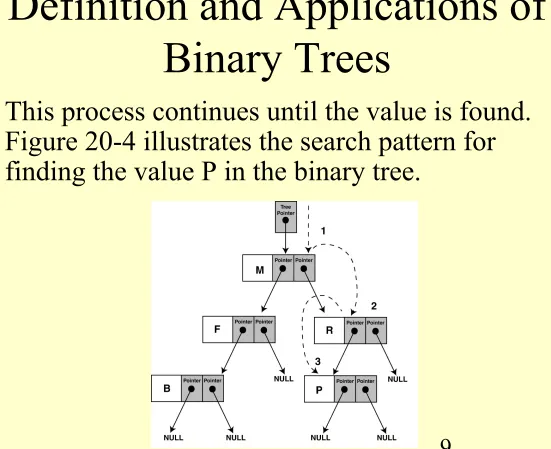
[image:9.720.83.634.63.512.2]• This process continues until the value is found.
Figure 20-4 illustrates the search pattern for
20.2 Binary Search Tree
Operations
• Creating a Node:
We will demonstrate binary
tree operations using the
IntBinaryTree
class.
• The basis of our binary tree node is the following
struct
declaration:
struct TreeNode
{
int value;
TreeNode *left;
TreeNode *right;
};
IntBinaryTree.h
class IntBinaryTree { public: struct TreeNode { int value; TreeNode *left; TreeNode *right; }; TreeNode *root;IntBinaryTree.h
(continued)
public:
IntBinaryTree() // Constructor { root = NULL; }
~IntBinaryTree() // Destructor { destroySubTree(root); } void insertNode(int);
bool searchNode(int); void remove(int);
void showNodesInOrder(void) { displayInOrder(root); } void showNodesPreOrder()
{ displayPreOrder(root); } void showNodesPostOrder()
20.2 Binary Search Tree
Operations
• Inserting a Node:
First, a new node is allocated
and its
value
member is initialized with the new
value.
• The left and right child pointers are set to NULL,
because all nodes must be inserted as leaf nodes.
• Next, we determine if the tree is empty. If so, we
simply make
root
point to it, and there is nothing
else to be done. But, if there are nodes in the tree,
we must find the new node's proper insertion
20.2 Binary Search Tree
Operations
• If the new value is less than the
root
node's
value, we know it will be inserted somewhere in
the left subtree. Otherwise, the value will be
inserted into the right subtree.
• We simply traverse the subtree, comparing each
node along the way with the new node's value, and
deciding if we should continue to the left or the
right.
The
insertNode
Member
Function
void IntBinaryTree::insertNode(int num) {
TreeNode *newNode, // Pointer to a new node
*nodePtr; // Pointer to traverse the tree
// Create a new node newNode = new TreeNode; newNode->value = num;
newNode->left = newNode->right = NULL;
if (!root) // Is the tree empty? root = newNode;
else {
The
insertNode
Member
Function
while (nodePtr != NULL) {
if (num < nodePtr->value) {
if (nodePtr->left)
nodePtr = nodePtr->left; else
{
nodePtr->left = newNode; break;
The
insertNode
Member
Function
else if (num > nodePtr->value) {
if (nodePtr->right)
nodePtr = nodePtr->right; else
{
nodePtr->right = newNode; break;
} }
else {
cout << "Duplicate value found in tree.\n"; break;
} }
Program 20-1
// This program builds a binary tree with 5 nodes.
#include <iostream.h>
#include "IntBinaryTree.h“
void main(void) {
IntBinaryTree tree;
cout << "Inserting nodes. "; tree.insertNode(5);
Program 20-1
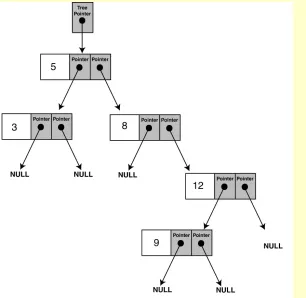
Figure 20-5 shows the structure of the binary tree built by the
program.
Note: The shape of the tree is
determined by the order in
Traversing the Tree
• There are three common methods for
traversing a binary tree and processing the
value of each node:
– inorder
– preorder
– postorder
Inorder Traversal
1. The node’s left subtree is traversed.
2. The node’s data is processed.
Preorder Traversal
1. The node’s data is processed.
2. The node’s left subtree is traversed.
Postorder Traversal
1. The node’s left subtree is traversed.
2. The node’s right subtree is traversed.
The
displayInOrder
Member Function
void IntBinaryTree::displayInOrder(TreeNode *nodePtr)
{
if (nodePtr)
{
displayInOrder(nodePtr->left);
cout << nodePtr->value << endl;
displayInOrder(nodePtr->right);
}
The
displayPreOrder
Member Function
void IntBinaryTree::displayPreOrder(TreeNode *nodePtr)
{
if (nodePtr)
{
cout << nodePtr->value << endl;
displayPreOrder(nodePtr->left);
displayPreOrder(nodePtr->right);
}
The
displayPostOrder
Member Function
void IntBinaryTree::displayPostOrder(TreeNode *nodePtr)
{
if (nodePtr)
{
displayPostOrder(nodePtr->left);
displayPostOrder(nodePtr->right);
cout << nodePtr->value << endl;
}
Program 20-2
// This program builds a binary tree with 5 nodes. // The nodes are displayed with inorder, preorder, // and postorder algorithms.
#include <iostream.h>
#include "IntBinaryTree.h“
void main(void) {
IntBinaryTree tree;
cout << "Inserting nodes.\n"; tree.insertNode(5);
Program 20-2 (continued)
cout << "Inorder traversal:\n"; tree.showNodesInOrder();
cout << "\nPreorder traversal:\n"; tree.showNodesPreOrder();
cout << "\nPostorder traversal:\n"; tree.showNodesPostOrder();
Program 20-2 (continued)
Program Output
Inserting nodes.
Inorder traversal:
3
5
8
9
12
Preorder traversal:
5
Program 20-2 (continued)
Postorder traversal:
3
Searching the Tree
The
IntBinaryTree
class has a public member function,
SearchNode
, which returns
true
if a value is found in the tree, or
false
otherwise.
bool IntBinaryTree::searchNode(int num) {
TreeNode *nodePtr = root;
while (nodePtr) {
if (nodePtr->value == num) return true;
else if (num < nodePtr->value) nodePtr = nodePtr->left; else
nodePtr = nodePtr->right; }
Program 20-3
// This program builds a binary tree with 5 nodes.
// The SearchNode function determines if the
// value 3 is in the tree.
#include <iostream.h>
#include "IntBinaryTree.h“
void main(void)
{
IntBinaryTree tree;
cout << "Inserting nodes.\n";
tree.insertNode(5);
Program 20-3 (continued)
if (tree.searchNode(3))
cout << "3 is found in the tree.\n";
else
cout << "3 was not found in the tree.\n";
}
Program Output
Inserting nodes.
Deleting a Node
• We simply find its parent and set the child
pointer that links to it to NULL, and then
free the node's memory.
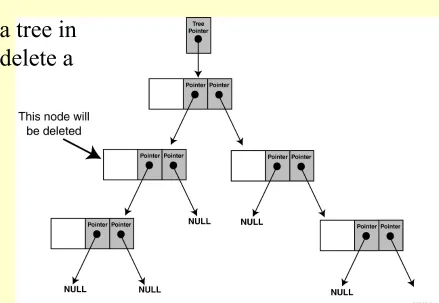
• But what if we want to delete a node that
has child nodes? We must delete the node
while at the same time preserving the
Deleting a Node
• There are two possible situations when we
are deleting a non-leaf node:
Deleting a Node
Deleting a Node
Deleting a Node
The problem is not as easily
solved, however, when the
node we are about to delete
Deleting a Node
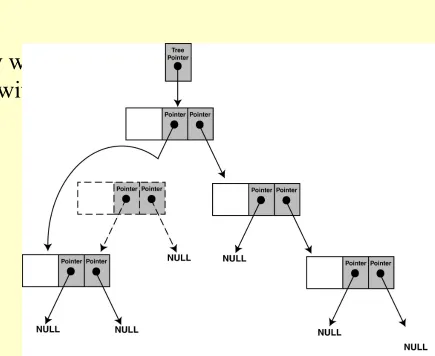
• We cannot attach both of the node's subtrees
to its parent, so there must be an alternative
solution.
Deleting a Node
Deleting a Node
To delete a node from the
IntBinaryTre
e, call the public member
function
remove
. The argument is the value of the node that is to be
deleted.
void IntBinaryTree::remove(int num)
{
deleteNode(num, root);
}
The
remove
member function calls the
deleteNode
member
function. It passes the value of the node to delete, and the
root
The
deleteNode
Member
Function
void IntBinaryTree::deleteNode(int num, TreeNode *&nodePtr) {
if (num < nodePtr->value)
deleteNode(num, nodePtr->left); else if (num > nodePtr->value)
deleteNode(num, nodePtr->right); else
makeDeletion(nodePtr); }
Notice the declaration of the
nodePtr
parameter:
TreeNode *&nodePtr;
nodePtr
is not simply a pointer to a
TreeNode
structure, but a
reference
to a
The
deleteNode
Member
Function
else
makeDeletion(nodePtr);
•The trailing
else
statement calls the
makeDeletion
function,
passing
nodePtr
as its argument.
•The
makeDeletion
function actually deletes the node from the
tree, and must reattach the deleted node’s subtrees.
•Therefore, it must have access to the actual pointer in the binary tree
to the node that is being deleted.
•This is why the
nodePtr
parameter in the
deleteNode
function is
The
makeDeletion
Member
Function
void IntBinaryTree::makeDeletion(TreeNode *&nodePtr) {
TreeNode *tempNodePtr; // Temporary pointer, used in // reattaching the left subtree.
if (nodePtr == NULL)
cout << "Cannot delete empty node.\n"; else if (nodePtr->right == NULL)
{
tempNodePtr = nodePtr;
nodePtr = nodePtr->left; // Reattach the left child delete tempNodePtr;
}
else if (nodePtr->left == NULL) {
The
makeDeletion
Member
Function (continued)
// If the node has two children. else
{
// Move one node the right. tempNodePtr = nodePtr->right; // Go to the end left node. while (tempNodePtr->left)
tempNodePtr = tempNodePtr->left; // Reattach the left subtree.
tempNodePtr->left = nodePtr->left; tempNodePtr = nodePtr;
// Reattach the right subtree. nodePtr = nodePtr->right;
delete tempNodePtr; }
Program 20-4
// This program builds a binary tree with 5 nodes. // The DeleteNode function is used to remove two // of them.
#include <iostream.h>
#include "IntBinaryTree.h“
void main(void) {
IntBinaryTree tree;
cout << "Inserting nodes.\n"; tree.insertNode(5);
Program 20-4 (continued)
cout << "Deleting 8...\n"; tree.remove(8);
cout << "Deleting 12...\n"; tree.remove(12);
cout << "Now, here are the nodes:\n"; tree.showNodesInOrder();
Program 20-4 (continued)
Program Output
Inserting nodes.
Here are the values in the tree: 3
5 8 9 12
Deleting 8... Deleting 12...
Now, here are the nodes: 3