$3.00
February 1984
No. 16
TABLE OF CONTENTS
Extending MicroSphere's Color GraphiCs System...
4
Double Density on the BB I ...
6
Interfacing the Microline to WordStar 3.30 ...
8
KayPro Column ... 12
Slicer Column ... 18
SBasic ... 20
BB II: Modifying Andy Bakkers' Interface ... 25
FORTHwords ... 26
C'ing Clearly ... 28
Pascal Procedures ... 30
Xerox 820 Column ... 34
On Your Own . ... 38
uInside CP/M" Review ... 39
Using DBase II Down Under ...
'40
..:
en
w
::J
o
w
a:
z
o
>
Q.o
o
w
w
a:
LL~
Z<
a:
a:
<
~ C
w
!::
::E::J
~
c
oen
a:
::J
o
LL
o
en
::E
a:
w
I-w
::I:
I-o
l-I-o
W
-:»
£II ::J
en
w
C
<
::E
en
w
-'"THE ORIGINAL BIG BOARD"
OEM - INDUSTRIAL - BUSINESS - SCIENTIFIC
SINGLE BOARD COMPUTER KIT!
Z-80 CPU!, 64K RAM!
(DO NOT CONFUSE WITH ANY OF OUR FLATTERING IMITATORS!)
THE BIG BOARD PROJECT: With thousands sold worldwide and over two years of field experience, the Big Board may just be one of the most reliable single board computers available today. This Is the same design that
was licensed by Xerox Corp. as the basis for their 820 computer.
$259
00
(64KKIT* *
BASIC I/O)The Big Board gives you the right mix of most needed computing features all on one board. The Big Board was designed from scratch to run the latest version of CP/M*. Just Imagine all the off-the-shelf software that can be run on the Big Board without any modifications needed.
SIZE: 8'12 X 133/, IN. SAME AS AN 8 IN. DRIVE. REQUIRES: +5V @ 3 AMPS + - 12V @.5 AMPS. FULLY SOCKETEDI
FEATURES: (Remember, all this on one board!)
64K RAM 24 X 80 CHARACTER VIDEO
Uses Industry standard 4116 RAM's. AII64K Is available to the user, our VIDEO With a crisp, flicker-free display that looks extremely sharp even on small and EPROM sections do not make holes In system RAM. Also, very special care monitors. Hardware scroll and full cursor control. Composite video orsput video was taken In the RAM array PC layout to eliminate potential noise and glitches. and sync. Character set Is supplied on a 2716 style ROM, making customized fonts easy. Sync pulses can be any desired length or polarity. Video may be Z-80 CPU Inverted or true. 5 x 7 Matrix - Upper & Lower Case.
Running at 2.5 MHZ. Handles all 4116 RAM refresh and supports Mode 2
INTERUPTS. Fully buffered and runs 8080 software. FLOPPY DISC CONTROLLER
Uses WD1771 controller chip with a TTL Data Separator for enhanced reliability. SERIAL 1/0 (OPTIONAL) IBM 3740 compatible. Supports up to four .8 Inch disc drives. Directly compatible with standard Shugart drives such as the SA800 or SA801. Drives can be Full 2 channels using the Z80 SIO and the SMC 8116 Baud Rate Generator. FULL configured for remote AC off-on. Runs CP/M" 2.2.
RS232! For synchronous or asynchronous communication. In synchronous mode, the clocks can be transmitted or received by a modem. Both channels can
be set up for either data-communication or data-terminals. Supports mode 2lnt. TWO PORT PARALLEL 1/0 (OPTIONAL) Price for all parts and connectors: $39.95 Uses Z-80 PIO. Full 16 bits, fully buffered, bl-dlrectlonal. Uses selectable hand
shake polarity. Set of all parts and connectors for parallel I/O: $19.95 BASIC 1/0
Consists of separate parallel port (Z80 PIO) for use with an ASCII encoded REAL TIME CLOCK (OPTIONAL)
keyboard for Input. Output would be on the 80 x 24 Video Display. Uses Z-80 CTC. Can be configured as a Counter on Real Time Clock. Set of all parts: $9.95
~
BLANK PC BOARD - $99.95 CP/M* 2.2 FOR BIG BOARDThe popular CP/M" D.O.S. to run on Big Board Is available for $139.00. - ' The blank Big Board PC Board comes 'complete with full
~ documentation (Including schematics), the character ROM, the PFM 3.3 MONITOR ROM, and a diskette with the source of our BIOS, BOOT, and PFM 3.3 MONITOR.
DOUBLE DENSITY ADAPTER BOARD - $149.95 (A& T~ Requires no cuts or MODS to an existing Big Board. Gives up to 670K storage on a single sided 8 in. diskette. With software to patch your CP/M* 2.2. PFM 3.3 2K SYSTEM MONITOR
. The real power of the Big Board lies In Its PFM 3.3 on board monitor. PFM commands Include: Dump Memory, Boot CP/M", Copy, Examine, Fill Memory, Test Memory, Go To, Read and Write I/O Ports, Disc Read (Drive, Track, Sector), and Search PFM occupies one of the four 2716 EPROM locations provided. Z-80 Is a Trademark of Zilog.
Digital Research Computers
(OF TEXAS)
P.O. BOX 461565 • GARLAND, TEXAS 75046 • (214) 271-3538
TERMS: Shipments will be made approximately 3 to 6 weeks after we receive your order. VISA, MC, cash accepted. We will accept COD's (for the Big Board only) with a $75 deposit. Balance UPS COD. Add $4.00shipping.
USA AND CANADA ONLY
MICRO CORNUCOPIA
P.O. Box 223
Bend, Oregon 97709
503-382-8048
Editor
&Publisher
David
J.
Thompson
Assistant Editor
Eric Belden
Graphic Design
Sandra Thompson
Technical Department
Dana Cotant
Advertising Director
Alice Holbrow
Staff Assistants
Dorcas Dsenis
Tracey Braas
Typography
Pa tti Morris
&Martin White
Irish Setter
MICRO CORNUCOPIA is the single board systems journal sup-porting systems programming lan-guages and single board systems-including the Big Board, Big Board II, Xerox 820, Kaypro, and Slicer. MICRO CORNUCOPIA is pub-lished six times a year by Micro Cor-nucopia of Oregon, ·P.O. Box 223, Bend, Oregon 97709.
SUBSCRIPTION RATES:
1 yr.(6 issues) $16.00 1 yr.(first class) $20.00 1 yr. (Canada & Mexico) $20.00 1 yr. (other foreign) $26.00 Make all orders payable in U.s. funds on aU. S. bank, please. ADVERTISING RATES: Available on request.
CHANGE OF ADDRESS: Please send your old label and new ad-dress.
SOFTWARE, HARDWARE, AND BOOK VENDORS: We would very much like to review your CP/M & MSDOS compatible products. Send materials to the Review Depart-ment, Micro Cornucopia.
CP/M is a trademark of Digital Research, Inc. Copyright © 1983 by Micro Cornucopia
All rights reserved
IICRD CDR.aCDPII
February 1984
The Single Board Systems Journal
No. 16
Hom.e
Sweet
Hom.e
Change
Change has been no stranger to Micro C these last three years. That's right, we were madly putting together a promo-tional piece on Micro Cornucopia for the Computer Faire, "exactly three years ago. We didn't know what the magazine would look like but that didn't keep us from promoting it.
Anyway, we have seen a lot of change over those three years. First came the magazines (we were hoping to be able to fill 16 pages), then the users disks ap-peared, followed shortly by my decision to leave Tektronix and the first SOG (cel-ebrating the first anniversary of issue #1).
Immediately after the first SOG, we took 10 days vacation. We chose to vaca-tion in Central Oregon and it was during that vacation that we decided to move Micro C from Portland, Oregon, to the Bend area. So we spent the last half of the vacation on a gUided tour of vacant houses. Take my word for it, real estate agents are not cut out to be travel guides. Finding the right house was a night-mare because we needed space for living and space for Micro C. After searching for three months we finally signed the papers on our house and started mov-ing. In early November, 1982, we were . actually here. Micro C was running a bit late, but we were settled in and we had lots of space (the whole daylight base-ment) for Micro C.
Well, in one year we went from two of us (Sandy and me) to five (Dana, Dorcas, and Alice). But five weren't enough and our basement was quickly becoming a compression chamber (as attendees to SOG 2 can attest).
So we purchased a small house in a commercial district for Micro C. It's a
neat feeling little place right on the edge of downtown. And we purchased it so we'd have space for two more people.
Eric, Text Co-processor
Our latest addition is Eric Belden. Eric has a bachelor's in math and a masters in journalism and he has been teaching computer literacy and math at our local community college. Eric is trying to fill the "One good person" spot. So far he feels he is in way over his head-which means he feels like the rest of us.
Eric will be receiving the article sub-missions and columns so I will have more time to handle the serious business of publishing (such as making sure the garbage gets picked up and someone cuts the grass). See "On Your Own" in this issue for more information about my plans.
Anyway, Eric will be handling sched-uling of articles and he will be doing the initial editing. New submissions should be sent to his attention. (Don't forget to indicate which disk etc. you would like in return.)
Submissions
As long as we're on the subject, here are a few guidelines for submissions.
1. Over-explain everything. Show it step by step. It's a lot easier for us to cut than add. (And safer.)
2. Include illustrations, if appropriate. They don't have to be pretty-Sandy re-draws practically everything-just make them clear.
3. We'd appreciate it if you'd send your submission on disk if it's longer than a page. Please include a printout just in case the disk gets zapped in the mail.
4. Fancy formatting (justification) makes the typesetter throw up (not a pretty sight). We can unformat WordStar files pretty easily but don't add any hy-phens (soft or otherwise). We have to re-move all hyphens by hand so please don't add them.
5. Please put your name, address, and phone number on the disk, in the disk, and on the printout. Let us know if you
LITTIIS
Dear Editor,
I would like to thank you all for creat-ing such a fine periodical and offercreat-ing such useful information on hardware and software (some with considerable price savings over the 7-11 type comput-er shops).
I purchased FlowCharter from Haven Tree Software Limited. It is a great pack-age and a much needed tool for main-taining documentation on a software project. We all know how important flow charts are and how much of a pain in the backsides they are to produce and main-tain.
The Bloodthirsty License Agreement and Honest Disclaimer for the package are worth a million.
HowyKyrk 18100 SW Augusta Aloha OR 97006
Dear Editor,
Wow! The gang at Micro Cornucopia is making the humble little Kaypro into one hot machine. First 5 MHz and now 800K per drive. Those PC clones better watch out.
There is one mod that many of us would love to see on the Kaypro and it's a 256K RAM disk. It ought to make PW swap files and TW work like a dream. I'm sure you'd have a lot of interest, espe-cially from those of use who can't afford (and see little use for) a full-blown co-processor.
One question: will the PRO-Monitor ROMs (II, 4, and 8) work with the Uni-form software and still enable the Kay-pro to read and write disks formatted for other machines?
Mike Perry 6035 40 th Ave NE Seattle, WA 98115
Editor's note:
Check with MicroSphere (503-388-1194) on the schedule for the RAM-disk. Tony did the design and it's fancier than the one he did for the BB I. It will do self diagnostics and print buffering as well as acting as a RAM disk. They are working on making it support 512K as well as 256K and it will be pretty cheap because you provide the RAM. (Also check with them on the price for the unpopu-lated color graphics board.)
2
About Uniform. This program takes infor-mation from CP 1M when it interfaces with drive A: ~o drive A: can be any type of drive (II, 4 or 8). Drive B:, however, must be cor-rect for your versio'n of Uniform. (So if you have Uniform for the II then drive B: has to be a single-sided 40 track model.)
Dear Editor,
"I had a real problem soldering parts onto the Xerox 820 board I got from BG Micro. After I wrote to Billy about the problem I got a telephone call from him. He apologized most profusely and thanked me for bringing the problem to his attention. It turns out that about half of his boards are nickel plated and he is now including a warning notice with the board. They can be soldered with a very hot iron but you have to avoid heating the joint too long or the solder will wick up into the socket. This happened on to meon4pins.
He impressed me as a responsible businessman who wanted to keep me as a customer.
Victor R. Frank 12450 Skyline Blvd. Woodside CA 94062
Editor's note:
High quality circuit boards are sometimes plated with nickel before they are tinned. My guess is that someone simply forgot the tin-ning when they were manufacturing the boards.
Dear Edi tor,
"I tried the Gilderfluke Z19 graphics converter in my Kaypro and pulled it out. It was not compatible with P.P.S software.
AIPaarmann 368 EI Gaucho Rd. Santa Barbara CA 93111
Editor's note:
I assume you are talking, AI, about Perfect software. Doug Mobley of Gilderfluke says that out of over 100 boards in use no one has had trouble with Perfect, at least not when running in the ADM-3A mode. (Perfect would have to be reconfigured for the H-19 terminal to run H-19 mode.) A few people have asked how to get graphics once they have installed the system. All they have to do is give the command to enter Heath mode.
Doug has added installation instructions for Words tar 3.0 and 3.3 (distributed by Kay-pro) so you can take advan tage of Gilderfluke's reverse video and the fast re-verse scroll. The board was designed in the
first place to run WordS tar. The board is available for the Kaypro II and 4 and is $175. The only bug they've found is that the new board will barf if it sees an esc X or esc Y followed by a control character. It is, howev-er, very unlikely that you'd need to enter such a sequence.
Kaypro II H19 Graphics Adapter $175 GilderFluke & Co
120 Midway Dr Space 013 Anaheim, CA 92805 714-776-2207
Dear Editor,
How do I get new schematics from Cal-Tex?
Wayne R. Olson
5342 Frost Point Circle SE Prior Lake MN 55372
Editor's Note:
If you've already tried Bill Siegmund at Cal- Tex without success, try contacting Jim Ferguson at Ferguson engineering. See his ad in this issue for the address.
Dear Editor,
Could I have more information about your Kaypro ROM? I'm particularly in-terested in using it if it qualifies as the "fast monitor ROM" needed to do the 5 MHz modification.
I bought your C diskettes a few months back, and recently read the Kernighan/Ritchie text. Now I'm ready to give it a try only I don't want to create 60K object files that print "Hello, World," nor do I want to wait until I "grow with C" to make them smaller.
Could you give a few hints? Do I have to manually dissect the" assembly rou-tines to pull out the ones I need? Or do I need a macro assembler? Or what? David Hillman
2006 NE Davis Portland OR 97232
Editor's Note:
Yes, the monitor ROM we offer is a very fast part. You can use it to run 5 MHz.
Also, the version of the Small C II compiler that generates .ASM files does make them a bit large. We also have a version of this com-piler that generates output for Microsoft's M80 and L80 assembler and linker. It gener-ates smaller code. If you have that assembler " package (about $200 I think), send back your
copy of K7 and ask for the M80 version. However, if you really want to get into C you might check out the C compilers from Software Toolworks or Aztec C. Both adver-tise in Micro C.
Dear Editor,
My system BB 1 is still not stable even after a year (and me, a designer of so-phisticated micro equipment). 1 don't have much time to debug it! It crashes reliably at room temperature (70 degrees F) until it warms up. 1 believed my prob-lem was in the RAM chips and 1 replaced them·with 64K chips. That didn't fix it.
Then 1 found 1 could make it run when 1 used freeze spray on a few chips so 1 replaced them. Now it's still as bad and the freeze spray no longer helps. So, 1 beat the shit out of it to see if it was a bad connection. It wasn't. 1 removed a few sockets and soldered parts in, that didn't help. (I'm using a linear power supply with line filters and a parallel keyboard.) Has anyone else had a similar experi-ence? (I've learned to live with it.) Great magazine, hope you keep it going. Byte is so big, it takes a week to find all the articles.
David Shaw RR3
Elgin, Ontario Canada
Editor's note:
This is an example of how much computers can teach us. You, for instance, are learning an invaluable skill and it's one that you should be able to market at top dollar.
You could teach seminars on "Learning to cope with an Incalcitrant Computer." I know dealers here in the Bend area who would pur-chase tickets for all their customers.
As for me, I don't have a clue. All three of our BB Is have been great. We've had trouble keeping more than one of our three BB IIs in service at anyone time, however.
Dear Editor,
I would like to know how to program the character set EPROM for the Kaypro II.
lohn Whittaker 2151 McNab
Long Beach CA 90815
Editor's note:
See Issue #6 "Do it Yourself Character Set."
Dear Editor,
As a BB II user, I hope to see more arti-cles and programs for its use. It seems the BB II does not share the popularity of the BB 1 and both will soon be replaced with 16 bit/32 bit machines. Keep doing the good job.
Hap Patterson 1714 Heritage Circle Lynchburg VA 24502
CP/M 2.2 License and disk for Scull-Tek Big Board ... $95.00
Reconfiguration of above for Ferguson Big Board or Xerox 820 ... $10.00 CP/M manuals ... $20.00
C-DIFF file compare utility for CP/M ... $29.95
With an assortment of public domain utilities to fill the disk.
Wabash 8 inch SSSD diskettes ... 10 for $30.00
plus $2 shipping per box of 10
CP/M Public Domain Software Collections
Add $2.00 each to copy CPMUG. RCPM or SIGM disks onto new disks. Specify which disk numbers you want. There are over 200 disks full of public domain software available in these three collections. The best way to find out what is available is to order a box of 10 disks plus $20 for copying and specify that you want the catalogs and abstracts. which will fill all ten. then after you read the abstracts order the disks you have picked out.
Quantity discounts and custom CP M configurations available Spnd S 1 :01 catalog which describes the ahovp and other ItPnlS In mOIl' oetall
('\HL~[]~ • E~TEAPA~EES
Illinois residents add 5% sales tax.CP/M is a trademark of Digital Research. Inc
P.O. BOX 395 • NAUVOO, ILLINOIS 62354 • (217) 453-2345
Dear Editor,
1 have a Big Board 1 (called a Big Bore by my friends who have DMA chips). 1 plan to go Slicer and 1 was wondering if they will be coming up with PC-DOS/ MS-DOS so we can develop systems for WANG-PC and IBM-PC on the Slicer. Stefan Gunnarsson
Spangavagen 53 16148 Bromma Sweden
Editor's Note:
Yes Stephen, the Slicer should make a very good development system for PC-DOS soft-ware as soon as the PC compatible board is finished. As for the Big Bore, I think your friends would be hard-pressed to tell much difference between a BB I with a winchester and a BB II on the same drive. We have two systems here, one with DMA and one with-out. Their benchmark times are very close. Very close.
Dear Editor,
Once again, 1 have to say how pleased 1 have been with the Kaypro disks 1 have received. The Crowe assembler works great, especially with my .PRN file print-er.
Incidentally, I found a bug in the Crowe Assembler. It apparently has problems with decimal literals larger than 1000. To get around the problem, just enter these large values in hex.
By the way, 1 don't dare use ZCPR when I'm in Perfect writer because if 1 accidentally enter cntl-C, 1 get dumped back to the system and lose my text.
If you would like to pass on my thanks to the authors, here is my list of favorite "Micro-C, Kaypro Disk Software".
1. Adventure-I can't deny it first place. 2. D.COM
3. FMAP, UCAT, CAT - I love good doc-umentation.
4. FINDBDS4-Works like a champ on those Elephant and Maxell disks. For your information, 1 have yet to have a failure on a 3M disk. By the way,if you're ever asked to recommend bulk disks, 1 got 100 from ALF Copy Service in Den-ver.
5. CRC.COM-It makes me comfort-able.
1 sure look forward to each issue's ar-rival. You are really doing a great job. Robert O. Berry
Canyon State Systems and Software P.O. Box 86
Sedona AZ 86336
Editor's note:
Thanks for the note about the Crowe as-sembler. See the Kaypro column in this issue for the ZCPR fix. .
Dear Editor,
Will the Co-Power 8088 board be avail-able for the BB II soon? Also, which as-semblerS" will assemble Russell Smith's CBIOS for the BB II? I would like to add an AM9S11 math chip so I can run Pascal MT+ faster.
Inge Sanden Nedre Blekkan
N-7062 Bjorkmyr Norway
Editor's note:
I doubt that SWP will be working on the
BB II in the near future, they are scrambling to get versions out for the Morrow system and some others (I understand). It 10(jks like Rus-sell Smith has his hands full at SWP.
Russell used Microsoft's MBO assembler and LBO linker to generate the code for the BB
II. I suggest that you use this package; it is very powerful and has become the standard of the industry.
(Letters continued on page 47)
Extending
Micro Sphere'
s Color Graphics System
By
Dana Cotant
We don't often promote add-on boards for the computers we support but there is a local group that is producing a really nice color graphics board for the Kaypro II and 4, as well as the Big Board
I.
The board is designed around the Tex-as Instruments 9918 video display proc-essor (VDP). The 9918 has all the block graphics capabilities of most standard graphics systems plus it is capable of sprite graphics.
A sprite is an opaque image that can easily be manipulated by software con-trol. To move the sprite only requires writing the x and y coordinates to the VDP. Moving images on a standard block graphics system requires remov-ing the image from its present location and replotting it at its new location. This can be very cumbersome. The sprite graphics system is much faster and easi-er to program.
One thing very nice about this system is that you use an external color monitor for the graphics. This means you will have your original screen for such things as menus. Anyone who has worked with a graphics that swaps back and forth be-tween two screen images (one for text and one for the graphics image) knows how time consuming and irritating it can be.
Programming the Color Graphics Board The board comes with an impressive amount of software. One of the disks contains graphics editors which give you complete control over shapes, patterns and colors on the graphics screen. The other disk contains programming exam-ples.
I have written some SBASIC programs for the board. The graphics procedures provided on this disk made t}-(e task a simple matter of writing the main loop.
The procedures included with the board take most of the burden out of graphics programming by providing the math routines necessary to do the basic , graphics manipulation. By stringing the procedures together in different ways, sophisticated graphics programs are quite easy.
Here at Micro Cornucopia we have agreed to be the software exchange cen-ter for programs that run on the
MicroS-4
phere board. I am just finishing a disk that contains some very interesting pro-grams.
A Joy Stick Interface
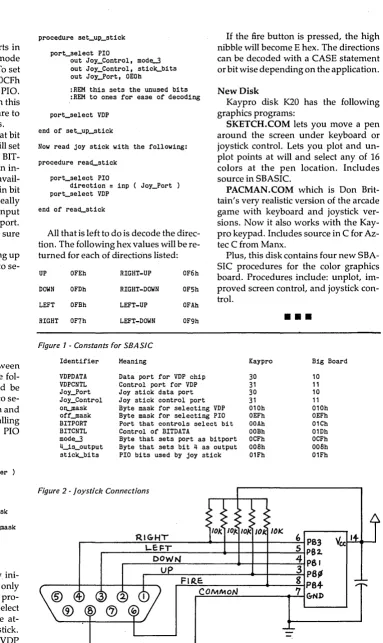
There is a joystick connection on the color board so I went to the local K-Mart and picked up a cheap generic version designed for the ATARI and VIC 20 (so any sticks for these machines should work wIth my software). The stick uses switch closures to tell the computer of the stick position. (In fact, this interface will not work with the older potentiome-ter based joy sticks unless you add a comparator to convert the stick's outputs to TTL levels.)
The stick I purchased has 6 connec-tions on the 9-position plug. One of these is common, one is the fire button switch, and the other 4 are the direction switches. As the joy stick is moved, the direction pin on the plug that corre-sponds with the direction the stick is moved is tied to the common pin by a switch closure.
On my particular stick, diagonal posi-tions are coded by closing two switches. For example, moving the stick to the po-sition between up and right closes the up and right pins on the plug. If we decide to let the signals be active low, the inter-face design becomes obvious.
Using the programmable PIa to our best advantage, the hardware design is trivial. Each of the signal pins can be pulled up by 10K resistors and the com-mon pin tied to ground.
Now, only the direction pins'closed by the stick will be pulled low. Decoding the joy stick becomes a matter of deter-mining which of the pins is low and translating it to a direction.
The only, hardware needed to com-plete the interface is a connector, 5 10K resistors, and a bypass capacitor. The connector is usually called a 9-position subminiature D male connector. I found one at Radio Shack for $1.99 (RS part #276-1537). It had solder type connec-tions on the back side.
The color graphics board has provi-sions for a 14-pin socket for the joy stick connections, but it is just as easy to sol-der jumpers between the D connector and the solder pads where the s'ocket would go. Using this method would also
save the price of two 14-pin sockets and a 14-pin dip jumper. If you're careful, you can build up the terminating network on the color board itself.
Selecting the VDP or the PIO
The VDP chip uses the same address as the B side of the PIa it is plugged into.
If we want to add a joy stick, it will need to use the B side of the PIa as well.
The VDP does not really use the PIa (it , is a port itself) so all we need do is
pro-vide a method of selecting between the PIa (when we want to read the stick) and the VDP (when we want to read and write to the graphics screen). The board has the necessary decoding circuits to se-lect either the PIa or the VDP depending on the state of a single input. As shipped this line is tied high so that the VDP is always selected. To free this input, re-move Rl. One end of R1 was tied to 5V and the other end ran to an open solder pad (marked J2 pad 3 on the schematic). Attach a jumper wire to this pad.
The destination of the free end of this jumper depends on the system you have. Big board owners would probably use the user definable bit of the system port. Kaypro folks should use the un-used B side of the general purpose PIa. The A side on the Kaypro is used for the printer port but the B side is simply brought out to solder pads E7-E14.
The user definable bit on the Big Board is bit 4 so let's use that bit on the Kaypro port as well. Add the free end of the jumper to E10 on the Kaypro or terminal 8 of the power connector (TB1) on the big board. Now when bit 4 on the port is high, the graphics chip is selected and when it is low the joy stick port is select-ed.
Software Drivers
There are several constants to be de-fined in order to write the port initializa-tion software. I will use SBASIC for the examples here because it allows the use of long identifiers and can be easily translated to another structured lan-guage for those writing in C or Pascal. The constants are shown in Figure 1.
PIO Programming
If you are not familiar with PIa pro-gramming, some of the constants will
need some explanation.
We will be using both of the ports in the control mode (mode 3). In this mode the PIO is a bidirectional bit port. To set this mode, first you need to send OCFh (mode3) to the control port of the PIO. The PIO will expect a second byte in this mode which will select which bits are to be inputs and which will be outputs.
A zero in a bit position will set that bit of the PIO as an output and a one will set it as an input. For the Big Board BIT-PORT, bit 3 is the .only bit that is an in-put. It is used as a keyboard data avail-able signal. So 4isoutput has a one in bit position 3. On the Kaypro, it really doesn't matter which bits we set to input since none of them are used on this port. The only important thing is to make sure there is a zero in bit position 4.
The first order of business is setting up the BITPORT so that we can use it to se-lect between the VDP and the PIO.
procedure set_bit-port
out BITCNTL, mode-3
out BITCNTL, 4~s_output
end of set_bit-port
Now we will be able to select between the VDP chip and the PIO with the fol-lowing procedure. The flag should be true to select the VDP chip or false to se-lect the PIO (constants PIO = OOOOh and VDP
=
'offffh can be used by the calling program as flags, e.g. ports elect PIO would select the PIO).procedure port_select ( flag
=
integer )var status
=
integerstatus
=
inp( BITPORT )IF ( flag ) THEN
out BITPORT, status OR o~ask
ELSE
out BITPORT, status AND off~ask
end of port_select
With this complete we may now ini-tialize the joy stick port. This need only be done once at the beginning of the pro-gram. Notice that we use the ports elect procedure to select the PIO before at-tempting to set it up for the joy stick. When we exit we will first turn the VDP back on.
port_select PIO
out Joy_Control, mod~
out Joy_Control, stick-bits out Joy_Port, OEOh
:REM this sets the unused bits :REM to ones for ease of decoding
port_select VDP
If the fire button is pressed, the high nibble will become E hex. The directions can be decoded with a CASE statement or bit wise depending on the application.
New Disk
Kaypro disk K20 has the following graphics programs:
Now read joy stick with the following:
SKETCH. COM lets you move a pen around the screen under keyboard or joystick control. Lets you plot and un-plot points at will and select any of 16 colors at the pen location. Includes source in SBASIC.
procedure rea~stick
port_select PIO
direction
=
inp ( Joy_Port )port_select VDP PACMAN.COM which is Don
Brit-tain's very realistic version of the arcade game with keyboard and joystick ver-sions. Now it also works with the Kay-pro keypad. Includes source in C for Az-tec C from Manx.
end of rea~stick
All that is left to do is decode the direc-tion. The following hex values will be
re-turned for each of directions listed: Plus, this disk contains four new SBA-SIC procedures for the color graphics board. Procedures include: unplot, im-proved screen control, and joystick con-trol.
UP OFEh RIGHT-UP OF6h
DOWN OFDh RIGHT-DOWN OF5h
LEFT OFBh LEFT-UP OFAh
[image:7.613.181.564.83.726.2]RIGHT OF7h LEFT-DOWN OF9h
•••
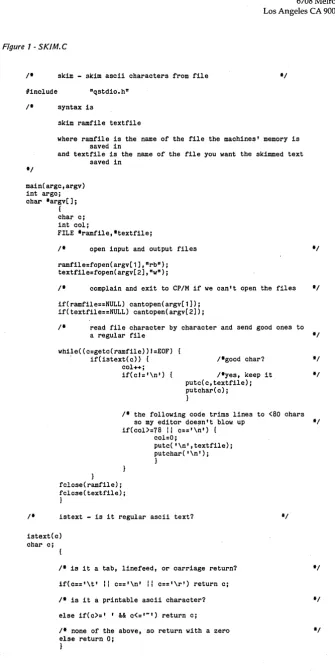
Figure 1 - Constants for SBASIC
Identifier
VDPDATA VDPCNTL Joy_Port Joy_Control oIt.Jllask
off~ask
BITPORT BITCNTL mode-3
4~s_output
stick-bits
Meaning
Data port for VDP chip Control port for VDP Joy stick data port Joy stick control port Byte mask for selecting VDP Byte mask for selecting PIO Port that controls select bit Control of BITDATA
Byte that sets port as bitport Byte that sets bit 4 as output PIO bits used by joy stick
Figure 2 -Joystick Connections
Kaypro
30
31
30
31 010h OEFh OOAh OOBh OCFh OOBh 01Fh
Big Board
10 11 10
"
010h OEFh 01Ch 01Dh OCFh OOBh 01Fh
r -______ ~~~---~~_+_+~~--~6
PB3
~---~---+~~+-~--~5~P82
~ __ ~~~ ________ ~-+~ _____ 4~P81
~~~ __________ +-~ __ ~3 P6~
~F~I~~=E~
____
~__
~__
~g~P8+~C~O~M~M~O~N~ ______ -.~7~&ND
Double Density on the BB I
By
Robert Carroll
This article is part design article and part review. Either way, it covers how you can get double density going on your BB I without paying double density prices.
Do It Yourself
This double density add-on can be built in one evening and you can run it single density with your present BB I CPt M until you get software for double den-sity.
Even to run single density, however, you will need to make one change to your monitor (or pa tch it in RAM) if your drives will not handle a 3 ms step rate. You need to change RAM location FF6A (step rate) from OOH to O1H to go back to a 6 ms step rate.
And, once you go double density, your processor will need to be running at least 4 MHz. You can even use Trevor Marshall's 5 MHz modification (see Issue #11, page 14).
The 2795 disk controller is really three chips in one. After you put together the controller circuit, you can align it in about 10 minutes.
All you need is a 2 MHz clock (avail-able on the BB) and +5V plus an oscillo-scope and frequency counter. The oscillo-scope (which can substitute for the counter) needs to be able to measure 200 ns.
I am using Jim Monesmith's software and PROM set. If you send Jim a disk with CP/M on it and two 2716-1s, he will incorporate his double density BIOS into your CP/M and he will burn his deluxe monitor into your ROMs. All this, in-cluding ZCPR and the source listings, for $50.
Jim Monesmith 438 Patterson Rd Dayton, OH 45419 513-298-6926 home
I've had his software package running here for a year without any trouble (out-side of operator error).
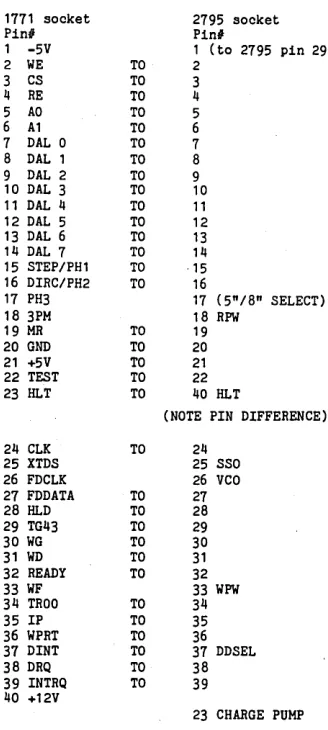
To wire in the new socket, follow the wiring list in Figure 1.
Modifications to the Big Board 1. Remove and store U98.
2. Remove U104 and bend out pins 4, 5,6,8,9, and 10 and reinstall it.
3. Jumper U102 pin 27 to U101 pin 6. 4. Cut trace running to U102 pin 37. 5. Jumper U102 pin 37 to TB1 pin 8 (PA4 DDSEL).
Alignment
1. Connect 2 MHz clock to pin 24. 2. Connect +5V to pin 21, return to pin 20.
3. Jumper pin 37 to ground and turn on supply.
4. Momentarily ground pin 19 (reset). Then jumper pin 22 to ground.
5. Attach scope to pin 31 and adjust 10K pot until the pulse width is 200 ns.
6. Attach scope to pin 29 and adjust 50K pot until the pulse width is 250 ns.
7. Connect frequency counter (or scope) to pin 16 and adjust variable capa-citor to set frequency to 500 KHz.
8. Remove jumper from pin 37 and verify that the frequency on pin 16 be-comes 250 KHz. (Pin 37 is the SD/DD switch.)
9. Disconnect power, clock, and pin 22 jumper.
10. Remove and store the 1771 and plug your new 40-pin header into the 1771's socket. (Make sure pin 1 is right.)
11. Now reconnect as in steps 1 through 4.
12. Note pin 22 must be high whenev-er the system is reset.
AstroTronics Board
If you prefer to save a little time and effort you can purchase the AstroTronics 2795 board, available for $19 (bare board) or $79 for the kit. The board is well laid out, but it would be nice if it were silk screened and solder masked. The docu-mentation is clear but there is no parts list. John says a parts list is coming.
t-=--~
Wiring Ul04
U
1'2-1771
~OC.KeT
(See Modifications to the 88, step 2)
216 Oswego Huntington Beach, CA 92648
Figure 1 - Wiring List for the 1771 Socket
1771 socket 2795 socket
Ping Pin#
1 -5V 1 (to 2795 pin 29) 2 WE TO 2
3 CS TO 3 4 RE TO 4 5 AO TO 5 6 A1 TO 6 7 DAL 0 TO 7 8 DAL 1 TO 8 9 DAL 2 TO 9 10 DAL 3 TO 10 11 DAL 4 TO 11 12 DAL 5 TO 12 13 DAL 6 TO 13 14 DAL 7 TO 14 15 STEP/PH1 TO ·15 16 DIRC/PH2 TO 16
17 PH3 17 (5"/8" SELECT) 18 3PM 18 RPW
19 MR TO 19 20 GND TO 20 21 +5V TO 21 22 TEST TO 22 23 HLT TO 40 HLT
(NOTE PIN DIFFERENCE) 24 CLK TO 24
25 XTDS 25 SSO 26 FDCLK 26 VCO 27 FDDATA TO 27 28 HLD TO 28 29 TG43 TO 29 30 WG TO 30 31 WD TO 31 32 READY TO 32 33 WF 33 WPW 34 TROO TO 34 35 IP TO 35 36 WPRT TO 36 37 DINT TO 37 DDSEL 38 DRQ TO 38 39 INTRQ TO 39 40 +12V
23 CHARGE PUMP Connect together the pin from the 1771 socket with the pin from the 2795 socket wherever there is a "TO" in the above table. If there is no "TO" then the pins are not connected.
Parts List
1 WD 2795 controller 1 40-pin DIP socket 1 10K trim pot 1 50K trim pot
1 1K 1/4 watt resistor 1 1N914 diode
1 5-60 pf variable cap. .15 uf capaCitor .1 uf 25V bypass cap.
•••
[image:8.612.408.572.137.502.2]Wiring the 2795 Into the 1771 Socket
WD 1771 SOCKET WD 2795
I WE 2
c:s
3RE 4
Arj) 5 AI 6 DAL¢ 7 DALI 8 DAL2- 9 DAL3 10
DAL4 II
DAL5 12 DAL.6 13 CAL?
Iif-STEP IS
DIR- 16 SSo /7
18
MR 19
GND 2.0
+5V 21
TEST 2.2
H'-T 2.3 CoLI<.
21
XTOS 2.5 FDCL}<.2JJ FDDtrA27 fiLD 21S' TG-lj-3 29 WG- .30WD .31
READ'( 32.
WF .33
TRee
34-"IP 35
WPR.T 36 ODEtJ 37 DRQ38 :t~Q.39
if 0
~ '" ~ .... .... .... '" " .... '" .... .-" .... '" " . L "
'" ....
" '" .." " '" "
'" ....
~
'" ....
'" " '" ~ . L ... .-". ... ~ ~ '" " '" " '" " .... '" .... "'-" ~
-'" " .-" .... -"--'''''9'4-"
...
~ ...A
....
,
" , IK ....
....
-"--.-., ~
2
we:
3 cs
4- RE
S A(J
b AI
7 DAL~ 8 DALI
9 OAL2
10
DAL3
"
OAL+/2
DAL.S
13
DALb
14-DAL. 7
15 STE.P 16 D,R,
25 SSo --:;
"
> SO" 19 Rpw
MR
2D G-ND 21
+5'1
Jig. HL.T 24- eL.K
"iiO pF
,~ 26 Veo . ""7' 27
FDDArA
22 HLD
2.9
TG-4-3
30 WG-31 WD
32- READy
~ wpw
/01<
34-TR.oo
35 rp 36 WPRT
·~fJAF 23
PUMP
/I
,3S'
DR,a.
39 rNTR.G.
~ E:NP
Micro Cornucopia, Number 16, February 1984 DDE:N nsr
Sj8
3.'L ~r!2-RP/MToMo
By the author of Hayden's "CP 1M Revealed. II
New resident console processor RCP and new
resident disk operating system ROOS replace CCP and BOOS without TPA size change.
User 0 files common to all users; user number visible in system prompt; file size and user assignment displayed by OIR; cross-drive command file search; paged TYPE display with selectable page size. SUBMIT runs on any drive with multiple command files conditionally invoked by CALL. An automatic disk flaw processing mechanism isolates unuseable sectors. For high capacity disk systems ROOS can provide Instantaneous directory access and delete redundant non dismountable disk logins. RPMGEN andGETRPMautomatically self-install RP 1M on any computer currently running C P 1M 8) 2.2 •
Source program assembly listings of Rep and RODS appear in the RP/M user's manual.
Manual alone $55; manual with RPMGEN.COM and GETRPM.COM with utilities on 811 SSSO $75.
Shipping $5 ($10 nonUS). MC, VISA.
microMethods
P.O. Box G 118 SW First St.
Warrenton, OR 97146 (503) 861-1765
ABLE II VT
INTELLIGENT STAND ALONE
VIDEO TERMINAL WITH
MANY HIGH END FEATURES
• Easy Emulation. A Very Powerful Low Cost Terminal Board. 6502 CPU & 6845 Video Controller. 4K Control in 2732 EPROM. Emulate or Customize with powerful download feature - Custom programs and escape tables retained during power down - Defaults to control ROM tables (H19 Compatible) when not modified. Month to MSEC Real Time Clock; Display to Sec, Transmit to MSEC • Reliable battery interface for clock and 2K user RAM • Menu driven set-up. Powers up as previously configured • History, for communications analysis, displays last 256 video, escape, and control char received. 2 Program/Menu selectable RS-232 compatible ports, with Daisy Chain .16 Program/Menu selectable baud rates (50to 19,200). TTL and RS-232 level baud clock outputs • 6 Program/Menu selectable bell tones - 9 Menu cursorselections (Box, underline, overline/solid, blink fast or slow) • Menu selectable auto LF on CR and/or Auto CR on LF or neither- Local, full duplex, simplex operation • 80x50 video with 80x24 screen window. Up/Down scroll with non-destruct mode • Transmit screen from top to cursor • cursor home, forward, backward, up, down • Horz. tab • full X-V cursor control including save, restore, and report cursor • cursor on/off - clear screen, clear line, erase to end of screen, to beginning of screen, to end of line, to beginning of line • Char selectable, normal, inverse, blink, and low intensity • 96 Upper and Lower case with descenders • 32 inter-connecting line/block graphic set. type ahead buffer. 8%x11 silk screened, double sided, glass-epoxy PC board • only uses easy to get parts· requires parallel ASCII keyboard and standard composite video monitor • made in U.S.A .•
Bare Board, Programmed Control
& Char. Gen EPROMS, Complete
Detailed Documentation Including Schematic and Source LIsting.
- NOW ONLY
$79.95-Complete Documentation - $10 (Refundable with purchase)
Will Accept MC & VISA
***
CALL OR WRITE***
LINGER
ENTERPRISES, INC.
PO Box 5783 Newport News, VA 23605
804-244-3874
Add $2 shipping & handling (VA residents add 4% tax)
Interfacing the Microline to WordStar 3.30
By
Mike Hirasuna
WordS tar and the Okidata Microline 92 aren't bad together even when they are not properly interfaced. However, with a little help, they can do great things.
This combination was my first word processing system and I was quite pleased until I discovered everything I couldn't do: superscripts, subscripts," continuous underlining, enhanced printing, emphasized printing, corre-spondence quality, character width se-lection, and line spacing selection. How-ever, all these were possible if my WordStar could just speak properly to my Microline.
The solution? Use WINS TALL (which comes with WordS tar) to define the user patches. WINSTALL is self-explanatory and easy to use. What follows are some suggestions on how to use WINS TALL to interface WordStar to an Okidata Mi-croline 92 printer.
Escape Sequence
Even though there are only four user patches, it is possible to define all of the important printer options. The trick is to define one of the user patches as just IBh, which is the hex code for ESC. Cntl-PE seems an obvious choice. The charac-ter which follows becomes the princharac-ter control character. The following is a brief list; there is a complete list in the print-er's manual.
Printer Options
ESC 0 Data quality
ESC 1 Correspondence quality ESC 2 User programmed ESC 6 Use 6 l/inch ESC 8 Use 8 l/inch
ESC C Start cont underlining ESC D Stop cont underlining ESC H Enter enhanced print ESC T Enter emphasized print
ESC I Enter normal print
ESC J Start superscript
ESC K Stop superscript ESC L Start subscript ESC M Stop subscript
Note: You must use capital letters where shown. Lower case letters have a different ASCII code (and besides they don't look as nice).
Character Pitch
Unfortunately, not all printer func-tions can be defined as an escape se-quence. There are four control characters
8
which define character pitch. The hex" codes for these controls are:
1C Hex For 12 cpi 1D Hex For 17 cpi 1E Hex For 10 cpi
1F Hex Double present width
Note: There is no command to undou-ble at the current pitch. The printer will automatically exit the double-width mode when a new pitch is specified.
Three of these controls can be defined with user patches. I use cntl-PR for 12 cpi, cntl-PQ for 17 cpi, and cntl-PW for double width. The control for 10 cpi will be explained below. The following is a summary of user patches:
cntl-PQ 1Dh 17 cpi (sQueezed printing)
cntl-PW 1Fh double width(Width doubled) cntl-PE 1Bh ESC lead-in (Escape sequence)
cntl-PR 1Ch 12 cpi (Reduced printing)
The normal pitch, 10 cpi, can be set with the pitch controls, PA and cntl-PN. Both commands must be used for this function. WordStar will only issue the command sequence for cntl-PN if the last pitch control was a cntl-PA.
The alternate pitch mode, entered with cntl-PA, should not be used to print anything. In this mode, WordStar will is-sue the command sequence for cntl-PA at the start of every line, and issue the command sequence for cntl-PN at the end of every line.
These control sequences can be de-fined in the pitch control section of WIN-STALL. The alternate pitch command sequence, cntl-PA, should be empty. The normal pitch command sequence, cntl-PN, should be lEh, for 10 cpi. When editing a document in WordStar, the normal pitch is invoked with cntl-PA cntl-PN. It is used to return from 12 cpi, 17 cpi, or double width modes.
Superscript and Subscript
Some of the printer functions may have alternate definitions. Superscript and subscript may be defined with their escape sequence or with the standard WordStar controls, cntl-PT for super-script and cntl-PV for subsuper-script. These may be defined in the carriage roll sec-tion of WINSTALL."
10528-C1 Cross Fox Lane Columbia MD 21044
The roll-up carriage sequence should be defined as ESC
J.
The roll-down car-riage sequence should be defined as ESC L. These controls act as toggles. The first oq:urrence of cntl-PT will roll up the car-riage; the second occurrence will roll down the carriage. The first occurrence of cntl-PV will roll down the carriage; the second occurrence will roll up the car-riage.Continuous Underlining
Since the Microline 92 does not use a two-color ribbon, the WordStar ribbon control, cntl-PY, can be used for continu-ous underlining. WordStar uses cntl-PY as a toggle to start and stop this function.
In WINSTALL, the cntl-PY function is defined in the ribbon selection section. The alternate selection control should be set as ESC C to start the underlining. The standard selection control should be set as ESC D to stop tbe underlining.
The ribbon seiection control has one advantage over its equivalent escape se-quence. When in the alternate selection, WordS tar will automatically revert back, momentarily, to the standard section to print out headers and footers.
Double Strike and Boldface
One of the nicer features of the Micro-line 92 is the correspondence quality printout. There are, however, some anomalies. Enhanced or emphasized printing has no effect when you are in the correspondence mode. More impor-tantly, correspondence mode cannot be used with the 17 cpi pitch (or its double width form).
This problem may be solved by using the double strike or the boldface controls in WordStar. Because the Microline 92 does not allow micro-spacing, there is no difference between the default double strike and the default boldface.
With WINSTALL, you can define boldface to be four overstrikes. This gives a sharp image which is almost as good as correspondence quality.
Page Offset
The WordStar default for text indenta-tion is 8 characters. This means that it outputs 8 spaces at the start of every line. This can cause problems with the Okida-ta printer in an alternate pitch or in the
continuous underlining mode. The solu-tion is to set WordStar's page offset to 0, and then use an escape sequence to tell the printer what indent you want.
The page offset can be defined with the PO dot command, but it is better to use WINSTALL to default the page off-set to
a
in the "Menu of WordStar Fea-tures" section.The left margin is defined with ESC % C Nl N2 N3, where the N's represent three decimal digits which define the print column. The first column is 001, and there are 12 columns to the standard character position. Hence, cntl-PE%C097 will define the left margin at column 97, which is equivalent to 8 char-acter positions.
An easier way to set the left margin is with the initialization sequence defined in WINSTALL. The initialization se-quence is sent at the start of every docu-mentprinted byWordStar. Hcan be pro-grammed to contain the escape sequence for setting the left margin at column 97. The left margin should be set back to col-umn 1 with the reset sequence which is sent at the end of every document.
Clearing the Printer
The printer can be cleared with an 18h. The printer will return to the data mode, go to 10 cpi and 6 lpi, and stop any spe-cial printing feature. However, it will not affect the left margin or the down-line character set. The clear command should also be included in the initialization and reset sequences.
Command Summary
A summary of command sequences for standard WordS tar controls is given below. Note that the initialization se-quence has an additional command, ODh, which will return the carriage.
cntl-PA cntl-PN
cntl-PY (alternate) cntl-PY (standard) . cntl-PT
cntl-PV
Boldface: 4
Page Offset: 0
empty lEh lBh 43h lBh 44h lBh 4Ah lBh 4Ch
Using PIP
Before installing these options, you may want to experiment with them. The Okidata manual suggests you write small BASIC programs to send the con-trols. There is an easier way.
Using PIP, you can redirect the key-board to the printer (LST: =CON:). The ASCII code of anything typed on the keyboard will be sent to the printer (ex-cept cntl-Z which is used to terminate the transmission). Fortunately, you don't usually need to send cntl-Z code (lAh) to the printer.
The pril1-ter will not print until its line buffer is full or it receives a carriage re-turn or line feed. If it is not obvious how to send the first 32 codes, the following table will help:
OOh cntl-@
Olh cntl-A
02h cntl-B
03h cntl-C
19h cntl-Y
lAh cntl-Z
lBh cntl-( (or ESC)
lCh cntl-\
lDh cntl-l
lEh cntl_A (i.e. control A)
lFh cntl-- (i.e. control -)
•••
not used alone
cntl-PAcntl-PN starts 10 cpi starts continuous underlining stops continuous underlining defines superscripts defines subscripts
Initialization: lah ODh lBh 25h 43h 30h 39h 37h
reset: lah lBh 25h 43h 30h 30h 31h
Micro Cornucopia, Number 16, February 1984
A NEW TWIST
FAT JACK
READING RACK
*
SEE COPY-SCREEN/KEYBOARD AT THE SAME TIME.*
EASILY ATTACHED TO ANY KAYPRO™*
16" WIDE - AND STRONG FULLY SUPPORTS - BOOKS MAGAZINES. REPORTS WITH UNIQUE PAGECLlp™Dealer and group inquiries invited. ONLY$17.95 +$1.50Shipping
(Continental U.S.A.) Washington Residents Add $1.45 Sales Tax. Cashier Checks & Money Orders Shipped Promptly. (Personal Checks Must Clear - 2 Weeks.)
(Price & 'Configuration subject to change without notice.)
The Best Accessory
You'll Ever Buy For Your
KayproTM
ORDER FROM:
TWIST, INC.
P.O. Box 1406, Renton, WA 98057
EXPAND YOUR
PROTENTJAL
-;:-. HARD DISK ADAPTOR Allows you to add megabytes of storage. Easy to install. Includes complete software and documentation.
$95.00 single unit quantity. ;: CP/M 3.0 BIOS UPGRADE Allows installation of CP /M 3.0 giving you a faster more powerful system.
$50.00 single unit quantity. -;:- PRONET
-local network for Kaypro computers. Call to order or for information OEM/DEALER INQUIRIES WELCOME
Quantity Discount Available.
II=DS
HUNTINGTON DATA SYSTEMSSolutions that work for you
307 SIXTH STREET HUNTINGTON BEACH, CA 92648
(714) 960-7498
Shedding
someljglit
on the
6
est
EProm
. Eraser on
the market.
The unique Orbital EProm
Eraser- multiple exposure
multi-plies productivity. Here's how to
improve your productivity by 140%.
Without mUltiplying your overhead by
the same factor. It's easy, with the
Orbital EProm Eraser, which erases
up to 14 units at a time. All ,in just
twenty minutes.
Totally unique, but conforms to
all data sheet specifications erasing
manuals. There's no other product like
it
on the market, yet the Orbital EProm
Eraser performs like a proven winner.
With even ultra-violet exposure that
conforms to Federal Standards for UV
radiation at 2537 angstroms.
Design features include:
• Automatic safety switch
• Custom designed long-life lamp
(replacements available)
• LED indicator
• U.L. Approval- another unique
feature
The most unique feature of
all-the price:
S49!~ding
shipping.
Shipped UPS: Master Charge or VISA
Order 1-800-241-8003, ext. 2537.
Check or Money Order payable to:
EProm Eraser
Co.
1753 Tully Circle, Atlanta, Ga. 30329
Big Board
and Xerox 820
EPROM
programmer kit
$75.00
Backed by our "Money Back Customer Satisfaction Policy"
,- One of the BEST values in EPROM programmers - Plugs into parallel port
- Kit includes all parts, including ribbon cable and ZIF socket
- User friendly menu-driven software written in BDS C
- Includes all 1800 lines of source code - Verifies erased EPROMs
- Programs
- Displays contents in Hex and ASCII - Saves EPROM to disk
- Loads EPROM from disk' - Verifies programming
- Calculates EPROMs checksum
- Programs 2516, 2716 (5V), and 2532 EPROMs Send for a complete documentation package or send your check or money order in the amount of $80 in U.S. funds (includes $5 shipping and handling) for immediate delivery. (N.Y. State residents add 7% sales tax.)
:';: :,y' "::;:;::,,, {~::,
'1
~:,:::::.:::., .:: .... :. :::"'::: / ' .:.::::.:
Kenmore ~omputer Technologies P.O. Box 635
NEW LOWER PRICES!
NOW IN "UNKIT"* FORM
TOO!
"BIG BOARD II"
4 MHz Z80·A SINGLE BOARD COMPUTER WITH "SASI"
HARD·DISK INTERFACE
$795 ASSEMBLED
&
TESTED
$545 "UNKIT"*
$245 PC BOARD WITH 16 PARTS
Jim Ferguson, the designer of the "Big Board" distributed by Digital Research Computers, has produced a stunning new computer that Cal- Tex Computers has been shipping for a year. Called "Big Board II", it has the following features:
• 4 MHz Z80-A CPU and Peripheral Chips
The new Ferguson computer runs at 4 MHz. Its Monitor code is lean, uses Mode 2 interrupts, and makes good use of the Z80-A DMA Chip.
• 64K Dynamic RAM + 4K Static CRT RAM + 24K E(E)PROM or Static RAM
"Big Board II" has three memory banks. The first memory bank has eight 4164 DRAMs that provide 60K of user space and 4K of monitor space. The second memory bank has two 2Kx8 SRAMs for the memory-mapped CRT display and space for six 2732As, 2Kx8 static RAMs, or pin-compatible EEPROMS. The third memory bank is for RAM or ROM added to the board via the STD bus. Whether bought as a bare board, an "unkit"', or assembled and tested, it comes with a 2732 EPROM containing Russell Smith's superb Monitor
• Multiple-Density Controller for SS/DS Floppy Disks
The new Cal- Tex single-board computer has a multiple-density disk controller. It can use 1793 or 8877 controller chips since it generates the side signal with TTL parts. The board has two connectors for disk signals, one with 34 pins for 5.25" drives, the other with 50 pins for 8" drives
• Vastly Improved CRT Display
The new Ferguson SBC uses a 6845 CRT controller and SMC 8002 video attributes controller to produce a display rivaling the display of quality terminals. There are three display modes Character, block-graphiCS, and line-graphics. The board emulates an ADM-31 with 24 lines of 80 characters formed by a 7x9 dot matrIX
• STD Bus
The new Ferguson computer has an STD Bus port for easy system expansion
.DMA
The new Ferguson computer has a Z80-A DMA chip that Will allow byte-wise data transfers at 500 K Bytes per second and bit-serial transfers via the Z80-A SI Qat 880 Kbits per second With mini mal processer overhead. When a hard-disc subsystem is added, the DMA Chip makes Impressive disk periormance pOSSible
CAL·TEX COMPUTERS, INC.
780 E. TRIMBLE ROAD #504 • SAN JOSE. CA 95131 • (408) 942·1424
SIZE: 8.75" X 15.5"
POWER: +5V @ 3A, +-12V @ O.1A
• "SASI" Interface for Winchester Disks
Our "Big Board II"" implements the Host portion of the "Shugart Associates Systems Interface."' Adding a Winchester disk drive is no harder than attaching a floppy-disk drive. A user simply 1) runs a fifty-conductor ribbon cable from a header on the board to a Xebec controller that costs only $295 and implements the controller portion of the SASI interface. 2) cables the controller to a Seagate Technology ST-506 hard disk or one compatible with it. and 3) provides power for the controller-card and drive. Since our CBIOS contains code for communicating with hard-disks. that"s all a user has to do to add a Winchester to a systeml
II Two Synchronous/Asynchronous Serial Ports
With a Z80-A SIO/O and a Z80-A CTC as a baud-rate generator, the new Ferguson computer has two full RS232-C ports. It autobauds on both
• A Parallel Keyboard Port + Four Other Parallel
Ports for User I/O
The new Cal- Tex single-board computer has one parallel port for an ASCII keyboard and four others for user-defined 1/0.
• Two Z80-A CTCs = Eight Programmable Counters/Timers
The new Ferg uson computer has two Z80-A CTCs. One is used to clock data into and out of the Z80-A SIO/O, while the other is for systems and applications use.
• PROM Programming Circuitry
The new Cal-Tex SBC has circuitry for programming 2716s, 2732(A)s, or pin-combatible EEPROMs.
• CP/M 2.2**
CP/M With Russell Smith's CBIOS for the new Cal- Tex computer is available for $150 The CBIOS is available separately for $25
*
The "unkit" is a fully-socketed, wave-soldered "Big Board "". It requires NO soldering. All an "un kit" purchaser must do is carefully insert the prime ICs we supply in the proper sockets and systematically proceed to bring up and test the board."CP M IS a registered trademark of Digital Research
The Kaypro Column
By
David Thompson
I
f you're wondering whether your Kaypro II is really 4, just wait. Kaypro Corp is changing things all around again. Only this time the Kaypro 4 and 10 will share the same processor board and the II will have a 4 board. OK?The new Kaypro 4 uses the Kaypro 10 board and two non-Tandon half-wide drives. (Rumors are coming in that Tan-don was sending its best drives to IBM and everyone else is getting the dregs so Kaypro is looking for a source of
de-pendable units.) .
The Kaypro II will have the original Kaypro 4 board and ROM. In fact, the present Kaypro II and 4 systems have a simple monitor sign-on that says "Kay_ pro" rather than Kaypro II or Kaypro 4. That way they can use the exact same board and ROM. The only thing you have to do to this version of the Kaypro II to turn it into a 4 is change the drives to double sided 48 tpi units.
The new Kaypro 4 will actually have some features that the 10 won't have (at least for a while). It will have a new CTC timer and a modem built in. However, they aren't quite ready to ship the new 4. They are still cleaning up the software and the FCC has not yet certified that they pass the radiation restrictions.
Disk Alignment
I've been getting calls from dealers who have aligned Tandon drives down to a gnat's eyelash only to have them get strange again after they are re-installed in a Kaypro.
As I mentioned in a previous issue, the Tandon drives don't have much metal (mettle) so any stress you put on them when screwing them back into place will put them out of alignment.
Ideally, you would align them in place but that would be more difficult than do-ing dental work on an ant. So you have to take them out, align them, and then replace them as carefully as possible.
If you don't have a real alignment disk, find a factory distribution disk and then adjust the small concentric screw on the back of the drive until you have maximum output from. the heads. Do this on track 13 hex (the middle track). After aligning on track 13, check tracks 0 and 27. If either 0 or 27 alignment is quite different than track 13 then you probably
12
have a warped frame and you might as well junk the drive.
You can use one of the disk utilities like DU.COM or our Kaypro diagnostic disk to get the the drive to step out to the proper track.
Morrow MD-ll
I took a byte out of the Morrow MD-11 in Issue #14, page 21 and immediately got a nibble out of David Block, product manager for the 11.
I mentioned in #14 that their release didn't make sense because it inferred that they were not using a winchester . controller. Well, it turns out that the Z80 is the winchester controller and it's the floppy controller (yep, no 1793 ... ). In fact, he mentioned that there were only 3 LSI chips in the system, the Z80, an 510 and a DART (asynchronous version of the 510).
Well, after he told me that, I was too stunned to speak hardly (so I spoke soft-ly). Everyone else is plugging in a West-ern Digital floppy controller chip and winchester controller card and calling it good. Not Morrow.
Speed
It turns out that they are using a few TTL chips, a small CRC generator chip (to check for bad disk sectors) and the Z80 to transfer data from disk to
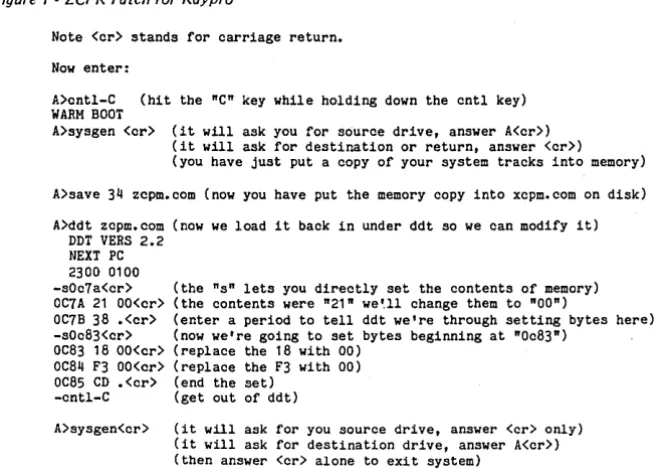
memo-Figure 1 -ZCPR Patch for Kaypro
Note <cr> stands for carriage return.
Now enter:
ry. They force the Z80 to execute a Nap instruction (a Nap means No OPera-tion) which it does very quickly. The Z80 then increments the address lines to point to the next instruction. The Mor-row folks force-feed it another Nap, and on and on for the number of bytes being read off the disk.
Meanwhile, the little TIL chips have taken over the data bus and are transfer-ring data into memory at the addresses selected by the Z80. Using this process, it takes 1.6 us per byte (5 Megabits per sec-ond) to transfer data into memory. The average disk access time is 80 ms. Since they are running 128 K and CP/M 3.0, they are also buffering the directory in RAM and doing track reads any time they go to the disk.
When you think about the speed they are getting and the bucks they are saving by removing most of the big chips (have you tried to buy a winchester controller card lately?), the system looks mighty in-teresting.
Wanted Typing Tutor
I've been getting a number of calls from Kaypro folks about a typing train-ing program. Look, they have really great ones for Apples, Commodores, Ataris and Timex's. How about the Kay-pro? After all, this would be a perfect project for SBASIC.
A>cntl-C (hit the "C" key while holding down the cntl key) WARM BOOT
A>sysgen <cr> (it will ask you for source drive, answer A<cr» (it will ask for destination or return, answer <cr»
(you have just put a copy of your system tracks into memory)
A>save 34 zcpm.com (now you have put the memory copy into xcpm.com on disk)
A>ddt zcpm.com (now we load it back in under ddt so we can modify it) DDT VERS 2.2
NEXT PC 2300 0100
-sOc7a<cr> (the "s" lets you directly set the contents of memory) OC7A 21 OO<cr> (the contents were "21" we~ll change them to "00")
OC7B 38 .<cr> (enter a period to tell ddt we're through setting bytes here) -sOc83<cr> (now we're going to set bytes beginning at "Oc83")
OC83 18 OO<cr> (replace the 18 with 00) OC84 F3 OO<cr> (replace the F3 with 00) OC85 CD .<cr> (end the set)
-cntl-C (get out of ddt)
A>sysgen<cr> (it will ask for you source drive, answer <cr> only) (it will ask for destination drive, answer A<cr» (then answer <cr> alone to exit system)
[image:14.615.235.569.508.744.2]Probably the best way to start would be to tryout a few of the programs on those other systems. I happen to like the Apple program that has ships approach-ing the star base. Each ship has a word on it and the length of the word and the difficulty of its letters are determined by your level of expertise. If a ship reaches your starbase, you lose. A ship disap-pears if you enter its word correctly but another ship immediately starts from the left edge of the screen to take its place.
The speed at which the ships move across the screen should be adjustable. The letters that are being typed should show up on the screen (reduces the temptation to look at the keyboard). The backspace key should delete characters and the user must hit the spacebar to end a word.
There are a number of differing views about the order in which people should learn the characters. One study indicates that people should learn all the letters under the index fingers first. Another in-dicates that they should learn words as soon as possible. So combining the two you would begin with "frtgbv" with the left hand and "juyhnm" with the right hand.
That doesn't give you too many words, but once you add the third fin-gers "edc" and "ik," you have many words to work with, including word endings like "ing" and" ed."
Software Technical Support
If you have questions about any of the Kaypro software (particularly SBASIC), try calling their software technical sup-port group. The direct dial number is 619-481-3920. No guarantees, but they try.
ZCPRFix
We've received some calls from people who have ZCPR (disk K9) and have found two problems. First, they can't use the numeric keypad and second, when they hit cntl-C (when inside a text editor), they warm-boot out of the edi-tor. (We've fixed the problem on the cur-rent disks.)
If you want to fix these problems, make up a disk with ZCPR in the system tracks (follow the instructions with disk K9 if you don't already have ZCPR in
your system), then add DDT.COM and SYSGEN. COM from your original Kay-pro system disk. Put this disk in drive A:. (See Figure 1 for the procedure.)
Now hit the reset button on the back of your Kaypro and after the reboot, you should have your keypad back.
Null Program
An empty file can be a lifesaver if you aCcidentally exited a program before sav-ing the data. What you really want to do is be back in the program without writ-ing over your work. With some pro-grams, re-entering simply resets the da-ta pointers so you don't save your dada-ta but it is worth a try. (See C'ing Clearly in this issue for another possible solution if
this doesn't work.)
Anyway, if you find yourself back in the operating system when you'd rather be in the program, try this: (assuming you are on drive A:)
A>SAVE 0 REPEAT. COMcr> A>REPEATcr>
What you are doing is creating an empty file and then telling CP/M to run that file. Of course, when CPM loads RE-PEAT, it loads nothing, then it jumps to memory location 100H where it assumes the code for REPEAT begins. Well, of course, the code for your previous pro-gram should still begin at 100H so you