E
XECUTIVE
S
UMMARY
If it’s not already, data center virtualization should be a key component of every IT organization’s strategy. This white paper looks at the benefits of data center virtualization and the critical role it can play in the larger development of private or public cloud strategies. This paper reviews the necessary steps in the evolution to a virtual data center—ranging from aligning with virtual storage to managing your emerging service-oriented architecture. It also shows how to successfully put these steps in motion.
White Paper
Moving Toward a Virtual Data Center
Kent Christensen, Practice Manager, Datalink
July 2012
T
ABLE OF
C
ONTENTS
Introduction... 2
Challenges for IT ... 3
Beyond Servers: The New Frontier of Data Center Virtualization ... 3
The benefits of data center virtualization ... 4
Virtualized applications platform ... 5
Beyond the Data Center: To the Cloud ... 6
Challenges to Adoption ... 7
Internal barriers ... 7
External barriers ... 7
Journey to Data Center Virtualization ... 8
Beginning the journey: Consolidation and management of virtual servers ... 8
Taking the next step: Alignment with virtual storage ... 9
Extending virtualization—and virtualization management—from servers/storage to the network ... 9
Steps toward greater efficiency: Virtual pools and unified infrastructures ... 10
Putting it All Together ... 11
Achieving Virtualization Success ... 11
I
NTRODUCTION
A dramatic transformation in the way Information Technology (IT) departments operate has put their directors and managers at a crossroads. On one side, they’re under pressure to deliver higher levels of service and be more responsive to enabling competitive business objectives. On the other side, IT departments are equally pressured to limit budgets, “do more with less,” and show positive ROI from optimization initiatives.
Savvy IT leaders have begun to resolve both sides of this conflict by rethinking their virtualization strategies. Originally considered a way to improve utilization of physical servers, virtualization has since been expanded to turn entire data centers into dynamic, agile, services-oriented architectures. These architectures can now accelerate business objectives and competitiveness.
Data center virtualization is a rare opportunity for IT. The potential cost savings are tremendous. The efficient sharing of physical server, storage, and network resources translates into far lower capital purchases and operating expenses. Wasteful application “silos” are eliminated. With virtualization at the data center level, data centers can now support more applications, implement them faster, and maintain higher service levels. Data center virtualization also gives IT managers and admins powerful new tools for resource scheduling, data protection, and disaster recovery.
Now, with the prospect of cloud computing on the near horizon, IT organizations also face another transformative landscape: How best to use data center virtualization as a springboard to either access third-party cloud services as needed or, better yet, build their own private cloud platform — with many of the same economies and efficiencies touted by third-party cloud providers. (For more information about evolving your virtual dynamic data center into a cloud platform, see the Datalink white paper "IT and the Cloud: Buy, Build or Both?")
For some organizations, full data center virtualization offers the most benefit. And some organizations take data center virtualization even further and develop a highly automated, highly standardized "cloud model."
Either way, IT must become more efficient and agile to meet increasing business demands and remain relevant and strategic to the organization. By not virtualizing across the data center, an organization risks losing gains in one area to inefficiencies in another. It also risks creating operational challenges as virtualization scales up.
Virtualization was originally a way to improve utilization of physical servers. Now it’s being expanded to turn entire data centers into dynamic, agile, services-oriented architectures — ones that accelerate business objectives and competitiveness.
C
HALLENGES FOR
IT
In most companies, IT is a cost center. It provides essential support for generating revenue and profits, certainly, but its operations still weigh on the expense side of the spreadsheet. IT directors and managers are under constant pressure to deliver more services and resources to the organization while reducing both capital outlays and operating expenses. Some of the challenges they face include:
Low utilization. Server virtualization has highlighted the traditionally low utilization of applications running on physical servers — sometimes as low as five to ten percent. The tremendous growth of applications and their supporting infrastructure puts IT under pressure to optimize physical resources — storage and networks, as well as servers.
Energy and environmental costs. A data center full of hardware consumes a lot of energy to both power the systems and keep them cool. Energy costs can add up to a significant percentage of the IT budget, and utility rates typically increase every year. In some
communities additional power is not even available. On top of this, many organizations have adopted “green” operating principles that put extra pressure on IT departments to conserve energy at the same time they’re asked to provide more services.
Complex operations. Application-centric data center architectures can lead to silos of infrastructure. These islands of resources are inefficient, prevent resource sharing, and add complexity to the number of environments that must be managed.
Lack of agility. Every new enterprise application takes time to install, configure, patch, debug, and put into production. Meanwhile, almost every smartphone user has become accustomed to downloading and installing applications in minutes. Business owners recognize that new delivery models can significantly reduce the time required to provision applications — thus increasing competitiveness and profits. Organizations simply can’t afford to waste time building whole new infrastructures every time somebody wants a new tool. Delivering applications much more efficiently than in the past is a major IT challenge. Fiscal impact. In the era of Return on Investment, even cost centers such as IT are
expected to show an immediate return on their expenditures. This is especially difficult given the typically low utilization of existing systems, plus the fact that most of the IT budget is dedicated to keeping the lights on. As organizations make incremental steps toward data center virtualization, they should expect positive capex returns as well as operational improvements.
As organizations make incremental steps toward data center virtualization, they should expect positive capex returns as well as operational improvements.
B
EYOND
S
ERVERS
:
T
HE
N
EW
F
RONTIER OF
D
ATA
C
ENTER
V
IRTUALIZATION
Virtualization across the data center can provide spectacular savings on floor space, power, and cooling costs, as well as utilization of existing assets across servers, storage, and networks. While the financial benefits alone are compelling, the largest gains can be obtained by reducing complexity and streamlining the speed at which IT accelerates the business.
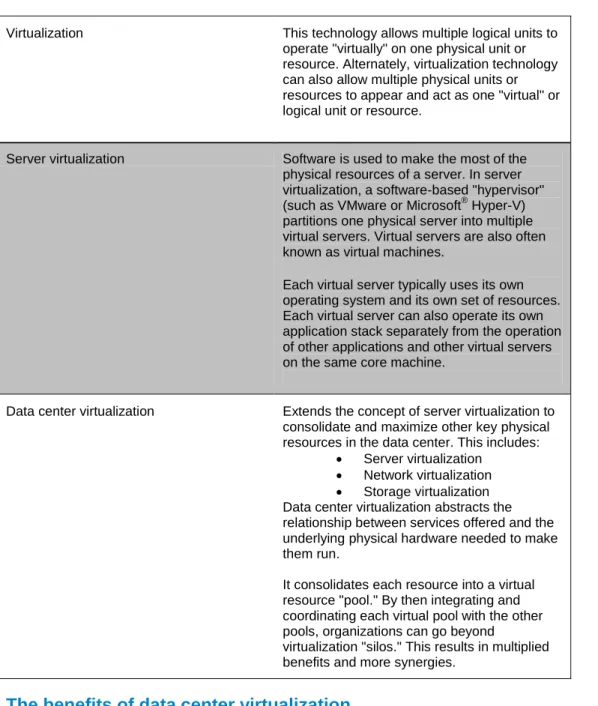
These benefits cannot be maximized with server virtualization alone. Table 1 highlights the differences between virtualization, server virtualization, and the wider concept of data center virtualization.
Table 1- Defining different types of virtualization
Virtualization This technology allows multiple logical units to operate "virtually" on one physical unit or resource. Alternately, virtualization technology can also allow multiple physical units or resources to appear and act as one "virtual" or logical unit or resource.
Server virtualization Software is used to make the most of the physical resources of a server. In server virtualization, a software-based "hypervisor" (such as VMware or Microsoft® Hyper-V) partitions one physical server into multiple virtual servers. Virtual servers are also often known as virtual machines.
Each virtual server typically uses its own operating system and its own set of resources. Each virtual server can also operate its own application stack separately from the operation of other applications and other virtual servers on the same core machine.
Data center virtualization Extends the concept of server virtualization to consolidate and maximize other key physical resources in the data center. This includes:
Server virtualization
Network virtualization
Storage virtualization Data center virtualization abstracts the relationship between services offered and the underlying physical hardware needed to make them run.
It consolidates each resource into a virtual resource "pool." By then integrating and coordinating each virtual pool with the other pools, organizations can go beyond
virtualization "silos." This results in multiplied benefits and more synergies.
The benefits of data center virtualization
A virtualized data center takes a holistic approach to the management of server, storage, and network processes. This creates an infrastructure with the following attributes or benefits:
Dynamic, efficient and agile
More efficient resource sharing (thanks to virtual pooling) Reduced complexity that now means fewer things to manage
Deeper gains in consolidation, better resource sharing, and simplified management of a unified infrastructure
This last set of benefits produces the largest gains in efficiency and productivity. Such benefits can be gained by applying advances in virtualization infrastructure management and unified infrastructures. These technologies offer greater virtualization management capabilities and deeper integration that lets organizations develop and leverage virtual resources at multiple levels simultaneously—from compute through to storage, networks, management and security resources.
The power of virtualization thus becomes multiplied as integration with compute, storage, network, management, and security technologies creates a synergistic approach.
The opportunity is to expand from islands of virtualization — with virtualized servers for some applications and virtualized storage for others — to a more coordinated virtualization strategy. This is where servers, storage, and network strategies are combined.
Virtualized applications platform
Instead of building separate infrastructures according to the needs of individual applications, data center virtualization lets you build a dynamic platform of infrastructure that supports all (or most) apps.
Abstracting applications from physical resources gives you management capabilities that you can’t get from physical hardware. These include:
The ability to migrate live applications from one physical server to another without disruption Increased availability for applications during hardware failure
Resource scheduling and load balancing across existing infrastructure Improved backup and disaster recovery
Increased performance, scale, and security
Integration with storage and network infrastructures
The result is a platform that will support many—if not most—IT applications. The availability, performance, and security are provided by the platform, which reduce the need to build those services into each
B
EYOND THE
D
ATA
C
ENTER
:
T
O THE
C
LOUD
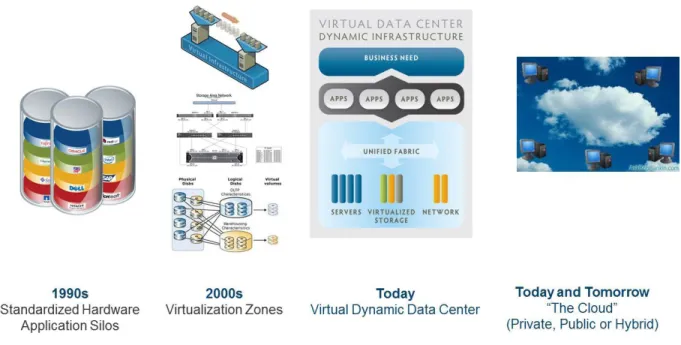
The virtualized applications platform described previously can operate smoothly within the overall virtual data center. It also provides the base framework most useful for ultimate expansion to an internal private cloud infrastructure.
Figure 2- Data Center Evolution — From Virtualized Data Center to Private Cloud
There’s a lot of IT community buzz about cloud computing, with good reason. Essentially, a cloud is a dynamic pool of shared resources and applications that can be accessed on demand, somewhat like tapping electricity from the grid. The public cloud — compute resources available through the Internet — is attracting a lot of attention because companies such as Google and Amazon are offering services for pennies on the dollar compared to traditional IT costs.
You might be surprised to learn how closely you can mirror public cloud computing functionality and benefits from behind the firewall of your own virtual dynamic data center via your own private cloud environment. (For more information about the benefits of private vs. public clouds, as well as a model for building out your virtual dynamic data center into a private cloud platform, see the Datalink white paper "IT and the Cloud: Buy, Build or Both?")
As cloud computing matures, the best strategy is this: Fix your own data center. Implementing a virtualization strategy across your entire data center lets you allocate and scale resources as needed, deliver services on demand, move data sets, and make management changes on the fly. It's a shorter journey from there to building an internal cloud that will then save money, run far more efficiently, and deliver more elasticity to the business. When public cloud services are more mature, this base also gives you the option to tap excess capacity or compute power during situations of periodic or peak resource demand.
C
HALLENGES TO
A
DOPTION
There can be a lot of obstacles to building a virtual data center. While not new, virtualization often has different meanings outside the core IT organization. (It can sometimes have different meanings within the different IT disciplines themselves.) There can be disagreements due to the number and complexity of solutions. As you map out your virtualization strategy, it's important to consider the barriers to adoption, both inside and outside your organization.
Internal barriers
Internal barriers fall into two groups: politics and culture, and new ways to think about IT. Many
organizations use a variety of applications running on different platforms. Each has its own requirements for networking and storage resources and may have different requirements for access and availability. Multiple applications and technologies can lead to isolated islands of data and potential interoperability issues. In addition, the stakeholders who helped build those applications likely have entrenched policies and attitudes that are not easily changed.
As a result, many organizations have a number of different virtualization initiatives directed by different groups within the company. Server teams may not be in sync with application administrators, and storage or networking teams may take a completely different and uncoordinated approach. A unified approach may disrupt the “corporate culture” and can create some internal conflict where decisions could potentially be based on relationships and alliances rather than sound business principles.
Virtualization also requires new skills. Many people need time to think it through. But thinking here is good as it lays the groundwork later to build an internal cloud. This also requires a lot of planning based on an understanding of exactly what the business needs. It’s an incremental process. By taking the time now to think through where you want to go and how you will accomplish it, your future transition to the private cloud will go more smoothly.
External barriers
External barriers largely come from disagreement within the industry on how to proceed. No two storage or network virtualization vendors agree on how to design and deploy a virtualization strategy. Reliable interoperability standards have not yet emerged. In fact, a highly efficient virtual data center strategy will likely require solutions from multiple vendors, including virtualization management, server, networking, and storage. Despite the growing number of unified infrastructure stacks now available (such as FlexPod™, Vblock®, VSPEX™ and others), they still require cross-functional skill sets to design,
implement and support. That’s why it’s prudent to work with a vendor-agnostic consultant. Whereas many manufacturers can only push their products and services, we are able to look at a plethora of options, making our customer’s success our first priority.
Virtualization is still new in many ways, and not fully understood outside of the core IT group. There can be disagreements due to the number and complexity of solutions, and the fact that they cross multiple disciplines. As you map out your virtualization strategy, consider the barriers to adoption, both inside and outside your organization.
J
OURNEY TO
D
ATA
C
ENTER
V
IRTUALIZATION
One of the most important things to remember about the transformation to data center virtualization is that this is a long-term commitment and process — a journey. Most organizations cannot simply change from existing infrastructures and processes to a dynamic virtual data center overnight. So you need to plan, break your strategy down into do-able phases, and always keep the ultimate benefits in mind.
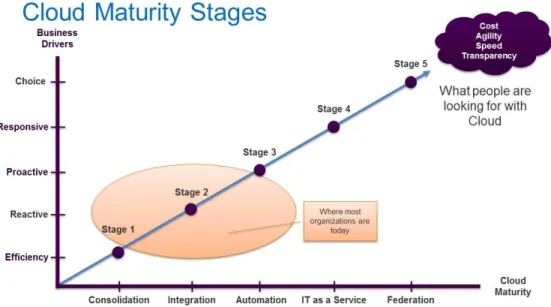
In the Datalink white paper "IT and the Cloud: Buy, Build or Both," a detailed, five-phase cloud maturity model helps explain the transition from consolidation to virtualization and, ultimately, cloud computing. Figure 2 shows a high-level view of this model.
Figure 2- Datalink's Five Stages of Cloud Maturity
Beginning the journey: Consolidation and management of virtual servers
Basic server consolidation. Most organizations have already started the first phase, which is server
virtualization. Initially, server consolidation leverages a hypervisor and a related virtualization
management suite that supports multiple operating systems and applications, much like a physical server. In this phase, organizations are virtualizing the applications that are most suited to virtualization, meaning they don’t have tremendous performance and availability requirements.
Automation and management: As virtual environments grow naturally, a significant amount of the
benefit from server virtualization comes from services in the virtual server environment's associated management suite (e.g. suites like VMware’s vCenter™ Server or Microsoft® ’s Systems Manager).
These extend virtualization from mere consolidation to cover the application platform as a whole — allowing it to reach new levels of automation, service and scalability suitable for many, if not most, mission-critical applications. Examples of such management capabilities on the VMware side include: VMotion™ (live migration), dynamic resource scheduling (DRS), fault tolerance/availability features, efficient data protection via frequent snapshot of VMs, and more affordable remote disaster recovery.
Taking the next step: Alignment with virtual storage
With server virtualization already in wide use, a growing number of organizations have begun to
recognize the value of storage virtualization. Some of this realization was triggered by server virtualization itself— virtualization not only requires shared storage, but puts additional demands on capacity,
performance, and availability. Many IT departments instinctively began buying more physical storage to support their VMs until they realized they could replicate the efficiency of virtualized servers with virtualized storage.
With traditional storage, one or more disks or LUNs are assigned to a server, essentially hardwired, preventing another server from using that storage space. The storage can’t be shared or reallocated without reconfiguration. Virtualization combines many servers together. They all need storage. In essence, relying on traditional storage without the ability to architect and extend it to better support a virtual server environment becomes not only inefficient, but can cause problems with your virtualized server environment itself.
With storage virtualization, however, you can better support a virtual server environment. You can also accomplish some of the same things you do with server virtualization, such as:
Better storage utilization as you allocate raw storage capacity to those resources that need it, when they need it.
Less wasted storage, particularly for virtual server environments.
The concept of storage virtualization is not a new one, but it is not as widely adopted as server
virtualization. At Datalink, we’ve been consolidating storage for many years, at a minimum, by deploying SANs for our customers. Ultimately, we implement higher-level storage virtualization in which storage is consolidated and services are added as well. As a result, storage virtualization delivers several benefits that you can’t get from physical storage alone. These include: tiered storage, thin provisioning, efficient copies, and more effective data protection and disaster recovery.
Extending virtualization—and virtualization management—from servers/storage
to the network
When organizations consolidate several applications on servers, they also create complexity on the network for management, storage I/O, and server-to-server I/O. In addition, virtualization obscures the relationship between the application and the network, creating challenges in network management for virtual applications. Similarly, server virtualization can create challenges when communicating between virtual servers and the underlying storage -- whether the storage is virtualized or not.
At this stage, organizations also need to start making use of the wider-reaching "virtualization-aware" management functionality and APIs now coming available from associated network, virtual server and storage vendors. This functionality allows the virtual environment to be managed much more simply and holistically as an integrated stack of interdependent parts:
To let network administrators see what’s going on in a virtual environment, manufacturers have started embedding network management capabilities into the virtualization management suites. For example, VMware introduced vNetwork to support advanced network
management and integration with management solutions. They also introduced a product called the VMware® vNetwork Distributed Switch, allowing management of networking
At the same time, Cisco extended the offering with its own embedded software switch — the Nexus 1000V — which lets you connect all of the virtual environments into a single
management network. It even creates “personalities” for applications so that, if an app moves, the network sees it and none of its characteristics are lost as it moves from physical location to physical location.
On the storage side, new APIs are starting to allow more efficient management of the underlying storage. From within the VMware interface, if you need to create a new VM, the VMware interface has also started becoming more storage-aware—ultimately going so far as to identify the underlying storage (e.g. a NetApp array) and initiate common ways the storage system could "zero-out" the use of more storage when a new VM is created (for instance, using something like a clone copy).
Extending virtualization to the network. Most virtualized enterprises require dramatically increased amounts of I/O to support the environment’s advanced features. For example, in a VMware environment, users commonly run VMotion and DRS repeatedly, which consumes considerable bandwidth. Best practices are to use dedicated networks to run these functions. VMware Fault Tolerance also requires at least one dedicated network.
The least disruptive migration path to a consolidated network is to do it in phases. The place to start is at the edge, or the servers supporting virtualization and virtualized storage. Many organizations are
replacing the six to eight (or more) physical interfaces and wires from each server with a pair of high-availability converged network ports. The following are two common approaches:
A pure Ethernet solution that combines iSCSI or NFS and all Ethernet management traffic or a common 10-gig network
Converged Network Adaptors leveraging Fibre Channel over Ethernet (FCoE)
Either way, only two ports are coming out of each box — and the edge data center network only needs to be wired once even though other network changes may take place over time. However, that doesn’t mean organizations have to run FCoE or the entire converged network through the core from the
beginning. Edge switches interface the converged network into the existing core storage and IP networks.
Steps toward greater efficiency: Virtual pools and unified infrastructures
The result of these earlier efforts to virtualize the server, storage, and network layers (and manage it all smoothly) soon become a pool of resources that work together to support the organization’s application loads. The combined virtual server, storage, and network infrastructure pool is then capable of providing tremendous efficiencies, not only in cost but also in flexibility and manageability. For many organizations, this becomes the preferred platform to support many, if not all, mission-critical applications.
The platform provides services equivalent to — or better than — purpose-built application stacks that support a single application. These benefits span availability, redundancy, security, high performance, and even local and remote failover. Since the infrastructure is virtualized, most applications can take advantage of the platform with no modification. As a result, when the business needs to bring up a new application, it can leverage the existing infrastructure. New applications usually come online in a fraction of the time and with fewer costs than those traditionally inherent in architecting a new application platform.
As you move to integrate and virtualize the various components in your infrastructure, it may not surprise you to learn that vendors are also innovating in order to make it easier for their customers to manage and
architectures. These pre-tested, pre-integrated infrastructure "stacks" (or building blocks) combine
network, server, storage, and management resources together. Working together, best-of-breed vendors now offer these unified architectures under such product or solution names as Vblock, FlexPod, VSPEX, Storage Replication Adapter (SRA), V-Scape™, and others. With these types of infrastructure blocks, pods or bundles, much of the initial legwork (and hassle) typically involved in integration and testing of components has already been accomplished.
Utilizing these types of shortcuts to efficiency will get you that much closer to providing a robust service-oriented architecture agile enough to meet the changing needs of the business. Moving from there to a private cloud is a significantly shorter step.
P
UTTING IT
A
LL
T
OGETHER
Start with an organization that has potentially disparate strategies (and sometimes even different
operational groups) across servers, storage, and networking. How do you migrate to a unified virtual data center approach that offers tremendous efficiencies today, and also positions the organization to leverage cloud services in the future?
The organizational challenges can be greater than the technical ones. The technology is well on the way to becoming an accepted best practice in a virtualized dynamic data center. Yet, to successfully adopt the solution and benefits, the organization needs to embrace a new way of thinking about IT and rally around a unified approach to data center computing. Organizations that have had the most success have a strong leader who champions the strategy and coordinates all parts of the IT organization to work together to execute against the vision.
Two things can significantly reduce the risk of adopting a complete virtual data center vision:
Adopt a proven architectural model where components are designed to interoperate in an orchestrated virtualized environment. Examples are Datalink’s V-Scape architecture or the VMware / Cisco / NetApp FlexPod architecture. Both leverage product integration
interoperability and testing between the vendors.
Work with a trusted partner that has the experience, skills, and trust to advise on such a critical endeavor. Understand not only their capabilities but how those align with your architecture vision.
A
CHIEVING
V
IRTUALIZATION
S
UCCESS
Some IT groups have discovered (painfully at times) that data center virtualization is not a do-it-yourself project. The best approach is to partner your internal champions with an outside, vendor-agnostic virtualization expert.
Dozens of organizations, from mid-tier enterprises to Fortune 500 corporations, have trusted Datalink with their virtualization projects. We have the extensive knowledge and experience to guide you through development of a data center virtualization strategy and then navigate the organizational and technical challenges of implementing it.
In fact, leading providers of virtual center solutions and infrastructure recognize the value of an
Our data center virtualization process begins by recognizing that your situation is unique. Cookie-cutter solutions often don’t work when building a successful virtual data center. What does work is careful analysis of your current infrastructure and operations. Datalink services, such as our virtual infrastructure audit and virtual infrastructure assessment, lay the analytical groundwork for developing a sound
virtualization strategy. That strategy is then often implemented in phases that result in eye-opening performance and efficiency gains with minimal disruption to ongoing operations. When projects are deployed as complete unified architectures, Datalink will integrate the components from multiple best-of-breed manufacturers and configure the solution to your environment. Finally, with OneCallsm Unified Support, Datalink becomes your first line of support across the complete solution.
Whether you’re just trying to stay ahead of shrinking capex and opex budgets, or are looking ahead to a cloud computing future, data center virtualization is quickly becoming a must-do for IT. The result is a more capable, more responsive, more efficient IT environment that is well-positioned to serve the business needs of your organization for years to come.
A
BOUT
D
ATALINK
A complete data center solutions and services provider for Fortune 500 and mid-tier enterprises, Datalink transforms data centers so they become more efficient, manageable, and responsive to changing
business needs. Datalink helps leverage and protect storage, server, and network investments with a focus on long-term value, offering a full lifecycle of services, from consulting and design to
implementation, management, and support. Datalink solutions span virtualization and consolidation, data storage and protection, advanced networks, and business continuity. Each delivers measureable
performance gains and maximizes the business value of IT. To learn more about how Datalink can help your organization use deduplication technologies to improve the overall efficiency of your data center and deliver dramatic ROI to your organization, contact Datalink at (800) 448-6314 or visit www.datalink.com. To view the latest white papers, please visit http://www.datalink.com/Library/WhitePapers.aspx. To receive insight into data center technologies and practices, follow Datalink online at the sites below.
http://twitter.com/datalinkcorp http://blog.datalink.com/
http://www.facebook.com/datalinkcorp
Copyright © 2012 Datalink Corporation. All rights reserved.