Creating Structured PDF Files
Using XML Templates
Matthew R. B. Hardy
EPRG
School of Computer Science
University of Nottingham
Nottingham, NG8 1BB, UK
[email protected]
David F. Brailsford
EPRG
School of Computer Science
University of Nottingham
Nottingham, NG8 1BB, UK
[email protected]
Peter L. Thomas
EPRG
School of Computer Science
University of Nottingham
Nottingham, NG8 1BB, UK
[email protected]
ABSTRACT
This paper describes a tool for recombining the logical structure from an XML document with the typeset appearance of the corresponding PDF document. The tool uses the XML representation as a template for the insertion of the logical structure into the existing PDF document, thereby creating a Structured/Tagged PDF. The addition of logical structure adds value to the PDF in three ways: the accessibility is improved (PDF screen readers for visually impaired users perform better), media options are enhanced (the ability to reflow PDF documents, using structure as a guide, makes PDF viable for use on hand-held devices) and the re-usability of the PDF documents benefits greatly from the presence of an XML-like structure tree to guide the process of text retrieval in reading order (e.g. when interfacing to XML applications and databases).
Categories and Subject Descriptors
E.1 [Data]: Data Structures — Trees; I.7.2 [Document and Text Processing]: Document Preparation — Markup Languages; I.7.4 [Document and Text Processing]: Electronic Publishing.
General Terms
Algorithms, Documentation.
Keywords
XML, PDF, Logical Structure Insertion.
1. INTRODUCTION
In recent years innovations in digital document formats have introduced the possibility of hybrid representations, whereby a document can contain both a graphically rich appearance and a logical structure, with the ability for these representations to interact in a useful way. One example of such a format is PDF, where the specifications for Structured and Tagged PDF enable logical structure to be added to a conventional PDF file. The exploitation of this ability has been slow, due to a lack of document production systems for creating documents with customised embedded logical structure and also due to the lack of tools for adding structure to the vast quantity of legacy PDF documentation created before PDF logical structure was available.
However, many document creation systems have an internal notion of logical structure and an ability to produce both appearance-based documents (often as PDF) and logically structured documents (usually in some XML-based markup). The two distinct forms of the document tend to be created and stored separately, with the XML application being used to store the logically structured representation and PDF storing the appearance-based form of the document. At present there is no standard mechanism for correlating the information in these two separate documents.
In what follows we assume that a document in some popular authoring application such as MS-Word or LATEX, can be
processed in two distinct ways: firstly to produce an equivalent version of the document in some XML-based markup (often XHTML) and secondly, via tools such as PDFMaker or PDFTeX, to produce an ‘appearance based’ paginated version. The existence of the two representations offers the ability to use the XML version of the document, which will very largely be in the correct ‘reading order’, as a template for inserting structure into the PDF version, where the reading order may deviate considerably from the order in which the material is rendered onto the page. In an earlier paper [6] we described how an XML template document could be used to check whether the structure tree in a corresponding Structured PDF document seemed to be plausibly equivalent to the XML document. The plugin we developed for this purpose was, in essence, to check whether the XML structure had been mapped correctly to PDF structure (possibly via some structure-aware document preparation process). We now describe how the plugin has evolved beyond structure verification into being capable of structure insertion.
When a PDF file possesses a structure tree there are clear benefits in terms of being able to access the PDF content in reading order and of knowing which logical category (e.g. heading, paragraph etc.) each piece of PDF content belongs to. However, PDF content is page structured by its very nature, whereas XML material is generally not, and the PDF structure tree uses a system of pointers to indicate the precise page and location of the material that corresponds to a particular leaf node in the structure tree. To complicate matters still further the PDF material itself is required to contain back pointers into the structure tree so that damaged PDF trees have some chance of being rebuilt from their constituent pages and also so that PDF objects such as charts, photographs etc can appear in several places in a rendered PDF file and yet be implemented via a single shareable instance of the object. This latter facility may require multiple sets of back pointers within a structured PDF file.
FINAL DRAFT of paper accepted for:
For all these reasons it will be necessary, in the next section, to describe the page structuring of PDF material prior to considering the PDF structure tree.
2. STRUCTURED/TAGGED PDF
A PDF document — even one without a structure tree—consists of a number of other tree structures, which control different layout aspects of the document. Principal among these, and the only tree that is actually required to exist, is the Page Tree. Now this particular tree structure is balanced, with its leaves being groupings of four pages or thereabouts. It exists simply to provide fast random access to individual pages so that they can be selected, deleted, printed out and so on. In addition to the Page Tree, there are a number of other trees that may be present in a PDF. For example, the Outline Tree is used to represent the hierarchically-structured bookmarks in a PDF document.
Since the introduction of the PDF 1.3 Specification [1], there has been the ability to add logical structure to a PDF document. This logical structure is represented by the Structure Tree and PDF documents that contain a Structure Tree are known as Structured PDFs. However, before the mechanisms for representing Structured PDF can be described, it is necessary to know how content is modelled within a PDF document.
2.1. Page Tree
The Page Tree consists of Pages Nodes and Page Nodes.
Pages Nodes are used to group pages with similar or shared properties, but they can also be used simply to group pages for easier internal navigation. Page Nodes are used to store the actual content of a specific page. For each page that is displayed in a PDF viewer, there is a corresponding Page Node within the PDF document.
2.1.1. Page Nodes
A Page Node consists of a set of properties and resources belonging to the current page and one or more Content Streams. The resources and properties available for a page include fonts, the dimensions of the page, whether the page should be rotated, and many more.
A Page Node can also contain links to the other trees in a PDF. How this is used with logical structure is described later, but such cross-references can also connect pages to article threads, annotations, etc.
2.1.2. Content Streams
It is the Content Streams that contain the actual page content and which define its typographical appearance. A PDF stream consists of a set of objects that are used to describe the graphical elements that are to be painted onto the page.
These objects can either act as operators or as the content that is being typeset. The structure of a PDF stream is very much like that found in a PostScript [3] document. Operators manipulate the graphics state and then paint content onto the page. Arguments belonging to each operator appear before the operator (postfix notation).
/ft1 1 Tf 12 0 0 12 50 50 Tm (Hello World) Tj
Figure 1: Sample PDF Content Stream.
Figure 1 shows an example of a simple Content Stream. In the example, a font is chosen using the Tf operator, which takes the
arguments of a font resource name, /ft1, and a point size of 1. The Tm operator then manipulates the Text Matrix. Six arguments are provided to the Tm operator, with the first four specifying the scaling, rotation and skew and the last two specifying the translation. In this case, the text is scaled by a factor of 12 and moved to coordinates (50,50) relative to the origin, which is at the bottom left-hand corner of the page. Finally, the text “Hello World” is placed on the page using the Tj
operator.
It is important to note that content can be placed on the page in any order. Although the example shown in Figure 1 rendered the text string in a single operation, this will not always be the case. The word “World” could have been put on the page first followed by a command to move left by a certain amount and then another
Tj command to render the word “Hello”. It is quite common for content to be placed on the page out of reading order and it is also the case that individual characters are sometimes laid down out of reading order.
2.2. Structured PDF
Structured PDF gives us the ability to apply logical structure to the content of a PDF document. It is the job of the Structure Tree within a PDF to contain the structure and to point to the content of the document in the correct reading order.
Although the syntax used to represent the logical structure in PDF is not the same as that used by XML, the conceptual model of the logical structure is very similar. XML files can generally be considered as a serialised representation of a tree and it is this tree-based model that Structured PDF has emulated.
2.2.1. Structure Tree
The root node in a PDF document’s structure tree is the
StructTreeRoot Node. This node is not considered part of the actual structure, but is used instead to specify properties of the structure below it. Directly below the StructTreeRoot are
Element Nodes. An Element Node can contain further
Element Nodes or can refer to page content.
A PDF Element Node is logically equivalent to an element in an XML document. Its ability to contain other elements as well as reference the page content allows it to model the hierarchical containment that is represented by the nesting of elements in an XML document.
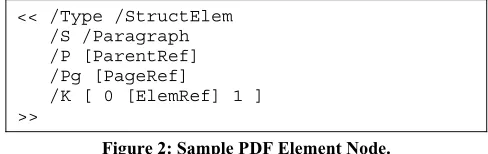
<< /Type /StructElem /S /Paragraph /P [ParentRef] /Pg [PageRef]
[image:2.612.315.559.523.600.2]/K [ 0 [ElemRef] 1 ] >>
Figure 2: Sample PDF Element Node.
Figure 2 shows an example of a PDF Element Node dictionary. PDF dictionary objects begin with ‘<<’ and end with ‘>>’. A type is then given to the dictionary object and in the case of an
All of the dictionary entries described above are required for any
Element Node, but there are also a number of optional entries present in Figure 2. The /Pg entry must be present if the
Element Node directly contains page content (i.e. the equivalent of an XML element containing #PCDATA). The value associated with /Pg is a reference to the Page Node containing the content (in the case of the content flowing over multiple pages, it indicates the first page on which the content is present).
The final entry present in the above example is the /K entry which denotes the ‘kids’ i.e. the child nodes immediately underneath the current node. This entry can contain references to page content or to hierarchically contained Element Nodes. In Figure 2 the /K
entry has an array of values associated with it. The first of these is used to refer to page content, the second to an Element Node and the third to more page content. This kind of node is equivalent to an element containing mixed content in an XML document. The reference to another Element Node merely points to another dictionary object containing the type /StructElem. However, it is the references to content that are the major difficulty for inserting logical structure into a PDF. These values (0 and 1) refer to Marked Content Identifiers within each page.
2.2.2. Marked Content Identifiers
So far, the mechanisms described have been well suited to mapping XML content to Structured PDF. However, unlike XML where tags are inserted around the content of the document, the content in a PDF does not have to be in any particular order and can indeed be on multiple pages and therefore in totally separate content streams. Clearly, a mechanism is required for indicating which content belongs to a given Element Node in the logical structure tree.
The method used for linking content back to the logical structure tree is known as Marked Content. Marked Content can be used in many ways and, as its name implies, it consists of markers inserted into the content. These can be used for any number of purposes, but in the case of logical structure, they are used to indicate blocks of text that logically belong together. This grouping is done by inserting Marked Content Identifiers
(MCIDs) inside the content streams.
/ft1 1 Tf 12 0 0 12 50 50 Tm /Paragraph <</MCID 0>> BDC (Hello World) Tj EMC …
Figure 3: Sample Content with MCIDs.
Figure 3 shows an example of an MCID being used to mark out a paragraph. The type of the MCID is given (/Paragraph) and then a dictionary containing the MCID number (<</MCID 0>>). The numbering of MCIDs starts afresh for each page, so the only requirement is that the number be unique for each MCID on a given page. The content being “marked up” is placed between a
BDC (Begin Demarcated Content) and EMC (End Marked Content). In the example above, the marked content is the words “Hello World”.
If we now re-examine the example shown in Figure 2 the purpose of the values 0 and 1 in the /K entry becomes clear. They are references to the value of the MCID (e.g. /MCID 0) in the content stream. Therefore, taking the examples shown in Figure 2 and Figure 3, the Element Node of subtype /Paragraph refers to the content “Hello Word”, then to another Element Node and finally to some other content on the page marked as /MCID 1.
The values shown above must be on the same page (referenced by
/Pg [PageRef]). It is also possible to refer to MCIDs on multiple pages by specifying a new page reference.
2.2.3. Attributes
A mechanism is also provided within Structured PDF for storing attributes. As described previously, PDF is primarily based on dictionaries containing key-value pairs. This format is ideally suited to storing attributes, which are themselves merely key-value pairs attached to an XML element.
To add attributes to an Element Node, a key must be added to the Element Node’s dictionary. The key is /A and the value can either be an inline dictionary or an indirect reference to a dictionary (streams can also be used for attribute entries, but these are not relevant here). The attribute dictionary can contain any attributes that can be represented in an XML document.
2.3. Tagged PDF
Tagged PDF is a stylised usage of Structured PDF. In Structured PDF, there are no extra requirements on either content streams or on the logical structure of a document, whereas Tagged PDF imposes further requirements that help standard applications such as Acrobat to make more flexible use of the PDF material. As we shall see, structured PDF documents are suitable for users wishing to store some suitable abstract logical structure within a PDF document for their own purposes. But customised structure on its own cannot be interpreted by standardised applications such as Acrobat Reader unless there is a way to indicate the meaning of the custom tags in terms of the layout properties of the document.
Tagged PDF is designed to provide basic facilities in three key areas:
1. Re-use and re-purposing of PDF Documents.
2. Accessibility of PDF Documents to people with disabilities (especially vision-related disabilities).
3. Reflow and media generalisation of PDF Documents.
It provides the above by introducing a number of requirements on the content and logical structure in a Tagged PDF document. These are achieved by the three following requirements:
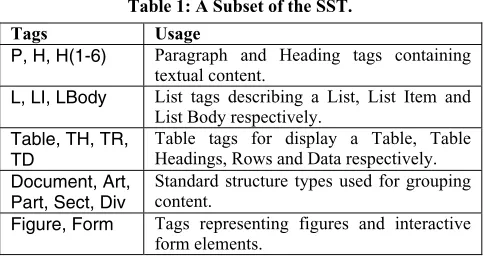
1. A set of Standard Structure Types (SST) must be used. These can be used directly by the logical structure or else a mapping must be provided to the SST from custom tag sets.
2. Explicit word demarcation is required and the content must appear in reading order within any given content stream.
3. Mappings must be provided to the Unicode Standard [9] for any fonts that use custom encodings.
2.3.1. Standard Structure Types & Role Mapping
Table 1: A Subset of the SST. Tags Usage
P, H, H(1-6) Paragraph and Heading tags containing textual content.
L, LI, LBody List tags describing a List, List Item and List Body respectively.
Table, TH, TR, TD
Table tags for display a Table, Table Headings, Rows and Data respectively.
Document, Art, Part, Sect, Div
Standard structure types used for grouping content.
Figure, Form Tags representing figures and interactive form elements.
If a user wishes to use a custom tagset that goes beyond the SST, a mechanism known as Role Mapping is used to map the custom tagset to the SST. By providing this RoleMap, users can retain the advantages of standard mappings of the SST (e.g. to and from HTML) that may be provided by software such as Acrobat, while at the same time allowing other applications to make use of the custom structure. For example, if a user views PDF material on a Personal Digital Assistant (PDA) and wishes to reflow the document, then the PDF viewer can make use of the structural information to perform a more intelligent reflow. The export of PDF to HTML is also greatly helped by knowing, from the PDF structure tree, that certain material corresponds, for example, to a table.
2.3.2. Explicit Word Demarcation & Reading Order
There is no guarantee in a traditional, non-structured, PDF file that there is any order to the content within a content stream. This means that we do not necessarily know which characters can be grouped to form words, paragraphs, etc.. Therefore, there is no default mechanism for ascertaining the reading order of content within a traditional PDF file.
A Tagged PDF file asserts a macroscopic reading order by visiting content streams in the order that they appear at the leaves of the structure tree. The microscopic reading order is taken care of by demanding that content within a single MCID must be rendered in the order in which it is to be read and that word endings must be clearly delineated by space characters. However, when a traditional PDF file is produced from a typesetting program, it is very common for there to be no space characters in the content streams. This results from the kerning and from the hyphenation-justification algorithms employed for flowing text onto a page. The space between words – and even between characters – is relatively fluid, so instead of using hard-space characters, there is a tendency to use PDF movement operators (analogous to PostScript moveto operators) to position individual characters, or whole words, at the correct position on the page.
By enforcing both correct reading order and explicit word-space characters in the content streams, a program can deterministically produce a correct reading of the document (something especially useful for content extraction and accessibility — e.g. programs that read documents out loud to a blind reader).
2.3.3. Unicode Mappings
The final requirement for a Tagged PDF is that fonts have a
ToUnicode Map. When a font is embedded into a PDF file it is often only a subset (i.e. the characters actually used) that is embedded. Moreover, it is quite common for these embedded fonts to use non-standard custom encodings. If a program wishes
to extract material from a PDF document, or to read it aloud, it has to be able to interpret the entire content stream. In a custom encoding, the glyph positions can represent any character, and the glyph names may be non-standard, so a program processing the content would not be able to correctly interpret the characters. Therefore, a requirement of Tagged PDF is that the text must in one of a number of default encodings such as
The process of deconstructing content, and then reconstructing it, is performed directly on the document and not just as an abstract manipulation of data. This process ensures that the guidelines for
MacRoman or
WinANSI (which the viewer can convert to Unicode internally) or if it is a custom encoding, a mapping between each glyph and its Unicode position must be provided.
3. PLUGIN OVERVIEW
A plugin for Acrobat has been created to take the logical structure from an XML document and to insert that structure into an existing, unstructured PDF document. The goal of the plugin is to use the XML as a template for re-ordering the content in the document into reading order and to insert explicit word demarcation deterministically. This, combined with a number of other alterations to the document, make the plugin capable of converting a legacy PDF to a Tagged PDF.
This section provides an overview of the insertion and reconstruction processes, without going into the implementation details, which are provided in the next section.
3.1. Source XML
The first task performed when embedding the logical structure is to obtain the source document for the logical structure. This is stored in an external file, which is selected by the user (the user is presented with a file selection interface).
The source XML can use any tagset, but it is not technically possible to automatically infer a RoleMap from an abstract tagset. Therefore, the RoleMap is embedded using a tagset defined in a separate schema from the main content of the XML document. If this is not present, no RoleMap is included (and therefore the resultant PDF is Structured PDF and not Tagged PDF).
The plugin takes the logical structure from the XML file and also caches the textual information from the same file. This is layer used to match the cached text to the textual content of the PDF document. The RoleMap (if present) is also cached.
At the same time as the plugin caches the textual content of the XML document, it also creates the structure tree inside the PDF. However, this structure framework is not linked to any content at this point. Instead it acts as the framework to which the content will be added later.
3.2. Ordering PDF Content
Content in a PDF can occur in any order on a page (though the pages themselves must be ordered). Immediately after caching the content from the XML document, the plugin must determine a reading order.
Tagged PDF are met if the remainder of the information required to create a Tagged PDF is also present.
It is important to note that the structural ordering of content is performed on a page-by-page basis. This is to ensure that the insertion is efficient even in large PDF documents.
3.3. Matching Content
Once the content of a page has been ordered, the task of matching the content from the XML document to the content in the PDF has to be performed. This is a non-trivial task because, although the PDF content’s reading order is now known, the actual ordering of the content in the XML and PDF versions of the document may be very different.
One other issue with matching the content is the possible presence of appearance artifacts1, which may have been added to the
content during the typesetting process. These artifacts must be identified and marked as such for the logical structure to be fully utilised.
A further issue arises with page boundaries. Since the document is being processed a page at a time, it is impossible to know what appears on the next page before the current page has finished being processed. Given that logical structure in an XML document is unlikely to take page boundaries and other layout artifacts into account, it would be very likely, in a large document, that a logical block of content would flow over a page boundary. This would be represented as a single block in the XML, but as two separate blocks of content in a PDF, so a series of partial matches may have to be dealt with.
The direction of the matching process is from the XML to the PDF because there is no way to know which content in the PDF constitutes a logical block in the PDF. For the purposes of structure insertion, the XML is taken as the more exact representation, because it has not been altered by any of the typesetting and layout processes that have been applied to the PDF content.
As each block (or partial block) of content is matched, it is added to the framework structure tree, which was created as the content of the XML was cached. The content is then removed from the search space so that it is not matched multiple times. In the case of a conflicting match (e.g. where two strings from the XML are matched) the first, sequentially, is taken to be the correct match.
3.4. Optimising Content
The process for ordering content breaks it down into individual characters. While this was necessary in the early stages of the process, it does greatly increase file size. To control this increase, the characters making up the blocks of logical content are merged to form more appropriately sized blocks (e.g. words and sentences), once the page has been processed and the content added into the structure tree.
It is also the case that the content may not have explicit word boundary demarcation and even if this is present, it may not be correct nor may it necessarily be relied upon. However the
content within the XML document may be taken as the canonical representation of the document’s content. Moreover, the XML
1 Appearance artifacts are content artifacts that are created as part
of the typesetting process (e.g. the numbers at the start of headings, a hyphen splitting a word across two lines, etc.).
has explicit word boundary demarcation, which can be used to ensure that whitespace is added correctly to the document as required by the Tagged PDF specification. Any original whitespace is removed so as not to unduly enlarge the document or leave incorrect content.
3.5. Insertion Process Repeated for Each Page
Once the structure insertion process is completed for a single page, it is repeated for the next and subsequent pages.
This process is not just as simple as starting each page from scratch. As the content in the XML is matched to the PDF, the cached copy of the XML is discarded. However, in the case where a content block splits over a page, it is necessary to replace the cached XML text node with the content remaining to be matched within that node.
3.6. Completing the Process
When all the content has been linked into the structure tree of the document, the process is effectively complete. When a RoleMap
is present in the source (or has been added manually) and the necessary font requirements have been met (see section 2.3.3) the document can then be marked as a Tagged PDF.
A document is marked as being “Tagged” by adding a key to the
catalog dictionary of the PDF document. The dictionary entry (i.e. “/MarkInfo <</Marked true>>”) is used to indicate whether or not a PDF is a Tagged PDF (if the key is not present, it is not a Tagged PDF).
4. IMPLEMENTATION
This section describes the key implementation details for the Acrobat Structure Insertion plugin. Due to the complexity of the system, only an outline of the implementation is given here.
The key details can be split into three distinct stages:
1. Processing of the logical structure from within the XML document, including the caching of the XML content and insertion of the logical structure framework into the PDF document.
2. Content deconstruction and reading order reconstruction of the existing PDF content, as well as the content caching process.
3. Matching of the cached content from the XML to the cached (and re-ordered) content of the PDF document, including the linkage of the matched content to the logical structure framework inserted as part of stage 1.
4.1. The Technologies
Before describing the three stages outlined above, it is important to understand the mechanisms for accessing both the XML document and the PDF document.
4.1.1. XML Processing
A Document Object Model (DOM) [10] parser was used by the plugin for processing the XML source document. The DOM provides a mechanism for accessing the content of an XML document in the form of a tree. The DOM is conceptually very similar to the model employed for representing logical structure within Structured PDF documents.
A DOM parser allows random access to any part of the XML document.
The specific implementation of the DOM used for this plugin was the one contained within MSXML 4.
4.1.2. Acrobat Plugin Programming
Adobe Acrobat provides an API [1] for extending its functionality through the use of plugins. Plugins can access PDF documents through the Acrobat environment and manipulate these documents. A plugin adds extra menus, menu items, tools, etc. to the Acrobat interface and can also register itself to handle events that occur within Acrobat.
PDF documents are accessed through a number of layers in the API. These layers provide different types of access to the PDF document and Acrobat itself. The layers that are relevant to this work are:
1. PDFEdit (PDE) Layer.
2. PDSEdit (PDS) Layer.
Objects and methods within the layers use a common syntax. For objects a layer descriptor is attached to the type of the object (e.g. if we are dealing text within the PDE layer, the object name would be PDEText). The same is true for methods. Method names are constructed using the rule <layer><object><verb><thing>. Therefore, if we wish to obtain the textual content of a PDEText
object, we would call the method PDETextGetText.
The PDFEdit (PDE) layer gives direct access to the contents of a PDF document. Objects found in this layer include PDEText,
PDEImage, PDEPath, etc. and these are all subtypes of the general PDEElement object. MCIDs are represented by
PDEContainer objects. The object type of main interest to this plugin is PDEText, as this represents textual content on a page. The object stores the text content, its position on the page, the style, font, etc. The PDEText objects will need to be added to newly constructed PDEContainer objects so that they can be linked to the structure tree.
The PDSEdit (PDS) layer gives access to the logical structure tree contained within a Structured PDF. The root of the tree (i.e. the
StructTreeRoot) is represented by a PDSTreeRoot. Element Nodes are represented by PDSElement objects and when a
PDSElement refers to content, it contains a reference to a
PDEContainer. The PDSEdit layer maps very closely to the DOM.
4.2. XML Source Processing
Before performing any of the three main stages the plugin must add itself to the Acrobat interface. The only addition is a menu item that initiates the structure insertion process. The first stage (i.e. processing of the XML source document) is described below.
When the user selects the menu item for the structure insertion plugin, a class CStructBuilder is constructed. This class handles the process of creating the logical structure within the legacy PDF document. The CStructBuilder’s first task is to construct a CXMLLoader class.
The CXMLLoader provides a standard, Microsoft Windows, File Selection dialog to enable the user to select the source XML document. The returned selection is loaded into the DOM using the default methods available to do this.
4.2.1. Iterating Over the Tree
The algorithm used for iterating over the DOM tree is a pre-order traversal, using a recursive depth-first tree descent algorithm [4]. This approach causes each node to be processed in the same order that it would appear in its serialised XML form.
A PDSTreeRoot is constructed as part of the XML processing. This is so that the logical structure framework can be inserted into the PDF at the same time as caching the XML content.
Starting with the root of the DOM and the PDSTreeRoot, a recursive function is called that processes the children of the DOM root. As each node is iterated over in the DOM tree its type is obtained and, depending on the type, a different process will be performed. In the case of an XML element, the method calls itself recursively. In the case of XML attributes, these are processed by a separate function and the process continues. Finally, in the case of text, the content is cached (this process is described later in this section).
4.2.2. Constructing the PDF Structure Tree
For efficiency, it is important not to have to process the XML tree more than once. Therefore, at the same time as caching the content, the logical structure framework is created within the PDF document.
This structure is created by the same process that performs the recursive descent. At the root of the tree the plugin constructs a
PDSTreeRoot using the methods available in the Acrobat API. The child of the DOM root is obtained (there can be only one) and a new PDSElement is constructed representing this element in the DOM tree. The PDSElement is added to the newly constructed PDSTreeRoot. A recursive method (insertKids) is then called with both the DOM element and
PDSElement as arguments.
This insertKids method obtains all the child nodes of the DOM element and begins iterating over them. For constructing the logical structure framework, only the element and attribute nodes are of relevance. In the case that the child node is an element node, a new PDSElement is constructed to represent this node and added as a child to the PDSElement passed in as an argument to the method. The insertKids method then calls itself recursively, passing in the child element and the newly constructed PDSElement and the process repeats itself. In the situation where a node is an attribute node, a new PDSAttrObj
object is created to represent the attributes.
4.2.3. Caching the Content
As the plugin iterates over the DOM tree, the logical structure framework is constructed, so there is no need to cache the entire structure. However, since the plugin is not ready at this stage to start performing content comparisons, it is the content that must be cached for later access.
The issue now arises of how to cache the content without caching the logical structure, given that the plugin will need to insert the content into the correct place in the logical structure framework.
To solve this problem, a new struct called a nodeHolder was created to hold the required information. The nodeHolder
stores the text node from the DOM tree as well as the
PDSElement, which will eventually contain a reference to the content, and also an integer value. The reference to the
hierarchical information of the text node’s position in the structure tree.
The integer stored in a nodeHolder is another cached value, which makes matching the content into the structure tree easier, because there is no guarantee that the PDF content will definitely appear in the order it appears in the XML document. As a result of this potential mismatch (e.g. a footnote pushed to the next page for spacing reasons), we need to know the ordering of the text nodes as they are contained in the PDF tree. Another more compelling reason for having the information is that if a node contains content, intermixed with structure nodes, we have to know how to intersperse the added content with the element nodes already in the PDF structure tree. Therefore, an integer is used to specify the position of the content in the PDF structure tree. The integer is calculated by counting all the element and text nodes belonging to the current node, as they are iterated over.
Whenever a text node is found within the DOM tree, a
nodeHolder is constructed to represent the association between the content and the structure tree. This information is then stored in a CArray, which is a type of linear expandable array.
Having cached the content of the XML document and built the framework of the logical structure tree, the first stage of the XML processing has been completed. The plugin then proceeds to manipulate the content of the PDF into an order that can be processed.
4.3. PDF Content Reordering
The processing of the XML was the first stage of operation for the plugin. The second stage is to take the content of the first page and sort it into an approximate reading order. The content of the page is then cached, in reading order, for comparison with the content in the XML document. Once logical structure has been added to the first page, it moves on and repeats the process for subsequent pages until all pages have been structured. This section describes the processing of the content of a single page, in order to make it ready for structure insertion, which is then described in a later section.
4.3.1. Deconstructing the PDF Content
To add logical structure to content within a PDF document, it is necessary to group content using MCIDs. One of the many problems with converting PDF documents to Tagged PDF is that access to the content is rarely at the required level of granularity.
One might assume that the level of access given to the content is at the string level (i.e. a single PDEText object representing each string that is displayed on the page). This is unfortunately not always the case. The PDFEdit layer of the API does provide access to the content of the document, but not with such fine granularity (or at least not by default). Instead, text is grouped into content with identical graphical properties. Therefore, a line of text, possibly with kerning and spaces, will be represented by a single PDETextRun (i.e. a run of text) contained within a single
PDEText element. It is quite common for all the content belonging to a single page to be contained within one PDEText
object. However, no specific order can be relied upon and nothing can be taken for granted with PDEText objects.It is therefore necessary to deconstruct the page content, down to the individual character level. The reason for this decision is that it is not possible to rely on any given word being contained within a given
PDETextRun and yet a single PDETextRun can contain many words, so it is necessary to deal with each character separately.
Fortunately, this approach also helps with the later algorithms for determining reading order (see section 4.3.2).
All PDEText objects on the page are iterated over and each
PDETextRun within a PDEText object is processed. Each character is iterated over and it, along with its graphics state, is copied to a newly constructed PDEText object. However, if a space character is encountered, it is not copied. This does not affect the typeset appearance, because each copied character is placed at a specific position on the page.
4.3.2. Constructing a Reading Order
A custom linked-list class was created for the purpose of caching the PDEText information. Each member of the list (a
CContentBlock object) stores a PDEText object, the textual content of the PDEText (for ease of access) and the coordinates representing the bounding box of the content.
As each new CContentBlock is added into the list, it is automatically sorted into order using a simple (x,y) coordinate ordering of the baseline coordinates. This is the first stage of the reading order calculations. Once all the content on the page has been processed, it has also been added into the list and sorted into a basic reading order. However, this process does not take into account discrepancies in the baseline coordinates2 or characters
belonging to a line that do not sit on the baseline (e.g. superscript or subscript characters).
Therefore, the next stage of processing for constructing a reading order is to start grouping content into ‘ranges’. These ranges represent content that is known to share the same baseline. The ranges are calculated by iterating over the content in the linked list, in its current ordering, and then grouping content that shares the same y-coordinate value at the bottom of the bounding boxes. However, it is still the case that multiple ranges might make up a single line.
The next stage of the process is to try to group ranges that are on the same line. At the moment all the ranges are ordered in decreasing value of the y-coordinate (due to that being the order of the content before the range finding). Adjacent ranges are now compared from left to right. If the baseline of the content on the left overlaps within the bottom eighty percent of the content to its right, then the ranges are considered to belong on the same line. In this case the ranges are merged and an average baseline calculated for the two blocks of content, which is stored with the range. This newly merged range is now compared to the range to the right and the same process is repeated.
The above algorithm produces a set of ranges, each of which can be considered to be a line of text in the document. Once this process is complete it is necessary to reorder the content in the linked list. This is performed by altering the bounding box values to match the average values calculated when grouping the ranges.
By using the insertion algorithms for the list designed to order the content into (x,y) ordering, we now automatically reorder the list to match the new ordering.
2 All characters in a PDETextRun share a bounding box with
4.4. XML to PDF Content Matching
The result of the previous algorithms mean that the plugin now has a cached copy of the content from the XML source document and a cached copy of the first page of the PDF document (in reading order). The next stage of the insertion process is to perform string matching between the content from the XML and the content in the PDF.
However, the previous stages of the process have not dealt with the issue of appearance artifacts. While the XML content can be considered to be in a relatively clean form, the PDF content may have typographical content that does not occur in the XML (e.g. hyphens). Therefore, the content within the PDF must be normalised before it can be compared.
4.4.1. Content Normalisation
The cached PDEText objects can refer to content that is an appearance artifact. Although the plugin needs to remove these characters for the comparison phase of the process, they cannot be removed from the page since they are an important part of the appearance of the document. Therefore it is necessary to create a second cache for the content, but this time only for the normalised content that is being used to compare the two documents.
A new array is created to store this second cache. Rather than copying the entire PDEText object into this new cache, only the character itself is copied. Alongside this information, its position in the content cache is recorded (so that the plugin can reference matched content back to the original content cache).
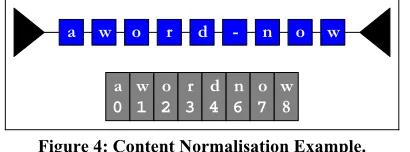
Each character in the linked list cache is iterated over and processed. If the content is not considered an artifact, it is copied to the array. Items not copied over include hyphens, whitespace characters (spaces have already been removed, but any other whitespace characters are now removed).
a 0
w 1
o 2
r 3
d 4
n 6
o 7
w 8
[image:8.612.73.278.423.499.2]a w o r d - n o w
Figure 4: Content Normalisation Example.
Figure 4 shows an example of the content in the original cache (at the top of the figure) and the normalised content of the new array after processing.
There may also be special characters in the content (e.g. ligatures) that need to be converted to ASCII/Unicode characters. It is likely that the XML source will contain only the actual character (ASCII or Unicode), but not a special typeset character such as a ligature. An example of such a conversion would be to take an ‘fi’ ligature and replace it with the individual characters ‘f’ and ‘i’. However, in the array, we associate a position with each character. We have just added an extra character by performing this expansion (and in more extreme cases could add many more). Therefore, all the newly added characters are given the same position value as the first character (e.g. in the case of the ‘fi’ expansion, if the ligature has the position 10, all the expanded characters will contain the position 10).
It is also the case that while the XML content is likely to be in a cleaner form than the PDF content, it will still contain characters that will hinder the comparison — the most obvious being
whitespace characters. For the comparison stage of the plugin, this whitespace information is irrelevant, so it is removed.
4.4.2. String Comparisons
The next stage of the matching process is to begin iterating over the list of nodes cached from the XML and to attempt to match these with the normalised PDF content. The content of each cached node is compared, one at a time, against the content of the PDF page.
String matching is a thoroughly researched area of computer science and there are many algorithms that can be used (e.g. the Boyer-Moore algorithm [5]). However, the requirement for the string matching that we perform in the plugin is to match the first occurrence of a given string, which can also include partial matches (e.g. content flowing between pages). Therefore the plugin uses a hybrid algorithm, adapting the principles of string matching techniques to the specific problem.
The basic principle of the algorithm is to take a search string passed in from the cached XML node and then to search for that string in the array of PDF page content (constructed as part of the normalisation process — see section 4.4.1). The main difficulty with the content matching is in recording which parts of the string have been matched previously, which have possibly been matched (e.g. partial matches) and which are still unmatched.
The algorithm used to match the text is relatively simple. The PDF content array is iterated over until the first characters of both the search string and the PDF content match. Once this happens, the rest of the string is tested sequentially against the content it is being matched against. Depending on whether a match condition is met, the algorithm either ends or continues trying to find a match.
Once the plugin has determined that there has been a match a
range is created. A range stores the starting point of the matched text and the end point. This is then attached to the cached XML node whose text is being compared.
In the case of a complete match, the situation is simple. The
range indicating the matched text is stored, together with the cached XML node. A flag is then set to indicate that the XML no longer needs to be matched.
In the case of a partial match, the process is slightly different. Just because part of the content has been matched does not mean that it is automatically a valid partial match — a given character may just have been matched by chance (in fact, this is very likely). Therefore, for a partial match, we require at least 5% of the search content to have been matched. In the case of a partial match, the search does not stop; instead it continues until the search space is exhausted. It is always the case that if we already have a partial match, a complete match will override the partial match. If a complete match overlaps a partial match, the partial match is removed in favour of the complete match.
When a partial match is recorded and once the content searching has finished for the page (and therefore the partial match is definite), the matched component of the textual content is removed, so that the remaining text can be used for searching on the next page to complete the match.
4.4.3. Adding the Content to the Structure Framework
end points of the range are added to newly constructed
PDEContainers (which represent MCIDs). The advantage of this approach is that in-line artifacts are added to the MCID, which is generally consider the correct approach to logical structure. However, any content that remains after all the matched content has been moved to PDEContainers is added to an artifact container, which marks it out as being an appearance artifact.
The content within each PDEContainer is then manipulated to add space characters using the XML source content as a template to do this.
Finally, each of the PDEContainers is added to the corresponding PDSElement in the structure tree using the cached information stored alongside the XML nodes. Once all of these have been added, the logical structure insertion for the page is complete. The process started in section 4.3 is repeated for the each subsequent page until the entire document has had logical structure added to it.
5. FUTURE WORK — MATHEMATICAL
MARKUP
The work described so far has added logical structure to existing documents that have a straightforward layout and a relatively coarse structural granularity. To illustrate the limitations of our current plugin, and the benefits that would accrue from a more powerful and granular treatment of specialist structure, we present here an initial study of the embedding of logical structure to describe mathematical expressions in technical documents. These experiments have involved embedding MathML within the structure tree of a PDF document. MathML is a W3C recommendation [11] for encoding mathematical expressions in XML. Presentational MathML was chosen since it uses an infix notation which is close to the way that an equation will actually be typeset and also to the way that an equation might be read aloud to a fellow mathematician over the telephone (indeed this was one of the design criteria for the troff mathematics pre-processor called eqn [7])
Embedding a higher-level representation of a mathematical expression in a document brings a number of advantages. Firstly the content can be re-purposed, either into packages such as Mathematica or into other document creation systems. Secondly we can make the expression more accessible to those with disabilities by incorporating alternative readings.
Traditional screen-readers, including the one used in Acrobat, have trouble reading mathematical expressions out-loud. However, once we have incorporated the expression into the structure of the document at the appropriate level of granularity we can embed an “Alternate Reading”, which is read out by the screen reader instead of trying to interpret the document content. Simply by embedding an English version of the equation in this alternative text we have greatly improved the read-out capabilities of mathematical expressions. Although reading mathematics is a research topic in its own right, a usable English translation can be easily produced with the help of MathML or LATEX math-mode input.
x =
4c
a
Figure 5: Sample Equation.
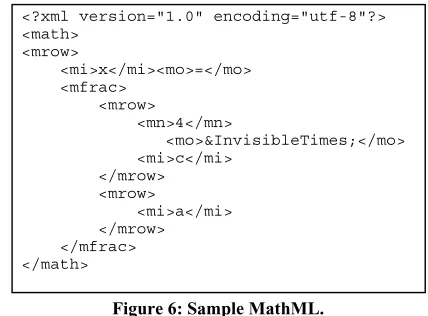
[image:9.612.329.543.96.254.2]Figure 5 shows an example of a mathematical equation and Figure 6 shows the MathML used to represent that equation.
Figure 6: Sample MathML.
The example above would fail to be properly structured by the Structure Insertion plugin. The x, =, 4, c and a items would be properly processed. However, the &InvisibleTimes does not correspond to anything visible in the PDF document and hence would not be inserted.
A demonstration of a PDF document making use of an embedded logical structure tree, representing MathML, can be found at
<http://www.eprg.org/research/structure>.
6. CONCLUSION
For many years the gap between structure-based and appearance-based document formats has seemed almost insurmountable. As a result of this research, though with considerable effort, it is now possible to merge logical structure and a graphically rich appearance within a single document format.
This paper has described the difficulties associated with using Structured and Tagged PDF to model logical structure and the natural discrepancies that can occur between an XML source document and a logically structured, final-form, PDF document.
As first sight it might seem that structure in PDF would serve only as an aid to recovering an XML-compatible version of the original document i.e. with the textual content streams converted to plain unformatted #PCDATA (in XML terms). Indeed the PDF structure tree can be used to do just that, but as we have seen, it can also be used to traverse the PDF text streams in reading order, with each of the text and graphic objects being rendered and formatted correctly with the full power of the PDF rendering model.
6.1. Structure Insertion
While the insertion of logical structure is of great benefit in the areas of accessibility, reflow, document re-use and so on, the majority of final-form documentation is still produced without any form of embedded logical structure. Although technical publishers sometimes use logically structured documents as the starting point for their final typeset document the structural information is nearly always lost in the document processing pipeline.
There is also a vast quantity of legacy PDF documentation that was created before it was possible to embed a PDF structure tree, for which a logically structured source might exist (this would be the case for technical publishers, who have archived SGML, or
<?xml version="1.0" encoding="utf-8"?> <math>
<mrow>
<mi>x</mi><mo>=</mo> <mfrac>
<mrow>
<mn>4</mn>
<mo>⁢</mo> <mi>c</mi>
</mrow> <mrow>
<mi>a</mi> </mrow>
more recently XML, sources along with the layout-based PDF versions).
Therefore, the need for tools that can take the logically structured source and use it to insert a structure tree into unstructured PDF documents is obvious. Given that no such tools have previously existed a major part of this research has been spent in developing them. The tools created here add the benefit of a logical structure tree, but instead of relying on standard structures (e.g. the Adobe Standard Structured Tagset), our plugin enables customised tagsets to be embedded, which will generally convey richer abstractions about the content of the document.
6.2. Insertion Limitations
As we have seen, the structure insertion plugin uses a source XML document as the basis for PDF structure insertion. There are limitations to this approach; a number of these are general limitations while others are specific to the matching algorithms used.
The first limitation lies in the process used to produce the reading order. The content matching routines take account of artifacts, etc. occurring in the PDF content, but for a positive match to be made, the normalised content of both documents must match exactly. In the case of a page consisting of multiple columns, the reading order construction algorithm will fail to produce a correct reading order. The algorithms that determine the reading order also make certain assumptions about the style of document. It must be read left to right and top to bottom. Any layout decisions that break this paradigm will cause the reading order calculations to fail and the insertion to fail.
To remedy this situation, a more complex, AI-based, reading-order algorithm would have to be applied. There would also be the possibility of employing algorithms that use point size and typeface changes, as well as x-y ordering, to more accurately determine the semantic nature of text strings (e.g. for headings, figure captions, etc.). Some possible algorithms well known to the Document Recognition community are described in [8]. However, more sophisticated algorithms of this sort would now benefit greatly from having the XML version of the document as an extra ‘knowledge source’ giving vital clues to the correct reading order and how page content should be grouped.
A second limitation of the processes described here lies in the actual content matching. The approach used was rather rigid and did not allow for any alterations in the document content, from that expected from the source XML. The example of MathML, in the previous section, points up very clearly the problems posed by non-printing tags such as &InvisibleTimes, especially when coupled with the need for a finely grained textual analysis. Moreover, textual mismatches may often occur which are unrelated to any issues of structural complexity. It may be the case that last-minute corrections to the final PDF are made midway through a document-processing pipeline, thereby causing the source document and the final-form document to become “out-of-sync” in various ways. If this happens, minor changes (e.g. a spelling correction) can cause large portions of the text not to be matched. A more robust string-matching algorithm, which is tolerant of minor textual differences, would go a long way towards solving this problem.
However, as proof of effectiveness of using source XML documents as structure templates, the plugin has been a great success. The embedded tagsets were, in the majority of documents, inserted correctly and they greatly enhanced the usefulness of the PDF document. A particularly noticeable benefit was in the “Read Aloud” mechanism available in Adobe Acrobat, which was markedly improved by the addition of logical structure. This, in turn, was largely due to the availability of accurate reading order and word boundary information.
7. ACKNOWLEDGEMENTS
Thanks are due to Adobe Systems Inc. for supporting Matthew Hardy and Peter Thomas during Graduate Internships at Adobe and also during their graduate studies generally. In particular we thank Peter Ullmann and Phil Levy for much administrative help, and Loretta Guarino, Dan Rabin and Richard Potter for technical information.
REFERENCES
[1]
[2]
[3]
[4]
[5]
[6]
[7]
[8]
[9]
[10]
[11]
Adobe Systems Incorporated. Acrobat Core API Reference. San Jose, CA: Adobe Systems Incorporated, 2002.
Adobe Systems Incorporated, PDF Reference (Second Edition) version 1.3, ISBN 0-201-61588-6, Addison-Wesley, July 2000.
Adobe Systems Incorporated. PostScript Language Reference Manual (3rd ed.). Addison-Wesley, 1999.
Alfred V. Aho, Ravi Sethi and Jeffrey D. Ullmann Compilers, Principles, Techniques, and Tools. USA: Addison Wesley, 1986.
A. K. Dewdney. “Searching Strings: The Boyer-Moore Algorithm.” in: The (New) Turing Omnibus. New York, NY: W. H. Freeman & Co., 1993, pp. 403–407.
Matthew R. Hardy and David F. Brailsford, “Mapping and Displaying Structural Transformations between XML and PDF.” in: 2002 ACM Symposium on Document Engineering, McLean, VA, November 8-9, 2002. McLean, VA, USA: ACM Press, 2002, pp. 95–102.
Brian, W. Kernighan and Lorinda L. Cherry, “A System for Typesetting Mathematics.” In: Comm. ACM UNIX
Programmer's Manual. Murray Hill, NJ, USA: Bell Laboratories, 1975, pp. 151–157.
W. S. Lovegrove and D. F. Brailsford, “ Document analysis of PDF documents: methods, results and implications.” Electronic Publishing, Origination, Dissemination and Design. 1995, 8(2 and 3), pp. 207–220.
Unicode Consortium, The. The Unicode Standard:
Worldwide Character Encoding, Version 1.0. USA: Addison Wesley, 1991. Vols. 1 & 2.
World Wide Web Consortium. Document Object Model (DOM) Level 2 Core Specification [online]. World Wide Web Consortium, 2000. Available at:
<http://www.w3.org/TR/DOM-Level-2-Core/>
World Wide Web Consortium. Mathematical Markup Language (MathML) Version 2.0 (2nd ed.) [online].