Multichannel User Interfaces towards Crossover
Inclusive Computing
Abdullah Almurayh,
Member, IAENG,
Sudhanshu Semwal,
Member, IAENG,
and Albert Glock,
Member, IAENG
Abstract—In this paper, we summarize the present methods available for providing user interfaces for disability applica-tions. Section 508 of the Rehabilitation Act of 1973 has con-tributed to providing accommodation to people with disability, and is generally considered a step in the right direction. As many modalities of interaction have become a focus, we propose multi-channel customized interfaces, where a person can take many types of inputs and map some portions of each of them to the output channels available, emerging as a sound design principle. Uniquely customizing interfaces provides an oppor-tunity for all, especially people with disabilities. In addition, the possibility of creating user interfaces for special cases and on demand helps to provide inclusive computing.
Index Terms—User interface, Cloud Computing, Inclusion, Human Computer Interaction
I. INTRODUCTION
C
OMPUTING refers to processing, symbol manipula-tion, transformamanipula-tion, representamanipula-tion, information ab-straction, and the like, which occurs in hardware and software [1]. Computing derives types of information from informa-tion based on patterns, structures, modulainforma-tions, algorithms, theories, logicalities, principles, and the like. Information transformation is the process of performing computational procedures to alter information into different forms. Com-puting requires interaction with human beings involving both the cognitive and physical capabilities. Sometimes supportive interaction methodologies are needed to increase the level of interaction so that computing becomes meaningful to the user [2], interaction for disability is one such example.Disability can be interpreted as a limitation and restric-tion caused by a health problem, a genetic problem, or an incidental disaster1. It results in impairments such as visual, cognitive, hearing, and physical, which could limit people’s abilities, e.g. inability of movement, a restriction in participation, and difficulty at work [3][4]. It is estimated that a billion people live with disabilities [5]. This requires interventions to remove environmental and social barriers. An important fact is that being disabled does not mean that a person is unskilled; many disabled people are extremely motivated and integrated into a skill-rich workforce; however, the limitation of their impairments could have a significant impact on the quality and ability of performing life tasks [2].
Manuscript received July 12, 2014; revised August 13, 2014. This work was supported in part by the Media Convergence, Games and Media Integration Consortium (GMI) and Research Lab, awarded by the College of Engineering and Applied Science at University of Colorado at Colorado Springs, and sponsored by the Saudi Arabian Cultural Mission(SACM).
A. Almurayh, S. Semwal, and A. Glock are with the The Depart-ment of Computer Science at the University of Colorado at Colorado Springs,CO, 80918 USA. E-mail: ([email protected], [email protected], [email protected]).
1Source: www.who.int
Inclusionimplies making technology accessible, reachable to and usable by everyone with different ability, disability, age, etc. Inclusion is also known as inclusive design, design for all, digital inclusion, universal usability, and the like2. Accessibility is the principle of making applications suitable and beneficial to everyone [6]. Section 508 – accessibility law – requires each federal agency to provide access to programs, activities, electronic and information technology [7]. Section 508 standards apply to all IT common services including software applications and operating systems, web-based in-formation and applications, telecommunications products, video or multimedia products, self-contained, closed prod-ucts, desktop and portable computers [8]. Making it possible for more people with disabilities to participate in the area of computing has become mandatory since it enhances their life in many different ways [9].
Assistive technology is any equipment, tool, product, application, mechanism, and system that can be used to enhance functional capabilities for people with disabilities [5][10]. Assistive technology has some limitations: social, cultural, design, privacy, security, and compatibility [11]. Most importantly, the proliferation and wide usage of as-sistive technology depends on the user’s economic status as some assistive applications are very highly priced [11]. This issue occurs for several reasons. First, the cost must include sufficient profit margin to amortize development cost [9]. Second, the manufacturer is obliged to include features which differentiate the product from similar products in the market place. The cost of this differentiation is included into the price [12]. Finally, intangibles such as branding and name-recognition can command higher prices [13].
In our work, we focus on applications, particularly user interfaces (UIs) as assistive tools that allow people with disabilities to overcome their limitations. A crossover appli-cation is an appliappli-cation designed specifically for a particular disability, yet is useful, at the same time, for those without any disability[14][15]. We believe that creating crossover user interfaces expands the inclusion circle of the computing field and generally reduces the burden on all users, regardless of dis/ability3.
II. PROBLEM TO SOLVE
We would like to design user interfaces so that they are not merely adaptive – acknowledging and accommodating the disability. The user interfaces need to be inclusive and handle disability transparently. The idea is that a user interface can have different interaction methods where users choose based
2Source: http://www.who.int/topics/disabilities/en/
on their capabilities and disabilities. We also propose an abstraction which will generate custom user interface on demand.
III. RELATEDWORK
Global Public Inclusive Infrastructure (GPII) aims to en-sure that everyone can access and use the Internet and all its information and communication technology (ICT) [16]. Accessibility is an important ingredient in education, em-ployment, health, and the like. Particularly, combining cloud computing and Web services to make accessibility simpler, more inclusive, available everywhere, and more affordable is the goal. Hence, GPII intends to create automatic user interfaces based on user preferences. GPII consists of two major components: a user to determine the needs, preferences and permissions, and an infrastructure to create solutions. The Cloud4all and Prosperity4All projects were proposed [17][18][19]. Indeed, we can embrace the idea of having an identifier that determines the nature of the user for the user interface, on which UI can be accordingly prepared.
Multimodal multimedia (MM) computing systems present mathematical expressions to visually impaired users based on their combined contexts and environment [20]. MM depends also on user preferences and interaction to select modalities, media, and presentation formats.
Some research emphasizes that pattern-based user inter-faces must be considered to generate user interinter-faces ac-cording to an abstract formula [10]. Therefore, there is a need to establish an abstractive method that creates a UI with different representations of output and input for a combination of applications. Another study involving motor-impaired and able-bodied participants performing pointing tasks using a mouse, and pointing tasks using single switch scanning techniques [21]. The study indicates that precise and fast pointing requires hand strength. Hand strength affects pointing performance of non-disabled users as well.
Recent research found that existing anthropometric data tools (User Data Tools) are very limited, as they lack usefulness and attraction [22]. Furthermore, designers found that the information on users obtained from participating users is more useful than adapting data from user data tools. Including all features (i.e., simplicity, comprehensiveness, effectiveness, and ease of use, etc.) in one tool – perhaps one user interface – in reality is difficult. The researchers emphasized that exploration and evaluation methods rely on the samples selected. Larger numbers of participants in the exploration stage is suggested to overcome the bias in sample size and specification [22]. We believe that design guidelines may not be capable of covering every concept of user needs. Design guidelines must be updated periodically as technology evolves rapidly because of the changes based on the user’s situation.
A bi-modal User Interface is aimed at assisting users with physical disabilities (i.e, handicapped) and involve HCI with non-disabled users [23]. It uses audio and vision-based chan-nels to process natural speech and pointing movements in parallel as a unified multimodal activity. The study indicates that a bimodal interface helped users with motor-disabilities by improving their independence and performance. In addi-tion, it can be helpful for non-disabled users as hands might be occupied (driving, cooking, eating, etc.). The ideas of
supporting several targeted group of users is also the focus of crossover application and assistive technology [14][24] research.
There is some attention paid to accessibility limitations between users and modern digital technologies, especially elderly and disabled users in the context of an inclusive world [25][26]. Engaging design could also involve older people as key participants by letting them contribute in decision-making and data collection processes [27]. User-Sensitive Inclusive Design encourages designers to extend their design briefs to include older and disabled people; however, it suggests a different method to designing for disregarded users (e.g., old and disabled users) by developing a real empathy with these users [28]. Situationally-induced impairments and disabilities (SIID) is an inclusive design process for developing a product that is designed for disabled and non-disabled [29].
The lack of usability in assistive and alternative tools limits their utilization by users with disabilities [Almurayh, 2014]. Although, there is a realistic effort to include accessibility or usability, or both, by the systems and companies, there is no clear consistent mechanism for the disabled user’s needs to access and utilize computing systems and fulfill Section 508 [8]. Therefore, disabled users face obstacles, as private companies need not comply with Section 508. Low cost and widely suitable solutions are expected to help with this problem.
Ubiquitous computing promotes new technologies to help elders to handle their problems independently though new forms of interaction between users and technologies [30]. There is a need to provide the universal design that promotes effective accommodations and expands the range of users’ abilities.
IV. THEPROPOSEDMETHOD
The proposed work consists of three approaches: crossover user interfaces, multi-channel user interface, and user inter-face on-demand. These approaches are complementary to each other, where the system allows user inclusion, diversity and acceptance of new types of methods and users.
A. Crossover user interfaces
Fig. 1: Overview of the proposed crossover computing. (A) Shows only one group non-disabled of users are included in the computing system, (B) illustrates, more groups are included though dedicated methods for each, and (C) represents crossover interaction methods that is utilized by more than one group of users.
TABLE I: Descriptive Codes
Code Description Code Description
k Keyboard/Mouse I Set of input channels
s Speech O Set of output channels
h Touchable i Input element
l Touchless o output element
t Tactile G Group of users
v Visual a Audible
may not essentially have the same properties. For example, some groups share both input/output interaction methods while some others share either. Theoretically, assume five types of input methods – according to Table 1– defined by the setI=ik, is, ih, il, itand three types of outputs defined by the set O = ov, oa, ot. There exist three types of user groups G = Gbvi, Ghcp, Gnon. The computing system S features the interaction channels C where C=I∪O. Since Gnon = ik, ov is a subset of C, a member M1 ∈ Gnon –¿ M1 ∈ S, which means M1 is included. However, let
a member M2 = is, ob, where ob is a Braille display as an example. Since S does not feature ob, (i.e. ob ∈/ C) the member is excluded from the computing system S. Now, by assuming a memberM3=ik, is, ih, ov, oa, it means that this particular member is capable of using a multi-channel user interface, which will be described next.
B. Multi-Channel User Interface
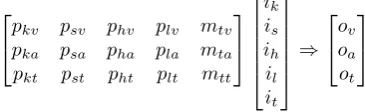
We define multi-channel user interface (MCUI) as a user interface that uses various perception channels (i.e. visual, audio, tactile, etc.) and multiple action channels such as keyboard, mouse, touchable, touchless, motion, speech, etc. Figure 2 illustrates the MCUI conceptually. The user can shift between I/O channels and can use multiple MCUI I/O channels concurrently. Every channel must have the exact power regardless of the performance each may yield. Furthermore, the data and information must be translated based on the user’s perception (output) and action (input). According to GPII [17], an identification method can be user specified as the appropriate and suitable interactive channel. Let input channels (I), output channels (O),be mapped by (M) so that:
I=i1 i2 i3. . . ix
Fig. 2: Abstractive Application programming interface AAPI overview showing continuous production of different context and patterns are transformed into a unique context understood by the system
O=
o1
o2
o2
.. . oy
Thus,Pij be matrix which maps the matrixIxto matrix Oj so thatI×P =O,Here cardinality ofP will be|O| by|I|. In the example in Section 4.1, there are five inputs I and three outputsO where,
pkv psv phv plv mtv pka psa pha pla mta pkt pst pht plt mtt
ik is ih il it
⇒
ov oa ot
MatrixPij is defined as preference matrix customizing for combination of input/output elements a user has chosen for interaction.
C. Personalized User Interface on-Demand
[image:3.595.49.294.284.356.2] [image:3.595.334.517.638.694.2]inter-Fig. 3: The input “s” is mapped to the desired output “a” based on the user preferences.
face on-demand means that a special user interface can be created and implemented based on a distinct set of needs. Hence, having the ability of creating user interfaces based on user requirements, cultural differences, and application preferences is expected to promote a wider range utilization, broad acceptance, and inclusion.
In the example in Section 4.2,here we call the elements of P(b,c), where1≤b≤xand1 ≤c≤y , aPersonalized
User Interface (PUI). PUI could be 0 or 1 or something in-between, and provide a unique and personalized interface values for a user’s preferences. Accordingly, Figure 3 shows how a user with P(s,a) has a unique preference that maps
the input “speech” to the output “audio”.
Tools such as XMM, SXM, WXM, AXM, Cloudstack, are various Xenserver management interfaces that have been created using different contexts [31][32] [33]. Thus, besides many other management tools (i.e., web-based, desktop, and mobile), developers were able to create additional interfaces that allow more users to be included. The reason for this is that Xenserver contains anabstract application programming interface– called Xen API or XAPI which allows commands to be performed in different ways [34].
V. DISCUSSION
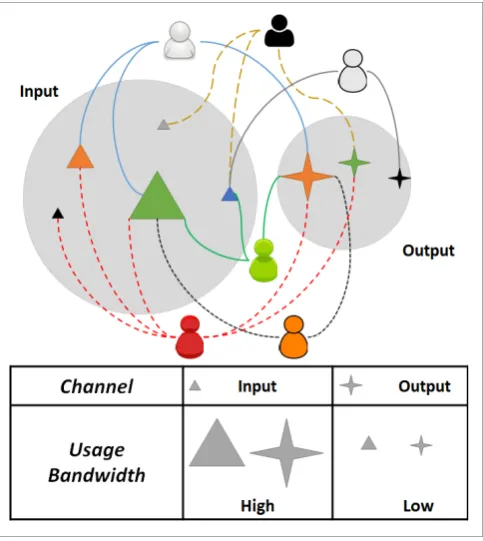
This proposal involves approaches that complement each other. The user has two roles: (1) an input emitter or action maker and (2) information receiver. Actions can be transformed from one channel to another having different characteristics. However, these channels may vary in terms of utilization bandwidths. Many factors affect bandwidths depending on user preferences, characteristics and needs. Non-disabled users “N” can utilize the channels (X, Y)
based on their preferences and characteristics. Hence,(X, Y)
[image:4.595.307.549.52.323.2]channels will have a high bandwidth since the majority of users have sufficient abilities to use X as an input channel and Y as an output channel (e.g. keyboard and monitor respectively.) A group “V” of users with disabilities (e.g. visually impaired) uses the channels (W, Z) based on their needs. Hence, (W, Z)channels will have a low bandwidth.
Fig. 4: Illustration of input and output channels showing their bandwidth of usage an sharing
The same group “V” uses the channels (A, B) based on their needs and characteristics. (A, B) channels can also be utilized by “N” users, which increases the utilization bandwidth of(A, B). Since,
Band(A,B)> Band(W,Z)
it is recommended to design and implement an interaction method using(A, B)channels.
As shown in Figure 4, there are several types of input and output channels and different types of users, and each chan-nel has diverse properties. Several input and output chanchan-nels can be used by a user concurrently and at different times different channels could be used by the same user. Each input channel must have the desirable power and effect. In addition, receiving from different channels must not impact the results to ensure the equality. Briefly, all input/output channels must indicate the exact power of productivity and effectiveness. In addition, there must be a significant consideration and maintenance to the most frequently used channels and in return not to neglect other channels that allow the inclusion of other types of users, whatever the users proportion is. For example, when there is a massive use of the computing system through a smartphone user interface, it is imperative to strengthen the capabilities of these applications and make them more effective, flexible, and perform the same purpose as is the case with their equivalent user interfaces.
[image:4.595.47.295.53.252.2]another (e.g. audio). Successful examples are text-to-speech readers, or those machines that produce braille sensations from text streams.
Persons could be characterized by their I/O channel capabilities, and perhaps more tailored solutions to their disabilities could be found. For example, it could be that a blind person has a much greater audio symbol rate than a sighted person. A device translating computer output to audio could perhaps leverage this by creating audio sources around the user.
VI. CONCLUSION
In this paper, we provided our basis of proposing cus-tomized interfaces for all. The idea extends our work in the area of crossover applications, where specific interaction is aimed on alleviating obstacles which restrict the informa-tion highway to people with disabilities. We developed a theoretical approach for such an interface, and proposed a personalized interface as a matrix Pij. Our idea is that Pij will capture the preference of a user as well as defined how the input and output channels are mapped in the dynamic user interfaces, which changes with the person’s context and preferences. We provide a unique methodology to design such interfaces in future.
REFERENCES
[1] P. S. Rosenbloom, On Computing: The Fourth Great Scientific Do-main. MIT Press, 2013.
[2] G. F. Shein, J. Treviranus, N. D. Brownlow, M. Milner, and P. Parnes, “An overview of human-computer interaction techniques for people with physical disabilities,” International Journal of Industrial Er-gonomics, vol. 9, no. 2, pp. 171 – 181, 1992.
[3] A. Edwards, “Assistive technologies,” in Web Accessibility, ser. Human-Computer Interaction Series. Springer London, 2008, pp. 142–162.
[4] WHO. (2012) Disability. World Health Organization. [5] WHO2. (2013) Disability. World Health Organization.
[6] J. P. Mueller,Accessibility for everybody: understanding the Section 508 accessibility requirements. Apress, 2003.
[7] J. Thatcher. (2011) Web accessibility for section 508. James W Thatcher dot Com. [Online]. Available: http://jimthatcher.com/webcourse1. htm
[8] Section508.gov. Section 508. Official website for Section 508 of the US Rehabilitation Act. [Online]. Available: http://www.section508.gov [9] S. Burgstahler and R. Ladner, “Increasing the participation of people with disabilities in computing fields,”Computer, vol. 40, no. 5, pp. 94–97, May 2007.
[10] S. Wendler and I. Philippow, “Requirements for a definition of genera-tive user interface patterns,” inComputer Interaction. Human-Centred Design Approaches, Methods, Tools, and Environments, ser. Lecture Notes in Computer Science, M. Kurosu, Ed. Springer Berlin Heidelberg, 2013, vol. 8004, pp. 510–520.
[11] A. Almurayh and S. Semwal, “Cultural considerations for designing crossover applications for the visually impaired,” inInformation Reuse and Integration (IRI), 2013 IEEE 14th International Conference on, IEEE. IEEE, Aug 2013, pp. 668–675.
[12] R. M. Grant, Contemporary Strategy Analysis and Cases: Text and Cases. John Wiley & Sons, 2010.
[13] C. L. Nordhielm,Marketing Management: The Big Picture, 2nd ed. Wiley Global Education, 2005.
[14] B. Wilke, J. Metzgar, K. Johnson, S. Semwal, B. Snyder, K. Yu, and D. Neafus, “Crossover applications,” inVirtual Reality Conference, 2009. VR 2009. IEEE. IEEE, 2009, pp. 305–306.
[15] S. K. Semwal, “Collaborative crossover applications,” inCollaboration Technologies and Systems (CTS), 2012 International Conference on. IEEE, 2012, pp. 636–637.
[16] G. Vanderheiden and J. Treviranus, “Creating a global public inclusive infrastructure,” inUniversal Access in Human-Computer Interaction. Design for All and eInclusion. Springer Berlin Heidelberg, 2011, vol. 6765, pp. 517–526.
[17] G. C. Vanderheiden, J. Treviranus, M. Gemou, E. Bekiaris, K. Markus, C. Clark, and A. Basman, “The evolving global public inclusive infras-tructure (gpii),” inUniversal Access in Human-Computer Interaction. Design Methods, Tools, and Interaction Techniques for eInclusion. Springer, 2013, pp. 107–116.
[18] M. Gemou, E. Bekiaris, and G. Vanderheiden, “Auto-configuration through cloud: Initial case studies for universal and personalised access for all,” inIST-Africa Conference and Exhibition (IST-Africa), 2013. IEEE, 2013, pp. 1–8.
[19] G. C. Vanderheiden, J. Treviranus, and A. Chourasia, “The global public inclusive infrastructure (gpii),” in Proceedings of the 15th International ACM SIGACCESS Conference on Computers and Ac-cessibility, ser. ASSETS ’13. New York, NY, USA: ACM, 2013, pp. 70:1–70:3.
[20] A. Awde, M. Miraoui, C. Tadj, and Y. Bellik, “Modeling and sim-ulation of a pervasive multimodal multimedia computing system for visually-impaired users.”Int. J. Adv. Comp. Techn., vol. 2, no. 3, pp. 6–14, 2010.
[21] P. Biswas and P. Robinson, “The effects of hand strength on pointing performance,” inDesigning Inclusive Interactions, P. M. Langdon, P. J. Clarkson, and P. Robinson, Eds. Springer London, 2010, pp. 3–12. [22] F. Nickpour and H. Dong, “Developing user data tools: Challenges and
opportunities,” inDesigning Inclusive Interactions, P. M. Langdon, P. J. Clarkson, and P. Robinson, Eds. Springer London, 2010, pp. 79–88.
[23] A. Karpov, A. Ronzhin, and I. Kipyatkova, “An assistive bi-modal user interface integrating multi-channel speech recognition and computer vision,” inHuman-Computer Interaction. Interaction Techniques and Environments, ser. Lecture Notes in Computer Science, J. Jacko, Ed. Springer Berlin Heidelberg, 2011, vol. 6762, pp. 454–463.
[24] J. Borg, S. Larsson, and P.-O. ¨Ostergren, “The right to assistive technology: For whom, for what, and by whom?”Disability & Society, vol. 26, no. 2, pp. 151–167, 2011.
[25] P. Biswas and P. Langdon, “Towards an inclusive world-a simulation tool to design interactive electronic systems for elderly and disabled users,” inSRII Global Conference (SRII), 2011 Annual. IEEE, 2011, pp. 73–82.
[26] P. Biswas, P. Robinson, and P. Langdon, “Designing inclusive inter-faces through user modeling and simulation,”International Journal of Human-Computer Interaction, vol. 28, no. 1, pp. 1–33, 2012. [27] P. Chamberlain and C. Craig, “Engagingdesign methods for collective
creativity,” inHuman-Computer Interaction. Human-Centred Design Approaches, Methods, Tools, and Environments, ser. Lecture Notes in Computer Science, M. Kurosu, Ed. Springer Berlin Heidelberg, 2013, vol. 8004, pp. 22–31.
[28] A. F. Newell and P. Gregor, ““user sensitive inclusive de-sign”— in search of a new paradigm,” inProceedings on the 2000 Conference on Universal Usability, ser. CUU ’00. New York, NY, USA: ACM, 2000, pp. 39–44.
[29] H. Oh, H. Kim, H. Hwangbo, and Y. Ji, “User centered inclusive design process: A situationally-induced impairments and disabilities perspective,” inHuman-Computer Interaction. Human-Centred Design Approaches, Methods, Tools, and Environments, ser. Lecture Notes in Computer Science, M. Kurosu, Ed. Springer Berlin Heidelberg, 2013, vol. 8004, pp. 103–108.
[30] D. J. V. Gonc¸alves, “Ubiquitous computing and ai towards an inclusive society,” inProceedings of the 2001 EC/NSF Workshop on Universal Accessibility of Ubiquitous Computing: Providing for the Elderly, ser. WUAUC’01. New York, NY, USA: ACM, 2001, pp. 37–40. [31] Apache. (2014) Apache cloudstack documentation.
Apache Software Foundation. [Online]. Available: http://incubator.apache.org/cloudstack/docs/en-US/index.html [32] A. Almurayh and S. Semwal, “Controlling xen cloud platform via
smart phones,” inInformation Reuse and Integration (IRI), 2013 IEEE 14th International Conference on. IEEE, 2013, pp. 676–683. [33] A. Almurayh, “Multi-dimensional interactive crossover user interfaces
for inclusive computing,” Ph.D. dissertation, University of Colorado Colorado Springs, Dec 2014, to be published, unpublished Disserta-tion.