RFID based Library Self Searching Management
System using NFC µFR RFID (R/W 13.56 MHz)
with Android OS
Rama Murthy. B1, Srujana. C2
1
Professor, Department of Instrumentation & USIC, Sri Krishnadevaraya University Ananthapuramu 515003 (AP) 2
Research Scholar, Department of Electronics, Sri Krishnadevaraya University, Ananthapuramu 515003 (AP)
Abstract: In Libraries, the order of maintaining and searching of books is very difficult very default with manual operation. To overcome this sometimes barcode system and at present Radio Frequency Identification (RFID) is a rapidly emerging, fast and low cost technology is used to day in our life such as Asset-tracking, Shoppingmals, Health applications and vehicle tracking etc. The RFID based self library management system is very helpful to library users and library staff in searching, sorting and rearranging the books after adding of new books and returning of books from the users to the shelves. Hence an attempt has been made in the present work to develop and implement the RFID Based Self Library Management System using handheld reader operated on the high-frequency NFC µFR RFID(R/W of 13.56 MHz’s) by the software using ANDROID STUDIO, the data base is stored in SQLite to improve the system performances. The purposed system successfully tested and implemented in our library and it is working satisfactorily and consistently.
Keywords: Android Studio, MIFARE cards and tags, SQLite, Tablet (IKall), µFR NANO RFID Read/Writer (1356 MHz).
I. INTRODUCTION
In the present days Radio Frequency Identification (RFID) devices playing vital role in our day to day life and can be in future become most appealing. Now there is a tremendous growth in the industry to use of RFID technology in the recent years and it can also be used in Supply chain management, Real time attendance management, Assistance tracking in Transport system and Library management etc. So, recently RFID is the latest technology used in the development of Library management system. It is a Radio Frequency Identification technology which enables in identifying object using tags attached to them irrespective to the line of sight not being adequate to the reader.
However, the system is effected easily by neighbouring environment and the resonant frequency by which the communication performance is degraded. In the present work a 13.56MHz RFID nfc uFR Nano system used for the development of Library Management System with Android OS. RFID Based Library Management System is a highly integrated, user-friendly and compatible system for any type of library.
It facilitates fast issuing, returning, searching of books and list of members with RFID enabled modules with anti collision [1]. It directly provides the books and members database to the library, so that the librarians no need to maintain manual records. The RFID tag itself contains Unique ID with books information stored in the tag as it can never be lost and that information with respect to its UID reading and non line of sight AIDC technologies help in identification of objects [2]. The basic system components are RFID read/writer, Tags and Smart cards and middleware.
The tag consists of a microchip attached to an antenna and is placed in the object to be located and it depends upon the type of tags that are passive and active.
A reader/writer can communicate with the tags through radio waves with-in the work station and the middleware converts the data captured by the reader format that is perceivable by the application [3].
II. HARDWARE DEVELOPMENT OF RFID BASED LIBRARY SELF MANAGEMENT SYSTEM USING ANDROID OS
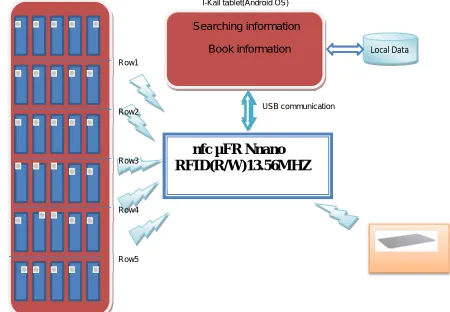
The block diagram of RFID based Self Library Management System using smart nfc µFR Nano RFID read/writer (13.56 MHz) using Android OS as shown in figure 1. The system mainly consists of following units, they are
[image:2.612.93.543.165.477.2]A detailed explanation for each individual unit as presented below.
Fig. 1 Block diagram of Handheld RFID based Library self management system using µFR NANO RFID R/W(13.56 MHz) with ANDROID OS
A. µFR Nano RFID Read/Writer (13.56 MHz)
In the present work a high frequency (HF) RFID read/writer of NFC µFR Nano (13.56MHz) is used with frequency range communicator and a built-in, well-tuned antenna provides the proximity operating distance up to 80 mm and contactless communication speed at higher baud rates up to 424 kBd. The device also has a built-in Crypto1®algorithm and non-volatile internal key memory storage for better security [5]. An audible speaker and 2 LEDs visible indicators ar e built-in and are absolutely user contr ollable by the µFR Nan o RFID(R/W).Th e RFID tags are as shown in figure 2.
Fig. 2 RFID (R/W) Searching information
Book information Local Data
nfc µFR Nnano
RFID(R/W)13.56MHZ
Student card
I-Kall tablet(Android OS)
USB communication Rack
Row1
Row2
Row3
Row4
[image:2.612.182.475.628.697.2]B. RFID Tag and Cards
In the present work two types of RFID tags are used, one is meant for member/student ID card which stores the information of student UID and books received, the other RFID tag is used to paste as a label at any where inside the book that holds the information of a book such as book title, author(s) name, edition, publisher’s name, cost and pages etc. The tags are
1) MIFARE_classic_1K (card): The MF1ICS50 is designed for simple integration and user convenience which allows the complete student ticketing transactions to be handled in less than 100 ms, the operating distance is 100 mm depending on the antenna geometry. This is more securable because of the unique serial number (UID) for each card [6] and is used for student identification. The MIFARE_CLASSIC_1K tags are as shown in figure 3(a).
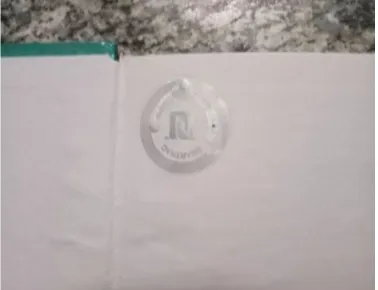
2) MIFARE_CLASSIC_1K (tags): The MIFARE MF0ICU1 tags are developed by NXP semiconductors used as contactless smart stickers and it has operating range of 100 mm depending on the antenna geometry and reader configuration. It has 7Bytes of unique serial number (UID), the memory is organized about 16 pages with 4bytes per page [7] and is used for book identification. These tag stickers are as shown in figure 3(b).
Fig. 3(a) MIFARE CARD Fig. 3(b) MIFARE_classic_1K tags
C. Tablet
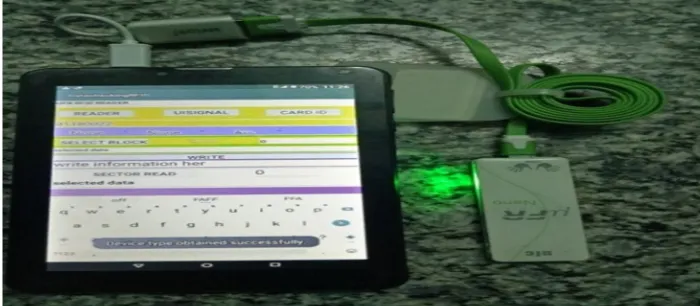
[image:3.612.140.490.461.614.2]The Tablet used in the present system is a 7 inches display with USB attached keyboard integrated with the RFID R/W of µFR NANO (1356 MHz). The main purpose of the present system is to check a book which has to be searched as it is available in the particular library rack or not. It receives the information from the read/writer and exchange the information with circulation database used by the library personals as shown in figure 4.
Fig. 4 RFID Based Library self management system using RFID (R/W) with Tab
D. Personal computer
Fig. 5 PC based LMS RFID (R/W) and tag
III. SOFTWAREDEVELOPMENT
The software development and implementation for RFID based Library self management system developed using the popular Android OS which is an open source software stack that includes the operating system, middleware and key applications along with API libraries for writing mobile applications that can shape the look, feel, and function of mobile handsets. Small, stylish, and versatile modern mobile phones have become powerful gadgets incorporated with cameras, media players, GPS systems and touch screens. [9]. All Android applications are written using Java as a programming language and are executed using accustom virtual machine called Dalvikrather than a traditional Java VM. Each Android application runs on a separate process within its own Dalvik instance, relinquishing all responsibility for memory and process management to the Android run time, which stops and kills processes as necessary to manage resources. Dalvik and the Android run time sit on top of a Linux kernel that handles low-level hardware interaction including drivers and memory management, while a set of APIs provides access to all of the underlying services, features, and hardware [10].
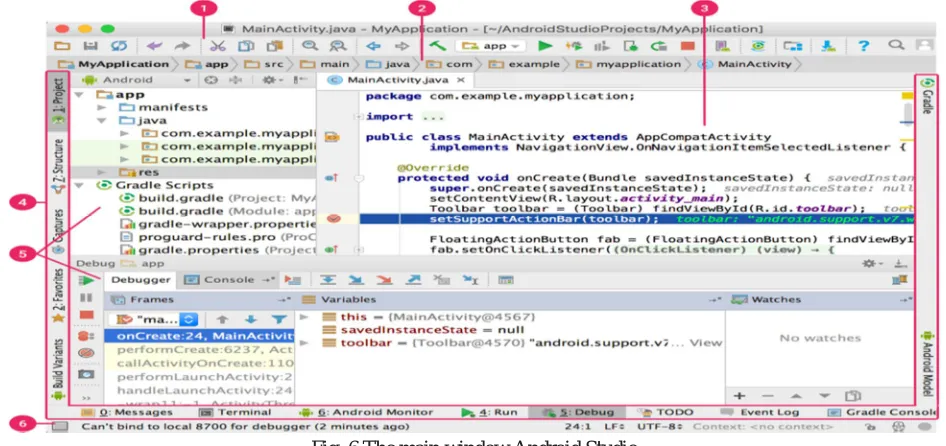
The following application services are the architectural cornerstones of all Android applications, providing the framework to be used by developer [11] as a system setting up Android Studio takes just few clicks. First download the latest version 3.4 of Android OS for Windows 64 bit. After downloaded an .exe file and make a double click to launch it. Install SDK and Android it takes several couple of minutes. Android Studio is a windowed environment to make the best use of limited screen real-estate and to keep you from overwhelmed. One of the essential functions of any integrated development (IDE) is navigation. Android projects are typically composed of many packages, directories and files [12]. The Android Studio main window is made up of several logical areas as identified in figure 6 where
[image:4.612.69.542.492.715.2]1) The toolbar lets carry out a wide range of actions, including running the app and launching Android tools.
2) The navigation bar helps to navigate through the project and open files for editing. It provides a more compact view of the
structure visible in the Project window.
3) The editor window is allows to create and modify the code. Depending on the current file type, the editor can change. For example, when viewing a layout file, the editor displays the Layout Editor.
4) The tool window bar runs around the outside of the IDE window and contains the buttons that allow expanding or collapsing individual tool windows.
5) The tool windows give access to specific tasks like project management, search, version control, and more as it can expand them and collapse them.
6) The status bar displays the status of your project and the IDE itself, as well as any warnings or messages.
We can organize the main window to give us more screen space by hiding or moving toolbars and tool windows and can also use keyboard shortcuts to access most IDE features. There are two main steps in creating a GUI viz. One is designing its layout, and the other is writing call back functions that perform the desired operations when the user selects different features [9].
A. SQLite Database
SQLite is an open-source relational database i.e. used to perform database operations on Android devices such as storing, manipulating or retrieving persistent data from the database. It is embedded in Android by default. So, there is no need to perform any database setup or administration task. Data is displayed in the logcat for displaying data on the spinner or list view which move to the next page [10].
SQLite Open Helper class provides the functionality to use the SQLite database. SqLite can provide following functions creation of table, insertion of data, upgrade, delete, view etc.
IV. IMPLIMENTATIONOFSYSTEM
The present work was developed as an RFID Based Smart Library management system using Android OS and the aim and objective of the work is to search the books in Library using handheld device of nfc uFR Nano RFID(R/W) is connected to the Tablet. The user friendly frames are developed using Android Studio (Android UI design + SQLite), and also to store the detailed information of the book in database maintained with SQLite3 using Android Studio is a open source, user customized platform and also supports for messaging, web browsing connectivity (GSM, CDMA, Blue Tooth, Wi-Fi etc.), media, hand set layout etc.
Searching of books using UID will search the information of Book UID, title and author. Searching or tracking of books on to the racks using UID of book, title and author will be processed and analyzed using RFID Read/Writer by implementing Android OS for Library Management System easily and efficiently.
The software developed for the Smart RFID Based Library Self Management System using Android Tablet integrated with µFR Nano using Android OS, the process of the LMS for book searching as presented below with the algorithm and flow charts.
A. Algorithm of RFID Based Library self Management System
[image:5.612.221.410.564.709.2]1) Open the RFIDLMS app in the tablet, and other hand paste the RFID tag to the proper reading place on the book for effective reading.
2) Login to the user or member of the library using User login page, when the user is new, click the registration button, then open the corresponding registration page and fill all details of the user and login to the Main UI page where the user can show the database of the books in the list view as it will be connected to department database.. Then search the book using UID/NAME/AUTHOR of the book
3) Interface the nfc µFR Nano RFID Read/Writer with Tab through USB to have a serial communication with a baud rate of 115200 PS, 1 second time period.
4) When the nfcµFR Nano RFID Reader connected to the tablet, insert a beep sound. Otherwise repeat step 3.
5) Then write the data on to the nfc µFR Nano RFID tag and read the book information using submenu of RFIDLSMS and store in library book database.
6) The option search of book can be made through the following steps. On search view enter the specified Books which will list the Book UID, Book Author Name, Title, Book Edition, Book Publisher, ISBN no, Pages, Cost, and Location display in list view.
7) We can search book in three ways, search by book UID, book name, book author name If any of the information is known that information can be entered and click on to the corresponding button in the handheld reader starts the work, Then check the Library rack, when the book is present then a beep sound can be heard which indicates that the searching book is present in that particular rack and the total information of the book is displayed in the tablet screen. Then check it whether the book searching information is correct or not, if it corrects, then continue the same process for the searching of the next book which saves energy and time of the user/member of the library.
8) Close the project by clicking on to the three dots of menu right side, then a logout option is displayed on the screen, then click it to Close the present login user window, user can login once again repeat the step 2.
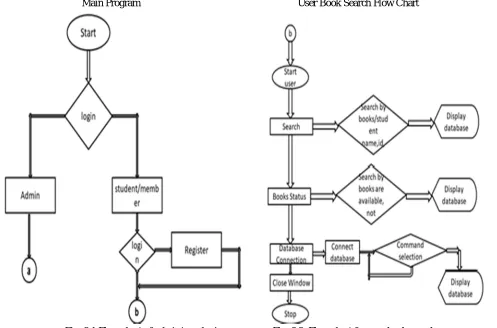
The flow charts of Library Management Self Management System using RFID are presented in figures in 8.1 and 8.2 respectively.
[image:6.612.56.553.371.699.2] [image:6.612.297.532.386.699.2]Main Program User Book Search Flow Chart
V. RESULTANDDISCUTION
The developed system is tested and implemented for the proposed RFID Based Library Self Management System and the following are the results as presented with their menu windows.
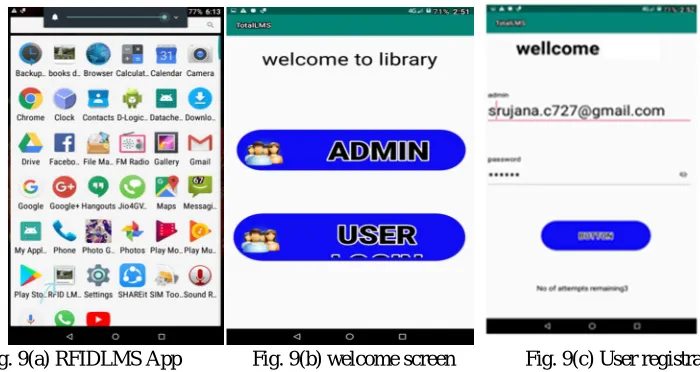
1) To execute the application, click on the RFIDLSMS App on the desktop screen as shown in figure 9(a). To open this app chooses the option admin login or user login as show in figure 9(b) and 9(c) respectively.
Fig. 9(a) RFIDLMS App Fig. 9(b) welcome screen Fig. 9(c) User registration
2) To view the list of books information available in the deportment of Electronics and Communication, Library rack, the window displays the books available in the department and in the same way to show student data base, these two data bases are shown in figure 9(e).
Fig. 9(e) Electronics and communication books and student database
The developed software package using Android Studio has been tested and implemented successfully for the present system of RFIDLSMS with nfc UFR Nano RFID(R/W) using Raspberry pi 3 B+ with Android OS.
VI. CONCLUSION
[image:7.612.128.478.145.331.2]REFERENCES
[1] Fu-Zhen, X (2014). The design and implementation of intelligent library management system based on RFID/GRPS.Journal of Chemical and Pharmaceutical Research, 6(4), 839-844.
[2] Archana, S. N., Padmakar,P.K. and Beena,C.(2014). Catalogue interfaces of Integrated Library Management System(ILMS): Experiences in a proprietary and open source software. DESIDOC Journal of Library and Information Technology,34(1),16-22.
[3] Daniel H, Puglia A, Puglia M (2007). RFID: A guide to radio frequency identification. New York, John Wiley and sons, Inc., p. 1.
[4] Klaus, 2003: RFID Handbook: Fundamentals and Applications in Contactless Smart Cards and Identification, Second Edition. John Wiley & Sons, pg. 396. [5] https://www.d-logic.net/nfc-rfid-reader-sdk/products/nano-nfc-rfid-reader
[6] ISO/IEC 14443 A—Internal Organization for Standardization/International Electro technical Commission: Identification cards – Contactless integrated circuit(s) cards – Proximity cards, part 1-4,Type A
[7] https://webshop.d-logic.net/products/nfc-rfid-cards-and-tags/iso14443-contactless-1k/stickers.html [8] Raspberry Pi learning community https:/www.element 14.com/community/welcome.
[9] Jonathan Simon,-Head First Android Development ,Published by O’Reilly Media, Inc., 1005 Gravenstein Highway North, Sebastopol, 2011 . [10] Abbey Deitel, Harvey Deitel, Paul Deitel,Android™ How to Program, Second Edition, Prentice Hall, Release Date: January 2014.
[11] Brian Hardy, Bill Phillips, Android Programming: The Big Nerd Ranch Guide,-, Publisher: Big Nerd Ranch Guides, Release Date: March 2013. [12] "Configure Android Studio | Android Developers". Android Developers. Retrieved June 22, 2018.