R E S E A R C H
Open Access
A framework to integrate speech based interface
for blind web users on the websites of public
interest
Prabhat Verma
*, Raghuraj Singh and Avinash Kumar Singh
* Correspondence:
Computer Science and Engineering Department, Harcourt Butler Technological Institute, Kanpur, 208002, India
Abstract
Despite many assistive tools available for browsing the web, blind persons are not able to perform the tasks using internet that are done by persons without such disability. Even the futuristic social networking sites and other websites using the features of web 2.0 indicate a lesser accessible/responsible web. In this paper, we propose a framework, which can be used by the websites of public interest to make their important utilities better accessible and usable to blind web users. The
approach is based on providing an alternate access system on the fly using one single website. The framework makes use of existing technologies like JavaScript, available speech APIs etc. and therefore provides a lightweight and robust solution to the accessibility problem. As a case study, we demonstrate the usefulness of the proposed framework by showing its working on a key functionality of the Indian Railways Reservation Website.
Keywords:Online TTS on web; Speech service; Speech interfaces; Accessibility; Usability; Navigability
Introduction
The original purpose of the World Wide Web was to be able to represent documents on different platforms and different user interfaces including text-based and auditory interfaces in a single computer network. It was then planned to convert each docu-ment into Braille [1]. Today, in 21st century, Internet is one of the biggest tools that have eased our life to a major extent. It has offered alternate ways of performing tasks which were otherwise tedious and time consuming. Thus, without requiring traveling a long distance and waiting in a queue for hours, one can access any information or can perform a task in seconds. Unfortunately, the benefits of this powerful tool are still away from the blind users who make the use of screen readers or similar assistive tools to surf the web. Findings of a study [2] reveal that accessing web content was“ frustrat-ingly difficult” for blind users, implying the need for availability of more accessible and usable web content and better assistive technology.
To get the status of web accessibility & usability among blind web users, we made a study on a group of 50 blind users at Adult Training Centre, National Institute of Visually Handicap, Dehradun, India during February, 2012. For this study purpose, we categorized web usage by a blind user into simple, intermediate and complex. A usage
is simple if a blind user browses for some news article, e-book or collects information on some topic. Screen Readers may serve well for all such simple usages. Tasks like sending or receiving e-mails, performing simple queries like finding examination result of a student by entering his/her roll number may be considered as of intermediate complexity. Tasks like getting a travel ticket reserved or online shopping are of complex category because they require multiple form filling that may spread across several web pages in a complex structure.
The participants were comfortable in using normal keyboards for providing inputs to the computer. Screen Reader, JAWS was being used by them for web browsing and email. They admired JAWS and admitted that they were able to use internet only because of this software. However, they also told that sometimes they were not able to access all the components of a webpage using JAWS. Most often, they were not able to find where to click on the webpage and as a result not able to proceed further. They were also facing problems in selecting dates from the Calendar while form filling, accessing information from social networking sites like face-book, chatting etc. Thus using JAWS they were able to perform simple tasks e.g. news paper reading, general surfing, knowledge gathering, simple query etc. but they were not comfortable in performing complex tasks involving multiple form filling. Besides, JAWS is not a freeware and its cost is too high to be afforded by an average Indian individual. Thus, the web usage of the participants was limited to the institute laboratory only.
Above mentioned interaction with blind web users compelled us to think beyond the limitations of screen readers. We observed that while working for some web related task that involves multiple form-filling spread over many pages/interfaces, screen reader users have to face difficulties at several levels. In most of the cases, cursor control does not come automatically to the relevant form to be filled on next page. Instead, blind user may need to search or traverse along the general navigational structure of the webpage. Besides, JavaScript validation may also create problems. Most of the JavaScript validations work on the click event of submit button. It is not always easy to comply with the validation requirements using screen reader as user may have to search, among many fields, the one to be modified.
In this paper, some of these issues and challenges have been taken up. We propose a framework using which, dedicated speech based interface may be provided on an existing website of public interest by its owner for providing its important services to the blind users. Thus, a blind user can perform important tasks independently on such a website without using any assistive tool like screen reader.
Existing systems and related work
by the complex structure/poor accessibility of web pages. The proxy server based approach may not be treated as reliable as they are maintained by a third party. Besides, they may not work on secure sites. Thus, there are many important web based tasks which, at present, cannot be performed satisfactorily by the blind user using any of the available assistive tools.
Screen readers
Various systems have been developed using approaches like content analysis, document reading rules, context summary, summary/gist based, semantic analysis, sequential information flow in web pages etc. But these systems have a number of issues which make them less usable. First, they are essentially screen readers or their extension. Second, they provide only browsing and do not support other applications like mail, form-filling, transaction, chat etc. A brief survey of some important Screen Readers is given here.
Some of the most popular screen-readers are JAWS [3] and IBM’s Home Page
Reader [4].
Emacspeak [5] is a free screen reader for Emacs developed by T. V. Raman and first released in May 1995; it is tightly integrated with Emacs, allowing it to render intelligible and useful content rather than parsing the graphics.
Brookes Talk [6] is a web browser developed in Oxford Brookes University in 90’s.
Brookes Talk provides function keys for accessing the web page. Brookes Talk reads out the webpage using speech synthesis in words, sentences and paragraph mode by parsing the web page content. It also uses some mechanism for searching the suitable results using search engines and supports a conceptual model of website too. It supports modeling of information on web page and summarizes the web page content.
Csurf [7] is developed by Stony Brook University. Csurf is context based browsing system. Csurf brings together content analysis, natural language processing and machine learning algorithm to help blind user to quickly identify relevant information. Csurf is composed of interface manager, context analyzer, browser object from tress processor and dialog generator. Csurf web browser uses the functionality of voice XML, JSAPI, freeTTS, Sphinx, JREXAPI, etc.
Aster (Audio system for technical reading) [8], developed by T. V. Raman, permits visually disabled individuals to manually define their own document reading rules. Aster is implemented by using Emacs as a main component for reading. It recognizes the markup language as logical structure of web page internally. Then user can either listen to entire document or any part of it.
Some researchers have also proposed to extract the web content using semantics [9]. Hearsay [10] is developed at Stony Brook University. It is a multimodal dialog system in which browser reads the webpage under the control of the user. It analyzes the web page content like HTML, DOM tree, segments web page and on the basis of this generates VoiceXML dialogues.
A Vernacular Speech Interface for People with visual Impairment named‘Shruti’has
Shruti-Drishti [11] is a Computer Aided Text-to-Speech and Text-to-Braille System developed in collaboration with CDAC Pune and Webel Mediatronics Ltd, (WML) Kolkata. This is an integrated Text-to-Speech and Text-to-Braille system which enables persons with visual impairment to access the electronic documents from the conference websites in speech and braille form.
Screen reading software SAFA (Screen Access For All) [12] has been developed by Media Lab Asia research hub at IIT Kharagpur in collaboration with National Association for the Blind, New Delhi in Vernacular language to enable the visually disabled persons to use PC. This enables a person with visual impairment to operate PC using speech output. It gives speech output support for windows environment and for both English and Hindi scripts.
As far as general surfing is concerned, above mentioned screen readers are important and useful tool for the blind users. But, in case of complex tasks like information query, complex navigation, form-filling or some transaction, they do not work to the level of satisfaction. Some elements of websites that do not comply with the accessibility guide-lines may be inaccessible to Screen Readers. Besides, they provide accessibility through abundant use of shortcut keys for which blind users have to be trained. Also, the screen readers need to be purchased and installed on the local machine which prevents them to use the internet on any public terminal.
Speech based web browsers
Prospects of Text-to-Speech (TTS) on web are gaining momentum gradually. At present, fetching mp3 on a remote web service is the only standard way for converting text to speech. APIs used for this purpose are proprietary and provide text to speech services, e.g. BrowseAloud [13] is a TTS service using which a web site can be speech enabled. Google Translate Service also has a TTS feature. Although many websites have provision of reading its contents, but it is limited to playing the content as a single mp3 file. There is no provision for interactive navigation and form filling in most of them [14].
WebAnywhere [14] is an open source online TTS developed at Washington University for surfing the web. It requires no special software to be installed on the client machine and, therefore, enables blind users to access the web from any computer. It can also be used as a tool to test the accessibility of a website under construction. WebAnywhere generates speech remotely and uses pre-fetching strategies designed to reduce perceived latency. It also uses a server side transformational proxy that makes web pages appear to come from local server to overcome cross-site scripting restrictions. On the client side, Javascript is used to support user interaction by deciding which sound to be played by the sound player.
Like screen readers, WebAnyWhere reads out the elements in sequential order by default. Although few shortcut keys are assigned to control the page elements, user has to make an assessment of the whole page in order to proceed further. In websites with poor accessibility design, user may be trapped during a complex navigation.
approach as they allow only restricted operations on their contents. This is a major drawback since most of the important tasks like bank transaction, filling examination forms, using e-mail services etc. are performed over secure sites. These drawbacks compromise the usability of WebAnyWhere and limit it to an information access tool only.
ReadSpeaker Form Reader [15] is an online TTS service to website providers. It claims that it can help their customers/users in fill out online forms.
Task based approaches
Few websites e.g. State Bank of India (www.onlinesbi.com) offer key shortcuts to perform certain tasks e.g. fund transfer, check the balance etc. Fortunately these tasks are simple and limited to single page only. Still, no provision is made for speech synthesis assuming that Screen Reader will be used by the blind users.
There is a Framework, SICE [16] for developing speech based web applications that may provide specific functionality to blind users. The framework is based on VoiceXML specifications for developing web based interactive voice applications. Communications are made using VOIP (Voice Over Internet Protocol); therefore, user does not have the dependency on telephony interface as required by existing VoiceXML specifications. Unlike telephony, complex web data can be conveniently handled using customized two way dialogue based access system in a controlled way. The framework is more effective in developing speech based web access systems for dedicated functionalities rather than developing generalized speech interfaces. The drawback of the framework is that, being a heavyweight system, it requires huge investment on hardware and software on server side.
System design and architecture
Motivation
So far, researchers have been emphasizing on finding the generic solutions to the acces-sibility issues. Expectations from the web site owners or content providers have been limited to providing accessible contents that could be usable with screen readers. Being client side tools, Screen Readers most often fail to perform the task as the web author intentions may not be well understood by assistive tool. As a result, blind users fail to perform important tasks like reservation booking, tax deposition, bill payment, online shopping etc. We propose that for all such important utilities, accessibility solution could be automated on the server side by the website author/owner. Thus, there is a need to have an authoring tool which could provide an integrated solution for sighted and blind users using a single website.
webpage, control may not reach to the relevant form or link on the next page. As a result, visually disabled user has to search the relevant form or link sequentially. Efforts have been made to tackle the issue using some semi-automatic client based approaches e.g. Curf [7] uses a context based approach to reach to the most relevant link on the next page. Unfortunately, these approaches do not serve our purpose.
Our proposed framework is inspired by online TTS Systems like WebAnywhere, BrowseAloud, ReadSpeaker form reader etc.. Working of a client-based tool, IMacro [17] has equally inspired us to automate the user activity, rather from server side in our case. Although IMacro is not an assistive technology, as it has been used to automate bulk form filling on client machine, our idea is to provide a similar functionality to client from server side.
Feasibility analysis
Although, direct speech enabling of public websites seems to be the best strategy in terms of usability and accuracy with which blind users can interact with complex form elements, it has not been a popular approach in industry. There are certain fears that must be overcome to make the approach feasible in general. First and most prominent one is that web authors need to create two documents for everything they write, which is obviously an overhead. The issue is tackled as follows: Is it possible to send the text in speech (mp3) form to the blind user from the same webpage that caters the other users? If so, overheads of maintaining two copies of same webpage can be eliminated.
The other fear is related with the hardware cost to maintain the speech server and other interfaces. A lightweight solution is imperative in terms of hardware and software architecture. Meeting these two requirements can make direct speech enabling the websites a feasible solution.
Design goals and decisions
The goal of this work is to design a framework which will facilitate the owner of website to provide a speech interface to its important services for the blind users. The framework should be based on providing an alternate access system on the fly on the same website so that the overheads involved are minimal. It should be scalable i.e. can be expanded for additional functionalities over time. Accessibility, Usability and Navig-ability should be enhanced considerably. Access time/Usage time for a given task should be reduced. Instances of confusion or indecisiveness during navigation should be eliminated completely. The system should be able to run for secure connections or at least in a mix of secure and insecure connection with extra measures of security through providing restricted access to the alternate speech based system.
Local installations should not be required. Thus, user should be able to access and use the website from any public terminal. However, it should seamlessly work with screen reader like JAWS if available, without any conflict. Speech synthesis for the text on the web and voice feedback for keyboard operations as a prerequisite for a blind user to use the web should be provided.
The conceptual architecture
JavaScript and dynamic contents to improve the accessibility and usability through their power of controlling the tasks on the user computer [18]. The framework is inspired by WebAnyWhere, discussed in previous section with two notable differences: First, in the proposed system, the speech based interface shall be provided by the first party i.e. the owner of the website rather than by a third party as is the case with WebAnyWhere. Second, our predefined task based approach enforces strict ordering of elements to be spoken and this ordering is priory known to the server. The framework is based on the
“attach on request” concept. Thus, it makes the use of one single site to provide the speech based interface on the fly without affecting its normal course for the sighted users.
SpeechEnabler is the core of this framework. It is implemented as a web server
plug-in. TheSpeechEnableracts like a macro recorder which records and saves the sequence
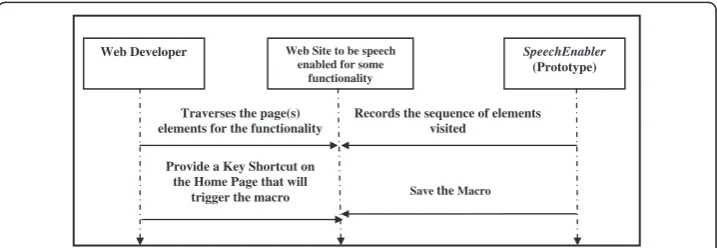
of page/form elements (hereafter called ‘the active nodes’) to be visited to perform a given task in the form of executable code on the server. Thus, on the website to be speech enabled for some functionality, the web author has to simply emulate the form (s) filling along the webpage(s) in the desired sequence. The SpeechEnablerrecords the active nodes with their order of traversal in the form of a macro. A key shortcut is designated on the home page of the original site to make a request for accessing the functionality by the blind users. On user request through the designated key shortcut for the task, the macro on the server is run; attaching the client side JavaScript code on the response page(s) on the fly. As a result, a logical chain is created among active nodes, which is known to both client and server. In addition, it attaches the sever side interface with the speech server, which is responsible to send the text of the form elements to the client in the form of MP3 file. A pre-fetching technique is used to minimize latency. Speech feedbacks for user key strokes during form filling is handled locally at client machine by JavaScript. The complete process has been described pictorially in Figures 1 and 2.
JavaScript has a remarkable ability of modifying a node in the document structure on the fly. On trigger of the macro as a result of user request, the process creates the response page(s) on the fly attaching a unique ID to each relevant element in the order of the traversal to perform the task. For example, if there are eight active nodes to be traversed on the first page, IDs from 101 to 108 will be assigned to them. Similarly, in the next (second) page, if there are five active nodes to be traversed, IDs from 201 to 205 will be assigned to them and so on. Fixation of IDs to the active nodes in this way
Web Developer Web Site to be speech enabled for some
functionality
SpeechEnabler (Prototype)
Traverses the page(s) elements for the functionality
Records the sequence of elements visited
Save theMacro
Provide a Key Shortcut on the Home Page that will
trigger the macro
ensures the strict ordering of traversal to perform the task and also in pre-fetching the next element to be spoken out. Assignment of IDs also helps in making the focus to an active node which is found to be the source of error during form validation.
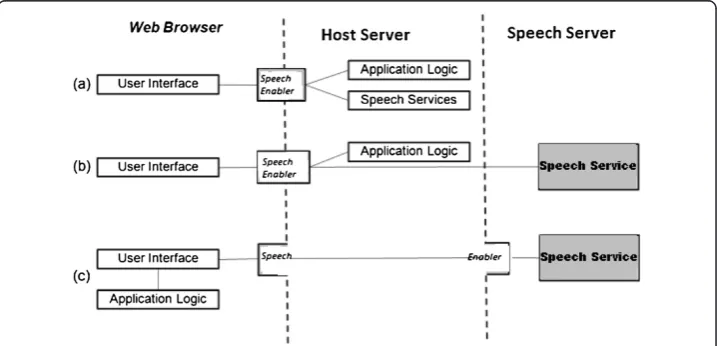
Interactions of user with the host server and speech server are shown using the con-ceptual architecture in the Figure 3. Initially, SpeechEnabler contains the application logic (order of traversal among active nodes for the functionality, saved in macro) and speech services (logic to forward the speech request to the speech server) as shown through interaction labeled (a) in the Figure. User request to use the functionality is sent using the designated key shortcut on the homepage. As a result, the relevant
macro of the SpeechEnabler is run.SpeechEnabler handles the application logic on its
own by preparing the response page on the fly and forwards the speech requests to the speech server. This fact is shown using interaction labeled (b) in the Figure. Once the page is loaded, command and control is taken by the web browser through the JavaScript code of the page for generating speech output through the speech server for the element in focus. Speech server converts the content of the speech service request forwarded by the browser into the speech MP3 and streams it to the user as part of response. This process is shown through interaction labeled (c) in the Figure.
Visually Challenged User
Web Site Speech Enabled for some
functionality
Speech Enabler (Prototype)
Makes a request using key shortcut on the home page
Triggers the Macro to generate the speech enabled page for the
functionality
Sends the response page, followed by the speech MP3 for each form
Figure 2User initiation: blind user opts for using the speech interface through a key shortcut request from the home page.
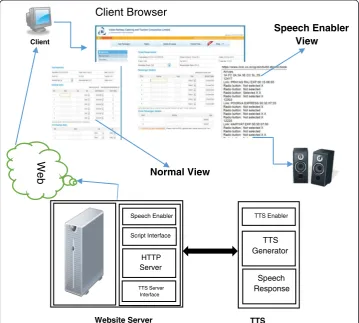
In the proposed system, the order of the page/form elements to be focused and spoken is made definite and predefined. The speech server sends the speech mp3 for each active form element. Arrived mp3 file is played for currently focused form element on the user machine using a browser plug-in player and the user is prompted to enter their details. Meanwhile, speech for the next element in the order is pre-fetched. Focus to the next element in the form is made by the down arrow key press which, at the same time, generates an event on which the pre-fetched speech for the element currently focused is played. Thus, user may control the traversal along the active page elements using up or down arrow keys. On pressing the submit button in a form, user control is directed to the relevant form on the next page which is again known priory. Component diagram of the complete System is depicted in Figure 4.
Implementation aspects
The prototype system has been implemented by us using Java programming language. It has 3-tier architecture: a client i.e.; web browser which is Java enabled. The client also includes speech plug-in for browser to play the sound. User Interface Object
consists of HTML pages with JavaScript functions and applets. Blind Users’ requests
are routed through the key shortcuts that invoke the underlying applet. The Server component includes a HTTP server, an RMI Server, an RMI registry, html pages,
HTTP Server
Script Interface Speech Enabler
Client
TTS Enabler
TTS Generator
Speech Response
TTS Server Interface
Web
Client Browser
Speech Enabler View
Normal View
Website Server TTS
Applet classes etc. Apache Tomcat Server has been used as web (HTTP) Server. RMI
Server is mainly used to implement the function of SpeechEnabler. Free Festival Text
to Speech (TTS) System has been used for producing speech. At client side, MP3 is played by Adobe Flash Player. A model application is developed using the prototype system for a functionality which has been described in the next section.
Case-study: Indian railways website
Indian Railways, being fully State controlled, is a major means of local transport in India. At present, Indian Railways provides various services viz. enquiry, online reser-vation, tour planning & management and hotel booking through its exclusive website, i.e. www.irctc.co.in. Prior to this service being operational, the travelers had to physic-ally visit the reservation centers to avail the reservation and other services. They had to wait in long queues to get the services. Now, as a convenient choice, a user can avail the service promptly, without making any physical movement, through online access to the Indian Railways Website. A large number of persons are taking advantage of this facility every day.
Unfortunately, this facility is not being availed by approximately seven million visually disabled in the country due to lack of any suitable interface available on the website for them. As compared to their sighted counterparts, they are in more need of such a facil-ity that could empower them by avoiding their physical movement to get the service at a reservation centre. To take care of security related issues at high priority and to prevent various malpractices & abuses made by agents or others, the site owners have imposed various types of restrictions for using the website or its database. This
prevents the use of third party approaches like ‘WebAnyWhere’ to access the site
through speech.
The website has several noted instances of inaccessibility where a screen reader user may get trapped during a task e.g.Book a Berth. If this task could be done by providing a separate dialogue based system accessible from the homepage of the Indian Railways website, it would be more than worth making effort for providing such an interface.
Navigation related issues
If the Indian Railways website, stated above is observed, it will be revealed that each web page is divided into many frames. To perform a task e.g. Book a Berth may not be a problem to a sighted person as s/he can always locate the link of interest to proceed forward. But, for a blind user, using a screen reader, it may take long time to locate the required link as the screen reader will speak out the links in sequential order including those belonging to general navigational structure. For example, to book a ticket, after login on the first page, focus would not automatically go to “Plan my Travel” form on the next page (Figure 5). The situation is even worst on next page. It is really difficult to reach to“List of Train”frame (Figure 6) traversing along general navigational structure and“plan my Travel”links.
Even some information pertaining to table data may not be semantically co-related since screen reader speaks out all the table headings followed by all the table data. For a big table, it becomes difficult to remember that which data belongs to what heading.
On “Ticket Reservation” page (Figure 8), speech equivalent for captcha is not
pro-vided which prevents a blind user to proceed further.
A blind user may accidently click a link or picture of an advertisement which may take him/her away from his website of interest.
Figure 5Plan my travel page of www.irctc.co.in.
Identify the key functionalities of the website
The first step is to identify the key functionalities on the Indian Railways website, which should be made accessible and usable through a speech based interface. The functionalities
may be speech enabled in a phased manner: more important first. To begin with,Book a
Berthis a heavily used functionality on the site. Thus, it a good start point to make this functionality speech enabled.
Figure 7Berth availability page of www.irctc.co.in.
Speech enabling the book a berth functionality
The taskBook a Berthis fairly complex as a user requires visiting at least Nine different web pages including two pages from a third party (i.e., Bank: to make payment). Each page has several links. Thus, after submitting a form on each page, user has to find the next page element of interest on his/her own as the control does not automatically
redirect to the next desired page element. To speech enable the task Book a Berthas
per our plan, the order of traversal of the active nodes is recorded by theSpeechEnabler in a macro on the host server. User request through the designated key shortcut
triggers the relevant macro on the server. On the response page, SpeechEnablerassigns
a unique ID to each active node in sequential order and adds the JavaScript code to establish a close chain among these active nodes. On the server side, it attaches the necessary code to interact with speech API. The response page is sent to the user along with the speech mp3 in sequential order of the active nodes.
The working of the speech enabled functionality Book a Berthmay be demonstrated
using the following scenario. Here, it is assumed that the blind user makes the use of
down arrow keys to focus the next active nodes after filling the value for the current input.
(i) Home Page (Figure9).
a. Blind user presses the designated Functionality Key shortcut forBook a Berth b. Control transfers to“Login Form”on the left frame.
c. System speaks: User Name, Text Box.
d. Blind user enters his user name in the text box currently in focus, listens speech feedback for key-presses made by him/her.
e. System speaks: Password, Text Box.
f. User enters his Password, listens his key presses in the text box currently in focus.
g. System speaks: Login, Submit Button.
h. On user click, Control transfers to linked page at“Plan My Travel”Form. (ii)Plan My Travel Page (Figure5).
a. System speaks: From, Text Box.
b. User enters the code for Source Station, listens his key presses in the text box currently in focus.
c. System speaks: To, Text Box.
d. User enters the code for Destination Station, listens his key presses in the text box currently in focus.
e. System speaks: Date, Date Table Object.
f. System speaks the Headers (Month name) from each table of months, g. User clicks the month name in the table header currently in focus. h. System speaks each date of the selected Month table sequentially. i. User clicks the desired date in the table currently in focus. j. System speaks: Ticket Type, Option Button.
k. System speaks options for Ticket Type, sequentially.
l. User clicks the desired Ticket Type in the Option Button currently in focus. m. System speaks: Quota, Option Button.
n. System speaks options for Quota, sequentially.
o. User clicks the desired Quota Type in the Option Button currently in focus. p. System speaks: Find Trains, Submit Button.
q. On user click, Control transfers to linked page at“List of Trains”Page. (iii)List of Trains Page (Figure6).
a. System speaks: List of Trains, Option Button.
b. System speaks options for Trains and berth availability.
c. User clicks the desired Train & Class in the Option Button currently in focus. d. On user click, Control transfers to the page having“Train Details”.
(iv)Train Details Page (Figure7).
a. System speaks: Availability, Table with Links.
b. System speaks the table data sequentially for date, availability and Link for
“Book.”
c. User clicks the“Book”link on the desired date currently in focus. d. Control transfers to the“Passenger Details”page
(v)Passenger Details Page (Figure8). a. System speaks: Name, Text Box.
b. User enters his name, listens his key presses in the text box currently in focus. c. System speaks: Age, Text Box.
d. User enters his Age, listens his key presses in the text box currently in focus. e. System speaks: Sex, Option Box.
f. System speaks the Options
g. User selects his Sex, currently in focus. h. System speaks: Berth Preference, Option Box. i. System speaks the Options,
j. User selects his Berth Preference, currently in focus. k. System speaks: Senior Citizen, Checkbox.
m. System speaks: Verification Code, Text Box. n. System speaks the code.
o. User enters each character of the code in the text box currently in focus after listening it.
p. System speaks: Go, Submit Button.
q. On user click, Control transfers to linked page at“Ticket Details”Page. (vi)Ticket Details Page (Figure10).
a. System speaks the details of the ticket.
b. System Speaks: Make Payment, Submit Button.
c. On user click, Control transfers to the“Make Payment”Page (vii)Make Payment Page (Figure11).
a. System speaks: Types for Payments, Option Button. b. System speaks each available payment type
c. User clicks the preferred type currently under the focus. d. System speaks: Options available, Radio Button.
e. System speaks the available options for the type of payment selected by the user.
f. User selects the preferred option under focus. Control transfers to the bank page for payment.
System assessment and performance analysis
In this paper we have outlined an alternative approach for addressing the issue re-lated to usability of the websites of public interest. There are instances of import-ant tasks like the one described by us as a case study, which are difficult to be performed by blind users using any of the existing web surfing tools. The pro-posed framework will provide workable and robust solutions to such complex
tasks. Thus, a blind user can perform the task on any available public terminal conveniently.
An assessment of the framework has been performed by us on its early prototype with 5 blind web users. All the participants were adult males and already using the
screen reader JAWS for web surfing. They were assigned the task of performing ‘book
a berth’first on the Indian Railways website using screen reader JAWS and then on the dummy speech-enabled Railways Reservation Website designed and created by us for
testing purpose using the prototype framework. General structure of this dummy
website is similar to the original one. However, JavaScript form validations are provided at individual field level. Since there was no actual provision for online payment on our
dummy site, we could test the functionality ‘Book a Berth’ up to filling Passenger
details. This was acceptable since most of our noted cases of indecision/confusion occur within this span of form filling.
Using screen reader on the Indian Railways website, none of the participants could complete the task without assistance. Four participants got stuck on the
‘Plan my Journey’ page. Only one participant could reach up to ‘List of Trains’
page where he could not locate the train details using screen reader. Participants were then asked to perform the same task on our speech-enabled dummy website for railway reservation. All the participants completed the task without difficulty. In fact, they were amazed by the simplicity and ease with they could perform this tedious task.
Overall results of this evaluation can be summarized as follows:
Usabilityis visibly enhanced as all the participants could perform the task without difficulty.
Timetaken to perform‘Book a Berth’functionality is considerably reduced as compared to screen reader JAW.
Due to chaining concept among related forms/fields and JavaScript validations on the individual field level, all the points of confusion and indecision during navigation are eliminated. Thus,Navigabilityis enhanced.
However, an exhaustive assessment of the framework with target group is still to be made that would be possible only after the System is developed completely.
Conclusions and future directions
In this paper, we highlighted the need and importance of direct speech-enabling the heavily used public websites for making their important services usable to the blind users and presented a framework for this purpose. These services may be accessed by blind users on any public terminal without having the need for any local installation. The approach is based on providing an alternate access system on the fly from one single site. The framework makes use of existing technologies like JavaScript, available speech APIs etc. Therefore, it provides a lightweight and robust solution to the accessi-bility problem. A future enhancement in the framework may be suggested where all the page elements except for the active nodes are‘locked’thus allowing blind users only to traverse along the active nodes in a definitive order.
Traditionally, an industry criterion for making investment on a project has been determined by the number of use cases offered by the aimed product. Thus, working at such a micro level may not gain due importance. Our work is primarily addressed to the responsible owners of the big websites meant for public usage that are accessed heavily. A little effort on their part could help blind users to a great extent. Thus, owners of the websites of public interest should come forward to add provisions for dedicated speech based interfaces for blind users.
All websites are not accessed equally on the Web. Therefore, it seems important that the websites which account for heavy traffic are made better accessible [19]. Public utility website owners should feel a greater sense of responsibility in providing feasible, error free and workable functionality from the point of view of blind users rather than leaving them to struggle with their screen readers. Usability, in its best form, at least for the most important functionalities, must be incorporated by the owners of these websites at the time of design itself. Other functionalities may be added up on the need basis in an incremental way.
It is hoped that the goal of achieving the benefits of internet to all including visually disabled users as desired by its original propagators can be achieved to some extent by providing the speech based dedicated functionalities on important websites of public interest.
Competing interests
The authors declare that they have no competing interests.
Authors’contributions
PV conceived of the study and its design. AKS participated in the design of the study and in drafting the diagrams. RRS reviewed and revised the whole manuscript. All authors read and approved the final manuscript.
Authors’information
Technological Institute, Lucknow in 2008 and B. E. in Computer Technology from Barkatullah University, Bhopal in 1992. His interests include Object Oriented Systems, Human Computer Interaction, and Web Technology.
Raghuraj Singh works as Professor in CSE Department, Harcourt Butler Technological Institute, Kanpur. He has about 22 Years experience in academics. He did his Ph.d. in Computer Science and Engineering from U. P. Technical University, Lucknow in 2006, M. S. in Software Systems from B.I.T.S. Pilani in 1997 and B. Tech. in Computer Science and Engineering from Kanpur University, Kanpur in 1990. He has graduated five Ph.D. students. His interests include Software Engineering, Artificial Intelligence, and Human Computer Interaction.
Avinash Kumar Singh has worked as a Research Fellow in CSE Department, Harcourt Butler Technological Institute, Kanpur. He has completed M. S. in Software Systems from BITS, Pilani in 2013 and Master in Computer Application from IGNOU, New Delhi in 2008. His interests include Brain Computer Interaction, Machine Learning, and Robotics.
Acknowledgements
The authors would like to thank the University Grant Commission, New Delhi, Uttarakhand Technical University, Dehradun and Adult Training Centre, National Institute of Visually Handicap, Dehradun for providing their support for the research work.
Received: 18 April 2012 Accepted: 29 November 2013 Published: 4 December 2013
References
1. Steinmetz R, Nahrstedt K (2004) Multimedia applications. X media Publishing Series, Springer. ISBN 3540408495, 9783540408499
2. Enabling Dimensions (2002) Usage of computers and internet by the visually disabled: issues and challenges in the Indian context, findings of a study conducted by enabling dimensions, January 2002, New Delhi. http://www. enablingdimensions.com/downloads
3. Freedom Scientific. http://www.freedomscientific.com/ access date 18.02.2012
4. Harper S, Patel N (2005) Gist summaries for visually disabled surfers. In: ASSETS’05: Proceedings of the 7th international ACM SIGCCESS conference on Computers and accessibility, New York, NY, USA, 2005. pp 90–97 5. EMACSPEAK. http://emacspeak.sourceforge.net/smithsonian/study.html
6. Zajicek M, Powel C, Reeves C (1999) Web search and orientation with brookestalk. In: Proceedings of tech. and Persons with disabilities Conf. 1999. (CSUN’99), Los Angeles
7. Mahmud J, Borodin Y, Ramakrishnan IV (2007) Csurf: A context-driven non-visual web-browser. In: Proceedings of the International Conference on the World Wide Web (WWW’07), Banff, Alberta, Canada, May 08-12, 2007 8. Raman TV (1998) Audio system for technical reading, Ph.D. Thesis. Springer. ISBN 3-540-65515-8
9. Huang A, Sundaresan N (2000) A semantic transcoding system to adapt web services for users with disabilities. In: Fourth International ACM Conference on Assistive Technologies, November 13-15, 2000, Virginia, ACM-SIGCAPH. Published by ACM
10. Ramakrishnan I, Stent A, Yang A (2004) Hearsay: enabling audio browsing on hypertext content. In: Proceedings of the 13thInternational Conference on World Wide Web (2004). ACM Press, pp 80–89
11. Media Lab Asia http://medialabasia.in/index.php/shruti-drishti
12. Screen Access For All (SAFA) http://punarbhava.in/index.php?option=com_content&view=article&id=919&Itemid=291 access date 18.02.2012
13. Aloud Browse http://www.browsealoud.com access date 18.02.2012
14. Bigham J, Prince C, AND Ladner R (2008) WebAnywhere: a screen reader on-the-go, W4A2008 -Technical, April 21–22, 2008. Co-Located with the 17th International World Wide Web Conference, Beijing, China
15. Read Speaker. http://www.readspeaker.com/readspeaker-formreader/ access date 22.09.2013
16. Verma P, Singh R, Singh A (2011) SICE: an enhanced framework for design and development of speech interfaces on client environment, 2011. Int J Comp Appl (0975–8887) 28:3
17. Internet Macros. http://www.iopus.com/imacros/ access date 22.09.2013
18. Bigham J, Ladner R (2007) Accessmonkey: a collaborative scripting framework for web users and developers, in W4A2007 technical paper May 07–08, 2007. Co-Located with the 16th International World Wide Web Conference, Banff, Canada
19. (2012) WebInsight. http://webinsight.cs.washington.edu/accessibility/ access date 18.02.2012
doi:10.1186/2192-1962-3-21