Software on Auto Billing System
Tajrin Ishrat
#1, Yasir Arafat
#21
Department of Electrical and Computer Engineering 2
Department Of Electrical and Electronic Engineering 1
Purdue University Calumet, Hammond, IN, USA. 2
International Islamic University Chittagong, Bangladesh 1
Abstract— Now-a-days auto billing system is widely used throughout the world. Its use is growing up day by day. There are different sectors which use auto billing system. Software on auto billing system of telephone exchange is the project work of this paper. It provides multi dimensional functions such as individual paper invoice for the subscriber, details paper invoice of all subscriber’s for office record, option of showing detail bill information such as charging rate, calling time, call duration etc. in printed form upon the subscriber’s query and more options. All the record will be stored on that software. So after long time anyone can check his billing status. Telephone bill was made depending on different calling rate, calling time, time duration using this software and all these had made in automatic way. We just need to give the required collected raw data. And this database would be connected with this software and an invoice will be made in automatic way. This software is user friendly & protected. It can be implemented to any kind of billing system after simple modification.
Index Term— Auto Billing, Visual basic code, Form, Calling Charge, Information Database, Raw data, Arrear Bill,
I. INTRODUCTION
Auto billing system is now the demand of time in every sector of our regular life. Out of these different sectors this paper mainly focused on telephone billing system. In telephony billing involves gathering data for customer use and the provision of features, calculating costs & invoicing for payment. Normally, telecommunication service providers will also need to focus their attention on understanding customer‟s needs & providing higher-quality services. So, providing bill information accurately to subscriber is a big challenge of service provider. Using this software all subscribers will be able to get their monthly bill information by a paper invoice in each month to pay their bill & the subscribers will also be informed their arrear bill if they have. The programming language used to prepare this software was VISUAL BASIC, as it is very easy to manipulate the desired work using this language. The raw data of Bangladesh Telecommunication Company Limited (BTCL) is used to prepare this software. The major functions of this software are preparing monthly paper invoice for the subscriber, information about arrear bill & detailed call record to show upon the subscribers query.
A.
A. Background:
In Bangladesh, Bangladesh Telephone &
Telegraphic Board (BTTB), now Bangladesh
Telecommunications Company Limited (BTCL) provides all the subscribers‟ information, billing record and bill calculation
process. The Bangladesh Telegraph and Telephone (T&T)
Department was created under the Ministry of Posts & Telecommunications after the independence of Bangladesh in 1971 to run the telecommunication services on a commercial basis. In 1976, Bangladesh T&T Department was converted into a corporate body.
B. In pursuance of an ordinance promulgated by the
president on 24 February 1979, the department was restructured into Bangladesh Telephone and Telegraph Board (BTTB) with a mandate to provide basic telecommunication services throughout the country.
C. Today 'BTTB' provides land-line telephone services in
the urban areas, domestic long distance and international services. In 2004, BTTB forayed in to the mobile telephony market of Bangladesh by launching a separate company called Teletalk.
D. BTTB provides dial-up Internet access in all 64
districts of the country, making it the most-accessible Internet service provider in the country. As of June 2008 its total dial-up subscriber is 28659. It also handles the .bd domain. BTTB transformed to a Govt. Public Limited Company with a new
name Bangladesh Telecommunications Company
Limited BTCL on 1 July 2008.
E. All the procedures were provided by BTTB in Dhaka,
all over the Bangladesh. That‟s why we were facing the necessity to make software for Chittagong region only. And we also tried to add new features in our software. So, we had to try to develop software on T&T charging system in Chittagong BTTB, commercial city of Bangladesh. With our software all subscribers will be get their information, monthly charging information and arrear bill record and also get billing record by a paper invoice in each month. For developing this software we used the raw data and all information of Agra-bad Exchange in Chittagong. Each exchange can be used this software easily and can be made a monthly bill invoice to provide the customers.
And this software could be usable in any Private Automatic Branch Exchange (PABX). So, we tried for our university PABX Exchange. And we also found that in our CUET PABX Exchange, there had nothing to provide any document or invoice in our campus subscriber. So we had to interest develop a software on PABX Exchange for made a paper invoice to send the subscriber and implemented it on the PABX Exchange, Chittagong University of Engineering and Technology (CUET). With the BTTB software we also developed software on PABX exchange in CUET. In our work we want to inform the subscriber about their charging bill of a month, their billing information, arrear bill record. With this software we also can transmit a bill invoice to an individual subscriber as bill document. For this purposes we use the PABX raw data and PABX subscribers‟ information. We also implemented this software in PABX Exchange and tried to evaluate with the existing one with the help of our most respective supervisor Professor Md. Rafiqul Alam, Dean &
Head, Electrical & Electronics Department, CUET.
A.
Objectives:
The main objective of this project work is to prepare paper invoice for the subscriber. For this work it is necessary to collect the detailed information of the subscriber to send the invoice to the subscriber‟s address. Another important part of this work is to collect the rate of call depending on area zone, calling time and call duration for calculating the bill. To show the arrear bill in the invoice paper is also of equal importance so that the subscribers could be able to pay their arrear bill.
B.
Importance:
It is almost impossible to think our daily life without auto billing system. Everyone has to pay Electric bill, Gas bill, Telephone bill, Mobile bill etc. which becomes easy and fast by the grace of technology. Software is the support of technology to do this work efficiently. So software on auto billing system has great importance in every sector. After some modification this software can be used in the sector where auto billing system is implemented. And it will be accessible by the subscribers also if this software will be connected with server. In this case it will be easy for customer to check the billing information from any place. This will be reliable also for them.
II. METHODOLOGY OF SOFTWARE
A billing system is composed of a series of independent applications that, when run together, are referred to as the billing system. Software development is the important part in the billing system.
Billing system collect data, rate and calculate charges and then prepare invoice for the subscriber. After a call is made, following steps are going on:
CDR:
This is used to record the details of the call. Usual information on a Call Data Recording (CDR) includes start time of call, end time of call, duration of call, originating number and terminating number. The CDR is then stored until time of billing.
Storage device:
CDR transfers the data to the storage device. And we are getting the raw data from that storage device such as disks, CD.
Guiding:
This matches calls to customer calling plans. The application uses the start & end number& the duration & time of call to decide what the charge should be, based on the calling plans on the customer‟s record.
Rating application:
This program applies the rate for the individual guided calls. Rating gives the call a value to be charge at the time of billing.
Billing:
This is usually performed once a month .This job collects all of the rated call that have been stored over the past 30 days. The program adds any promotions and discounts that are associated with the customer account. For example, if customers have called over a certain number of minutes, they might get a volume discount. In addition, any extra charge and credits are applied.
Invoicing:
When the billing job is complete, a file is created that includes all of the customer‟s information. This file is sent to a print house to be converted to paper invoices. These invoices are then stuffed into envelopes, along with specific inserts targeted to the customer.
III. DESIGN AND FLOWCHART
In the working method we are following some
steps. At first we had to get some idea and to take
decision. After that we were going to develop a
design of flowchart for software.
Test Impleme
ntation
Develop Software Design & Flow Chart
Idea Decision
Developing software was done after a long time using Visual Basic Language. At last we were making a test by implementing this software in practical working field.
IV. PROCESS OF WORK
A. Raw Data:
We found the reader raw data is in the notepad form.
The raw data from telephone exchange is prerequisite for this software. This data is given in the Notepad form. So at first, it should be converted into Microsoft Access database to link the data with the software.
B. Design the Forms:
We designed the some forms in the
format which we want to show the customers. According this condition we used text, combo, command, frame, level etc buttons.
Table I
Raw Data from Telephone Exchange in notepad
Table II
Converted Raw Data to Microsoft Access
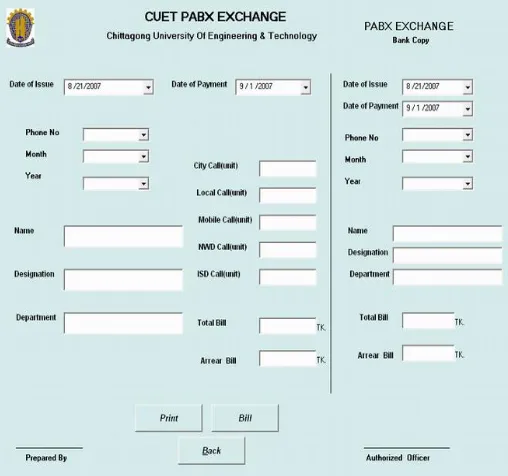
This form is also the representation of output for coding. In this calculate button is working as a command.
C. Access The Data with Visual Basic:
As we declared the database as globally for all the forms, we connected the data in the module & also connected by code in the form load. For this we defined various variables.
D. Selection of Data from table:
We selected the data from different tables in the various database by necessary coding in the command button in the code window. This taken data are showed in the text or combo button etc.
E. Area Code Table:
There are considering of different region in the country and out of country. Depending on the distance region are divided and recognize them according to one specific code, called area code. Depending on the area code charge will be consider in different. So we had to consider the area code table.
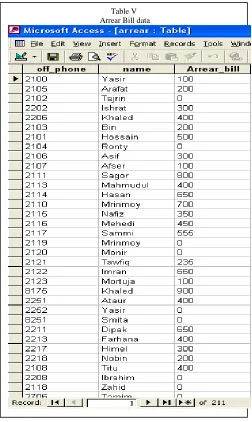
F. Subscriber Arrear Bill Information
In this data table subscriber arrear bill will be updated. When they have bill, it will be included with current
Table III Subscriber‟s Database
Fig. 3. Form for Invoice
bill. If they does not have any arrear bill, it will be shown no arrear bill. So before making the final bill form we have to check this data of arrear bill.
G. Calculation and Format:
Whole calculations were calculated in the code window. We also defined the format in which show in the form.
V. FLOWCHART AND WORKS
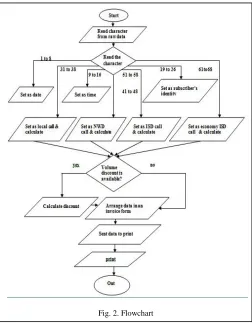
A. Flow chart of Software:
In this flowchart briefly the overall work is given. In our software at first we need all subscriber information and
subscriber phone number. Depending on that we were make charging and billing information.
B. Flow chart for Information
This flow described how all the subscriber information would be added or deleted or any modifications (like save, first or last, next record etc.).
Fig. IV. Flow chart on software
Fig. 5. Flow chart for recording data Table V
C. Flow Chart for Recording data
This flowchart gives the instruction for getting added data record, deleted data record, save etc. depending on the condition.
D. Flow chart for searching data
If anyone wants to search record depending on subscriber number or month or year, this following flow chart will be use for that.
E. Flow chart for charging and billing
Previously all flow chart described how data or information would be collected. After that we had to charge and calculate the bill for each month with arrear bill also.
VI. PROGRAM CODE & SOFTWARE DEVELOPMENT
The Subscribers detailed information is another important item for this software so that individual paper invoice can be made. Calculation of bill depends upon the nature of call (Local call, National Wide (NWD) call or International Call (ISD) call).So, it is necessary to know the call charge. After that, the duration of call should be concerned from the raw data. Using this call duration & call charge, bill can be calculated for each call. Peak hour & off peak hour should be considered at the time of bill calculation as the rate of call differs in these periods. In this way after calculating all the call charges for a month, a monthly bill is prepared for the subscribers showing the net amount payable. The call duration is shown as unit for every types of call. So the subscribers could easily be informed, how many unit call they made.
To calculate the monthly bill from the raw data, the software should be able to detect day, month & year from the date column. To perform this work, the code used in this software is shown below:
Fig. 6. Flow Chart for Recording
Fig. 7. Flowchart on searching data
Private Sub Command7_Click()
Dim rst1 As New ADODB.Recordset Dim rst2 As New ADODB.Recordset month_value = Trim(Combo2.ListIndex + 1) year_value = Trim(Combo3.ListIndex + 2000)
If month_value = 2 Then If year_value Mod 4 = 0 Then
rst1.Open "select ds,s_date,u_time, code,s_time from wesun where ds ='" + Combo1.Text + "' and s_date>=#" + month_value + "/1/" + year_value + "# and s_date<=#" + month_value + "/29/" + year_value + "#", con1,
adOpenDynamic, adLockOptimistic Else
rst1.Open "select ds,s_date,u_time, code,s_time from wesun where ds ='" + Combo1.Text + "' and s_date>=#" +
month_value + "/1/" + year_value + "# and s_date<=#" + month_value + "/28/" + year_value + "#", con1,
adOpenDynamic, adLockOptimistic End If
ElseIf month_value = 4 Or month_value = 6 Or month_value = 9 Or month_value = 11 Then
rst1.Open "select ds,s_date, u_time, code,s_time from wesun where ds ='" + Combo1.Text + "' and s_date>=#" + month_value + "/1/" + year_value + "# and s_date<=#" + month_value + "/30/" + year_value + "#", con1,
adOpenDynamic, adLockOptimistic
Else: rst1.Open "select ds,s_date, u_time, code,s_time from wesun where ds ='" + Combo1.Text + "' and s_date>=#" + month_value + "/1/" + year_value + "# and s_date<=#" + month_value + "/31/" + year_value + "#", con1, adOpenDynamic, adLockOptimistic
………..
Again to calculate the time duration of each call the following codes are used:
Do While Not rst1.EOF
date_value = CDate(rst1.Fields("u_time"))
minute_value = Minute(date_value) hour_value = Hour(date_value)
If hour_value = 12 Then hour_value = 0
call_duration = hour_value * 60 + minute_value + 1
dat_value = CDate(rst1.Fields("s_time")) hor_value = Hour(dat_value)
VII. RESULTS
A. Invoice of Telephone Bill
Telephone Bill Invoice provides the customer information and monthly telephone bill with arrear
bill included. Here all types of calling information are included also.
In
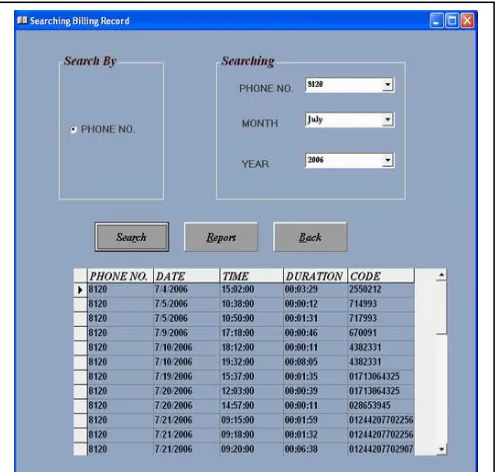
B. Data Search
In that software any customer information could be found by searching method. And all previous data are also stored here.
Fig. 9. Sample Telephone Bill
C. Call Record in Report Form:
In this report all the call information will be shown as word form. So, any one can see all call records in monthly or yearly also as all records will be stored in this form.
D.Detailed Call Record of Individual Subscriber
Each subscriber‟s all kind of call, calling time and time duration, call date are recorded in that part. So any one can check own number for details information.
E. Arrear Bill Included
In the monthly bill will be provided to subscriber as paper invoice. But before that we checked there has any due for previous month from previous database. If there has any amount this will be added with the present month.
Fig. 13. Arrear Bill Calculation
VIII. COMPARATIVE EVOLUTION
In our project we developed a software titled as “Software Development of Telephone Bill on BTTB & PABX
Fig. 12. Detailed call Record of Individual subscriber
Exchange ” for prepare a monthly bill & a paper invoice to a subscriber. We compared software output data with existing software output data. Maximum time we found similar data between them. But we found a small difference between software output data and existing software output data in some of the subscribers.
For Example 1: Month of the JULY, 2006.
Our Software Output Existing Software Output
Phone No. Total Bill Phone No. Total Bill
2602 504.00 2602 811.50
We tried to find out the factors for which the difference occurred. The factors are given below:
1. We work with the calling time from the raw data of
exchange. This time is divided into two time : 1. Peak time
2. Off-peak time
2. When a call is made in the peak time but call is end in
the off-time. In this time some calculation will be mismatch.
3. We take the data of call duration of raw data of
exchange. Our software calculation may be different with the existing software.
4. Software defines the different type of call depending
on district code. So there will be some different from existing one.
5. We got one error in existing one. It was not
calculated hour range calling duration, which was the big different with our software.
Our software output is perfectly right, as we calculate the output manually. In addition of current month telephone bill any subscriber can also get information of the arrear bill for individual subscriber for every month, which does not have in the existing system.
6.
IX. CONCLUSIONS
Finally it can be said that by using this software preparing the monthly bill as paper invoice is more easy and error free. This software is user friendly & protected which provide multidimensional functions. The demand of auto billing system can be fulfilled with the help of this software.
ACKNOWLEDGMENT
Praise to Almighty, the cherisher & sustainers of the world, for giving us patience, ability, energy & knowledge for completion of this tedious work.
The authors wishes to express their sincere to supervisor
Professor Mohammad Rafiqul Alam, Dean & Head,
Department of Electrical & Electronic Engineering,
Chittagong University of Engineering & Technology (CUET), Chittagong for his guidance, instructions & informative suggestions, helpful assistance, patience & encouragement throughout the whole semester which made us to the progress of this project.
We rejoice to extend our gratitude to Mohammad
Rubiyat Tanvir Hasan, Assistant Professor, Dept. of EEE,
CUET for his helpful guidelines.
Thanks to Bikrom Kumar Biswas, Asst. Engg. of
Agrabad BTTB Exchange and Md. Parvez & Salauddin,
Programmer, Md. Badal , operator of PABX Exchange,
CUET for their valuable help by giving time and technical wizardry.
Finally, we are grateful to all of our friends, seniors, juniors, who have always been part of our life. We like to convey our deepest gratitude to our parents for their unconditional love and indulgence at the moment of triumph and turmoil. Continuous inspiration and understanding of these individuals enabled us to cross the hurdles of our life. Our beliefs and values have been shaped in large part by their influence.
REFERENCES
[1] Bangladesh Telecommunication Company Limited,Bangladesh . [2] Bangladesh Telegraph and Telephone (T&T) , Agrabad, Ctg.. BD. [3] http://www.bttb.net.
[4] http://www.iec.org (Web ProForum Tutorials ).
[5] Curtis L. Smith, Michael C. Amundsen, ” Database Programming with VISUAL BASIC 6 ”,First Edition,Techmedia,1999Authors .
[6] Robbed Phayes,” VISUAL BASIC 6 unleashed (complete solution)”, Tech media.
[7] http://www.mercurycorp.com/news.html. [8] http://visualbasic.freetutes.com/.
[9] Mahbubur Rahman ,”Database & Multimedia Programming „VISUAL BASIC‟ 6” ,Volume 1,8th
edition,Systech Publications,2005.