Market Data / Supplier Selection /
Event Presentations /
Best Practice
/
Template Files / Trends & Innovation
SAMPLE: Effective Web
Design
Best Practice Guide
Sample only, please download the full report from:
SAMPLE:
Effective Web
Design
Econsultancy Lemon Studios 2nd Floor 85 Clerkenwell Road London EC1R 5AR www.econsultancy.com [email protected] Telephone:+44 (0) 20 7681 4052 All rights reserved. No part of this publication may be
reproduced or transmitted in any form or by any means, electronic or mechanical, including photocopy, recording or any information storage and retrieval system, without prior permission in writing from the publisher. Copyright © Econsultancy.com Ltd 2008 Published June 2007
Contents
About Econsultancy ... 1
1.
Introduction – why a best practice guide on website
design? ... 2
1.1.
Who is this guide for? ... 2
1.2.
Why a best practice guide on website design? ... 3
1.3.
How is this guide structured? ... 4
1.3.1.
Features of this guide ... 1
PART 1 Strategy and planning ... 2
2.
Section 2 Internet marketing strategy and planning
process ... 3
2.1.
Skip to content ... 3
2.2.
Aligning website design with internet marketing strategy or
campaign objectives ... 4
2.3.
Defining the Opportunity. ... 6
2.3.1.
Step 1. Set E-marketing Objectives: ... 6
2.3.2.
Step 1a. Evaluate E-marketing Performance ... 11
2.3.3.
Step 1b. Assess Online Marketplace: ...19
2.4.
Internet marketing strategy definition ... 23
2.4.1.
Step 2. Define E-marketing Strategy ... 23
2.4.2.
Define customer value proposition (CVP)... 26
2.4.3.
Define E-communications strategy ... 30
2.5.
Delivering Results Online. ... 33
2.5.1.
Step 3a. Implement customer experience ... 33
2.5.2.
Stage 3b. Manage E-communications: ... 36
2.5.3.
Step 4. Profile, Personalise, measure and improve
(E-permission marketing, legal compliance and E-CRM) ... 37
2.5.4.
E-CRM and E-permission marketing ...41
2.6.
Legal requirements ... 43
PART 2 User-centred web design & usability ... 44
3.
Section 3 User-centred web design process ... 45
3.1.
Introduction ... 45
3.2.
User or audience types ... 50
Effective Web Design
Best Practice Guide
All rights reserved. No part of this publication may be reproduced or transmitted in any form or by any means, electronic or mechanical, including photocopy, recording or any information storage
3.3.
Different online behaviour types ... 58
4.
Section 4. Web usability... 63
4.1.1.
Expert reviews. ... 69
4.1.2.
Questionnaires or survey ... 70
4.1.3.
Interviews ... 71
4.1.4.
Usability testing... 72
4.1.5.
Eyetracking ... 74
4.1.6.
Focus Groups ... 76
5.
Section 5. Visual Design ... 77
5.1.
Introduction ... 77
5.2.
Layout or page design ... 80
5.2.1.
Wireframes ... 84
5.2.2.
Page template designs ... 87
5.3.
Site personality and mood boards ... 90
5.4.
Colour ... 92
5.5.
Typography ... 94
5.6.
Specific visual design issues ... 96
5.6.1.
Whither white space? ... 96
5.6.2.
Web 2.0 Design approaches ... 97
PART 3 Web accessibility and web standards ... 100
6.
Section 6. Web accessibility & Standards ... 101
6.1.
Web accessibility – introduction ... 101
6.2.
Web accessibility features ... 106
6.2.1.
Accessibility help page or statement... 106
6.2.2.
Persistent, site-wide accessibility options ... 108
6.2.3.
Accessibility code implementation ... 111
6.3.
Supporting different web access platforms ... 114
6.3.1.
Screen resolution and dimension support ... 114
6.3.2.
Liquid layouts and adaptive layouts ... 116
6.3.3.
Web browser support ... 118
6.4.
Web standards ... 119
6.4.1.
Presentation support using Cascading Style Sheets (CSS)
support ... 121
6.4.2.
Scripting support using ECMAscript and Javascript ... 123
6.4.3.
Interactivity support through plug-ins (Flash and PDFs) .. 124
6.4.4.
Microformats ... 124
PART 4 Information architecture ... 127
7.
Section 7. Information architecture ... 128
7.1.
Techniques for creating an information architecture... 131
7.2.
Information seeking behaviour analysis ... 131
7.3.
Content analysis and document metadata ... 133
7.4.
Card-sorting ... 134
7.5.
Controlled vocabularies ... 136
7.6.
Blueprints. ... 140
7.7.
URL strategies ... 141
8.
Section 8. Findability Best Practice Principles ... 143
8.1.
Introducing Findability ... 143
8.1.1.
Different marketing-led approaches to navigation ...145
8.2.
Navigation systems ...146
8.2.1.
Hyperlinking best practice ... 146
8.2.2.
Main navigation best practice principles ... 151
8.2.3.
Secondary (local) navigation ...154
8.2.4.
Footer navigation ...156
8.2.5.
Sitemap and site index best practice ... 157
8.3.
On-site search engine Best Practice ... 159
8.3.1.
Assessing on-site search effectiveness – search analytics .. 164
9.
Section 9. Search Engine Optimisation (SEO) Best
Practice Principles ... 166
9.1.
On-page optimisation ... 168
9.2.
Internal link optimisation ... 170
PART 5 Persuasive Design & Copywriting ... 173
10.
Section 10. Persuasive design & copywriting ... 175
10.1.
Home page persuasion ... 177
10.2.
Run-of-site persuasion in page templates ... 180
10.2.1.
Page Headers ... 180
10.2.2.
Page Footers ... 182
10.2.3.
Navigation ... 182
10.2.4.
Other standard run-of-site features including
call-to-action prompts ... 183
10.3.
Power pages ... 186
10.3.1.
About Us ... 186
Effective Web Design
Best Practice Guide
All rights reserved. No part of this publication may be reproduced or transmitted in any form or by any means, electronic or mechanical, including photocopy, recording or any information storage
10.3.3.
Search pages ...187
10.3.4.
Site map ... 189
10.3.5.
FAQ... 190
10.4.
Category page persuasion ... 192
10.4.1.
Online retail merchandising ... 193
10.5.
Product page persuasion ...196
10.6.
Landing page persuasion ... 197
10.7.
Basket and checkout page persuasion ...199
10.8.
Forms-based persuasion ... 204
10.9.
Copywriting persuasion ... 206
10.9.1.
Engaging with hyperlinks ... 211
11.
Section 11. Using web analytics to improve website
effectiveness ... 216
11.1.
Selecting the right web analytics tool ... 218
11.1.1.
Types of web analytics tool ... 218
11.2.
Configuration of web analytics tools and tagging... 219
11.2.1.
Design for analysis (DFA) ... 220
11.2.2.
Testing alternative website designs ... 220
11.2.3.
A/B Testing ... 221
11.2.4.
Mutivariate testing ... 223
11.3.
Key questions to ask and the web analytics reports which
answer them ... 225
11.3.1.
Visitor volume trends... 225
11.3.2.
Visitor engagement ... 226
11.3.3.
Referrer mix, volume and quality ... 230
11.3.4.
Search engine marketing analysis... 231
11.3.5.
Visitor segmentation ... 231
11.3.6.
Page popularity ... 233
11.3.7.
Conversion funnels ... 236
11.3.8.
Navigation: clickstreams and forward and reverse path
analysis ... 236
11.3.9.
Search effectiveness ... 238
11.4.
Web analytics won‟t answer all your questions ... 239
PART 6 Implementation and management ... 240
12.
Section 12.Technical site requirements ... 241
12.1.
Content management systems ... 241
12.2.
E-CRM systems ... 243
13.
Section 13. The Law – is your site legally compliant? 245
14.
Section 14. Selecting agencies to support web design . 251
14.1.
Web design agency selection checklist ... 252
14.2.
Agreeing the contract ... 254
Appendix 1. Web design resources ... 255
Appendix 2. Glossary ... 257
About the lead author ... 269
SAMPLE: Effective Web Design Page 1
All rights reserved. No part of this publication may be reproduced or transmitted in any form or by any means, electronic or mechanical, including photocopy, recording or any information storage and retrieval system, without prior permission in writing from the publisher. Copyright © Econsultancy.com Ltd 2008
1.
Introduction – why a best practice guide
on website design?
There are many books and blogs on different aspects of web design, but these sources date quickly, typically refer to only one aspect of web design and it can take a lot of time to find the quality guidance you need.
Our aim in creating this guide is to provide a regularly updated, single point of reference covering best practice approaches for all the topics that anyone involved with website design needs to do an effective job.
These key topics needed for an effective web design include:
Accessibility
User-centred design and usability
Internet marketing planning and improvement process
Information architecture and findability
Search engine optimisation (SEO)
Web standards
Persuasion to deliver business results
Web analytics
Legal requirements
We don‟t include guidance on technical aspects of site design coding using web standards like XHTML, CSS and Javascript although we do cover the importance of agreeing web standards support at the start of a design project.
1.1.
Who is this guide for?
We have created this guide for everyone who is involved with commissioning, designing and managing websites.
It incorporates our collective experience of designing results-based websites so that you can avoid the time and expense of developing sub-optimal designs and features that fail to deliver the best results.
If you are commissioning a website, this guide will give you:
Templates for developing a brief for a new website
Full details on all the business requirements a website must deliver
What to look for in an agency when selecting the core competencies such as visual design,
usability, accessibility, information architecture, persuasion and search engine optimisation. If you are involved in designing a website, this guide will give you:
Best practice guidelines for all key aspects of website design including: visual design,
usability, accessibility, information architecture, persuasion and search engine optimisation. Benchmark your agency‟s capabilities against best practice.
A detailed reference for implementation of practical features of websites including home page design, page template layout, navigation, on-site search, search engine optimisation.
Inspiration on different design approaches for a range of different sites and features.
A review of your capabilities against what businesses are looking for, so helping you pitch
more effectively and design better quality sites If you are managing a website, this guide will give you:
A framework to benchmark your site design against competitors.
Practical tips on improvements for different aspects of your site like the home page, page
templates, navigation and search functionality.
Best practice in persuasion through refining your key marketing messages and how they
are communicated.
In this first edition of the guide, we focus on commercial websites, although we have included examples of not-for-profit and public-sector sites. Many of the best practice principles we describe are relevant to all websites.
The examples in this guide acknowledge that radically different design approaches are often required by different types of site. For example a transactional e-commerce site (e.g. www.tesco.com), will be quite different in design from a B2B services-oriented relationship-building website (e.g. www.accenture.com) as will a Brand building site (e.g. www.heinz.com) and finally a Portal or media site (e.g. www.bbc.co.uk). We use examples from all of these types of site.
1.2.
Why a best practice guide on website design?
How can we make best practice recommendations for website design when the aims of different sites are so diverse? Surely best practice varies for different business types, different creative styles, and different technologies? Then there are the different types of site, from blogs to complex transactional e-commerce sites and campaign sites from simple landing pages to rich, Flash-based brand experiences.
But all sites share certain features if they are to be successful:
They must engage their audiences with relevant content and interactive experiences;
They must be easy to use; they must be accessible through different devices and to users with visual impairment or other disabilities including motor control, learning difficulties and deaf users;
They must ultimately deliver returns on the time and money their owners have invested in them;
In a nutshell, they must deliver a compelling experience for their visitors.
That‟s why nearly everyone involved in web design is passionate about it – it‟s the challenge of balancing all of these factors which are constantly evolving due to changes in technologies, creative design styles and competition.
In this best practice report we will acknowledge these differences but explain how best practice should be followed for different sites. It will allow you to benchmark yourself against the common web design principles, patterns and processes used by some of the best practitioners in the digital industry.
Sample only, please download the full report from:
SAMPLE: Effective Web Design Page 3
All rights reserved. No part of this publication may be reproduced or transmitted in any form or by any means, electronic or mechanical, including photocopy, recording or any information storage and retrieval system, without prior permission in writing from the publisher. Copyright © Econsultancy.com Ltd 2008
1.3.
How is this guide structured?
This guide is designed so you can apply it both to creating new sites and improving existing sites through re-designs and “quick-win” enhancements.
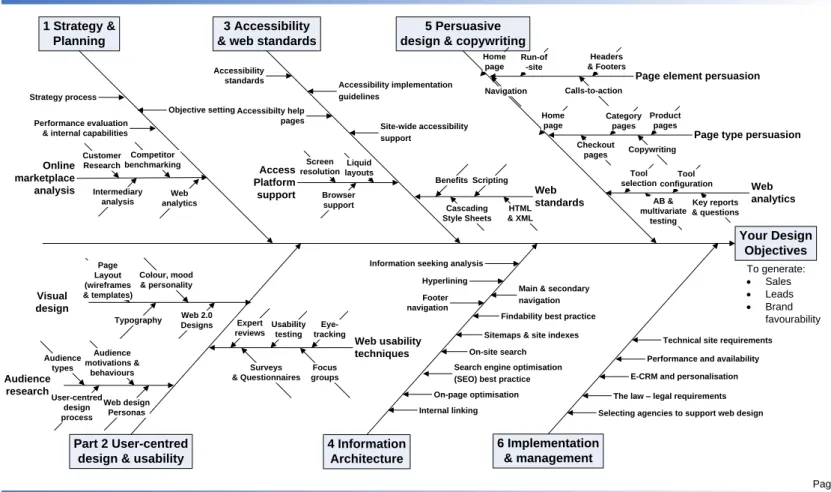
We have structured the guide around all the design aspects necessary to create a balanced design. There are 14 key aspects of web design implementation which need to be managed for a successful project. These are broken down into six parts which we have made available as separate sections for ease of reference. We have summarised the success factors in Figure 1 Success map for effective web design.
Here is an overview, a flavour of what we cover in the different sections:
PART 1. Strategy and Planning
Section 2. Internet marketing planning and improvement process.
To create a website which delivers results for its owners is not just about visual design, it‟s not just about usability or accessibility or indeed about the development tools selected.
An effective site requires an in-depth understanding of marketplace within which the website operates. In particular, the context for an effective customer experience should be assessed as part of customer experience management. To understand the marketplace and to tap into it requires a sound Internet marketing plan.
In this section, we outline a structured process for developing an Internet marketing strategy that aligns with an organisations online and offline marketplaces. We also give examples of how strategic goals translate into site designs.
PART 2. User-centred design and usability
Section 3. User-centred web design process.
User-centred design (UCD) is an established, proven approach to design or range of products. It has been embraced by web design and usability agencies as a sound approach to delivering customer-centric websites that deliver value for a business. It should be a key business requirement to appoint an agency which has a sound UCD process and the right skill set and experience to execute it.
In this section we introduce the key techniques of UCD such as audience analysis, persona development, usability and information architecture. We then cover these in more detail later in the document.
Section 4. Web usability.
The reason why usability is critical to website design is obvious. Jakob Nielsen expresses it well in his “Usability 101” when he says:
“On the Web, usability is a necessary condition for survival. If a website is difficult to use, people leave. If the homepage fails to clearly state what a company offers and what users can do on the site, people leave. If users get lost on a website, they leave. If a website's information is hard to read or doesn't answer users' key questions, they leave. Note a pattern here?”
In this section, we examine the rationale for usability and best approaches for different usability techniques including expert reviews, questionnaires, interviews, usability testing and focus groups.
PART 3. Accessibility and Web standards
Section 5. Web accessibility.
"For me being online is everything. It's my hi-fi, it's my source of income, it's my supermarket, it's my telephone. It's my way in.”
- Lynn Holdsworth, screen reader user, Web Developer and Programmer. (Source: RNIB) This quote shows the importance of web accessibility to a visually impaired user of a website who uses a screen-reader which reads out the navigation options and content on a website. In this section, we review the benefits of implementing accessibility and web standards, different requirements for accessibility and summarise the places you can go to find the latest standards and tools for assessing the accessibility of your sites
PART 4. Information Architecture
Section 6. Information architecture.
“It is important to recognise that every information system, be it a book or an intranet, has an information architecture. `Well developed' is the key here, as most sites don't have a planned information architecture at all. They are analogous to buildings that weren't architected in advance. Design decisions reflect the personal biases of designers, the space doesn't scale over time, technologies drive the design and not the other way around."
Rosenfeld and Morville (2002)
Information architecture tends to play the role of the ugly stepsister at the Web Design Ball – it‟s not sexy for many tastes. But just how important is information architecture (IA)? Where does it come on the list of priorities for a new site design? Is it more important or less
important than each of usability, accessibility and persuasion? Most would argue that it is less important, but we believe the value of information architecture is under-estimated.
As the quote suggests, without a sound foundation provided by an effective information architecture a site is likely to be less usable, accessible and less persuasive.
In this section, we review structured techniques for creating an information architecture including information seeking behaviour analysis; content analysis and document metadata, card-sorting and controlled vocabularies.
Section 7. Visual Design.
With such a focus on usability, accessibility and persuasion in results-led website design, the role of the visuals within a site can be underestimated compared to the more functional aspects of website design.
But the visual design certainly does have a major influence on the experience as perceived by visitors and designers certainly spend a lot of intention on the visual design.
In this section, we explore different aspects of getting the visuals right including site personality, use of colour, images, typography and page templates and layout.
SAMPLE: Effective Web Design Page 5
All rights reserved. No part of this publication may be reproduced or transmitted in any form or by any means, electronic or mechanical, including photocopy, recording or any information storage and retrieval system, without prior permission in writing from the publisher. Copyright © Econsultancy.com Ltd 2008
Many web users visiting many sites are directed information seekers who are looking for something specific – a particular product or particular content. And they want to find it fast. So a key requirement of all sites is to make it easy for the site visitor to find the content – to quickly connect them with what they are looking for.
Usability and accessibility don‟t quite emphasise the importance of this, so we need a new „ility‟. Findability. We like this word – it emphasises the importance of focusing on navigation, on-site search and document metadata within a design project.
In this section of the guide, we will take an in-depth look at maximising findability on your site through redesigning or refining your navigation and search functions.
Section 9. Search Engine Optimisation (SEO) Best Practice Principles
Search engine optimisation (SEO) should be built into your plan for a new or refined site from the outset. Amongst designers, there is a debate about how proactive they should be in
achieving SEO. Some believe that SEO occurs naturally with a good quality of standards based coding. We disagree.
Our view is that for commercial sites, it is essential to be proactive to gain the best results in a competitive market. Good positions won‟t happen by accident. SEO should be at the core of all site developments.
In this section, we introduce the key practical elements of SEO for designers which determine a website‟s ranking position.
PART 5. Persuasive Design, copywriting and web analytics
Section 10. Persuasive design & copywriting.
Persuasive design is perhaps talked about less than the other techniques we have covered in this guide such as usability and accessibility. But in our view, it is equally important. Sites which are reviewed, built and monitored through a persuasion approach will likely give better results than those where usability or accessibility is to the fore.
In this section, we will illustrate Persuasive Design techniques for different page types and SEO Best Practice by examining Econsultancy.com, so showing some of the „secrets of our success‟. We also review other sites.
Section 11. Using web analytics to improve website design effectiveness
Although “web analytics” is the formal name for the process and tools used to analyse and improve the marketing effectiveness of websites, many marketers and designers, know it simply as „website statistics‟. Many initially view these statistics on a par with paint drying after seeing the 100 pages of monthly site statistics provided by IT, but if so, they are probably in the wrong job.
Consequently, in many companies where the website is not core to business activity, these site stats are ignored. But successful e-marketers make the effort to understand the different reports and then ask the right questions to understand cause, effect and remedy or opportunity.
In this section we introduce different types of web analytics tools and highlight the most useful reports to review in your web analytics system to improve website results.
PART 6. Implementation and management
A site will fail if it fails to deliver satisfactory experiences for its visitors. This is not only down to the factors we have reviewed such as content, usability and accessibility, but also
dependent on the infrastructure including hosting, servers, content management systems. Speed and availability are still important in the broadband world.
In this section, we give pointers on how you can assess and improve the performance of your website.
Section 13. The Law – is your site legally compliant?
Many laws have been enacted in many countries to control communications and
e-commerce and to protect the consumer. Website owners are subject to these and it is typically directors within a company who are liable, so it is important to check your site is compliant. Reputational damage may be greater than the financial consequences of breaking the law. These laws are constantly being refined and new test cases in the courts help clarify the compliance required.
While we can‟t hope to take you through all the laws, and aren‟t qualified to do so – you should consult a lawyer. In this section, we can explain the main types of laws to which the owners of websites are subject and point you in the right direction for detailed, up-to-date guidance.
Section 14. Selecting agencies to support web design.
We have seen that results-led web design is dependent on many success factors. This makes finding the best agencies for you is challenging.
In this section, we look at some of the types of agencies and issues to consider and we give a briefing checklist of issues to consider.
Sample only, please download the full report from:
SAMPLE: Effective Web Design Page 1
All rights reserved. No part of this publication may be reproduced or transmitted in any form or by any means, electronic or mechanical, including photocopy, recording or any information storage
Figure 1
- Success map for effective web design
Page 1
Effective web design success map
Version 1.0 Author: Dave Chaffey © E-consultancy 2007 Your Design Objectives To generate: · Sales · Leads · Brand favourability Accessibility implementation guidelines Audience research Audience motivations & behaviours User-centred design process Audience types Part 2 User-centred design & usability 1 Strategy & Planning Access Platform support Liquid layouts Browser support Screen resolution Online marketplace analysis Competitor benchmarking Intermediary analysis Customer Research Objective setting 6 Implementation & management Web standards Cascading Style Sheets Accessibilty help pages 4 Information Architecture 5 Persuasive design & copywriting 3 Accessibility
& web standards
Web analytics
Accessibility standards
Technical site requirements Performance and availability On-page optimisation
Search engine optimisation (SEO) best practice
On-site search
Sitemaps & site indexes Main & secondary navigation Hyperlining
Information seeking analysis Strategy process
Performance evaluation & internal capabilities
Web usability techniques Focus groups Expert reviews Usability testing Surveys & Questionnaires Web design Personas Visual design Colour, mood & personality Typography Page Layout (wireframes & templates) Web 2.0 Designs Eye-tracking Benefits Site-wide accessibility support Footer navigation
Findability best practice
Internal linking
Page element persuasion
Calls-to-action Home page Run-of -site Navigation Headers & Footers
Page type persuasion
Copywriting Home page Category pages Checkout pages Product pages Web analytics Key reports & questions Tool configuration AB & multivariate testing Tool selection
E-CRM and personalisation The law – legal requirements Selecting agencies to support web design Scripting
HTML & XML
1.3.1.
Features of this guide
To make it easier for you to assess the current effectiveness of your site, we have developed different features which summarise each aspect of website design which we cover. These include:
A simple definition
A summary of the business requirements for using a web design techniques
A summary of best practice pointers for you to check your existing or planned design against.
Example screenshots of best practice sites
Links to the best web articles on each topics to save you the time in searching
Key recommendations on approaches you should use and tips on website design and persuasion.
You will find these guidelines within the web design best practice report. These are designed to summarise the main features of an effective website and to give you an easy way to benchmark your website or agency capability against others.
Key Business Requirement 1
These should form a main heading in a brief for a new website design project.
There are 27 top-level business requirements we detail in the report. These need to be
considered by all website owners. Each has an easy to follow box with sections explaining the business case for the requirement, examples, best practice, what to watch for and resources including links to free websites and books.
Key Business Recommendation 1
Issues businesses should consider their needs and specify them within their brief.
There are 58 key business recommendations within the report. These provide more
detail on the main business requirements.
Web Design Approach 1
These are fundamental approaches in web design which designers may wish to turn to for reference when working on a particular issue.
There are 56 web design approaches we detail in the report. Each has an easy to follow
box with sections explaining the design goals, examples, best practice, what to watch for and resources including links to free websites and books.
Web Design Tip 1
Practical tips to improve the effectiveness of a site design.
There are 70 web design tips within boxes within the report. Thousands more
highlighted within the Web design approaches boxes.
Persuasion Technique 1
Practical approaches to improve results from web site design and copywriting.
We have also made extensive use of diagrams and example web pages which highlight best practice – there are over 150 figures in this report to show our recommendations in