Geography
Vol 97 Part 1 Spring 201247
Smartphones
and fieldwork
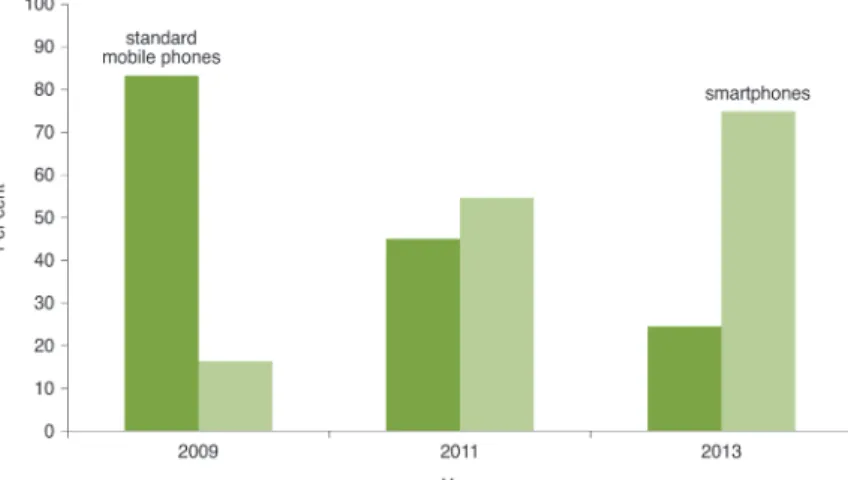
Figure 1: Survey results from first year under-graduate students (n=73) about which type of mobile phone (standard mobile phone or smartphone) they owned in 2009, currently own in 2011 and intend to own by 2013. Source: Welsh et al., 2011.
Smartphones
and fieldwork
Katharine Welsh and
Derek France
Fieldwork and technology
Fieldwork is a fundamental part of an undergraduate geography degree (Kent et al., 1997) and is regarded as being at the heart of geography (Gold, 1991). Innovations in fieldwork have taken many forms ranging from modes of assessment (e.g. France and Ribchester, 2004; McGuinness and Simm, 2005) through to the use of technology. The application of computers and technology to fieldwork has grown from the 1980s when Gardiner and Unwin (1986) used desktop computers on fieldtrips to bring immediacy to projects and to motivate students. More recent technological innovations such as digital
storytelling (France and Wakefield, 2011) and the use of social networks such as Twitter (Linsey et al., 2010) have built upon the initial forays with technologies in order to engage students and to improve connectivity between student groups. Smartphones are increasing in popularity and have become almost ubiquitous among the population. There is a potential opportunity for both staff and students to make effective use of student-owned devices to enhance fieldwork learning.
The rise of the
smartphone
Since 2007, there has been a rapid increase in worldwide smartphone ownership. Companies such as Apple, Samsung, Nokia and Google have released various iterations of handsets (e.g. iPhone, Samsung Galaxy, HTC Desire) of a similar size to a standard mobile phone, but which offer the processing power and capabilities of a small computer. Applications (apps) are small software packages which can be downloaded for free or for a small cost and which can then be used on the handset, essentially allowing each user to personalise their smartphone to suit their own requirements.1A survey of geography
undergraduates (n=73) (Welsh et al., 2011) illustrated how mobile phone ownership has changed and is expected to change again over the next two years (Figure 1). Within this cohort of students, the figures suggest a dramatic shift from 90% ownership of standard mobile phones to 70% ownership of smartphones over the course of five years (2009–13) (Figure 1). Increasingly,
smartphones are becoming more ‘affordable and ubiquitous’ (Melhuish and Falloon, 2010, p. 4) and are ‘the fastest- growing [mobile technology] sales segment’ (Johnson et al., 2011 p. 9).
Consideration should be given to encouraging students to use their smartphones in formal educational settings such as the classroom or in the field in order to aid their learning.
Geography
Vol 97 Part 1 Spring 201248
Smartphones
and fieldwork
Many primary and secondary schools ban mobile phones from the classroom, largely due to the distraction their use can cause (Campbell, 2006). However, when used responsibly, mobile phones hold huge potential in an educational setting. Staff and students at Priory School in Portsmouth have worked together to devise a ‘Mobile Policy’ (Rogers, 2011), which encourages responsible and acceptable use of mobile phones during school social time. The students felt that changing behaviour and perceptions towards mobile devices during social time was a first step to using their own mobile devices in the classroom. Learning with mobile devices has pedagogical benefits such as student-centred learning and the ability to turn any space into a learning space (Cochrane and Bateman, 2010). Although devices were institution-owned, the Learning2Go (see website) mobile learning local authority scheme (2003–present) in Wolverhampton provides many examples of how mobile devices have been successfully used in classroom environments.
Student-owned
smartphones and
education
Students typically view their smartphone as a basic communication tool and often do not exploit the rich potential that these devices hold for learning. In particular, geography students and students of aligned disciplines (e.g. geology, bioscience, archaeology) could make better use of their smartphone while on a fieldtrip or when conducting research in the field because the size and portable nature of the devices lends itself to this type of work. Johnson et al. (2011) identify the use of mobile phones in education as one of the key areas in which they expect significant growth in the next 12 months. Due to the relative expense of bulk purchasing smart phone and mobile phone contracts that departments may incur, it is practical to encourage students to use their own non-specialist equipment (i.e. their own
smartphones or alternative technology such as tablet computers) in the classroom or on fieldwork wherever possible. However, inclusivity must be a key consideration whether in the field or classroom and students should not be disadvantaged because they do not own a smartphone. Ideally, smartphones are best suited to group activities because it is highly likely that at least one member of the group will own a smartphone and be willing to use it as a tool for data collection.
Although there is some resistance to using student-owned smartphones in education (Johnson
et al., 2011), making use of such devices may help to reduce the pressure on departmental budgets and enhance digital literacy of students. It may also encourage students to break down barriers between formal and informal learning by allowing them to select the tools they feel are necessary for the environment within which they are working. There are mixed opinions from staff and students about using their own devices in an academic setting. Knight argues that although mobile phones and mp3 (personal music) players may be valuable learning tools, the ‘projection of teaching materials into personal space may be interpreted as an unwanted intrusion to the personal and social life of the individual and an infringement of norms of behaviour between “teacher” and “learner”’ (2006, p. 21). Jarvis and Dickie noted similar concerns, stating that ‘while many undergraduate students own mp3 players, they were reluctant to have their digital entertainment spaces “invaded” by
academic materials’ (2010, p. 177). Other studies, such as Beddall-Hill et al., found contrasting views and observed that ‘students used their own mobile technology in different ways to support their work and not just for social communication’ and also noted that students view the iPhone as offering ‘valid and suitable methods of conducting
research’ (2011, p. 73). The work of Beddall-Hill et al. (2011) and Linsey et al. (2010) is supported by Welsh et al. (in press), who found that those students who used a smartphone as part of their fieldwork data collection were less concerned with mixing academic and social ‘space’ and more concerned with damaging their equipment in bad weather or in extreme environments. Logistical concerns about the weather or extreme environments may be overcome by the use of Aquapaks – these are relatively inexpensive covers (£15–30) that could be supplied to students from departments as they allow a device to be waterproofed yet remain functional. A key finding from Linsey et al. was that students are ‘prepared to take personal technologies on fieldtrips’ (2010, p. 7). However, they also found that ‘students do not use their personal technologies for learning activities unprompted’ (Lindsay et al., 2010, p. 7), thus perhaps with some encouragement from staff members, students would in fact be willing to use their smartphones for educational purposes while conducting fieldwork.
Geography
Vol 97 Part 1 Spring 201249
Smartphones
and fieldwork
Staff and smartphones
The oft-cited reasons for not using technology (in fieldwork) is the practitioner’s lack of confidence with technology and lack of time available to support technological problems (Welsh et al., in press). However, Beddall-Hill (2010) identified that making use of student-owned devices saves students time when learning to use functions of equipment and also saves departments money. In fact, most of the necessary technological
knowledge is often already instilled in the student user simply because mobile technologies are now ‘woven into all times and places of student lives’ (Traxler, 2010, p. 5). Therefore, it is unlikely that practitioners will be required to provide additional technical support and, indeed, it is possible that staff may learn new things about the available technology from the students.
Applications for fieldwork
Smartphones offer the potential to ‘become multifunctional tools, combining the role of what previously required several separate devices’ (Beddall-Hill et al., 2011, p. ??) and allowing students to easily customise their mobile devices by letting them download numerous apps which may be useful within a range of field settings. Several apps which may be applicable to student fieldwork are outlined below.
Evernote
Evernote (available free from iTunes and Android Marketplace) is essentially a note-taking tool which is available as a desktop and mobile version. The data gathered in either version can be
synchronised across the two platforms and the functionality of Evernote can be fully exploited when both versions work in tandem. The desktop version allows users to clip text from the web, store links and write notes while the mobile version allows users to take geotagged photographs (Figure 2), write a note, or record short audio clips that are synchronised in the Evernote ‘notebook’. There is huge potential within this app for geography students as Evernote is ideal for project work to gather resources and store ideas in one place. It could be used as an
electronic media-rich reflective field diary which would enhance a traditional field diary (c.f. McGuinness and Simm, 2005) by enabling student access throughout fieldwork. Students could be asked to take geotagged photographs or write
short notes on their smartphone throughout the day which would be stored within Evernote. The students could then be required to reflect on the field day and synthesise the data that have been collected and use the photographs and notes in their Evernote ‘notebook’ to refresh their memory of the day. The mobile version of Evernote is very simple to use and requires no more knowledge than a smartphone user would have already. The desktop version would require at least one session before the field trip to familiarise the student with the software, particularly how to set up an Evernote ‘notebook’.
iGeology
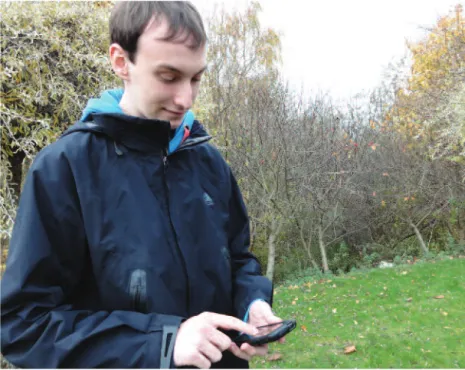
iGeology is a free app available from the British Geological Survey (available free from iTunes and Android Marketplace). It makes use of the in-built global positioning system (GPS) which is a typical feature of smartphones and allows the user to search for UK locations and identify the bedrock and superficial deposits in that area (Figure 3). iGeology is very straightforward to use but has limited functionality because the user cannot undertake any mobile mapping; they can only identify the bedrock and superficial deposits by name. Furthermore, at present no similar apps are available for countries outside of the UK.
Nevertheless, the app may be useful in some field environments, particularly as it eliminates the need for a paper map of solid geology, which can get damaged in bad weather. Also, it is likely that the smartphone can be placed into an Aquapak or
Figure 2:Geotagging photos using Evernote. Photo: © K.E. Welsh.
Geography
Vol 97 Part 1 Spring 201250
Smartphones
and fieldwork
used under an umbrella more easily than a paper map due to the compact nature of the device.
Dropbox
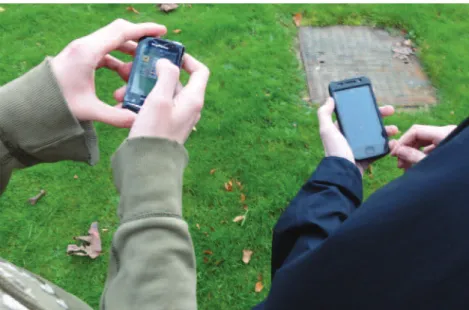
Dropbox (available free from iTunes and Android Marketplace) gives the user 2Gb of space on a ‘cloud’ server. There is a desktop and a mobile version of the software. This allows the user to access the files and folders stored in the Dropbox from multiple computers or from their smartphone (Figure 3). When changes are made to a document, the app synchronises the information across the desktop and mobile version. This enables the student to access and modify the documents when they are away from a desktop computer. It is also ideal for group collaboration because multiple authors can modify documents without changes being lost. It eliminates the need for cables and back-up hard drives to be taken on fieldtrips and saves time during a residential fieldtrip as it eliminates the need for a data back-up session during an evening. Any document stored in Dropbox is also available to the student wherever they have their mobile device, which could be useful for reference purposes while away from a desktop computer. The only drawback is that free space is limited to 2Gb, which may be insufficient if there are large video or audio files. However, a monthly subscription costs approximately £5 for 50Gb (which may overcome this issue).
Polldaddy
Polldaddy (available free from iTunes, unavailable from Android Marketplace) allows the user to design and conduct 10-question surveys for free. The software has both mobile and web-based versions. The web-based version allows the
student to design a questionnaire while the mobile version allows them to take the questionnaire out into the field and survey people without the need to connect to the internet. This is particularly useful where 3G coverage may be poor and Wi-Fi2
is unavailable. The user can conduct the survey ‘offline’, then when they return to a 3G area or Wi-Fi enabled zone, the data will automatically synchronise to the online version. The results are collated automatically, saving time and enabling students to begin analysis on the data immediately. The main limitations of the free version of the app is that the students can only view the collated results on the web-based version and cannot export the data to Excel unless they upgrade to the next pricing plan (currently £169 per year).
Tumblr
The blogging application Tumblr (available free from iTunes and Android Marketplace) also has both a web-based and a mobile version. The advantage of Tumblr over other blogging apps such as Blogger or Wordpress is the range of multi-media blog posts that a user can write. Rather than just traditional text plus pictures, Tumblr allows a user to post text, photographs, links, quotes, audio and video quickly and easily to the blog, all integrated into one app rather than several different ones. Tumblr enables students to comment on blog posts and interact with each other’s audio, video, text and images. This is a particularly useful app for fieldwork as it negates the need for a dictaphone, video camera, digital camera and notebook due to its multi-tasking nature.
Concluding remarks
With sufficient guidance and supervision, smartphones can be used in a positive way to enhance student fieldwork experience within geography. The multi-tasking and portable nature of a smartphone renders the device an ideal data collection tool. The educational potential offered by smartphones will likely increase over time as the processors within the devices become more powerful and as software developers extend the quantity and variety of apps available for download. Staff and students should experiment in order to explore the possibilities which smartphones offer for fieldwork, although this may require a change in school policy in relation to fieldwork use.
Figure 3:A student accessing iGeology (left) and a student uploading a file to Dropbox (right) while conducting fieldwork. Photo: © K.E. Welsh.
Geography
Vol 97 Part 1 Spring 201251
Smartphones
and fieldwork
Notes
1. To provide some context to the number of apps available and the possibilities they hold, at time of writing (autumn 2011), the Apple-owned iTunes App Store has over 500,000 apps available for download (Apple, 2011) and the Android Market has 250,000 apps available for download (Nickinson, 2011). It is estimated that approximately 37% of apps available through iTunes are free to download, with the average app costing around £2.30 (US$3.34) (Elmer De-Witt, 2011).
2. Smartphone users can connect to Wi-Fi (a wireless connection to the internet) in their home if they have broadband, in school if there is a wireless signal available or occasionally in those libraries, hotels and cafés that offer free Wi-Fi. There is no additional cost to a smartphone user. If there is no Wi-Fi available to the smartphone user, most smartphones have the option to connect to a 3G signal (which is also a wireless connection to the internet but tends to be slower than Wi-Fi). Connecting to a 3G signal may incur data download charges (‘downloading’ encompasses viewing web pages, listening to audio files via the web, etc.). Most smartphone users have a 3G data plan built into their monthly or pay-as-you-go contract for use in the UK, but it is useful to remind students to check their data plan to ensure there will be no additional cost incurred. 3G charges outside of the UK can be expensive (such as £3 per minute), so students would be well advised not to connect to the internet if on fieldwork outside of the UK.
References
Apple (2011) ‘Ten billion app countdown’. Available online at www.apple.com/itunes/10-billion-app-countdown(last accessed 4 April 2011). Bedall-Hill, N. (2010) ‘Postgraduates, field trips and
mobile devices’ in Traxler, J. and Wishart, J. (eds)
Making Mobile Learning Work: Case studies of practice. ESCalate HEA Subject Centre for Education, pp. 18–22.
Bedall-Hill, N., Jabbar, A. and Al Sheri, S. (2011) ‘Social mobile devices as tools for qualitative research in education: iPhones and iPads in ethnography, interviewing, and design-based research’, Journal of the Research Centre for Educational Technology, 7, pp. 67–89.
Campbell, S.W. (2006) ‘Perceptions of mobile phones in college classrooms: ringing, cheating, and classroom policies’, Communication Education, 55, pp. 280–94. Cochrane, T. and Bateman, R. (2010) ‘Smartphones give
you wings: pedagogical affordances of mobile Web 2.0’, Australasian Journal of Educational Technology, 26, pp. 1–14.
Elmer De-Witt (2011) ‘Apple iTunes store 500,000 ios apps and counting’. Available online at
http://tech.fortune.cnn.com/2011/05/24/apples-itunes-store-500000-ios-apps-and-counting(last accessed 8 November 2011).
France, D. and Ribchester, C. (2004) ‘Producing web sites for assessment: a case study from a level 1 fieldwork module’, Journal of Geography in Higher Education, 28, pp. 49–62.
France, D. and Wakefield, K. (2011) ‘How to produce a digital story’, Journal of Geography in Higher Education, 35, pp. 617–23.
Gardiner, V. and Unwin, D. (1986) ‘Computers and the
field class’, Journal of Geography in Higher Education, 10, pp. 169–79.
Gold, J.R. (1991) ‘Fieldwork’ in Gold, J.R., Jenkins, A., Lee, R., Monk, J., Riley, J., Sheppard, I. and Unwin, D. (eds) Teaching Geography in Higher Education: A manual of good practice. Oxford: Blackwell, pp. 21– 35.
Jarvis, C. and Dickie, J. (2010) ‘Podcasts in support of experiential field learning’, Journal of Geography in Higher Education, 34, pp. 173–86.
Johnson, L., Smith, R., Willis, H., Levine, A. and Haywood, K. (2011) The 2011 Horizon Report. Austin, TX: The New Media Consortium.
Kent, M., Gilbertson, D.O. and Hunt, C.O. (1997) ‘Fieldwork in geography teaching: a critical review’,
Journal of Geography in Higher Education, 21, pp. 313–32.
Knight, J. (2006) ‘Investigating geography undergraduates attitudes to teaching, learning and technology’,
Planet, 16, pp. 19–21.
Learning2Go website: www.learning2go.org(last accessed 7 December 2011).
Linsey, T., Hall, R., Ooms, A., Taylor, P., Andrew, M., O’Brien, J., Field, K. and Downward, S. (2010)
Transforming Curriculum Delivery through Technology. JISC Final Report.
Melhuish, K. and Falloon, G. (2010) ‘Looking to the future: M-learning with the iPad’, Computers in New Zealand Schools: Learning, Leading, Technology, 22, pp. 1–16.
McGuinness, M. and Simm, D. (2005) ‘Going global: long-haul fieldwork on undergraduate geography’, Journal of Geography in Higher Education, 29, pp. 241–53. Nickinson, P. (2011) ‘Android Market now has more than
a quarter-million applications’, Android Central, 14 July. Available online at www.androidcentral.com/ android-market-now-has-more-quarter-million-applications(last accessed 14 July 2011). Rogers, D. (2011) ‘Creating a mobile policy’, 1 October.
Available online at
http://daviderogers.blogspot.com/2011/10/creating-mobile-policy.html(last accessed 17 November 2011).
Traxler, J. (2010) ‘Will student devices deliver innovation, inclusion and transformation?’, Journal of the Research Centre for Educational Technologies, 6, pp. 3–15.
Welsh, K., France, D., Park, J. and Whalley, B. (2011) ‘Enhancing fieldwork learning in the biosciences’,
Bioscience Bulletin, 32, p. 6.
Welsh, K., France, D., Whalley, B. and Park, J. (in press) ‘Geotagging photos for student fieldwork’, Journal of Geography in Higher Education.
Katharine Welsh (email: [email protected]) is a Postdoctoral Research Assistant at the University of Chester, working on the Enhancing Fieldwork Learning (www.enhancing
fieldwork.org.uk) Higher Education Academy National Teaching Fellowship Scheme project led by Professor Derek France (email: