_________________________________________________________________________________________________________ Consider the following C++ code snippet:
vector<string> myVector(kNumStrings);
for(vector<string>::iterator itr = myVector.begin(); itr != myVector.end(); ++itr)
*itr += "Now longer!";
Here, we create a vector<string> of a certain size, then iterate over it concatenating “Now longer!” to each of the strings. Code like this is ubiquitous in C++, and initially does not appear all that exciting. How -ever, let's take a closer look at how this code is structured. First, let's look at exactly what operations we're performing on the iterator:
vector<string> myVector(kNumStrings);
for(vector<string>::iterator itr = myVector.begin(); itr != myVector.end(); ++itr)
*itr += "Now longer!";
In this simple piece of code, we're comparing the iterator against myVector.end() using the != operator, incrementing the iterator with the ++ operator, and dereferencing the iterator with the * operator. At a high level, this doesn't seem all that out of the ordinary, since STL iterators are designed to look like regu-lar pointers and these operators are all well-defined on pointers. But the key thing to notice is that STL iterators aren't pointers, they're objects, and !=, *, and ++ aren't normally defined on objects. We can't write code like ++myVector or *myMap = 137, so why can these operations be applied to vector<string>::iterator?
Similarly, notice how we're concatenating the string “Now longer!” onto the end of the string: vector<string> myVector(kNumStrings);
for(vector<string>::iterator itr = myVector.begin(); itr != myVector.end(); ++itr)
*itr += "Now longer!";
Despite the fact that string is an object, somehow C++ “knows” what it means to apply += to strings. All of the above examples are instances of operator overloading, the ability to specify how operators nor-mally applicable to primitive types can interact with custom classes. Operator overloading is ubiquitous in professional C++ code and, used correctly, can make your programs more concise, more readable, and more template-friendly.
There are two overarching purposes of operator overloading. First, operator overloading enables your custom classes to act like primitive types. That is, if you have a class like vector that mimics a standard C++ array, you can allow clients to use array notation to access individual elements. Similarly, when designing a class encapsulating a mathematical entity (for example, a complex number), you can let clients apply mathematical operators like +, -, and * to your type as though it were built into the language. Second, operator overloading enables your code to interact correctly with template and library code. For example, you can overload the << operator to make a class compatible with the streams library, or the < operator to interface with STL containers.
This chapter discusses general topics in operator overloading, demonstrating how to overload some of the more common operators. It also includes tricks and pitfalls to be aware of when overloading certain oper-ators.
A Word of Warning
I would be remiss to discuss operator overloading without first prefacing it with a warning: operator over-loading is a double-edged sword. When used correctly, operator overover-loading can lead to intuitive, tem-plate-friendly code that elegantly performs complex operations behind the scenes. However, incorrectly overloaded operators can lead to incredibly subtle bugs. Seemingly innocuous code along the lines of *myItr = 5 can cause serious problems if implemented incorrectly, and without a solid understanding of how to overload operators you may find yourself in serious trouble.
There is a pearl of design wisdom that is particularly applicable to operator overloading:
The Principle of Least Astonishment: A function's name should communicate its behavior and should be consistent with other naming conventions and idioms.
The principle of least astonishment should be fairly obvious – you should design functions so that clients can understand what those functions do simply by looking at the functions' names; that is, clients of your code should not be “astonished” that a function with one name does something entirely different. For ex-ample, a function named DoSomething violates the principle of least astonishment because it doesn't communicate what it does, and a function called ComputePrimes that reads a grocery list from a file viol-ates the principle because the name of the function is completely different from the operation it performs. However, other violations of the principle of least astonishment are not as blatant. For example, a custom container class whose empty member function erases the contents of the container violates the principle of least astonishment because C++ programmers expect empty to mean “is the container empty?” rather than “empty the container.” Similarly, a class that is bitwise const but not semantically const violates the principle, since programmers assume that objects can't be modified by const member functions.
When working with operator overloading, it is crucial to adhere to the principle of least astonishment. C+ + lets you redefine almost all of the built-in operators however you choose, meaning that it's possible to create code that does something completely different from what C++ programmers might expect. For ex-ample, suppose that you are working on a group project and that one of your teammates writes a class CustomVector that acts like the STL vector but which performs some additional operations behind the scenes. Your program contains a small bug, so you look over your teammate's code and find the following code at one point:
CustomVector one = /* ... */, two = /* ... */; one %= two;
What does the line one %= two do? Syntactically, this says “take the remainder when dividing one by two, then store the result back in one.” But this makes no sense – how can you divide one CustomVector by another? You ask your teammate about this, and he informs you that the %= operator means “remove all elements from one that are also in two.” This is an egregious violation of the principle of least astonish-ment. The code neither communicates what it does nor adheres to existing convention, since the se-mantics of the %= operator are meaningless when applied to linear data structures. This is not to say, of course, that having the ability to remove all elements from one CustomVector that are contained in an-other is a bad idea – in fact, it can be quite useful – but this functionality should be provided by a properly-named member function rather than a cryptically-overloaded operator. For example, consider the follow-ing code:
CustomVector one = /* ... */, two = /* ... */; one.removeAllIn(two);
This code accomplishes the same task as the above code, but does so by explicitly indicating what opera-tion is being performed. This code is much less likely to confuse readers and is far more descriptive than before.
As another example, suppose that your teammate also implements a class called CustomString that acts like the standard string type, but provides additional functionality. You write the following code:
CustomString one = "Hello", two = " World"; one += two;
cout << one + "!" << endl;
Intuitively, this should create two strings, then concatenate the second onto the end of the first. Next, the code prints out one followed by an exclamation point, yielding “Hello World!” Unfortunately, when you compile this code, you get an unusual error message – for some reason the code one += two compiles correctly, but the compiler rejects the code one + "!". In other words, your teammate has made it legal to concatenate two strings using +=, but not by using +. Again, think back to the principle of least astonish-ment. Programmers tacitly expect that objects that can be added with + can be added with += and vice-versa, and providing only half of this functionality is likely to confuse code clients.
The moral of this story is simple: when overloading operators, make sure that you adhere to existing con-ventions. If you don't, you will end up with code that is either incorrect, confusing, or both.
Hopefully this grim introduction has not discouraged you from using operator overloading. Operator overloading is extraordinarily useful and you will not be disappointed with the possibilities that are about to open up to you. With that said, let's begin discussing the mechanics behind this powerful technique. Defining Overloaded Operators
We introduced operator overloading as a mechanism for redefining how the built-in operators apply to custom classes. Syntactically, how do we communicate to the C++ compiler that we want to redefine these operators? The answer is somewhat odd. Here's the original motivating example we had at the beginning of the chapter:
vector<string> myVector(kNumStrings);
for(vector<string>::iterator itr = myVector.begin(); itr != myVector.end(); ++itr)
*itr += "Now longer!";
When you provide this code to the C++ compiler, it interprets it as follows: vector<string> myVector(kNumStrings);
for(vector<string>::iterator itr = myVector.begin(); operator!= (itr, myVector.end());
itr.operator++())
(itr.operator*()).operator +=("Now longer!");
Notice that everywhere we used the built-in operator in conjunction with an object, the compiler reinter-preted the operator as a call to a specially-named function called operator op, where op is the particular operator we used. Thus itr != myVector.end() translated into operator!= (itr, myVector.end()), ++itr was interpreted as itr.operator++(), etc. Although these functions may have cryptic names, they're just regular functions. Operator overloading is simply syntax sugar, a way of
rewriting one operation (in this case, function calls) using a different syntax (here, the built-in operators). Overloaded operators are not somehow “more efficient” than other functions simply because the function calls aren't explicit, nor are they treated any different from regular functions. They are special only in that they can are invoked using the built-in operators rather than through an explicit function calls.
If you'll notice, some of the operators used above were translated into member function calls (particularly ++ and *), while others (!=) were translated into calls to free functions. With a few exceptions, any oper-ator can be overloaded as either a free function or a member function. Determining whether to use free functions or member functions for overloaded operators is a bit tricky, and we'll discuss it more as we con-tinue our tour of overloaded operators.
Each of C++'s built-in operators has a certain number of operands. For example, the plus operator (a + b) has two operands corresponding to the values on the left- and right-hand sides of the operator. The point-er dpoint-erefpoint-erence oppoint-erator (*itr), on the other hand, takes in only one operand: the pointer to dereference. When defining a function that is an overloaded operator, you will need to ensure that your function has one parameter for each of the operator's operands. For example, suppose that we want to define a type RationalNumber which encapsulates a rational number (a ratio of two integers). Because it's mathemat-ically sound to add two rational numbers, we might want to consider overloading the + operator as ap-plied to RationalNumber so that we can add RationalNumbers using an intuitive syntax. What would such a function look like? If we implement the + operator as a member function of RationalNumber, the syntax would be as follows:
class RationalNumber { public:
const RationalNumber operator+ (const RationalNumber& rhs) const; /* ... etc. ... */
};
(You might be wondering why the return type is const RationalNumber. For now, you can ignore that... we'll pick this up in the next section)
With operator+ defined this way, then addition of RationalNumbers will be translated into calls to the member function operator+ on RationalNumber. For example, the following code:
RationalNumber one, two;
RationalNumber three = one + two; will be interpreted by the compiler as
RationalNumber one, two;
RationalNumber three = one.operator +(two);
Notice that the code one + two was interpreted as one.operator+ (two). That is, the receiver object of the operator+ function is the left-hand operand, while the argument is the right-hand argument. This is not a coincidence, and in fact C++ will guarantee that the relative ordering of the operands is preserved. one + two will never be interpreted as two.operator+ (one) under any circumstance, and our imple-mentation of operator+ can take this into account.
Alternatively, we could consider implementing operator+ as a free function taking in two arguments. If we chose this approach, then the interface for RationalNumber would be as follows:
class RationalNumber { public:
/* ... etc. ... */ };
const RationalNumber operator+ (const RationalNumber& lhs, const RationalNumber& rhs); In this case, the code
RationalNumber one, two;
RationalNumber three = one + two; would be interpreted by the compiler as
RationalNumber one, two;
RationalNumber three = operator+ (one, two);
Again, the relative ordering of the parameters is guaranteed to be stable, and so you can assume that the first parameter to operator+ will always be on the left-hand side of the operator.
In some cases, two operators are syntactically identical but have different meanings. For example, the - operator can refer either to the binary subtraction operator (a - b) or the unary negation operator (-a). If overload the - operator, how does the compiler know whether your overloaded operator is the unary or binary version of -? The answer is rather straightforward: if the function operates on two pieces of data, the compiler treats operator- as the binary subtraction operator, and if the function uses just one piece of data it's considered to be the unary negation operator. Let's make this discussion a bit more concrete. Suppose that we want to implement subtraction on the RationalNumber class. Because the binary sub-traction operator has two operands, we would provide subsub-traction as an overloaded operator either as a free function:
const RationalNumber operator- (const RationalNumber& lhs, const RationalNumber& rhs); or, alternatively, as a member function:
class RationalNumber { public:
const RationalNumber operator- (const RationalNumber& rhs) const; /* ... etc. ... */
};
Notice that both of these functions operate on two pieces of data. In the first case, the function takes in two parameters, and in the second, the receiver object is one piece of data and the parameter is the other. If we now want to provide an implementation of operator- which represents the unary negation operat-or, we could implement it as a free function with the following signature:
const RationalNumber operator- (const RationalNumber& arg); Or as a member function of this form:
class RationalNumber { public:
const RationalNumber operator- () const;
/* ... etc. ... */ };
Again, don't worry about why the return type is a const RationalNumber. We'll address this shortly. What Operator Overloading Cannot Do
When overloading operators, you cannot define brand-new operators like # or @. After all, C++ wouldn't know the associativity or proper syntax for the operator (is one # two + three interpreted as (one # two) + three or one # (two + three)?) Additionally, you cannot overload any of the following oper-ators:
Operator Syntax Name
:: MyClass::value Scope resolution
. one.value Member selection
?: a > b ? -1 : 1 Ternary conditional
.* a.*myClassPtr; Pointer-to-member selection (beyond the scope of this text)
sizeof sizeof(MyClass) Size of object
typeid typeid(MyClass) Runtime type information operator
(T) static_cast dynamic_cast reinterpret_cast
const_cast
(int) myClass; Typecast
Note that operator overloading only lets you define what built-in operators mean when applied to objects. You cannot use operator overloading to redefine what addition means as applied to ints, nor can you change how pointers are dereferenced. Then again, by the principle of least astonishment, you wouldn't want to do this anyway.
Lvalues and Rvalues
Before we begin exploring some of the implementation issues associated with overloaded operators, we need to take a quick detour to explore two concepts from programming language theory called lvalues and rvalues. Lvalues and rvalues stand for “left values” and “right values” are are so-named because of where they can appear in an assignment statement. In particular, an lvalue is a value that can be on the left-hand side of an assignment, and an rvalue is a value that can only be on the right-hand side of an assignment. For example, in the statement x = 5, x is an lvalue and 5 is an rvalue. Similarly, in *itr = 137, *itr is the lvalue and 137 is the rvalue.
It is illegal to put an rvalue on the left-hand side of an assignment statement. For example, 137 = 42 is il-legal because 137 is an rvalue, and GetInteger() = x is illegal because the return value of GetInteger() is an rvalue. However, it is legal to put an lvalue on the right-hand side of an assignment, as in x = y or x = *itr.
At this point the distinction between lvalues and rvalues seems purely academic. “Okay,” you might say, “some things can be put on the left-hand side of an assignment statement and some things can't. So what?” When writing overloaded operators, the lvalue/rvalue distinction is extremely important. Because operator overloading lets us define what the built-in operators mean when applied to objects of class type, we have to be very careful that overloaded operators return lvalues and rvalues appropriately. For ex-ample, by default the + operator returns an rvalue; that is, it makes no sense to write
(x + y) = 5;
Since this would assign the value 5 to the result of adding x and y. However, if we're not careful when overloading the + operator, we might accidentally make the above statement legal and pave the way for nonsensical but legal code. Similarly, it is legal to write
myArray[5] = 137;
So the element-selection operator (the brackets operator) should be sure to return an lvalue instead of an rvalue. Failure to do so will make the above code illegal when applied to custom classes.
Recall that an overloaded operator is a specially-named function invoked when the operator is applied to an object of a custom class type. Thus the code
(x + y) = 5; is equivalent to
operator+ (x, y) = 5;
if either x or y is an object. Similarly, if myArray is an object, the code myArray[5] = 137;
is equivalent to
myArray.operator[](5) = 137;
To ensure that these functions have the correct semantics, we need to make sure that operator+ returns an rvalue and that operator[] returns an lvalue. How can we enforce this restriction? The answer has to do with the return type of the two functions. To make a function that returns an lvalue, have that function return a non-const reference. For example, the following function returns an lvalue:
string& LValueFunction();
Because a reference is just another name for a variable or memory location, this function hands back a ref-erence to an lvalue and its return value can be treated as such. To have a function return an rvalue, have that function return a const object by value. Thus the function
returns an rvalue.* The reason that this trick works is that if we have a function that returns a const ob-ject, then code like
RValueFunction() = 137;
is illegal because the return value of RValueFunction is marked const.
Lvalues and rvalues are difficult to understand in the abstract, but as we begin to actually overload partic-ular operators the difference should become clearer.
Overloading the Element Selection Operator
Let's begin our descent into the realm of operator overloading by discussing the overloaded element selec-tion operator (the [ ] operator, used to select elements from arrays). You've been using the overloaded element selection operator ever since you encountered the string and vector classes. For example, the following code uses the vector's overloaded element selection operator:
for(int i = 0; i < myVector.size(); ++i) myVector[i] = 137;
In the above example, while it looks like we're treating the vector as a primitive array, we are instead call-ing the a function named operator [], passing i as a parameter. Thus the above code is equivalent to for(int i = 0; i < myVector.size(); ++i)
myVector.operator [](i) = 137;
To write a custom element selection operator, you write a member function called operator [] that ac-cepts as its parameter the value that goes inside the brackets. Note that while this parameter can be of any type (think of the STL map), you can only have a single value inside the brackets. This may seem like an ar-bitrary restriction, but makes sense in the context of the principle of least astonishment: you can't put multiple values inside the brackets when working with raw C++ arrays, so you shouldn't do so when work-ing with custom objects.
When writing operator [], as with all overloaded operators, you're free to return objects of whatever type you'd like. However, remember that when overloading operators, it's essential to maintain the same functionality you'd expect from the naturally-occurring uses of the operator. In the case of the element se-lection operator, this means that the return value should be an lvalue, and in particular a reference to some internal class data determined by the index. For example, here's one possible prototype of the C++ string's element selection operator:
class string { public:
/* ... */
char& operator [] (size_t position); };
* Technically speaking any non-reference value returned from a function is an rvalue. However, when returning ob-jects from a function, the rvalue/lvalue distinction is blurred because the assignment operator and other operat-ors are member functions that can be invoked regardless of whether the receiver is an rvalue or lvalue. The addi-tional const closes this loophole.
Here, operator[] takes in an int representing the index and returns a reference to the character at that position in the string. If string is implemented as a wrapper for a raw C string, then one possible im-plementation for operator[] might be
char& string::operator[] (size_t index) {
return theString[index]; // Assuming theString is an array of characters }
Because operator[] returns a reference to an element, it is common to find operator[] paired with a const-overload that returns a const reference to an element in the case where the receiver object is im-mutable. There are exceptions to this rule, such as the STL map, but in the case of string we should provide a const overload, as shown here:
class string { public:
/* ... */
char& operator [] (size_t position);
const char& operator [] (size_t position) const; };
The implementation of the const operator[] function is identical to the non-const version.
When writing the element selection operator, it's completely legal to modify the receiver object in re -sponse to a request. For example, with the STL map, operator[] will silently create a new object and re-turn a reference to it if the key isn't already in the map. This is part of the beauty of overloaded operators – you're allowed to perform any necessary steps to ensure that the operator makes sense.
Unfortunately, if your class encapsulates a multidimensional object, such as a matrix or hierarchical key-value system, you cannot “overload the [][] operator.” A class is only allowed to overload one level of the bracket syntax; it's not legal to design objects that doubly-overload [].*
Overloading Compound Assignment Operators
The compound assignment operators are operators of the form op= (for example, += and *=) that update an object's value but do not overwrite it. Compound assignment operators are often declared as member functions with the following basic prototype:
MyClass& operator += (const ParameterType& param)
For example, suppose we have the following class, which represents a vector in three-dimensional space: class Vector3D {
public:
/* ... */ private:
static const int NUM_COORDINATES = 3; double coordinates[NUM_COORDINATES]; };
* There is a technique called proxy objects that can make code along the lines of myObject[x][y] legal. The trick is
to define an operator[] function for the class that returns another object that itself overloads operator[]. We'll
It is legal to add two mathematical vectors to one another; the result is the vector whose components are the pairwise sum of each of the components of the source vectors. If we wanted to define a += operator for Vector3D to let us perform this addition, we would modify the interface of Vector3D as follows:
class Vector3D { public:
/* ... */
Vector3D& operator+= (const Vector3D& other); private:
static const int NUM_COORDINATES = 3; double coordinates[NUM_COORDINATES]; };
This could then be implemented as
Vector3D& Vector3D::operator +=(const Vector3D& other) { for(int i = 0; i < NUM_COORDINATES; ++i)
coordinates[i] += other.coordinates[i]; return *this;
}
If you'll notice, operator+=returns *this, a reference to the receiver object. Recall that when overload-ing operators, you should make sure to define your operators such that they work identically to the C++ built-in operators. It turns out that the += operator yields an lvalue, so the code below, though the quint-essence of abysmal style, is perfectly legal:
int one, two, three, four;
(one += two) += (three += four);
Since overloaded operators let custom types act like primitives, the following code should also compile: Vector3D one, two, three, four;
(one += two) += (three += four);
If we expand out the calls to the overloaded += operator, we find that this is equivalent to Vector3D one, two, three, four;
one.operator+=(two).operator +=(three.operator +=(four));
Note that the reference returned by one.operator+=(two) then has its own += operator invoked. Since operator += is not marked const, had the += operator returned a const reference, this code would have been illegal. Make sure to have any (compound) assignment operator return *this as a non-const refer-ence.
Unlike the regular assignment operator, with the compound assignment operator it's commonly meaning-ful to accept objects of different types as parameters. For example, we might want to make expressions like myVector *= 137 for Vector3Ds meaningful as a scaling operation. In this case, we can simply define an operator *= that accepts a double as its parameter. For example:
class Vector3D { public:
/* ... */
Vector3D& operator += (const Vector3D& other); Vector3D& operator *= (double scaleFactor); private:
static const int NUM_COORDINATES = 3; double coordinates[NUM_COORDINATES]; };
Despite the fact that the receiver and parameter have different types, this is perfectly legal C++. Here's one possible implementation:
Vector3D& Vector3D::operator*= (double scaleFactor) { for(int k = 0; k < NUM_COORDINATES; ++k)
coordinates[k] *= scaleFactor; return *this;
}
Although we have implemented operator+= and operator*= for the Vector3D class, C++ will not automat-ically provide us an implementation of operator-= and operator/=, despite the fact that those functions can easily be implemented as wrapped calls to the operators we've already implemented. This might seem counterin-tuitive, but prevents errors from cases where seemingly symmetric operations are undefined. For example, it is legal to multiply a vector and a matrix, though the division is undefined. For completeness' sake, we'll prototype operator-= and operator/= as shown here:
class Vector3D { public:
/* ... */
Vector3D& operator += (const Vector3D& other); Vector3D& operator -= (const Vector3D& other); Vector3D& operator *= (double scaleFactor); Vector3D& operator /= (double scaleFactor); private:
static const int NUM_COORDINATES = 3; double coordinates[NUM_COORDINATES]; };
Now, how might we go about implementing these operators? operator/= is the simplest of the two and can be implemented as follows:
Vector3D& Vector3D::operator /= (double scaleFactor) { *this *= 1.0 / scaleFactor;
return *this; }
This implementation, though cryptic, is actually quite elegant. The first line, *this *= 1.0 / scaleFact-or, says that we should multiply the receiver object (*this) by the reciprocal of scaleFactor. The *= oper-ator is the compound multiplication assignment operoper-ator that we wrote above, so this code invokes operator*= on the receiver. In fact, this code is equivalent to
Vector3D& Vector3D::operator /= (double scaleFactor) { operator*= (1.0 / scaleFactor);
return *this; }
Depending on your taste, you might find this particular syntax more readable than the first version. Feel free to use either version.
Now, how would we implement operator-=, which performs a componentwise subtraction of two Vec-tor3Ds? At a high level, subtracting one vector from another is equal to adding the inverse of the second vector to the first, so we might want to write code like this:
Vector3D& Vector3D::operator -= (const Vector3D& other) { *this += -other;
return *this; }
That is, we add -other to the receiver object. But this code is illegal because we haven't defined the unary minus operator as applied to Vector3Ds. Not to worry – we can overload this operator as well. The syntax for this function is as follows:
class Vector3D { public:
/* ... */
Vector3D& operator += (const Vector3D& other); Vector3D& operator -= (const Vector3D& other); Vector3D& operator *= (double scaleFactor); Vector3D& operator /= (double scaleFactor); const Vector3D operator- () const;
private:
static const int NUM_COORDINATES = 3; double coordinates[NUM_COORDINATES]; };
There are four pieces of information about this function that deserve attention: • The name of the unary minus function is operator -.
• The function takes no parameters. This lets C++ know that the function is the unary minus function (I.e. -myVector) rather than the binary minus function (myVector – myOtherVector).
• The function returns a const Vector3D. The unary minus function returns an rvalue rather than an lvalue, since code like -x = 137 is illegal. As mentioned above, this means that the return value of this function should be a const Vector3D.
• The function is marked const. Applying the unary minus to an object doesn't change its value, and to enforce this restriction we'll mark operator – const.
const Vector3D Vector3D::operator- () const { Vector3D result; for(int k = 0; k < NUM_COORDINATES; ++k) result.coordinates[k] = -coordinates[k]; return result; }
Note that the return type of this function is const Vector3D while the type of result inside the function is Vector3D. This isn't a problem, since returning an object from a function yields a new temporary object and it's legal to initialize a const Vector3D using a Vector3D.
When writing compound assignment operators, as when writing regular assignment operators, you must be care-ful that self-assignment works correctly. In the above example with Vector3D's compound assignment operat-ors we didn't need to worry about this because the code was structured correctly. However, when working with the C++ string's += operator, since the string needs to allocate a new buffer capable of holding the current string appended to itself, it would need to handle the self-assignment case, either by explicitly checking for self-assignment or through some other means.
Overloading Mathematical Operators
In the previous section, we provided overloaded versions of the += family of operators. Thus, we can now write classes for which expressions of the form one += two are valid. However, the seemingly equivalent expression one = one + two will still not compile, since we haven't provided an implementation of the lone + operator. C++ will not automatically provide implementations of related operators given a single overloaded operator, since in some cases this could result in nonsensical or meaningless behavior.
The built-in mathematical operators yield rvalues, so code like (x + y) = 137 will not compile. Con-sequently, when overloading the mathematical operators, make sure they return rvalues as well by having them return const objects.
Let's consider an implementation of operator + for our Vector3D class. Because the operator yields an rvalue, we're supposed to return a const Vector3D, and based on our knowledge of parameter passing, we know that we should accept a const Vector3D & as a parameter. There's one more bit we're forget-ting, though, and that's to mark the operator + function const, since operator + creates a new object and doesn't modify either of the values used in the arithmetic statement. This results in the following code
class Vector3D { public:
/* ... */
Vector3D& operator += (const Vector3D& other); const Vector3D operator+ (const Vector3D& other); Vector3D& operator -= (const Vector3D& other); Vector3D& operator *= (double scaleFactor); Vector3D& operator /= (double scaleFactor); const Vector3D operator- () const;
private:
static const int NUM_COORDINATES = 3; double coordinates[NUM_COORDINATES]; };
How are we to implement this function? We could just do a component-by-component addition, but it's actually much easier to just write the function in terms of our operator +=. The full version of this code is shown below:
const Vector3D Vector3D::operator +(const Vector3D& other) const { Vector3d result = *this; // Make a deep copy of this Vector3D. result += other; // Use existing addition code.
return result; }
Now, all of the code for operator + is unified, which helps cut down on coding errors.
There is an interesting and common case we haven't addressed yet – what if one of the operands isn't of the same type as the class? For example, if you have a Matrix class that encapsulates a 3x3 matrix, as shown here:
class Matrix { public:
/* ... */
Matrix& operator *= (double scalar); // Scale all entries private:
static const int MATRIX_SIZE = 3;
double entries[MATRIX_SIZE][MATRIX_SIZE]; };
Note that there is a defined *= operator that scales all elements in the matrix by a double factor. Thus code like myMatrix *= 2.71828 is well-defined. However, since there's no defined operator *, cur-rently we cannot write myMatrix = myMatrix * 2.71828.
Initially, you might think that we could define operator * just as we did operator + in the previous ex-ample. While this will work in most cases, it will lead to some problems we'll need to address later. For now, however, let's add the member function operator * to Matrix, which is defined as
const Matrix Matrix::operator *(double scalar) const { MyMatrix result = *this;
result *= scalar; return result; }
Now, we can write expressions like myMatrix = myMatrix * 2.71828. However, what happens if we write code like myMatrix = 2.71828 * myMatrix? This is a semantically meaningful expression, but unfortunately it won't compile. When interpreting overloaded operators, C++ will always preserve the or-der of values in an expression.* Thus
2.71828 * myMatrix is not the same as myMatrix * 2.71828. Remember that the reason that myMatrix * 2.71828 is legal is because it's equivalent to myMatrix.op-erator *(2.71828). The expression 2.71828 * myMatrix, on the other hand, is illegal because C++ will try to expand it into (2.71828).operator *(myMatrix), which makes no sense.
* One major reason for this is that sometimes the arithmetic operators won't be commutative. For example, given matrices A and B, AB is not necessarily the same as BA, and if C++ were to arbitrarily flip parameters it could res-ult in some extremely difficres-ult-to-track bugs.
To fix this, we can make operator * a free function that accepts two parameters, a double and a Matrix, and returns a const Matrix. Thus code like 2.71828 * myMatrix will expand into calls to operat-or *(2.71828, myMatrix). The new version of operator * is defined below:
const Matrix operator * (double scalar, const Matrix& matrix) { Matrix result = *matrix;
matrix *= scalar; return result; }
But here we run into the same problem as before if we write myMatrix * 2.71828, since we haven't defined a function accepting a Matrix as its first parameter and an double as its second. To fix this, we'll define a second free function operator * with the parameters reversed that's implemented as a call to the other version:
const Matrix operator *(const Matrix& matrix, double scalar) { return scalar * matrix; // Calls operator* (scalar, matrix) }
As a general rule, mathematical operators like + should always be implemented as free functions. This prevents problems like those described here.
One important point to notice about overloading the mathematical operators versus the compound assign-ment operators is that it's considerably faster to use the compound assignassign-ment operators over the stan-dalone mathematical operators. Not only do the compound assignment operators work in-place (that is, they modify existing objects), but they also return references instead of full objects. From a performance standpoint, this means that given these three strings:
string one = "This "; string two = "is a "; string three = "string!";
Consider these two code snippets to concatenate all three strings: /* Using += */
string myString = one; myString += two;
myString += three; /* Using + */
string myString = one + two + three
Oddly, the second version of this code is considerably slower than the first because the + operator gener-ates temporary objects. Remember that one + two + three is equivalent to
operator +(one, operator +(two, three))
Each call to operator + returns a new string formed by concatenating the parameters, so the code one + two + three creates two temporary string objects. The first version, on the other hand, generates no temporary objects since the += operator works in-place. Thus while the first version is less sightly, it is significantly faster than the second.
Overloading ++ and
--Overloading the increment and decrement operators can be a bit tricky because there are two versions of each operator: prefix and postfix. Recall that x++ and ++x are different operations – the first will evaluate to the value of x, then increment x, while the second will increment x and then evaluate to the updated value of x. You can see this below:
int x = 0
cout << x++ << endl; // Prints: 0 cout << x << endl; // Prints: 1 x = 0;
cout << ++x << endl; // Prints: 1 cout << x << endl; // Prints: 1
Although this distinction is subtle, it's tremendously important for efficiency reasons. In the postfix ver-sion of ++, since we have to return the value of the variable was before it was incremented, we'll need to make a full copyof the old version and then return it. With the prefix ++, since we're returning the current value of the variable, we can simply return a reference to it. Thus the postfix ++ can be noticeably slower than the prefix version; this is the reason that when advancing an STL iterator it's faster to use the prefix increment operator.
The next question we need to address is how we can legally use ++ and -- in regular code. Unfortunately, it can get a bit complicated. For example, the following code is totally legal:
int x = 0;
++++++++++++++x; // Increments x seven times. This is legal because it's equivalent to
++(++(++(++(++(++(++x))))));
The prefix ++ operator returns the variable being incremented as an lvalue, so this statement means “in-crement x, then in“in-crement x again, etc.”
However, if we use the postfix version of ++, as seen here: x++++++++++++++; // Error
We get a compile-time error because x++ returns the original value of x as an rvalue, which can't be incre-mented because that would require putting the rvalue on the left side of an assignment (in particular, x = x + 1).
Now, let's actually get into some code. Unfortunately, we can't just sit down and write operator ++, since it's unclear which operator ++ we'd be overloading. C++ uses a hack to differentiate between the prefix and postfix versions of the increment operator: when overloading the prefix version of ++ or --, you write operator ++ as a function that takes no parameters. To overload the postfix version, you'll overload op-erator ++, but the overloaded operator will accept as a parameter the integer value 0. In code, these two declarations look like
class MyClass { public:
/* ... */
MyClass& operator ++(); // Prefix
const MyClass operator ++(int dummy); // Postfix private:
/* ... */ };
Note that the prefix version returns a MyClass&as an lvalue and the postfix version a const MyClass as an rvalue.
We're allowed to implement ++ and -- in any way we see fit. However, one of the more common tricks is to write the ++ implementation as a wrapped call to operator +=. Assuming you've provided this func-tion, we can then write the prefix operator ++ as
MyClass& MyClass::operator ++() { *this += 1;
return *this; }
And the postfix operator ++ as
const MyClass MyClass::operator ++(int dummy) {
MyClass oldValue = *this; // Store the current value of the object. ++*this;
return oldValue; }
Notice that the postfix operator++ is implemented in terms of the prefix operator++. This is a fairly standard technique and cuts down on the amount of code that you will need to write for the functions. In your future C++ career, you may encounter versions of operator++ that look like this:
const MyClass MyClass::operator ++(int) {
MyClass oldValue = *this; // Store the current value of the object. ++*this;
return oldValue; }
Although this function takes in an int parameter, that parameter does not have a name. It turns out that it is perfectly legal C++ code to write functions that accept parameters but do not give names to those para-meters. In this case, the function acts just like a regular function that accepts a parameter, except that the parameter cannot be used inside of the function. In the case of operator++, this helps give a cue to read-ers that the integer parameter is not meaningful and exists solely to differentiate the prefix and postfix versions of the function.
Overloading Relational Operators
Perhaps the most commonly overloaded operators (other than operator =) are the relational operators; for example, < and ==. Unlike the assignment operator, by default C++ does not provide relational operat-ors for your objects. This means that you must explicitly overload the == and related operators to use
them in code. The prototype for the relational operators looks like this (written for <, but can be for any of the relational operators):
class MyClass { public:
/* ... */
bool operator < (const MyClass& other) const; private:
/* ... */ };
You're free to choose any means for defining what it means for one object to be “less than” another. How -ever, when doing so, you must take great care to ensure that your less-than operator defines a total order-ing on objects of your type. This means that the following must be true about the behavior of the less-than operator:
• Trichotomy: For any a and b, exactly one of a < b, a = b, and b < a is true. • Transitivity: If a < b and b < c, then a < c.
These properties of < are important because they allow the notion of sorted order to make sense. If either of these conditions does not hold, then it is possible to encounter strange situations in which a collection of elements cannot be put into ascending order. For example, suppose that we have the following class, which represents a point in two-dimensional space:
class Point { public:
Point(double x, double y); double getX() const;
void setX(double value); double getY() const; void setY(double value); }
Now consider the following implementation of a less-than operator for comparing Points: bool operator< (const Point& one, const Point& two) {
return one.getX() < two.getX() && one.getY() < two.getY(); }
Intuitively, this may seem like a reasonable definition of the < operator: point a is less than point b if both coordinates of a are less than the corresponding coordinates of b. However, this implementation of < is bound to cause problems. In particular, consider the following code:
Point one(1, 0), two(0, 1); cout << (one < two) << endl; cout << (two < one) << endl;
Here, we create two points called one and two and compare them using the < operator. What will the first line print? Using the above definition of operator<, the comparison one < two will evaluate to false be-cause the x coordinate of one is greater than the x coordinate of two. But what about two < one? In this case, two's x coordinate is less than one's, but its y coordinate is greater than one's. Consequently, we have that two < one also evaluates to false. We have reached a precarious situation. We have found two
values, one and two, such that one and two do not have equal values, but neither is less than the other. This means that we could not possibly sort a list of elements containing both one and two, since neither one precedes the other.
The problem with the above implementation of operator< is that it violates trichotomy. Recall from the above definition of a total ordering that trichotomy means that exactly one of a < b, a = b, a > b must hold for any a and b. Our definition of operator< does not have this property, as illustrated above. Con-sequently, we have a legal implementation of operator< that is wholly incorrect. We'll need to redefine how operator< works in order to ensure that trichotomy holds.
One common strategy for implementing operator< is to use what's called a lexicographical ordering. To illustrate a lexicographically ordering, consider the words about and above and think about how you would compare them alphabetically. You'd begin by noting that the first letter of each word was the same, as was the second and the third. However, the fourth letter of the words disagree, and in particular the let-ter u from about precedes the letter v from above. Consequently, we would say that about comes lexico-graphically before above. Interestingly, though, the last letter of about (t) comes after the last letter of above (e). We don't care, though, because we stopped comparing letters as soon as we found the first mis-match in the words.
This strategy has an elegant analog for arbitrary types. Given a type, one way to implement operator< is as follows. Given two objects a and b of that type, check whether the first field of a and b are not the same. If so, say that a is smaller if its first field is smaller than b's first field. Otherwise, look at the second field. If the fields are not the same, then return a if a's second field is smaller than b's and b otherwise. If not, then look at the third field, etc. To give you a concrete example of how this works, consider the following revision to the Point's operator< function:
bool operator< (const Point& one, const Point& two) {
if (one.getX() != two.getX()) return one.getX() < two.getX(); return one.getY() < two.getY();
}
Here, we first check whether the points disagree in their x coordinate. If so, we say that one is less than two only if it has a smaller x coordinate. Otherwise, if the points agree in their x coordinate, then whichever has the lower y coordinate is said to have the smaller value. Amazingly, this implementation strategy results in an ordering that is both trichotic and transitive, exactly the properties we want out of the < operator.
Of course, this strategy works on classes that have more than two fields, provided that you compare each field one at a time. It is an interesting exercise to convince yourself that a lexicographical ordering on any type obeys trichotomy, and that such an ordering obeys transitivity as well.
Once you have a working implementation of operator<, it is possible to define all five other relational op-erators solely in terms of the operator<. This is due to the following set of relations:
A < B ⇔ A < B A <= B ⇔ !(B < A) A == B ⇔ !(A < B || B < A) A != B ⇔ A < B || B < A A >= B ⇔ !(A < B) A > B ⇔ B < A
For example, we could implement operator> for the Point class as bool operator> (const Point& one, const Point& two) { return two < one;
}
We could similarly implement operator<= for Points as
bool operator<= (const Point& one, const Point& two) { return !(one < two);
}
This is a fairly standard technique, and it's well worth the effort to remember it. Storing Objects in STL maps
Up to this point we've avoided storing objects as keys in STL maps. Now that we've covered operator over-loading, though, you have the necessary knowledge to store objects in the STL map and set containers. Internally, the STL map and set are layered on binary trees that use the relational operators to compare elements. Due to some clever design decisions, STL containers and algorithms only require the < operator to compare two objects. Thus, to store a custom class inside a map or set, you simply need to overload the < operator and the STL will handle the rest. For example, here's some code to store a Pointstruct in a map:
struct pointT { int x, y;
bool operator < (const pointT& other) const { if(x != other.x)
return x < other.x; return y < other.y; }
};
map<pointT, int> myMap; // Now works using the default < operator. You can use a similar trick to store objects as values in a set.
friend
Normally, when you mark a class's data members private, only instances of that class are allowed to access them. However, in some cases you might want to allow specific other classes or functions to modify private data. For example, if you were implementing the STL map and wanted to provide an iterator class to traverse it, you'd want that iterator to have access to the map's underlying binary tree. There's a slight problem here, though. Although the iterator is an integral component of the map, like all other classes, the iterator cannot access private data and thus cannot traverse the tree.
How are we to resolve this problem? Your initial thought might be to make some public accessor methods that would let the iterator modify the object's internal data representation. Unfortunately, this won't work particularly well, since then any class would be allowed to use those functions, something that violates the principle of encapsulation. Instead, to solve this problem, we can use the C++ friend keyword to grant the iterator class access to the map or set's internals. Inside the map declaration, we can write the follow-ing:
template <typename KeyType, typename ValueType> class map { public:
/* ... */
friend class iterator; class iterator {
/* ... iterator implementation here ... */ };
};
Now, since iterator is a friend of map, it can read and modify the map's private data members.
Just as we can grant other classes friend access to a class, we can give friend access to global functions. For example, if we had a free function ModifyMyClass that accepted a MyClass object as a reference parameter, we could let ModifyMyClass modify the internal data of MyClass if inside the MyClass declar-ation we added the line
class MyClass { public:
/* ... */
friend void ModifyMyClass(MyClass& param); };
The syntax for friend can be misleading. Even though we're prototyping ModifyMyClass inside the My-Class function, because ModifyMyClass is a friend of MyClass it is not a member function of MyClass. After all, the purpose of the friend declaration is to give outside classes and functions access to the MyC-lass internals.
When using friend, there are two key points to be aware of. First, the friend declaration must precede the actual implementation of the friend class or function. Since C++ compilers only make a single pass over the source file, if they haven't seen a friend declaration for a function or class, when the function or class tries to modify your object's internals, the compiler will generate an error. Second, note that while friend is quite useful in some circumstances, it can quickly lead to code that entirely defeats the purpose of encapsulation. Before you grant friend access to a piece of code, make sure that the code has a legitim-ate reason to be modifying your object. That is, don't make code a friend simply because it's easier to write that way. Think of friend as a way of extending a class definition to include other pieces of code. The class, together with all its friend code, should comprise a logical unit of encapsulation.
When overloading an operator as a free function, you might want to consider giving that function friend access to your class. That way, the functions can efficiently read your object's private data without having to go through getters and setters.
Unfortunately, friend does not interact particularly intuitively with template classes. Suppose we want to provide a friend function PQueueFriend for a template version of the CS106B/X PQueue. If PQueueFriendis declared like this:
template <typename T> void PQueueFriend(const PQueue<T>& pq) { /* ... */
}
You'll notice that PQueueFriend itself is a template function. This means that when declaring PQueueFriend a friend of the template PQueue, we'll need to make the friend declaration templatized, as shown here:
template <typename T> class PQueue { public:
/* ... */
template <typename T> friend PQueueFriend(const PQueue<T>& pq); };
If you forget the template declaration, then your code will compile correctly but will generate a linker er-ror. While this can be a bit of nuisance, it's important to remember since it arises frequently when over-loading the stream operators, as you'll see below.
Overloading the Stream Insertion Operator
Have you ever wondered why cout << "Hello, world!" << endl is syntactically legal? It's through the overloaded << operator in conjunction with ostreams.* In fact, the entire streams library can be thought of as a gigantic library of massively overloaded << and >> operators.
The C++ streams library is designed to give you maximum flexibility with your input and output routines and even lets you define your own stream insertion and extraction operators. This means that you are al-lowed to define the << and >> operators so that expressions like cout << myClass << endl and cin >> myClass are well-defined. However, when writing stream insertion and extraction operators, there are huge number of considerations to keep in mind, many of which are beyond the scope of this text. This next section will discuss basic strategies for overloading the << operator, along with some limitations of the simple approach.
As with all overloaded operators, we need to consider what the parameters and return type should be for our overloaded << operator. Before considering parameters, let's think of the return type. We know that it should be legal to chain stream insertions together – that is, code like cout << 1 << 2 << endl should compile correctly. The << operator associates to the left, so the above code is equal to
(((cout << 1) << 2) << endl);
Thus, we need the << operator to return an ostream. Now, we don't want this stream to be const, since then we couldn't write code like this:
cout << "This is a string!" << setw(10) << endl;
Since if cout << "This is a string!" evaluated to a const object, we couldn't set the width of the next operation to 10. Also, we cannot return the stream by value, since stream classes have their copy functions marked private. Putting these two things together, we see that the stream operators should re -turn a non-const reference to whatever stream they're referencing.
Now let's consider what parameters we need. We need to know what stream we want to write to or read from, so initially you might think that we'd define overloaded stream operators as member functions that look like this:
class MyClass { public:
ostream& operator << (ostream& input) const; // Problem: Legal but incorrect };
* As a reminder, the ostream class is the base class for output streams. This has to do with inheritance, which we'll cover in a later chapter, but for now just realize that it means that both stringstream and ofstream are special-izations of the more generic ostream class.
Unfortunately, this isn't correct. Consider the following two code snippets: cout << myClass;
myClass << cout;
The first of these two versions makes sense, while the second is backwards. Unfortunately, with the above definition of operator <<, we've accidentally made the second version syntactically legal. The reason is that these two lines expand into calls to
cout.operator <<(myClass); myClass.operator <<(cout);
The first of these two isn't defined, since cout doesn't have a member function capable of writing our object (if it did, we wouldn't need to write a stream operator in the first place!). However, based on our pre -vious definition, the second version, while semantically incorrect, is syntactically legal. Somehow we need to change how we define the stream operator so that we are allowed to write cout << myClass. To fix this, we'll make the overloaded stream operator a free function that takes two parameters – an ostream to write to and a myClass object to write. The code for this is:
ostream& operator << (ostream& stream, const MyClass& mc) { /* ... implementation ... */
return stream; }
While this code will work correctly, because operator << is a free function, it doesn't have access to any of the private data members of MyClass. This can be a nuisance, since we'd like to directly write the con-tents of MyClass out to the stream without having to go through the (possibly inefficient) getters and set-ters. Thus, we'll declare operator << a friend inside the MyClass declaration, as shown here:
class MyClass { public:
/* More functions. */
friend ostream& operator <<(ostream& stream, const MyClass& mc); };
Now, we're all set to do reading and writing inside the body of the insertion operator. It's not particularly difficult to write the stream insertion operator – all that we need to do is print out all of the meaningful class information with some formatting information. So, for example, given a Point class representing a point in 2-D space, we could write the insertion operator as
ostream& operator <<(ostream& stream, const Point& pt) { stream << '(' << pt.x << ", " << pt.y << ')';
return stream; }
While this code will work in most cases, there are a few spots where it just won't work correctly. For ex-ample, suppose we write the following code:
cout << "01234567890123456789" << endl; // To see the number of characters. cout << setw(20) << myPoint << endl;
Looking at this code, you'd expect that it would cause myPoint to be printed out and padded with space characters until it is at least twenty characters wide. Unfortunately, this isn't what happens. Since oper-ator << writes the object one piece at a time, the output will look something like this:
01234567890123456789 (0, 4)
That's nineteen spaces, followed by the actual Point data. The problem is that when we invoke operator <<, the function writes a single ( character to stream. It's this operation, not the Point as a whole, that will get aligned to 20 characters. There are many ways to circumvent this problem, but perhaps the simplest is to buffer the output into a stringstream and then write the contents of the stringstream to the destination in a single operation. This can get a bit complicated, especially since you'll need to copy the stream formatting information over.
Writing a correct stream extraction operator (operator >>) is complicated. For more information on writing stream extraction operators, consult a reference.
Overloading * and ->
Consider the following code snippet:
for(set<string>::iterator itr = mySet.begin(); itr != mySet.end(); ++itr) cout << *itr << " has length " << itr->length() << endl;
Here, we traverse a set<string>using iterators, printing out each string and its length. Interestingly, even though set iterators are not raw pointers (they're objects capable of traversing binary trees), thanks to operator overloading, they can respond to the * and -> operators as though they were regular C++ pointers.
If you create a custom class that acts like a C++ pointer (perhaps a custom iterator or “smart pointer,” a topic we'll return to later), you can provide implementations of the pointer dereference and member se-lection operators * and -> by overloading their respective operator functions. The simpler of these two functions is the pointer dereference operator. To make an object that can be dereferenced to yield an ob-ject of type T, the syntax for its * operator is
class PointerClass { public:
T& operator *() const; /* ... */
};
You can invoke the operator * function by “dereferencing” the custom pointer object. For example, the following code:
*myCustomPointer = 137; is completely equivalent to
myCustomPointer.operator *() = 137;
Because we can assign a value to the result of operator *, the operator * function should return an lvalue (a non-const reference).
There are two other points worth noting here. First, how can C++ distinguish this operator * for pointer dereference from the operator * used for multiplication? The answer has to do with the number of parameters to the function. Since a pointer dereference is a unary operator, the function prototype for the pointer-dereferencing operator * takes no parameters. Had we wanted to write operator * for
multi-plication, we would have written a function operator * that accepts a parameter (or a free function ac-cepting two parameters). Second, why is operator * marked const? This has to do with the difference between const pointers and pointers-to-const. Suppose that we have a const instance of a custom pointer class. Since the pointer object is const, it acts as though it is a const pointer rather than a point-er-to-const. Consequently, we should be able to dereference the object and modify its stored pointer without affecting its constness.
The arrow operator operator -> is slightly more complicated than operator *. Initially, you might think that operator -> would be a binary operator, since you use the arrow operator in statements like myClassPtr->myElement. However, C++ has a rather clever mechanism for operator -> that makes it a unary operator. A class's operator ->function should return a pointer to the object that the arrow oper-ator should actually be applied to. This may be a bit confusing, so an example is in order. Suppose we have a class CustomStringPointer that acts as though it's a pointer to a C++ string object. Then if we have the following code:
CustomStringPointer myCustomPointer;
cout << myCustomPointer->length() << endl; This code is equivalent to
CustomStringPointer myCustomPointer;
cout << (myCustomPointer.operator ->())->length() << endl;
In the first version of the code, we treated the myCustomPointer object as though it was a real pointer by using the arrow operator to select the length function. This code expands out into two smaller steps:
1. The CustomStringPointer's operator -> function is called to determine which pointer the ar-row should be applied to.
2. The returned pointer then has the -> operator applied to select the length function.
Thus when writing the operator ->function, you simply need to return the pointer that the arrow oper-ator should be applied to. If you're writing a custom iteroper-ator class, for example, this is probably the ele-ment being iterator over.
We'll explore one example of overloading these operators in a later chapter. List of Overloadable Operators
The following table lists the most commonly-used operators you're legally allowed to overload in C++, along with any restrictions about how you should define the operator.
Operator Yields Usage
= Lvalue MyClass& operator =(const MyClass& other); See the the earlier chapter for details.
+= -= *= /= %=
(etc.)
Lvalue MyClass& operator +=(const MyClass& other);
When writing compound assignment operators, make sure that you correctly handle “self-compound-assignment.”
+ - * / %
(etc.)
Rvalue const MyClass operator + (const MyClass& one, const MyClass& two); These operator should be defined as a free functions. < <= ==
> >= != Rvalue
bool operator < (const MyClass& other) const; bool operator < (const MyClass& one,
const MyClass& two);
If you're planning to use relational operators only for the STL container classes, you just need to overload the < operator. Otherwise, you should overload all six so that users aren't surprised that one != two is illegal while !(one == two) is defined.
[] Lvalue ElemType& operator [](const KeyType& key); const ElemType& operator [](const KeyType& key) const;
Most of the time you'll need a const-overloaded version of the bracket operator. Forgetting to provide one can lead to a real headache!
++ -- Prefix: Lvalue
Postfix: Rvalue Prefix version: MyClass& operator ++();Postfix version: const MyClass operator ++(int dummy);
- Rvalue const MyClass operator -() const;
* Lvalue ElemType& operator *() const;
With this function, you're allowing your class to act as though it's a pointer. The return type should be a reference to the object it's “pointing” at. This is how the STL iterators and smart pointers work. Note that this is the unary * operator and is not the same as the * multiplicative operator.
-> Lvalue ElemType* operator ->() const;
If the -> is overloaded for a class, whenever you write myClass->myMember, it's equivalent to myClass.operator ->()->myMember. Note that the function should be const even though the object returned can still modify data. This has to do with how pointers can legally be used in C++. For more information, refer to the chapter on const.
<< >> Lvalue friend ostream& operator << (ostream& out, const MyClass& mc); friend istream& operator >> (istream& in,
MyClass& mc); () Varies See the chapter on functors.
Extended Example: grid
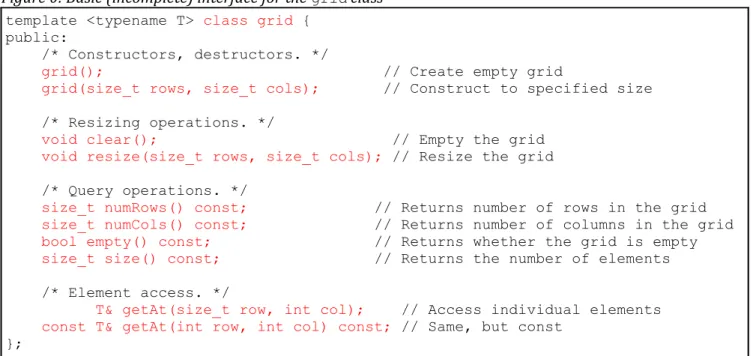
The STL encompasses a wide selection of associative and sequence containers. However, one useful data type that did not find its way into the STL is a multidimensional array class akin to the CS106B/X Grid. In this ex-tended example, we will implement an STL-friendly version of the CS106B/X Grid class, which we'll call grid, that will support STL-compatible iterators, intuitive element-access syntax, and relational operators. Once we're done, we'll have an industrial-strength container class we will use later in this book to implement more complex examples.
Implementing a fully-functional grid may seem daunting at first, but fortunately it's easy to break the work up into several smaller steps that culminate in a working class.