Multi-Clip Video Editing from a Single Viewpoint
Vineet Gandhi
INRIA/Laboratoire Jean Kuntzmann, FranceRemi Ronfard
INRIA/Laboratoire Jean Kuntzmann, FranceMichael Gleicher
University of Wisconsin-Madison, USAABSTRACT
We propose a framework for automatically generating multiple clips suitable for video editing by simulating pan-tilt-zoom camera move-ments within the frame of a single static camera. Assuming impor-tant actors and objects can be localized using computer vision tech-niques, our method requires only minimal user input to define the subject matter of each sub-clip. The composition of each sub-clip is automatically computed in a novelL1-norm optimization frame-work. Our approach encodes several common cinematographic practices into a single convex cost function minimization prob-lem, resulting in aesthetically pleasing sub-clips which can easily be edited together using off-the-shelf multi-clip video editing soft-ware. We demonstrate our approach on five video sequences of a live theatre performance by generating multiple synchronized sub-clips for each sequence.
Categories and Subject Descriptors
I.3.8 [Computer Graphics]: Applications; I.4.9 [Image process-ing and Computer Vision]: Applications
General Terms
Computer Vision, Computer Graphics
Keywords
Video Editing, Video Processing
1.
INTRODUCTION
High quality video uses a variety of camera framings and move-ments edited together to effectively portray its content on screen. To produce such video from a live event, such as a theater per-formance or concert, requires source video from several cameras to capture multiple viewpoints. These individual camera videos, orrushes,are then edited together to create the final result. The requirement of a “multi-camera shoot”, including having multiple
Permission to make digital or hard copies of all or part of this work for personal or classroom use is granted without fee provided that copies are not made or distributed for profit or commercial advantage and that copies bear this notice and the full citation on the first page. Copyrights for components of this work owned by others than ACM must be honored. Abstracting with credit is permitted. To copy otherwise, or republish, to post on servers or to redistribute to lists, requires prior specific permission and/or a fee. Request permissions from [email protected].
CVMP’1413-14 November 2014, London, United Kingdom Copyright 2014 ACM 978-1-4503-3185-2/14/11 ...$15.00. http://dx.doi.org/10.1145/2668904.2668936.
synchronized cameras each with a skilled operator capable of cre-ating good framings and camera movements, makes it expensive and intrusive, and therefore impractical for many scenarios.
In this paper, we introduce an approach to create multiple syn-chronized videos from a live staged event that are suited for editing. Our key idea is to use a single non-moving camera that captures the entire field of view of the event andsimulatingmultiple cam-eras and their operators as a post-process, creating a synchronized set of rushes from the single source video. This strategy allows us to avoid the cost, complexity and intrusion of a multiple camera shoot. A pan-tilt-zoom (PTZ) camera can be simulated simply by cropping and zooming sub-windows of the source frame. The chal-lenge we are addressing here is simulation of a competentcamera operator: choosing the different virtual viewpoints such that their results are videos that are likely to be useful for editing. This means that each video must not only obey cinematic principles to be "good video" but also have properties that make it easier to edit with the other rushes.
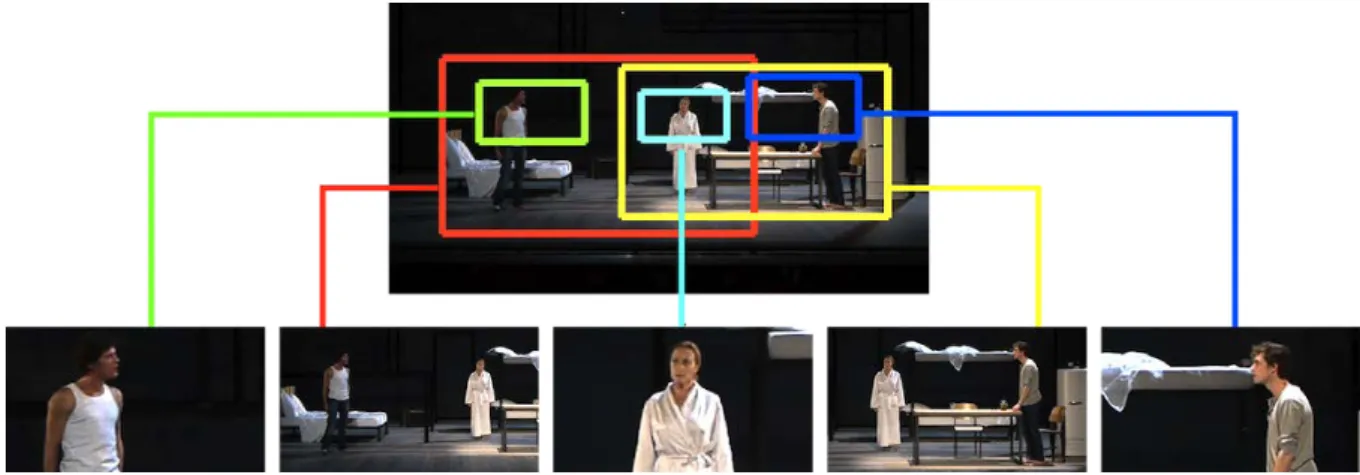
Our solution, illustrated in Figure 1, takes as input a single “mas-ter shot” — a high resolution video taken from the viewpoint of a member of the audience. Because we consider staged events (such as theater performances or concerts), we can assume that this van-tage point is sufficient to see all of the action (otherwise, the au-dience would miss it as well). Computer vision techniques are used as a pre-process to identify and track the actors. Our method then creates videos by simulating each of the cameras individually. Each virtual camera takes a simple specification of which actors it should contain and how they should be framed (screen position and size). A novel optimization-based algorithm computes the dy-namic framing for the camera i.e. the movement of a sub-window over the master shot. The optimization considers the specification, cinematic principles of good camera movements, and requirements that the videos can be cut together.
The output of our method is a set of synchronized videos (or
rushes) that provide multiple viewpoints of the staged event. These rushes can then be edited together using traditional multi-track video editing software. This allows a human editor to use their creativity, expertise in editing, and understanding of the content, to create a properly edited video. Our approach automates the synthetic rush generation process, which is tedious to perform manually.
The central idea of our approach is that we can cast the problem of determining a virtual camera movement, that is the size and posi-tion of the subregion of the master clip over time, as an optimizaposi-tion problem. Specifically, we cast it as a convex program allowing for efficient and scalable solution. The key insight is that many of the principles of good camera motion, including what camera shots are useful in editing, can be cast within this optimization framework.
Figure 1: Our method takes as input a high resolution video from a single viewpoint and outputs a set of synchronized subclips by breaking the groups into a series of smaller shots.
2.
RELATED WORK
The problem of creating a multi-view edited video from limited input camera views has been considered previously in very spe-cialized scenarios. The Virtual Videography system [14] used vir-tual PTZ to simulate multiple cameras from a lecture video. The MSLRCS [23] and AutoAuditorium [5] systems use a small set of fixed views including input of presentation slides. These systems achieve full automation, albeit at the expense of allowing for cre-ativity and human input in the editing process. They are also lim-ited to working in the more constrained environment of usually a single presenter in front of a chalkboard or a slide screen. Extend-ing to the richer environment of multiple actors in more complex stagings would be challenging, especially as it requires a richer set of shot types to be generated. In contrast, our system addresses only the rush generation aspect, but can generate a rich range of shot types from more complex scenarios including multiple actors. Remarkably little work as been devoted specifically to the prob-lem of optimizing the composition of a virtual PTZ camera in post-production. Recent work has focused more on providing interactive control of the virtual PTZ camera in real time [17, 8, 9]. A method for automatic editing of basketball games was recently proposed by Carr et al. [6] employing both robotic and virtual PTZ cameras. The robotic camera follows the centroid of the detected players and then a virtual camera is employed to crop subregions of the ob-tained images to compensate for motor errors. Because they are targeting online applications, their method makes decisions in near real time (with a small delay), which can lead to sub-optimal so-lutions. To the best of our knowledge, our technique provides the first general solution to the problem forofflinecomputation of a virtual pan-tilt-zoom camera shot given a list of visual targets over the entire duration of a recorded performance.
The question of a computational model to describe “good” cam-era movements, particularly in terms of subwindows of video, has been considered by work in video stabilization. While most video stablization work simply aimed to remove jitter, Re-Cinematography [11] formalized cinematic principles in terms of movement in the frame for computation. Grundmann et al. [13] showed that this can be formulated in an optimization framework. We build on this computational formulation of camera movement, extending it to the problem of multiple rush generation.
Our work is also related to the general problem of automatic video editing. Our main contribution is this area is concerned with generating rushes that can easily be cut together. To the best of our
knowledge, this has not been addressed in previous work. Berthouzoz et al. [4] have looked at the problem ofwhento place cuts and tran-sitions during dialogue scenes, based on audio analysis, assuming that the input shots are correctly framed. We solve the complemen-tary problem of generating correctly framed input shots. Wang et al. [22] proposed an approach for automatic editing of home videos. Their method selects important parts of the scene based on detec-tions and motion saliency and summarizes video by removing parts of the video both temporally and spatially. Our method does not re-move parts of the video temporally and generates multiple shots for the entire duration of the video with controlled camera dynamics. Arev et al. [2] looked at the problem of selecting rushes and editing them together using a large number of viewpoints taken by "social cameras" (i.e. cameras operated by the audience) possibly with re-duced resolution. We are solving the opposite problem of using a single high-resolution viewpoint. Interestingly, multiple cameras focusing on the same attention point give a heuristic measure of the importance of that attention point, which can be used to automat-ically edit the video without deep understanding of the scene. In our case, we cannot rely on such heuristic and instead focus on the rush generation problem, leaving the "final cut" to the user.
A general framework for automatically cropping sub-clips from a panoramic video and editing them together into a movie in real-time has been proposed for the case of sports events [7, 20]. Oper-ating in real-time limits the capability of that system to tracking of simple targets. Because we are focusing on post-production, rather than live broadcast, we are able to perform tracking and recognition of multiple actors even in complex cases, which makes our method more generally applicable to rich cultural heritage content. Further-more, our method can be used to generate arbitrary shot composi-tions, which better addresses the challenges of post-production.
Using computer vision to control cameras and create full-edited movies is not a new idea. Pinhanez and Bobick [19] have inves-tigated the use of low-level motion tracking to control TV cam-eras but their method is limited to closed-world domains (exem-plified by cooking shows) and requires extensive domain-specific knowledge. In contrast, our approach is domain-agnostic and relies on general principles of image composition and film editing. Our method assumes a pre-processing stage, where actors are tracked and the location of their heads and floor projections are recovered in each frame of the input video. In this paper, we implemented a simple offline tracker based on actor specific detections [10] but any suitable tracker can be used instead, including interactive
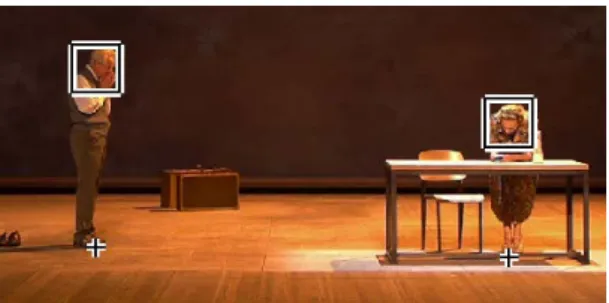
track-Figure 2:Input to the system are the upper body bounding boxes for each actor (shown with squares) and the points where the actors touch the stage floor (shown with cross markers).
ers introduced recently by Bailer et al. [3] which are well suited for the task of video production.
3.
VIRTUAL CAMERA SPECIFICATION
Given a single video covering the entire stage our method al-lows the user to create different reframed shots or rushes with a simple description for each shot. Each reframed video is generated by computing a virtual camera trajectory over the master shot i.e. choosing a cropped window over the master shot at each time. The core component of our approach is an optimization framework to compute the virtual camera trajectory with optimal composition, movement and “cuttability”. In this section, we present and ex-plain our shot specification scheme in details, and review some fundamental concepts in cinematography that motivate our opti-mization approach. Several established video production books emphasize the role of composition and cutting in cinematography [1, 16, 15, 18]. Mascelli [16] identifies five main topics in cin-ematography: camera angles (where to place the camera relative to the subject); continuity (making sure that actions are fully cov-ered); cutting (making sure that transitions between cameras are possible); close-ups (making sure that important parts of actions are emphasised); and composition.
Since we are working from a single camera angle (the camera po-sition chosen for the input master shot) and the action is recorded in full continuity, camera angles and continuity are given as an in-put to our method. On the other hand, we need to take special care of composition and cutting when computing virtual camera move-ments to compensate for the constant camera angle.
3.1
Actor detection
The input to our method is a list of all actors present in the mas-ter shot and their bounding boxes. We assume they are given as
(bx,by,bs,bh)wherebx,byare the center coordinates of the upper body bounding box,bsis the actor’s upper body size andbhis the actor’s height on stage(all in pixels). An actors height on stage is the length from top of the upper body bounding box to the point it touches the stage floor. An example of the input bounding boxes and corresponding floor points are shown in Figure 2.
For standing posture the stage height (bh) of an actor is approxi-mately four times the size of the upper body bounding box (bs). But this ratio may not be true for other postures like sitting or bending and it becomes important to take into account the floor points to compute the stage height of the actor.
3.2
Virtual camera geometry
The images of two virtual PTZ cameras with identical camera centers are related by a projective transformation (homography).
In principle, a virtual PTZ camera image can therefore be speci-fied exactly from the master camera image with four points (eight parameters).
In practice, we use a rectangular cropping window with a fixed aspect ratio as a simplified model of a virtual PTZ camera. Thus our camera model is specified with just three parameters : the virtual camera centerf x,f yand the virtual camera heightf s(all in pixels), where(f x,f y,f s)lie within the space of the master image. This has the benefit that the virtual camera does not create unwanted geometric deformations in the virtual image and it preserves the resolution of the master camera image. The virtual camera image can therefore be obtained by isotropic re-sampling of the cropped image from the master shot.
3.3
Shot naming conventions
Based on common practice in video production [21], shots are specified by their subject matter and size. The subject matter for a shot is typically the list of actors who should be onscreen. Op-tionally, objects or stage locations can also be subject matters for a virtual camera shot, although this is not used in this paper. The size for a shot is typically defined by specifying the average screen size occupied by each actor. We use classical conventional shot size names including "long shot" (LS), "full shot" (FS) and "medium shot" (MS) as a specification.
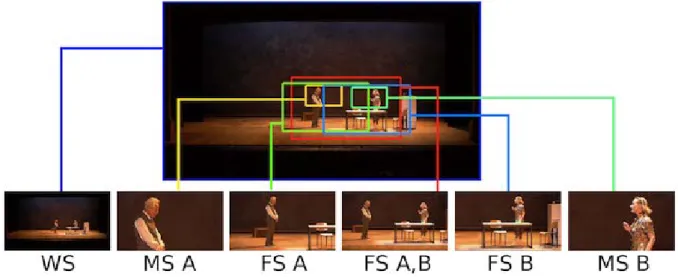
Our system lets users choose the subject matters and shot sizes for each virtual camera independently. Those specifications are given for the entire duration of the master shot. For instance, the specification for a virtual camera can simply be a "full shot of actor A and actor B" or just "FS A,B". Figure 3 shows that a total of five virtual cameras can be specified using only two shot sizes and two actors.
Given the actor bounding boxes, the subject matters and shot sizes for all virtual cameras, the task is now to compute virtual camera trajectories resulting in good composition for each camera, and preserving possibilities for cutting between cameras.
3.4
Composition
As emphasized by Mascelli [16], good camera work begins with composition, which includes not just the composition of objects in a static frame, but also the composition of movements in a dynamic frame.
Framing, or image placement, is the positioning of subject matter in the frame[16] and is the most important aspect of shot compo-sition in our context. For our purpose, the most important fram-ing principles emphasized by Mascelli are that (a) subjects should
not come into contact with the image frame; (b) the bottom frame shouldnotcut across subject’s joints (knees, waist, elbows, ankles) but should instead cutbetween joints; (c) subjects must be given more space in the direction they travel and the direction they look.
The subjects in our case are the actors in the shot specification. To ensure that the subjects do not come into contact with the image frame, we define an inclusion region for the given shot specifica-tion. This inclusion region is then encoded as a hard constraint in our optimization framework to make sure that the subjects are always nicely kept inside the virtual camera frame. Examples of inclusion regions with two different shot specifications are shown in Figure 4 and Figure 5 with shaded rectangles. The inclusion re-gion is defined using four coordinates(xlt,xrt,yut,ybt). The values
xlt,xrt andyutdenote the leftmost, rightmost and the topmost co-ordinate of the upper body bounding boxes of actors included in the shot. The coordinateybtis defined differently for the full shot and the medium shot. For a single actor in a medium shotybtis the topmost coordinate plus twice the size of its upper body bounding
Figure 3:The figure shows the possible set of framing with two actors (A,B) and two shot sizes i.e. the medium shot (MS) and the full shot (FS). Even with a simple case of two actors a total of 6 camera choices are available including the original wide shot (WS).
Figure 4: Inclusion region for shot specification "FS A,B" i.e. the full shot of Actor A and Actor B. A full shot of two actors is a tightest window which keeps both of them entirely inside the frame.
box. In the case of full shot of an actorybtis the point where the actor touches the stage floor. In case of multiple actors, the lower coordinate is computed for each actor individually andybtis taken the as maximum value among them. A shot size penalty in the optimization cost function tries to keep the virtual camera framing close to the inclusion region maintaining a nice composition. The penalty is explained with detail in Section 4.2.
The shot size penalty and hard constraints ensure that the actors specified in the shot are nicely framed inside the virtual camera. But other actors may still come in contact with virtual camera win-dow. To avoid this we add another penalty term in the optimization framework which avoids chopping external actors and tries to keep them either fully outside or pulls them fully inside the virtual cam-era window. This is explained in detail in Section 4.6.
3.5
Cutting rules
An another important consideration in our work is to make sure that the virtual PTZ cameras produce shots that can easily be edited together. In this paper, we enforce “cuttability” of the shots by maintaining screen continuity of all actors and by creating only “sparse” virtual camera movements.
When cutting between cameras showing the same actors with
Figure 5: Inclusion region for shot specification "MS A" i.e. the medium shot of Actor A. The boundaries of nearest actors on the left and the right are also shown in this figure.
different compositions, it is important to keep them in similar screen positions. To enforce such screen continuity, we give a preference for virtual shot compositions where the actors keep the screen po-sitions from the master shot. An example is given in Figure 3 with two actors. The actor on the the left is kept on the left side in the virtual camera shot composition "MS A" and the actor on the right is kept on the right side of the virtual camera shot composition "MS B".
Cutting during camera movement is difficult because the move-ments of the two cameras should be matched. As a result, film editors typically prefer to cut when none of the cameras are in mo-tion.To maximize the number of opportunities for cutting, we there-fore give a preference to virtual cameras withsparse pan, tilt and zoom movements. As will be explained in the next section, we en-force this preference by regularizing the first order derivative of the virtual camera coordinates in theL1-norm sense.
3.6
Camera movement
Importance of a steady camera has been highlighted by Thom-son’s ‘Grammar of the shot’ [21]. It is of no use to prepare a well-composed shot only to have its image blurred or confused by an unstable camera. As discussed in earlier section, a steady camera
is also beneficial for cutting. Also the camera should not move without a sufficient motivation as it may appear puzzling to the viewer.
The goal of avoiding movement as much as possible still leaves the question of what kinds of movements to use when they are nec-essary. Thomson in his book [21] mentions that a good pan/tilt shot should comprise of three components: a static period of the cam-era at the beginning, a smooth camcam-era movement which "leads" the movement of the subject and a static period of the camera at the end.
As mentioned in the earlier section, we use L1-norm regulariza-tion over the first order derivative of virtual camera coordinates to get the static camera behavior. In order to obtain smooth transi-tions between the static segments we add L1-norm regularization term over the third order derivative of the virtual camera coordi-nates. This will tend to give segments of constant acceleration and deceleration, creating the ease-in and ease-out effect. This is ex-plained with detail in Sections 4.3 and 4.4.
An instant problem which may arise while moving a cropping window inside the master shot is that the actual motion of the actor on stage may not be preserved inside the virtual camera. For ex-ample, an actor which is static on stage may appear moving/sliding inside the virtual camera frame or an actor moving on the left on stage may appear moving on the right in the virtual camera frame. We introduce another penalty term in the optimization framework to preserve the apparent motion of the actors. This is explained with detail in Section 4.5.
4.
OPTIMIZATION
In this section we show that how different cinematographic prin-ciples explained in the previous section are defined as different penalties or constraints and are combined in a single convex cost function which can be efficiently minimized to obtain the virtual camera trajectory for a given shot specification. We first summa-rize the notation and then explain each term of the cost function in detail.
Notation: The algorithm takes as input the bounding boxes(bxm t,
bymt ,bsmt,bhtm)for each actor(m= [1 :M])and timet. The algo-rithm also takes as input the inclusion region{xlt,xrt,yut,ybt}and the external actor boundaries{xlt0,xr
0
t,xtlt,xtrt}, which are derived using the actor tracks and the shot specification.
The algorithm outputs a cropping windowξ={f xt,f yt,f st}for each frame(t= [1 :N]), where(f xt,f yt)are the coordinates of the center and(f st)is the size i.e. half of the height of the cropping window.
We also definext= 12(xlt+xrt)as the midpoint of the left and the right coordinates of the inclusion region andyt= 12(yut+ybt) as the midpoint of vertical inclusion coordinates. We definest=
1
2(ybt−yut)as the desired size of the cropping window andAr as the required aspect ratio. The variable f st denotes the vertical half length of the cropped window and the horizontal half length is given byArf st.
4.1
Inclusion constraints
We introduce two sets of hard constraints, first that the crop-ping window should always lie within the master shot and sec-ond that the inclusion region should be enclosed within the crop-ping window. Hence, the left most coordinate of cropcrop-ping win-dowf xt−Arf stshould be less thanxltand should be greater than zero. Similarly, the right most coordinate of cropping window
f xt+Arf stshould be greater thanxrtand less than the width(W) of the master shot . Formally, we define the horizontal inclusion
constraints as:
0<f xt−Arf st≤xltandxrt≤ f xt+Arf st≤W. (1) Similarly, we define the vertical inclusion constraints:
0<f yt−f st≤yutandybt≤f yt+f st≤H, (2) whereHis the height of the master shot.
4.2
Shot size penalty
As explained earlier, to maintain the desired composition the vir-tual camera cropping window should remain close to the inclusion region. So, we wantf xtto be close to the midpoint of left and right coordinates of the inclusion region. Similarly, we want f ytto be close to the midpoint of the top and the bottom coordinates of the inclusion region. Also, we want f stto be close to the height of the inclusion region. Any diversion from the desired position and size is penalized using a data term:
D(ξ) =1 2 N
∑
t=1 ((f xt−xt)2+ (f yt−yt)2+ (f st−st)2). (3) This term by default always centers the given set of actors. This may not be always good for editing later, where an appropriate look-space is preferred. As discussed in Section 3.5, this problem can be resolved by maintaining the screen positions of the actor in the master shot. To do this, we pre-compute a vectorhtwhich is 1 at timetif the actor is rightmost on stage; -1 if the actor is leftmost on stage; and 0 if the actor is between other actors. Now appropri-ate look-space can be creappropri-ated by modifying the term(f xt−xt)in Equation 3 to(f xt+0.17Ar f stht−xt).4.3
First order L1-norm regularization
Simply computing compositions independently at each time step, may lead to a noisy virtual camera motion. As discussed in previ-ous section, a steady camera behavior is necessary for a pleasant viewing experience. Also, long static camera segments are favor-able for the purpose of cutting. To obtain the desired static cam-era behavior we introduce an L1-norm regularization term over the first order derivative. When L1-norm term is added to the objec-tive to be minimized, or constrained, the solution typically has the argument of the L1-norm term sparse (i.e., with many exactly zero elements). Hence, adding L1-norm term to the velocity will tend to give piecewise constant segments combined with fast transitions. This will filter out the noisy camera motion.
The term is defined as follows:
L11(ξ) = N−1
∑
t=1
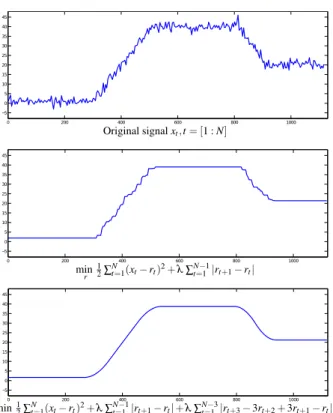
(|f xt+1−f xt|+|f yt+1−f yt|+|f st+1−f st|). (4) This is illustrated in Figure 6 with a synthetic one dimensional sig-nal. This signal can be interpreted as the xcoordinate of crop-ping window computed based on the inclusion region derived from noisy actor tracks. The middle plot in Figure 6 shows the optimized signal minimizing the closeness term to original signal (shot size penalty in one dimension) with L1-norm regularization on velocity term. We can observe that adding the L1-norm on velocity tends to give piecewise constant segments(with exactly zero motion). Using a more common L2 norm tends to spread the movement over many frames, leading to continual drifting motions, rather than distinct periods of zero movement.
4.4
Third order L1-norm regularization
When the camera moves it should move smoothly. The camera movement should start with a segment of constant acceleration and
0 200 400 600 800 1000 −5 0 5 10 15 20 25 30 35 40 45 Original signalxt,t= [1 :N] 0 200 400 600 800 1000 −5 0 5 10 15 20 25 30 35 40 45 min r 1 2∑ N t=1(xt−rt)2+λ∑tN=−11|rt+1−rt| 0 200 400 600 800 1000 −5 0 5 10 15 20 25 30 35 40 45 min r 1 2∑ N t=1(xt−rt)2+λ∑tN=−11|rt+1−rt|+λ∑Nt=−13|rt+3−3rt+2+3rt+1−rt| Figure 6: Top: Synthetic one dimensional data x. Middle: Op-timized signal r, minimizing the sum of squares closeness term to original data with L1-norm regularization on velocity. Bot-tom: Optimized signal r, minimizing the sum of squares close-ness term to original data with L1-norm regularization on both velocity and jerk.
should end with a segment of constant deceleration. Using only L1-norm on velocity will lead to sudden start and stop of the camera (sharp corners in middle plot of Figure 6). It also leads to a stair-case artifact (slopes in middle plot of Figure 6). Previous work [13] on camera stabilization has shown that a combination of first order L1-norm regularization with higher order L1-norm regularization on camera coordinates can be used in an optimization framework to obtain smooth camera trajectories with jerk free transitions be-tween static segments. In the same spirit we introduce a third order L1-regularization term which is defined as follows:
L13(ξ) = N−3
∑
t=1 (|f xt+3−3f xt+2+3f xt+1−f xt| +|f yt+3−3f yt+2+3f yt+1−f yt| +|f st+3−3f st+2+3f st+1−f st|). (5) Introducing L1-norm on third order derivative will give jerk free transitions at the start and stop of the camera movement, with seg-ments of constant acceleration and deceleration. We can observe this in bottom plot of Figure 6 that using a combination of L1-norm on both velocity and jerk gives the desired camera behavior show-ing smooth transitions between long piecewise constant segments.4.5
Apparent motion penalty
To preserve the sense of activity on stage, the actual motion of the actors should be same as the apparent motion seen in the cropped window on the virtual camera. We introduce two differ-ent penalty terms to include this in the optimization cost function.
The first term penalizes any cropping window motion if the actor included in shot specification is static.
M1(ξ) =
∑
m N−1∑
t=1 (cxtm|f xt+1−f xt|+cymt |f yt+1−f yt| +csmt |f st+1−f st|). (6) Herecxmt ,cymt andcsmt are pre-stored binary vectors which take a value of 1 if the actor is static in the position and size co-ordinates respectively. For example,cxmt is 1 if(bxmt+1−bxmt )is less than a threshold else it is 0, wherebxtmis x-coordinate of the center of the bounding box of the given actor(m)at time(t). This penalty is added for each actor specified in the shot description. If the actor is static, a penalty equivalent to the cropping window motion is added to the cost function, else this term is zero.
The second term adds a penalty if the direction of apparent mo-tion is not preserved:
M2(ξ) =
∑
m N−1∑
t=1 (max(0,−(bx˙tm−f x˙t)bx˙mt) +max(0,−(by˙mt −f y˙t)by˙mt) +max(0,−(bs˙mt −f s˙t)bs˙mt)). (7) Here,bx˙tm= (bxmt+1−bxmt)gives the the actual horizontal motion of the actor on stage, ˙f xmt = (f xmt+1−f xmt )is the horizontal motion of the virtual camera cropping window and(bx˙mt −f x˙t)is the ap-parent motion of the actor inside the virtual camera cropping win-dow between consecutive time instants. The term(bx˙mt −f x˙t)bx˙tm is positive if the apparent direction of motion is same as the actual direction of motion on the stage. A penalty is added if the term is negative, otherwise the penalty is zero. This is summed over the set of actors included in the shot description.
4.6
Pull-in or keep-out penalty
To avoid being cut by the frame, each actor must either be in or out of the virtual camera window. For actors included in the shot description, this is ensured by a hard constraint on the inclusion region. But other actors may still come in contact with the virtual camera frame (if they come in close vicinity of the inclusion region or cross across it). So we would like to add a penalty if the right-most coordinate of the cropping window f xt+Arf st lies within the right external actor boundariesxr0tandxtrt(please refer to Fig-ure 5). Similarly, we would like to add a penalty if the leftmost coordinate of the cropping window f xt−Arf stlies within the left external actor boundariesxlt0andxtlt(please refer to Figure 5). But such a conjunction is not convex.
To approximate this within the convex framework, we use a heuris-tic that pre-computes binary vectorstlandtrwhich take a value of 1 if a touch event occurs from the left or the right respectively or they take a value of zero. A touch event occurs if an outside actor comes in close vicinity of the inclusion region for a given shot spec-ification. Using these two vectors, we define two separate penalty termsEoutandEin. TheEoutpenalty is only applied when no touch event is occurring on the left or the right inclusion regions. It is defined as follows: Eout(ξ) = N
∑
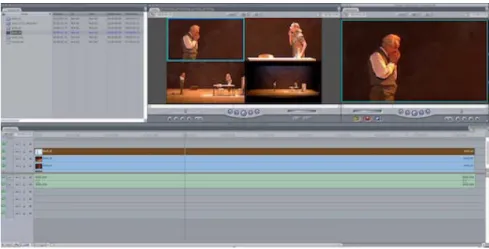
t=1 ((∼tlt)max(0,xl 0 t−f xt+Arf st) + (∼trt)max(0,f xt+Arf st−xr 0 t)). (8) When no touch event occurs any instance of the cropping win-dow frame touching the closest external actor on the left or the rightFigure 7: Screenshot of a multiclip sequence generated using a set of four sequences in Final Cut Pro. In the middle we see the four sequences including the original master shot and three reframed sequences (MS A, MS B, FS All) which were generated using the proposed method. On the right, we see the edited sequence.
is penalized. For example, if the right edge of the cropping win-dowf xt+Arf stis greater thanxr
0
t, a penalty off xt+Arf st−xr
0
tis added, otherwise the penalty is zero. Similarly, the penalty is also defined for left edge. The no touch event in Equation 8 is defined as the logical not (∼) of the left and the right touch vectorstltand
trt.
When a touch event occurs, the penalty termEout switches to
Ein, which is defined as follows:
Ein(ξ) = N
∑
t=1 (tltmax(0,f xt−Arf st−xtlt) +trtmax(0,xtrt−f xt−Arf st)). (9) Here, xtrandxtldenote the leftmost and rightmost coordinate of the upper body bounding box of an outside actor (not included in shot specification) touching from the left or the right side re-spectively. For example, if an outside actor is touching from the right, the rightmost coordinate of the cropping windowf xt+Arf st should be greater than the rightmost coordinate of the tracking win-dow of the touching actorxtrt, otherwise a penalty of(xtrt−f xt−Arf st)is added to the cost function.
4.7
Energy minimization
Overall the problem of finding the virtual camera trajectory given the actor bounding boxes and the shot specification, can simply be summarized as a problem of minimizing a convex cost function with linear constraints. Which is defined as follows:
minimize f x,f y,f s (D(ξ) +λ1L11(ξ) +λ2L13(ξ) +λ3Eout(ξ) +λ4Ein(ξ) +λ5M1(ξ) +λ6M2(ξ)) subject to 0≤ f xt−Arf st≤xlt, xrt≤f xt+Arf st≤W, 0≤ f yt−f st≤yht, ybt≤ f yt+f st≤H,t=1, . . . ,N. (10)
Here,λ1,λ2,λ3,λ4,λ5andλ6 are parameters. They can be
ad-justed to control the amount of regularization and the weight of each penalty term. In this paper, we use only two parameters with
(λ1=λ2)and(λ3=λ4=λ5=λ6), giving a similar preference to
each penalty term. But this can be adjusted in special cases where higher preference may be required for a specific penalty term. One major advantage of our method is that any standard off the shelf convex optimization toolbox can be used to solve Equation 10. In our case we use cvx [12].
5.
RESULTS
We present results on five different sequences from Arthur Miller’s play ‘Death of a Salesman’. The sequences were recorded during rehearsals at Célestins, Théâtre de Lyon. Each of these sequences were recorded from the same viewpoint in Full HD(1920×1080). Those sequences were chosen from scenes with two, three and four actors to demonstrate the versatility of our approach.
For each of these master shots, we generate a variety of reframed sequences with different shot specifications. The reframed sequences are generated with a resolution of (640×360), maintaining the original 16 : 9 aspect ratio. These generated sequences can be di-rectly imported and edited in a standard video editing software as a multi-clip. Figure 7 shows example of a multi-clip sequence con-sisting of the original sequence (master shot) and the three reframed sequences generated using our method. All the original videos and generated rushes are available online1.
Qualitative evaluation.The results on two different sequences are shown in Figure 8 and Figure 9. Each figure shows a few selected keyframes from the original video and the correspond-ing frames from the virtual camera sequences generated uscorrespond-ing our method. A plot of the horizontal position fx of the virtual cam-era trajectory against time is shown for each of the gencam-erated se-quences. The generated sequences allow the editor to highlight de-tails which may be not be so easy to notice in the original sequence. Also, it provides much more variety to keep the viewer interested. Now we discuss the generated sequences on three important aspects of cinematography:
Composition.
We can observe that the virtual cameras main-tain a nice composition based on the shot specification. For exam-ple, the virtual cameras "MS A" and "MS B" in Figure 8 keep a1https://team.inria.fr/imagine/vgandhi/cvmp_ 2014/
Orig FS All 1 2 3 4 5 6 7
f
xt
MS B 1 2 3 4 5 6 7f
xt
MS A 1 2 3 4 5 6 7f
xt
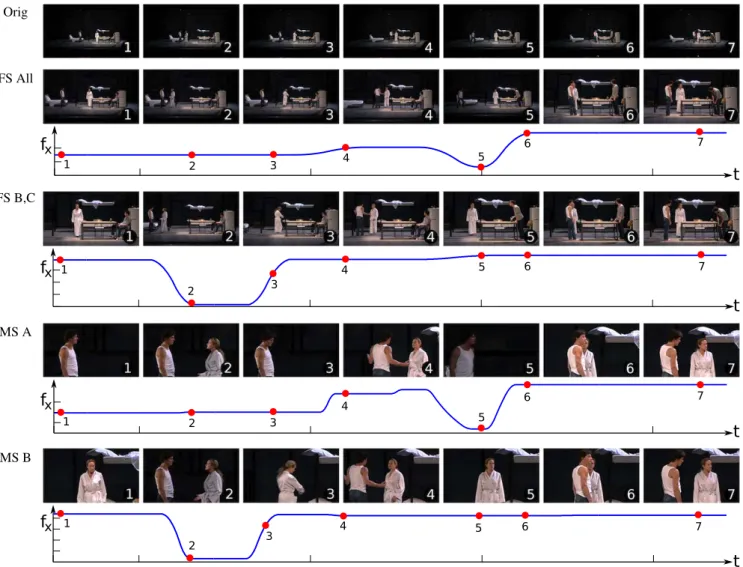
Figure 8: Reframing results on a sequence with two actors (A,B). The top row shows a set of selected keyframes from the original video. The corresponding keyframes from the three different virtual camera sequences are shown below. The three reframed sequences include the medium shot of each actor (MS A, MS B) and a full shot of both the actors (FS All). A plot of the horizontal position fxof the virtual camera trajectory against time is shown for each of the three reframed sequences. The position of the
keyframes on the plot is marked with red dots.
stable medium shot of both actors avoiding the actors to come in contact with the image frame. The generated shot also preserves the screen continuity, for example the camera "MS B" keeps the actor B at 1/3 right as she is positioned on the right side of the stage. Similarly, the camera "MS A" keeps actor A on 1/3rd left as he enters from the left. Another example can be seen with camera "MS B" in Figure 9, where the camera keeps the actor in the center as it stays between two other actors on stage.
The virtual cameras also avoid cropping the actors not mentioned in shot specification. For example, the camera "MS B" in Figure 8 pulls in actor A when it comes close to actor B at keyframe 6. Sim-ilar example can be seen with camera "FS B,C" in Figure 9, which maintains a tight full shot of actors B and C but pulls in actor A when it comes close to the camera frame.
Camera motion.
The plots of fxin Figure 8 and Figure 9 show that the virtual camera path smoothly transitions between long static segments. Observe how the virtual camera remains static for long period between keyframes 4 to 5 and keyframes 6 to 7 in Figure 8 as the actors do not move significantly. When the camera moves, it moves smoothly preserving the apparent motion of the actors on stage. For example, observe how the camera "MS A" in Figure 8 moves to the right as the actor A enters the stage between keyframes 3 and 4.Cuttability.
Good composition, screen continuity and long static cameras in the generated virtual camera sequence provides the editor plenty of choices to cut. For example the editor can switch among all four possibilities (including the original) at keyframe 4 and 5 in Figure 8. Similarly, the editor can switch among all five options at keyframe 1 in Figure 9. In a few scenarios the generated virtual cameras may not be cuttable, for example cutting between camera "MS A" and "MS B" at keyframe 6 in Figure 8 in not pos-sible because it would create a jump cut. This happens because, due to the pull in event both cameras end up framing the same ac-tors with slightly different compositions. In some cases, the virtual camera framing comes too close to the framing of the original mas-ter shot and cutting between them may lead to a jump cut. An example of this can be seen in keyframe 3 of camera "FS All" in Figure 8.6.
LIMITATIONS AND FUTURE WORK
Currently in our system, optimization is performed separately for each given shot specification. This may lead to jump cuts in few cases as discussed in previous section. In future work, we plan to perform a joint optimization for the set of given shot specifications. The proposed work focuses on framing actors present on stage but does not allow to include objects in the shot specification. In future work, we plan to integrate some simple objects in the shot naming conventions using standard objects detectors. The Full HD mas-ter shots used in the experiments in this paper did not provide us
Orig FS All 1 2 3 4 5 7 6
f
xt
FS B,C 1 2 3 4 5 6 7f
xt
MS A 1 2 3 4 5 7 6f
xt
MS B 1 2 3 4 5 6 7f
xt
Figure 9: Reframing results on a sequence with three actors (A,B,C). Selected keyframes from the original sequence and 4 virtual camera sequences are shown in this figure. The four virtual camera sequences include the full shot of all three actors (FS All), full shot of actors two actor (FS B,C) and medium shots of two of the actors (MS A, MS B). A plot of the horizontal position fxof thevirtual camera trajectory against time is shown for each of the four reframed sequences. The position of the selected keyframes on the plot is marked with red dots.
enough resolution to go closer than medium shots. But the method can be easily applied to master shots with higher resolutions (4K
or 6K), which will allow to extend the range of shots to medium close-ups (MCU) and close-ups (CU).
The reframed rushes obtained from our method are automatically annotated with actor and camera movements which makes them suitable for automatic editing. In future work we plan to investigate the problem of automatic camera selection given the rushes.
7.
CONCLUSION
We have presented a system which can generate multiple re-framed sequences from a single viewpoint taking into considera-tion the composiconsidera-tion, camera movement and cutting aspects of cin-ematography. We have cast the problem of rush generation as a convex minimization problem and demonstrated qualitatively cor-rect results in a variety of situations. To our knowledge this is the first time that the problem of rush generation has been addressed
and validated experimentally. In effect, our method provides a cost-effective solution for multi-clip video editing from a single view-point.
8.
ACKNOWLEDGMENT
This work was supported by Region Rhone Alpes (project Scenop-tique) and ERC advanced grant EXPRESSIVE. We thank Claudia Stavisky and the complete cast and crew of ‘Death of a Salesman’ for letting us record their rehearsals at Célestins, Théâtre de Lyon. We thank Hélène Chambon and Auxane Dutronc for their support, advice and expertise. Part of this research was supported by French ANR research project Spectacle en ligne(s).
9.
REFERENCES
[1] John Alton.Painting With Light. University of California Press, 1949.
[2] Ido Arev, Hyun Soo Park, Yaser Sheikh, Jessica K. Hodgins, and Ariel Shamir. Automatic editing of footage from multiple social cameras. InACM Transactions on Graphics (SIGGRAPH), 2014.
[3] Christian Bailer, Alain Pagani, and Didier Stricker. A user supported tracking framework for interactive video
production. InProceedings of the 10th European Conference on Visual Media Production, 2013.
[4] Floraine Berthouzoz, Wilmot Li, and Maneesh Agrawala. Tools for placing cuts and transitions in interview video.
ACM Transactions on Graphics (SIGGRAPH), 2012. [5] Michael Bianchi. Automatic video production of lectures
using an intelligent and aware environment. InProceedings of the 3rd international conference on Mobile and ubiquitous multimedia, 2004.
[6] Peter Carr, Michael Mistry, and Iain Matthews. Hybrid robotic/virtual pan-tilt-zom cameras for autonomous event recording. InProceedings of the 21st ACM International Conference on Multimedia, 2013.
[7] F. Daniyal and A. Cavallaro. Multi-camera scheduling for video production. InVisual Media Production (CVMP), 2011 Conference for, 2011.
[8] Vamsidhar Reddy Gaddam, Ragnar Langseth, Sigurd Ljødal, Pierre Gurdjos, Vincent Charvillat, Carsten Griwodz, and Pål Halvorsen. Interactive zoom and panning from live
panoramic video. InProceedings of Network and Operating System Support on Digital Audio and Video Workshop, NOSSDAV ’14, 2013.
[9] Vamsidhar Reddy Gaddam, Ragnar Langseth, Håkon Kvale Stensland, Pierre Gurdjos, Vincent Charvillat, Carsten Griwodz, Dag Johansen, and Pål Halvorsen. Be your own cameraman: Real-time support for zooming and panning into stored and live panoramic video. InProceedings of the 5th ACM Multimedia Systems Conference, MMSys ’14, 2014. [10] Vineet Gandhi and Remi Ronfard. Detecting and Naming
Actors in Movies using Generative Appearance Models. In
Computer Vision and Pattern Recognition, 2013. [11] Michael Gleicher and Feng Liu. Re-cinematography:
Improving the camerawork of casual video.ACM Transactions on Multimedia Computing Communications and Applications (TOMCCAP), 5(1):1–28, 2008.
[12] Michael Grant and Stephen Boyd. CVX: Matlab software for disciplined convex programming, version 2.1.
http://cvxr.com/cvx, March 2014.
[13] M. Grundmann, V. Kwatra, and I. Essa. Auto-directed video stabilization with robust l1 optimal camera paths. InIEEE Conference on Computer Vision and Pattern Recognition (CVPR), 2011.
[14] Rachel Heck, Michael Wallick, and Michael Gleicher. Virtual videography.ACM Trans. Multimedia Comput. Commun. Appl., 3(1), February 2007.
[15] Andrew Laszlo and Andrew Quicke.Every Frame a Rembrandt: Art and Practice of Cinematography. Focal Press, 2000.
[16] Joseph Mascelli.The Five C’s of Cinematography: Motion Picture Filming Techniques. Silman-James Press, 1965. [17] Aditya Mavlankar and Bernd Girod. Video streaming with
interactive pan/tilt/zoom. InHigh-Quality Visual Experience, Signals and Communication Technology, pages 431–455, 2010.
[18] Gustavo Mercado.The Filmmaker’s Eye: Learning (and
Breaking) the Rules of Cinematic Composition. Focal Press, 2010.
[19] Claudio S. Pinhanez and Aaron F. Bobick. Intelligent studios modeling space and action to control tv cameras.Applied Artificial Intelligence, 11(4):285–305, 1997.
[20] O. Schreer, I. Feldmann, P. Weissig, C.and Kauff, and R. Schafer. Ultrahigh-resolution panoramic imaging for format-agnostic video production.Proceedings of the IEEE, 101(1):99–114, January 2013.
[21] Roy Thomson and Christopher J. Bowen.Grammar of the shot. Focal Press, 2009.
[22] Tinghuai Wang, A Mansfield, Rui Hu, and J.P. Collomosse. An evolutionary approach to automatic video editing. In
Visual Media Production, 2009. CVMP ’09. Conference for, pages 127–134, Nov 2009.
[23] Cha Zhang, Yong Rui, Jim Crawford, and Li-Wei He. An automated end-to-end lecture capture and broadcasting system.ACM Trans. Multimedia Comput. Commun. Appl., 2008.