© 2009 The Psychonomic Society, Inc. 472 Most behavior observations rely on video recordings because direct observation has a high risk of disturbing the observed subject. The observer scores the video data, usually with the help of behavior coding software. For complex video readings, the observer needs to be able to move forward and backward in the video, as well as to use different playback speeds. To read such video data successfully and fluently, the coding program needs to be able to track the video time code accurately.
For behavioral recording from the videos, one can use different sampling methods. When recording behaviors continuously, one records each time the behavior occurs (frequency), the length of the behavioral sequence (bout duration), and the total time the subject exhibits each of the behaviors during the time period. During instan-taneous behavioral recording, an observed behavior is scored in predefined time intervals. During one–zero sampling, the observer records only frequencies—for ex-ample, whether the behavior occurs (frequency) during the observed time periods (Martin & Bateson, 1995).
We have developed the open-source software CowLog for recording behaviors from digital video. CowLog is easy to use and modify, and tracks the time code from video files and records the time with the coded behavior to a data file. The program is suitable for coding any digital video, but the authors have used it only in animal research.
The new program is different from existing, similar software in three significant ways: (1) CowLog is the only software targeting Linux and BSD operating sys-tems, (2) it is open-source software released under the GNU GPL license, and (3) it supports all popular video codecs, because it uses MPlayer as a video player.
CowLog is the only solution that can be used without any software costs, because it works on free operating systems. This makes it especially appealing to students. The use of the GPL license means that the source code is available to all users, and users are free to use, modify, and redistribute the source code. Therefore, future devel-opments of open-source software, unlike develdevel-opments of freeware, are not dependent on a single developer. Digital video recorders use a variety of different video formats to encode video, and thus it is also important that the coding software has the ability to be used with as many formats as possible without the need to transcode the video.
Several behavioral data collection programs are avail-able, some of which are also freeware. However, these are not open-source programs and operate only in Microsoft Windows—mfor example, Etholog (Ottoni, 2000), which does not read the video time code, and ODCS (MacLin & MacLin, 2005), which supports only mpeg and AVI video formats and does not provide any analysis tools. More powerful programs, such as The Observer (Nol-dus, Wageningen, The Netherlands), also read the video time code and have multiple analysis tools; however, The Observer is expensive and its license is restricted to a predefined number of computers. In many studies, the user needs only the simpler features of programs, such as coding the video and calculating total duration, bout duration, and frequencies from the data.
The aim of this article is to introduce CowLog as a new open-source tool for behavioral research. We pre-sent information on the basic features, use, and struc-ture of the software and also present the basic behavioral analysis of the data using a package called Animal for
CowLog: Open-source software for coding
behaviors from digital video
Laura Hänninen and Matti PasteLLUniversity of Helsinki, Helsinki, Finland
We have developed CowLog, which is open-source software for recording behaviors from digital video and is easy to use and modify. CowLog tracks the time code from digital video files. The program is suitable for coding any digital video, but the authors have used it in animal research. The program has two main windows: a coding window, which is a graphical user interface used for choosing video files and defining output files that also has but-tons for scoring behaviors, and a video window, which displays the video used for coding. The windows can be used in separate displays. The user types the key codes for the predefined behavioral categories, and CowLog transcribes their timing from the video time code to a data file. CowLog comes with an additional feature, an R package called Animal, for elementary analyses of the data files. With the analysis package, the user can calculate the frequencies, bout durations, and total durations of the coded behaviors and produce summary plots from the data.
doi:10.3758/BRM.41.2.472
on one screen, and the coding window can be visible on another).
Users type the key codes for their predefined behavioral categories, and CowLog transcribes their timing from the video time code to a data file. The data file can be used to calculate frequencies, bout durations, and total durations for each of the behaviors.
CowLog comes with an additional analysis component, a package called Animal, for elementary analysis of data files. Animal is written with the open-source statistical software R. Packages provide a convenient way to distrib-ute users’ own functions in order to extend the functional-ity of R. With the analysis program, the user can calculate the frequencies, bout durations, and total durations of the coded behaviors.
The most recent version of CowLog can be freely downloaded from its homepage: www.mm.helsinki .fi/~mpastell/CowLog.
Use
Before starting the behavioral observations, the user must assign behavioral codes. The behavioral class is a set of behaviors, in which each occurrence is exclusive (i.e., the subject can either stand or walk, but not both). The behaviors belonging to parallel classes may occur simul-taneously (e.g., standing and eating).
At the moment, the program consists of three behav-ioral classes, each with eight behaviors. The names for the key codes are always the same (numbers from 1 to 24). The user decides which key code represents each of the coded behaviors. No initial setup is needed, since the key code definitions are always the same; however, the user needs to keep track of codes elsewhere. The user should also note that in this program the behavioral states (i.e., behaviors for which the user wants to record both the oc-currence and duration) and events (behaviors for which only the number of occurrences is recorded) are defined in the analysis stage. Coding is performed continuously
elementary analysis of data files, written with the open-source statistical software R, supplied with CowLog.
CowLog
The program reads all common digital video formats and also works on older computers. The recommended operating system for CowLog is Ubuntu Linux 8.04, but it has also been tested on FreeBSD 7.0.
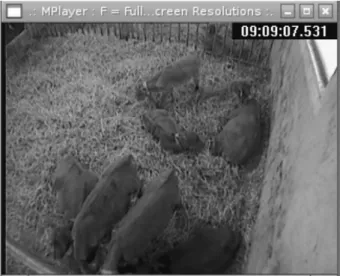
The graphical user interface for the CowLog program has two windows: a coding window (Figure 1), for choos-ing the video files, definchoos-ing the output file, and scorchoos-ing behaviors, and a video window (Figure 2), showing the video used for coding. The windows can be used in sepa-rate displays (i.e., the video can be viewed in full screen
Figure 1. The coding window of CowLog. The name of the video file being used is shown in the upper file dialog, and the user-defined name for the data file under it. B1, B2, and B3 are the behavioral classes available for the scoring, and squares below show the status of the users’ previous recordings in each of the behavioral classes. The left column of keys are the operator keys for the video window.
Figure 2. The video window of CowLog with a test picture from a calf study.
point, which makes the removal of the wrong codes pos-sible while using the descriptive analyses function. Software Description and System Requirements
The recommended operating system for CowLog is Ubuntu Linux 8.04 (Canonical Ltd.), but it has also been tested with FreeBSD 7.0 (The FreeBSD Project). The pro-gram should run on most Linux and BSD distributions, as well as Mac OS X (Apple Inc.), provided the software dependencies are met. CowLog supports all video formats playable with MPlayer (which means most common video formats). The codecs for the required video formats need to be installed on the computer.
The program consists of a graphical front end made with Kommander 1.3 (Britton, King, Laffoon, & Man-tja, 2008), and it uses the MPlayer media player running in slave mode to show the video files and read the time code. A set of underlying shell and Gawk (Robbins, 2007) scripts are used to pass commands between the graphical user interface and MPlayer.
Because of its modular structure, the program needs other software packages to run. All of the dependencies are open source and can be easily installed in Ubuntu using the graphical package manager. The following soft-ware packages are needed by CowLog.
Kommander 1.3. Kommander is a tool for creating graphical applications with a simple user interface. Kom-mander produces noncompiled dialogs and very small applications that run fast and can be distributed without binary compatibility issues. It was used to create the cod-ing window of the CowLog, and the commands passed on to MPlayer are called from Kommander scripts.
MPlayer. MPlayer is a movie player that runs on many systems. It plays almost all existing video formats, such as MPEG/VOB, AVI, Ogg/OGM, ASF/WMA/WMV, and DivX 3/4/5. CowLog runs MPlayer in slave mode to play the videos and read the time codes.
Gawk. Gawk is a GNU implementation of the popular Awk programming language (Robbins, 2007). The Awk utility interprets a special-purpose programming language that makes it possible to handle simple data-reformatting jobs with just a few lines of code. CowLog calls Gawk to format the output from MPlayer to a cleaner form before writing to the data file.
Example Output From the Software
CowLog writes the output files in plain text format. The output data are organized in columns: The first column shows the time in seconds from the beginning of video recording, and the second column represents the behavioral key code (Table 1). Each row represents each of the observations. by logging the time each behavior starts. In the analysis
stage, the type of the behavior is given as an input for the analysis function, and the start time of the next state is used as the end time of the previous state. Accordingly, the start time of events is used to mark the occurrence of a behavior. An example output from the software is shown in Table 1.
After the program has been started, the user defines the video observation file to be used for coding and the prefix and location of the data files. After the files have been defined, the user simply presses the start button to start coding. The user can enter the scores by pressing the buttons in the coding window (Figure 1) or by pressing keyboard shortcuts. Each of the behavioral classes has a representative display from which the user can follow the five last-entered codes. If the user wants to code several behaviors with the same time code, he or she pauses the video, enters the codes, and resumes playing. The cod-ing is ended simply by closcod-ing the program, and can be directly resumed to the same data files by moving to the correct position in the video. The program does not auto-matically give the user the resuming point; the user needs to check the time stamp in the last row of the data file.
The user can run the video at different speeds—up to five times the normal speed. To ease the search for a wanted point in a video, CowLog can automatically jump 30 sec forward or backward.
CowLog saves the outputs for each behavioral class in separate data files. The output files have the extensions .bh1, .bh2, and .bh3, where the number corresponds to the behavioral class. The files contain the complete data of the observed sessions. The program saves the data after each scoring, so that no data are lost if the computer crashes or is disconnected.
Coding errors are easy to remove manually from the data files after the recording has finished. Users can also define one key code in each of the classes as an error key. Pressing this key after the coding error has occurred marks the data
Table 1
Example Output From the Software Time (sec) Code
1.3 3 49.3 4 53.7 3 71.6 4 97.5 3 103.7 4 140.5 3 159.3 4 171.0 3 Table 2
An Example Output From the Analysis Function
Behavioral Feature Standing Still Locomotion Lying Down Hidden
Frequency 270 269 30 9
Bout length (min) 0.8 0.37 37.33 4.03
appear on-screen and can be saved to a variable and to a file. An example function is shown below:
cowAnalyze(file5'filename.bh1',states5c(1,2,3), events5c(4,5),state.names5c('state1','state2', 'state3'), event.names5c('event4','event5'))
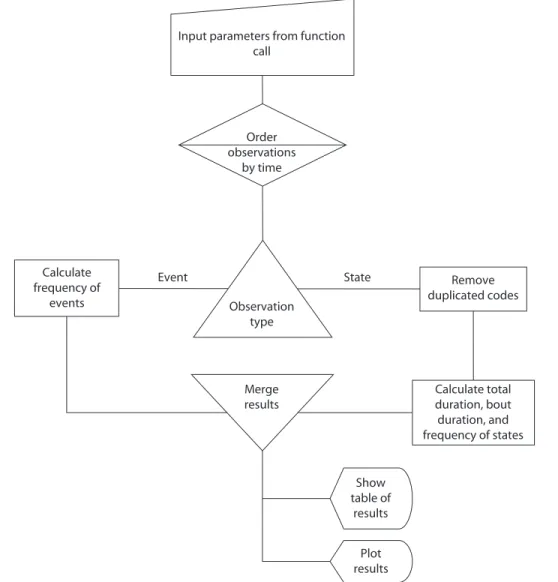
The function also removes double-state (duplicated) errors for state codes. The operation of the main analy-sis function in the package is shown as a flowchart in Figure 3.
An ExAMPLE PROjECT
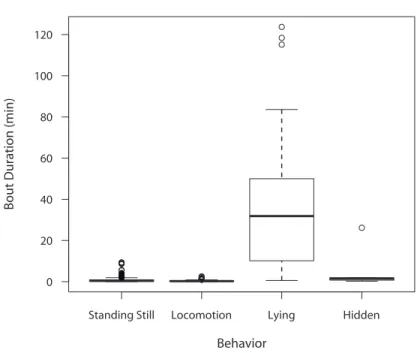
The sample files are obtained from the project study-ing calves’ activity, in which calves’ overall activity was scored continuously for 24 h. We show here an example of the behavior of 1 calf scored from a 24-h .avi video file. The data file was analyzed with the provided R function. The output obtained from the analysis is shown in Table 2 and the function produced is shown in Figure 4.
DESCRiPTivE AnALySES OF RECORDED DATA
The data files created by the program can be processed with almost any statistical software. We have written an analysis package, Animal, with the open-source statistical software R 2.72 (R Development Core Team, 2008). Pack-ages provide a convenient way to extend the functionality of R. The package has a main analysis function to process CowLog data files. Other functions are called internally from the main function to perform specific tasks. We have also written a basic R manual for the package, and all its code is accessible for users to modify. The Animal pack-age is available for download with CowLog.
The results from the analysis can be exported to other programs using the clipboard or R’s functions for saving data. The main function (cowAnalyze) takes the data file name, labels of the codes, and type (event or state) of the codes as inputs, and gives a summary table (Table 2) and a plot of the results as output. The descriptive statistics will
Remove duplicated codes Calculate frequency of events Calculate total duration, bout duration, and frequency of states Input parameters from function
call Show table of results Plot results Observation type Order observations by time Merge results State Event
Figure 3. A flowchart showing the operation of the main analysis function in the Animal R package.
needed. Because CowLog is an open-source program, and the main window is created with a graphical tool, users can also modify the interface and data file formats for their own purposes. The use of an open-source license contributes to the reproducible research, because everyone can see ex-actly how the coding and analysis are executed.
The program is freely available from its Web page, where users may share their comments and applications or ask for help from other users when troubleshooting.
AUThOR nOTE
We thank DVM Ann-Helena Hokkanen for her valuable comments on the user interface and for testing of the software. Correspondence concerning this article should be addressed to M. Pastell, Department of Agrotechnology, P.O. Box 28, 00014 University of Helsinki, Hel-sinki, Finland (e-mail: [email protected]).
REFEREnCES
Britton, M., King, T., Laffoon, E., & Mantja, A. (2008).
The Kommander handbook. Available from http://docs.kde .org/kde3/en/kdewebdev/kommander/index.html.
MacLin, O. H., & MacLin, M. K. (2005). Coding observational data: A
software solution. Behavior Research Methods, 37, 224-231.
Martin, P., & Bateson, P. (1995). Measuring behavior: An
introduc-tory guide (2nd ed.). Cambridge: Cambridge University Press.
Ottoni, E. B. (2000). EthoLog 2.2: A tool for the transcription and
tim-ing of behavior observation sessions. Behavior Research Methods, Instruments, & Computers, 32, 446-449.
R Development Core Team (2008). R: A language and
environ-ment for statistical computing.Vienna: R Foundation for Statistical Computing.
Robbins, A. D. (2007). GAWK: Effective AWK programming. A user’s
guide for GNU Awk. Boston: Free Software Foundation. (Manuscript received December 18, 2008; revision accepted for publication February 25, 2009.) DiSCUSSiOn AnD FURThER
DEvELOPMEnT
At the moment, CowLog is a basic program designed for coding the behavior of 1 subject from one video at a time. The development version of CowLog also works with two parallel videos. This can be beneficial in study designs in which 1 subject is filmed with several videos simultaneously, using synchronized time codes. In this case, only one data file is saved. Using several videos, however, requires the messages from the coding window to be passed to several instances of MPlayer, and this is not yet implemented in the distributed version. The maxi-mum number of video files the program can read simul-taneously depends on how many instances of MPlayer the computer can run.
The R package Animal is provided with the software for easy calculation of elementary statistics. The package can be freely modified by users, just like CowLog. The analyzed data can also be exported in ASCII format or via the clipboard to other statistical software for the user’s own calculations. The use of the analysis package requires a basic knowledge of how to use R, but the user can get de-scriptive statistics of a data file with a single function call. No advanced programming is needed. We are currently working on a graphical front end so that the user does not need to use R to get the descriptive statistics.
The program can be used as is, because it does not need any modifications for the codes to be used. The behavioral codes are only saved as numbers; thus, the labels for dif-ferent behaviors need to be supplied in the analysis stage. Thus, users can change states to events and vice versa, and return to already transcribed data for new analyses, if
Standing Still Locomotion Lying Hidden
0 20 40 60 80 100 120
Bout Duration of Different Behaviors
Behavior
Bout Duration (min)
Figure 4. An example output from the analysis function: A boxplot of the bout duration, in minutes, for different scored behaviors.